Prettier: Indent script and style tags content in *.vue files
Prettier 1.10.2
Playground link
When I have a Vue.js file:
<script>
    export default {
        mounted() {
            console.log('Component mounted!')
        }
    }
</script>
How do I stop prettier changing the indentation to:
<script>
export default {
    mounted() {
        console.log("Component mounted!");
    }
};
</script>
 GrahamCampbell
All 229 comments
Same with <style>
Prettier 1.10.2
Playground link
--parser vue
--tab-width 4
Input:
<style>
    body {
        color: #fff;
    }
</style>
Output:
<style>
body {
    color: #fff;
}
</style>
Expected behavior:
I would prefer the output to stay unchanged..
 lipis
on 4 Feb 2018
lipis
on 4 Feb 2018
Why would you want an additional level of indentation there?
 azz
on 5 Feb 2018
azz
on 5 Feb 2018
For me, I view the contents of a script tag like the contents of any other html tag - I indent its body. So for me, it's consistency.
 hawkrives
on 5 Feb 2018
hawkrives
on 5 Feb 2018
same for me..
lipis
on 5 Feb 2018
Current behaviour matches the default for eslint-plugin-vue/script-indent. Seems like a small price to pay for an entire indentation level for _all_ your code. So long as all script/style tags are _consistently_ not indented, this seems like a non-issue to me.
azz
on 5 Feb 2018
It's a blocker for using prettier for me and many others.
GrahamCampbell
on 5 Feb 2018
@GrahamCampbell would you be able to explain why it is a blocker?
azz
on 5 Feb 2018
I think we should follow the most common Vue convention here, if there is one.
 lydell
on 5 Feb 2018
lydell
on 5 Feb 2018
Also there are two different schools for HTML:
<html>
  <head>
    <title>This is more consistent</title>
  </head>
  <body>
    <div></div>
  </body>
</html>
<html>
<head>
  <title>than this</title>
</head>
<body>
  <div></div>
</body>
</html>
Yes, for HTML, but now we’re talking Vue :) Which similar, but not quite the same.
lydell
on 5 Feb 2018
Just for fun: https://twitter.com/PrettierCode/status/960584198376566784 :)
lipis
on 5 Feb 2018
Fwiw, when I implemented this, I followed the vue official website example: https://vuejs.org/v2/guide/single-file-components.html
 vjeux
on 5 Feb 2018
vjeux
on 5 Feb 2018
I was just checking the documentation for the same reason.. and it looks like in the unit test section they are indenting.. https://vuejs.org/v2/guide/unit-testing.html 😕
lipis
on 5 Feb 2018
In the style guide there is one example where the content of the <script> is unindented.
<!-- TodoItem.vue -->
<template>
  <span>
    {{ todo.text }}
    <button @click="removeTodo(todo)">
      X
    </button>
  </span>
</template>

<script>
import { mapActions } from 'vuex'

export default {
  props: {
    todo: {
      type: Object,
      required: true
    }
  },
  methods: mapActions(['removeTodo'])
}
</script>
Same for <style>:
<template>
  <button class="c-Button c-Button--close">X</button>
</template>

<!-- Using the BEM convention -->
<style>
.c-Button {
  border: none;
  border-radius: 2px;
}

.c-Button--close {
  background-color: red;
}
</style>
I think this is controverse and a configuration option should be provided.
 igeligel
on 5 Feb 2018
igeligel
on 5 Feb 2018
We want less options... not more :)
lipis
on 5 Feb 2018
Here's an actual argument why it's beneficial to have indentation: It allows you to use (indentation-based) code folding to collapse the style and script tags (as in Visual Studio Code).
 felixfbecker
on 5 Feb 2018
felixfbecker
on 5 Feb 2018
@felixfbecker Is that the case? Folding is available for tags, it is not really dependant on its content. But looks like VSCode check for indentation to make elements foldable.
There is an issue open about it https://github.com/Microsoft/vscode/issues/3422
 montogeek
on 6 Feb 2018
montogeek
on 6 Feb 2018
@montogeek
Yes, it is a good reason. From my comment earlier i just wanted to say it is official. I do not care what is used in the end when it is consistent :)
Inlined pictures:


igeligel
on 6 Feb 2018
If you have the Vue plugin installed it folds them correctly.. but not out of the box VS Code
lipis
on 6 Feb 2018
This is not the case on Atom for example:


montogeek
on 6 Feb 2018
I'd vote for indentation too. For widest and easiest editor support for folding
 larsenwork
on 7 Feb 2018
larsenwork
on 7 Feb 2018
NB Laravel code style indicates indentation: https://github.com/laravel/framework/blob/5.5/src/Illuminate/Foundation/Console/Presets/vue-stubs/ExampleComponent.vue.
GrahamCampbell
on 8 Feb 2018
For what it's worth from the 241 people that voted in the Twitter poll here are the results..
▓▓▓▓▓▓▓▓▓░░░░░░ 57%  Yes       137 people
▓▓▓░░░░░░░░░░░░ 19%  No         46 people
▓▓▓▓░░░░░░░░░░░ 24%  Whatever   58 people
if we remove the whatever then it becomes
▓▓▓▓▓▓▓▓▓▓▓░░░░ 75%  Yes       137 people
▓▓▓▓░░░░░░░░░░░ 25%  No         46 people
and since whatever would do whatever they should be included with the majority..
▓▓▓▓▓▓▓▓▓▓▓▓░░░ 81%  Yes       195 people
▓▓▓░░░░░░░░░░░░ 19%  No         46 people
and since whatever would do whatever they should be included with the majority..
What?
azz
on 8 Feb 2018
He is saying that people who say whatever, will follow the herd , and join the yes
 lukepolo
on 8 Feb 2018
lukepolo
on 8 Feb 2018
prettier and eslint-plugin-vue conflict for indent rule.they say we should not use it together.
"_Both vue/script-indent and prettier change the indentation of your code. Both are formatter. You can't use both together but you can choose which formatter you use._"
https://github.com/vuejs/eslint-plugin-vue/issues/369
 lerit
on 9 Feb 2018
lerit
on 9 Feb 2018
I think the big split there indicates that configuration is needed.
GrahamCampbell
on 10 Feb 2018
I just instinctively prefer to see indentation there, in the script tag. This is in no way a blocker or deal breaker for me, but it does annoy me every time I edit a .vue file. 😄
 ryancole
on 12 Feb 2018
ryancole
on 12 Feb 2018
For me it is a matter of readability in the indented example I see immediately where script and style parts are starting / ending while in the not indented example I have to search for the beginning and ending tags:
If technically possible, I would at least provide an option for having indents as it seems to be a controversial topic and lots of users are annoyed by not having that option.
no indents
<template>
  <div class="container">
    <img class="image" :width="imageSize" :height="imageSize" :src="src" alt="recipe image" />
  </div>
</template>

<script>
export default {
  name: 'recipe',
  props: ['src'],
  data() {
    return {
      imageSize: 300
    }
  }
}
</script>

<style scoped="true" lang="scss">
$color__shadow--base: rgb(19, 34, 58);
.container {
  width: 300px;
  height: 300px;
  & > .image {
    &:hover {
      width: 308px;
      height: 308px;
      margin-top: -4px;
      margin-left: -4px;
    }
  }
}
.image {
  object-fit: cover;
  border-radius: 4px;
  box-shadow: 0 3px 6px rgba($color__shadow--base, 0.16),
    0 3px 6px rgba($color__shadow--base, 0.23);
  transition: all 0.25s ease-out;
  &:hover {
    box-shadow: 0 10px 20px rgba($color__shadow--base, 0.19),
      0 6px 6px rgba($color__shadow--base, 0.23);
  }
}
</style>
indents
<template>
  <div class="container">
    <img class="image" :width="imageSize" :height="imageSize" :src="src" alt="recipe image" />
  </div>
</template>

<script>
  export default {
    name: 'recipe',
    props: ['src'],
    data() {
      return {
        imageSize: 300
      }
    }
  }
</script>

<style scoped="true" lang="scss">
  $color__shadow--base: rgb(19, 34, 58);
  .container {
    width: 300px;
    height: 300px;
    & > .image {
      &:hover {
        width: 308px;
        height: 308px;
        margin-top: -4px;
        margin-left: -4px;
      }
    }
  }
  .image {
    object-fit: cover;
    border-radius: 4px;
    box-shadow: 0 3px 6px rgba($color__shadow--base, 0.16),
      0 3px 6px rgba($color__shadow--base, 0.23);
    transition: all 0.25s ease-out;
    &:hover {
      box-shadow: 0 10px 20px rgba($color__shadow--base, 0.19),
        0 6px 6px rgba($color__shadow--base, 0.23);
    }
  }
</style>
 gwildu
on 22 Feb 2018
gwildu
on 22 Feb 2018
I would like to point out that there is a very similar case in which Prettier already _does_ force indentation: GraphQL template strings.
sendRequest(gql`
query {
  someField
}
`);
is reformatted (for good reason) to
sendRequest(gql`
  query {
    someField
  }
`);
So doing the opposite for style and script tags is inconsistent.
felixfbecker
on 22 Feb 2018
I just think it’s a case of common sense. I very seriously doubt anybody
using this would argue for the non-in dented version. As a developer you
just expect to see indentation there.
On Thu, Feb 22, 2018 at 12:59 AM Felix Becker notifications@github.com
wrote:
I would like to point out that there is a very similar case in which
Prettier already does force indentation: GraphQL template strings.sendRequest(gql
query { someField});is reformatted (for good reason) to
sendRequest(gql
query { someField });So doing the opposite for style and script tags is inconsistent.
—
You are receiving this because you commented.
Reply to this email directly, view it on GitHub
https://github.com/prettier/prettier/issues/3888#issuecomment-367585880,
or mute the thread
https://github.com/notifications/unsubscribe-auth/AAdlwbuUrNsgeKzeIoyQgoh5h_5az4u2ks5tXRA5gaJpZM4R4qLQ
.
ryancole
on 22 Feb 2018
I wouldn't oppose adding an option for this if there was significant demand for it
 duailibe
on 22 Feb 2018
duailibe
on 22 Feb 2018
I'm not sure there are too many people who prefer the current behavior. I would rather change it than add an option.
 suchipi
on 22 Feb 2018
suchipi
on 22 Feb 2018
Same here.. let's change the behaviour instead of an option.. plus it's more consistent :)
lipis
on 22 Feb 2018
@lipis
if I were wanting to look into this, would this be a required change to the vue printer file?
https://github.com/prettier/prettier/blob/master/src/language-vue/printer-vue.js
and for examples, are there any other printers that already set a base initial indentation level?
ryancole
on 2 Mar 2018
Just to point out Vue _does_ have a (soft) standard here for non-indented. If you look at nearly every single example coming from the core team, it's non-indented.
The preferences of those who saw a survey on Twitter and responded to this thread should not swing the standard Prettier provides away from this IMO. I'd advocate for configuration at the very least.
Examples:
https://vuejs.org/v2/guide/single-file-components.html#ad
https://github.com/vuejs/vue-hackernews-2.0/tree/master/src/components
https://github.com/vuejs/vue-syntax-highlight
Edit: This is actually a pretty firm standard seeing as how it's the default in the official eslint-plugin-vue
 pearofducks
on 4 Mar 2018
pearofducks
on 4 Mar 2018
I'm not sure there are too many people who prefer the current behavior. I would rather change it than add an option.
Most people who prefer the current behavior aren't likely to comment here. After taking a look at vue's site and https://github.com/prettier/prettier/issues/3888#issuecomment-370236801, IMO we either add an option or don't change the behavior at all.
duailibe
on 5 Mar 2018
Just curious, what's the best way to support adding this option?
Personally I'm pretty ambivalent but all the existing files in our repository use the base indenting method for styles and scripts, and several of our team really prefer it that way. I'd love to get the whole team to use Prettier but I'm not sure I can convince them to accept it until it supports base indentation as an option.
Thanks!
 macgyver
on 6 Apr 2018
macgyver
on 6 Apr 2018
I really like Prettier and I would very much like for my team to be able to use Prettier in our vscode workflow with Vue files, but we can't at this moment, because it looses the top level indentation. Our team standard is to have the top-level indentation present. Without the indentation, it is visually more difficult for me to find the three separate code blocks in the one Vue file.
I vote for an option that allows us to change this behaviour, with the default being what it is now.
Is there any chance of this option being implemented soon?
 pbastowski
on 28 Apr 2018
pbastowski
on 28 Apr 2018
Hi @vjeux
While reading this issue thread, early on you mention that you implemented this piece of code. If you could point me to the location in the source where I could make the change myself, to add the top level indentation for all Vue files, then I will attempt to add it to the code myself, for those of us that can't live without it and can't wait for this discussion to end in a positive result for us.
Are you able to help me with that?
Thanks
Paul
pbastowski
on 29 Apr 2018
I can't understand why code following <template> gets an indent, but <script> and <style> don't. 🤷♂️
I want to use prettier in my projects but this is what's stopping me.
 citrus
on 1 May 2018
citrus
on 1 May 2018
@citrus from https://github.com/prettier/prettier/issues/3888#issuecomment-363185093
Fwiw, when I implemented this, I followed the vue official website example: https://vuejs.org/v2/guide/single-file-components.html
duailibe
on 1 May 2018
@citrus That’s because we don’t format the code inside the <template>, so we preserve it as-is.
 j-f1
on 1 May 2018
j-f1
on 1 May 2018
Also what @j-f1 said:
Prettier 1.12.1
Playground link
--parser vue
Input:
<template><p>Templates are not formatted yet ...</p></template>

<script>
  something();
</script>

<style>
  .class {
    color: black;
  }
</style>
Output:
<template><p>Templates are not formatted yet ...</p></template>

<script>
something();
</script>

<style>
.class {
  color: black;
}
</style>
Regardless of the Vue examples, indenting <script>, <style> (and whatever else) just make so much sense! Common sense.. :) Can we just switch it without adding an option?
lipis
on 2 May 2018
@duailibe I understand that you followed the example.. my point was more in line with why the examples are written that way. Basically why did the author of that decide to indent <template> but not <script>. Just doesn't make sense!
citrus
on 2 May 2018
@lipis - I appreciate that you have an entirely valid and strong opinion here, it's quite disconcerting to see you treating such a big change with such little regard to its effect.
This project is now used by a _lot_ of people, more than have happened to see a Twitter survey, or thumbs-up any of your comments. Changing any of prettier's behavior away from what is now relied upon by people should be carefully considered and have a process the community understands - or else prettier could be seen as an unreliable tool by users.
I'd also suggest when prettier implements behavior for a filetype, it does so following (at least by default) what the implementing team has put forth as a standard - and not what prettier's team feel is logical. In this case as I mentioned above, Vue does have a standard - not just in some screenshots, but _eslint-plugin-vue_ (by default) will enforce this.
My point being, the zero-config standard of tools should align to best benefit users. I feel this is the most logical rather than worrying about one style or another being considered logical.
pearofducks
on 2 May 2018
So let’s go change it in vue first 🤗 , if that gets approved revisit this topic ?
lukepolo
on 2 May 2018
@pbastowski sorry I missed your comment. Basically you'd need to wrap these two lines here:
https://github.com/prettier/prettier/blob/32900842e3bf85ab4377f7e4a25617f18c718f9c/src/language-vue/embed.js#L42-L45
in an docBuilders.indent:
return concat([
  // first
  indent(concat([hardline, textToDoc(/* */)])),
  // rest
]);
@duailibe Thanks. I added the change as you described above. I works, sort of. There is an extra line added just after the <script> block and the last </script> tag is also indented.
<script>

    import debounce from 'lodash/debounce'

    export default {
    }

    </script>
The same goes for the <style> block
<style lang="scss" scoped>

    .sofy-data-table /deep/ ul.pagination {
        margin-top: 0px;
        margin-bottom: 0px;
    }
    .pad-sort-right {
        padding-right: 20px;
    }
    .pad-sort-left {
        padding-left: 20px;
    }
    </style>
sad to see that this still under discussion :( and seems there are no solution yet..
although i got something which is "almost" working trough eslint... almost....
//.eslintrc https://github.com/vuejs/eslint-plugin-vue
{
  "root": true,
  "extends": [
    "plugin:vue/essential",
    "@vue/typescript"
  ],
  "rules": {
    "vue/script-indent": [
      1, 4, {"baseIndent": 1}
    ]
  }
}
 milewski
on 5 May 2018
milewski
on 5 May 2018
Any update on this?
 bangjelkoski
on 16 May 2018
bangjelkoski
on 16 May 2018
I don't think anyone has posted anything in the vue docs repository to propose this change. Prettier is following the convention of the vue docs. Which IMO is what they should do, even though I dont like it.
lukepolo
on 16 May 2018
If 75% of Vue developers want it, why not add this option? Also, if Vue docs sometimes use it, it seems like it is a viable option.
 DCzajkowski
on 16 May 2018
DCzajkowski
on 16 May 2018
Can we, at the least, just have it as an option?
 danchristian
on 22 May 2018
danchristian
on 22 May 2018
@danchristian That's what the whole issue is about. They don't want to add an option for that 😕
DCzajkowski
on 22 May 2018
And that's because prettier is both a formatter AND style guide.
DCzajkowski
on 22 May 2018
If you re using Vetur with prettier, try adding these options to your VSCode settings (i use default for the other options):
"vetur.format.defaultFormatter.html": "js-beautify-html",
    "vetur.format.defaultFormatterOptions": {
        "js-beautify-html": {
            "wrap_attributes": "force"
        }
    },
"vetur.format.scriptInitialIndent": true,
"vetur.format.styleInitialIndent": true,
With these settings VSCode now automatically indents my script and style from the beginning (also wraps html attributes in new lines). I am using VSCode Insiders v1.24, Prettier 1.3.1 and Vetur 0.12.3.
bangjelkoski
on 22 May 2018
@DCzajkowski Yeah I get that, I have read through the whole thread. However this issue has been open for nearly 4 months now, without resolve. It's a subjective issue, so why not just add it as an option and let the user/team/org choose their preference in the configuration. Even if you wait for the Vue Core team to standardise the direction, I see no harm in adding either option as a configuration setting as it's personal preference, much like tabs/spaces etc.
danchristian
on 22 May 2018
@danchristian Please read https://prettier.io/docs/en/option-philosophy.html
Similar to this, there are other dozens issues with people saying "there's no harm" in adding "just this option".
duailibe
on 22 May 2018
If you know Vue.js, you also know that vue is in contrast to, e.g., angular a framework that let's you chose your own preferences.
There are tons of examples for this, you want to have scoped css, just put the scoped attribute to your styles tag, you want to have global css just don't put the attribute, you want to have both, just have two styles tags, you want to use SASS, just put the lang="sass" attribute, the same for stylus, less, ..., for the template you can use jsx, html, createElement, it's your choice.
So as Vue is built for people who like this flexibility, even if prettier in general doesn't, it still might make sense to add some flexibility. So in my case I see two options, either prettier is going to add a little bit flexibility for us vue users who like that flexibility or I won't use prettier. There were ways to work together before prettier so there are ways to work together without prettier now that there is prettier.
It's a shame, that this discussion has to follow that path, but in the end it's your decision, just take a final decision and then we can decide to go with or without prettier, but having the email inbox of all the followers spammed for months with this topic without letting them know if this option will gonna be added or not in my opinion is a bit embarrassing, don't you think so? I hope I didn't hurt the feelings of anybody with my comment, but I really think this discussion should come to an end.
gwildu
on 23 May 2018
The issue is that prettier is a great plugin, because of how it handles styling (by making the abstract node tree etc.)
What I think would be awesome, if there were two plugins:
- prettier - plugin that prettifies code based on config
- prettier-styles - a config file with very opinionated styling
That way everyone could customize things to their likings.
And I don't buy the philosophy behind "By far the biggest reason for adopting Prettier is to stop all the on-going debates over styles." Isn't prettier actually causing such debates?
E.g. If there was config, there would be no debate. Now, there is no config, as everything is hard-coded, so there are debates like here, here, here and here and many many more... Adding configuration would eliminate those, no?
Having said that, I don't see it coming, unfortunately. I think a fork of the repo is the only option 😕
DCzajkowski
on 23 May 2018
@gwildu @DCzajkowski Prettier was not built with flexibility in mind. Surely there's room for a tool like that and I'm sure others would appreciate it, but it's not the direction we want to follow, for several reasons. Another thing usually underrated is the cost of the maintenance an option, making sure we print everything accordingly, and making sure options don't conflict, etc..
And I don't buy the philosophy behind "By far the biggest reason for adopting Prettier is to stop all the on-going debates over styles." Isn't prettier actually causing such debates?
This was about the debates over styles in teams, in the community, etc.. You're mentioning debates in the repo's issue thread which is several orders of magnitude smaller than the general community. Adding more configuration means people would continue to spend time having the same discussions ("should we indent this or not? should we add spaces here or not?" and other examples). What we've seen happen a lot is people say "The way Prettier prints this is not my personal preference but I'd rather have it format automatically than having to care about that again".
Having said that, don't say "fork the repo" with a sad face! This is an open source project, you are free to modify (and distribute) as you wish! We know we can't please everyone.
And finally, this issue will remain open until we feel safe we will (or will not) change this.
duailibe
on 23 May 2018
@duailibe Thank you for linking to that, I hadn't read it before. After reading it, I do understand your stance, but I am also confused why I can say useTabs: true but indenting code between script and style tags as an option isn't being considered?
danchristian
on 23 May 2018
@danchristian That’s partially because the original contributors didn’t necessarily follow the same philosophy as we do now for adding options, and it’s hard to remove options once you’ve added them.
Also, we’re still considering it — that’s why this issue is open.
j-f1
on 23 May 2018
An attempt to see if the Vue.js team wants to weigh in and settle this issue: https://twitter.com/ccalo/status/999295489412657154?s=21
 chriscalo
on 23 May 2018
chriscalo
on 23 May 2018
We indent for readability and when something is not indented, it’s less readable, and there some languages out there where non-indented code is a bug. There should be no exceptions, not even in pure HTML, because every time we create an exception, we create space for more and, at some point we’ll have to explain them. Could anyone tell me why code inside style tag or script tag should not be indented? What’s the difference between those and “code” inside a body tag? Is there a really good reason for that or is this just “this is how we were doing it the whole time”?
Prettier is supposed to make code prettier, and unindented code inside anything is uglier. I hate PSR2, it was supposed to create a coding style, and it kind of did, it’s not all that bad but it also made my code uglier, removed symmetry from lots of parts of my code and I was so much happier when Taylor Otwell was defining Laravel’s coding style, it was beautiful.
How about an opnionated Prettier, making everyone move forward with a readable and pretty code, defining guidelines, and just let those who are creating frameworks and even languages worry only about programming logic? How about framework creators asking Prettier on the prettier and universal way of writing a piece of code? It’s a win-win, they won’t have to worry about and waste time styling anymore!
 antonioribeiro
on 2 Jun 2018
antonioribeiro
on 2 Jun 2018
@pbastowski I encountered the same issue and just made a fork, removed the indentation before </style> tag, you may take a look if you are still struggling in this issue :)
here is the fork: https://github.com/maogongzi/prettier/pull/1
 maogongzi
on 2 Aug 2018
maogongzi
on 2 Aug 2018
Another reason to indent is to stay consistent with how editors indent code. I haven't found an editorconfig configuration that allows to skip indentation in script and style tags. Having IDE auto-formatting constantly indenting the files differently than prettier leads to harder-to-read git diffs and other nastyness.
Is there a temporary workaround available to remedy this as of yet - like for instance a PR that incorporates the fixes mentioned in https://github.com/prettier/prettier/issues/3888#issuecomment-385960667 and https://github.com/prettier/prettier/issues/3888#issuecomment-409898556?
PS @milewski (in reply to https://github.com/prettier/prettier/issues/3888#issuecomment-386807449) I attempted to run eslint with "vue/script-indent": ["warn", 2, { baseIndent: 2 }] after prettier had done it's job. This works in theory (at least for the script-tag), but the results are horrendous - vue/script-indent is just not capable of doing proper indentation:
<script lang="ts">
    import Vue from "vue";
    import Component from "vue-class-component";

    import SmallNotification from "@/modules/Notification/components/smallNotification.vue";

  @Component({
    name: "update",
    components: {
      SmallNotification,
    },
  })
    export default class Update extends Vue {
    public update = false;

    constructor() {
      super();
      window.addEventListener("onSWUpdateReady", event => {
        this.enableUpdate();
      });
      window.addEventListener("onSWUpdated", event => {
        this.enableUpdate();
      });
    }

    public enableUpdate() {
      this.update = true;
      setTimeout(this.disableUpdate, 300000);
    }

    public disableUpdate() {
      this.update = false;
    }

    public reload() {
      this.disableUpdate();
      window.location.reload();
    }
    }
</script>
 motin
on 24 Sep 2018
motin
on 24 Sep 2018
Is there any chance we'll get config for this? Or should we abandon hope already.
pbastowski
on 22 Oct 2018
Wow, it's almost a year since this was requested.
Lack of this config is the main reason to not use Prettier for Vue SFC files
 pribilinskiy
on 19 Nov 2018
pribilinskiy
on 19 Nov 2018
So, a ton of new Prettier features were added in v1.15, including reformatting the HTML code in my Vue template, sometimes not how I want it, but the one feature that many of us have requested, that being root indentation of the script and style blocks, perhaps behind an option, is too much to ask apparently.
pbastowski
on 19 Nov 2018
PR welcome, no discussion labels
 alexander-akait
on 19 Nov 2018
alexander-akait
on 19 Nov 2018
Let's indent them without an extra option!
lipis
on 19 Nov 2018
Indenting without options isnt great ... If u check vue docs there no indent anywhere for such thing.
https://vuejs.org/v2/guide/single-file-components.html
 aldarund
on 29 Nov 2018
aldarund
on 29 Nov 2018
@aldarund The very next page does have indentation: https://vuejs.org/v2/guide/unit-testing.html
j-f1
on 29 Nov 2018
@j-f1 well, if u create default app with latest vue cli it dont have indent. And in style guide https://vuejs.org/v2/style-guide/ there also no indent, although its not specified as rule but in example code there no indent
aldarund
on 29 Nov 2018
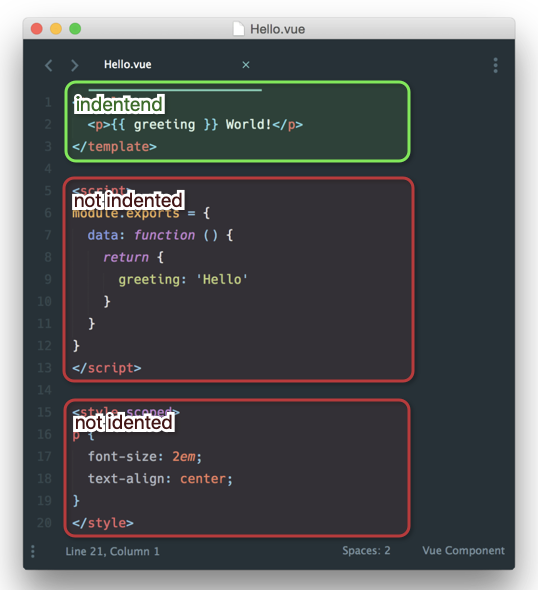
@aldarund, Im my opinion code blocks inside code blocks should be all indented, no matter what languages we are writing in one or another. Why indent some and not others? Not to indent code blocks inside a html tag only because the code inside is not javascript or css is consistent with act of coding itself, because we have to ask ourselves: "what about php inside html? wait! and ruby? ouch! blade? twig?..., should I indent them or not?"
The coding style in Vue docs is inconsistent because Vue is not really defining a coding style, maybe they have one preferred, but this discussion is a lot more profound than just let a framework define if code should be indented or not. In PHP we have internals writing the PHP compiler/interpreter and PHP FIG group helping us defining the coding style must of us are using today.
Prettier should help us define, once and for all, a common coding style for a language to be used by developers on all frameworks. HTML-ish in Vue should be written the same in PHP, Ruby, React, and that, for all languages it supports, to remove this kind of inconsistency we look at every day.
It will conflict with what some are using today, because you don't like the way I write code, and vice-versa, but unless we find a RFC (widely accepted) telling us what to do and why, both ways are acceptable and I will have to live with the choices made by not so smart people.
antonioribeiro
on 29 Nov 2018
And official eslint plugin vue default to no indent -> https://github.com/vuejs/eslint-plugin-vue/blob/master/docs/rules/script-indent.md
aldarund
on 29 Nov 2018
Weighing in from the Vue team, I see no-indent for <script> and <style> much more often in the community and I think there's very good justification for keeping it the standard. Inside the <template>, you're not changing contexts (it's still XML), so the indentation serves to clarify the hierarchy. But for <script> and <style>, the context change (the fact that you're writing in a different language now) serves the same purpose.
 chrisvfritz
on 6 Dec 2018
chrisvfritz
on 6 Dec 2018
Honestly how is this debate still ongoing without this just becoming an option? Tabs vs Spaces.. Single quotes vs Doubles... Semicolons.. Bracket spacing.. its all just a _preference_ right? Isn't prettier supposed to be a tool to help keep our code formatted the way _we as authors_ like it? .. clearly the people want this as an option.
citrus
on 6 Dec 2018
Inside the <template>, you're not changing contexts (it's still XML)
Nope, by default it's HTML but can be pug or slim
for <script> and <style>, the context change (the fact that you're writing in a different language now)
For <template> it also changes so you could say that for a markup language no need for indentation too
Thumbs up for @citrus
pribilinskiy
on 7 Dec 2018
Isn't prettier supposed to be a tool to help keep our code formatted the way we as authors like it?
No, prettier is a tool that keeps code formatted in a consistent way- not necessarily one that any particular individual likes. That's not to say that we want the output to be ugly, but the value of prettier is in its consistency.
This is a little counterintuitive, and is something I see a lot of people who are yet to use prettier or are new to prettier misunderstand.
Prettier makes it so you don't have to think about how to format code anymore. "Should I indent this? Hmmm, maybe it would be better if I broke these onto multiple lines..."... just configure format-on-save in your editor and let prettier handle it. It's so freeing to focus on what the code does instead of how it looks. It takes a while to get used to, but eventually you'll wonder how you lived without it.
Prettier makes it so you and your co-workers don't have disagreements about code style anymore. The point isn't that one of you likes prettier's style and that person wins over everyone else, the point is that there's consistency and a tool that takes this thought-sink out of your team's collective use of time.
This sounds really undesirable until you get used to using an opinionated code formatter, but you are spending time thinking about how to format your code and it doesn't matter. If it's readable and consistent, it's fine. The time you spend pausing and making decisions about when and how to format things is lost time. Let prettier do that for you instead, and it will free you so you can focus on the real problems: What the code actually does.
suchipi
on 7 Dec 2018
"Should I indent this? Hmmm, maybe it would be better if I broke these onto multiple lines..."
Should I use double quotes or singles? Semi colons?
how is that any different?
citrus
on 7 Dec 2018
Yeah, I wish prettier didn't have options. But "I'll just hit save and whatever the config for this repo is, it'll figure it out" is way nicer than "oh crap, I wrote a semicolon out of habit, but this repo doesn't like them".
suchipi
on 7 Dec 2018
So again... literally the exact same argument.. Say you indent something on a project because thats your style.. then you run prettier and the config formats it without the indent. You commit and everyone is happy.
citrus
on 7 Dec 2018
@suchipi I see your point and agree, this is very valuable... for startups and new repos.
It's very hard to convince ten devs to switch to Prettier with large codebase.
Such discussions/debates can last eternally.
One should either close such issues or create a poll so that users of Prettier can vote.
A poll must be created on GitHub (to be authentic) as a separate issue with comments disabled by using GitHub reactions as voting system (Like/Dislike) and with a time limit, e.g. 3-6 months
pribilinskiy
on 7 Dec 2018
@citrus I agree with you, would be nice to set a style for my team, which may be different from your team, the way we could still share code without harm to my preferred style nor yours, that's why I wrote this a while ago:
https://medium.com/@iantonioribeiro/for-my-own-coding-style-c849d19aaf8a
antonioribeiro
on 7 Dec 2018
@antonioribeiro as I understood correctly, the idea of Prettier is to have consistent style world-wide, not company-wide. Again, good for startups and OSS
pribilinskiy
on 7 Dec 2018
Note that I'm not arguing there shouldn't be an option - I just want to make it clear that within the Vue community at least, those who prefer an indent seem to be in the minority. So if Prettier decides to pick one, it should definitely not be adding an indent. I don't think this issue has anything to do with Vue specifically though, but rather with embedded languages within XML. It just appears to be a Vue issue because we Vue developers probably spend the most time working in files with embedded languages. 😄
Instead, I think the behavior should be consistent across all XML. And if there's an option, as there probably should be, it would be inconsistent to have it apply only to .vue files. And since the people who spend the most time looking at files with embedded languages tend to prefer no indent, I think that should probably be the default across all XML.
chrisvfritz
on 7 Dec 2018
“those who prefer no indent seem to be in the minority. So if Prettier decides to pick one, it should definitely not be adding an indent”
Isn’t this contradictory 🤔
danchristian
on 7 Dec 2018
Yeah, think he typed that the wrong way around :)
... based on the rest of what he wrote.
In any case, where did Chris get his stats from that say people who indent are the minority/majority?
I can quite easily say that people who want the indent are the majority. But I can’t prove it, but it’s what I and my team want, because it looks prettier.
pbastowski
on 7 Dec 2018
Isn’t this contradictory 🤔
Yes, it was a typo. 😅 I just fixed it.
chrisvfritz
on 7 Dec 2018
where did Chris get his stats from that say people who indent are the minority/majority?
I'm sampling from the hundreds of teams (if not thousands by now 😄) who've asked me to look at code through issues, consulting, workshops, Twitter, meetups, conferences, etc. I haven't been tracking exact stats, but out of the projects using .vue files my estimate is about 90% no-indent.
chrisvfritz
on 7 Dec 2018
Wow, thousands of teams, it's hard to underestimate that. Then it's a no-brainer, really, no kidding, no sarcasm. Just close someone that issue.
How many use Prettier?
pribilinskiy
on 7 Dec 2018
@chrisvfritz writes:
I think the behavior should be consistent across all XML
This is perhaps the strongest argument for indentation.
Script and style tags are XML elements like any other, and as such, most editors will indent the content.
Looking forward to the day when Prettier begins handling other XML dialects like DocBook and DITA, it would make more sense to use indentation consistently by default — or provide an option to support workflows that expect it.
 infotexture
on 7 Dec 2018
infotexture
on 7 Dec 2018
Is the no-indent due to using Prettier, which doesn’t indent currently?
Funny question, I know. Just checking.
pbastowski
on 7 Dec 2018
@chrisvfritz could you name some of the biggest clients you have dealt with, who write massively .vue SFCs
pribilinskiy
on 7 Dec 2018
If it's readable and consistent, it's fine.
But the whole point of this debate is that it is not consistent. Everything is indented _except_ those blocks.
those who prefer an indent seem to be in the minority
DCzajkowski
on 7 Dec 2018
Probably those who voted for indent are not chrisvfritz clients
pribilinskiy
on 7 Dec 2018
@chrisvfritz,
XML is all about indent, most languages must be indented to be readable, python code doesn’t even work without it, Basic is probably the only language I’ve seen people coding on without indentation, so how could it be consistent if we are not consistent with indentation across languages?
And, above all it’s ugly, because it’s not symmetrical across the rest of the code we will write inside the not-indented code, no symmetry is ugliness, so Prettier should pick the Uglier?
antonioribeiro
on 7 Dec 2018
But the whole point of this debate is that it is not consistent. Everything is indented _except_ those blocks.
My point exactly, some posts ago e in the previous one
antonioribeiro
on 7 Dec 2018
Just close someone that issue.
@pribilinskiy I'm not arguing that the issue should be closed. That's still a lot of people who prefer the indented style and just indenting everywhere is probably the most intuitive initially, which is why it's the current default for HTML.
could you name some of the biggest clients you have dealt with, who write massively .vue SFCs
@pribilinskiy I don't really want to pull specific companies into this. 😄 And I don't think it's really relevant to the conversation.
This is perhaps the strongest argument for indentation. Script and style tags are XML elements like any other, and as such, most editors will indent the content.
@infotexture I think the indentation can make sense when you only have a little embedded code, but when most of your code is embedded, indenting essentially your entire file wastes screen real estate without adding information.
Is the no-indent due to using Prettier, which doesn’t indent currently?
@pbastowski Good question! No, Prettier only very recently started supporting HTML.
@DCzajkowski My sample is predominantly enterprise, so my only guess is the benefits become more apparent for those writing larger applications, while Twitter polls are biased towards people with more free time for social media, like students. You save a lot of screen real estate by not increasing the base indent of nearly your entire file. The only advantage I've seen to the indented style is people are used to it or just like it better.
It actually reminds me of the trailing comma rule quite a lot - many people hate trailing commas for looking ugly or strange, but once you get used to it, it's hard to argue against since they clean up diffs and reduce friction when adding/moving lines.
And, above all it's ugly, because it’s not symmetrical across the rest of the code we will write inside the not-indented code, no symmetry is ugliness, so Prettier should pick the Uglier?
@antonioribeiro I try to stop myself when I have a gut reaction that something is "ugly" - because it basically just means I'm not used to it. And we can really get used to anything, so I think it's better to focus on the practical development problems a style causes/solves.
chrisvfritz
on 7 Dec 2018
So shall we just indent it without an option for consistency? Two (or four) more spaces it's not a big deal in a big picture.
lipis
on 7 Dec 2018
Adding more info, I just did a quick internal poll of the Vue team and 83% prefer the no-indent style. To end bikeshedding on this, maybe it'd be best to just have an option like:
"htmlNoIndentTags": ["html", "script", "style"]
Then the current default for HTML (always indent) could apply to .vue files too. It's not the option I prefer, but it's the conceptually simplest default and I'm used to configuring Prettier.
chrisvfritz
on 7 Dec 2018
@chrisvfritz we already have way too many options for an opinionated code formatter.
lipis
on 7 Dec 2018
our entire file wastes screen real estate
@chrisvfritz I personally rock 4 spaces over 2 and I don't see how your _2 less spaces_ benefit you in any way. Also, if you need so much real estate, maybe you are writing too nested code? 😉 😛 Because, really, 2 spaces is < 20px on my screen. Do you really need those 20px? What are you trying to prove?
@lipis @suchipi Why don't you make a poll, give it a few months to run, and then decide on what is the best? Are you afraid that majority is going to vote for indentation? Because if yes, then you are making an opinionated formatter that is against the majority.
If the poll results say, that 60% of programmers prefer no-indent, I will personally start to not-indent these sections. But as of right now, I am in the majority.
DCzajkowski
on 7 Dec 2018
If the poll results say, that 60% of programmers prefer no-indent, I will personally start to not-indent these sections. But as of right now, I am in the majority.
+1 on this. Let's see some numbers.
citrus
on 7 Dec 2018
@DCzajkowski https://twitter.com/PrettierCode/status/960584198376566784 and the 24% of whatever goes to the majority, since they don't really care.. do we need another poll?
lipis
on 8 Dec 2018
Maybe now that HTML is in and Prettier got more popular we can have more votes :) Let's run it on Monday when most people are back to _work_ :)
lipis
on 8 Dec 2018
By @chrisvfritz:
My sample is predominantly enterprise, so my only guess is the benefits become more apparent for those writing larger applications, while Twitter polls are biased towards people with more free time for social media, like students.
If social media is not relevant to some, maybe let's make a poll that will be relevant. If they can't acknowledge that majority wants it indented, let's make another poll on their rules. If indentation wins, there are no excuses.
DCzajkowski
on 8 Dec 2018
Let's have a referendum!
lipis
on 8 Dec 2018
Perhaps we should add a feature that lets us broadcast messages that are displayed X% of the time when Prettier is run as an interactive CLI? This would help reach more of our users.
j-f1
on 8 Dec 2018
@lipis Are we still doing a poll?
citrus
on 11 Dec 2018
@citrus Let's do this! Can you help me with the words and the options?
lipis
on 11 Dec 2018
So here we are again: https://twitter.com/PrettierCode/status/1072541955538726913 :)
_May your Gods be with ya!_
lipis
on 11 Dec 2018
Thanks for posting @lipis .. looks like we're off to a good start :)
citrus
on 11 Dec 2018
For the record the wording of that twitter poll can be a bit confusing. Prettier definitely should indent the contents of style and script tags, just not the first line.
 casey6
on 11 Dec 2018
casey6
on 11 Dec 2018
*first column 😉
DCzajkowski
on 11 Dec 2018
But the whole point of this debate is that it is not consistent. Everything is indented except those blocks.
This is a fundamental misunderstanding that I've seen reading all of these comments.
The consistent approach would be to indent consecutive lines _of the same language_. The contents inside a <script> or <style> tag are a different language than the tag itself, that's why they are _not_ indented. The contents inside a template tag are the same language as the tag itself, that's why they _are_ indented.
There's even an example in the vue-loader docs of a template using pug syntax and in that case it's not indented. Just as you would expect considering <template> is not valid pug code.
In my opinion the criteria for indentation is pretty straight forward.
casey6
on 11 Dec 2018
Not really. Take for example content that's inside of inline <style> and <script type="whatever"> blocks within HTML. It's not part of the markup language though usually indented.
Or ES5 template strings with HTML content - it's also usually indented, though not of the same language. Examples:
<script type="module">
  import {addTextToBody} from './utils.mjs';

  addTextToBody('Modules are pretty cool.');
</script>
```html
```js
const renderTable = addrs => html`
  <table>
    ${addrs.map(addr => html`
      <tr>$${addr.first}</tr>
      <tr>$${addr.last}</tr>
    `)}
  </table>
`;
Even though Vue SFC is not HTML, the framework's author decided to use XML tags and attributes (<style lang="scss" scoped>) as the wrappers for these blocks, thus *.vue is kinda interpreted as HTML, regardless of what you say.
pribilinskiy
on 11 Dec 2018
Take for example content that's inside of inline
Most helpful comment
For me, I view the contents of a script tag like the contents of any other html tag - I indent its body. So for me, it's consistency.