Prettier: [resolved] [HTML] allow corresponding option to jsxBracketSameLine
Note: Read this comment to make sure you’re up-to-speed on what this issue is and is not about: https://github.com/prettier/prettier/issues/5377#issuecomment-628213559
For React/JSX - Prettier has an option to allow tags to close on the same line as the declaration, rather then on a new line:
jsxBracketSameLine: true:
<button
  className="prettier-class"
  id="prettier-id"
  onClick={this.handleClick}>
  Click Here
</button>
jsxBracketSameLine: false:
<button
  className="prettier-class"
  id="prettier-id"
  onClick={this.handleClick}
>
  Click Here
</button>
With Prettier 1.15.1, at least for the Angular parser, there is no corresponding option, so all HTML is formatted like this:
Input:
<my-component class="wcd-flex-1 dialog-contents wcd-scroll-vertical"
              [foo]="bar">
</my-component>
Output:
<my-component
    class="wcd-flex-1 dialog-contents wcd-scroll-vertical"
    [foo]="bar"
>
</my-component>
It would be nice to have a flag to set it such that the output of the above would be:
<my-component
    class="wcd-flex-1 dialog-contents wcd-scroll-vertical"
    [foo]="bar">
</my-component>
 bengry
All 273 comments
I don't think this is the same as you are requesting. JSX and HTML are two different things.
 michaeljota
on 7 Nov 2018
michaeljota
on 7 Nov 2018
Perhaps we should name it to angleBracketSameLine.
 j-f1
on 7 Nov 2018
j-f1
on 7 Nov 2018
@michaeljota I agree they are different things, but in this regard they can be "collapsed" under the same option I think, as the behavior is largely the same. @j-f1's suggestion for the name (change?) emphasis it.
bengry
on 7 Nov 2018
I don't think I've ever seen any markup language with the closing brackets on a separate line. I'd like to see angleBracketSameLine or some equivalent.
 matt328
on 13 Nov 2018
matt328
on 13 Nov 2018
The reason I personally write the closing bracket on the next line is that it makes it much simpler to work out what's an attribute and what's content.
<my-component
  foo="bar"
  moo="cow">
  Now some text
  It's really not clear where the text started
</my-component>
compared to
<my-component
  foo="bar"
  moo="cow"
>
  Now some text
  It's much clearer where the text started
</my-component>
It also matches what people do in code and so we found it pretty simple to get our company to all adopt the coding style.
 aboyton
on 13 Nov 2018
aboyton
on 13 Nov 2018
@aboyton good point. But what about when you don't have content?
<my-component
  foo="bar"
  moo="cow">
</my-component>
Or is it still:
<my-component
  foo="bar"
  moo="cow"
>
</my-component>
Or something else entirely?
bengry
on 14 Nov 2018
<my-component
  foo="bar"
  moo="cow"
></my-component>
Is what I do to reduce vertical space (or just put it all on one line).
aboyton
on 14 Nov 2018
It also happens on Vue template. Closing bracket on the next line or same line is not important for this issue. Prettier provides this feature as an option for JSX but not for Angular or Vue.
 SungwonKim
on 15 Nov 2018
SungwonKim
on 15 Nov 2018
would be awesome to have that JSX option for any kind of html parser
 stewwan
on 16 Nov 2018
stewwan
on 16 Nov 2018
Case 1: When I fold the tag vscode folded the start tag itself,
not include the end tag.
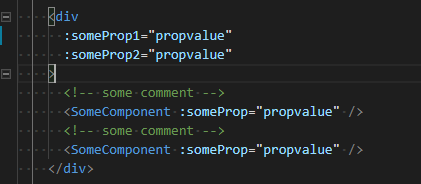
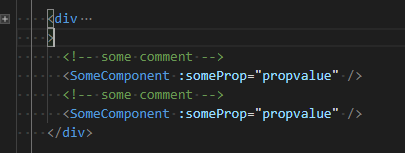
Case 2: When I put > back to the previous line, the fold is include the end tag.
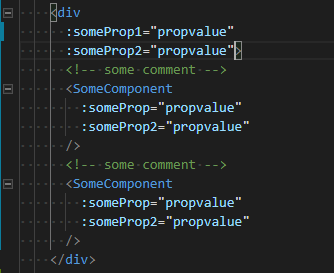
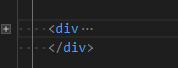
There are two fold tag in Case 1, fist one is fold start tag itself, second one is fold the end tag.
VS Code was right, but I think the Case 2 is best for me.
It will be better, if there is a switch like TagBracketSameLine option for any kind of html parser.
 dousybox
on 7 Dec 2018
dousybox
on 7 Dec 2018
For me this is the most annoying prettier formatting. Specially in Angular it prefers to break lin on the bracket instead of on attributes.

 Carniatto
on 17 Dec 2018
Carniatto
on 17 Dec 2018
my team is fine with
<div
    id="bar"
    class="foo"
><div>
but hates
<div
    id="bar"
    class="foo"
>
    content
<div>
 stephen-dahl
on 8 Jan 2019
stephen-dahl
on 8 Jan 2019
@stephen-dahl agree. The angle bracket hanging out there on its own line is never going to catch on. I've tried for the last month, but my mind still sees it as an error or a typo. IMO, js-beautify has solved the html formatting problem. Until prettier gets its stuff together, I'll be using that for my html.
matt328
on 14 Jan 2019
I'm trying to figure out how to get things between braces/brackets on the same line while using prettier and this is the closest related issue I can find, how would I get this
            { rel: 'icon', type: 'image/x-icon', href: '/favicon.ico' },
            { rel: 'stylsheet', type: 'text/css', href: 'https://unpkg.com/vue-plyr/dist/vue-plyr.css' },
            { rel: 'stylesheet', href: 'https://maxcdn.icons8.com/fonts/line-awesome/1.1/css/line-awesome-font-awesome.min.css' },
            { rel: 'stylesheet', type: 'text/css', href: 'https://use.typekit.net/rbp5ahp.css' }
instead of this (which is happening whenever I save)
            { rel: 'icon', type: 'image/x-icon', href: '/favicon.ico' },
            {
                rel: 'stylsheet',
                type: 'text/css',
                href: 'https://unpkg.com/vue-plyr/dist/vue-plyr.css',
            },
            {
                rel: 'stylesheet',
                href:
                    'https://maxcdn.icons8.com/fonts/line-awesome/1.1/css/line-awesome-font-awesome.min.css',
            },
            {
                rel: 'stylesheet',
                type: 'text/css',
                href: 'https://use.typekit.net/rbp5ahp.css',
            },
 JonathanAlumbaugh
on 17 Jan 2019
JonathanAlumbaugh
on 17 Jan 2019
There’s not an option for that. If you just have that kind of thing once in your codebase, you can put a // prettier-ignore comment before the array to stop Prettier from changing it.
j-f1
on 17 Jan 2019
Until it is fixed you can just disable prettier for .html files and use the standard formatter while keeping your other files pretty:
{
"editor.formatOnPaste": true,
"prettier.singleQuote": false,
"prettier.trailingComma": "none",
"prettier.disableLanguages": ["html"],
"editor.formatOnSave": true,
"editor.rulers": [110],
"html.format.wrapAttributes": "force",
"html.format.enable": true,
"html.format.wrapLineLength": 110
}
From: https://github.com/prettier/prettier-vscode/issues/182#issuecomment-438966521
 DanielHabenicht
on 7 Feb 2019
DanielHabenicht
on 7 Feb 2019
My team won't let me adopt prettier for angular html templates because of this one.
 vort3xxx
on 8 Feb 2019
vort3xxx
on 8 Feb 2019
when you have 47 thumbs up in an issue it's a signal that it's important for the community
 oswaldofreitas
on 9 Feb 2019
oswaldofreitas
on 9 Feb 2019
This is really bothering me, I can't even work in my project with that new line just for a ">", it makes my code horrible and hurts my eyes :)
Seems like others are having the same issue:
https://github.com/vuejs/vue-cli/issues/3078
I think when there is an impasse of how should be the correct looking, an option to configure that would be great to attend everyone.
btw, I LOVE what Prettier does to my javascript!
oswaldofreitas
on 16 Feb 2019
It's a bit hard to enforce using prettier when issues like this exists.
 krokofant
on 17 Feb 2019
krokofant
on 17 Feb 2019
It's a bit hard to enforce using prettier when issues like this exists.
It's actually not hard at all. You just need to focus coding, and leave Prettier alone with the formatting. Is easier than you think.
michaeljota
on 18 Feb 2019
It's actually not hard at all. You just need to focus coding, and leave Prettier alone with the formatting. Is easier than you think.
I'm sure that mentality works great for small, authoritarian teams, but when you have to convince 80 other engineers to adopt a new tool and it doesn't pass their sniff test because the code it produces looks way different than the code they've been writing forever, then the conversation goes nowhere.
Tool selection is often a social tug of war on larger teams where the toolmaster gets stuck respecting some accidents of history in order to gain adoption.
vort3xxx
on 19 Feb 2019
a new option similar to jsxBracketSameLine would save us so much time on waiting and discussing.
Also, code style is pretty like when you get a new keyboard, you need some time to adapt your eyes to it and I personally don't want to waste time with this since I've been working for a long time with the same code style, unless it's something really necessary or worth to change
oswaldofreitas
on 19 Feb 2019
While I agree with the mentality of "let the formatter handle formatting", this particular configuration is already an option. This request is to extend it to other similar markup.
 gjbianco
on 19 Feb 2019
gjbianco
on 19 Feb 2019
Please do add this option for .vue files, I really wanted to give Prettier a try and this lonely brackets all around my code are really giving me a hard time!
 lysla
on 10 Mar 2019
lysla
on 10 Mar 2019
Hi, any news about it?
Also my team hate > on a new line. Also we are working with VUE and VETUR extension but JSX options doesn't apply.
 michaelsogos
on 14 Mar 2019
michaelsogos
on 14 Mar 2019
when you have 47 thumbs up in an issue it's a signal that it's important for the community
wow, it's now 67 and counting! Unfortunately no responses from the prettier team?
oswaldofreitas
on 14 Mar 2019
This thread is just full of thumb ups
 alphabt
on 14 Mar 2019
alphabt
on 14 Mar 2019
Anyone dare to provide a pull request? 🍰
krokofant
on 16 Mar 2019
Please, add this option for .vue files
 kodmis
on 20 Mar 2019
kodmis
on 20 Mar 2019
How many people choose js-beautify-html?
  "vetur.format.defaultFormatter.html": "js-beautify-html",
  "vetur.format.defaultFormatterOptions": {
    "js-beautify-html": {
      "wrap_attributes": "force-aligned"
    }
  },
 y4n6
on 25 Mar 2019
y4n6
on 25 Mar 2019
Please add this for html files this is a deal breaker for our team we will not be implementing to bad liked it otherwise.
 goat67
on 8 Apr 2019
goat67
on 8 Apr 2019
I'm also looking forward to this. Current behavior stops me from using it.
 marekrewers
on 9 Apr 2019
marekrewers
on 9 Apr 2019
/cc @vjeux what do you think?
 alexander-akait
on 9 Apr 2019
alexander-akait
on 9 Apr 2019
maybe deprecate old option renaming to have 1 option apply to all the html like languages (html, xhtml, jsx, ect)
stephen-dahl
on 9 Apr 2019
@evilebottnawi Sounds reasonable to add an option for it since we're already doing it for JSX.
 vjeux
on 9 Apr 2019
vjeux
on 9 Apr 2019
Will this work for .html and for .vue files? Currently I have to disable prettier whenever I work on vue files.
 phifa
on 11 Apr 2019
phifa
on 11 Apr 2019
@phifa You could set .vue files to be handled by another parser, like the html one.
https://prettier.io/docs/en/configuration.html#setting-the-parser-docs-en-optionshtml-parser-option
https://prettier.io/docs/en/options.html#parser
krokofant
on 11 Apr 2019
+1
I just can't be convinced that's a desirable way of formatting the code:
Input:
<template><p></p></template>
Output:
<template
  ><p></p
></template>
 mkapiczy
on 22 Apr 2019
mkapiczy
on 22 Apr 2019
@mkapiczy You can configure the html spacing to ignore. This is not about that, but about the closing tag when you have multiple properties in the element.
michaeljota
on 22 Apr 2019
@krokofant no that will not work since I want my script and style tags to be formatted by prettier.
phifa
on 22 Apr 2019
@mkapiczy You can configure the html spacing to
ignore. This is not about that, but about the closing tag when you have multiple properties in the element.
This is useful for solving mkapiczy's problem.
 vaynewang
on 26 Apr 2019
vaynewang
on 26 Apr 2019
Is it Need today 「vaynewang notifications@github.com」在 2019年4月26日 週五,上午10:30 寫道:
…
@mkapiczy https://github.com/mkapiczy You can configure the html spacing to ignore. This is not about that, but about the closing tag when you have multiple properties in the element. This is useful for solving mkapiczy's problem. — You are receiving this because you are subscribed to this thread. Reply to this email directly, view it on GitHub <#5377 (comment)>, or mute the thread https://github.com/notifications/unsubscribe-auth/AKIVS7JSFMATN46VZQ2YAHTPSJSL5ANCNFSM4GCMT42A .
yes. format Vue template or html template (not react JSX) , need that config.
vaynewang
on 26 Apr 2019
That helped, thanks. Still supporting the original issue tought
mkapiczy
on 26 Apr 2019
The folding issue in VS Code is a real problem like @dousybox pointed out.
phifa
on 30 Apr 2019
What's the situation now?
 Devil-Cong
on 24 May 2019
Devil-Cong
on 24 May 2019
For me, in some cases, it's even worse.
<div class="col">
    <component [(value)]="value"
    ><component2
      >text</component2
    ></component
    >
</div>
 clabough
on 19 Jun 2019
clabough
on 19 Jun 2019
@clabough It sounds like you might be looking for the html-whitespace-sensitivity option.
 lydell
on 20 Jun 2019
lydell
on 20 Jun 2019
@lydell Yes, I'm aware of that setting, but in the documentation, I do not know why the ending > gets wrapped.
<!-- <span> is an inline element, <div> is a block element -->

<!-- input -->
<span class="dolorum atque aspernatur">Est molestiae sunt facilis qui rem.</span>
<div class="voluptatem architecto at">Architecto rerum architecto incidunt sint.</div>

<!-- output -->
<span class="dolorum atque aspernatur"
  >Est molestiae sunt facilis qui rem.</span
>
<div class="voluptatem architecto at">
  Architecto rerum architecto incidunt sint.
</div>
Why is
<span class="dolorum atque aspernatur"
  >Est molestiae sunt facilis qui rem.</span
>
any different than
<span class="dolorum atque aspernatur"
  >Est molestiae sunt facilis qui rem.</span>
Perhaps it's trying to align < and > vertically, but that's not a whitespace issue.
clabough
on 21 Jun 2019
what's going on here? are we gonna fix this sh*t or not?
 craigcosmo
on 21 Jul 2019
craigcosmo
on 21 Jul 2019
In Vue SFC, I hope to:
- enable/disable
prettierfor<template>,<script>or<style>blocks - format custom blocks of particular language by
prettier
For this purpose, I create eslint-plugin-prettier-vue to handle .vue files
 meteorlxy
on 21 Aug 2019
meteorlxy
on 21 Aug 2019
@meteorlxy I don't support the opinions on formatting any more, but that's a great work. Thanks for sharing. If you don't want to, just don't use it.
michaeljota
on 21 Aug 2019
@lydell Yes, I'm aware of that setting, but in the documentation, I do not know why the ending
>gets wrapped.<!-- <span> is an inline element, <div> is a block element --> <!-- input --> <span class="dolorum atque aspernatur">Est molestiae sunt facilis qui rem.</span> <div class="voluptatem architecto at">Architecto rerum architecto incidunt sint.</div> <!-- output --> <span class="dolorum atque aspernatur" >Est molestiae sunt facilis qui rem.</span > <div class="voluptatem architecto at"> Architecto rerum architecto incidunt sint. </div>Why is
<span class="dolorum atque aspernatur"
  >Est molestiae sunt facilis qui rem.</span
>
any different than
<span class="dolorum atque aspernatur"
  >Est molestiae sunt facilis qui rem.</span>
Perhaps it's trying to align
<and>vertically, but that's not a whitespace issue.
@clabough @lydell I have the same question
Playground Link
Why the ending > of the second button is in new line
 qpxtWhite
on 22 Aug 2019
qpxtWhite
on 22 Aug 2019
@qpxtWhite What buttons are referring to?
lydell
on 22 Aug 2019
@lydell
I'm using Vue parser, and the parsed vue template is not expected

Playground Link
In the sample, the first "custom-button" is good, and the second "custom-button" is ugly!
qpxtWhite
on 23 Aug 2019
@qpxtWhite I see, thanks. Doing the unusual break between </tag and > allows having the closing tags on different lines:
<template>
  <div>
    <my-custom-button @click="handleButtonClick" type="primary">{{
      buttonName
    }}</my-custom-button>
    <my-custom-button @click="handleButtonClick" type="primary"
      ><span class="btn btn-lg btn-primary btn-elevated"
        >start</span
      ></my-custom-button
    >
  </div>
</template>

<script></script>

<style></style>
vs:
<template>
  <div>
    <my-custom-button @click="handleButtonClick" type="primary">{{
      buttonName
    }}</my-custom-button>
    <my-custom-button @click="handleButtonClick" type="primary"
      ><span class="btn btn-lg btn-primary btn-elevated"
        >start</span></my-custom-button>
  </div>
</template>

<script></script>

<style></style>
I just started using prettier and I've setup my config file and got really annoyed when I realized I could not stop prettier from moving my html tag-ending brackets to the next line. I'll be moving to beautify in vscode until you guys get your ** together. Formatted code looks gross with Prettier, I can't believe the people here have been waiting a year and 152 likes without any official response yet. Yikes!
 GitGangGuy
on 7 Sep 2019
GitGangGuy
on 7 Sep 2019
@GitGangGuy
"Prettier is an opinionated code formatter."
--> It's not a bug, it's a feature. 🎉
DanielHabenicht
on 14 Sep 2019
@DanielHabenicht It's also open-source supported by the community and build for the community or not? adding this option would make it easier for some teams to use it.
Carniatto
on 16 Sep 2019
@Carniatto It is a difficult line to walk – see the Option philosophy.
lydell
on 16 Sep 2019
@lydell I think this issue has reached an appropriate amount if interest to get a response saying that prettier is willing to look at options to implement the requested change or closing the issue with a brief explanation of the reasoning.
My proposal is to rename the option jsxBracketSameLine to htmlBracketSameLine and have the option cover jsx and html. deprecate jsxBracketSameLine and remove it in the next major version.
Or heck, if we dont want the option how about changing the default? I would be surprised if more people want the current behavior than want this behavior.
either way this issue needs closed or to move to next steps.
stephen-dahl
on 16 Sep 2019
the author dont do this becuase of technical issue? Or it's his belief?
craigcosmo
on 16 Sep 2019
I believe the underlying html formatter has the option for this, so it is mostly a design decision that needs to happen.
stephen-dahl
on 16 Sep 2019
no who in their right mind want to make tag ending look crazy like that?
craigcosmo
on 16 Sep 2019
@DanielHabenicht It's also open-source supported by the community and build for the community or not? adding this option would make it easier for some teams to use it.
Written Sarcasm is something I still have to develop. 😆 I am all for it! I hate the current Status and have prettier disabled in my projects for html files.
DanielHabenicht
on 17 Sep 2019
There is no “underlying html formatter”. Prettier uses its own stuff. As far as I know, there are no technical limitations to the placing of the closing >. Also note that Prettier is run by a group of volunteers, not a single person.
Personally I think it makes sense changing jsxBracketSameLine to something that applies to both JSX and HTML. But right now we need to focus on getting the next release out.
The issue stays open. We’ve found that it has generally worked better to keep issues open for a long time than closing them.
lydell
on 17 Sep 2019
There is no “underlying html formatter”.
Ok, I thought I read that there was somewhere above.
right now we need to focus on getting the next release out.
Makes sense, after the release what needs to happen to get a determination on this from the team? I'm sure that there are several that would be willing to do the work if it was approved.
The issue stays open. We’ve found that it has generally worked better to keep issues open for a long time than closing them.
ya I noticed that at the end of the Option philosophy after reading it again. I guess most people don't search closed issues.
stephen-dahl
on 17 Sep 2019
@pwang2 That’s unrelated to this issue. You’re looking for --html-whitespace-sensitivity ignore:
Prettier 1.18.2
Playground link
--html-whitespace-sensitivity ignore
--parser vue
Input:
<template>
  <v-btn text small color="primary" class="my-4 float-right" f="f">Continue</v-btn>
</template>
Output:
<template>
  <v-btn text small color="primary" class="my-4 float-right" f="f">
    Continue
  </v-btn>
</template>
I would love to introduce Prettier in our Angular codebase. But my teammates can't live with what it does to inline templates... Splitting them up into separate .html files is not always desirable and would be a rather big undertaking on the existing codebase.
I think the community have proven interest in this - anything blocking this change from being made?
 mario-d-s
on 22 Oct 2019
mario-d-s
on 22 Oct 2019
Guys what’s happening, are we gonna fix this floating-bracket problem or not?
 alb3rtuk
on 30 Oct 2019
alb3rtuk
on 30 Oct 2019
It’s not prettier until this is fixed
 jasonhibbs
on 30 Oct 2019
jasonhibbs
on 30 Oct 2019
If someone here knows the underlying code and can point me in the right direction of where the fix needs to be made/applied/tested I might have time to make a PR. Depends on how much work is involved, I’m very busy with work.
alb3rtuk
on 30 Oct 2019
I agree with @mario-d-s, we really want to use Prettier in Visual Studio Code, but this floating bracket in Vue templates is terrible formatting. So we're looking for alternate formatters because we don't want it polluting our code.
 dalezak
on 30 Oct 2019
dalezak
on 30 Oct 2019
I temporarily fixed it by making my printWidth: 500px. It gets rid of the floating brackets but it's not ideal because now all of your attributes are on a single line.
alb3rtuk
on 30 Oct 2019
I temporarily fixed it by making my printWidth: 500px. It gets rid of the floating brackets but it's not ideal because now all of your attributes are on a single line.
I did the same here with printWidth: 100
oswaldofreitas
on 31 Oct 2019
I like htmlBracketSameLine feature。please support it 😭
 tangdaohai
on 1 Nov 2019
tangdaohai
on 1 Nov 2019
This issue is now 357 days old, has 76 comments and 187 "upvotes" on the initial comment. Browsing through the thread, it seems clear that this feature would be very appreciated by a larger audience than only React developers.
The only progress made so far seems to be 1 of the contributors agreeing that it would be interesting but there's other stuff going on.
I've just started at a new position on a team that is rewriting their frontend in VueJS. They are currently using prettier and this problem has already come up. I'd prefer we continue with prettier but without any mention of a plan to adopt from the maintainers I don't know how long we'll wait. At this point it just seems a little careless.
 udyux
on 1 Nov 2019
udyux
on 1 Nov 2019
I don't even understand how is this the default. How is the next line closing bracket more readable than the same line.
 EduardsE
on 9 Nov 2019
EduardsE
on 9 Nov 2019
Okey Seems you all want it, I was searching for this that why jsxBracketSameLine won't effect in HTML
I want it too :( in the same line
 pyrrhicman
on 12 Nov 2019
pyrrhicman
on 12 Nov 2019
+1
 IMalaniak
on 13 Nov 2019
IMalaniak
on 13 Nov 2019
Our team has been focusing on this issue since one year ago.
We never give up.
y4n6
on 2 Dec 2019
Pulled my hair out trying to figure out if I was doing something wrong - as with the requestors above, makes no sense to orphan the closing bracket in HTML.
 motorstreak
on 6 Dec 2019
motorstreak
on 6 Dec 2019
@EduardsE It's explained here: https://github.com/prettier/prettier/issues/5377#issuecomment-438457597
Related (the same way to format delimiters is discussed for CSS): https://github.com/prettier/prettier/issues/7033
Why adding an option is not an option: https://github.com/prettier/prettier/issues/40
Finally, it's not clear at all how this can be implemented for inline elements, where whitespace can't be inserted after the closing bracket in the default whitespace-sensitive mode.
<span
  long-attribute-number-one="long-value-number-one"
  long-attribute-number-two="long-value-number-two"
  >some content here</span
>
 thorn0
on 6 Dec 2019
thorn0
on 6 Dec 2019
Finally, it's not clear at all how this can be implemented for inline elements, where whitespace can't be inserted after the closing bracket in the default whitespace-sensitive mode
@thorn0 the same way _it is already implemented_ in JSX through jsxBracketSameLine, which is exactly what this issue is about...
Why adding an option is not an option: #40
I get that the whole point of Prettier is to limit variations in form. So why add an option for React developers? Furthermore, why not extend the option's scope to cover the rest of the community given how eagerly they want to adopt it?
We could go one step further by embracing the "no options" philosophy and eliminate the jsxBracketSameLine option altogether, setting the ~default~ only behaviour to having the closing bracket on the same line seeing as very few people have voiced their support for the current default.
@EduardsE _Personally_, I don't agree with the reason linked by @thorn0 (Comments that start with "personally" should be read as opinions, not reasons). The "flow" of indentation plays a huge role in how I read my markup in order to visualize the structure. Syntax highlighting takes care of identifying different types of entities as far as I'm concerned.
The only technical argument in favour of the "newline" format that makes sense to me is by comparing it to trailingComma where re-ordering/adding props (attributes) is less prone to syntax errors.
udyux
on 12 Dec 2019
@udyux HTML and JSX are not the same and have completely different rules regarding whitespace. That's something people here just prefer to ignore. If we do it "the same way", the same people that want this option now, tomorrow will return with complaints that Prettier breaks their code by adding whitespace to their spans and links. As for block elements, do you write JS? Does it look okay to you to format functions like in this comment? How is this different from this situation with HTML tags? BTW, the Prettier team admits that adding jsxBracketSameLine was a mistake. It indeed might get removed in the future.
thorn0
on 12 Dec 2019
Is this something the prettier developers are looking into? There are quite few things that are blocking the prettier usage completely. This one with JSX implementation being one but completely avoid HTML.
 lordgreg
on 12 Dec 2019
lordgreg
on 12 Dec 2019
HTML and JSX are not the same ..., do you write JS? Does it look okay to you to format functions like in this comment? How is this different from this situation with HTML tags? ...
So.. HTML and JSX are too different to share styles, but HTML & JS are similar enough? That doesn't sound right. Am I missing something?
 leff
on 12 Dec 2019
leff
on 12 Dec 2019
@leff https://prettier.io/blog/2018/11/07/1.15.0.html#whitespace-sensitive-formatting
thorn0
on 12 Dec 2019
"important" whitespace and tags ending on the same line are not mutually exclusive. Especially since whitespace getting in the way is rare. It is an exception. I would much rather have those rare cases look a little weird (because I formatted them in some strange way to avoid spaces) than _every_ tag look awful, and html code folding to be broken all the time.
I realize that this is just a personal preference. But it's a strong one. And it's a shame that this one little thing must come between me and a library that otherwise does everything I want.
leff
on 12 Dec 2019
"important" whitespace and tags ending on the same line are not mutually exclusive.
They're not if you're okay with this:
<span
  long-attribute-number-one="long-value-number-one"
  long-attribute-number-two="long-value-number-two">some content here</span>
and html code folding to be broken all the time
In which editor is code folding broken? In VS Code, it isn't.
thorn0
on 12 Dec 2019
and html code folding to be broken all the time
In which editor is code folding broken? In VS Code, it isn't.
Wow, they must have fixed that in the last few months. It's still not great in vue-html.
leff
on 12 Dec 2019
Oh, and I am very much ok with your example html. But my point is that 99.9% of the time I'm ok with this html
<span
  long-attribute-number-one="long-value-number-one"
  long-attribute-number-two="long-value-number-two">
 some content here
</span>
It's very rare that the whitespace matters. In apps with thousands of html files, I might need to care in one of them? Maybe. I have flexbox and grid now, so maybe not.
leff
on 12 Dec 2019
@leff Good for you then. Sounds like you can use --html-whitespace-sensitivity ignore for your projects. But still it's not clear how --html-whitespace-sensitivity css or strict can be combined with the proposed option. And what are your thoughts on this point? E.g. in your last message did you intentionally use different indentation levels for the attributes and the content? Do you think it's a better way to separate them visuaully?
thorn0
on 12 Dec 2019
@thorn0 I only just noticed your collaborator tag. I'm sorry if this is a little blunt but try turning down the dismissive, passive-aggressive and slightly condescending overtone. It contributes nothing to the discussion and risks having your valid opinions taken less seriously. "Everyone is entitled to their opinion, even if its the wrong one" doesn't work very well outside of a punchline.
I do write a lot of JavaScript on a daily basis. I also write nearly as much HTML/Vue/JSX markup and CSS/SCSS. I feel comfortable surmising that no qualified UI developer will prefer to ignore the impact of whitespace sensitivity. What you might perceive as ignorance may just be experience telling us when to give it importance. For most these instances are rare.
The JS formatting in the comment you linked to is not very readable for a number of reasons, one of which is habit/convention. But as @leff has already mentioned there is no sense in comparing JavaScript syntax and style to HTML. Even less so when, only two sentences earlier, comparing HTML to JSX is dismissed on the basis that they are completely different.
I'm of the same opinion that whitespace sensitive situations are so few and far between that I'd much rather have some awkward looking code in those cases than to format everything based on an edge-case. I've found a way to disable prettier in Vue templates and have always had jsxBracketSameLine set to true and literally cannot recall an occasion where my formatting was a problem. However, readability is absolutely a problem for me when formatted with a newline.
As for "this point", if you use an editor that has syntax highlighting I feel that it is reasonable to assume that the difference in color/contrast will suffice.
I'm probably going to put this thread aside for a while as the vibe is no longer one of collaboration and emotions are starting to come into play, myself included. I hope that we can come together to figure this out in the long run, Prettier is an awesome idea very nearly perfectly executed. This whole issue, however, will be harder to swallow for UI developers like myself who spend as much time writing markup as we do JavaScript and struggle with the cognitive load imposed by the format.
Here's to hoping for an outcome, any outcome! 🥂
udyux
on 12 Dec 2019
@udyux That's some interesting feedback. I'm indeed annoyed by the fact that people read the option philosophy page and #40, but still keep insisting that their personal habits are more important than the project's philosophy.
I feel comfortable surmising that no qualified UI developer will prefer to ignore the impact of whitespace sensitivity. What you might perceive as ignorance may just be experience telling us when to give it importance. For most these instances are rare.
Are inline links rare? Whitespace-sensitive formatting is a critical feature of Prettier. One needs to be able to reformat a project with thousands of files without a fear that this might introduce whitespace errors. This probability can't be ruled out completely, as the display property can be changed via CSS, but Prettier tries its best to be a reliable tool here. I think it's important.
The only conclusion I can draw from here is that if the requested option gets added, there still will be cases (with --html-whitespace-sensitivity set to css or strict) where it won't be possible to write > on the same line as the last attribute. The result might look really inconsistent, but given that the proponents of this option request seem to not care about whitespace, probably it would make sense to allow it only with --html-whitespace-sensitivity explicitly set to ignore.
if you use an editor that has syntax highlighting
So, we have two ways to format code. One of them needs aid from syntax highlighting to be readable and the other one is fine as is (and also is more diff-friendly). Why prefer the first one?
thorn0
on 13 Dec 2019
@thorn0
it would make sense to allow it only with --html-whitespace-sensitivity explicitly set to ignore
I'm not trying to be sarcastic when I say you've solved it then. That makes perfect contextual sense and communicates relatively clearly to the user what the possible implications of using the option are.
keep insisting that their personal habits are more important than the project's philosophy
I agree, a big part of what makes prettier great is how it manages to filter out that noise, all thanks to this philosophy. But when this many developers collectively express support for the same syntactical format, some might call it convention.
personal preference < prettier < convention or at least thats what I thought the idea was.
Why prefer the first one?
Readability. HTML defines the structure. It is important to be able to mentally render the structure efficiently or assess if there are technical problems in the structure (eg. missing/wrong closing tag). For me, at least, code formatting/flow helps make this happen.
udyux
on 15 Dec 2019
@udyux
But when this many developers... some might call it convention.
How many is many enough? These developers can as well be just a vocal minority whereas those who are okay with Prettier's current formatting have no reason to come here and express their opinion. Conventions emerge, mutate and go. There once was a convention that element names should be written in uppercase. Who does that today?
at least thats what I thought the idea was
The idea is: good enough consistent and reliable automated formatting > lack thereof.
_So why choose the "Prettier style guide" over any other random style guide? Because Prettier is the only "style guide" that is fully automatic. Even if Prettier does not format all code 100% the way you'd like, it's worth the "sacrifice" given the unique benefits of Prettier, don't you think?_
-- https://prettier.io/docs/en/why-prettier.html
Readability. HTML defines the structure. It is important to be able to mentally render the structure efficiently or assess if there are technical problems in the structure (eg. missing/wrong closing tag). For me, at least, code formatting/flow helps make this happen.
I don't see how what you wrote is inherent to that specific formatting style. That style appears more readable to you only because you're used to it.
BTW, Prettier editor integration really helps with syntax errors. Once you see the formatting stopped happening upon save, you know there is a syntax error somewhere.
thorn0
on 16 Dec 2019
Just switch your team to react like I did then you don't have to worry about it :p
joking aside, back in September I had a conversation with @lydell asking for the prettier team to give a yes or no to this.
@lydell I think this issue has reached an appropriate amount if interest to get a response saying that prettier is willing to look at options to implement the requested change or closing the issue with a brief explanation of the reasoning.
My proposal is to rename the option jsxBracketSameLine to htmlBracketSameLine and have the option cover jsx and html. deprecate jsxBracketSameLine and remove it in the next major version.
Or heck, if we dont want the option how about changing the default? I would be surprised if more people want the current behavior than want this behavior.
the core of the response was
Personally I think it makes sense changing jsxBracketSameLine to something that applies to both JSX and HTML. But right now we need to focus on getting the next release out.
I understand the reasoning for leaving the issue open but still think that this needs a definitive response. Is there a process for reaching a final (for now) determination on these types of requests? If not one should probably be added. In the end we are arguing about preference and opinion, but lost argument is better than one that never ends or is ignored.
stephen-dahl
on 16 Dec 2019
I think we need twitter poll to make the final decision like. Will be great also ask developers about change default behavior, to find out how much this behavior is not very convenient.
/cc @prettier/core what do you think about it?
alexander-akait
on 16 Dec 2019
@evilebottnawi I don’t think we should make a Twitter poll: https://github.com/prettier/prettier/pull/3903#issuecomment-555112516
Personally I’m in favor of changing this option to cover all HTML-like syntax.
lydell
on 16 Dec 2019
@lydell i think we can implement htmlBracketSameLine right now and union jsxBracketSameLine and htmlBracketSameLine in future, in theory we can do it right now in next, but I'm afraid we don’t have enough time right now for this
alexander-akait
on 16 Dec 2019
I'd like to remind that jsxBracketSameLine was added only because this was an easy way to get Prettier adopted inside Facebook. It was important for the project to get traction back then, but why do we need another such trade-off today? The potential interference of this option and --html-whitespace-sensitivity looks like a Pandora's box of problems to me. Keep it simple and resist adding configuration, anyone? What happened to that?
thorn0
on 16 Dec 2019
@thorn0 sometimes the developers love ugly, and unfortunately we can’t ignore them, then there come moments like now, I fully support the rejection of extra/unnecessary options and even wanted to delete some of them in the future, but there are very holywar moments that we still have to take into account
alexander-akait
on 16 Dec 2019
@thorn0 what if prettier simply left the ending bracket alone.
let
<tag
  arg=value
>
  content
</tag>
and
<tag
  arg=value>
  content
</tag>
both exist. That should address your white space concerns, removes the need for an option, and lets both sides of this issue get their way. prettier can just look at if the > is on a new line or not and format accordingly
stephen-dahl
on 16 Dec 2019
this might also allow you to get rid of the jsx option
stephen-dahl
on 16 Dec 2019
@evilebottnawi Developers have their opinions, Prettier is supposed to have an opinion too. This issue is not nearly as divisive as tabs-vs-spaces and semi-vs-no-semi.
BTW, just thought that it might be a natural process that in these days of frameworks like Vue and Angular, when tags have more attributes than they used to, there is a need for a clearer separation of the attributes and the content. And that's what Prettier's current style achieves.
@stephen-dahl It'd be a huge sacrificing of consistency. Prettier tries to keep as less of the original formatting as possible.
thorn0
on 16 Dec 2019
How many is many enough?
I'd like to remind that jsxBracketSameLine was added only because this was an easy way to get Prettier adopted inside Facebook
@thorn0 I feel like you've answered your own question here.
In other news, turns out my workaround in Vue templates was temporary. We've had to turn off Prettier for .vue files entirely. There are conflicts somewhere between the vue/recommended, airbnb and prettier eslint configs. We have prettier as the last reference under extends. Around one third of our files toggle between formats on a closing bracket every time the file is formatted. Both results trigger lint errors.
What this underlines is that prettier is almost never used alone and while eslint is not a formatter, it does try to fix errors automatically. We now need to make a huge sacrifice in consistency to preserve our lint configuration. We simply don't have the time right now to dive into debugging this sort of issue.
@stephen-dahl I recently switched jobs so I could stop working with React ;)
udyux
on 17 Dec 2019
@udyux Maybe you forgot to add prettier/vue to the extends array? Also note that ESLint has a --fix flag that fixes many, but not all, problems.
lydell
on 17 Dec 2019
I think a good and honest response for issues like this might be: _We're not sure this is the right thing to do. If you really need this functionality, feel free to fork Prettier and publish your fork. If we see that it's used really a lot, we will consider a merge_.
Because we really are not sure, and how else can we measure the demand? ¯\_(ツ)_/¯
@udyux It was a completely different phase of this project, with completely different concerns.
We simply don't have the time right now to dive into debugging this sort of issue.
Yet, you're advocating increasing Prettier's configuration complexity so that people would need even more time to wrap their head around it.
thorn0
on 17 Dec 2019
Can't you give the same option? (React-jsx user have the option "jsxBracketSameLine" while Vue and Angular users not ) I don't think it's a inconsistency matter, It´s a matter to keep the same options in all the frames.
I hope to use this functionality in vue 😥
 hansfelix
on 20 Dec 2019
hansfelix
on 20 Dec 2019
Perhaps we should name it to
angleBracketSameLine.
Perhaps we should name it to “bracketSameLine” for all tag template, include jsx.
 jiankafei
on 31 Dec 2019
jiankafei
on 31 Dec 2019
For reference, the google html styleguide looks like this : https://google.github.io/styleguide/htmlcssguide.html#HTML_Line-Wrapping
<md-progress-circular
    md-mode="indeterminate"
    class="md-accent"
    ng-show="ctrl.loading"
    md-diameter="35">
</md-progress-circular>
After fighting a bit with this, we're going to use Beautify for now for html formatting. I hope this option is implemented and our team can use prettier for HTML soon.
To the maintainers and contributors : thanks for the great work 👍!
 nassimbenkirane
on 22 Jan 2020
nassimbenkirane
on 22 Jan 2020
This is an inconsistency in prettier because it was react-focused. Other frameworks exist, and there is a clear problem with this feature which is not being addressed.
 tihomir-kit
on 3 Feb 2020
tihomir-kit
on 3 Feb 2020
I'm sorry to ask this question here. I'm using plain HTML and I want to have the angle bracket not take it's separate line
What I dont want :
<div
  class="flex items-center justify-center w-20 h-20 bg-red-500 rounded-full"
>
  <img src="images/SectionOne/icon-android.png" alt="" />
</div>
````

What I want :
```html
<div class="flex items-center justify-center w-20 h-20 bg-red-500 rounded-full">
  <img src="images/SectionOne/icon-android.png" alt="" />
</div>
I see that this is currently being discussed. Is there a way to change the settings current and not have it break down in a separate line? How can I disable this in the meanwhile?
 sangeet
on 4 Feb 2020
sangeet
on 4 Feb 2020
I see that this is currently being discussed. Is there a way to change the settings current and not have it break down in a separate line? How can I disable this in the meanwhile?
There is no option in Prettier for this @sangeet. Your best option should be to use another formatter for HTML.
 GlThibault
on 4 Feb 2020
GlThibault
on 4 Feb 2020
Something new here?
It would be really nice if we have that.
 danielehrhardt
on 11 Feb 2020
danielehrhardt
on 11 Feb 2020
We truly need angleBracketSameLine, from a vue developer
 devilyouwei
on 18 Feb 2020
devilyouwei
on 18 Feb 2020
Just read the whole discussion and switched to Beautify...
I mean, there is no reliable way to "measure the demand", some people don't care to dig more and just ditch Prettier for html/vue/ag files and that's it.
And if we're talking consistency, having that option for jsx and not for anything else is nothing short of funny.
 otomeskhy
on 25 Feb 2020
otomeskhy
on 25 Feb 2020
/cc @prettier/core Let's pay attention to this problem, it is very popular
alexander-akait
on 25 Feb 2020
I'm also going to disable prettier's HTML formatting, until it produces formatting like presented in:
https://github.com/prettier/prettier/issues/5377#issuecomment-581673350
 elesueur
on 6 Mar 2020
elesueur
on 6 Mar 2020
We truly need angleBracketSameLine, from a vue developer
agree
 tarponjargon
on 17 Mar 2020
tarponjargon
on 17 Mar 2020
We definetly need angleBracketSameLine to avoid this:
<v-btn
  v-if="condition"
  >{{ bar }}</v-btn
>
edit: Added Expected Outputs and final comment.
Expected Output Option One:
<v-btn
  v-if="condition">
{{ bar }}
</v-btn>
Expected Output Option Two:
<v-btn v-if="condition">{{ bar }}</v-btn>
I think > should be appended to the end of the attributes and never alone.
 Gaabooo
on 18 Mar 2020
Gaabooo
on 18 Mar 2020
Hi, another Vue dev in pain here - please add angleBracketSameLine
edit: look how this a tag is formatted..
Prettier output - notice placement of the opening & closing >:
<a
      href="https://github.com/nuxt/nuxt.js"
      target="_blank"
      class="button--grey"
      >GitHub</a
>
Expected Output Option One:
<a
  href="https://github.com/nuxt/nuxt.js"
  target="_blank"
  class="button--grey"
>
  GitHub
</a>
Expected Option Two:
<a
  href="https://github.com/nuxt/nuxt.js"
  target="_blank"
  class="button--grey">
  GitHub
</a>
Either of those would be acceptable IMO. Why is the closing > getting exploded - why is that tag not whole? And what's up with the opening > ? That should be on its own line or appended to the end of the attributes. The markup is extremely illegible in its current state.
 dylanmcgowan
on 21 Mar 2020
dylanmcgowan
on 21 Mar 2020
@Gaabooo and @dylanmcgowan Could you also show your expected outputs, please?
lydell
on 21 Mar 2020
@lydell updated my comment
dylanmcgowan
on 21 Mar 2020
@dylanmcgowan Thanks! I don’t think the proposed option here is what you’re looking for. It sounds like you’re looking for HTML Whitespace Sensitivity.
lydell
on 21 Mar 2020
@lydell edited my comment as well :)
It's exactly this:
https://prettier.io/docs/en/options.html#jsx-brackets
Gaabooo
on 21 Mar 2020
@Gaabooo Same thing with your “Expected Output Option One”. The placement of the > wouldn’t help there – you’re looking for HTML Whitespace Sensitivity.
lydell
on 21 Mar 2020
@lydell I'm looking for a way to have the > aligned correctly with the corresponding tag.
Already tried with HTML Whitespace Sensitivity but didn't solve the issue
Gaabooo
on 21 Mar 2020
@Gaabooo Ah, I see, you probably need HTML Whitespace Sensitivity _plus_ this proposed option.
lydell
on 21 Mar 2020
@lydell Exactly that ❤️
Gaabooo
on 21 Mar 2020
I thought this problem is solved for Vue with version 2 but it isn't :cry: Closing bracket for templates are still on a new line...
 MikeMitterer
on 25 Mar 2020
MikeMitterer
on 25 Mar 2020
Our solution:
In your settings.json
"[html]": {
    "editor.defaultFormatter": "vscode.html-language-features"
  },
 Nightbr
on 25 Mar 2020
Nightbr
on 25 Mar 2020
@Nightbr any idea where would one put this in a Vue project? Doesn't seem to be a settings.json file.
 katowulf
on 4 Apr 2020
katowulf
on 4 Apr 2020
The settings.json is for VS code. You can edit your global settings.json or in your project create it in .vscode/settings.json.
Nightbr
on 5 Apr 2020
How is this still now fixed?? None of these proposed 'solutions' work for template tags in Vue components... :/
 emilyplusplus
on 7 Apr 2020
emilyplusplus
on 7 Apr 2020
Sooo ... would this be the cause for something like this:
<div>Please click on <a href='/foo'>this link</a>.</div>
and it formats to
<div>
    Please click on
    <a href='/foo'>
        this link
    </a>
    .
</div>
It throws the trailing period (or anything after the tag) down on the next line. It adds visual space in the rendered html between the end of the sentence and the period. Minor, but annoying, so I'm trying to verify the cause.
 EyePulp
on 10 Apr 2020
EyePulp
on 10 Apr 2020
Please fix it!!
danielehrhardt
on 10 Apr 2020
wow, from Nov 2018 and not fixed yet, looks like the maintainers just don't care about our voice here
oswaldofreitas
on 10 Apr 2020
@oswaldofreitas That's pretty passive/aggressive snark if not sarcastic. I think a more gracious read is "you get what you pay for" and they probably have other priorities. Raising issues is fine, but acting entitled and hurt when an issue isn't addressed as fast as you like doesn't help anyone.
EyePulp
on 10 Apr 2020
Agreed. Just chill man, you can always take it out of your project. But you are not "entitled" to ask for anything, especially not being that rude. If you ask for something do it nicely especially when what you are getting is free volunteering work from others.
Gaabooo
on 10 Apr 2020
Yes, I'd also like this feature incorporated, but those who put in the work can set their own priorities.
However, that the "needs discussion" status may be outdated. We have had a lot of discussion on this, and it might be time to decide either to put angleBracketSameLine on the list of features to implement (on the maintainers' timetable) or to decide that it is undesirable to expand the jsx rule to html for some reason.
 karptonite
on 10 Apr 2020
karptonite
on 10 Apr 2020
Yes, I'd also like this feature incorporated, but those who put in the work can set their own priorities.
However, that the "needs discussion" status may be outdated. We have had a lot of discussion on this, and it might be time to decide either to put
angleBracketSameLineon the list of features to implement (on the maintainers' timetable) or to decide that it is undesirable to expand the jsx rule to html for some reason.
lol said this back in september https://github.com/prettier/prettier/issues/5377#issuecomment-531866285
stephen-dahl
on 10 Apr 2020
@stephen-dahl Well, back in September, all focus was on getting 2.0 out. Maybe now there is finally bandwidth to revisit this.
karptonite
on 10 Apr 2020
hey guys, sorry if I looked rude, but I wanted to say there is a big voice here asking this feature and I've read some comments in the past in this same thread from one of the maintainers saying something about number of people that are not adding their input here and could be way bigger than "us" (which asked the feature) and wouldn't want this, also there was a discussion about prettier shouldn't have options, so I thought it was just a disrespect with the ones which wrote here asking for this feature and didn't have any updates from the maintainers since from 2018 at least just to say "hey, this is in the roadmap, just wait a bit more since we're taking care of other things".
This is a pretty great lib though and I wouldn't like to remove it from my project just because a feature that I could wait to be added. What I would like actually is just to have more feedback in an interval shorter than 17 months.
oswaldofreitas
on 10 Apr 2020
@oswaldofreitas those are reasonable points, and it's understandable if you're frustrated by not seeing a response or fix after this length of time.
FWIW - I cleaned out my eslint config and found the minimal settings needed to prevent the particular issue I was complaining about inside my Vue HTML blocks. This doesn't solve the problem for everyone, but it does let me keep using prettier for html. "htmlWhitespaceSensitivity": "css" was probably the biggest part of it, and realizing that I didn't have all the plugins properly required & installed at the project level in my package.json. Using the OUTPUT tab under VSCode to see eslint errors made the debugging much easier.
// eslintrc.js
module.exports = {
    plugins: ['vue', 'prettier'],
    extends: ['prettier', 'plugin:vue/recommended'],
    rules: {
        'vue/no-v-html': 'off',
        'vue/attribute-hyphenation': 'off',
        'prettier/prettier': 'error',
        'vue/max-attributes-per-line': [2, { singleline: 10 }],
        'vue/html-closing-bracket-newline': 'off',
        'vue/html-indent': 'off',
        'vue/html-self-closing': 'off',
    },
};
// .prettierrc
{
    "trailingComma": "es5",
    "tabWidth": 4,
    "printWidth": 100,
    "singleQuote": true,
    "arrowParens": "always",
    "htmlWhitespaceSensitivity": "css"
}
// package.json
{
   //...
    "devDependencies": {
     //...
        "eslint": "^6.8.0",
        "eslint-config-prettier": "^6.10.1",
        "eslint-plugin-prettier": "^3.1.2",
        "eslint-plugin-vue": "^6.2.2",
        "prettier": "^2.0.4",
    },
}
@EyePulp thank you for your tips, what I've used that helped was the printWidth: 100 that's in your settings too
oswaldofreitas
on 10 Apr 2020
So basically it happens with inline elements (according to CSS defaults) because white space is significant in those and adding a line break adds a space, inline, in the rendered output.
Here's some valid Prettier formatted code:
<!-- valid -->
<template>
  <div>
    <p v-if="request">{{ request }}</p>
    <p v-else class="error pa-2">
      Nu s-a găsit cererea de produs cu
      <code>ID={{ $route.params.id }}</code>
      !
    </p>
  </div>
</template>
If I don't want that extra space between the content between the code tags and !, I write this:
<!-- invalid -->
<template>
  <div>
    <p v-if="request">{{ request }}</p>
    <p v-else class="error pa-2">
      Nu s-a găsit cererea de produs cu
      <code>ID={{ $route.params.id }}</code>!
    </p>
  </div>
</template>
But Prettier complains:
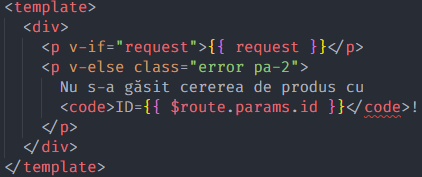
So if I let it fix it, it produces this:
<!-- valid -->
<template>
  <div>
    <p v-if="request">{{ request }}</p>
    <p v-else class="error pa-2">
      Nu s-a găsit cererea de produs cu
      <code>ID={{ $route.params.id }}</code
      >!
    </p>
  </div>
</template>
I think this is ugly. The previous <code>ID={{ $route.params.id }}</code>! was much better.
Funny thing, even doing the following makes Prettier happy again:
<!-- valid -->
<template>
  <div>
    <p v-if="request">{{ request }}</p>
    <p v-else class="error pa-2">
      Nu s-a găsit cererea de produs cu
      <code>ID={{ $route.params.id }}</code> !
    </p>
  </div>
</template>
Notice the extra space before the ! that I didn't want. So either I'm happy, or Prettier is, but not both.
 brokenthorn
on 15 Apr 2020
brokenthorn
on 15 Apr 2020
In file '.prettierrc' use { "htmlWhitespaceSensitivity": "ignore"} it fixes this problem.
 i-nata
on 16 Apr 2020
i-nata
on 16 Apr 2020
In file '.prettierrc' use { "htmlWhitespaceSensitivity": "ignore"} it fixes this problem.
No, this does not fix the problem. That option comes with a warning. Basically that option says that you do not care about white space being something significant in inline elements. This ends up altering the intended rendered output. Please read this from the Prettier blog.
To save you some time, here's a quick explanation taken from that link.
Take the following HTML snippet:
<!-- <span> is an inline element, <div> is a block element -->

<!-- input -->
<span class="dolorum atque aspernatur">Est molestiae sunt facilis qui rem.</span>
<div class="voluptatem architecto at">Architecto rerum architecto incidunt sint.</div>
Prettier, without altering its default white space behavior, outputs this as:
<!-- output -->
<span class="dolorum atque aspernatur"
  >Est molestiae sunt facilis qui rem.</span
>
<div class="voluptatem architecto at">
  Architecto rerum architecto incidunt sint.
</div>
Why? Because span cares about white space and includes it in the output, so if Prettier had formatted that span like this:
<!-- rendered output ALTERED, NOT INTENDED -->
<span class="dolorum atque aspernatur">
  Est molestiae sunt facilis qui rem.
</span>
That would have included the space(s) before Est and the space(s) after rem. including the newline and space(s) after that, into the span, space(s) that weren't there in the source, before reformatting.
div's a div... a block element, it ignores white space. No issues there.
I've change my mind about Prettier here thanks to to that blog post. In fact, it's doing the right thing. I was quickly back to loving it. 😁
brokenthorn
on 16 Apr 2020
Any updates on this ? Very frustrating, desperately need this option. Pls consider.
 devansvd
on 17 Apr 2020
devansvd
on 17 Apr 2020
How do I get this same behavior working in vue components?
 OdinTech3
on 18 Apr 2020
OdinTech3
on 18 Apr 2020
Also looking for a way to fix this in HTML template literals used in Polymer and LitElements.
 milesje
on 19 Apr 2020
milesje
on 19 Apr 2020
I also absolutely need this feature for html.
 hege088
on 20 Apr 2020
hege088
on 20 Apr 2020
+1
 867380699
on 28 Apr 2020
867380699
on 28 Apr 2020
I finally understand why htmlWhitespaceSensitivity strict/css cause that ugly template format.
It's necessary because if you care about spaces in html, then you better to let extra spaces or (\n)s to be appear within the bracket so that the spaces in template won't disturb the real html.
So if you don't care about spaces, \n, \r in html, then use { htmlWhitespaceSensitivity: "ignore" }
If you really care about it, what prettier did with { htmlWhitespaceSensitivity: "css"/"strict" } is necessary and inevitable.
Remember don't be blind to those spaces in your template as what you did when using jsx. It's totally different thing. You should double check which spaces are necessary and which are not.
If you really want beautiful format and care spaces the same time, then put those necessary spaces or (\n)s into a span with {{}} and use { htmlWhitespaceSensitivity: "ignore" }.
Check the difference below. Then you would find it inevitable to keep bracket together with text node when formating a long single line html to multiple line with spaces in concern.
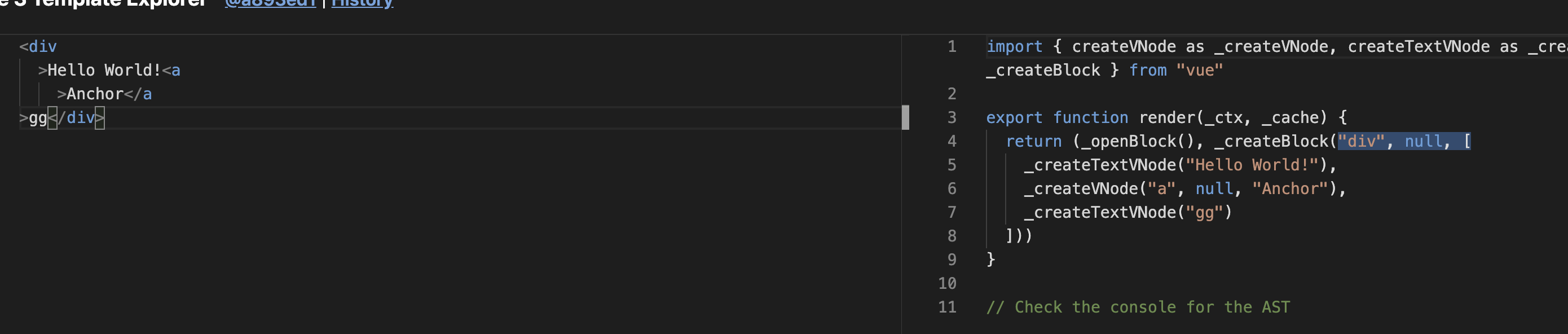
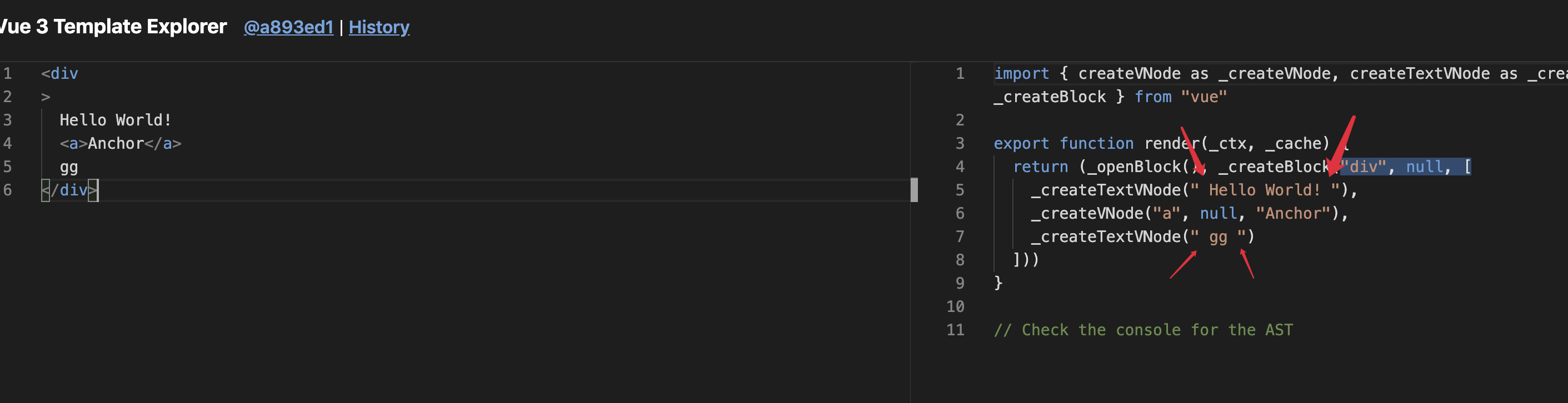
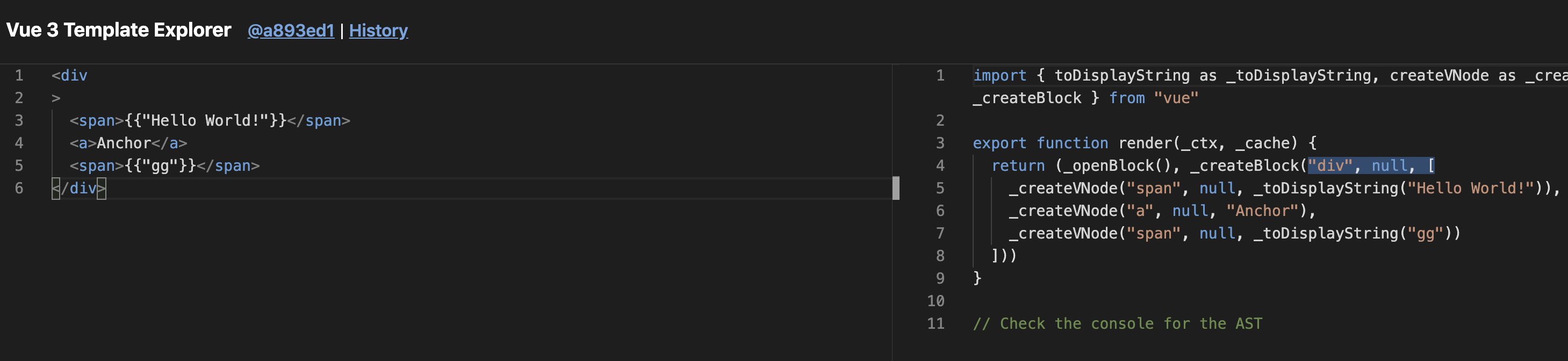
 TotooriaHyperion
on 29 Apr 2020
TotooriaHyperion
on 29 Apr 2020
@TotooriaHyperion Look at the initial post in this issue again to see an example of what we are asking for, in terms of formatting. It is possible to respect white space while putting (in some cases) a closing > on the same line as the rest of the closing tag, rather than at the beginning of the next line. To some of us, anyway, that makes the formatting less ugly.
karptonite
on 29 Apr 2020
It also messes up code folding in vscode
OdinTech3
on 30 Apr 2020
I'm not sure why this is a good formatting?
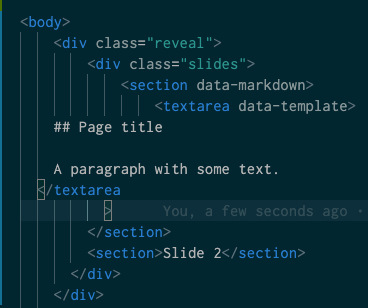
This is with { htmlWhitespaceSensitivity: "ignore" } set, BTW. Why can't the closing tag's > live with it?
 dinedal
on 4 May 2020
dinedal
on 4 May 2020
Please fix this. Currently it makes my code look more ugly than before formatting ... :-(
 fipstree
on 7 May 2020
fipstree
on 7 May 2020
What would it take for this to be fixed cuz @fipstree is right, the
formatting doesn't look great. Also don't even see the benefit of the
current formatting behavior.
On Thu, May 7, 2020, 4:07 AM fipstree notifications@github.com wrote:
Please fix this. Currently it makes my code look more ugly than before
formatting ... :-(—
You are receiving this because you commented.
Reply to this email directly, view it on GitHub
https://github.com/prettier/prettier/issues/5377#issuecomment-625099478,
or unsubscribe
https://github.com/notifications/unsubscribe-auth/ADMY5F7AHMJ4SWIU6J2ZMK3RQJT4NANCNFSM4GCMT42A
.
OdinTech3
on 7 May 2020
Am I going crazy or is htmlWhitespaceSensitivity: "ignore" simply not working? Is it actually working for you guys?
I am on latest (prettier 2.0.5) and even with that option, it transforms my html and puts > on a new line. What is going on?
Very simple reproduction code: https://codesandbox.io/s/prettier-ignoring-v4xe5?file=/index.html
Try reformatting that bit of html, hit save and boom its ugly again.
I thought it could be a Codesandbox quirk, but you will get the same result if you download the files and try the same locally. any ideas?
 adamJLev
on 13 May 2020
adamJLev
on 13 May 2020
htmlWhitespaceSensitivity: "ignore" does not seem to work in my codebase either.
 frostbytedata
on 13 May 2020
frostbytedata
on 13 May 2020
@adamJLev @frostbytedata Can you reproduce your issue in the playground? :pray:
lydell
on 13 May 2020
@lydell hi! yes here: https://prettier.io/playground/#N4Igxg9gdgLgprEAuEAeARhAJgTwHwA6UABMalgJYBuRppYANgIYDOLAvASAGYQTE4mWLEy606MCjAZxOIdEwBOYknRYwcMuQFslAcwpQAtDAgAHJMQCMABjMAPANwq6xJRSZHm6OAznx1LkJVUgAJXwZ+AHcIRQYscVQAekoqYMSWMEUKMxhg1xkYYl5+dmIuEpcyJMzs3ODkzFxgkAAaEHNJaBZkUCVFCCiABSUEHpQmBiimHB729EUmMABrOBgAZTMlwz1kGEUAVzh2gAsYbQYAdROpOBYtsDh1salqKRxkEAo9KFi4Nq+UBYcEUMCGiz0umQ3EmwPaACsWPYAEKLFZrdZMbRwAAyhn+SBhDDhIER9nWOxkAEUDhB4NDYccQFtFMDFJ8zhcAWZsrBLhQsDATsgABw2do8iDAy6LMyfHl3EFUf7tACOtPg4PM4xArCMUDgcCwRoBijg6ooZvBTEhTAZxKZwO0FD2h0dlLgNLpBKJJJgTHQ-MFwqQACZ2vsmBQGDsAMIQbRQlB3ACsAIOwIAKgHxr6mVQjgBJKDG2DrLI5GAAQRL6w0MntwIAvk2gA
adamJLev
on 13 May 2020
@adamJLev Thanks! That looks like expected to me. What do you expect the code to look like?
Edit: I get it. You want it to look like the input, right? If so – that’s currently not possible (and not what htmlWhitespaceSensitivity: "ignore" is supposed to do), and that’s what this issue is about. (Although some people are talking about line breaks in end tags </a\n> and stuff, which would be a different issue, but :shrug:)
lydell
on 13 May 2020
with this setting htmlWhitespaceSensitivity: "ignore", I expect Prettier to stop trying to move closing angle brackets to its own line:
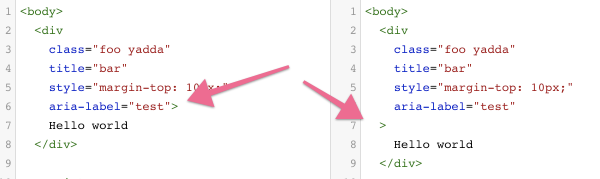
Basically the setting doesn't seem to be working. or am I missing something? (Edit by @lydell: See the comment just above ☝️ )
The real solution would to to have a jsxBracketSameLine type of setting that works with regular html/vue, but this would be a decent workaround for now.
adamJLev
on 13 May 2020
My playground seems to be exactly the same as @adamJLev so thank you for that explanation @lydell. I also read the blog post above about why prettier behaves this way with inline html elements. It can affect the way the HTML behaves, and I quickly realized how asking for this by default would be a mistake. However, it would be nice to have an option that must be explicitly enabled so those of us that understand this consequence, can use it to have the closing > bracket displayed as we would like.
I guess my mistake was I assumed using htmlWhitespaceSensitivity: "ignore" was that explicit setting, but it appears the behavior is not possible even with that set to "ignore". Am I misunderstanding?
frostbytedata
on 13 May 2020
Am I misunderstanding?
No, you are correct! "ignore" means “ignore the whitespace rules of HTML and always break lines and indent and format as much as you want” (where you=Prettier).
lydell
on 13 May 2020
Got it, thanks for the explanation @lydell!
Hope jsxBracketSameLine-like functionality can be ported to work with html and vue as well soon, this is basically the only thing stopping me and many people from using prettier for their projects.
adamJLev
on 13 May 2020
Is there a particular reason this is stopping you? Is it breaking tooling for you, or is it so visually annoying to your eyes that you’d rather have no automatic formatter, or something else?
lydell
on 13 May 2020
Sadly, for me and my team, it would be the latter. Thanks for your help though @lydell!
frostbytedata
on 13 May 2020
@lydell OK, so it's pretty clear to me after reading the thread and seeing this issue and how it's handled that Prettier should just drop HTML formatting support because clearly you prefer to support React instead.
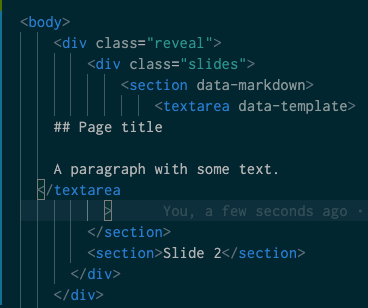
Look at this. This is _not_ properly formatted HTML. This is what Prettier outputs.
Here is a sane style guide for HTML: https://google.github.io/styleguide/htmlcssguide.html
Here is another one: https://www.w3schools.com/html/html5_syntax.asp
Show me a single style guide in which the below is advocated please.
</textarea
        >
OK, so it's pretty clear to me after reading the thread and seeing this issue and how it's handled that Prettier should just drop HTML formatting support because clearly you prefer to support React instead.
What do you mean? 😢
Yeah, having a line break inside an ending tag is super weird. I’ve been meaning to open an issue about that for a couple of days. Hopefully this is the kick in the butt I need to finally do it.
lydell
on 13 May 2020
Please @lydell YES do it 🤗
If it was worth adding that flag for JSX, its certainly worth adding for normal HTML and vue!
My Vue code wants to look cute but it just cant, with that ugly hanging angle bracket in there.
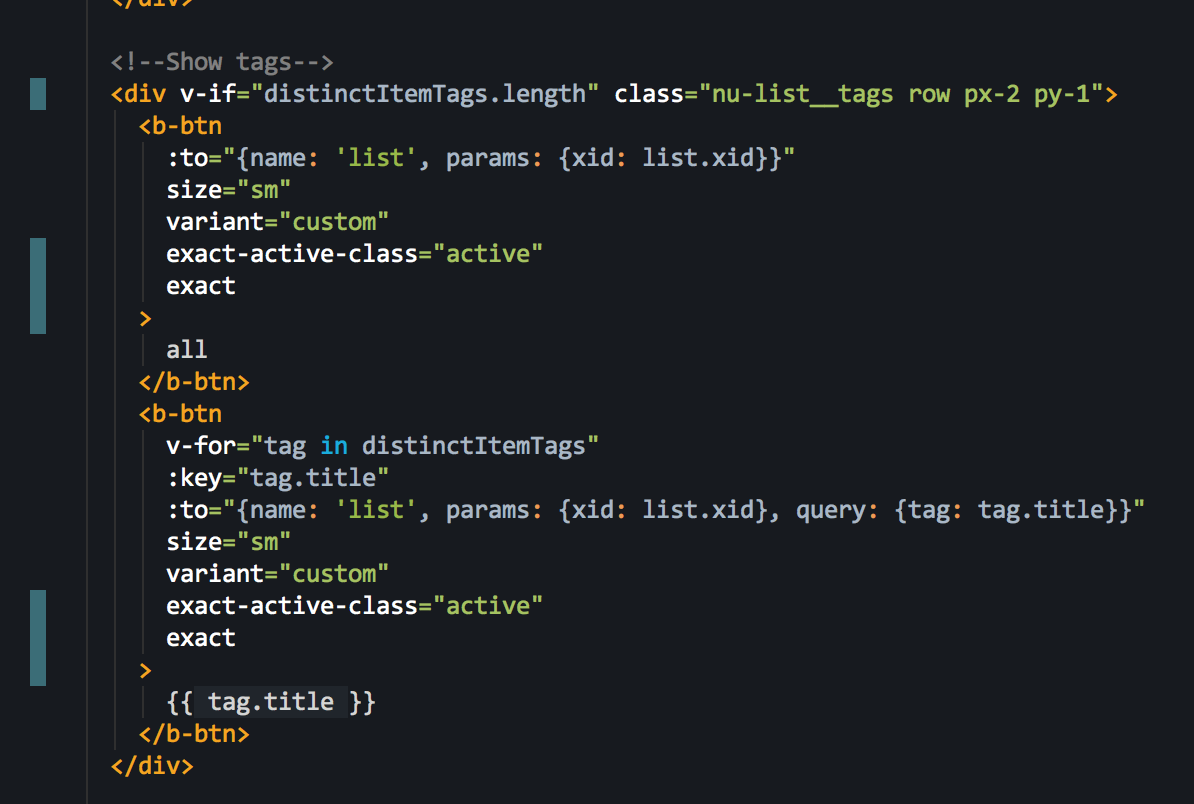
Thanks!
adamJLev
on 13 May 2020
Alright, here’s the issue about avoiding line breaks in end tags:
https://github.com/prettier/prettier/issues/8302
Note: This issue (#5377) is about the want to format:
<div
  id="main-content"
  class="home-section home-section--highlighted"
  data-binding="home"
>
  Some text
</div>
…like this:
<div
  id="main-content"
  class="home-section home-section--highlighted"
  data-binding="home">
  Some text
</div>
Like you can in JSX. But! You can still end up with a > on its own line for inline elements, since there’s no safe way to break lines otherwise (see the _start_ tags of the following two examples). (You can opt-out of safety via htmlWhitespaceSensitivity: "ignore".)
The new issue (#8302) is about avoiding line breaks in end tags. Instead of this:
<span class="dolorum atque aspernatur"
  >Est molestiae sunt facilis qui rem.</span
>
…you’d get this:
<span class="dolorum atque aspernatur"
  >Est molestiae sunt facilis qui rem.</span>
Thanks for claryifing @lydell , I was under the impression this is the same issue fixed at once.
But its a slightly different thing.
For the feature requested in this issue right here - I would propose calling this new option htmlBracketSameLine would make sense, and allow things to be consistent between JSX code and HTML code in the same codebase too which would be 👍 👍
adamJLev
on 13 May 2020
Is it likely that someone would want to format a code base with jsxBracketSameLine but not htmlBracketSameLine or vice versa? If not, as @j-f1 proposed, angleBracketSameLinecould cover both settings, and we don’t even have to increase the number of options. 😀
karptonite
on 13 May 2020
@lydell thanks for responding to this issue 👍
I'm not sure what you mean by
You can opt-out of safety via htmlWhitespaceSensitivity: "ignore"
With the new issue (#8302), if you were to set this config (htmlWhitespaceSensitivity: "ignore"),
would this:
<span class="dolorum atque aspernatur"
  >Est molestiae sunt facilis qui rem.</span
>
be transformed into this (as many people in this thread would like ?):
<span class="dolorum atque aspernatur">
    Est molestiae sunt facilis qui rem.
</span>
or is that the case that even with htmlWhitespaceSensitivity set to "ignore", the prettier team's preference goes towards adding a linebreak before the opening tag ?
nassimbenkirane
on 14 May 2020
Sorry I should have read more carefully
@adamJLev Thanks! That looks like expected to me. What do you expect the code to look like?
Edit: I get it. You want it to look like the input, right? If so – that’s currently not possible (and not what
htmlWhitespaceSensitivity: "ignore"is supposed to do), and that’s what this issue is about. (Although some people are talking about line breaks in end tags</a\n>and stuff, which would be a different issue, but 🤷)
nassimbenkirane
on 14 May 2020
Is it likely that someone would want to format a code base with
jsxBracketSameLinebut nothtmlBracketSameLineor vice versa? If not, as @j-f1 proposed,angleBracketSameLinecould cover both settings, and we don’t even have to increase the number of options. 😀
That's true, even better!
Prettier team, Pretty please I beg you! haha. Let us bask in the same beautiful code that JSX users get. Based on what I see being done for JSX, its likely under 10 lines of code to achieve the same effect same for html.
(In case anyone else is curious: https://github.com/prettier/prettier/blob/master/src/language-js/printer-estree.js#L2269 )
Thank you.
adamJLev
on 14 May 2020
Here's the 2 line code change to get this working by default anyone is interested:
https://github.com/adamJLev/prettier/commit/a0cd45b4cbea2039941f5cea0dccacf506b0fd2e
Its a ductape solution obviously and updating all the unit tests that expect the previous style, and making it configurable via options would take a lot longer, but hopefully the @prettier team will feel inclined to add this change properly into the project after people have been asking for it for 2 years now 😄
Feel free to install my fork and get actually pretty Vue/html files again:
yarn add "https://github.com/adamJLev/prettier#b0b0c28799d25c2c8a4c67fc1285f7e1183f6b9b"
I'll try to keep my fork up to date with upstream since i'll be using this for different projects myself too. 🤓
adamJLev
on 14 May 2020
Beastmode @adamJLev! Thanks!
frostbytedata
on 14 May 2020
@prettier please include @adamJLev solution in the next release
 sergeyfilimonov
on 16 Jun 2020
sergeyfilimonov
on 16 Jun 2020
Concur with this thread; this is stopping me from using Prettier.
 tommcclean
on 16 Jun 2020
tommcclean
on 16 Jun 2020
@adamJLev Thank you so much! I love this. @prettier, please include this in the next release.
One thing I noticed is, if it is a it still adds new line before /> because of isIndentationSensitiveNode.
 a3om77
on 17 Jun 2020
a3om77
on 17 Jun 2020
This should absolutely be an option for formatting html. The dangling > has been a frustrating aesthetic to deal with.
 thebentern
on 17 Jun 2020
thebentern
on 17 Jun 2020
I have quit using prettier for our code base because of this issue.
goat67
on 18 Jun 2020
I have quit using prettier for our code base because of this issue.
Could you please tell us what do you use to format your code now? For example, when I tried to get rid of prettier I could not replace this option https://prettier.io/docs/en/options.html#print-width in my code. It seems ESLint by itself can't work well with this option and different amount of attributes like prettier does. I would like to wrap my attributes only when the line is more then 120 characters. Otherwise, not to wrap at all.
a3om77
on 18 Jun 2020
I have quit using prettier for our code base because of this issue.
Could you please tell us what do you use to format your code now? For example, when I tried to get rid of prettier I could not replace this option https://prettier.io/docs/en/options.html#print-width in my code. It seems ESLint by itself can't work well with this option and different amount of attributes like prettier does. I would like to wrap my attributes only when they are more then 120 characters. Otherwise, not to wrap at all.
We set VS Code to format on save and then use VS Code's html formatting:
  "[html]": {
    "editor.defaultFormatter": "vscode.html-language-features"
  },
We could not stand the hideous looking html formatted by prettier. Oh and ignore *.html in .prettierignore.
 dylanvdmerwe
on 18 Jun 2020
dylanvdmerwe
on 18 Jun 2020
(cc'ing @j-f1 since he's on the prettier team.)
Lot of demand for this as you can see.
I totally get that prettier is an "opinionated" code formatter, but this seems more like an accident than a real opinion or design decision.
Two biggest reasons:
- The current "closing bracket by itself in its own line" thing, is not a best practice according to any html or vue style guide that I have ever seen. It's basically more of an accident, or a classic case of a bug disguised as a feature.
- If it was worth adding
jsxBracketSameLinefor JSX, its clearly worth addingangleBracketSameLinefor regular HTML (and HTML-like markup like Vue).
Thoughts? thank you 🙏
adamJLev
on 18 Jun 2020
I chatted with @thorn0 about this and he pointed out that this is consistent with how Prettier formats all other kinds of closing bracket.
j-f1
on 19 Jun 2020
@thorn0 I think https://github.com/prettier/prettier/issues/5377#issuecomment-628722438 solution is not a bad and looks really readable
alexander-akait
on 19 Jun 2020
I wrote lots of comments in this issue. I have nothing new to add.
thorn0
on 19 Jun 2020
I chatted with @thorn0 about this and he pointed out that this is consistent with how Prettier formats all other kinds of closing bracket.
That could apply just as well to jsxBracketSameLine. Without getting into whether the current formatting is consistent with how people expect html to be formatted, I'd say that if this setting makes sense for jsx, extending it to html also seems to make sense.
karptonite
on 19 Jun 2020
@karptonite This all was discussed above.
What probably wasn't discussed is why people who supposedly like this project don't understand that adding an option isn't an improvement. It's a step away from the project's goals. It makes it worse, it decreases its value. You've read the option philosophy and yet still think that "just one more option" is a good idea. Are you sure you don't miss the point of Prettier?
thorn0
on 19 Jun 2020
@karptonite This all was discussed above.
What probably wasn't discussed is why people who supposedly like this project don't understand that adding an option isn't an improvement. It's a step away from the project's goals. It makes it worse, it decreases its value. You've read the option philosophy and yet still think that "just one more option" is a good idea. Are you sure you don't miss the point of Prettier?
I know where you are coming from and yes Prettier is an "Opinionated Formatter" however if prettier provides the opportunity for devs who use JSX to enable and disable the angle bracket on a new line via the jsxBracketSameLine option then why not let others dev who write simple HTML and Vue the same opportunity.
Why JSX gets the special treatment?
OdinTech3
on 19 Jun 2020
@thorn0 how I do see it right now is that that option should not be added because "we want our HTML/Vue to look cool", but rather to make it consistent because there is already an option for JSX.
I just re-read the philosophy again and I do agree with it, but this is not a new option but rather making the existing one consistent across the platforms.
And yes, I also do know the history behind adding it for JSX (adoption at FB), but now it is time to make it consistent, and the need for it has arisen because of the decision to add it for JSX, easy as that.
otomeskhy
on 19 Jun 2020
Why JSX gets the special treatment?
@OdinTech3 It was discussed above. For history. It's an accident. We don't want more of them, but can't remove it.
thorn0
on 19 Jun 2020
Then referencing @otomeskhy comment just make the option consistent to HTML like template languages i.e JSX and Vue. This thread clearly shows that there is demand for it.
OdinTech3
on 19 Jun 2020
Why JSX gets the special treatment?
@OdinTech3 It was discussed above. For history. It's an accident. We don't want more of them, but can't remove it.
Totally understandable - so I propose renaming / merging both options into a more generic one: angleBracketSameLine
And then extending that same logic to HTML. One setting to rule them all 👍
Backwards compatibility can be achieved by deprecating the old one and saying that the new one should be used instead. Easy enough, IMO.
adamJLev
on 19 Jun 2020
Prettier is the name. But it makes html ugly. 😅
Please add the option!
dylanvdmerwe
on 19 Jun 2020
@otomeskhy Any new possibility to leave formatting matters up to the user is a new option. It can be disguised in many forms, but it still has all the downsides of a "normal" option.
thorn0
on 19 Jun 2020
It seems like we keep falling back on the 'option' notation here, but isn't it just changing the default formatting for vue to a (better) standard? It's prettier.
 dannon
on 19 Jun 2020
dannon
on 19 Jun 2020
Come on guys, it is just an option! Many devs love it. Code looks way way better and clearer and (!) smaller. It is important for big vue components. Prettier is a tool, so why can’t we just add this simple feature to make life better?
a3om77
on 19 Jun 2020
@a3om77 Yes, it's a tool, but are you sure you understand the purpose of this tool? If we add an option, the same holy war we have in this issue will repeat itself indefinitely, whenever some team starts using Prettier. Prettier's purpose is to prevent these wars. Preventing them is more important than matching personal stylistic preferences (which is an unattainable goal as those preferences are subjective and incompatible with each other, which is why the need in a tool like Prettier arises in the first place).
thorn0
on 19 Jun 2020
@dannon When it comes to code formatting, what is "prettier", "more readable", etc. is highly subjective. The downsides of this way to format opening tags were already discussed in this issue. Did you read that?
thorn0
on 19 Jun 2020
So are you telling me that a "holy war" is ensuing in the React community
over the option to enable or disable jsxBracketSameLine?
On Fri, Jun 19, 2020, 5:00 PM Georgii Dolzhykov notifications@github.com
wrote:
@dannon https://github.com/dannon When it comes to code formatting,
what is "prettier", "more readable", etc. is highly subjective. The
downsides of this way to format opening tags were already discussed in this
issue. Did you read that?—
You are receiving this because you were mentioned.
Reply to this email directly, view it on GitHub
https://github.com/prettier/prettier/issues/5377#issuecomment-646858499,
or unsubscribe
https://github.com/notifications/unsubscribe-auth/ADMY5F5RXQSHBMDMNMH3TI3RXPGV5ANCNFSM4GCMT42A
.
OdinTech3
on 19 Jun 2020
@thorn0 Im not sure if you’re trying to ignore it or if you really haven’t realized this yet, but this two year old issue thread has accumulated over 200 comments of (estimation) around 100 unique users. There is a huge demand for this feature to be implemented.
Sure, you could decline any feature request with the reasoning that it adds a new option. But that’s the whole point of adding a new feature. The basis of the decision to implement a feature or not shouldn’t be determined by the feeling in your gut, but by looking at the potential usefulness for the people requesting it and, more importantly, how many users are waiting for such a feature. Especially with such a highly anticipated feature that has sparked from a simple question - “developers love jsxBracketSameLine regardless of if the maintainers think it was a mistake; why can’t we have it for everything then?”.
The issue has received hundreds of positive responses from lone devs all around the world, and the only real backlash is coming from the great maintainers themselves that wrote this awesome formatter. It just doesn’t come to my (and so many other peoples) mind here why this optional flag in the prettier configuration file whose wanted behavior has been described thoroughly is so blocked off by you guys, the people behind this project.
Is the implementation too difficult? Would it take too much time? Is it prone to bugs or other issues? All of these would be valid interjections that might change this very repetitive discourse into something actually productive. People might come together to find the best way to write this, helping you guys out with an option you apparently don’t value at all.
Again, this isn’t for you. We know this from the messages you’ve posted already. You see any added option as a time and money investment and want to keep Prettier as minimal as possible. However, the option we’re asking for already exists, regret it or not; just not for our preferred languages. Considering FB wanted this option for jsx in the first place just proves that there indeed is stylistic value that whole communities wants to have added to their codebases as well.
Prettier is the best webcode formatter I’ve came across. It would be a huge loss for me and many others if this feature wouldn’t receive the attention and implementation it deserves.
If there are any responses besides “it’s a new option = bad” left, I’d love to hear from them! I’d also like to point out that while most of this has been written pretty harshly, I appreciate the hard work that went into this project, as I’ve pointed out a few times before. I love open source and I love its openness to something new. I hope prettier will continue to grow as a very fine formatter; thank you maintainers/devs!
GitGangGuy
on 19 Jun 2020
@OdinTech3 Kind of. It might be not that heated, but still instead of a "let's just use Prettier" situation, React users face a dilemma. Two team members who disagree on this option's value are enough to return back to the pre-Prettier era and arguments over code style. This could be prevented, but now it's too late.
thorn0
on 19 Jun 2020
@GitGangGuy
If there are any responses besides “it’s a new option = bad” left,
Yes. Why didn't you read them before writing your comment?
thorn0
on 19 Jun 2020
@thorn0 Would your recommendation be to either accept the situation as it is, or find another formatter?
More broadly, is that a reasonable assessment of the position of the Prettier Team in general? I don't want to belabor this or continue advocating (with the mighty 👍 emoji, no less =) if the outcome has already been decided.
EyePulp
on 19 Jun 2020
Considering FB wanted this option for jsx in the first place just proves that there indeed is stylistic value that whole communities wants to have added to their codebases as well.
It doesn't really prove that. It just wasn't thought out well at that point. But now FB of course won't reformat all their code.
thorn0
on 19 Jun 2020
Just use @adamJLev's fork. It's obvious that the maintainers of this repo have no intention to listen to the community.
frostbytedata
on 19 Jun 2020
@frostbytedata That's pretty obviously not true, as the large amount of collaborator replies would attest.
They may however _not agree_, and that does seem to be the case. =)
EyePulp
on 19 Jun 2020
Prettier is a great project, no doubt about this, I love the philosophy around it, love the minimalistic goals it tries to achieve, love the dedication and efforts of the maintainers to follow their own opinionated rules.
There's no doubt in here, you rock guys, I really mean it, hats off...
I was expecting this Neverending thread to be by far the most voted topic, but I was literally shocked it barely made the top three or so
https://github.com/prettier/prettier/issues?q=is%3Aopen+is%3Aissue+sort%3Areactions-%2B1-desc
And i can easily understand why reading through the other highly voted topics.
At the end of the day, I understand your stubbornness, why make the efforts of fixing something that is not broken?
The thing is, software engineers in general have the tendencies to dismiss mere mortals as nonsense as long as it diverges from their own common sense...
And that is ok, especially in open source projects, you don't like my efforts, build your own [fillintheblanks] library if mine does not suit your needs!
But then again open source is all about the community that builds around a specific project.
I've seen fantastic projects without any community revolving around it, and those projects don't exist for the simple reason that they are not popular enough to exist. Obviously this is not the case with prettier.
If you don't have the moral incentive to please the masses, and why would you of course, open up a patreon page or similar to build up some financial incentive, maybe that would make everybody happier on the long run...
If all these hundreds thumbs up per issue would convert into Starbucks coffees or Belgian trapiste beers (your mileage may vary in here), i'm pretty sure angleBracketsSameLine would actually start to make a bit more sense :)
 dandohotaru
on 20 Jun 2020
dandohotaru
on 20 Jun 2020
@frostbytedata That's pretty obviously not true, as the large amount of collaborator replies would attest.
They may however _not agree_, and that does seem to be the case. =)
Agreed, I don't mean to demean the amount of work people have put into this. I just don't understand the stubbornness. It is impossible to ask my team to adopt this package because of something so little that could be fixed so easily. And I don't seem to be alone if you read the rest of this thread. I think its just a tragedy that a project as good as Prettier, is impossible to evangelize because of that one tiny issue.
I want to love it. I want my team to use it. But we just can't.
frostbytedata
on 20 Jun 2020
@frostbytedata Yeah, I'm of the same mindset. I think the word "opinionated" is being used as a shield to support arbitrary inflexibility, but that's probably an emotional response on my part. It's their prerogative. I just need to start looking for a formatter that supports sensible defaults with capacity for overrides that can be stored in a repo so the team can adopt them as needed per language/project. At this point I just need to solve for the html/vue html situation.
I think I've reached the acceptance stage of grieving over html formatting in prettier. =)
EyePulp
on 20 Jun 2020
@EyePulp My personal recommendation is not to care too much about these things. The position of the team in general is that it's time to freeze the options. Not only are options contrary to the project's goal, there is more to it. We have 240+ open bugs. Adding "just one option" is not just one more use case to support as one might think, it multiplies the number of use cases because you need to test and support all the crazy combinations of option values and different tricky patterns in the input code, so the surface for bugs multiplies too. Yet Prettier has to stay reliable. So yes, the outcome has been pretty much decided. Option requests are still open mostly because we wanted to collect feedback (make sure we understand all the substantial arguments for and against proposed options).
@frostbytedata Actually, forks aren't frown upon here. Given Prettier's opinionatedness, forking is perfectly understandable and expected. We'd be happy to see more forks. In particular, because their popularity can provide valuable feedback. If you face problems with using a fork (e.g. problems with editor integrations), please feel free to open issues. We'll be glad to help.
thorn0
on 20 Jun 2020
@dandohotaru
If you don't have the moral incentive to please the masses
What if the masses are already pleased, and the people in this issue are a vocal minority? How can we know?
thorn0
on 20 Jun 2020
@thorn0 Roger that. I appreciate the response, and more broadly the effort that goes into protecting the conceptual integrity of a project against the anguished masses (minor or major) advocating for change. Saying "no" is part of a necessary balancing act at times, and it's easy to forget that when we disagree.
Whether the request is _scope-creep_ or _reasonable flexibility_ is debatable, but the weight of maintenance rests on the few, not the many. Best of luck with those 240+.
EyePulp
on 20 Jun 2020
@thorn0
@dandohotaru
If you don't have the moral incentive to please the masses
What if the masses are already pleased, and the people in this issue are a vocal minority? How can we know?
I agree that it is hard to know. For my part, while I slightly prefer “same line” formatting, it isn’t a big deal to me. I work on a team with only two coders that are affected by prettier. One also has a slight preference for “same line”, while the other one, who happens to be the boss, with 20+ years of work in html, feels so strongly that the default formatting (without “same line”) is ugly that we have been delaying extending Prettier our html. We had assumed that not converting jsxBracketsSameLine to angleBracketsSameLine was a matter of it being lower priority, not a matter of there being strong resistance to it.
I feel as if I am totally on board with the “reduced options” philosophy, but for “same line angle brackets”, the option is already there. It is only a question of whether it applies to all html-like code, or only some of it. I think that applying it inconsistently is a mistake.
I also know what it is like to have to deal with vocal users who want a change, and being uncertain whether it is just a small but vocal minority, or a real majority. In the end, the people in charge have to make the call.
karptonite
on 20 Jun 2020
My personal recommendation is not to care too much about these things.
@thorn0 this is not about caring too much, this is about performance and efficiency. Your brain works different when you look at different code. Would you like to spend your brain resources more to analyse your code or to make a new code?
Just take a look at these two different options:
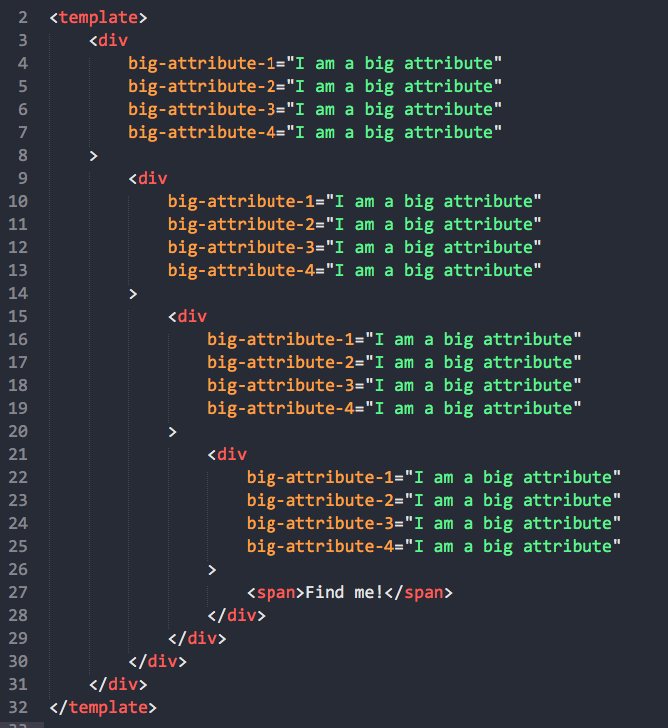
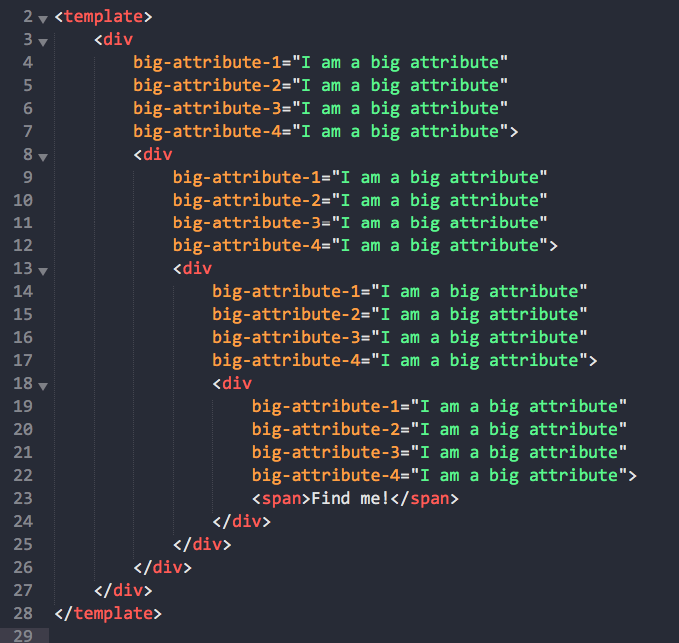
And here is how my mind (and many others as you can see) processes it:
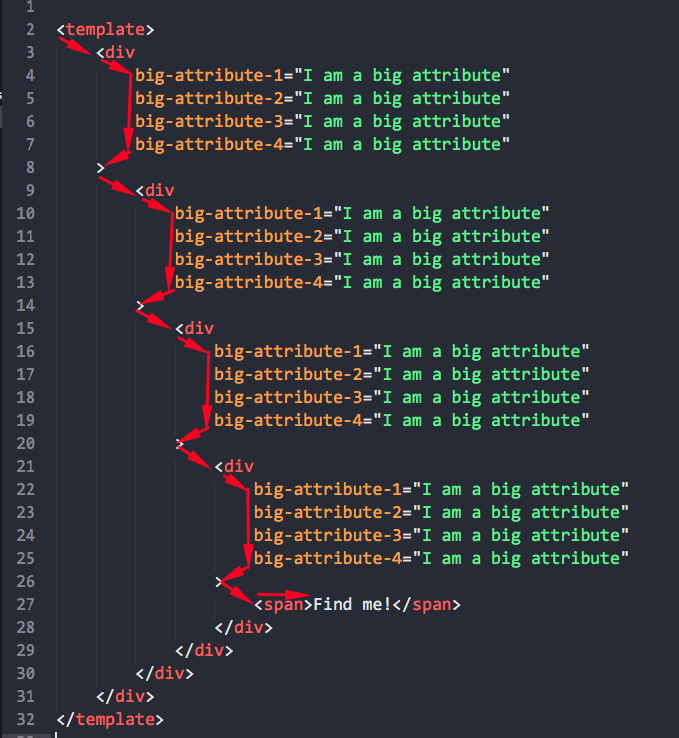
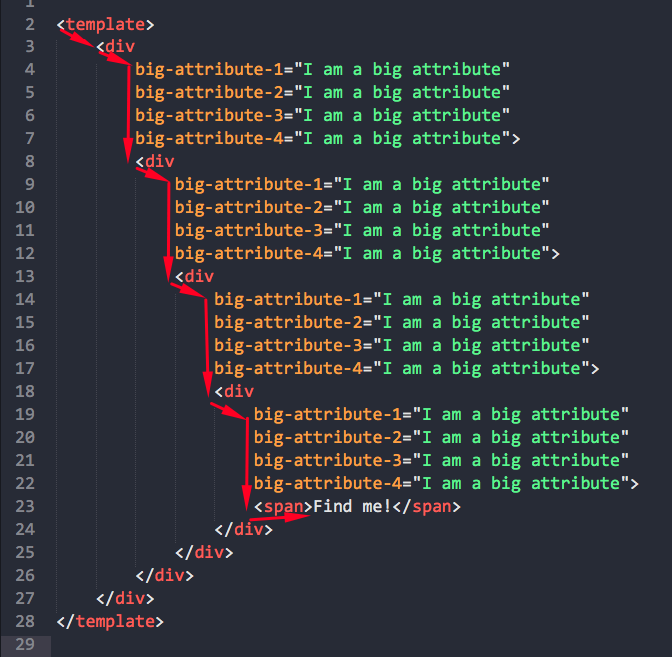
The second option is a way way easier to process. Also, it makes your code shorter by 4 useless lines. (Imagine if it is a big component!) It does not break DOM tree. Your mind understands there is one tag and another things inside of it. (Code editors also will allow you to collapse blocks well). But when you look at the first option there are two different parts of the tag and you need to process them both.
Our team really happy with Prettier, and ONLY this one little thing breaks everything. Thanks @adamJLev for his fork, now we at least can keep using Prettier and our minds process things like clockwork.
Please, be more flexible. I am not telling about adding infinite amount of options. Just options that are really in demand by many developers like the option we discuss here. If this is about lack of will/time/inspiration to fix all possible bug after adding this option just tell us, we will figure something out. But I did not noticed any bug in @adamJLev's fork working with Vue.js so far.
Thanks Prettier team for your time and this amazing tool even if you do not want to listen "minorities".
a3om77
on 20 Jun 2020
I find it pretty funny that a product named Prettier is fighting a change to make code prettier.
goat67
on 20 Jun 2020
If the resistance is to more options, perhaps the team would be more open to the argument that we should change the _default_ formatting to same line for closing angle brackets, and not have an option at all?
karptonite
on 20 Jun 2020
Is nobody of the opinion that it is easier to add a new attribute if the > is already out of the way? And it helps git diff – adding an attribute is a one line change instead of a two line change (just like why we prefer trailing commas).
lydell
on 21 Jun 2020
Is nobody of the opinion that it is easier to add a new attribute if the
>is already out of the way? And it helpsgit diff– adding an attribute is a one line change instead of a two line change (just like why we prefer trailing commas).
@lydell, I agree. But the way how you and other guys understand the code (how fast you process it in your mind, how clear you see it) is more important than one extra line in git diff. It does not prevent in case with trailing commas, but with the > on a new line it unfortunately does.
a3om77
on 21 Jun 2020
@thorn0
Prettier's purpose is to prevent these wars
That's nice, but, and don't get me wrong, in this case you are dictating whats right or wrong.
People here asking for an OPTION. They don't ask you to do it this or the other way - just an OPTION.
If you want to prevent wars by telling people what's right or wrong than you put your self in a God position. History AND presence shows us this does never work for the long term
MikeMitterer
on 22 Jun 2020
It's debatable whether this silly power trip really saves time by pretending it reduces opinion and time wasted on picking one (it doesn't necessarily, people will still hold their opinions and discuss them, this just prevents them from materializing while they're waiting for someone to create a decent alternative). Or, maybe it actually wastes time because people now have to deal with hacky workarounds, have to google solutions to their formatting problems or because they have to ditch this great formatting tool altogether.
If at some point, there is a critical mass of people who want more freedom of opinion, an alternative will pop up. At that point even more time and effort will be wasted because of 2 competing products. Completely unnecessary.
The project seems to have outgrown the authors who are unwilling to face the fact that the project is "Used by 1.8m" and has 37k stars and is used for 3 major frameworks which don't have the same code style standards. It's unrealistic to expect that one size will fit all. The authors are trying to enforce their own reasons / philosophy to use Prettier, but in reality, a lot of people don't necessarily care much about their philosophy and use Prettier simply because it's really damn good code formatter.
tihomir-kit
on 22 Jun 2020
This issue is overwhelming, it has 200+ comments (i can't read them all, i'm only human) but i've started to use prettier on one of my project and it is a really nice code formatting tool ! We all agree on that.
But like many people said, i agree that adding a simple option just to let us choose between two approaches/philosophies is the best solution. We don't care about the default, you can keep it your way by default, but at least we can choose if we want to follow another track ! My team and I don't like the current formatting for HTML closing brackets.
 JoMas971
on 24 Jun 2020
JoMas971
on 24 Jun 2020
When it comes to code formatting, what is "prettier", "more readable", etc. is highly subjective.
LOLz at this. There's no disagreement that it's ugly as hell and solves exactly one use case (arguments are better on their own line) while producing cognitive overhead and other bad use cases (empty tags, single tags, indented content, et al).
katowulf
on 24 Jun 2020
this really needs to be an option. mind boggling that it isn't.
 jamie-bell
on 24 Jun 2020
jamie-bell
on 24 Jun 2020
I understand the philosophy behind Prettier, the need to be opinionated and stop adding extra options. But I’ve also been using Vue.js and Prettier for a very very long time, and I agree with most people here - having a closing angle bracket on its own line is not clean, it is making the code harder to read/maintain, and ultimately making the experience of using Prettier less enjoyable.
The community that supports and use Prettier on a regular basis is asking for a fix. I don’t believe this should come from a fork, as we all want to keep using a well maintained, single source of truth. Whether it's implement as an option or as a default should be up to the core team.
 maoosi
on 25 Jun 2020
maoosi
on 25 Jun 2020
Sadly no argument on this seems good enough for the prettier team.
For anyone that still wants to use prettier but absolutely hates the discussed html bracket formatting, I published my fork to npm so its easier to include in your projects:
https://github.com/adamJLev/prettier
https://www.npmjs.com/package/@adamjlev/prettier
The only real change is this: https://github.com/adamJLev/prettier/commit/a0cd45b4cbea2039941f5cea0dccacf506b0fd2e
To override vanilla prettier with my version, you can use an npm aliasing trick which does require npm v6+ or yarn, but is working well for me on all my projects.
Just add it to your package.json like so:
"devDependencies": {
  "prettier@npm:@adamjlev/prettier": "^2.1.0"
}
@adamJLev Thank you very much.
 zzx0106
on 26 Jun 2020
zzx0106
on 26 Jun 2020
Three lines!!!! The whole discussion for three lines, open since 2018???
Thanks to @adamJLev
The prettier Teams seems not to be opinionated - this must be something else? self-opinionated?
MikeMitterer
on 26 Jun 2020
/cc @thorn0 @sosukesuzuki @fisker @lydell What are your opinions on this?
Honestly, I find this changes by default to be better for html. What are the fundamental problems of this change?
alexander-akait
on 26 Jun 2020
@evilebottnawi I would personally be sad to see this changed because I agree with https://github.com/prettier/prettier/issues/5377#issuecomment-438457597 and don’t have any issues reading the zig-zag example in https://github.com/prettier/prettier/issues/5377#issuecomment-646988895.
The fundamental problems are the usual, I think: It’s impossible to know what “most people” want and which disappointed crowd is bigger.
I’m no good at this, so I put down my “vote”.
lydell
on 27 Jun 2020
Not everyone thinks the same way and not everyone experiences things the same way (in this context this means what's easier to read).
If _it's impossible to know what most people want_, then maybe an opinion shouldn't be enforced, but an option to choose should be provided.
tihomir-kit
on 27 Jun 2020
If it's impossible to know what most people want, then maybe an opinion shouldn't be enforced, but an option to choose should be provided.
I think that most people using prettier want fewer options—it is sort of the defining characteristic of Prettier.
But I reject the idea that it is impossible to know what most people want. While I don’t have the reach, and it wouldn’t be perfect, I feel like one neutrally worded poll with examples on Twitter by someone with a large developer following could get us a long way toward an answer to the question of what most people would want.
But I also challenge the idea that changing jsxBracketSameLine to angleBracketSameLine amounts to an addition of an option, rather than making an existing option more consistent. As I understand it, when the jsx option was added, Prettier didn’t even support html. If at that time it had been named angleBracketSameLine, would we even be having this conversation, or would the option have naturally been incorporated into the html formatter as logically consistent with the the way prettier handles html-like code?
I feel like changing the default is the best resolution to this stand-off. But anything is better than a fork, which is just a way of having really hard-to-configure options.
karptonite
on 27 Jun 2020
@adamJLev, could you please add extra condition to the printer-html.js to make self-closing tags always having > on the same line even if it is whitespace sensitive node? This will make code better standardised.
Replacements:
(isWhitespaceSensitiveNode(node) ? line : " ") to (isWhitespaceSensitiveNode(node) && !node.isSelfClosing ? line : " ")
(isWhitespaceSensitiveNode(node) ? softline : "") to (isWhitespaceSensitiveNode(node) && !node.isSelfClosing ? softline : "")
It will be helpful with self-closing <textarea /> tags, for example.
Thanks much.
a3om77
on 27 Jun 2020
Like @pootzko said, not everyone thinks the same and they experience things differently. Personally i don't like the zig-zag reading and i rather like to have the closing bracket at the end of line instead of a new line. But that doesn't mean this is the only good way to do it ! I understand why the prettier team have chosen to put this bracket at a new line too... But we should have the choice !
But like @karptonite said, prettier already have an option called jsxBracketSameLine, and i agree with him that this option should have been named differently, to something like angleBracketSameLine or xmlBracketSameLine for example and be also added to the HTML printer as well, just for the seek of cohesity between JSX and HTML because they are basically the same, the only difference is that JSX is written in a js/ts file instead of an HTML file, but the purpose is the same, they all are XML languages at the end so they need to follow the same rules.
I know my opinion is not heavy (if not meaningless) but i'll still share it with you: I'll vote to change the jsxBracketSameLine to be also applied to HTML files as well (i know this is not hard to do it code-wise) and change its name to something more generic like proposed below.
JoMas971
on 27 Jun 2020
@evilebottnawi
The advantages of the current formatting over the proposed one:
- Cleaner version-control diffs. The same reasoning applies here as in the case of trailing commas in JS.
- The clear separation between the content of the brackets (attributes) and what follows after them (child nodes). The two are easily told apart without relying on syntax highlighting.
- The consistency with how Prettier formats other brackets. This one simply follows from the fact that Prettier adheres to the two principles above.
- For inline elements without leading whitespace, the closing bracket can't stay on the same line with the last attribute. Keeping it there only for some but not all elements would look inconsistent. Whitespace significance is quite counter-intuitive. There is no need to make it even more confusing.
thorn0
on 27 Jun 2020
@thorn0
With all due respect, word consistency made me chuckle :) It seems like your arguments don't apply to JSX. Fair enough.
otomeskhy
on 27 Jun 2020
@karptonite
I also challenge the idea that changing jsxBracketSameLine to angleBracketSameLine amounts to an addition of an option
It does though:
- the same ability to generate debates within teams,
- the same maintenance cost.
So, no difference.
anything is better than a fork
There is nothing wrong with forks.
thorn0
on 27 Jun 2020
We've explored a number of tools that format code.
Prettier does a damn good job. The only problem is that jsxBracketSameLine set to true does not work on html.
Please fix this.
 phakamani
on 3 Jul 2020
phakamani
on 3 Jul 2020
Also vscode gets confused at times when collapsing an element with a bracket on a separate line.
Example
1. This is the output after executing prettier
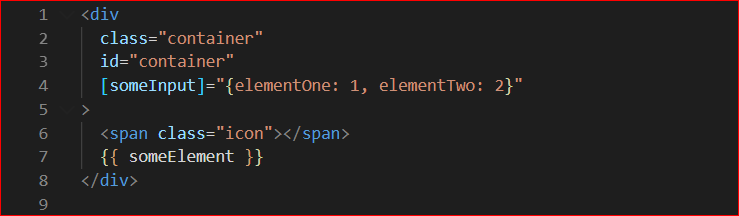
2. Collapsing the div element in vscode

3. This is how the markup looks if the bracket is on the same line
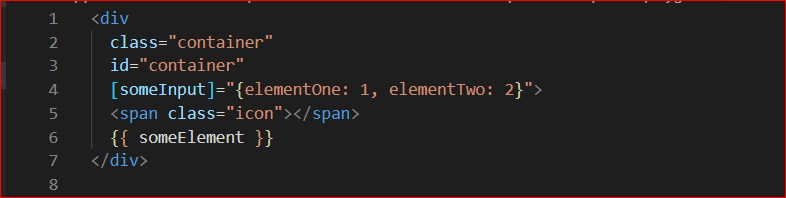
4. This is how it would look after collapsing the div in vscode

phakamani
on 3 Jul 2020
@dandohotaru
If you don't have the moral incentive to please the masses
What if the masses are already pleased, and the people in this issue are a vocal minority? How can we know?
Incredible logic. I was part of that silent majority until I found this ticket, now I've joined the vocal minority.
 nickenchev
on 7 Jul 2020
nickenchev
on 7 Jul 2020
The Jsx Bracket Same Line and the Jsx Single Quote are not working for me. I am using 5.1.3
 NormTheThird
on 8 Jul 2020
NormTheThird
on 8 Jul 2020
It doesn't make sense that you'd have this special option for React .jsx files but then ignore Vue, Angular and HTML in general. The number of upvotes on this issue says it all, the jsx option should be made generic so it applies to all file types. Lets get this done.
 RehanSaeed
on 24 Jul 2020
RehanSaeed
on 24 Jul 2020
@evilebottnawi
The advantages of the current formatting over the proposed one:
- Cleaner version-control diffs. The same reasoning applies here as in the case of trailing commas in JS.
- The clear separation between the content of the brackets (attributes) and what follows after them (child nodes). The two are easily told apart without relying on syntax highlighting.
- The consistency with how Prettier formats other brackets. This one simply follows from the fact that Prettier adheres to the two principles above.
- For inline elements without leading whitespace, the closing bracket can't stay on the same line with the last attribute. Keeping it there only for some but not all elements would look inconsistent. Whitespace significance is quite counter-intuitive. There is no need to make it even more confusing.
The disadvantages are that a non trivial amount of people don't care for those "advantages" if the output is considered broken in the eyes of many. The first time I saw this, I too, had to double check whether I have forgotten a closing bracket or missed a quote.
This whole discussion is beyond ridiculous, like putting square wheels on a car and listing the "advantages" as follows
- Doesn't roll down steep inclines
- Hand brake not needed when accelerating from inclines
- Harder to steal, because harder to drive
All of which is true and yet I doubt somebody is going to use such a car.
For now we have disabled prettier for HTML files, because we simply can't work this kind of style, it is very hard on the eyes and it takes ages, at least for me, to make sense of it.
 crystalbyte
on 30 Jul 2020
crystalbyte
on 30 Jul 2020
Is nobody of the opinion that it is easier to add a new attribute if the
>is already out of the way? And it helpsgit diff– adding an attribute is a one line change instead of a two line change (just like why we prefer trailing commas).
No.
crystalbyte
on 30 Jul 2020
Do you really prefer this (current behavior)
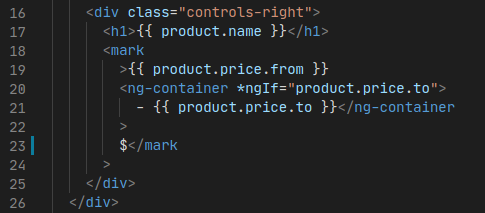
to this?
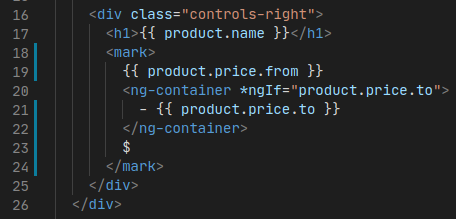
 ElectroluxV2
on 31 Jul 2020
ElectroluxV2
on 31 Jul 2020
@ElectroluxV2 That’s not what this issue is about. I think you’re looking for the html-whitespace-sensitivity option.
lydell
on 1 Aug 2020
@ElectroluxV2 That’s not what this issue is about. I think you’re looking for the html-whitespace-sensitivity option.
Nope

I had tried every possible option for this setting and changing value to space wrapped and without spaces. Still same ugly result.
ElectroluxV2
on 1 Aug 2020
@ElectroluxV2
Prettier 2.0.5
Playground link
--html-whitespace-sensitivity ignore
--parser html
Input:
<button mat-icon-button>
  <mat-icon [matBadge]="basketBadge" matBadgeColor="primary">shopping_bag</mat-icon>
</button>
Output:
<button mat-icon-button>
  <mat-icon [matBadge]="basketBadge" matBadgeColor="primary">
    shopping_bag
  </mat-icon>
</button>
@lydell This works fine in the playground, but using it in VSCode with Vue SFC format, the formatting is still wreaking havoc
Before
<input
    name="fname"
    v-model="fname"
/>
* After *
<input name="fname" v-model="fname" />
At this point, I am not even sure where VSCode is reading the rules from? My prettier.config.js is as follows
module.exports = {
    "no-empty-interface": false,
    bracketSpacing: true,
    semi: false,
    printWidth: 180,
    tabWidth: 4,
    useTabs: false,
    singleQuote: false,
    quoteProps: "as-needed",
    trailingComma: "all",
    disableLanguages: ["html"],
    htmlWhitespaceSensitivity: "ignore",
}
.eslintrc.js
    ..
    plugins: [],
    extends: ["plugin:vue/essential", "@vue/prettier"],
    parserOptions: {
        parser: "babel-eslint",
        ecmaVersion: 2018
    },
    ..
Should I be adjusting .eslintrc.js or prettier.config.js or VSCode settings
How do I determine which rules VSCode is using
 mikeerickson
on 5 Aug 2020
mikeerickson
on 5 Aug 2020
@crystalbyte Which argument is unclear or controversial?
@thorn0 Unfortunately I find it very "holy war", maybe we should consider this option, support for the option does not look too heavy (it is most commented and popular issue with most of likes)
alexander-akait
on 5 Aug 2020
I am trying to figure out how to "disable" prettier (or is it eslint) the reformatting of HTML tags. In my case, I always want it to appear as I type.
This should never be changed by formatting as I want attributes to be on separate lines?
<input
    name="fname"
    v-model="fname"
/>
At what point does prettier kick in and change this? I am seeing some formatting retained when I have a number of attributes?
```vue
...
<el-autocomplete
    style="width: 180px; padding-right: 10px;"
    class="inline-input"
    v-model="country"
    :fetch-suggestions="querySearch"
    placeholder="country"
    @select="handleSelect"
>
    Slot Markup
</el-autocomplete>
...
Note: In my case, I am using Vue Single File Components.
mikeerickson
on 5 Aug 2020
@mikeerickson The attributes are put on one line if they fit, and on separate lines otherwise. There’s an issue about it here: https://github.com/prettier/prettier/issues/5501
lydell
on 5 Aug 2020
@lydell OK, that makes sense. Not quite what I am going for, but if that is the consensus I guess I can adapt.
What I was hoping for was some "ignore" this auto formatting and leave it as I put it?
mikeerickson
on 5 Aug 2020
@mikeerickson No, there’s no way to ignore parts of Prettier’s formatting. That’s kind of the whole point of Prettier.
lydell
on 5 Aug 2020
@lydell fair enough, I can accept that 😀
mikeerickson
on 5 Aug 2020
I've temporarily limited conversation the issue from spam/off topic so we can discuss between @prettier/core developers, I would like to hear everyone here, this problem has been present for a very long time and we need to give an official answer.
I would like to express my thoughts on this:
- This is a very popular problem and very controversial, we need to decide it.
- It seems like a lot of developers think do not see the advantages in our default formatting (I don't want to change default).
- This goes into "holy war", it is bad for us, it is bad for developers, it is always bad.
- We have
jsxBracketSameLine, forjsx, yes, JSX is not HTML, but formatting is very similar, it looks not entirely fair in relation to developers who usevue/html/etc. jsxBracketSameLineoption was introduced for facebook, yes i know thatprettierfrom facebook team, but we are OSS for all projects, we must respect everyone opinion.- Very many developers use the
jsxBracketSameLineoption (but not all), this tells us that this formatting is really very popular. - Maintaining this option doesn't seem hard.
- I don't like new options, but I don't see any other solutions here.
- Keeping ignoring is not a good idea.
My suggestion:
- Deprecate the
jsxBracketSameLineoption in favor thebracketSameLineoption - The
bracketSameLineoption will work forhtml/jsx/vue/etc formats, I'm sure that someone who loves this style of formatting uses it everywhere (so we don't needhtmlBracketSameLine,vueBracketSameLine/etc) - Do release and close this holy war
alexander-akait
on 6 Aug 2020
I don't have strong opinion on this, the only trouble for me is I can't "Collapsing the div element in vscode" https://github.com/prettier/prettier/issues/5377#issuecomment-653656059 , I know this should be a vscode issue, but I'll be glad to use bracketSameLine to avoid this problem.
 fisker
on 6 Aug 2020
fisker
on 6 Aug 2020
From @ntotten (prettier-vs-code):
I agree with your suggestions of consolidating to bracketSameLine. This feedback comes up on the vscode plugin issue too. Personally I like the no new options philosophy but since we already have the jsx option i think merging to a single shared option is fine.
alexander-akait
on 10 Aug 2020
And so, it took 2 weeks. No negative reaction from maintainers (most of positive or neutral). I think it's time for us to move on. I hope no one will be angry (including prettier maintainers).
I think consolidating of the bracketSameLine option is the best solution here. In fact, we don't even create a new option. It's just an improvement.
Roadmap (should be done in one PR):
- Deprecate
jsxBracketSameLine(soft, only deprecation message, logic should not be changed, thejsxBracketSameLineoption only affected onjsx). - Implement the new
bracketSameLineoption (for HTML, JSX, Vue, Angular, usingbracketSameLine: truesetsjsxBracketSameLinetotruetoo). - Improve tests (need tests for HTML, Vue, Angular) and docs.
I ask you to refrain from unnecessary/spam/off topic/etc comments so that we do not lose this comment. You can express emotions using emoji :star: And yes, PR welcome.
alexander-akait
on 22 Aug 2020
The option name bracketSameLine seems quite generic. The previous suggestion of angleBracketSameLine is a bit more specific.
Another alternative might be xmlBracketSameLine, since:
- JSX is apparently "JavaScript XML".
- HTML in Prettier is formatted as XHTML (as far as I know?).
That would likely be the most specific name.
 glen-84
on 9 Sep 2020
glen-84
on 9 Sep 2020
@ElectroluxV2
Prettier 2.0.5
Playground link--html-whitespace-sensitivity ignore --parser htmlInput:
<button mat-icon-button>
  <mat-icon [matBadge]="basketBadge" matBadgeColor="primary">shopping_bag</mat-icon>
</button>
Output:
<button mat-icon-button>
  <mat-icon [matBadge]="basketBadge" matBadgeColor="primary">
    shopping_bag
  </mat-icon>
</button>
Does not work for me
 gethari
on 10 Nov 2020
gethari
on 10 Nov 2020
What's now with the option bracketSameLine? Will we get it or not?
An update or a final answer would be good!
hege088
on 10 Nov 2020
What's now with the option bracketSameLine? Will we get it or not?
An update or a final answer would be good!
??
danielehrhardt
on 18 Nov 2020
What's now with the option bracketSameLine? Will we get it or not?
An update or a final answer would be good!
I'm not on the team, but it seems clear that they have agreed to support it, but that there has not yet been a corresponding pull request. Correct me if I'm wrong, but I think they would accept a good pull request that implements this. I spent some time on it myself, but ran into some roadblocks, then got distracted. It isn't a super-trivial feature to implement.
karptonite
on 18 Nov 2020
Maybe someone could merge it:
https://github.com/prettier/prettier/pull/6644
danielehrhardt
on 27 Nov 2020
Related issues
 lipis
·
88Comments
lipis
·
88Comments
 vishnevskiy
·
173Comments
vjeux
·
70Comments
glen-84
·
69Comments
aboyton
·
81Comments
vishnevskiy
·
173Comments
vjeux
·
70Comments
glen-84
·
69Comments
aboyton
·
81Comments
Most helpful comment
And so, it took 2 weeks. No negative reaction from maintainers (most of positive or neutral). I think it's time for us to move on. I hope no one will be angry (including prettier maintainers).
I think consolidating of the
bracketSameLineoption is the best solution here. In fact, we don't even create a new option. It's just an improvement.Roadmap (should be done in one PR):
jsxBracketSameLine(soft, only deprecation message, logic should not be changed, thejsxBracketSameLineoption only affected onjsx).bracketSameLineoption (for HTML, JSX, Vue, Angular, usingbracketSameLine: truesetsjsxBracketSameLinetotruetoo).I ask you to refrain from unnecessary/spam/off topic/etc comments so that we do not lose this comment. You can express emotions using emoji :star: And yes, PR welcome.