Prettier: Don’t multi-line imports (let them take less space) / Conflict with VSCode’s organizeImports
Hi.
There is a bug somewhere when builtin VSCode's source.organizeImports feature is used together with Prettier.
People sometimes prefer to use VSCode's built-in source.organizeImports feature ON SAVE which, among other things, places all imports on the same line. And this conflicts with Prettier when it formats imports at multiple lines: if there is an error in the code, the underlining of this error shifts towards beginning of the file.
I recorded a video which shows the effect, pretty easy to reproduce:
https://www.dropbox.com/s/apj5znzlqy8pub6/vscode-prettier.mp4?dl=0
There are two possible ways I imagine:
- Fix the bug somehow (I tried to find the root case, but failed unfortunately), so organizeImports + Prettier could work together.
- Introduce an option which allows to turn off imports indentation in Prettier (a quick PR: https://github.com/prettier/prettier/pull/5991) - it's a work-around in some sense, but at the same time, having all imports on the same line is VSCode's default they evangelize, and Prettier in some sense goes against this default.
 DmitryKoterov
All 68 comments
Hi! Thanks for the well written issue and the video!
VSCode underlining in the wrong place sounds like a bug in VSCode and/or the Prettier VSCode plugin to me – please report this to either/both of those!
That being said, I do think it would be interesting to discuss not breaking import statements into multiple lines. I happen to have discussed this thing before, for elm-format (another code formatter): https://github.com/avh4/elm-format/issues/324#issuecomment-290947601
I would not mind elm-format automatically splitting long those [long import lines]!
Hmm … I might have to take that back. I worked on a view file today where the imports ended up taking a whole screen-full. So I tried joining each import to a single line. They became quite long – but it I think I like it better! I don’t really read the imports, so it was nicer to get to see the actual contents of the without scrolling a full page.
It happens quite often to me that files start with more than a window-full of just imports, that I have to scroll past every time I open them. To me it has started to feel more and more that imports are just cruft at the top of the file that I rarely look at and want to spend as little time on as possible. I want the computer to add new imports and remove unused ones, sort them and format them, and otherwise mostly keep them out of the way.
I think not breaking imports onto multiple lines could help with this. It could at least be worth exploring.
 lydell
on 20 Mar 2019
lydell
on 20 Mar 2019
it has started to feel more and more that imports are just cruft at the top of the file that I rarely look at
Exactly. Noone reads them, and even during code navigation (on Cmd+Click on some identifier), VSCode jumps us into the file which contains the imported symbol definition, not to the import statement line. Many IDEs for other languages (e.g. for Java) even collapse all import statements by default.
DmitryKoterov
on 20 Mar 2019
Just to play "devil's advocate": too many imported declarations could be a sign of a module that could be split into smaller module (ideally smaller modules that are functional:)
 brodybits
on 20 Mar 2019
brodybits
on 20 Mar 2019
I think not breaking imports onto multiple lines could help with this.
That'd make me sad. Minified code will tend to have all of its imports on the same line, even though that isn't how people normally write code, and it would be a shame for prettier to leave it in this unusual state.
Exactly. Noone reads them
This does not match my experience.
 bakkot
on 21 Mar 2019
bakkot
on 21 Mar 2019
Minified code will tend to have all of its imports on the same line
Just to be clear, noone proposes to have all imports on the same line. The proposal is to (optionally) have symbols related to every single “import” statement on the same line, i.e. one line per each “import” statement.
DmitryKoterov
on 21 Mar 2019
Oh! Forgive me, I misunderstood. That seems fine to me. (Doing it unconditionally, anyway; I don't think it would be worth adding an option.)
bakkot
on 21 Mar 2019
If we do it unconditionally, many people (the ones who got used to the current behavior) will likely be upset...
DmitryKoterov
on 21 Mar 2019
Sorry for being unclear. I meant that this:
import huffman from "n-ary-huffman";
import { repr } from "tiny-decoders";

import iconsChecksum from "../icons/checksum";
import type {
  ElementReport,
  ElementTypes,
  ElementWithHint,
  ExtendedElementReport,
  HintMeasurements,
  HintUpdate,
} from "../shared/hints";
import {
  type HintsMode,
  type KeyboardAction,
  type NormalizedKeypress,
} from "../shared/keyboard";
import {
  Resets,
  addListener,
  bind,
  isMixedCase,
  log,
  makeRandomToken,
  partition,
  splitEnteredText,
  unreachable,
} from "../shared/main";
import type {
  FromBackground,
  FromOptions,
  FromPopup,
  FromRenderer,
  FromWorker,
  ToBackground,
  ToOptions,
  ToPopup,
  ToRenderer,
  ToWorker,
} from "../shared/messages";
import {
  type OptionsData,
  type PartialOptions,
  flattenOptions,
  getDefaults,
  makeOptionsDecoder,
  unflattenOptions,
} from "../shared/options";
import { type Durations, type Perf, TimeTracker } from "../shared/perf";
Would be printed as:
import huffman from "n-ary-huffman";
import { repr } from "tiny-decoders";

import iconsChecksum from "../icons/checksum";
import type { ElementReport, ElementTypes, ElementWithHint, ExtendedElementReport, HintMeasurements, HintUpdate } from "../shared/hints";
import { type HintsMode, type KeyboardAction, type NormalizedKeypress } from "../shared/keyboard";
import { Resets, addListener, bind, isMixedCase, log, makeRandomToken, partition, splitEnteredText, unreachable } from "../shared/main";
import type { FromBackground, FromOptions, FromPopup, FromRenderer, FromWorker, ToBackground, ToOptions, ToPopup, ToRenderer, ToWorker } from "../shared/messages";
import { type OptionsData, type PartialOptions, flattenOptions, getDefaults, makeOptionsDecoder, unflattenOptions } from "../shared/options";
import { type Durations, type Perf, TimeTracker } from "../shared/perf";
And most likely behind an option, yes.
lydell
on 21 Mar 2019
Hi,
In my team we want to use Prettier so we avoid the generel discussion on format,
but import statement over multiple line is an absolute no-go.
There are a couple of reasons for this:
- Most important for me is, that no person should write imports at all, the formatter/vscode/prettier should do this so we avoid different versions and possible merge conflict, and as described in Prettier's "Option Philosophy" its about avoiding individuals opinions on format.
- But it is a real bug that Prettier convert imports to multiline because of //@ts-ignore which we are forced to used for some js modules in our typescript code.
What you should be able to write is:
//@ts-ignore
import { a, b } from 'MyNonTypedModule'
But it's converted to:
//@ts-ignore
import {
  a,
  b
} from 'MyNonTypedModule'
And this fails.
We can fix this by writing:
import {
 a,
 b
//@ts-ignore
 } from 'MyNonTypedModule'
But now auto import stop working.
If I import a new part from 'MyNonTypedModule' let say 'c',
it will be added as a new import statement
import {
 a,
 b
//@ts-ignore
 } from 'MyNonTypedModule'
import { c }  from 'MyNonTypedModule'
I hope we all can agree that this is a real bug, not just a personal opinion on formatting code?
(And maybe I should have written it is its own issue, but: )
I have written an option 'ForceSingleLineImports' with full tests,
default value false (So it dont change anything for anybody unless they activate it)
that do exactly what @lydell suggesting, and this fixes all my and my teams problems.
Im new to opensource projects on github, so I dont know how to get the code up.
(I cloned the project, made the changes and the tests, in it's own branch, but I dont have permission to upload the branch)
Can anyone help me with the permission?
Then you can see the code,
or write back why you dont think this should be in Prettier :)
 alfnielsen
on 28 Mar 2019
alfnielsen
on 28 Mar 2019
We probably won’t add an option for this, but I recommend:
- opening a bug report in the VS Code repo (if there isn’t one already) about the comment issue
- forking this repo (https://github.com/prettier/prettier/fork) so you can publish your branch for others to use
I’d also encourage you to use your forked version — we’re perfectly fine with that if you can’t use the official version of Prettier.
Finally, have you considered authoring types for the non-typed modules you have? It would fix your whole problem.
 j-f1
on 28 Mar 2019
j-f1
on 28 Mar 2019
Hi @j-f1
Thank for the answer.
We dont really have the resources for fixing(adding types) and following changes for a lot of non-typed modules, so I dont believe that is a good ideer.
(Some of the modules are actually written in typescript, but they dont use NoImplicitAny, which gives the same problem - we need ts-ignore or remove no-implicit-any, and that, my opinion, removes one the main reason for using ts in the first place.)
Im also a little concerned about the force, for the same reason. (Then I need to following all fixes you make and making parallel updates (re-forking) to my forked version, unless there is some smart way that im not aware of?)
But I will report it on VS Code as you suggest and talk with my team about holding a Prettier fork updated.
alfnielsen
on 28 Mar 2019
many people (the ones who got used to the current behavior) will likely be upset
Yes. We've had requests for doing the opposite, i.e. always break named imports in multiple lines. And also had #1954
 duailibe
on 1 Apr 2019
duailibe
on 1 Apr 2019
Playing Devil's advocate: The rational thing to do for people like me, who think the imports take too much space, would be to put all imports at the _end_ of the file.
lydell
on 1 Apr 2019
That’s actually a good idea @lydell!
j-f1
on 2 Apr 2019
Any updated about this?
 galkin
on 26 Apr 2019
galkin
on 26 Apr 2019
We probably won’t add an option for this
@j-f1 What's the reasoning behind not supporting the single-line format for imports?
 positlabs
on 8 May 2019
positlabs
on 8 May 2019
We probably won’t add an option for this
That's a shame. Not keeping imports on one line to me is a blocker from ever using Prettier (and not a fork). I mostly use Typescript, and it often has additional imports (for typing) that makes multi-line imports occur more often.
Adding 5-20 lines for a large percentage of files is just more noise, as I don't feel like imports need to be viewed very often (linting warns for unused imports, editors will often auto import functions/classes). This feels like the return of code folding for imports, where e.g. Java in Webstorm automatically hides imports to keep code readable.
 csvn
on 10 May 2019
csvn
on 10 May 2019
Hi
I have written an extension to vscode called vsc-organize-imports, that work with prettier.
It can be set up to FormatOnSave, which will run after Prettier,
and format the imports to single lines or multi-lines depending on settings.
I have written it, because it's for me, is important that the imports are sorted and single line,
but I added the option for those people that wants multi-line version,
so maybe some of the people writing on this issue will find it useful.
alfnielsen
on 26 May 2019
How about formatting them like this:
import {
  Lorem, ipsum, dolor, sit, amet, consectetur, adipiscing, elit,
  Maecenas, vitae, venenatis, arcu, Sed, ultrices,
} from "lorem-ipsum"
 phaux
on 27 May 2019
phaux
on 27 May 2019
Anything new here?
Why a new option can't be created? This behavior is very noisy sometimes, especially in TypeScript files, which requires a lot of type importing (which usually have long names).
Because of that I get this output:
import { compare } from 'bcryptjs';
import { sign, verify } from 'jsonwebtoken';
import { getManager } from 'typeorm';
import {
  AUTH_REFRESH_TOKEN_KEY as REFRESH_TOKEN_KEY,
  AUTH_ACCESS_TOKEN_KEY as ACCESS_TOKEN_KEY
} from '../constants/env';
import {
  AUTH_INVALID_CREDENTIALS as INVALID_CREDENTIALS,
  AUTH_INVALID_TOKEN as INVALID_TOKEN
} from '../constants/error-codes';
import User from '../entities/User';
import { RefreshJwtToken, AccessJwtToken } from '../types/Tokens';
import AuthorizationError from '../utils/errors/AuthorizationError';
A good portion of the JavaScript (and TypeScript) community also consider this format uglier, and not prettier. (Please don't take this too serious lol)
I know that a new option can't be created for every single code-style aspect, but I really think that this one is very important for some use cases, such as this one.
Please consider adding this option! :)
 lffg
on 9 Sep 2019
lffg
on 9 Sep 2019
Why a new option can't be created?
Please see our Option Philosophy.
lydell
on 10 Sep 2019
Please consider a way around this... it really is frustrating when you cant see the top line of your component when you open a file because of it being multi-lined. I want this functionality everywhere except my imports :(
import {
  AfterViewInit,
  Component,
  ComponentFactoryResolver,
  EventEmitter,
  Injector,
  Input,
  Output,
  Type,
  ViewChildren,
  ViewContainerRef
} from '@angular/core';
 legalbrickstechnology-dcm
on 8 Oct 2019
legalbrickstechnology-dcm
on 8 Oct 2019
I also find this very uncomfortable to break imports to multiple lines, the imports part of the file gets too large and I need to scroll over it every time I open the file, plus it looks not consistent when one imports are written in one line while another it multiple, for me it's much simpler to scroll horizontally (on MacOs) and keep it in long line, I rarely need to look what's in my imports. This one of the reasons why I'm considering not using prettier.
 vedmant
on 22 Nov 2019
vedmant
on 22 Nov 2019
I would find it very valuable to match the behavior of typescript's organize imports command. Right now they're kinda fighting each other. Both typescript and prettier are very widespread amongst the projects I've been working with.
phaux
on 23 Nov 2019
@phaux To solve this, I'd recommend running organize-imports-cli before Prettier as a pre-commit hook (e.g. using lint-staged).
 thorn0
on 23 Nov 2019
thorn0
on 23 Nov 2019
This will not solve the problem, as Prettier will reformat the import statements every time. What should've been done is the addition of a new option. This won't hurt anyone...
lffg
on 23 Nov 2019
@lffg I wrote "before Prettier".
thorn0
on 23 Nov 2019
To solve this, I'd recommend running organize-imports-cli before Prettier as a pre-commit hook (e.g. using lint-staged).
This is not an acceptable option if Prettier is running on save, which is extremely common. I like seeing how the code will look the next time I open a file, so running prettier on pre-commit is not ever going to be an option for me.
csvn
on 25 Nov 2019
How exactly does what I wrote prevent you all from running Prettier on save?
thorn0
on 25 Nov 2019
It doesn't, it just does not help at all while you're working on files locally, since prettier will reformat 🤷♂️
csvn
on 25 Nov 2019
Ah, I see now. You don't realize that I was answering to a specific comment (https://github.com/prettier/prettier/issues/5995#issuecomment-557749716).
If the problem is "organize imports and Prettier are fighting each other", then the solution is to always run them in the same order: first organize imports, than Prettier. That's it.
thorn0
on 25 Nov 2019
This shouldn't be that complicated... This would be solved easily by having an option that defaults off that keeps imports on one line with proper spacing. It's very frustrating especially when working with UI frameworks to have Prettier reform:
import { Divider, Button, Modal, Form, Icon, Input, Select, Spin, Typography, message } from "antd";
to
import {
Divider,
Button,
Modal,
Form,
Icon,
Input,
Select,
Spin,
Typography,
message
} from "antd"
This significantly decreases readability and forces me to scroll down on files that shouldn't even be 50 lines long.
The ONLY advantage I have for separating the lines like this is in git diffs it will show you specifically what import was added/removed instead of showing you that the whole import line was removed and added.
 bfitec
on 1 Dec 2019
bfitec
on 1 Dec 2019
I will add my 2 cents. I am pretty newbie in programming and moreover in TypeScript. So i do often look what do i import and what not. I don't use unused imports automatic removing, because many times i leave some imports just to know/remind, that there is such class, constant or smt. Especially when learning/working with some new libraries.
Eventually, when i am OK with my component, i make a final cleanup.
But point is that i read imports quite a lot.
I believe, it's true that when you become JS/TS Ninja, you don't care no more about them. But at early stages, i really want to list those imports stacked and not single-lined and scrolling is not an issue to me.
 dzintars
on 18 Jan 2020
dzintars
on 18 Jan 2020
This is no such thing like coding style that fits everyone. Some people have smaller screens and for scrolling all the time is more painful than for people with large screens. I think it have to be an option for this, or is this dictatorship project?
vedmant
on 18 Jan 2020
@vedmant I agree with you. At the same time what makes prettier so great is that it unifies formatting across many projects with opinionated low-customizable formatting. This is the only feature that stops me from being able to use prettier because I don't want to add 20 lines to every file in my project. I wouldn't call it a dictatorship...
From the readme
Prettier is an opinionated code formatter. It enforces a consistent style by parsing your code and re-printing it with its own rules that take the maximum line length into account, wrapping code when necessary.
bfitec
on 18 Jan 2020
I'm having the same problem...
Some people in the project leave "organizeImports" active on saving and others like me leave it disabled.
To avoid this conflict we have to keep using //prettier-ignore on imports...
 yardz
on 21 Jan 2020
yardz
on 21 Jan 2020
I really don't understand why not add an option to support this? I totally agree with @vedmant on this:
This is no such thing like coding style that fits everyone. Some people have smaller screens and for scrolling all the time is more painful than for people with large screens. I think it have to be an option for this, or is this dictatorship project?
 StinsonZhao
on 27 Mar 2020
StinsonZhao
on 27 Mar 2020
As a workaround for this issue I've been using eslint-plugin-import and Prettier side-by-side. It's been working great. See .eslintrc and .vscode/settings.json in https://github.com/bduffany/nextjs-app-template. You'll also need the devDependencies in package.json that contain "eslint".
 bduffany
on 6 Apr 2020
bduffany
on 6 Apr 2020
hi it possible please to ignore import ???
Logically we never need work with import in vscode, because all are managing by intellisense.
Besides, this breaks the formatting of the colors.
Here how is ugly ! and unreadable
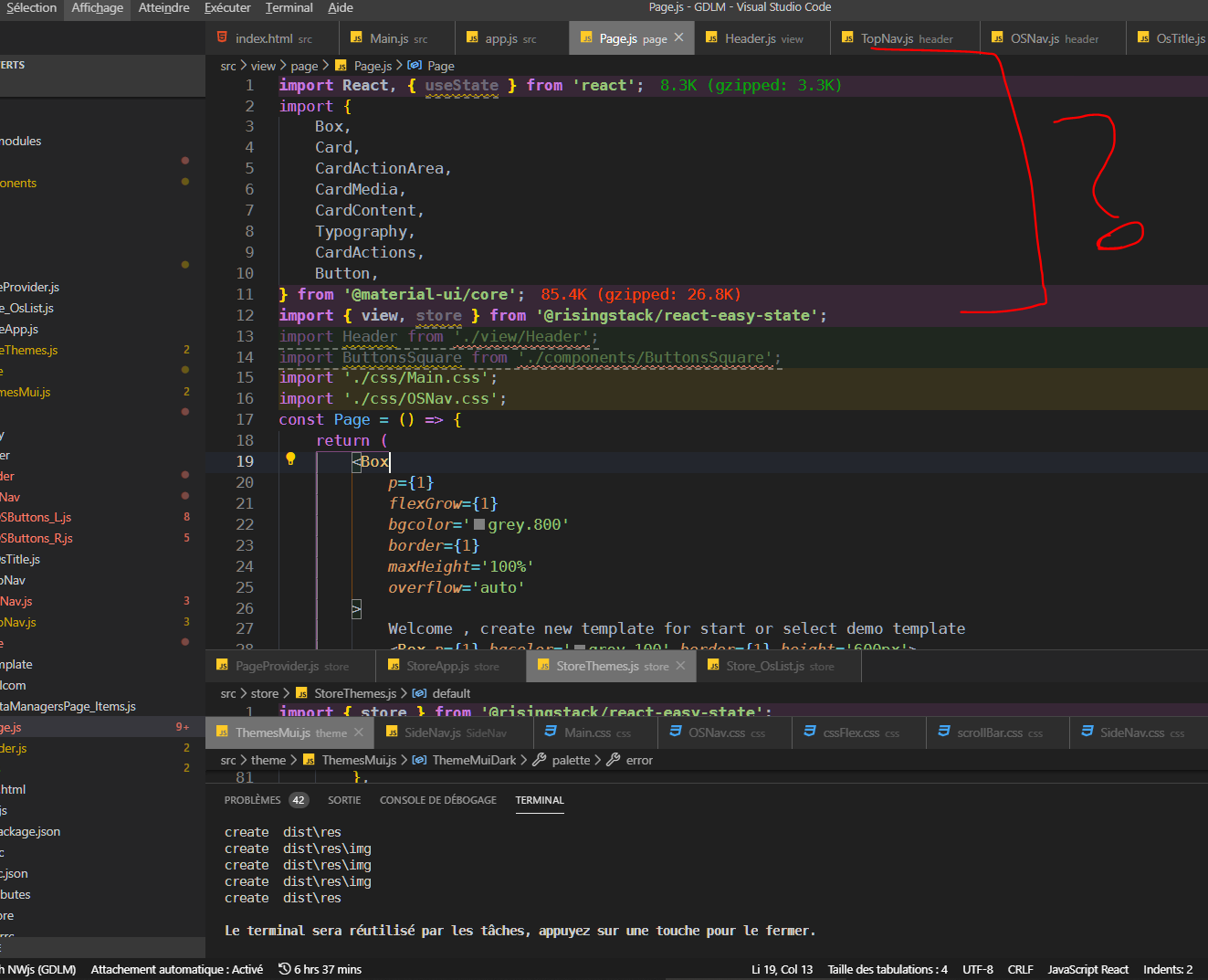
It should look more like this :)

Thanks for any help or tips
 djmisterjon
on 12 Apr 2020
djmisterjon
on 12 Apr 2020
Hmm, funny that a tool called Prettier forces arguably ugly imports. Sadly, it doesn't look like the team is interested in providing a fix.
 tomnar
on 22 Apr 2020
tomnar
on 22 Apr 2020
hi it possible please to ignore import ???
Logically we never need work with import in vscode, because all are managing by intellisense.
Besides, this breaks the formatting of the colors.Thanks for any help or tips
Jup,
My first line just starts with:
//prettier-ignore
import { bla, blabla, blbalbalba, blablablala } from "../shared/shared.js"
Together with auto-import I'm just getting all the functions I need :)
Ps. I'm considering to drop Prettier for an alternative for this reason.
 FloodGames
on 1 May 2020
FloodGames
on 1 May 2020
We dont really have the resources for fixing(adding types) and following changes for a lot of non-typed modules, so I dont believe that is a good ideer.
@alfnielsen you can always use a shorthand ambient module declaration for untyped/under-typed packages:
// declarations.d.ts
declare module "untyped-module"
 avinoamsn
on 7 May 2020
avinoamsn
on 7 May 2020
Seems to me with prettier, if you set the print line higher, the imports wont wrap unless line length is reached. I use 100 imports seems to always get formatted on 1 line
 d1820
on 21 May 2020
d1820
on 21 May 2020
Dropped prettier because of this. I hate multi-line imports, this was a dealbreaker.
 dennissheppard
on 3 Jun 2020
dennissheppard
on 3 Jun 2020
Dropped prettier because of this. I hate multi-line imports, this was a dealbreaker.
I still use Prettier, but sometimes my imports looks dreadful after running Prettier... What a shame. An option really should be added to control this behavior.
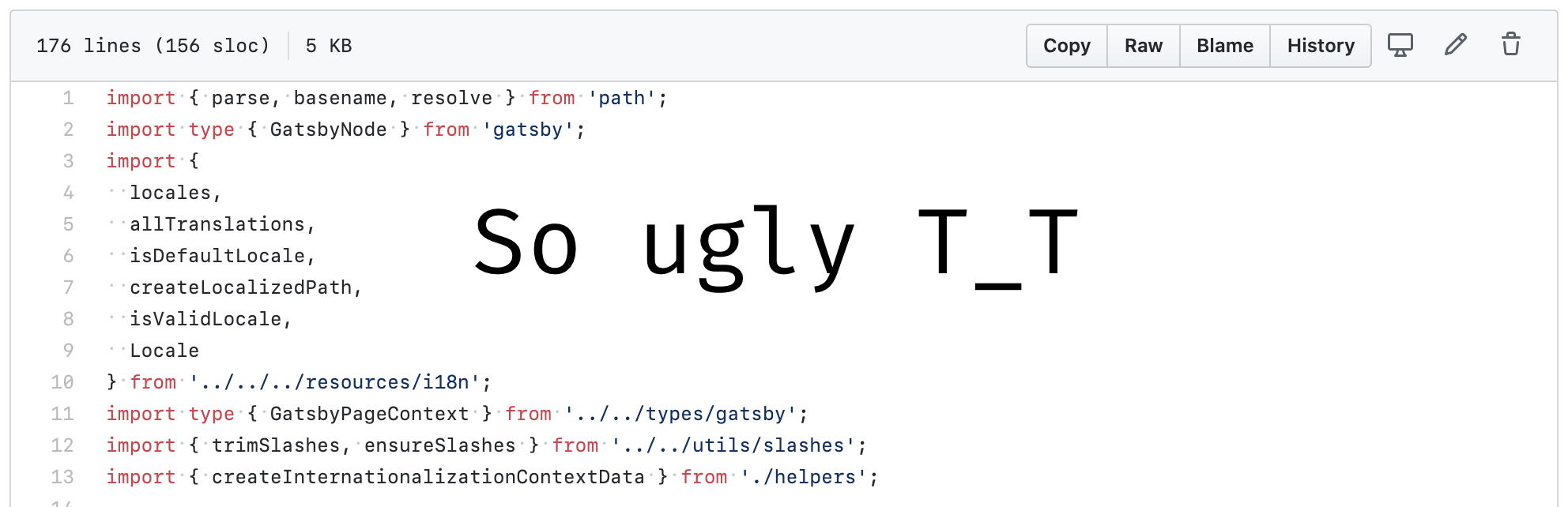
lffg
on 3 Jun 2020
I sometimes merge a lot of .js into one (i.e. export * from name.js).
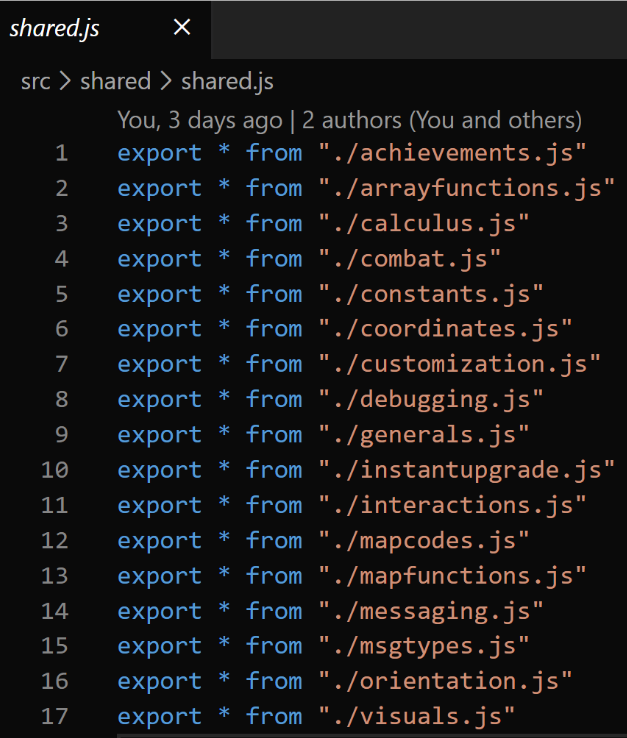
Perhaps _that's not a best practice_ _(?)_ as that means I import what I need from things like: buttons.js, shared.js (which lowkey attaches many js files itself)

//prettier-ignore
suffices for me
FloodGames
on 4 Jun 2020
How about this? I'm also in favor of not importing with 99999 lines, it is very illegible
It should be a plugin configuration
 SergioSuarezDev
on 3 Jul 2020
SergioSuarezDev
on 3 Jul 2020
any news? how to not multiline imports???
 shaulnaim
on 16 Jul 2020
shaulnaim
on 16 Jul 2020
I can't imagine anyone wanting to see this when they open their files.
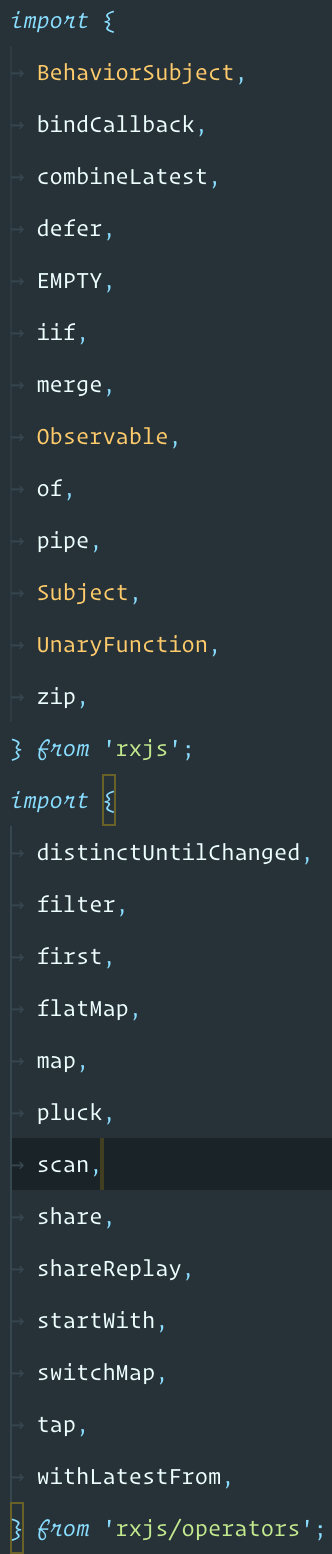
 pasevin
on 21 Jul 2020
pasevin
on 21 Jul 2020
@pasevin I would like to see this at some cases. It shouldn't be an opinionated feature. That should be an option and the default behavior could be whatever you like. I will change that accordingly my usecase/workflow. Vertical scroll is more ergonomic for me when working with multiple splits.
dzintars
on 21 Jul 2020
@dzintars I am all for customization and tweaking your settings. But don't forget: "What is Prettier?
Prettier is an opinionated code formatter...."
pasevin
on 21 Jul 2020
@pasevin So, basically you are highlighting 2 groups of developers - Solo Developers/Projects and Team Developers/Projects. I am talking from Solo Developer/Project perspective and on this case... i would like to have:
Prettier is an
opinionatedcode formatter...."
dzintars
on 21 Jul 2020
@dzintars, as of now, Prettier is an opinionated code formatter (the very title of the home page is "Prettier · Opinionated Code Formatter"). Then, what are the opinions, that may (possibly) be changed*. The main reason why this issue has been open for over a year is Prettier's Option Philosophy: in short, Prettier does not intend to add any more options, so if this feature requires an additional option, this feature is a no go.
*note the "status:needs discussion" label of this issue
 DamianoMagrini
on 21 Jul 2020
DamianoMagrini
on 21 Jul 2020
Yep, this is why many of us hope we change their opinion on this one :)
pasevin
on 21 Jul 2020
+1
 vjsingh
on 21 Jul 2020
vjsingh
on 21 Jul 2020
@DamianoMagrini Thank you for the link.
I do understand the booth sides. It's something like Go team are standing strong for to protect Go from bloating like Java. And i totally support this attitude.
But IMHO in code formatters landscape the winner will be the one, which will come up with the solution to support multiple "flavors" of code formatting. I like Prettier like many of us does. And moreover... there is no strong competitor of Prettier because of pain which sometimes happens of "Prettier Opinions" in most cases can be handled silently. And so - nobody is trying to compete really hard. But if there will be an competitor of Prettier which is as good as Prettier is now + it will allow for the teams to decide what "flavor of Opinionated options" to enable per project i definitely will take that. I work with back-end, front-end and other stuff. And Prettier does not work perfectly for me in various projects. I am forced to live with just a single set of "Prettier Opinions" or to turn it off. But i don't like that. I would like to have all my projects been formatted consistently. So i am silently waiting for a formatter which will be great for different kind of projects. Which will allow for community to build up the formatting flavors and where the flavors will compete for "The Industry Standard" medals or stars. Not the formatter itself. :)
Sharing just an humble opinion.
dzintars
on 21 Jul 2020
ohhhh bottom line. how can i make the import to be in one line without using ignore>?
shaulnaim
on 21 Jul 2020
It only gets reformatted if the line is longer than the line length you
specified, so try increasing that, or breaking the import line into
multiple lines.
 christhegrand
on 21 Jul 2020
christhegrand
on 21 Jul 2020
@christhegrand it's true about the printWidth, but breaking into separate lines doesn't work. It will reformat into separate lines regardless.
And in any case, increasing print width just to fit your imports and risk reformatting the whole file, is not a good solution.
The Prettier team should just decide if they will change this behavior or leave it as it is, and close this issue forever.
Then everyone can sleep well.
P.S. another way to make everyone somewhat happy would be to implement this: https://github.com/prettier/prettier/issues/5287
pasevin
on 21 Jul 2020
P.S. another way to make everyone somewhat happy would be to implement this: #5287
@pasevin, I don't think that is a good solution for this case nor it will make us happier. I won't like to begin all my files with something like "prettier-ignore-start" and "prettier-ignore-end".
Sadly, I don't think we have another alternative besides adding a new option for this case. I don't think there is nothing else we can do (if the Prettier core team won't really add a new option) — except changing the code formatter, of course (but I don't think that most people will do this, neither will I).
I really don't see why not add an option to control this behavior. This is a truly horrific behavior which, as I stated above, makes any code with a lot of imported members _uglier_.
lffg
on 21 Jul 2020
having the same issue, if the prettier and organize import is enabled, this will be the result
Version: 1.49.1 (user setup)
Commit: 58bb7b2331731bf72587010e943852e13e6fd3cf
Date: 2020-09-16T23:27:51.792Z
Electron: 9.2.1
Chrome: 83.0.4103.122
Node.js: 12.14.1
V8: 8.3.110.13-electron.0
OS: Windows_NT x64 10.0.19041
 mhamri
on 23 Sep 2020
mhamri
on 23 Sep 2020
@mhamri That’s unrelated to this issue. That has to be a problem in the prettier-vscode extension, some other extension or vscode itself.
lydell
on 23 Sep 2020
@dzintars I am all for customization and tweaking your settings. But don't forget: "What is Prettier?
Prettier is an opinionated code formatter...."
I disagree, Prettier is a tool for developers, just like a drill is a working tool for the renovator.
Some prefer to work with square heads and other with stars, and this without preventing the tool from doing both.
It would be silly to change the drill (formatter plugin) for each users preferences.
Besides, Prettier already has a lot of options which allow to adapt the design of codes to the taste of each one, it simply lacks some options for become a perfect tool !
So for now i use "printWidth": 115 , weird result, but is until the authors find a solution.
Edit:
for take part of the debate , solution a would provide is to allow a simple option named ignoreMatch
So user will can adapte this to her environment by create a simple regexr for is case.
https://regexr.com/
Example in .prettierrc:
ignoreMatch:["/\import.*?\;/g",],
This will ignore all my imports in my userCase.
Also, maybe a good idea to use array to provide multiple regexr.
Sure is not performance friendly !, but who care in dev! just don't use it! or update your machine.
Regexr is a somewhat general-purpose options when your too lazy to provide good solutions or you have too many cases.
And in addition it could cover many other cases, not only the import case!
it is a bit boring to use for the user or the first time, but you hit all userCase, and motivated people will be happy to take the time to setup this for their environment and workflow.
what do you think ?
djmisterjon
on 24 Sep 2020
Multi-lines imports are recommended in the airbnb styleguide,However, I think there needs to be an option to configure single line or multiple lines。
 xiaoxiyao
on 30 Oct 2020
xiaoxiyao
on 30 Oct 2020
Example in .prettierrc:
ignoreMatch:["/\import.*?\;/g",],
This will ignore all myimportsin my userCase.
Also, maybe a good idea to use array to provide multiple regexr.
Thanks, maybe a stupid question, but my .prettierrc only accepts the format like this, and the ignorematch doesn't seem to work (invalid character \ ):
{
"ignoreMatch": ["/import.*?;/g"],
"printWidth": 100,
"semi": false,
"endOfLine": "auto"
}
any clue?
FloodGames
on 30 Oct 2020
@FloodGames There is no ignoreMatch option.
lydell
on 30 Oct 2020
IMO, Prettier should always break onto multiple lines and VS Code should auto-collapse each import line (meaning you can toggle to open). This probably also requires a better collapsed preview in VS Code.
 VoieDev
on 4 Nov 2020
VoieDev
on 4 Nov 2020
first test seem work for
https://standardjs.com
but a little too dictatorial for my taste., will see at future !
I would even say more strict than prettier!
djmisterjon
on 4 Nov 2020
Related issues
 ikatyang
·
91Comments
ikatyang
·
91Comments
 vjeux
·
70Comments
vjeux
·
70Comments
 vishnevskiy
·
173Comments
vishnevskiy
·
173Comments
 azz
·
184Comments
azz
·
184Comments
 damassi
·
152Comments
damassi
·
152Comments
Most helpful comment
Sorry for being unclear. I meant that this:
Would be printed as:
And most likely behind an option, yes.