${data.name}
The Pokemon ${data.name} has a base experience of ${data.base_experience}, they also weigh ${data.weight}
Prettier 1.8.2
Playground link
# Options (if any):
--print-width=80
Input:
class Quote {
    character = {
        name: 'Dorian'
    }

    text = `Yes, ${this.character.name}, you will always be fond of me. I represent to you all the sins you have never had the courage to commit.`
}
Output:
class Quote {
  character = {
    name: "Dorian"
  };

  text = `Yes, ${
    this.character.name
  }, you will always be fond of me. I represent to you all the sins you have never had the courage to commit.`;
}
Expected behavior:
I would prefer a long string to _not_ get split into multiple lines, even if it contains expressions. When there are no expressions, Prettier correctly lets a long string go beyond the print-width limit.
I can't decide if this is a bug or a personal preference, but it's been creating weird hard to read code in our codebase. We can clean most of it up by simplifying our expressions, but there's only so short we can go.
 Swizec
Ref: previous discussion https://github.com/prettier/prettier/issues/3315#issuecomment-346897564
 ikatyang
on 1 Dec 2017
ikatyang
on 1 Dec 2017
As we'll focus the discussion on this issue, I'll copy my comment from the other thread (cc @lipis):
The thing about template literals is without breaking between { and } we were actually printing:
const str1 = `text text text ${foo.
  bar} text text`;

const str2 = `text text text ${foo[
  bar
]} text text`;
which IMO are strictly worse than what we're printing right now. Note the foo.bar and foo[bar] are a group with "break points", meaning that if they don't fit in one line, they will break. We'd need to special case printing MemberExpressions when inside a template literal so this wouldn't happen.
The other problem with this is when should and shouldn't break in those cases:
foo = `Text text text text text ${foo.bar.baz.spam.eggs}`;
foo = `Text text text text text ${longFooBarBazSpam.longFooBarBazEggs}`;
Until we can find an heurisitic that's good enough to decide on those cases, it's better to keep consistent that always breaks.
 duailibe
on 6 Dec 2017
duailibe
on 6 Dec 2017
I think those cases we shouldn't brake at all..
foo = `Text text text text text ${foo.bar.baz.spam.eggs}`;
foo = `Text text text text text ${longFooBarBazSpam.longFooBarBazEggs}`;
and consider that a _single expression_
while this one is not:
foo = `Text text text text text ${foo.bar.baz.spam.eggs + foo.bar.baz.bacon}`;
foo = `Text text text text text ${longFooBarBazSpam.longFooBarBazEggs - longFooBarBazSpam.longFooBarBazBacon}`;
 lipis
on 6 Dec 2017
lipis
on 6 Dec 2017
Personally I am of the opinion that a template string, regardless of what’s
in there, is a single expression. People putting too much logic in there is
an antipattern and almost always leads to a mess.
Discouraging messes is the job of a linter, not a formatter, if I’m not
mistaken. Maybe a good way to approach this is to have people vote on
whether they perceive complex string templates as one expression or more?
On Wed, Dec 6, 2017 at 6:33 AM Lipis notifications@github.com wrote:
I think those cases we shouldn't brake at all..
foo =
Text text text text text ${foo.bar.baz.spam.eggs};
foo =Text text text text text ${longFooBarBazSpam.longFooBarBazEggs};and consider that a single expression
while this one is not:
foo =
Text text text text text ${foo.bar.baz.spam.eggs + foo.bar.baz.bacon};
foo =Text text text text text ${longFooBarBazSpam.longFooBarBazEggs - longFooBarBazSpam.longFooBarBazBacon};—
You are receiving this because you authored the thread.
Reply to this email directly, view it on GitHub
https://github.com/prettier/prettier/issues/3368#issuecomment-349613128,
or mute the thread
https://github.com/notifications/unsubscribe-auth/AADeM-Fq6oU30YxsD1pd5H5hrhiYl-dSks5s9nujgaJpZM4Qx-k7
.
Swizec
on 6 Dec 2017
I would agree.. maybe it makes sense to not break them at all..
lipis
on 6 Dec 2017
Discouraging messes is the job of a linter, not a formatter
The job of a formatter is to format the code, whether or not it's a mess, trying its best to output code that looks consistent. I don't think we should be in charge of encouraging or discouraging any pattern.
Don't get me wrong, I would love if people wrote code in specific styles.. that would make the job of a formatter a whole lot simpler, but that's not what we've noticed out there in codebases, both smaller and bigger ones.
As for the formatting issue, prettier used to not format template literals at all, but people complained code wasn't getting formatted. Then it started formatting but using removeLines to remove breaks which would output ${a.b.c.d.e} in a single line, but would break other more complex cases, with function calls and object expressions inside.
I see what we have today as a good compromise but I agree "simple" cases could get better. The whole point is deciding what is simple and have a sane way to format those cases without adding too much complexity to the code.
See #2046, #1893, #1662, #1626, #821, #1183 (and there's more :-)) for more context on this issue.
duailibe
on 6 Dec 2017
If there's a rule of thumb needed, I'd propose that inserting one existing value into a template string should never cause breaks. If you're doing something that could create a new value (getters aside), or picks between values, it's complex enough to warrant breaks.
Expressions that shouldn't break:
`${foo}` // this is done, which is awesome!
`${foo.bar}`
`${foo[bar]}`
`${foo[bar][baz]}`
There's some interesting middle ground that would be nice to have, but breaks with that rule of thumb:
`${foo()}` // all of the above as function calls with no arguments. i.e. just 'get this computed value'
`${foo || bar}` // to inline defaults without paying the 'break cost'. but with member access chains, this could get long. :shrug:
 jwbay
on 7 Dec 2017
jwbay
on 7 Dec 2017
I'd say a lot of people, including myself, could dig an option that reverts to previous behaviour i.e. rule to disable formatting template literals completely e.g. ignoreTemplateLiterals: true.
Does this exist already? Any reason this would be a problem?
 danwfeeney
on 4 Jan 2018
danwfeeney
on 4 Jan 2018
I definitely think that template literals should be treated as one holistic expressions and their contents should never be altered.
log(
    chalk.bgRed(
        chalk.white(
            `Covered Lines below threshold: ${
                coverageSettings.lines
            }%. Actual: ${coverageSummary.total.lines.pct}%`
        )
    )
);
(Github displaying tabs as 8 spaces is also a travesty)
 JonathanWolfe
on 12 Jan 2018
JonathanWolfe
on 12 Jan 2018
@JonathanWolfe Would you agree that this should not be formatted?
`Covered Lines below threshold: ${
     coverageSettings
.lines

}%. Actual: ${  coverageSummary

.total.

lines
.
pct
  }%`
(that’s valid JS)
 j-f1
on 12 Jan 2018
j-f1
on 12 Jan 2018
@j-f1: Unfortunately, and it pains me to say this to that example, yes; I would leave that alone.
The copout answer is because nobody would write something like that, but really, I believe the contents of Template Strings/Literals/Expressions to be intentionally formatted by the author when they're written.
An ideal answer might be to leave the expression location alone, but format them as if it is a standalone line. This way the contents get formatted and made pretty, but the braces aren't broken apart.
Maybe an even simpler answer is to not allow line breaks when formatting template expressions.
JonathanWolfe
on 12 Jan 2018
@JonathanWolfe We used to not format and we changed it because a LOT of people expected the code to be formatted there as well. So it's not an option to stop formatting those expressions.
We do want to make the formatting better and we'll gladly take suggestions
duailibe
on 12 Jan 2018
@duailibe: I get that expectation. I would say the best thing to do would be to not linebreak the braces of ${ } as it just makes the the template literal look awkward afterwards
JonathanWolfe
on 12 Jan 2018
Yeah that's an option.. If we simply remove the linebreaks, that would be formatted as:
const foo = `some text here ${foo
  .bar.baz} continues here`;
Which is worse than what we're doing right now. That's just how it prints a MemberExpression. So in that case we'd also need to special case if a MemberExpression is inside a TemplateLiteral, but what would mean for examples like:
const foo = `some text here ${foo.something({
  key: prop
}).bar.baz()}`;
Should it remain as is? That's inconsistent with how we print that case in other places:
foo
  .something({
    key: prop
  })
  .bar.baz();
Anyway, we're not opposed on improving that, it's just it's a difficult problem and we'd need a consistent suggestion of different examples and how we should print them. Hopefully that gives more context on the decisions on this subject.
duailibe
on 12 Jan 2018
@duailibe: Sure, I've got lots of time right now so I'll make a big list of before/afters.
I went out and took a bunch of template literals from MDN, CSS-Tricks, and the lit-html repo.
It appears to me that the heuristic to use to get the best formatting is:
// Input
console.log(`Fifteen is ${a          + b} and not ${2*a    +

      b}.`);

// Current
console.log(`Fifteen is ${a + b} and not ${2 * a + b}.`);

// Desired - No change
console.log(`Fifteen is ${a + b} and not ${2 * a + b}.`);
``js
// Input
const foo =some text here ${foo.something({
key: prop
}).bar.baz()}`;
// Current
const foo = some text here ${foo
.something({
key: prop,
})
.bar.baz()};
// Desired
const foo = some text here ${foo.something({key: prop}).bar.baz()}
```js
// Input
const classes = `header ${ isLargeScreen() ? '' :
  (item.isCollapsed ? 'icon-expander' : 'icon-collapser') }`;
const classes = `header ${ isLargeScreen() ? '' :
 `icon-${(item.isCollapsed ? 'expander' : 'collapser')}` }`;

// Current
const classes = `header ${
  isLargeScreen() ? '' : item.isCollapsed ? 'icon-expander' : 'icon-collapser'
}`;
const classes = `header ${
  isLargeScreen() ? '' : `icon-${item.isCollapsed ? 'expander' : 'collapser'}`
}`;

// Desired
const classes = `header ${isLargeScreen() ? '' : item.isCollapsed ? 'icon-expander' : 'icon-collapser'}`;
const classes = `header ${isLargeScreen() ? '' : `icon-${item.isCollapsed ? 'expander' : 'collapser'}`}`;
``js
// Input
var pronoun = person.parent.getPronoun({formal:true});
var output = myTagthat ${person.parent.getPronoun({ formal:true })} is a ${ person.parent.getAge() }`;
// Current
var pronoun = person.parent.getPronoun({ formal: true });
var output = myTagthat ${person.parent.getPronoun({
formal: true,
})} is a ${person.parent.getAge()};
// Desired
var pronoun = person.parent.getPronoun({ formal: true });
var output = myTagthat ${person.parent.getPronoun({ formal: true })} is a ${person.parent.getAge()};
```js
// Input
let person = {
  firstName: `Ryan`,
  lastName: `Christiani`,
  sayName() {
    return `Hi my name is ${this.firstName} ${this.lastName}`;
  }
};

// Current
let person = {
  firstName: `Ryan`,
  lastName: `Christiani`,
  sayName() {
    return `Hi my name is ${this.firstName} ${this.lastName}`;
  },
};

// Desired - No change
let person = {
  firstName: `Ryan`,
  lastName: `Christiani`,
  sayName() {
    return `Hi my name is ${this.firstName} ${this.lastName}`;
  },
};
`` The Pokemon ${data.name} has a base experience of ${data.base_experience}, they also weigh ${data.weight}js
// Input
function createMarkup(data) {
return
${data.name}
`
}
// Current
function createMarkup(data) {
return
    <article class="pokemon">
      <h3>${data.name}</h3>
      <p>The Pokemon ${data.name} has a base experience of ${
    data.base_experience
  }, they also weigh ${data.weight}</p>
    </article>
;
}
// Desired
function createMarkup(data) {
return
    <article class="pokemon">
      <h3>${data.name}</h3>
      <p>The Pokemon ${data.name} has a base experience of ${data.base_experience}, they also weigh ${data.weight}</p>
    </article>
;
}
```js
// Input
class element {
  render() {
    return svg`<g>
      ${[0, 10, 20].map((x, i) => svg`<line x1=${x * i} y1="0" x2=${x * i} y2="20"/>`)}
      ${[0, 10, 20].map((y, i) => svg`<line x1="0" y1=${y + i} x2="0" y2=${y + i}/>`)}
    </g>`;
  }
}

// Current
class element {
  render() {
    return svg`<g>
      ${[0, 10, 20].map(
        (x, i) => svg`<line x1=${x * i} y1="0" x2=${x * i} y2="20"/>`
      )}
      ${[0, 10, 20].map(
        (y, i) => svg`<line x1="0" y1=${y + i} x2="0" y2=${y + i}/>`
      )}
    </g>`;
  }
}

// Desired - no change
class element {
  render() {
    return svg`<g>
      ${[0, 10, 20].map(
        (x, i) => svg`<line x1=${x * i} y1="0" x2=${x * i} y2="20"/>`
      )}
      ${[0, 10, 20].map(
        (y, i) => svg`<line x1="0" y1=${y + i} x2="0" y2=${y + i}/>`
      )}
    </g>`;
  }
}
``js
// Input
const render = () => html
<li>${index}: ${i.name}</li>)}// Current
const render = () => html
  <ul>
  ${repeat(
    items,
    i => i.id,
    (i, index) => html
  )}
  </ul>
;
// Desired - no change
const render = () => html
  <ul>
  ${repeat(
    items,
    i => i.id,
    (i, index) => html
  )}
  </ul>
;
```js
// Input
const render = () => html`
  ${when(state === 'loading',
  html`<div>Loading...</div>`,
  html`<p>${message}</p>`)}
`;

// Current
const render = () => html`
  ${when(
    state === 'loading',
    html`<div>Loading...</div>`,
    html`<p>${message}</p>`
  )}
`;

// Desired - No change
const render = () => html`
  ${when(
    state === 'loading',
    html`<div>Loading...</div>`,
    html`<p>${message}</p>`
  )}
`;
``js
// Input
const render = () => html
// Current
const render = () => html
<div>Current User: ${guard(user, () => user.getProfile())}</div>
;
// Desired
const render = () => html
  <div>Current User: ${guard(
    user,
    () => user.getProfile()
  )}</div>
;
```js
// Input
const omg = `Covered Lines below threshold: ${
   coverageSettings
.lines

}%. Actual: ${  coverageSummary

.total.

lines
.
pct
  }%`

// Current
const omg = `Covered Lines below threshold: ${
  coverageSettings.lines
}%. Actual: ${coverageSummary.total.lines.pct}%`;

// Desired
const omg = `Covered Lines below threshold: ${coverageSettings.lines}%. Actual: ${coverageSummary.total.lines.pct}%`;
``js
// Input
log(
chalk.bgRed(
chalk.white(
Covered Lines below threshold: ${coverageSettings.lines}%. Actual: ${coverageSummary.total.lines.pct}%`
)
)
);
// Current
log(
chalk.bgRed(
chalk.white(
Covered Lines below threshold: ${
        coverageSettings.lines
      }%. Actual: ${coverageSummary.total.lines.pct}%
)
)
);
// Desired
log(
chalk.bgRed(
chalk.white(
Covered Lines below threshold: ${coverageSettings.lines}%. Actual: ${coverageSummary.total.lines.pct}%
)
)
);
```js
// Input
render(html`
  Count: <span>${asyncReplace(countUp())}</span>.
`, document.body);

// Current
render(
  html`
  Count: <span>${asyncReplace(countUp())}</span>.
`,
  document.body
);

// Desired - No change
render(
  html`
  Count: <span>${asyncReplace(countUp())}</span>.
`,
  document.body
);
It's been a month since @JonathanWolfe's suggestion and a few thumbsups on the post. How do we keep it moving? Someone want to do a PR?
 lachieh
on 14 Feb 2018
lachieh
on 14 Feb 2018
I just started using prettier and to immediately turn it off because of this! Definitely willing to help out if necessary!
 framerate
on 20 Mar 2018
framerate
on 20 Mar 2018
*tumbleweeds and crickets*
Would a PR for this be welcomed?
lachieh
on 20 Mar 2018
A PR exploring ways to improve the oh-so-tricky-to-format template literals would certainly be up for discussion :+1:
 lydell
on 20 Mar 2018
lydell
on 20 Mar 2018
I think with template literal, it shouldn't try to respect printWidth at all (leaving it manual), or with a configuration option for this as template literal are more and more important
Other example
https://prettier.io/playground/#N4Igxg9gdgLgprEAuc0DOMAEAzCFMC8mABgBZoA2AhgBQAkwAslTKQHQBOEArlACY1SASgC+AGgbNWnHvxppMAKkwBGAAxrRAUglMW7LrwEUlqjdt0QADlTABLGAE8RQ4gG4QYkNZh30yUCoOLgB3AAUghDRkECoANwg7Pk9YjGRsKgo0OC8AIw5bAGs4GABlG3soAHNkGA5uHJA+CDB0zOyvOyhsjhgwgqqAWyo2rMaAKzQADwAhArBisqpBuAAZLrhRju9uGCtdgCYtxpsOHpjcqlzHCmgUqw4umAB1JNZkAA41LweIbOeClYYg84D04psvBw4ABHbh2KH9KhDEZIDJjLzZQZ2Wr1RpoLpVChwACK3Ag8GOXhgV1efHeSAOVIKdgoBIAwhBBsMYlBoBCQNxsgAVK7RVHtOAiERAA
 caub
on 6 Apr 2018
caub
on 6 Apr 2018
Templates strings are still string, and it's helpful to display them as is, hence never ever add a new line. If you need to call a function in a template string, then just declare a variable.
At least having the option to make it behave that way would be great
 tgroutars
on 6 Apr 2018
tgroutars
on 6 Apr 2018
@tgroutars we will keep simple variables as one-line, but more "complex" things get broken.
Here is the current behavior (all lines exceed the print width):
Prettier 1.11.1
Playground link
--range-end 9999999
--range-start 0
Input:
`This is really long bla bla bla bla bla bla bla bla bla bla bla bla bla bla ${name}`;

`This is really long bla bla bla bla bla bla bla bla bla bla bla bla bla bla ${attributes.name}`;

`This is really long bla bla bla bla bla bla bla bla bla bla bla bla bla bla ${model.attributes.name}`;

`This is really long bla bla bla bla bla bla bla bla bla bla bla bla bla bla ${model.getName()}`;

`This is really long bla bla bla bla bla bla bla bla bla bla bla bla bla bla ${model.get("name")}`;
Output:
`This is really long bla bla bla bla bla bla bla bla bla bla bla bla bla bla ${name}`;

`This is really long bla bla bla bla bla bla bla bla bla bla bla bla bla bla ${
  attributes.name
}`;

`This is really long bla bla bla bla bla bla bla bla bla bla bla bla bla bla ${
  model.attributes.name
}`;

`This is really long bla bla bla bla bla bla bla bla bla bla bla bla bla bla ${model.getName()}`;

`This is really long bla bla bla bla bla bla bla bla bla bla bla bla bla bla ${model.get(
  "name"
)}`;
 suchipi
on 6 Apr 2018
suchipi
on 6 Apr 2018
@suchipi That's awesome! :)
tgroutars
on 6 Apr 2018
@suchipi do you think a configuration like I proposed is possible? because for those occasional large template strings, I really prefer letting my code editor wrap it if needed
caub
on 6 Apr 2018
@suchipi That's the same behaviour as when this was posted back in v1.8.2. I'm the same as OP—I pretty much never want template literals to wrap.
I understand the opinionatedness of Prettier, but if the idea is to remove the need to think about the code formatting, then wrapping template literals goes against that. I have to think much harder about this:
const example = `${person.fullName}'s parent is called ${
  person.parent.fullName
} and is of age ${person.parent.age}`;
than I do about this:
const example = `${person.fullName}'s parent is called ${person.parent.fullName} and is of age ${person.parent.age}`;
To get around this, I would have to define three extra variables, even if they only get used this one time. That's not something that will get optimized away in a minifier/webpack.
const personName = person.fullName;
const parentName = person.parent.fullName;
const parentAge = person.parent.age;
const example = `${personName}'s parent is called ${parentName} and is of age ${parentAge}`;
What determines whether there should be an option for preferences like this?
lachieh
on 6 Apr 2018
@caub I don't see your proposal, could you post a link to it?
@lachieh we aren't satisfied with this output either, but template literal strings have been a somewhat difficult thing to get right. At one point in the past we removed all newlines and it broke some things (like styled-components). I'd be open to changing the current formatting rules to be more inclusive for which things should not break; I don't think there's a need for an option here (and I would prefer not having one).
suchipi
on 6 Apr 2018
Sorry, I just meant my previous comment, about having something like a ignoreTemplateLiterals config option to avoid formatting them, even if they exceed printWidth
caub
on 6 Apr 2018
We won't do that; please read https://prettier.io/docs/en/option-philosophy.html for more info.
suchipi
on 7 Apr 2018
Ok thanks I know the options must remain very simple. So then I'd suggest not trying to line-break template literals on their expressions by default.
And thanks again for this tool
caub
on 7 Apr 2018
I know my answer isn't your problem but I just want to share for somebody try to find same problem with ESLint.
In my .eslintrc file I added indent: ['error', 'tab'],, it make my template literal break new line.
Just remove it
 zcmgyu
on 8 Jun 2018
zcmgyu
on 8 Jun 2018
Just ran into this myself today... definitely not the formatting I was looking for!
console.log(
  `API: Loaded ${properties.data.data.length} Properties / ${
    propertyTypes.data.data.length
  } Property Types`
);
Since formatting template literals is pretty tricky I second @caub opinion. Perhaps they shouldn't be formatted at all if they exceed the printWidth?
 nlenkowski
on 17 Dec 2018
nlenkowski
on 17 Dec 2018
@nlenkowski This is not an option as we're not interested in regressing from previous developments. As mentioned before in this very thread, Prettier used to not format the expressions and only started because it was very much requested.
duailibe
on 17 Dec 2018
@duailibe Then, perhaps, this could be made a config option, like singleQuote or trailingComma.
 opennota
on 18 Dec 2018
opennota
on 18 Dec 2018
@opennota It looks like a config option has already been taken off the table, see above.
@duailibe Gotcha, makes sense. Occasional wonky formatting of template literals is not the end of the world anyways!
nlenkowski
on 18 Dec 2018
Prettier used to not format the expressions @duailibe
All expression or templates literal expressions?
formatting inner expressions in templates literals is definitely good, it just would be great to inline them (no multiline/line-breaks)
caub
on 18 Dec 2018
@opennota A config option is off the table.
@nlenkowski We do want to improve how they're printed though, see my response below.
formatting inner expressions in templates literals is definitely good, it just would be great to inline them (no multiline/line-breaks)
@caub I agree. It's not impossible, it's just difficult as the printer will occasionally break the nodes inside the expressions (i.e. a very long member chain will naturally break) and we need a way to print them all differently when inside a template expression.
There are ways to achieve that: we could add some ifs to check if it's inside a template expression but we'd have to add a lot of those, make sure we covered all possible nodes and new changes to the formatter would also have to take into account how they would print if inside a template expression.
My point is, we just haven't found a solution for this problem yet.
duailibe
on 18 Dec 2018
How about increasing the printWidth while the printer is inside a template string (e.g. printWidth + 40 or some other constant)? This way, really long template strings will still get breaks (which makes sense IMO) but shorter template strings don't break too easily. Not sure if it's easier to implement compared to what @duailibe described but it could strike a nice balance between readability and too long lines. Also 80 + 40 = 120 looks like a nice default for something like this.
 morris
on 2 Jan 2019
morris
on 2 Jan 2019
Same here, Prettier, even though i love you, I have to disable you. I kept trying to do this,
toEmail = `<body><h1>Name: ${data.srcElement[0].value}</h1>\n<h1>E-mail / Phone Number: ${data.srcElement[1].value}</h1>\n<h1>Message: </h1>\n${data.srcElement[2].value}</body>`;
And Prettier kept turning it into this,
toEmail = `<body><h1>Name: ${
data.srcElement[0].value
}</h1>\n<h1>E-mail / Phone Number: ${
          data.srcElement[1].value
        }</h1>\n<h1>Message: </h1>\n${data.srcElement[2].value}</body>`;
Then I would get SyntaxError: literal not terminated before end of script. So bye bye for now Prettier, hopefully there is a fix for this soon!
 jacobgasser
on 21 Jan 2019
jacobgasser
on 21 Jan 2019
Can you reproduce this in our playground @jacobgasser? Prettier shouldn’t be causing syntax errors.
j-f1
on 21 Jan 2019
This is the current behavior (v1.16.1)
Input:
toEmail = `<body><h1>Name: ${data.srcElement[0].value}</h1>\n<h1>E-mail / Phone Number: ${data.srcElement[1].value}</h1>\n<h1>Message: </h1>\n${data.srcElement[2].value}</body>`;
Output:
toEmail = `<body><h1>Name: ${
  data.srcElement[0].value
}</h1>\n<h1>E-mail / Phone Number: ${
  data.srcElement[1].value
}</h1>\n<h1>Message: </h1>\n${data.srcElement[2].value}</body>`;
So seems like only indentation has changed a bit.
 Marcholio
on 28 Jan 2019
Marcholio
on 28 Jan 2019
@jacobgasser Your SyntaxError is not a result of Prettier. Something is preventing the browser from loading the full script. The code you pasted is definitely terminated correctly so perhaps some other step in your build process is cutting the script short or the browser just isn't loading the full thing. Either way, it's not a fault of Prettier.
lachieh
on 28 Jan 2019
Hey everyone. Prettier is a great tool, but the template literal formatting issue has just gone from "mild annoyance" to total blocker for me. I've created a DSL around tagged template literals (the code below is simplified for readability):
routes: [
  route(parse `GET /widgets`),
  route(parse `GET /widgets/${int("id")}`),
  route(parse `GET /widgets/search/from/${date("from")}/to/${date("to")}?${string("query")}`),
  route(parse `POST /widgets`),
  route(parse `PUT /widgets/${int("id")})
]
If those route entries get long enough, prettier starts to wrap them, and the result is unreadable (again, the code below is simplified to get the point across):
routes: [
  route(parse `GET /widgets`),
  route(parse `GET /widgets/${int(
      "id"
  )}`),
  route(parse `GET /widgets/search/from/${date(
      "from"
  )}/to/${date(
      "to"
  )}?${string("query")}`),
  route(parse `POST /widgets`),
  route(parse `PUT /widgets/${int(
    "id"
  )})
]
Good luck making any sense of that!
I tried to go through this issue and related ones and it seems like the stance of the prettier team is:
Is that an accurate summary? If so, does anyone even have the start of an idea for how (3) would work given the huge variety of use cases with template literals, and especially tagged template literals, which are likely to become more and more common? If not, then would the team be open to revisiting either (1) or (2)?
On a slightly unrelated note, I'll also mention that there doesn't seem to be a way to disable prettier on blocks of JS/TS code, so right now, my only options are (a) put // prettier-ignore before every single route or (b) don't use prettier.
 brikis98
on 24 Feb 2019
brikis98
on 24 Feb 2019
route(parse `GET /widgets/search/from/${date("from")}/to/${date("to")}?${string("query")}`),
To be fair, a string like this is already rather bad in terms of readability. Prettier's template logic certainly makes it worse, but this is not a good starting point either.
 batjko
on 25 Feb 2019
batjko
on 25 Feb 2019
I opened #5979 to introduce the concept of a "simple" template literal that prints with infinite width. The heuristic just covers identifiers and member access expressions to start.
jwbay
on 16 Mar 2019
Can we just have an option to NOT format template strings?
I think that is a simple solution to something that a lot of people have very different opinions about and is very difficult to put together a good heuristic around
 dyst5422
on 2 Apr 2019
dyst5422
on 2 Apr 2019
People who commented here, can you try out the playground with @jwbay's changes here (https://deploy-preview-5979--prettier.netlify.com/playground/) and report what are the cases Prettier still doesn't format correctly?
Thank you in advance for the cooperation
duailibe
on 8 May 2019
It's a lot better. However it still does this.
Prettier pr-5979
Playground link
--parser babylon
Input:
function displayFn(str?): string | undefined {
    if (str) {
      return `${str.foobar}x ${str.bar} / ${str.baz ? str.baz : "?"} -- ${str.name}`;
    }
    return undefined;
  }
Output:
function displayFn(str?): string | undefined {
  if (str) {
    return `${str.foobar}x ${str.bar} / ${str.baz ? str.baz : "?"} -- ${
      str.name
    }`;
  }
  return undefined;
}
 snebjorn
on 9 May 2019
snebjorn
on 9 May 2019
There's more discussion to be had about what constitutes a 'simple' template string, but this will solve 80% of the situations outlined in @JonathanWolfe's original proposed solution
lachieh
on 9 May 2019
We need an option to turn off line breaks on template strings. I'm seeing corruption and eslint complains if it expects trailing commas.
"trailingComma": "all",
return `${oreIdUrl}/sign#app_access_token=${appAccessToken}&account=${account}&broadcast=${broadcast}&callback_url=${encodeURIComponent(callbackUrl)}&chain_account=${chainAccount}&chain_network=${encodeURIComponent(chainNetwork)}&transaction=${encodedTransaction}${optionalParams}`;
is being corrupted with a comma in the string:
    return `${oreIdUrl}/sign#app_access_token=${appAccessToken}&account=${account}&broadcast=${broadcast}&callback_url=${encodeURIComponent(
      callbackUrl,    <<===== CORRUPTED WITH A COMMA
)}&chain_account=${chainAccount}&chain_network=${encodeURIComponent(chainNetwork)}&transaction=${encodedTransaction}${optionalParams}`;
If I remove the comma, eslint comma-dangle complains.
I want my string templates untouched and not corrupted. I can't use Prettier now.
 sgehrman
on 22 May 2019
sgehrman
on 22 May 2019
@sgehrman It's recommended in documentation to disable all lint rules with which Prettier might conflict: https://prettier.io/docs/en/integrating-with-linters.html Prettier has its own option around trailing commas.
jwbay
on 22 May 2019
my eslint and prettier are synced, so it's not a problem. The point is if the line gets broken like that with the comma, and then I fix the comma, now eslint gets confused by this line break and thinks it needs a comma. So I had to turn of trailing commas all to get it to work at all without having a corrupted string.
sgehrman
on 22 May 2019
Also I don't understand why line breaking a template string is even considered a good idea.
`hello
     there`

and `hello there`
are completely different strings. The first one has a newline char and spaces in there now. This wrapping completely changes the string.
sgehrman
on 22 May 2019
@sgehrman Your code isn’t being broken, it’s just that allowing a trailing comma in function calls is a relatively new JS feature, so your target environment may not support it.
Also I don't understand why line breaking a template string is even considered a good idea.
That’s true for the content of the string, like foo in `foo ${bar}`; however, the formatting of interpolations like bar in the example doesn’t affect the value of the string.
j-f1
on 2 Jun 2019
I started using prettier, liked it a lot, and then found all my template expressions broken up into pieces, making them unreadable. There really needs to be an option to disable this.
 hermann-punk
on 5 Jun 2019
hermann-punk
on 5 Jun 2019
@hermann-punk Please share the code that is unreadable now. There won't be an option for this, but we can make it better
duailibe
on 5 Jun 2019
Apologies! It only applied in a narrow set of expressions and I fixed it
for myself by setting line width to 120 characters, which seems to produce
more comfortable results for me.
On Wed, 5 Jun 2019 at 16:25, Lucas Duailibe notifications@github.com
wrote:
@hermann-punk https://github.com/hermann-punk Please share the code
that is unreadable now—
You are receiving this because you were mentioned.
Reply to this email directly, view it on GitHub
https://github.com/prettier/prettier/issues/3368?email_source=notifications&email_token=AMHRWHI2LVVA3DYJJR56FCLPY7EGZA5CNFSM4EGH5E52YY3PNVWWK3TUL52HS4DFVREXG43VMVBW63LNMVXHJKTDN5WW2ZLOORPWSZGODW7377A#issuecomment-499105788,
or mute the thread
https://github.com/notifications/unsubscribe-auth/AMHRWHKN7I7NNUBPEGEXAG3PY7EGZANCNFSM4EGH5E5Q
.
hermann-punk
on 6 Jun 2019
Please read the issue https://github.com/prettier/prettier/issues/6192 and https://github.com/prettier/prettier/issues/6262 for a decision.
Take a look to this image:
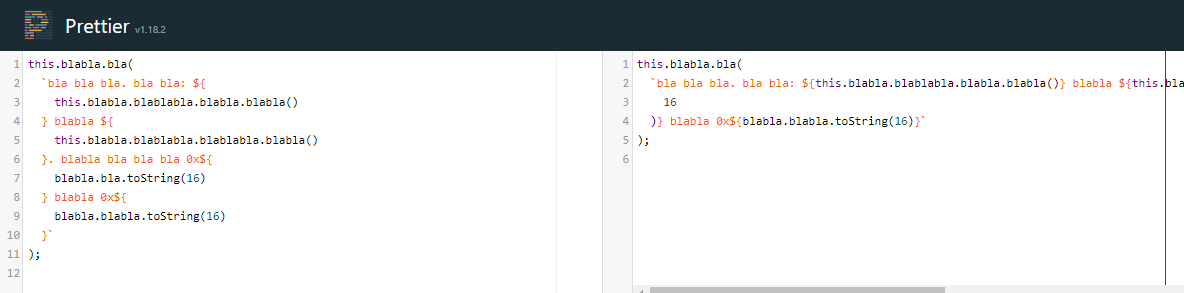
It's about separating code and text. And not crossing the line limit. Vertical scrolling during development and reviewing should be avoided.
Prettier should format this string like other nodes. For example arrays. If an array fits the line width it is formatted in a single line. When you add a new item which will overflow the line width, it will be formatted in multilines by wrapping each item. This is prettier in my opinion.
But please take a look to the other threads / issue (see links above in this post), before you reject this proposal. This is maybe only solvable by an option to match the different tastes and opinions. But I hope we all agree that my example above (image / demo) like Prettier currently formats the template stings can be very ugly.
Here is a demo I converted the literal template string to a default string. And you see that the behavior is equal like I described. Warum sollte Prettier template strings anders behandeln? This is not prettier.
Here you can see the demo as screenshot. It demonstrates how Prettier formats concatenated strings. Is an expected behavior. Only the template strings are formatted in a different way. Why?

 Domvel
on 7 Nov 2019
Domvel
on 7 Nov 2019
@Domvel it is open source so we are welcome to PRs
 alexander-akait
on 7 Nov 2019
alexander-akait
on 7 Nov 2019
@evilebottnawi Of course. I would do it with pleasure. But this is just yet in the discussion state. And I don't like rejected pull-requests. :) (Waste of work) And currenlty It sounds like rejection. (unjustifiably) It looks more like a bug. But here it is discussed if we should keep this bug. Weird.
And btw. My wanted format behavior was already implemented before. It was removed. We should just revert it or add an option. (see #6262) (I have not yet checked if this is exactly my desired behavior.)
Domvel
on 7 Nov 2019
I cannot understand why someone would want a template literal such that
`hello my name is ${
myObject.name
}  nice to meet you`
this is unambiguously ridiculous. i am comfortable saying that 99% of devs would never want this in their codebase. set your word wrap on your text editor and call it a day.
 shamilovtim
on 7 Nov 2019
shamilovtim
on 7 Nov 2019
@shamilovtim Nope, you just don't understand it. The string you posted will be formatted by my proposal like:
//                                                                             |
`hello my name is ${myObject.name} nice to meet you`;
//                                                                             |
(unless your double space, I corrected.)
Ask before downrate. It's about breaking on line width limit. But anyway, I have already written it: It looks like this is only solvable by an option so that everyone is satisfied.
I cannot understand why someone would want a 1000 and more long string in one line.
btw. your code snippet above is really ugly formatted. (This is just manipulative.)
Domvel
on 7 Nov 2019
I understand full well that you want it to happen when it hits the column width but that makes no difference, It's still the same code. If it's bad code at 50 characters, it's bad code at 100 characters. There is no value judgment in my mind that suddenly makes this good just because my line is long.
shamilovtim
on 7 Nov 2019
@shamilovtim And you want a ugly wrapped or cutted string. (behind line limit) You like vertical scrolling and breaking strings / lines at inappropriate places. Or what's your desired format? Any examples?
Avoid overlapping the print width / line length. (usually 80 or 120). Is this really ridiculous? Show me your source code please. Think about more complex strings as your tiny string above. And again, take a look to the demo and screenshot above. The right side is your desired format. 🙄 (more or less. Maybe you want a complete one liner?)
Domvel
on 7 Nov 2019
to back up my point that if it's bad code at 50 characters, it's bad code at 100 characters. line 7 is a 128 long column all on one line with prettier.
const validationSchema = Yup.object().shape({
    reduceFee: Yup.number()
      .typeError('The fee must be a number')
      .required(`If you don't want to reduce the fee please set the visit fee back to ${originalFee}`)
      .max(
        originalFee,
        `The fee can only be reduced below the original price of ${originalFee}. Please set the fee to ${originalFee} or lower`
      )
  });
Under your proposal I would get the following result:
const validationSchema = Yup.object().shape({
    reduceFee: Yup.number()
      .typeError('The fee must be a number')
      .required(`If you don't want to reduce the fee please set the visit fee back to ${originalFee}`)
      .max(
        originalFee,
        `The fee can only be reduced below the original price of ${originalFee}. Please set the fee to ${
          originalFee
           } or lower`
      )
  });
or maybe it would break my string somewhere else. either way, it would look like a function parameter and obscure the meaning of my code. you have a setting in your code editor for word wrap if you have a problem with this, which is completely compatible with the way prettier treats this now. i'm not sure why instead you'd prefer your preference to be inserted into my code rather than changing a setting in your editor.
shamilovtim
on 7 Nov 2019
@shamilovtim No, that is not correct. Not my proposal.
It will look like this. (Example print with 80 chars).
const validationSchema = Yup.object().shape({
  reduceFee: Yup.number()
    .typeError('The fee must be a number')
    .required(
      `If you don't want to reduce the fee please set the visit fee back to ${
        originalFee
      }`
    )
    .max(
      originalFee,
      `The fee can only be reduced below the original price of ${
        originalFee
      }. Please set the fee to ${
        originalFee
      } or lower`
    )
});
In your original code, I have to scroll vertically to find the variables / expression. Horrible. (For Clean Code / Reviews / Debugging)
Domvel
on 7 Nov 2019
yeah, that's just insane to me. it should be clear what's a parameter in my function and what's a string. this compromises my code and it alters the semantic nature of commas and brackets away from every language norm i've ever seen since i learned on Java 10 years ago. hell i'd rather get a horizontal scrollbar that takes 3 seconds to scroll right for 1000 characters than have this kind of behavior from prettier. that's my stance on this.
shamilovtim
on 7 Nov 2019
@shamilovtim Note: That the code highlighter here on Github is really not the best. Especially for literal template string. Try it in VS Code. (I use VS Code with One Dark Pro btw). And you will see the code and string separated clearly. Here on Github, you're right. Hard to read.
Domvel
on 7 Nov 2019
shamilovtim
on 7 Nov 2019
@shamilovtim You ignores the print width. And no one should scroll vertically. I don't even wish that to my enemies. ;) Your first screenshot is resized here. :D
Domvel
on 7 Nov 2019
i'm on a 15" 2018 MBP and the 128 column only ends at 50% of my screen.
shamilovtim
on 7 Nov 2019
@shamilovtim Hey, if you set a high value for your print width my proposal will not annoy you. Now again, I am not sure if you have fully understood my proposal. Ok, maybe you want a small print width for the other stuff to keep it clean, but not for the template string, right? That's a bit contradictory. But ok, it's your opinion about this. If you want to fill your full screen, you should write all your code (nodes) in a single line. I'll suggest overflow-x: hidden for VS Code. Hehe. ;) Keep in mind that maybe you have two code windows side by side. (Also with multiple monitors).
Again, an option could be the correct way. To respect the print width or not.
Respect the print width will result in this:
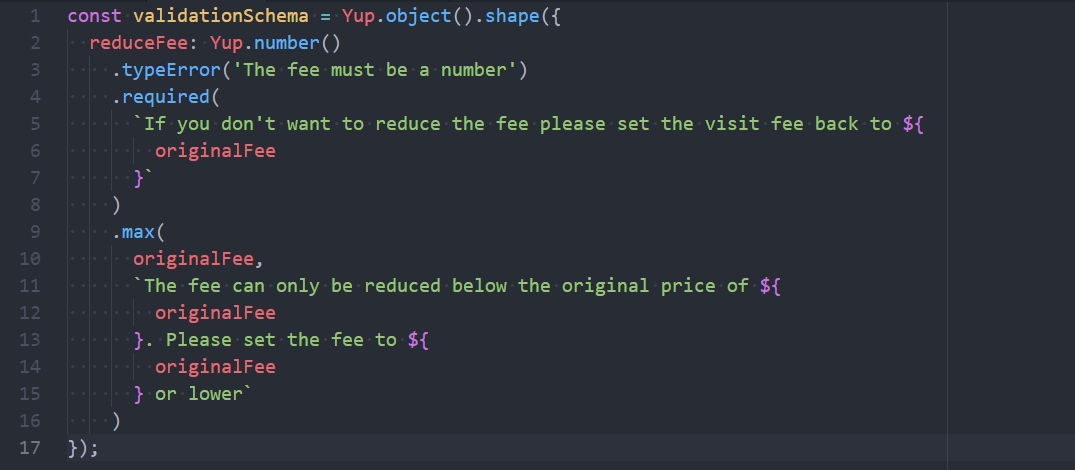
Disabled the option will result this (may cause more vertical overflow / scroll and maybe linter issues.):

(Look at the print width line / ruler.)
Note that Prettier formats a concat string similar as my proposal:
const validationSchema = Yup.object().shape({
  reduceFee: Yup.number()
    .typeError('The fee must be a number')
    .required(
      "If you don't want to reduce the fee please set the visit fee back to " +
        originalFee
    )
    .max(
      originalFee,
      'The fee can only be reduced below the original price of ' +
        originalFee +
        '. Please set the fee to ' +
        originalFee +
        ' or lower'
    )
});

So my proposal is just a request to handle template string like all other nodes like concat string, array, etc. formatted by Prettier. Only the template string steps out of line. Looks like Prettier breaks its rules.
Domvel
on 7 Nov 2019
my print width for prettier is about 120 (50% of my screen) which i think is very reasonable. and the literal i have there on line 7 only breaks it by about 8 characters. i don't mind the param being on a separate line, because both params are being treated equally. it's only once you start treating string literals like params that i have a problem because it's competing with my params for visual meaning. if my string wrapped i'd say so be it. the whole thing would be green in my screenshot, i wouldn't be seeing "originalFee" wrapped down in its lexical color two times like it's a parameter. in my color theme i treat literal syntax highlighting like Monokai does and i'm sure you understand how popular Monokai is with people. this would obfuscate code for thousands of people. if i had to change the syntax highlighting of literals just for prettier i'd say prettier is doing something wrong.
sorry for all the chatter on here.
shamilovtim
on 7 Nov 2019
/cc @thorn0 I think we need open new issue about this improvements and copy examples of code in new issue and continue fix problems with literal, will be great fix all possible problems to 2.0
alexander-akait
on 22 Nov 2019
Why not just allow us to use // prettier-ignore-start and // prettier-ignore-end.
I find ANY changes to my template literals to be an offense against me, God and Nature. :)
I should be allowed to disable the formatting ANY time in my code by wrapping it. But even in version 1.16.4 it refuses to accept the ignore command in my JS.
PLEASE allow this to work!!
Here is an example of my code:
  // prettier-ignore-start
  return `
  <a class="${mobileDisplay === "false" ? styles.mobileHide : ""}" href="${item.link && item.link.URL ? item.link.URL : ""}" ${item.link && item.link.URL.indexOf("//") > -1 ? `target="_blank"` : ""}>
    <div class="${styles.icon}">${icon({ pkg: "std", name: item.name, title: item.svgTitle})}</div>
  </a>`;
  // prettier-ignore-end
 intervalia
on 9 Jan 2020
intervalia
on 9 Jan 2020
@intervalia // prettier-ignore does work for template literals. Not sure what you need prettier-ignore-start and prettier-ignore-end for. Could you elaborate? Preferably in a separate issue.
 thorn0
on 9 Jan 2020
thorn0
on 9 Jan 2020
I am using VSCode. I have Prettier 1.16.4.
If I have this in my file:
  // prettier-ignore
  return `
  <a class="${mobileDisplay === "false" ? styles.mobileHide : ""}" href="${item.link && item.link.URL ? item.link.URL : ""}" ${item.link && item.link.URL.indexOf("//") > -1 ? `target="_blank"` : ""}>
    <div class="${styles.icon}">${icon({ pkg: "std", name: item.name, title: item.svgTitle})}</div>
  </a>`;
And format the file, or even paste into that template literal then the code reformats to this:
  // prettier-ignore
  return `
  <a class="${mobileDisplay === "false" ? styles.mobileHide : ""}" href="${
    item.link && item.link.URL ? item.link.URL : ""
  }" ${item.link && item.link.URL.indexOf("//") > -1 ? `target="_blank"` : ""}>
    <div class="${styles.icon}">${icon({
    pkg: "std",
    name: item.name,
    title: item.svgTitle
  })}</div>
  </a>`;
}
I just updated to 1.19.1 and I am still getting the same formatting
intervalia
on 9 Jan 2020
@intervalia Just tested this with Prettier 1.16.4 and it worked for me. Anyways, it's really off topic in this issue. Please open a separate issue and provide clear steps to reproduce the problem if you want help with this.
thorn0
on 9 Jan 2020
I think that printWidth should still be respected for "simple" cases in some circumstances.
We have one template string that is providing an error message with multiple fields that represent a data key, and were using typescript/tslint with 'prefer template strings'. Previously the template string was separated onto 5 lines, and fairly readable. With prettier 1.19.1 it's condensed into a single line that is 316 characters long - with a print width of 120 characters. I can understand the argument for exceeding the print width by a moderate amount in order to keep the template string together, but almost tripling the print width is arguably taking that too far.
Can I suggest at least putting in a heuristic where if the printWidth is exceeded by too much - e.g. more than 50% - then even the simple template strings should be wrapped?
 dawnmist
on 10 Mar 2020
dawnmist
on 10 Mar 2020
@dawnmist We might consider something like that, but does it really make sense to use template literals in such situations? Wouldn't a simple concatenation be more readable?
thorn0
on 10 Mar 2020
@thorn0 The tslint rule for prefer template strings marks plain concatenation as undesirable/needs fixing. Until now that rule had worked hand-in-hand nicely with prettier.
It's only the change in prettier to ignore the printWidth entirely for template strings that now makes it a problem - the template strings _used_ to be readable but now are being formatted in a manner that makes no sense given the content of the template string. Sure, changing them all to simple concatenation _now_ would be more readable than what prettier is creating - but that's because prettier is ignoring its other settings entirely and mashing everything into a single line regardless of what the final length would be even in situations when doing that is clearly unsuitable.
dawnmist
on 10 Mar 2020
most of the time I log, I apply format functions to the content:
console.log(`... ${format(x)} ...`)
which ends up as
console.log(`...${
  format(x)
}...`);
undesirable, IMO. I'd rather have template literals left untouched. It should probably be an option:
{
  singleQuotes: true,
  ...
  ignoreTemplateLiterals: true,
}
 doplumi
on 8 Nov 2020
doplumi
on 8 Nov 2020
 DmitryKoterov
·
68Comments
DmitryKoterov
·
68Comments
 glen-84
·
69Comments
glen-84
·
69Comments
 justrhysism
·
207Comments
justrhysism
·
207Comments
 aboyton
·
81Comments
aboyton
·
81Comments
 rassie
·
82Comments
rassie
·
82Comments


Most helpful comment
Can we just have an option to NOT format template strings?
I think that is a simple solution to something that a lot of people have very different opinions about and is very difficult to put together a good heuristic around