Powertoys: Power Toys hotkey doesn't overrides system hotkey
Environment
Windows build number: Microsoft Windows [Version 10.0.18363.900]
PowerToys version: v0.19.1
PowerToy module for which you are reporting the bug (if applicable): PowerToys Run
Steps to reproduce
- For example set PT Run hotkey to default
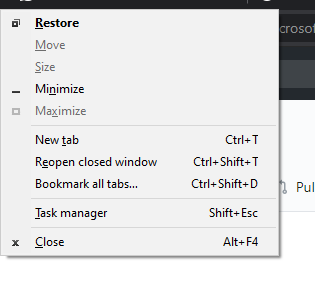
Alt+Space - Sometimes this hotkey triggers window menu instead of opening PT Run (check #4922)
Expected behavior
PT Run launches
Actual behavior
Sometimes window menu opens. I tried different hotkeys (eg: Win + Space) the same thing happened sometimes. This time sometimes keyboard layout selector opened instead of PT Run.
Screenshots
 TheMisir
All 10 comments
Same issue here with the latest v19.1, even after remapping Alt+Space to different keymap eg. Alt+P, it's not opening up Run at all.
 teekamsuthar
on 12 Jul 2020
teekamsuthar
on 12 Jul 2020
posted this somewhere else, but try to seeing if you have "itype.exe" running in task manager. It was also not working for me, but I went to task manager and kill "itype.exe" process. and it was working again.
it is installed if you have microsoft mouse and keyboard centre.
I dealt with it by creating a batch scipt that kills itype.exe and put it in my startup folder..
I'm on version 0.19.0
 ultimatethunderboltgodkiller
on 13 Jul 2020
ultimatethunderboltgodkiller
on 13 Jul 2020
Guys, how about not overriding the system default hot-key?
It's literally the only way to get a window back in view when the title-bar is off-screen for some unusual reason.
You hit Alt+Space then hit "S" or Size or "M" for Move so that you can use the keyboard arrow keys to size or move the windows. Since you can't move the mouse off screen, this is your only option.
 kasajian
on 14 Jul 2020
kasajian
on 14 Jul 2020
Guys, how about not overriding the system default hot-key?
I ended up just not using Alt + Space. Instead I'm currently using Alt + P from dentistfrankchen's comment. But since Alt + Space is default hotkey for PT Run I think this issue needs to be fixed for new users.
TheMisir
on 14 Jul 2020
They should probably just change the default hotkey to something that isn't already in use by something else
 T-x-T
on 14 Jul 2020
T-x-T
on 14 Jul 2020
For me is not working with any hotkey that I try.
Does anyone know if this issue is fixed in version 0.19.2?
 carlosmatioli
on 17 Jul 2020
carlosmatioli
on 17 Jul 2020
hi everyone, we've fixed some bugs in most recent release, can you see if this is repro-able in the latest release, in 19.2?
 saahmedm
on 17 Jul 2020
saahmedm
on 17 Jul 2020
@saahmedm I'll reply soon, I need to test when PC is on load.
UPDATE:
I checked a few times. Sometimes when I press Alt + Space windows menu opens and closes a few seconds later then PT Run launches. Usually when PC is on avg. load.
TheMisir
on 17 Jul 2020
Thanks for the update @THeMisir, since we're receiving this issue a lot, so directing you to this thread: #5055 , please follow the conversation and help us out there!
closing as duplicate
saahmedm
on 22 Jul 2020
I changed it to Win+Q because that does the same thing as Win+S and if PT Run is not active, you still have a search function.
 Jay-o-Way
on 25 Oct 2020
Jay-o-Way
on 25 Oct 2020
Related issues
 aminya
·
3Comments
aminya
·
3Comments
 enricogior
·
3Comments
enricogior
·
3Comments
 21cpDev
·
3Comments
21cpDev
·
3Comments
 CombeeMike
·
3Comments
CombeeMike
·
3Comments
 verglor
·
3Comments
verglor
·
3Comments
Most helpful comment
Guys, how about not overriding the system default hot-key?
It's literally the only way to get a window back in view when the title-bar is off-screen for some unusual reason.
You hit Alt+Space then hit "S" or Size or "M" for Move so that you can use the keyboard arrow keys to size or move the windows. Since you can't move the mouse off screen, this is your only option.