Powertoys: [installer] uninstalling PT requires quitting other apps
This applies to current master 4dfac020650989c598bf4eb529bfe5e136047889
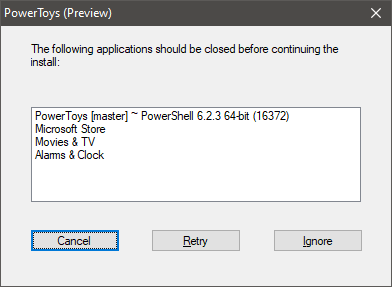
The MSI is trying to uninstall components that are used by other apps.
 enricogior
All 14 comments
The reason why this was happening is that launcher continues to run in the background while we try to uninstall PowerToys. If my understanding is correct, the above PR fixed it because Launcher was no longer running in that MSI because of the missing dlls.
An easy way to repro this even without launcher is to open settings v2 and try to uninstall powerToys. It shows the same dialogue that some applications need to be closed and it doesn't show this when we close settingsv2 and try to uninstall. However, it is prominently noticed with launcher because it is always running in the background.
According to me the correct fix for this issue would be to close PowerLauncher.exe and the Settings executable before uninstalling, as is done for the PowerToys.exe.
EXISTINGPOWERRENAMEEXTPATH OR EXISTINGIMAGERESIZERPATH
 alekhyareddy28
on 13 May 2020
alekhyareddy28
on 13 May 2020
yes, we should add this too
 crutkas
on 13 May 2020
crutkas
on 13 May 2020
and windowwalker
crutkas
on 13 May 2020
@alekhyareddy28
great finding, thanks!
enricogior
on 13 May 2020
@enricogior I haven't been able to repro this exact scenario where it shows other random applications. For me it only shows PowerToys settings. Did you face this while installing or while uninstalling?
 arjunbalgovind
on 14 May 2020
arjunbalgovind
on 14 May 2020
I hit this installing.
crutkas
on 14 May 2020
@enricogior I haven't been able to repro this exact scenario where it shows other random applications. For me it only shows PowerToys settings. Did you face this while installing or while uninstalling?
I see random applications as well, but only while uninstalling. This doesn't show up for me if all PTs are exited properly.
alekhyareddy28
on 14 May 2020
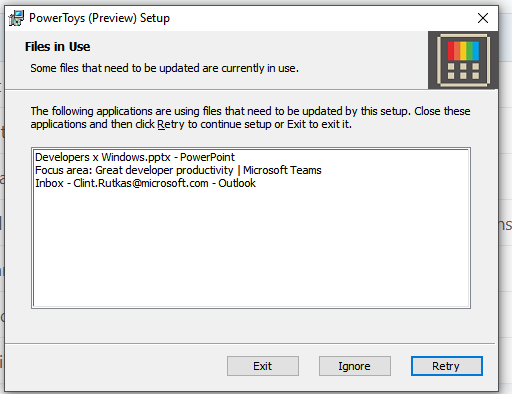
I just installed from the farm, still hitting scenarios it where 'files are in use.' Seems Office related.
Note, this was on "install", not uninstall
I had uninstalled prior builds and deleted settings as well.
crutkas
on 14 May 2020
It might be a bug in WiX/MSI/Windows, since in theory those applications are not using the dlls installed by PT, but for some reason they are considered the same dll even if they are copies.
enricogior
on 14 May 2020
Maybe there's a possibility that Wix is looking only at the file IDs rather than the file names? I think there were some files added in the wix installer without file IDs and maybe that is what is causing the problem? Just thinking of possible reasons why Wix would throw this error
arjunbalgovind
on 14 May 2020
@arjunbalgovind
yest, that is a possibility. We'll verify it. Thanks of the suggestion.
enricogior
on 14 May 2020
@arjunbalgovind yes, that's our theory as well.
Looks like we might just disable the FileInUse dialog or InstallValidate action altogether now. I'd like to test this solution, but I cannot reproduce the problem on installation. I have Outlook, PowerPoint and Teams open, just the same as on @crutkas screenshot, but the installation still happens w/o that dialog. Would be awesome to have a consistent way of reproducing it.
I'm also thinking of possible implications of disabling that dialog, but only the contrived and intentional scenarios come up.
 yuyoyuppe
on 14 May 2020
yuyoyuppe
on 14 May 2020
WiX is the build toolset. Windows Installer (MSI) is the runtime. So WiX isn't involved in this at runtime, other than supplying the dialog. File ids are irrelevant but maybe not names.
Start with a verbose log.
 barnson
on 14 May 2020
barnson
on 14 May 2020
@barnson
So WiX isn't involved in this at runtime
We know that, but if we do something wrong in the WiX definitions or if WiX doesn't build the installer correctly, it's still "involved".
enricogior
on 14 May 2020
Related issues
 xfirf
·
3Comments
xfirf
·
3Comments
 patware
·
3Comments
patware
·
3Comments
 amorenew
·
3Comments
amorenew
·
3Comments
 Satanarious
·
3Comments
enricogior
·
3Comments
Satanarious
·
3Comments
enricogior
·
3Comments