Powertoys: Shortcut guide not working
Windows build number: 10.0.18362.720
PowerToys version: v0.15.2
PowerToy module for which you are reporting the bug (if applicable): Shortcute Guide
I just installed powertoys on my pc. I opend the programs as admin. When I press the Windows key to trigger the Shortcute Guide function nothing happens.
 sinandemirci
All 13 comments
are you press and holding? any other programs running that could intercept a keystroke?
 crutkas
on 26 Mar 2020
crutkas
on 26 Mar 2020
I opend the programs as admin
@sinandemirci you mean you run PowerToys as admin, or you run other applications as admin?
In the second case, you also need to set PowerToys to run as admin (there is an option in the General Settings).
 enricogior
on 26 Mar 2020
enricogior
on 26 Mar 2020
I opened Powertoys as admin and no other apps were open.
P.S. I know that I need to press hold the Windows key. I even tried changing the time needed.
sinandemirci
on 26 Mar 2020
@sinandemirci my question is more about what other apps are running possibly in the background. Some apps can grab keystrokes. RDP style apps are a great example of grabbing WinKey for instance.
crutkas
on 26 Mar 2020
No other apps were working in the background. I specificly tried it in that way. I press hold the windows key for about 2 seconds and when I release it the start menu opens everytime.
sinandemirci
on 27 Mar 2020
@sinandemirci
did you install the MSI or the MSIX version?
By default the Shortcut Guide should be on, but just to be 100% sure, verify in the General Settings if it's on (the Shortcut Guide settings are still on even when the module is turned off).
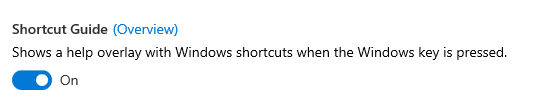
enricogior
on 27 Mar 2020
I installed the MSI version and the setting is on.
sinandemirci
on 27 Mar 2020
The next step would be to send you a debug version of PowerToys to try to figure out what is going on.
Since we are in the process of releasing 0.16, we won't be able to work on this until next Wednesday.
enricogior
on 27 Mar 2020
I don't know why but it seems to work now. The only imported thing worth mentioning is that I closed my laptop yesterday and opened my laptop today
sinandemirci
on 27 Mar 2020
OK, please let us know if it happens again.
enricogior
on 27 Mar 2020
I just installed version .18 and the shortcut guide does not work.
Running as admin is enabled.
Shortcut Guide enabled in PowerToy settings.
Windows 10 .0.18363
Have rebooted computer.
EDITED TO ADD: _Restarted computer did not fix however POWERING OFF the computer then restarting has resolved the issue._
 NuclearM00se
on 21 May 2020
NuclearM00se
on 21 May 2020
@NuclearM00se do you have another app like AHK or somethign that could take over WinKey?
crutkas
on 21 May 2020
I have no other app that is PoweToy-like. I generally don't find them useful but I decided to explore Power Toys mostly for the renaming app for the time being.
NuclearM00se
on 21 May 2020
Related issues
 Martin-Hausleitner
·
3Comments
Martin-Hausleitner
·
3Comments
 verglor
·
3Comments
verglor
·
3Comments
 CombeeMike
·
3Comments
CombeeMike
·
3Comments
 seritools
·
3Comments
seritools
·
3Comments
 saahmedm
·
3Comments
saahmedm
·
3Comments