Powertoys: FanzyZones and multiple taskbar icons
Environment
Windows build number: Microsoft Windows [Version 10.0.18363.476]
PowerToys version: 0.14
PowerToy module for which you are reporting the bug (if applicable): FanzyZones
Steps to reproduce
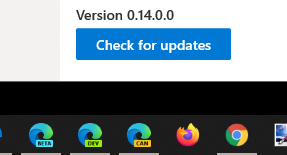
After installing 0.14; opened Edge (Chromium) in Canary, Developer, and Beta channels and it opened multiple windows for the browser and a new icon on the Taskbar.
Turning off PowerToys cleared the issue and Edge worked properly/as expected.
Tried to uninstall PT's from Control Panel and it would crash before completing.
Renamed the program directory and used the Settings>Apps area to uninstall with same results and then finally deleted the renamed folder to reinstall 0.13.
Problem cleared with 0.13 installed.
Expected behavior
Expect Edge to open just one instance versus multiple windows/instances.
Actual behavior
After installing 0.14; opened Edge (Chromium) in Canary, Developer, and Beta channels and it opened multiple windows for the browser and a new icon on the Taskbar.
Turning off PowerToys cleared the issue and Edge worked properly/as expected.
Tried to uninstall PT's from Control Panel and it would crash before completing.
Renamed the program directory and used the Settings>Apps area to uninstall with same results and then finally deleted the renamed folder to reinstall 0.13.
Problem cleared with 0.13 installed.
Screenshots
 WinObs
All 9 comments
Hi @WinObs
thank you for reporting the issues.
I've tried to reproduce it without success
Can you please provide some more details?
Did you have the Edge windows snapped on FancyZones zones with the Move newly created windows to their last known zone option on before reopening them?
tried to uninstall PT's from Control Panel
Do you mean the actual "old" Control Panel and not Windows Settings -> Apps?
What crashed? Did it show any dialog reporting the crash?
Can you check the event log for information regarding the uninstall crash?
Thank you
 enricogior
on 2 Dec 2019
enricogior
on 2 Dec 2019
i can't repro this. Talking with @winObs, he is going to try a few things. Looks like @enricogior also has multiple versions installed as well and didn't hit the issue.
 crutkas
on 2 Dec 2019
crutkas
on 2 Dec 2019
I can repro that, it's the FancyZones "Move newly created windows to their last known zone" regression.
@WinObs could you try our new DLL and see if the problem persists. Here are the instructions and the download link.
 bzoz
on 4 Dec 2019
bzoz
on 4 Dec 2019
This fixed the issue for me!
Rich aka @WinObs
From: Bartosz Sosnowski notifications@github.com
Sent: Wednesday, December 4, 2019 4:33 AM
To: microsoft/PowerToys PowerToys@noreply.github.com
Cc: Richard Hay richardhayjr@hotmail.com; Mention mention@noreply.github.com
Subject: Re: [microsoft/PowerToys] FanzyZones and multiple taskbar icons (#829)
I can repro that, it's the FancyZones "Move newly created windows to their last known zone" regression.
@WinObshttps://eur03.safelinks.protection.outlook.com/?url=https%3A%2F%2Fgithub.com%2FWinObs&data=02%7C01%7C%7C49a3081614994fcf1c0608d7789ce5fb%7C84df9e7fe9f640afb435aaaaaaaaaaaa%7C1%7C0%7C637110487570423003&sdata=pYqxjYSiBllYpQjPNLVdA%2FuVI3cjSPlGC%2FqLyWYi0AQ%3D&reserved=0 could you try our new DLL and see if the problem persists. Here are the instructions and the download linkhttps://eur03.safelinks.protection.outlook.com/?url=https%3A%2F%2Fgithub.com%2Fmicrosoft%2FPowerToys%2Fpull%2F856%23issuecomment-561553060&data=02%7C01%7C%7C49a3081614994fcf1c0608d7789ce5fb%7C84df9e7fe9f640afb435aaaaaaaaaaaa%7C1%7C0%7C637110487570433014&sdata=1kyRMPK1%2BLZh4qWGTx1QfZDc5cjpT711dx3miQrPf%2Fk%3D&reserved=0.
—
You are receiving this because you were mentioned.
Reply to this email directly, view it on GitHubhttps://eur03.safelinks.protection.outlook.com/?url=https%3A%2F%2Fgithub.com%2Fmicrosoft%2FPowerToys%2Fissues%2F829%3Femail_source%3Dnotifications%26email_token%3DAJXJD3BV4H7OOCV67IKHVJDQW52LHA5CNFSM4JUENZZ2YY3PNVWWK3TUL52HS4DFVREXG43VMVBW63LNMVXHJKTDN5WW2ZLOORPWSZGOEF4KKZQ%23issuecomment-561554790&data=02%7C01%7C%7C49a3081614994fcf1c0608d7789ce5fb%7C84df9e7fe9f640afb435aaaaaaaaaaaa%7C1%7C0%7C637110487570443025&sdata=725pkKVZK3ojL%2ByVsOYWa0Q5oNUb5ZV6qwnGbF21Q%2Bs%3D&reserved=0, or unsubscribehttps://eur03.safelinks.protection.outlook.com/?url=https%3A%2F%2Fgithub.com%2Fnotifications%2Funsubscribe-auth%2FAJXJD3DUYBPGCXU4P3R66Y3QW52LHANCNFSM4JUENZZQ&data=02%7C01%7C%7C49a3081614994fcf1c0608d7789ce5fb%7C84df9e7fe9f640afb435aaaaaaaaaaaa%7C1%7C0%7C637110487570453036&sdata=aSsHx63yzuxjl%2FJqocXMQPR%2BPf65nCG2Z9lBvK2MP7w%3D&reserved=0.
WinObs
on 4 Dec 2019
Yes, my initial uninstall attempts were using the legacy Control Panel. Once I used the Settings app – the uninstall went just fine.
No dialogs were shown through when the uninstall attempt crashed out of Control Panel – just see the typical reset of explorer.exe (taskbar rebooting/starting).
As I answered in another thread on this – one of the team sent a new DLL due to a regression with the open new windows in a specific zone and I am now running version 0.14 with that new DLL and the issue with extra windows opening is gone.
Rich aka @WinObs
From: Enrico Giordani notifications@github.com
Sent: Monday, December 2, 2019 3:34 PM
To: microsoft/PowerToys PowerToys@noreply.github.com
Cc: Richard Hay richardhayjr@hotmail.com; Author author@noreply.github.com
Subject: Re: [microsoft/PowerToys] Edge (Chromium) and FanzyZones Issue (#829)
Hi @WinObshttps://apc01.safelinks.protection.outlook.com/?url=https%3A%2F%2Fgithub.com%2FWinObs&data=02%7C01%7C%7Cc1b07142c8f441ba7b8608d77766eb4b%7C84df9e7fe9f640afb435aaaaaaaaaaaa%7C1%7C0%7C637109156222700621&sdata=roqJA31w3p%2F3mTIeZOtRz%2Fm4RatsFoG7p9%2FRCekH44c%3D&reserved=0
thank you for reporting the issues.
I've tried to reproduce it without success
Can you please provide some more details?
Did you have the Edge windows snapped on FancyZones zones with the Move newly created windows to their last known zone option on before reopening them?
tried to uninstall PT's from Control Panel
Do you mean the actual "old" Control Panel and not Windows Settings -> Apps?
What crashed? Did it show any dialog reporting the crash?
Can you check the event log for information regarding the uninstall crash?
Thank you
—
You are receiving this because you authored the thread.
Reply to this email directly, view it on GitHubhttps://apc01.safelinks.protection.outlook.com/?url=https%3A%2F%2Fgithub.com%2Fmicrosoft%2FPowerToys%2Fissues%2F829%3Femail_source%3Dnotifications%26email_token%3DAJXJD3BDUBSL6WLW2AIYDJ3QWVWKHA5CNFSM4JUENZZ2YY3PNVWWK3TUL52HS4DFVREXG43VMVBW63LNMVXHJKTDN5WW2ZLOORPWSZGOEFUZURI%23issuecomment-560568901&data=02%7C01%7C%7Cc1b07142c8f441ba7b8608d77766eb4b%7C84df9e7fe9f640afb435aaaaaaaaaaaa%7C1%7C0%7C637109156222720642&sdata=BSty9sIiN6vyjPX%2BIm55rPOwYwI%2Brb1Zs0q43LDUCII%3D&reserved=0, or unsubscribehttps://apc01.safelinks.protection.outlook.com/?url=https%3A%2F%2Fgithub.com%2Fnotifications%2Funsubscribe-auth%2FAJXJD3C4JYIUHFNND465MGTQWVWKHANCNFSM4JUENZZQ&data=02%7C01%7C%7Cc1b07142c8f441ba7b8608d77766eb4b%7C84df9e7fe9f640afb435aaaaaaaaaaaa%7C1%7C0%7C637109156222730647&sdata=Jz7mO7InFRpJC3cwCRe50GKYT0z0kUUqVC76qbUVwMA%3D&reserved=0.
WinObs
on 4 Dec 2019
@WinObs
thank you very much for reporting the issue and for taking the time to test the fix, this was a great help.
Thanks.
enricogior
on 4 Dec 2019
Glad to help out!
From: Enrico Giordani notifications@github.com
Sent: Wednesday, December 4, 2019 8:07 AM
To: microsoft/PowerToys PowerToys@noreply.github.com
Cc: Richard Hay richardhayjr@hotmail.com; Mention mention@noreply.github.com
Subject: Re: [microsoft/PowerToys] FanzyZones and multiple taskbar icons (#829)
@WinObshttps://eur03.safelinks.protection.outlook.com/?url=https%3A%2F%2Fgithub.com%2FWinObs&data=02%7C01%7C%7Ca7fd1cdfabcb42e37f9508d778bae6fd%7C84df9e7fe9f640afb435aaaaaaaaaaaa%7C1%7C0%7C637110616437425417&sdata=LMslsK6ER6E3LlFB%2BgNxAkLuK9TWU%2FJi8o0EaB4yVek%3D&reserved=0
thank you very much for reporting the issue and for taking the time to test the fix, this was a great help.
Thanks.
—
You are receiving this because you were mentioned.
Reply to this email directly, view it on GitHubhttps://eur03.safelinks.protection.outlook.com/?url=https%3A%2F%2Fgithub.com%2Fmicrosoft%2FPowerToys%2Fissues%2F829%3Femail_source%3Dnotifications%26email_token%3DAJXJD3EKDM3BHX7MYOMNGN3QW6TQVA5CNFSM4JUENZZ2YY3PNVWWK3TUL52HS4DFVREXG43VMVBW63LNMVXHJKTDN5WW2ZLOORPWSZGOEF4544A%23issuecomment-561634928&data=02%7C01%7C%7Ca7fd1cdfabcb42e37f9508d778bae6fd%7C84df9e7fe9f640afb435aaaaaaaaaaaa%7C1%7C0%7C637110616437445439&sdata=NYULTQnM7FJVttCU1N%2Fokd7syOhgclj%2BWxoEL8v1Gu4%3D&reserved=0, or unsubscribehttps://eur03.safelinks.protection.outlook.com/?url=https%3A%2F%2Fgithub.com%2Fnotifications%2Funsubscribe-auth%2FAJXJD3ADOOFPKNAVQFWRTQLQW6TQVANCNFSM4JUENZZQ&data=02%7C01%7C%7Ca7fd1cdfabcb42e37f9508d778bae6fd%7C84df9e7fe9f640afb435aaaaaaaaaaaa%7C1%7C0%7C637110616437455444&sdata=X3kPKAcpucPRj6mxRBohBPMx4o0LjPeNpfAoakNvCUI%3D&reserved=0.
WinObs
on 4 Dec 2019
The new release is available https://github.com/microsoft/PowerToys/releases/tag/v0.14.1
enricogior
on 5 Dec 2019
Installed the update - thanks.
WinObs
on 5 Dec 2019
Related issues
 SWinxy
·
3Comments
SWinxy
·
3Comments
 Martin-Hausleitner
·
3Comments
Martin-Hausleitner
·
3Comments
 anish-94
·
3Comments
anish-94
·
3Comments
 21cpDev
·
3Comments
21cpDev
·
3Comments
 Satanarious
·
3Comments
Satanarious
·
3Comments