Polaris-react: Multiple ResourcePicker in a component
Issue summary
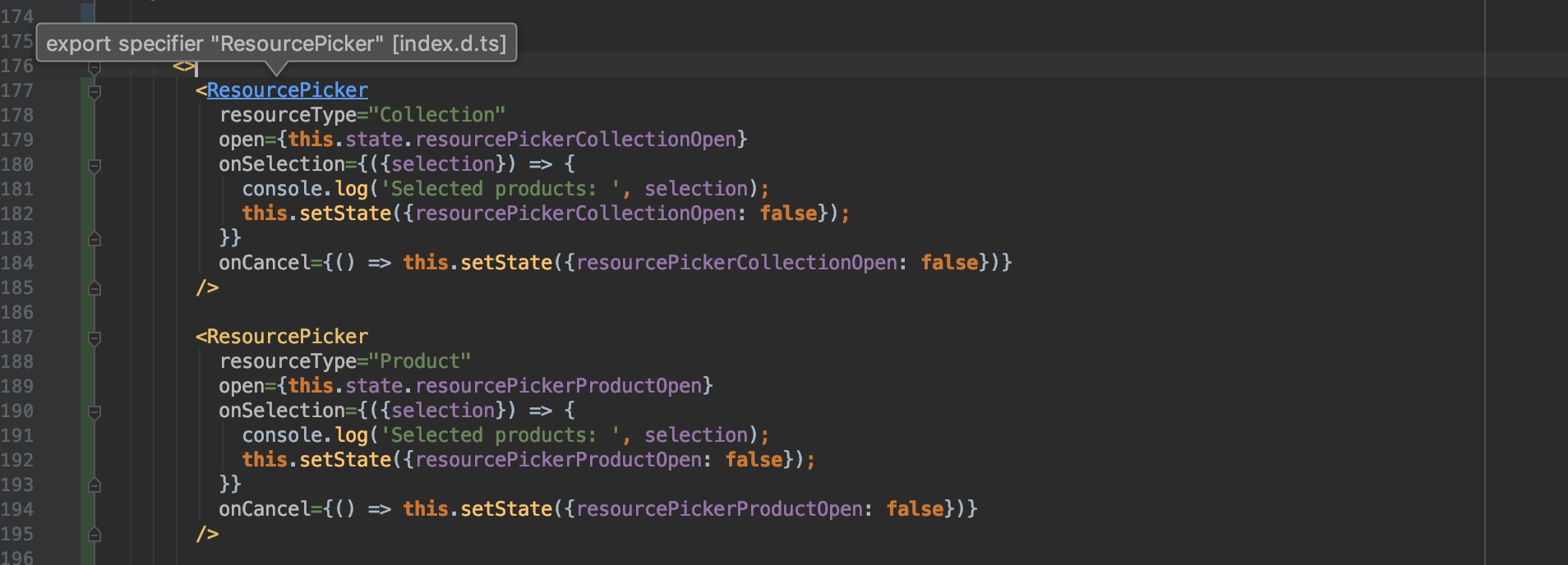
I added two ResourcePicker with two type Product and Collection, but does't work, the resource picker just active last line ResourcePicker
See this image below:
Expected behavior
Actual behavior
Steps to reproduce the problem
1.
1.
1.
Reduced test case
The best way to get your bug fixed is to provide a reduced test case. This CodeSandbox template is a great starting point.
Specifications
- Are you using the React components? (Y/N): Y
- Polaris version number: 3.1.0
- Browser: Chrome
- Device: Mac
- Operating System: OSX Mojave
 fchienvuhoang
All 8 comments
I just came across this too. One workaround is to use only one ResourcePicker component on your page and then set the key prop on it to be equal to whatever you use for the resourceType prop. That key prop changing will cause the component to be unmounted/mounted as the resource type changes.
 mbaumbach
on 19 Nov 2018
mbaumbach
on 19 Nov 2018
Hi @fchienvuhoang, thanks for raising this. (And thank you @mbaumbach for sharing that tip!)
I'm a bit unsure of what you are trying to achieve rendering two pickers at once. Are you looking to achieve a multi-paged modal? Does the same button/input trigger both pickers? Or is there something in one that triggers the other to open and the currently visible one to close? The two can't be rendered together, one or the other should be rendered conditionally (the product or the collection picker) based on the props. If you try to render them both simultaneously the product picker (the last one in the markup you screenshot) will render over the top of the collection picker every time as they are both absolutely positioned to the same place on the screen.
 chloerice
on 19 Nov 2018
chloerice
on 19 Nov 2018
I should note that in my case, I was only trying to render the one picker component conditionally (Using the provided open prop) and noticed that the resource picker didn't change based on the resourceType prop changing as I closed one picker and opened the other, which is why I had to force the unmount/remount using the key prop. Based on the code pasted above, it looks like they may be trying to do the same thing I was with the conditional open prop.
Perhaps the bug is that once a ResourcePicker component has first been rendered, whenever setting the open prop to true, whatever the first resourceType that was used on first render will always be used until the ResourcePicker is unmounted in some way.
I think this could also manifest itself if you have ResourcePicker components in disparate portions of the component hierarchy and conditionally rendering only using the open prop. It'll always use the last mounted resourceType.
Looking at the ResourcePicker code it appears the resourceType is only configuring the appBridge in componentDidMount. Perhaps this is intended behavior, but it differs from how it works in Polaris 2 and it could be confusing given there's a conditional open prop.
mbaumbach
on 19 Nov 2018
Thanks, @mbaumbach that gives me enough info to attempt to reproduce 👍
chloerice
on 19 Nov 2018
@chloerice yes I added two resourcePicker for ready in DOM, and I just active only one resource picker if merchant choose type product or collection in a Choice List, but just one type ResourcePicker type active although I have two state open individual for each Resource picker. Also I try other way switch dynamic ResourceType option with variables but not work two.
Thanks!
fchienvuhoang
on 20 Nov 2018
@fchienvuhoang For a quick workaround, you should be able to conditionally render each of those ResourcePicker components (what @chloerice was recommending) via something like:
{this.state.resourcePickerCollectionOpen && <ResourcePicker resourceType="Collection" ... />}
Keeping the rest of the props as is. If you do a similar conditional render for each ResourcePicker, it should work. Adding a unique key prop to each would be extra safe (though it may not be necessary depending on your state management).
mbaumbach
on 20 Nov 2018
@mbaumbach ohh I will try, thank you so much!
fchienvuhoang
on 20 Nov 2018
This issue has been inactive for 180 days and labeled with Icebox. It will be closed in 7 days if there is no further activity.
![probot-shopify[bot] picture](https://avatars2.githubusercontent.com/in/10530?v=4&s=40) probot-shopify[bot]
on 19 May 2019
probot-shopify[bot]
on 19 May 2019
Related issues
 danrosenthal
·
3Comments
danrosenthal
·
3Comments
 shahab65
·
3Comments
mbaumbach
·
3Comments
shahab65
·
3Comments
mbaumbach
·
3Comments
 greghesp
·
3Comments
greghesp
·
3Comments
 janklimo
·
3Comments
janklimo
·
3Comments
Most helpful comment
@fchienvuhoang For a quick workaround, you should be able to conditionally render each of those
ResourcePickercomponents (what @chloerice was recommending) via something like:Keeping the rest of the props as is. If you do a similar conditional render for each
ResourcePicker, it should work. Adding a uniquekeyprop to each would be extra safe (though it may not be necessary depending on your state management).