Pnpframework: "Object reference not set to an instance of an object" when provisioning ClientSidePages
Version: >= 0.86.0-preview (currently trying 0.101.0-preview)
Issue
Object reference not set to an instance of an object. when applying a template (with ClientSidePage) to a web, using following code:
web.ApplyProvisioningTemplate(provisioningTemplate, applyingInformation);
Same code & template work when using a nuget package 0.84.0 for example. Seems to be introduced when PnP.Core was used for handling ClientSidePages (not sure if the issue lies in this library or with them).
My template is very simple and only provisions 1 ClientSidePage.
Output:
01/02 - Initializing engine
02/02 - ClientSidePages
Stacktrace:
Object reference not set to an instance of an object. at
PnP.Framework.Provisioning.ObjectHandlers.SiteToTemplateConversion.ApplyRemoteTemplate(Web web, ProvisioningTemplate template, ProvisioningTemplateApplyingInformation provisioningInfo, Boolean calledFromHierarchy, TokenParser tokenParser) at
Microsoft.SharePoint.Client.WebExtensions.ApplyProvisioningTemplate(Web web, ProvisioningTemplate template, ProvisioningTemplateApplyingInformation applyingInformation)
Peculiar thing: it does work without a problem when using PnP.PowerShell (latest nightly build, including PnP.Core 0.101.0-preview).
Steps to reproduce
- Create a modern Communication Site
- Apply the template with web.ApplyProvisioningTemplate (in code, as mentioned: PowerShell works). I had to upload as zip, so it needs renaming to pnp first.
- See it fail with the
Object reference not seterror
 YannickRe
All 11 comments
Thanks for reporting this @YannickRe , I'll have a look
 jansenbe
on 5 Jan 2021
jansenbe
on 5 Jan 2021
Hi @YannickRe ,
I've tried to apply the template from the pnp package using latest code and I'm not able to reproduce your issue, the page gets created correctly.
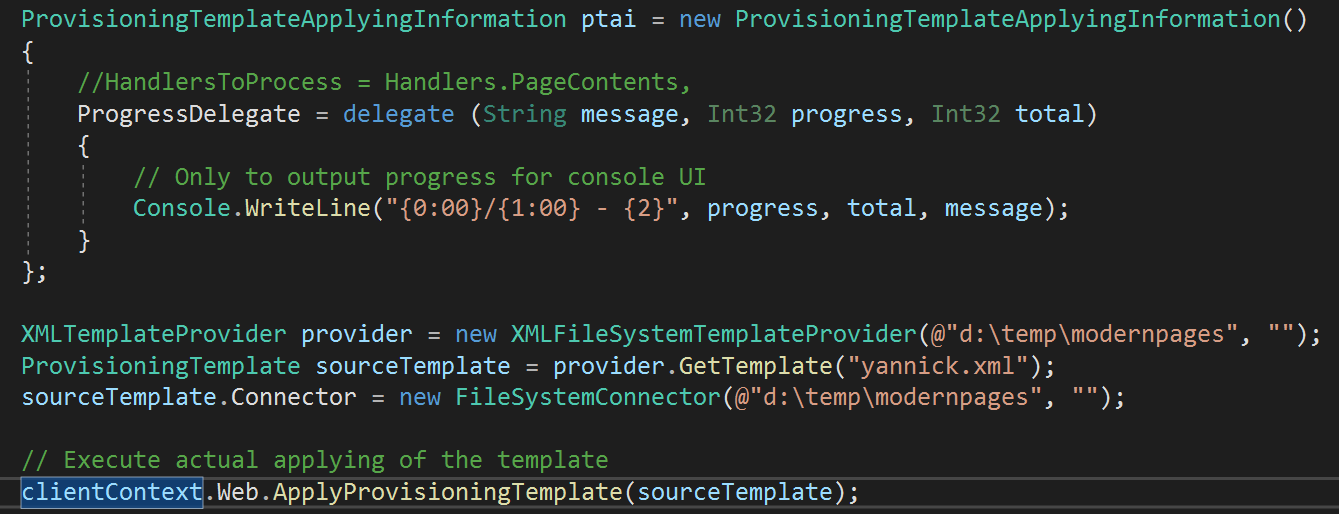
Can you retry your code while using the latest PnP Framework nuget? If you're running from code cross check you've bumped PnP Framework to also use the latest PnP Core nuget. I've tested with PnP Core SDK version 0.4.33-beta1
jansenbe
on 5 Jan 2021
@jansenbe I still encounter the issue, now when I'm using 0.1.102-preview. I run from nuget, and it includes PnP.Core 0.4.33-beta1.
I'll check if I can make a console app to reproduce, there must be something specific in my setup that triggers the issue.
YannickRe
on 5 Jan 2021
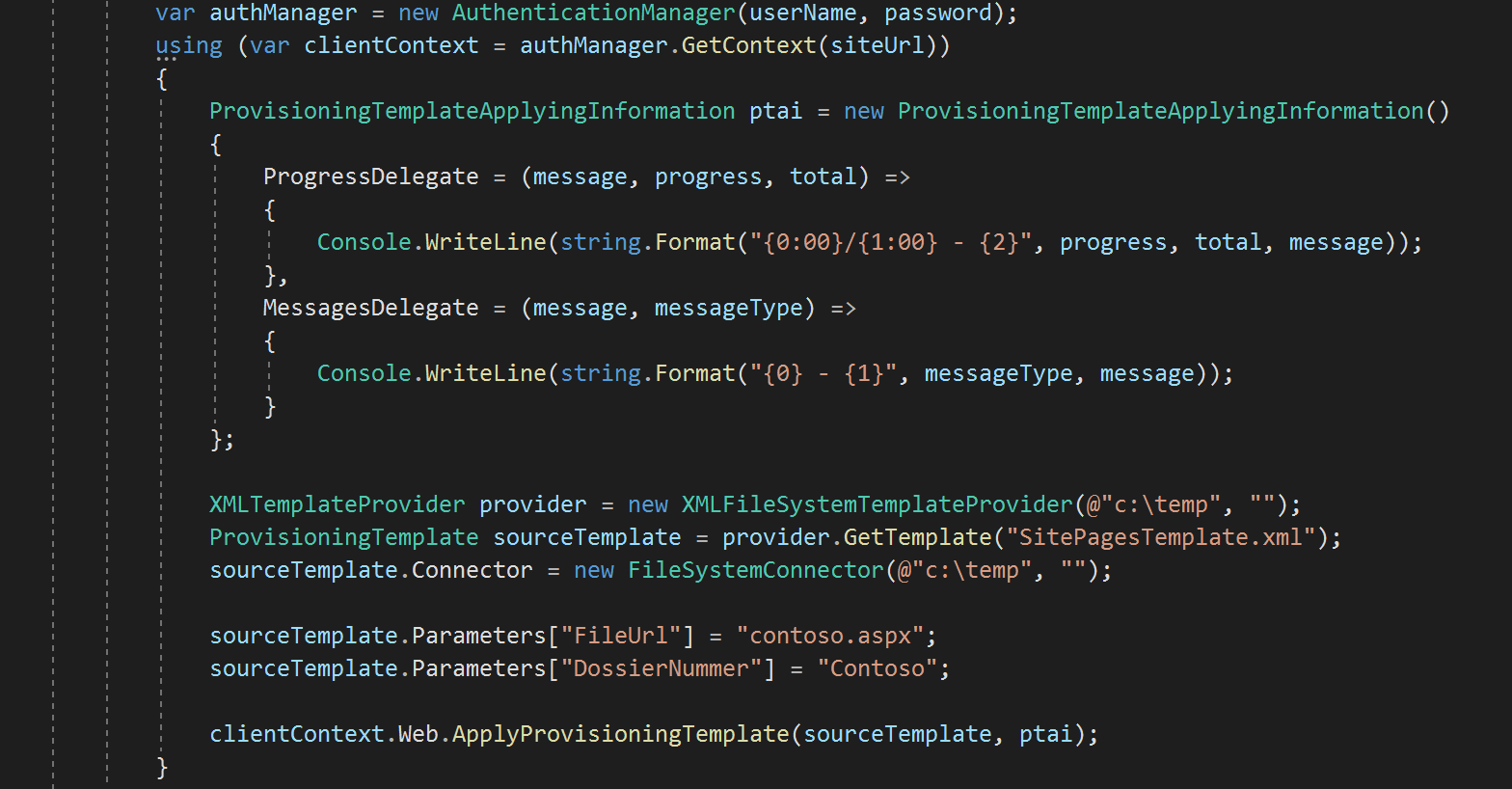
@jansenbe It's an authentication thing. When I use username/password authentication, all works:
It goes wrong when I try to use Azure.Identity to fetch my token. This works before PnP.Core, but now with the newer packages, it fails:
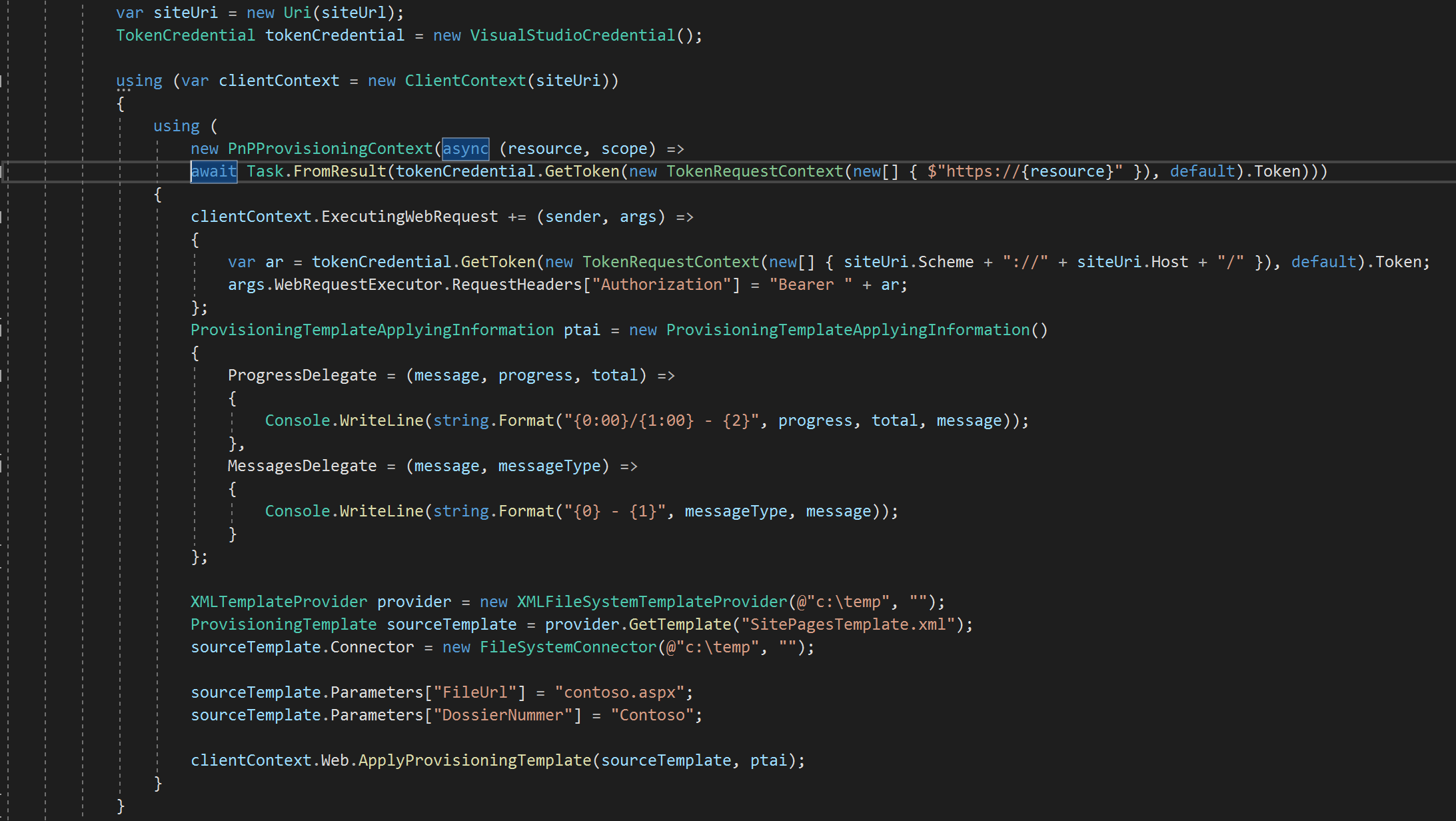
Any idea why this would fail within PnP.Core, any pointers for me to check?
YannickRe
on 5 Jan 2021
My working theory is that following lines of code aren't handling my way of acquiring tokens, and that the ExecutingWebRequest gets dropped:
https://github.com/pnp/pnpframework/blob/167a75bea8296d741b1fb46e22cd9b35ad791b24/src/lib/PnP.Framework/PnPCoreSdk.cs#L37
https://github.com/pnp/pnpframework/blob/167a75bea8296d741b1fb46e22cd9b35ad791b24/src/lib/PnP.Framework/PnPCoreSdkAuthenticationProvider.cs#L52-L68
Does that makes sense? Or am I looking in the wrong place completely?
YannickRe
on 6 Jan 2021
That indeed might be the root cause, the PnPCoreSdkAuthenticationProvider is the one that's being called by PnP Core SDK code whenever a request needs to be get authorized. Seems as your scenario is not working in this model. We're using the PnP Framework GetAccessToken method and I think you should end up in the highlighted section:
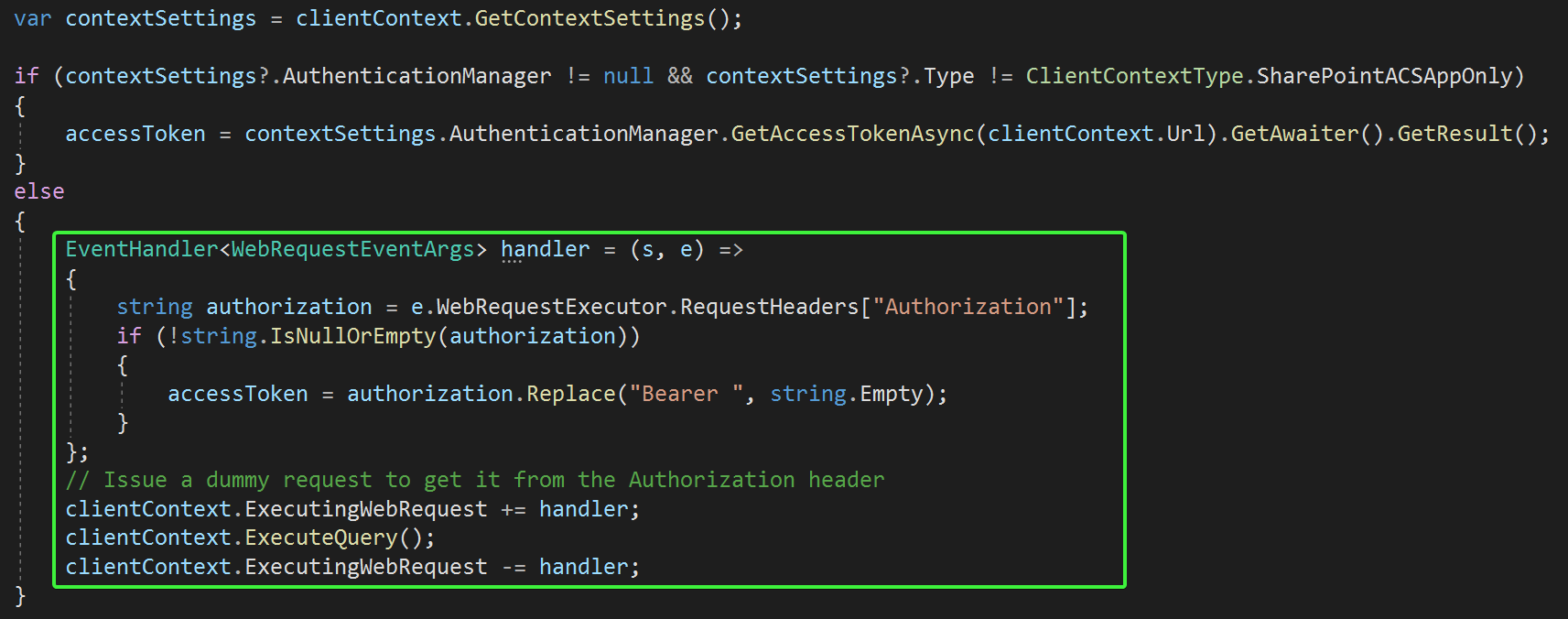
But since you've just created your context you've not yet retrieved a token and as such we can't grab the token...can you try to do one executequery upfront and see if that helps? If not I would suggest to connect your sample code code to the dev branch of PnP Framework and debug
jansenbe
on 6 Jan 2021
Alternatively if you can realize your authentication scenario using the AuthenticationManager class then that should also fix the problem
jansenbe
on 6 Jan 2021
I added an ExecuteQuery() first, to fetch the Title of the Web. It doesn't make a difference, still get the NullReferenceException.
Also, the ExecutingWebRequest gets called multiple times in step one of the provisioning engine (initializing) before the nullreference shows in step 2 (ClientSidePages). I assume that would also have been enough to initialize the necessary things.
I tried the AuthenticationManager.GetAccessTokenContext method but it fails too. Looking at the code, it essentially does the same as what I already do in my code. This would mean that any ClientContext acquired through that code path would also throw this error.

I cannot use the AuthenticationManager class as it does not support ManagedIdentities. I'd love for that class to switch to using Azure.Identity (like Microsoft Graph SDK will do soon too, and all Azure nuget packages already do). Azure.Identity supports all types of authentication, and more (like VisualStudio credentials, AzureCLI credentials and ManagedIdentities).
Has this been considered or something you would consider?
I'll see if I can set aside some time to source code debug PnP.Framework with my sample code to see where exactly this thing fails.
YannickRe
on 6 Jan 2021
Just noticed you're using the PnPProvisioningContext in your sample that fails and as such you control how the access token is obtained. I've tried that myself and below still works for me (accessToken is a string variable holding a valid access token):
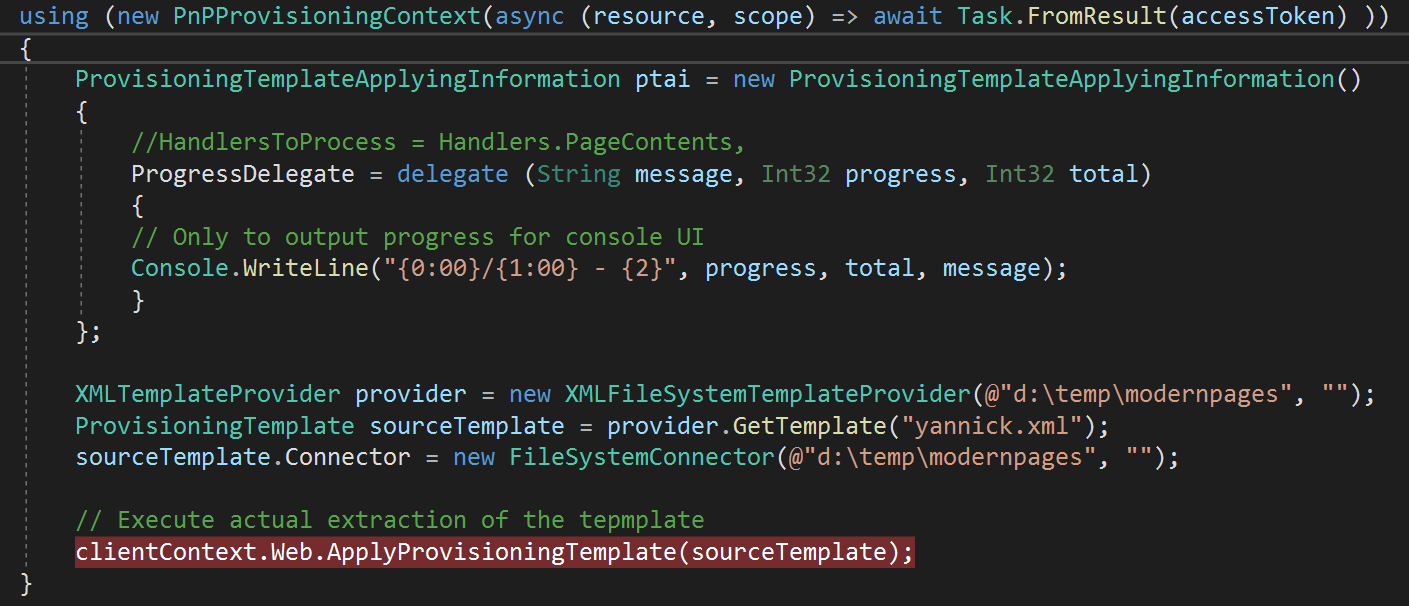
Are you sure your code is getting a valid access token?
jansenbe
on 6 Jan 2021
I'm VERY sure, as the same code works without issue when using the older nuget packages.
Also, my AuthManager try doesn't use the PnPProvisionContext and also fails, so that doesn't seem to be the issue:

Last thing I can think of, from the top of my head, are missing permission scopes. Is there a list of the minimal scopes you need to get provisioning to work now that we're depending on PnP.Core?
Using the source code for debugging will help clarify a lot. All of this are just educated guesses, I'll have to dig a bit deeper to troubleshoot. Currently I am not blocked, by staying on the older preview. I'll figure it out soon ;)
YannickRe
on 6 Jan 2021
I know the issue, I don't completely understand why and thus the best course of action to resolve it.
The nullreference happens here, where contextSettings is null and the next line throws the error:
https://github.com/pnp/pnpframework/blob/2079cded410148a0d757f35f619d439b286a0396/src/lib/PnP.Framework/PnPCoreSdkAuthenticationProvider.cs#L94-L95
I changed the line to
if (contextSettings != null && contextSettings.Type == Utilities.Context.ClientContextType.Cookie)
This works for new pages, but when updating an existing page I get the following error
Additions to this Web site have been blocked.

Please contact the administrator to resolve this problem.
and that is triggered from
https://github.com/pnp/pnpframework/blob/2079cded410148a0d757f35f619d439b286a0396/src/lib/PnP.Framework/Provisioning/ObjectHandlers/ObjectClientSidePages.cs#L913-L916
I think this is a separate issue, newly introduced, as I also get this when doing username/password authentication now.
Can you check if you see the same on your end?
YannickRe
on 8 Jan 2021
Related issues
 kevmcdonk
·
7Comments
kevmcdonk
·
7Comments
 derhallim
·
6Comments
derhallim
·
6Comments
 Swampen
·
3Comments
Swampen
·
3Comments
 MattiaBonanni
·
4Comments
MattiaBonanni
·
4Comments
 roberAlb
·
5Comments
roberAlb
·
5Comments