Pnp-sites-core: DefaultColumnValue has no effect
Category
[X ] Bug
Environment
[X] Office 365 / SharePoint Online
I'm trying to set a column default value for a folder using DefaultColumnValue. I get no errors applying the template, but there is no column default value for the folder.
I've previously posted about this issue in PnP-Provisioning-Schema, but since I haven't got any replies to that post, I try to post here as well.
https://github.com/SharePoint/PnP-Provisioning-Schema/issues/344
 schoier
All 16 comments
Thank you. @schoier. I’ll try to repro and report back with my findings.
 wobba
on 6 Nov 2018
wobba
on 6 Nov 2018
I also had this issue. i ended up using CSOM
var metadataDefaults = new Microsoft.SharePoint.Client.DocumentManagement.MetadataDefaults(context, SPlist);
Microsoft.SharePoint.Client.Folder folder = listToOperate.RootFolder.EnsureFolder("Templates");
                if(folder.Exists)
                {
                    metadataDefaults.SetFieldDefault(folder, "xxx-fieldName", "xxx-defaultValue");
                    metadataDefaults.Update();
                }
 Jlopean
on 14 Nov 2018
Jlopean
on 14 Nov 2018
@wobba Maybe I'm stupid, but the DefaultColumnValues are never set because the corresponding extension method is never called internally. Especially not in the class responsible for creating and configuring lists from the provisioning profile
Search:
https://github.com/SharePoint/PnP-Sites-Core/search?utf8=%E2%9C%93&q=DefaultColumnValues&type=
 tmeckel
on 21 Nov 2018
tmeckel
on 21 Nov 2018
@tmeckel Thanks for the input!
Can someone give an answer to when this will be implemented?
schoier
on 21 Nov 2018
@wobba Any updates on the implementation?
schoier
on 16 Jan 2019
@schoier haven't had time to look at this - but we do accept PR's if you have time :)
wobba
on 16 Jan 2019
@schoier taking a look right now
wobba
on 16 Jan 2019
@wobba I don't know if it's related, but you can take a look at Set-PnPDefaultColumnValues does not work with nordic letters in -Folder parameter #1706
Just to make sure we don't get the same problem with this part.
schoier
on 16 Jan 2019
It's the same code basically :) Encoding is always an issue it seems.
wobba
on 16 Jan 2019
I'll take a look at https://github.com/SharePoint/PnP-PowerShell/issues/1706 while fixing this one.
wobba
on 16 Jan 2019
@schoier Default column value support has been added and will be included in next months release.
wobba
on 16 Jan 2019
@wobba Great news - thank you!
schoier
on 17 Jan 2019
Doesnt work for me, Im using version
I've got this going on in a list (which works fine creating the folder ) but it does not set the default column value
I have a column which comes through with the Content Type assocated with the list, Ive tried 'Engineering Category' and 'Engineering_x0020_Category' to no avail.
The only way I can get defaults to set on a folder is to go through the UI like so
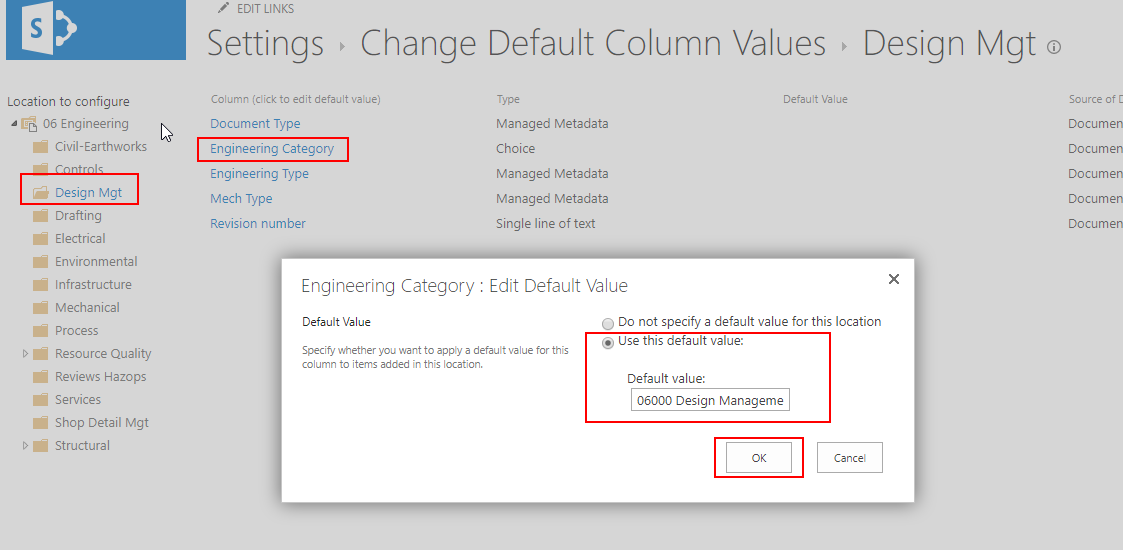
Am I missing something? Or have I completely mis-understood what is meant by DefaultColumnValues ?
cheers
 nigel-dewar
on 12 Mar 2019
nigel-dewar
on 12 Mar 2019
@nigel-dewar which version of PnP PowerShell are you using?
wobba
on 12 Mar 2019
Goodmorning,
Can someone tell me if it's possible to use the element in a xml provisioning template?
Thx Martin
 offringam
on 8 Aug 2019
offringam
on 8 Aug 2019
@offringam It should work. If not, please open a new issue and include a sample template and explanation of the type of column etc.
wobba
on 12 Aug 2019
Related issues
 domedellolio
·
3Comments
domedellolio
·
3Comments
 NPrice99
·
7Comments
NPrice99
·
7Comments
 Andrewsimmans
·
4Comments
Andrewsimmans
·
4Comments
 TanmayDharmaraj
·
4Comments
TanmayDharmaraj
·
4Comments
 JohanVanderBeach
·
6Comments
JohanVanderBeach
·
6Comments