Pnp-modern-search: Search Results - Unable to set "External Template URL"
Version used
3.15.3.0
Describe the bug
When you try to set the External Template URL for Custom Results layout, and you click away (or TAB away) from the text box, the value clears.
If you click somewhere outside the text box (with a valid URL) quickly after pasting in a value, the value remains.
To Reproduce
Configure Search Results web part to return any kind of results.
Sets Results Layout to Custom
Set the "External Template URL" value to a valid URL
Tab to the next control (Edit Result Types), or click anywhere outside the text box
Notice the value disappeared from the External Template URL field
Expected behavior
Value should remain
Screenshots

Desktop (please complete the following information):
- Chrome (latest)
- SharePoint Online
 jimmywim
All 17 comments
This may be a problem with OOTB SharePoint's PropertyPaneTextField and async onGetErrorMessage.
Have raised issue: https://github.com/SharePoint/sp-dev-docs/issues/6479
jimmywim
on 17 Nov 2020
Hi @jimmywim. Thank you for let us know. As a workaround, try to set your value and immediately save your page. This way, the value should get persisted in the WP property bag.
 FranckyC
on 17 Nov 2020
FranckyC
on 17 Nov 2020
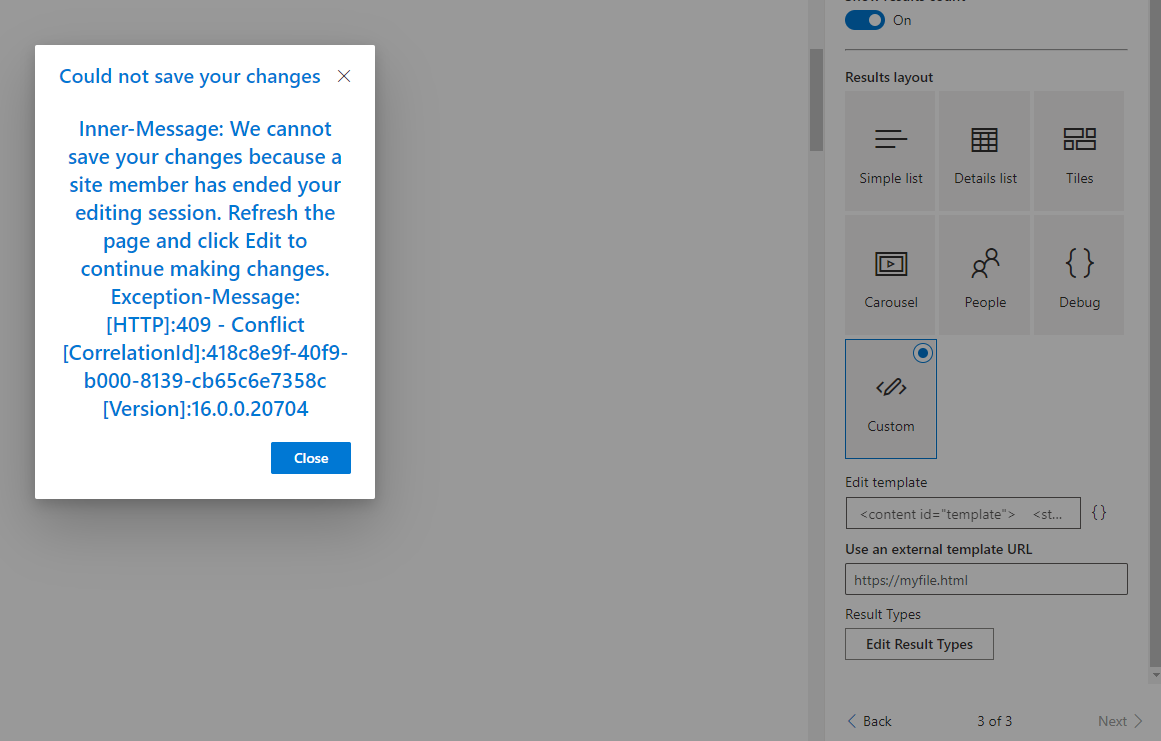
Hi @FranckyC - scarily, when I try what you suggest, then half the time I get this (it still also clears the value). If I refresh the page it doesn't error like below but does still clear the value.
jimmywim
on 17 Nov 2020
Weird indeed :(. If you try with the v4, does it produce the same behavior?
FranckyC
on 17 Nov 2020
@FranckyC Check my first comment on this issue, I believe it's an issue affecting OOTB PropertyPaneTextField async validation.
jimmywim
on 17 Nov 2020
We've started experiencing similar issue, we're currently using version 3.14.2.0
Other observations on the behavior are:
If you paste the template URL and quickly click outside before results have a chance of refreshing, the URL will be saved but the results remain blank
Editing a page that already had a working template will also also clear the URL just by clicking in and out of the External Template URL field
 ArturoAP
on 18 Nov 2020
ArturoAP
on 18 Nov 2020
Unfortunately, v4 has the same problem.
 MKGy
on 20 Nov 2020
MKGy
on 20 Nov 2020
Working on a fix for both versions. Stay tuned.
FranckyC
on 20 Nov 2020
Should be resolved in develop.
FranckyC
on 23 Nov 2020
@FranckyC Does this mean it'll be available as an updated v3 release soon?
jimmywim
on 23 Nov 2020
@jimmywim a new package will be published with this fix a t the end of the month
FranckyC
on 24 Nov 2020
Great, looking forward to this new version. I got the same issue as jimmywim, great to have the fix in both 3 a 4 versions.
 Christian-Stahl
on 26 Nov 2020
Christian-Stahl
on 26 Nov 2020
Hi again, just checking if there's any progress in the case or when we should have the fix up n running? Cheers Christian
Christian-Stahl
on 1 Dec 2020
@Christian-Stahl Seems MSFT are already onto the root cause: https://github.com/SharePoint/sp-dev-docs/issues/6479#issuecomment-736119802
jimmywim
on 1 Dec 2020
Thanks mr @jimmywim!
Christian-Stahl
on 1 Dec 2020
@Christian-Stahl new packages for v3 and v4 have been released containing a fix.
FranckyC
on 1 Dec 2020
@FranckyC v4 with this fix is not released yet. Latest v4 release was 13 November.
 lennertcc
on 9 Dec 2020
lennertcc
on 9 Dec 2020
Related issues
 mbice
·
4Comments
mbice
·
4Comments
 thebigs1992
·
4Comments
mbice
·
3Comments
thebigs1992
·
4Comments
mbice
·
3Comments
 stevebeauge
·
5Comments
stevebeauge
·
5Comments
 anoopt
·
4Comments
anoopt
·
4Comments
Most helpful comment
@jimmywim a new package will be published with this fix a t the end of the month