Pnp-modern-search: Can we limit the scope of search results to Hub site and its connected sites ?
Can we limit the scope of search results to Hub site and its connected sites only ?
Please suggest if it is possible by any configuration already.
 AmitTyagi1
All 12 comments
Hi @AmitTyagi1
By using provided buttons in the search configuration panels or further development this is not possible.
But you can specify search parameters on your own, this will deliver exactly the search result that you are looking for and of course this has also a problem attached.
Basically
Search does not know anything about hierarchy and hubs sites and what ever is connected to it.
How to achieve a "Hub-Site search" and connected results?
If you configure search parameters as for example in search verticals, you narrow down search results to specific paths. Specify there the path to your hub site and to each connected site.
In my company we narrowing search results down to the relevant stuff like that:
{searchTerms}
(
(
Path:"https://tenant.sharepoint.com/sites/WS_" OR
Path:"https://tenant.sharepoint.com/sites/HS_" OR
Path:"https://tenant.sharepoint.com/sites/CS_"
)
-Path:"https://tenant-my.sharepoint.com"
-Path:"https://tenant.sharepoint.com/sites/mtest/"
-Path:"https://tenant.sharepoint.com/sites/migtest/"
-Path:"https://tenant.sharepoint.com/sites/migtestv2/"
-Path:"https://tenant.sharepoint.com/sites/migtestv3/"
-Path:"https://tenant.sharepoint.com/sites/archive/"
)
Whats the attached problem on that solution?
When somebody associates a site to the hub site, you need to be informed by that guy, in order that you can update the search parameter configuration.
 Georg-Trixl
on 8 May 2020
Georg-Trixl
on 8 May 2020
Don't listen to @AmitTyagi1 :)
Use this in the query template field:
{searchTerms} DepartmentId:{PageContext.hubSiteId}
See https://microsoft-search.github.io/pnp-modern-search/search-parts/search-results/#custom-query-variables and https://www.techmikael.com/2018/04/working-with-hub-sites-and-search-api.html for reference.
 wobba
on 8 May 2020
wobba
on 8 May 2020
Don't listen to @AmitTyagi1.
Use this in the query template field:
{searchTerms} DepartmentId:{PageContext.hubSiteId}See https://microsoft-search.github.io/pnp-modern-search/search-parts/search-results/#custom-query-variables and https://www.techmikael.com/2018/04/working-with-hub-sites-and-search-api.html for reference.
Sure @wobba will try your suggestion.
AmitTyagi1
on 8 May 2020
More effective for the search system and works when more sites are added to the hub.
wobba
on 8 May 2020
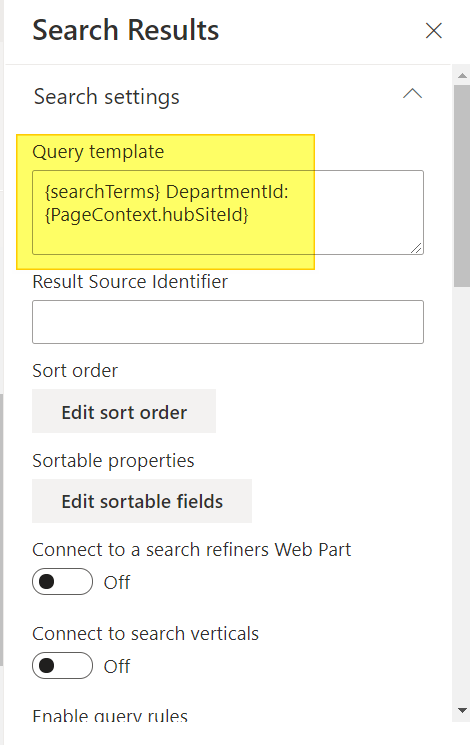
Hi @wobba, I tried your suggestion. But it doesn't give me any results. I am not sure if i missed something, but below is how my Search Results configuration looks.
Do i need to make any related changes on the "Search Box" also ?
I tried pasting the actual Site Id also in the query template field but it didn't worked too. Like,
{searchTerms} DepartmentId:{11111111-1111-1111-1111-1111111111}
AmitTyagi1
on 9 May 2020
All items should have the SiteID of the hub in the DepartmentId managed property. If you remove the {} does it work in your manual test?
wobba
on 9 May 2020
I tried following as per your suggestion with no luck.
{searchTerms} DepartmentId:11111111-1111-1111-1111-1111111111
I am ready to test if you have any other suggestions.
AmitTyagi1
on 9 May 2020
Is there a quick way to verify(may be using Powershell or any other means) that DepartmentId property is being populated with the SiteID of the hub in my tenant.
AmitTyagi1
on 9 May 2020
Hi @AmitTyagi1 , can you try to double curly braces like this: DepartmentId:{{PageContext.hubSiteId}}. If I remember correctly, the DepartmentId managed property includes {} already in its value.
 FranckyC
on 9 May 2020
FranckyC
on 9 May 2020
Great !!! @FranckyC double curly braces worked. Thanks a lot for your help.
AmitTyagi1
on 9 May 2020
I might add trimming of {} as well on those props. Very inconsistent usage with and without in SP 😕
wobba
on 9 May 2020
Do we have a way to exclude the contents of Site Assets and Form Templates libraries from the search results ?
AmitTyagi1
on 20 May 2020
Related issues
 PathToSharePoint
·
4Comments
PathToSharePoint
·
4Comments
 polashivaprasad
·
5Comments
polashivaprasad
·
5Comments
 RedGlow
·
5Comments
RedGlow
·
5Comments
 szyvett
·
4Comments
szyvett
·
4Comments
 RichG82
·
3Comments
RichG82
·
3Comments