Plugin.video.netflix: Key generation error in NF AuthenticationKey program
Bug report
Your Environment
- Netflix add-on version: not
- Operating system version/name: windows 10
- Device model: Desktop computer Ryzen 2700 rx570 Processor
- I am using an anti-virus program V3
Used Operating system: - [ ] Android
- [ ] iOS
- [ ] Linux
- [ ] OSX
- [ ] Raspberry-Pi
- [x] Windows
Describe the bug
After running the program, I logged in from the Netflix web page, but nothing happened
Expected behavior
After running the program and closing all web pages, I ran the program.
Actual behavior
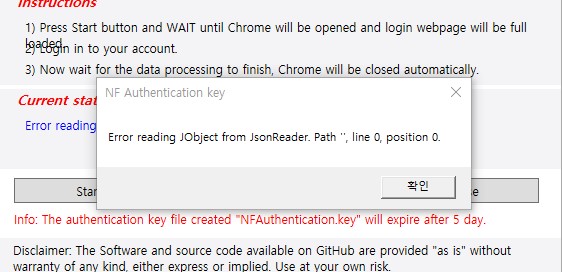
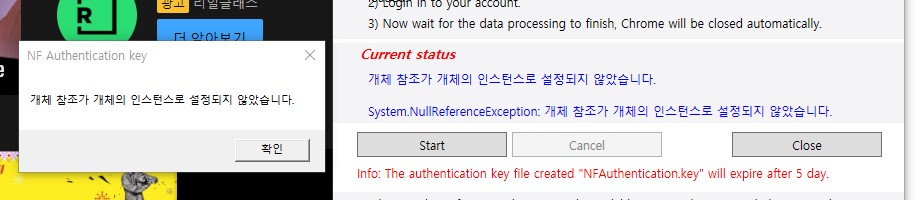
Two errors occur depending on the behavior
Steps to reproduce the behavior
- Run the program
- Access to incognito web page.
- Netflix login
- Nothing happens.
Possible fix
Tried in various Windows system environments, but all errors are generated.
Debug log
Debug log does not exist because it is not set to kodi
The debug log can be found here:
Additional context or screenshots (if appropriate)
Other information
I am Korean and I have tried various methods to solve the problem and other users with the same environment and language have no problem
Has anyone had the same problem as me?
Screenshots
When I waited quietly after logging in
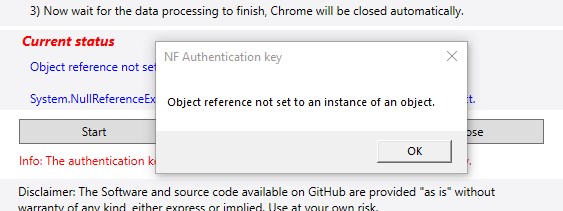
When you stop the program
add photos
 BOX369
All 25 comments
Thank you for your interest in this add-on development,
this is an automatically generated message by our Bot
It seems that you have not full followed the template we provide and require for all bug reports.
Attach the debug log is mandatory for a bug report, _the log rules are explained in the Issue creation page or in the ReadMe_.
Please edit your Issue message to follow our template. The issue will be closed after about one week has passed without satisfactory follow-up from your side.
If you believe it was sent in error, please say so and a team member will remove the "Ignored rules" label.
![github-actions[bot] picture](https://avatars.githubusercontent.com/in/15368?v=4&s=40) github-actions[bot]
on 31 Dec 2020
github-actions[bot]
on 31 Dec 2020
Eliminated rule errors
No other problem found
BOX369
on 31 Dec 2020
VPN topic is not allowed with this add-on
therefore all reports have to be done _without VPN_ or the Issue will be closed
i have prepared a zip:
NFAuthenticationKey.zip
make sure you extract all files before run the executable
and take a new screenshot of the error thanks
 CastagnaIT
on 31 Dec 2020
CastagnaIT
on 31 Dec 2020
This problem does nothing after logging in
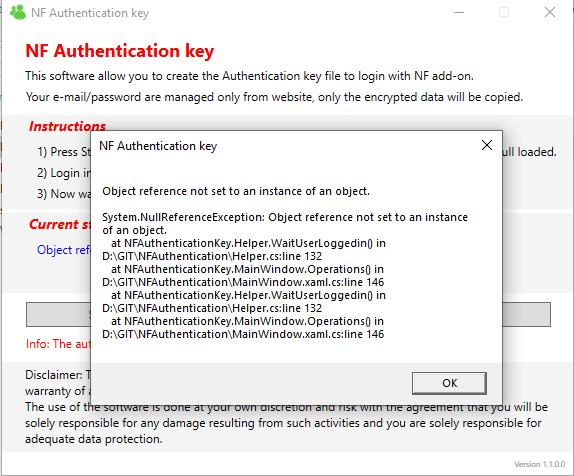
BOX369
on 31 Dec 2020
Could a keyboard security program cause this problem?
BOX369
on 1 Jan 2021
keyboard security program
i do not know this software, you can try disable antivirus/antimalware softwares
seem that the NFAuthenticationKey software not receive the answer of your browser, or your browser not provide an answer
I would not know what to do for you,
what browser version are you using?
CastagnaIT
on 1 Jan 2021
Il you have a old versio of browser update the browser, and try with this:
NFAuthenticationKey_t1.zip
CastagnaIT
on 1 Jan 2021
이전
이전 버전의 브라우저가 있으면 브라우저를 업데이트하고 다음을 시도하십시오.
NFAuthenticationKey_t1.zip
I'll try it right away and I'll reply
BOX369
on 1 Jan 2021
이전
이전 버전의 브라우저가 있으면 브라우저를 업데이트하고 다음을 시도하십시오.
NFAuthenticationKey_t1.zipI'll try it right away and I'll reply
The program does not print any messages and is still waiting.
BOX369
on 1 Jan 2021
means that not receive the response from your browser
I don't know what kind of problem your system has
as far as i know, there is nothing else i can do
CastagnaIT
on 1 Jan 2021
브라우저에서 응답을받지 못함을 의미합니다.
내가 아는 한 시스템에 어떤 종류의 문제가
있는지 모르겠습니다.
The version of chrome is 87.0.4280.88
BOX369
on 1 Jan 2021
Message has been printed
You have exceeded the time avaliable for the loginRestart the operation
BOX369
on 1 Jan 2021
브라우저에서 응답을받지 못함을 의미합니다.
내가 아는 한 시스템에 어떤 종류의 문제가
있는지 모르겠습니다.
I also tried windows safe mode
BOX369
on 1 Jan 2021
브라우저에서 응답을받지 못함을 의미합니다.
내가 아는 한 시스템에 어떤 종류의 문제가
있는지 모르겠습니다.나는 또한 Windows 안전 모드를 시도했습니다
Does this program work well for others without errors?
BOX369
on 1 Jan 2021
yes...
CastagnaIT
on 1 Jan 2021
I'll try it with Dirn Computer in the university's engineering lab.... If it doesn't work, I'll contact you again.
BOX369
on 1 Jan 2021
예...
There was an error in the account that did not pay.
BOX369
on 2 Jan 2021
There was an error in the account that did not pay.
can you reformulate your answer? i do not think i understand correctly
CastagnaIT
on 2 Jan 2021
지불하지 않은 계정에 오류가 있습니다.
당신의 대답을 재구성 할 수 있습니까? 나는 내가 정확하게 이해한다고 생각하지 않는다
The program does not cause errors only when your Netflix account is premium
BOX369
on 2 Jan 2021
this should not be related to the website,
when the software try to get the browser navigation history Page.getNavigationHistory
the browser DevTools protocol seem not answer or answer in different way
debugging browser is difficult, because i cannot determine what happen to you from my location
i need to try develop something to allow the software to write on a file what happen
CastagnaIT
on 2 Jan 2021
Hmmmmmm I'm fortunate to have solved this problem
BOX369
on 2 Jan 2021
While solving this problem I have solved various problems, tried playing on various devices and succeeded in playing.
BOX369
on 2 Jan 2021
If you have any data or questions you need, we can provide you with information.
BOX369
on 2 Jan 2021
If you need other help, please feel free to comment.
BOX369
on 2 Jan 2021
이것은 웹 사이트와 관련이 없어야
합니다. 소프트웨어가 브라우저 탐색 기록을 얻으려고 할 때Page.getNavigationHistory
브라우저 DevTools 프로토콜이 다른 방식으로 응답하거나 응답하지 않는 것처럼 보입니다.내 위치에서 무슨 일이 일어나는지 알 수 없기 때문에 브라우저 디버깅이 어렵습니다
. 소프트웨어가 파일에 무슨 일이 일어나는지 쓸 수 있도록 무언가를 개발해야합니다.
If there are no related questions, is it okay to close this issue?
BOX369
on 3 Jan 2021
Related issues
 Smeulf
·
7Comments
Smeulf
·
7Comments
 Wittmannen
·
7Comments
Wittmannen
·
7Comments
 dagwieers
·
13Comments
dagwieers
·
13Comments
 coaxial
·
7Comments
coaxial
·
7Comments
 RH1CK
·
6Comments
RH1CK
·
6Comments