Plots.jl: PlotlyJS backend to Plots not working in Jupyter notebook
I'm trying to get plotly to work as a backend to Plots.jl but have no luck with either Julia 0.7, Julia 1.01 or Julia 1.10.
With Julia 0.7, I get no error messages but no plots display (blank canvas).
With both Julia 1.01 and 1.10, I get the following error message:
"only png or svg allowed. got: :html"
I'm using this in a Jupyter notebook (Anaconda install) in google chrome browser.
 AtheistApe
All 8 comments
I've found the same problem using Windows 10, Julia 1.1.0, Plots 0.24.0, PlotlyJS 0.12.3 and IJulia 1.18.1 (Jupyter 5.7.0)
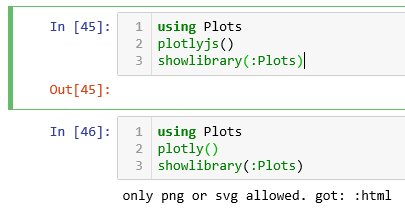
Code example:
using Plots
plotlyjs()
showlibrary(:Plots)
 diegozea
on 9 May 2019
diegozea
on 9 May 2019
Also WebIO v0.8.1, this is related to https://github.com/sglyon/PlotlyJS.jl/issues/278
diegozea
on 9 May 2019
See #1985. Rolling Plots back to version 0.23.1 works. (I'm using JupyterLab and Julia 1.1)
 rappdw
on 10 Jul 2019
rappdw
on 10 Jul 2019
With #2125 this should now work for Plotly, not yet for PlotlyJS though.
 daschw
on 7 Aug 2019
daschw
on 7 Aug 2019
Thanks, when will this be updated in a release? I'm running Plots 0.25.3 and still getting this error. (I don't know on what schedule the fixes on github enter the release versions)
 ljschumacher
on 7 Aug 2019
ljschumacher
on 7 Aug 2019
It's included in Plots 0.26.1, which will be released soon (as soon as https://github.com/JuliaRegistries/General/pull/2547 gets merged).
daschw
on 7 Aug 2019
Fixed in #2131
daschw
on 8 Aug 2019
Still not working, not sure what version I'm at, hopefully latest version, as it's just installed.
 arisliang
on 29 Nov 2020
arisliang
on 29 Nov 2020
Related issues
daschw
·
68Comments
 ChrisRackauckas
·
46Comments
ChrisRackauckas
·
46Comments
 floswald
·
53Comments
floswald
·
53Comments
 SimonDanisch
·
30Comments
SimonDanisch
·
30Comments
 PaulSoderlind
·
40Comments
PaulSoderlind
·
40Comments
Most helpful comment
I've found the same problem using Windows 10, Julia 1.1.0, Plots 0.24.0, PlotlyJS 0.12.3 and IJulia 1.18.1 (Jupyter 5.7.0)
Code example: