Platformio-atom-ide-terminal: not working ide-terminal after update atom to 1.47.0 in Ubuntu 16.04
- [ ] I have reset Atom to defaults prior to submitting report.
- [ ] I have not reset Atom to defaults prior to submitting report.
Description
not working ide-terminal after update atom to 1.47.0 in Ubuntu 16.04
not working ide-terminal after update atom to 1.47.0 in Ubuntu 16.04
Steps to reproduce
- not working ide-terminal after update atom to 1.47.0 in Ubuntu 16.04
- not working ide-terminal after update atom to 1.47.0 in Ubuntu 16.04
- not working ide-terminal after update atom to 1.47.0 in Ubuntu 16.04
not working ide-terminal after update atom to 1.47.0 in Ubuntu 16.04
Expected behavior:
not working ide-terminal after update atom to 1.47.0 in Ubuntu 16.04
Actual behavior:
not working ide-terminal after update atom to 1.47.0 in Ubuntu 16.04
Reproduces how often:
not working ide-terminal after update atom to 1.47.0 in Ubuntu 16.04
Versions
> atom --version
> apm --version
OS name and version:
Platformio-ide-terminal version:
Additional Information
 drscat
All 24 comments
the same problem in ms windows 10 x64
 asiloisad
on 22 May 2020
asiloisad
on 22 May 2020
same issue for ms windows 10
everytime restart my pc I have to reinstall the package and it is taking a long time
 sandeepsreedeep
on 22 May 2020
sandeepsreedeep
on 22 May 2020
Same issue for ubuntu 19.10
 ffais
on 22 May 2020
ffais
on 22 May 2020
https://atom.io/packages/atom-ide-terminal
atom-ide-terminal good working )
drscat
on 22 May 2020
The same for Windows 10 64 and 2.10.0 version.
Started, but stay without invitation string, black field with a blinking rectangle on top left.
 BaldrOdinson
on 22 May 2020
BaldrOdinson
on 22 May 2020
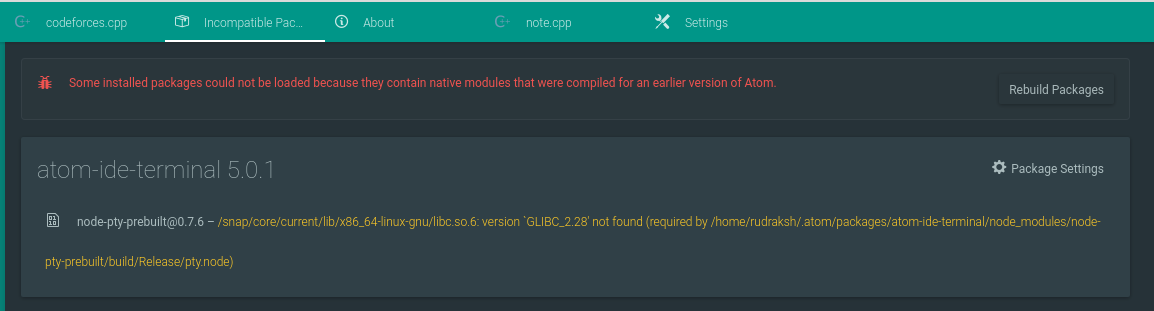
I got this same error with atom-ide-terminal and after i rebuild the package the terminal stopped working properly.
Below is the screeshot of pio ide terminal.
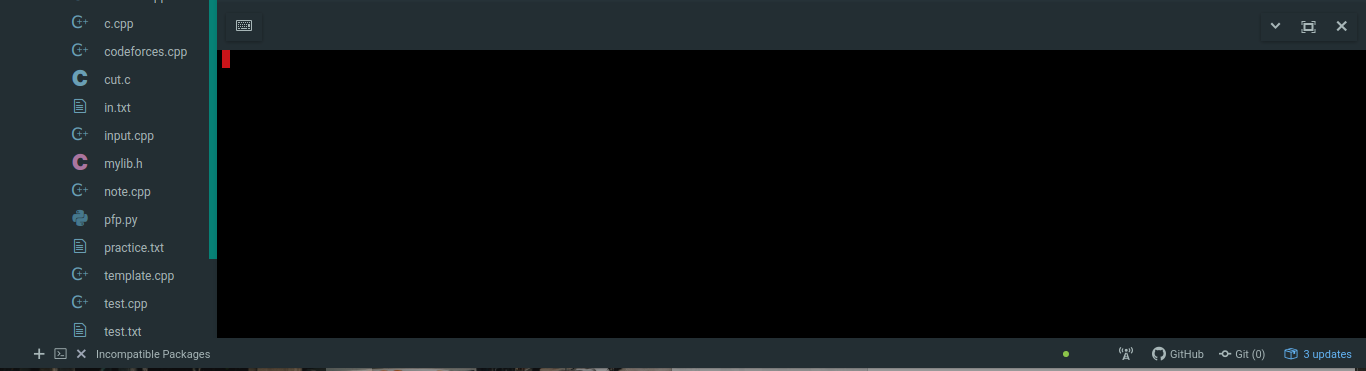
Ubuntu 19.10
Platformio-ide-terminal version 2.10.0
apm 2.4.5
npm 6.2.0
node 10.2.1 x64
atom 1.47.0
 RudrakshKashyap
on 22 May 2020
RudrakshKashyap
on 22 May 2020
Same problem with ubuntu 18.04 and Atom 1.47.
 OseiasMzM
on 23 May 2020
OseiasMzM
on 23 May 2020
For now i've installed terminus which is working fine. https://atom.io/packages/terminus
RudrakshKashyap
on 23 May 2020
Same here, running Mint 19.3 x86_64.
 chima-okwara
on 23 May 2020
chima-okwara
on 23 May 2020
Rebuild the Package and restart Atom. That should solve the problem.
 jwerre
on 23 May 2020
jwerre
on 23 May 2020
I already did that. I even uninstalled and reinstalled it. Nothing seemed
to change.
On Sat, 23 May 2020 at 17:32, Jonah Werre notifications@github.com wrote:
Rebuild the Package and restart Atom. That should solve the problem.
—
You are receiving this because you commented.
Reply to this email directly, view it on GitHub
https://github.com/platformio/platformio-atom-ide-terminal/issues/862#issuecomment-633089233,
or unsubscribe
https://github.com/notifications/unsubscribe-auth/AKMKICC2FQILAE5CNVTEQ53RS73AJANCNFSM4NG7SDEQ
.
chima-okwara
on 25 May 2020
For now I use terminus it works well
 stephdl
on 25 May 2020
stephdl
on 25 May 2020
For now I'm using VSCode, but I hope platformio-terminal will work again.
OseiasMzM
on 27 May 2020
After atom upgrade to 1.47.0 have same problem.
OS:Windows 10 1909
 Yoshinosido
on 27 May 2020
Yoshinosido
on 27 May 2020
upgrade to 1.47.0, now platformio isn't working.
Ubuntu 20.04
 chadhumphrey
on 29 May 2020
chadhumphrey
on 29 May 2020
Same here problem after upgrading to 1.47.0
OS: Manjaro Gnome 20.0.2
 getricj
on 3 Jun 2020
getricj
on 3 Jun 2020
As long as the platformio-ide-terminal is broken, disable it and install terminus instead. The terminal will open, when you click on the bottom status bar "+" sign or use "CTRL-`" kotkeys. If you need a serial terminal you can start miniterm.py in the command line.
 wurmtal868
on 6 Jun 2020
wurmtal868
on 6 Jun 2020
_Sorry, my answer was not about PlatformIO IDE Terminal._
 christalk
on 10 Jun 2020
christalk
on 10 Jun 2020
New Version Atom 1.48.0
v1.48.0 (2020-06-10)
https://atom.io
christalk
on 10 Jun 2020
Same for me, Atom 1.48.0 did not fix the terminal
wurmtal868
on 10 Jun 2020
Launching atom with sudo is not a good idea. First of all it will refuse to run without "--no-sandbox".
If you use this extra option, root will take over all user configuration files that get touched during the session. When you then try to run atom without sudo you won't be able to access the files that have been touched by sudo, which can lead to strange behavior.
wurmtal868
on 11 Jun 2020
I'm on OS Catalina 10.15.3. Having the same issue with Atom 1.48.0 and platformio-ide-terminal 2.10.0.
I uninstalled 2.10.0 and rolled back to 2.9.0 and that works (for now).
apm uninstall platformio-ide-terminal
apm install [email protected]
 wtmatthias
on 15 Jun 2020
wtmatthias
on 15 Jun 2020
Thanks wtmatthias,
It sounds the good answer, nowadays (at the moment)
See what ashkanahrabi commented 4 days ago •
_I've found the fix.
Try downgrading Platformio-ide-terminal to 2.9.0_
apm uninstall platformio-ide-terminal
apm install [email protected]
https://github.com/platformio/platformio-atom-ide-terminal/issues/872#issuecomment-643603517
christalk
on 17 Jun 2020
 the-j0k3r
on 15 Jul 2020
the-j0k3r
on 15 Jul 2020
Related issues
 QuasimodoNZ
·
4Comments
QuasimodoNZ
·
4Comments
 yangwao
·
4Comments
yangwao
·
4Comments
 EdgarUstian
·
4Comments
EdgarUstian
·
4Comments
 colorwin
·
5Comments
colorwin
·
5Comments
 p0slaney-19
·
4Comments
p0slaney-19
·
4Comments
Most helpful comment
For now i've installed terminus which is working fine. https://atom.io/packages/terminus