Piranha.core: How to extend database
How can I add new table to database?
 OmidID
All 3 comments
I don't think there's anything stopping you from using an IDE of your choice to connect to the database Piranha is using and adding tables using standard SQL commands. But actually conducting CRUD operations against those custom tables might be tricky. If you're using a SQL server of some kind, like MySQL, this might be your best option.
However, if you're just using the default implementation of SQLite files, then it's just simpler to create a separate SQLite database and work with that separately for your own stuff. This is what I did in my mixed app that has some Piranha CMS pages and some custom pages.
In ConfigureServices() (Startup.cs), I add an Entity Framework DbContext that has the entities of my secondary SQLite database:
services.AddPiranhaEF(options =>
    options.UseSqlite("Filename=./piranha.blog.db"));
services.AddDbContext<MyAppContext>(options =>
    options.UseSqlite(Configuration.GetConnectionString("Sqlite")));
That custom connection string is defined in appsettings.json:
"ConnectionStrings": {
    "Sqlite": "Data Source=HPS_Local.SQLite"
}
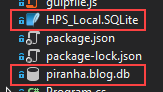
And here you can see that both database files exist in the root of my project. Note that the file extension doesn't really matter, they're both SQLite databases:
 stamminator
on 16 Nov 2018
stamminator
on 16 Nov 2018
Our recommendation is to not extend the DbContext in Piranha as this might complicate migrations when updating to a newer version. Adding your own DbContext is sufficient though, there's no need to use a separate database for your custom tables.
 tidyui
on 16 Nov 2018
tidyui
on 16 Nov 2018
@stamminator @tidyui Thank you for complete response.
So i got the idea i need to implement new database.
OmidID
on 17 Nov 2018
Related issues
 aneff-official
·
3Comments
aneff-official
·
4Comments
tidyui
·
6Comments
aneff-official
·
3Comments
aneff-official
·
4Comments
tidyui
·
6Comments
 w0ns88
·
6Comments
w0ns88
·
6Comments
 mtlc1402
·
5Comments
mtlc1402
·
5Comments
Most helpful comment
Our recommendation is to not extend the DbContext in Piranha as this might complicate migrations when updating to a newer version. Adding your own DbContext is sufficient though, there's no need to use a separate database for your custom tables.