Piranha.core: Piranha Manager Hyperlink Buttons Width
Hello! @tidyui
Recently I have got to know more about this system and created a project myself. I have been reading the documentation, but since there isn't everything documented (for the newer version), I decided to write an issue here.
As the title says, my problem is with these buttons. Their width (col-sm-3) makes the text (add/remove) go out of the box and it looks ugly. However this is when I use the Half-Width.
When I cloned the solution from github, I was able to change the widths in the manager files. Now I am using just the Blog template and it doesn't have the Manager files, but the thing is that I don't want to include the whole project just for this small change.
Is this a bug, because the Image fields buttons appear normally when the Half-Width option is on?

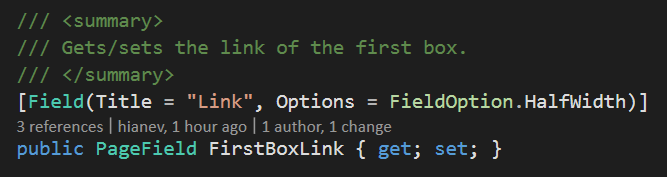
I think it will be fairly easy to change the widths. Could you add that, please?
Sorry if anything offended you, writing for a first time here and at all in github.
Thank you in advance!
Yours,
Chris
 aneff-official
All 3 comments
Hi there! Yes the buttons have been changed for the ImageField which had the same issue, but it must have been missed for the PostField and PageField. We'll fix it for the 5.2 release which is due this week!
 tidyui
on 9 Oct 2018
tidyui
on 9 Oct 2018
The fields will be changed to look like this (like the media fields):

Regards
tidyui
on 9 Oct 2018
And for the record, if someone is offended by you when you report a bug you should consider NOT using their project anymore 😂
Regards
tidyui
on 9 Oct 2018
Related issues
aneff-official
·
4Comments
aneff-official
·
4Comments
 SamBray
·
3Comments
SamBray
·
3Comments
 stefanolsenn
·
3Comments
aneff-official
·
3Comments
stefanolsenn
·
3Comments
aneff-official
·
3Comments