Picongpu: more about ADIOS
Hello,
I have a few questions about the adios plugin and its output. My PIConGPU data is produced and compressed as TBG_adios="--adios.period !TBG_plugin_period --adios.file simData --adios.source 'species_all,fields_all' --adios.disable-meta 0 --adios.compression blosc:threshold=2048,shuffle=bit,lvl=1,threads=8,compressor=zstd"
1) Do we have the possibility to process binary data with the ADIOS2 backend? So far I used os.environ['OPENPMD_BP_BACKEND'] = 'ADIOS1' because version 2 gives some error about the backend like
> loading time series .........................................................
[ADIOS2] Warning: Attribute with name /openPMD has no type in backend.
[ADIOS2] Warning: Attribute with name /openPMD has no type in backend.
terminate called after throwing an instance of 'std::runtime_error'
  what():  [ADIOS2] Requested attribute (/openPMD) not found in backend.
Aborted (core dumped)
This happens although I have adios2 installed as a Python package

Adios2 is also installed in spack, so maybe it needs to be loaded like spack load adios2 instead of the usual spack load adios?

2) In the past, adios used to produce a meta file and a folder with the .bp data as a single file. Now there are two such files. I wonder if there are more possibilities now and how to benefit from them.

3) For the first time I got the error OSError: [Errno 24] Too many open files: and the adios module in Python could process only 297 files out of 731 files written during the simulation. I would correlate this somehow with the moving window because the error came when I started to use it and not in the past, but it is just a guess.
4) Is there a way to surpress or correct the error/warning ERROR: Attribute '/data/31548/particles/e/particles_info/unitSI' is not found! WARNING: Skipping invalid openPMD record 'particles_info'. This is not harmful, but maybe solutions exist.
some complementary discussion on ADIOS is in #3256
 cbontoiu
All 13 comments
The ADIOS plugin, so what you enable as --adios...., is only for ADIOS 1.
In addition to this plugin, the develop version of PIConGPU also has openPMD plugin which supports ADIOS backend. And for this version the only way to output ADIOS we recommend is using this plugin with ADIOS2 backend. The details were discussed in #3382, briefly the reason is that ADIOS1 was shown to be problematic, and the native ADIOS plugin is to be removed soon. And out plan is that the openPMD plugin becomes the only way to output HDF5 or ADIOS (2) in some, hopefully not far, future.
 sbastrakov
on 17 Nov 2020
sbastrakov
on 17 Nov 2020
To precise, with --adios you write ADIOS1 data. With --openPMD you write ADIOS2 data by default. ADIOS1 and ADIOS2 are mutually exclusive in a way that you can not write data with the one version of the library and read with the other.
Regarding the warnings, maybe @PrometheusPi has some idea, recently he used the ADIOS2 and openPMD-api most of us.
Maybe also @franzpoeschel knows more about the warnings.
 steindev
on 17 Nov 2020
steindev
on 17 Nov 2020
Thank you for your answers! It is clear now.
cbontoiu
on 17 Nov 2020
@cbontoiu The warnings you mentioned under 1 and 4 are caused by a slight error in how we implemented the particle attributes - which is not compatible with the openPMD standard. A fix is on its way - see #3389 for details. For the error you mentioned in 3: I never encountered that.
 PrometheusPi
on 17 Nov 2020
PrometheusPi
on 17 Nov 2020
Another example of error when too many files are loaded
number of files: 765
Input file:  /media/quasar/StorageDisk/PIC_SIGNATURES/PICONGPU/SIG_HEX_ARRAY_THICK_3D/HEX_ARRAY_THICK_TUBES_3D_PAR_ds[cm-3]_1.0e+22_RxC_4x4_inR[nm]_10.0_th[nm]_20.0_wl[nm]_100.0_I[Wcm-2]_2.00e+15_A0_3.82e-03_Dt[fs]_10_pol_C_msh_384_960_400
........................... Data Total Charge and Number of Particles ............................
........... ElectronsTotalChargeAndNumber ........................
Electrons file exists
and will be appended beyond time [fs]: 1.332696
Traceback (most recent call last):9924 fs
  File "adios_3D_Data_TotalCharge.py", line 94, in <module>
OSError: [Errno 24] Too many open files: '/media/quasar/StorageDisk/PIC_DATA/PICONGPU/DAT_HEX_ARRAY_THICK_3D/HEX_ARRAY_THICK_TUBES_3D_PAR_ds[cm-3]_1.0e+22_RxC_4x4_inR[nm]_10.0_th[nm]_20.0_wl[nm]_100.0_I[Wcm-2]_2.00e+15_A0_3.82e-03_Dt[fs]_10_pol_C_msh_384_960_400/d_general/ElectronsTotalChargeAndNumber.dat'
This is how I load the files and perhaps one can increase the memory buffer allocated to this process
# ----------------------------------------------------------------------------------------
path, dirs, files = next(os.walk(OUTPUT_NAME + '/simOutput/bp/'))
file_count = len(files)
print("> loading time series .........................................................")
ts = io.Series(OUTPUT_NAME + '/simOutput/bp/simData_%T.bp', io.Access_Type.read_only);
print("> finished loading time series .........................................................")
Interestingly, the error is thrown while data are processed, so it may as well be a Python or system related error, not necessarily one from adios.
cbontoiu
on 18 Nov 2020
cbontoiu
on 18 Nov 2020
- Now there are two such files.
ADIOS creates several data files for parallelization purposes. If your simulation uses multiple MPI ranks, there are normally going to be multiple such files. More info on that can be found here (search for "substreams" or "numaggregators") for ADIOS2.
- For the first time I got the error
OSError: [Errno 24] Too many open files:and the adios module in Python could process only 297 files out of 731 files written during the simulation
So, the situation is:
- file-based iteration layout (one file per iteration, as is created by the PIConGPU ADIOS plugin)
- a system with a restricted number of available file handles at a time
- a simulation with (1) a lot of iterations and (2) possibly many aggregated files per iteration
Unfortunately, the openPMD API does currently not provide for ways to grant users more fine-grained control over file handles under these circumstances. While we have already investigated solutions for handling this situation better in writing, for reading your best solution for now would be to only process ~200 iterations at a time (by moving them to a separate folder temporarily). I'm going to look into better solutions for this, thanks for bringing it up!
 franzpoeschel
on 19 Nov 2020
franzpoeschel
on 19 Nov 2020
This PR implements an easy fix for the issue above.
franzpoeschel
on 20 Nov 2020
Hello,
Yet another aspect puzzles me with adios files. I have data produced by picongpu with two GPUs assigned to the y-direction
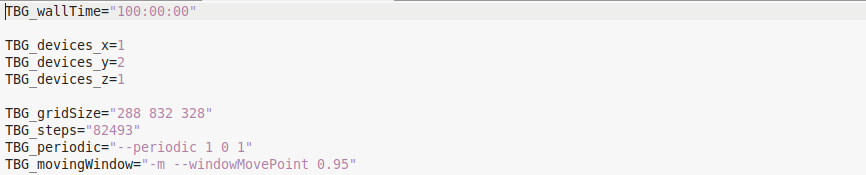
and 832 cells along the y-direction. I was surprised to understand that I can access only half of the y cells.
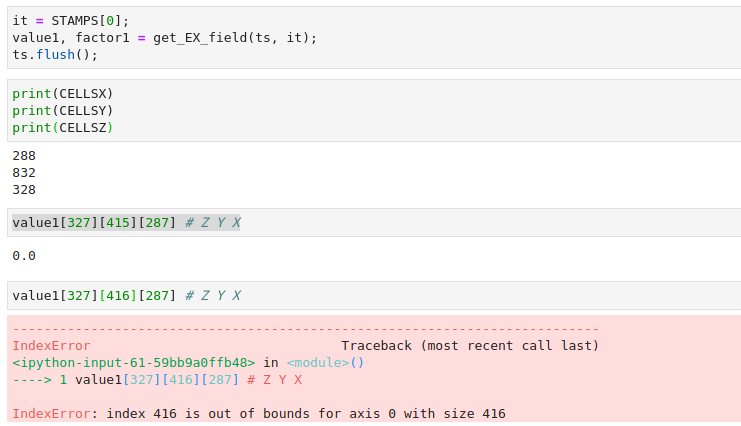
Also commands like those below deliver only half of the total charge in the simulation
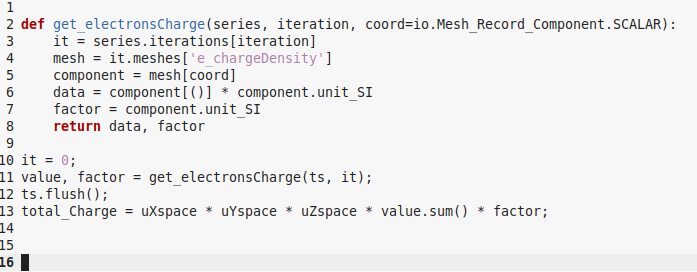
Could anyone help to understand how I can fetch the other half of the data?
Regards and thanks
cbontoiu
on 25 Nov 2020
I am not exactly sure of all the details, but I think you only get output of what is in the moving window. The last layer of GPUs in y direction is used for that and are not part of the output. There is an image on our github wiki explaining it but I can't easily link it from phone
sbastrakov
on 25 Nov 2020
Maybe this page
https://github.com/ComputationalRadiationPhysics/picongpu/wiki/PIConGPU-domain-definitions#moving-window
but it tells me that all domain, initially meshed is available, though it is solved by 2 GPUs.
cbontoiu
on 25 Nov 2020
I am not exactly sure of all the details, but I think you only get output of what is in the moving window. The last layer of GPUs in y direction is used for that and are not part of the output. There is an image on our github wiki explaining it but I can't easily link it from phone
You are right, if the moving window is used the output will be number_of_gpus_inY - 1 in size.
 psychocoderHPC
on 25 Nov 2020
psychocoderHPC
on 25 Nov 2020
Maybe this page
https://github.com/ComputationalRadiationPhysics/picongpu/wiki/PIConGPU-domain-definitions#moving-window
but it tells me that all domain, initially meshed is available, though it is solved by 2 GPUs.
Only the dashed output will be visible in the hdf5/adios files. The non dashed areas are during the simulation available but will not be shown in output. If you use two GPUs, you will see always a volume that looks like one gpu.
psychocoderHPC
on 25 Nov 2020
Related issues
 HighIander
·
4Comments
HighIander
·
4Comments
 ax3l
·
4Comments
ax3l
·
4Comments
 berceanu
·
4Comments
cbontoiu
·
3Comments
berceanu
·
4Comments
cbontoiu
·
3Comments
 bussmann
·
4Comments
bussmann
·
4Comments
Most helpful comment
ADIOS creates several data files for parallelization purposes. If your simulation uses multiple MPI ranks, there are normally going to be multiple such files. More info on that can be found here (search for "substreams" or "numaggregators") for ADIOS2.
So, the situation is:
Unfortunately, the openPMD API does currently not provide for ways to grant users more fine-grained control over file handles under these circumstances. While we have already investigated solutions for handling this situation better in writing, for reading your best solution for now would be to only process ~200 iterations at a time (by moving them to a separate folder temporarily). I'm going to look into better solutions for this, thanks for bringing it up!