Picongpu: PIConGPU 3D visualization
dear Dr. Michael and team,
I hope this issue finds you well during these covid19 days.
We are having trouble with the visualization of the output files. We ran the simulation well on the container and generated h5 files, we would like to visualize the data in 3D simulation software. like the beautiful simulations presented in your youtube page. What is the best software and what script should we be using in python for that?
Can you please help or refer us to someone who can assist us?
Thank you very much
Oded Gour-Lavie (via Amir Cogan)
 amircogan
All 30 comments
Hello @amircogan .
I assume you mean videos like this. We produce it in-situ (so during the simulation, not from files) using free software called ISAAC, that is also developed by our group. ISSAC is available on github here. It is an optional dependency of PIConGPU as described in our documentation. So after instaling it and compiling PIConGPU together with ISSAC one could get this kind of visualization. ISACC also allows interactive control over some visualization parameters. In case you have questions or encounter issues, please report it and we will try to help.
Regarding "classical" visualization from a set of files, I guess standard scientific visualization techniques can be employed, given the tools understand our output formats: it is openPMD-annotated hdf5 or ADIOS files. So the file format is native hdf5 / adios, and openPMD just means there is certain meta information in addition. There exist tools to work with such annotated files specifically: openPMD-viewer allows to do basic 1D / 2D things easily via jupyter, there is also plugin for Visit however I am not up to date with its state (however, I am sure they would answer on their github if you ask).
 sbastrakov
on 29 Oct 2020
sbastrakov
on 29 Oct 2020
cc @steindev @n01r @PrometheusPi @FelixTUD
sbastrakov
on 29 Oct 2020
Dear,
Thank you very much, this is very helpful. We will follow these guides. Sounds very promising.
Oded, Doron and Amir
amircogan
on 29 Oct 2020
Dear @amircogan,
for post processing of (openPMD-flavoured) hdf5 files, you could also have a look at our yt-backend: https://github.com/openPMD/openPMD-yt. As far as I know, it is not part of the main yt code base yet, but the code is in the repo.
yt is a visualization tool commonly used in astrophysics. It is capable of proving 3D volumetric rendering similar to Visit or Paraview. For details please see: https://yt-project.org/
 PrometheusPi
on 29 Oct 2020
PrometheusPi
on 29 Oct 2020
Thank you Richard!!
We will try these tools, first we try ISAAC.
Will keep you updated.
amircogan
on 2 Nov 2020
Hi,
Question about ISAAC please:
Currently we have only 1 strong GPU machine with NVIDIA card.
We installed PIConGPU on it.
Now we want to install ISAAC.
Is it correct to assume ISAAC must be installed on a machine with strong NVIDIA GPU as well, or can it be installed on other machine.
is it OK to install on the same machine as PIConGPU or will this downgrade the performance too much, meaning we are required to purchase another strong machine for this purpose ?
academy clusters that people are using ? Is it possible to use them say on "pay per usage" model ?
Many thanks
amircogan
on 2 Nov 2020
ISAAC has two parts. One runs together with PIConGPU on the same GPU(s), to provide in-situ access to simulation data. So that part just shares hardware resources with PIConGPU and can't use other hardware even if that's available. Then there is a server than forms and sends images. As far as I know (which is not much), it runs on a CPU, and so for a GPU simulation that could be a CPU of the same machine? Please correct if I'm wrong @PrometheusPi @FelixTUD
sbastrakov
on 2 Nov 2020
@sbastrakov is totally right. One part of ISAAC will be compiled together with PIConGPU (as a so-called plugin) and use the same hardware (GPU(s)) as PIConGPU - in your case your NVIDIA GPU. Another part is the ISAAC server, which runs on a CPU and just transfers the image (stream) from the PIConGPU simulation to your client. The third part is a client, which also CPU-only and currently a simple html page. So do not worry, your one GPU is enough to run both PIConGPU and ISAAC.
PrometheusPi
on 2 Nov 2020
Great thanks. So I understand it is possible to install the "ISAAC server" on the same machine with the NVIDIA card and utilize the CPU of this machine for the server. Hope that is correct.
amircogan
on 2 Nov 2020
@amircogan This would be possible.
PrometheusPi
on 2 Nov 2020
Dear team,
We are still struggling to get the ISAAC working end to end.
Here is our status:
We installed the ISAAC server and it is running - all is good in that part.
For the in situ library: we previously installed PIConGPU using NVIDIA docker.
So now we added the ISAAC in situ library like this in the interactive docker:
spack install isaac
We added to the .cfg file the ISAAC plugin - this line:
TBG_plugins="!TBG_pngYX \
!TBG_e_histogram \
!TBG_e_PSypy \
!TBG_e_macroCount \
!TBG_isaac"
We rebuilt the PIConGPU using pic-build script
then we try running the PIConGPU like this:
tbg -s bash -c etc/picongpu/1.cfg -t etc/picongpu/bash/mpirun.tpl $HOME/runs/lwfa_003 --isaac.period 20 --isaac.name TRY1 --isaac.url 172.17.0.1
BUT we get this error:
tbg: unrecognized option '--isaac.period'
tbg: unrecognized option '--isaac.name'
tbg: unrecognized option '--isaac.url'
Please advise. Seems like the build did not pick up the ISAAC library
Many thanks!
installed it on the docker using
amircogan
on 2 Nov 2020
It seems you are right @amircogan and somehow PIConGPU build did not find (and so did not use) ISAAC. To test it directly, please run .build/picongpu -v from your simulation directory (directory with your setup, from where you called pic-build). It shows all optional dependencies and reports either the found version or the fact it was not found.
in case ISAAC is indeed not found, please add its directory to your CMAKE_PREFIX_PATH environment variable by the time you call pic-build. pic-build itself also reports for each dependency whether it was found or not, however this is inbetween lots of other cmake output. In case you are building again from the same directory (say, after changing CMAKE_PREFIX_PATH), please make sure to first remove directory .build so that the new build happens properly, and does not reuse settings of the previous build.
sbastrakov
on 3 Nov 2020
@amircogan Did you use a picongpu.profile for your workflow? It would be beneficial to create a version with ISAAC paths and the exports as suggested by @sbastrakov . This works well enough for me.
 Anton-Le
on 4 Nov 2020
Anton-Le
on 4 Nov 2020
Dear all,
Still this is not working for us.
Here is the status:
I added isaac path to CMAKE_PREFIX_PATH at the end , so I have:
root@75226aa651e1:~/picInputs/myLWFA# echo $CMAKE_PREFIX_PATH
/usr/local/opt/spack/linux-ubuntu16.04-x86_64/gcc-5.4.0/picongpu-gtc18-2xa57b6o6uk4bll6r77huzgjdq3bu4id:/usr/local/opt/spack/linux-ubuntu16.04-x86_64/gcc-5.4.0/boost-1.65.1-kjp324yw7d3pwc3dokkwu4ktwkqinxtp:/usr/local/opt/spack/linux-ubuntu16.04-x86_64/gcc-5.4.0/bzip2-1.0.6-ufczdvsqt6edesm36xiucyry7myhj7e7:/usr/local/opt/spack/linux-ubuntu16.04-x86_64/gcc-5.4.0/zlib-1.2.11-5nus6knzumx4ik2yl44jxtgtsl7d54xb:/usr/local/opt/spack/linux-ubuntu16.04-x86_64/gcc-5.4.0/cmake-3.11.4-eiqy72tanfy3ffq3f6oja4mbq7p4v35h:/usr/local/opt/spack/linux-ubuntu16.04-x86_64/gcc-5.4.0/ncurses-6.1-3o765ourmesfrji6yeclb4wb5w54aqbh:/usr/local/opt/spack/linux-ubuntu16.04-x86_64/gcc-5.4.0/pkgconf-1.4.2-fovrh7alpft646n6mhis5mml6k6e5f4v:/usr/local/opt/spack/linux-ubuntu16.04-x86_64/gcc-5.4.0/openssl-1.0.2o-b4y3w3bsyvjla6eesv4vt6aplpfrpsha:/usr/local/cuda:/usr/local/opt/spack/linux-ubuntu16.04-x86_64/gcc-5.4.0/isaac-1.4.0-r3arzsjmpcatt52tzugduu4z2wqkbq6k:/usr/local/opt/spack/linux-ubuntu16.04-x86_64/gcc-5.4.0/icet-2.1.1-g32gv2u3paerubqutc5nnc753lulwxyx/lib:/usr/local/opt/spack/linux-ubuntu16.04-x86_64/gcc-5.4.0/openmpi-2.1.2-5hexahvcxacxnygntr3kmod2f7bm55qn:/usr/local/opt/spack/linux-ubuntu16.04-x86_64/gcc-5.4.0/hwloc-1.11.9-z2zurpl4bq5wouixvhyb7exbiaom3fc6:/usr/local/opt/spack/linux-ubuntu16.04-x86_64/gcc-5.4.0/libpciaccess-0.13.5-5urc6tcjae26fbbd2wyfohoszhgxtbmc:/usr/local/opt/spack/linux-ubuntu16.04-x86_64/gcc-5.4.0/libtool-2.4.6-o2pfwjf44353ajgr42xqtvzyvqsazkgu:/usr/local/opt/spack/linux-ubuntu16.04-x86_64/gcc-5.4.0/m4-1.4.18-3z33ecfn4quhwerdpr2g4y6o7nhjvwcb:/usr/local/opt/spack/linux-ubuntu16.04-x86_64/gcc-5.4.0/libsigsegv-2.11-fypapcprssrj3nstp6njprskeyynsgaz:/usr/local/opt/spack/linux-ubuntu16.04-x86_64/gcc-5.4.0/util-macros-1.19.1-milz7fmttmptcic2qdk5cnel7ll5sybr:/usr/local/opt/spack/linux-ubuntu16.04-x86_64/gcc-5.4.0/libxml2-2.9.8-wpexsphdmfayxqxd4up5vgwuqgu5woo7:/usr/local/opt/spack/linux-ubuntu16.04-x86_64/gcc-5.4.0/xz-5.2.4-teneqii2xv5u6zl5r6qi3pwurc6pmypz:/usr/local/opt/spack/linux-ubuntu16.04-x86_64/gcc-5.4.0/numactl-2.0.11-jbirn2ed5w4igefslpot7ljw5fpnq7id:/usr/local/opt/spack/linux-ubuntu16.04-x86_64/gcc-5.4.0/autoconf-2.69-cbvv5rjbrjxjodn2nl6eo3zczxfmtyf3:/usr/local/opt/spack/linux-ubuntu16.04-x86_64/gcc-5.4.0/perl-5.26.2-n2k4mzapfb7qe63kyafa3mbayrlxlvfl:/usr/local/opt/spack/linux-ubuntu16.04-x86_64/gcc-5.4.0/gdbm-1.14.1-q4fpyuo7ouhkeq6d3oabtrppctpvxmes:/usr/local/opt/spack/linux-ubuntu16.04-x86_64/gcc-5.4.0/readline-7.0-nxhwrg7xwc6nbsm2v4ezwe63l6nfidbi:/usr/local/opt/spack/linux-ubuntu16.04-x86_64/gcc-5.4.0/automake-1.16.1-lykrrr4hrdi2binlnhbmokgbb5wvwlsx:/usr/local/opt/spack/linux-ubuntu16.04-x86_64/gcc-5.4.0/jansson-2.9-j26xs6hkxkyokxua5gju7yx66iar2bcl:/usr/local/opt/spack/linux-ubuntu16.04-x86_64/gcc-5.4.0/libjpeg-turbo-1.5.90-slwcyi52ryjlf5xm766w7hkicsobz3uv:/usr/local/opt/spack/linux-ubuntu16.04-x86_64/gcc-5.4.0/nasm-2.13.03-hdm5sjhwxuingfkmis76o27towzwsxju:/usr/local/opt/spack/linux-ubuntu16.04-x86_64/gcc-5.4.0/isaac-server-1.4.0-oyhtypzuirwb4iztc3oord5xvcsi3yk4:/usr/local/opt/spack/linux-ubuntu16.04-x86_64/gcc-5.4.0/libwebsockets-2.2.1-yxulrqbxubjbaixg4mo4ckyoj2j57dav:/usr/local/opt/spack/linux-ubuntu16.04-x86_64/gcc-5.4.0/libsplash-1.7.0-p5vhnjsushrqjwvkdpscfxs3byjcdrzv:/usr/local/opt/spack/linux-ubuntu16.04-x86_64/gcc-5.4.0/hdf5-1.10.2-yjxfmfg2hwsf5q7bmg7ic7p76xe5jlns:/usr/local/opt/spack/linux-ubuntu16.04-x86_64/gcc-5.4.0/pngwriter-0.7.0-v7bw3dudvbge2gkzxvrh5moscxkzetcv:/usr/local/opt/spack/linux-ubuntu16.04-x86_64/gcc-5.4.0/freetype-2.7.1-dmpx2kzjsnfr6h3kgkvbco2c4o5kly7n:/usr/local/opt/spack/linux-ubuntu16.04-x86_64/gcc-5.4.0/libpng-1.6.34-a5oblht5r7sql6oimuiq3cn2w4kaikqp:/usr/local/opt/spack/linux-ubuntu16.04-x86_64/gcc-5.4.0/rsync-3.1.3-o6kooy6x2hddhfi7djo5pr6bmhyd4ien:/usr/local/opt/spack/linux-ubuntu16.04-x86_64/gcc-5.4.0/picongpu-gtc18-2xa57b6o6uk4bll6r77huzgjdq3bu4id/:/usr/local/opt/spack/linux-ubuntu16.04-x86_64/gcc-5.4.0/isaac-1.4.0-gtgbctwevkermadbfztcbtfdkadeugk3
As Anton recommended I also did
source etc/picongpu/picongpu.profile
I noticed it already contained reference to isaac.
Here is it's content:
root@75226aa651e1:~/picInputs/myLWFA# cat etc/picongpu/picongpu.profile
export PIC_PROFILE=$(cd $(dirname $BASH_SOURCE) && pwd)"/"$(basename $BASH_SOURCE)
. /usr/local/share/spack/setup-env.sh
spack load [email protected]
spack load --dependencies picongpu@gtc18%[email protected]~adios backend=cuda cudacxx=nvcc +hdf5+isaac+png arch=linux-ubuntu16.04-x86_64 ^[email protected]%[email protected] arch=linux-ubuntu16.04-x86_64 ^[email protected]%[email protected] arch=linux-ubuntu16.04-x86_64 ^[email protected]%[email protected]+atomic+chrono~clanglibcpp cxxstd=default +date_time~debug+exception+filesystem~graph~icu+iostreams+locale+log+math~mpi+multithreaded~numpy patches=2ab6c72d03dec6a4ae20220a9dfd5c8c572c5294252155b85c6874d97c323199 +program_options~python+random+regex+serialization+shared+signals~singlethreaded+system~taggedlayout+test+thread+timer~versionedlayout+wave arch=linux-ubuntu16.04-x86_64 ^[email protected]%[email protected]+shared arch=linux-ubuntu16.04-x86_64 ^[email protected]%[email protected]~doc+ncurses+openssl+ownlibs~qt arch=linux-ubuntu16.04-x86_64 ^[email protected]%[email protected] arch=linux-ubuntu16.04-x86_64 ^[email protected]%[email protected] arch=linux-ubuntu16.04-x86_64 ^[email protected]%[email protected] arch=linux-ubuntu16.04-x86_64 ^[email protected]%[email protected]~cxx~debug~fortran~hl+mpi+pic+shared~szip~threadsafe arch=linux-ubuntu16.04-x86_64 ^[email protected]%[email protected]~cairo+cuda+libxml2+pci+shared arch=linux-ubuntu16.04-x86_64 ^[email protected]%[email protected] build_type=RelWithDebInfo arch=linux-ubuntu16.04-x86_64 ^[email protected]%[email protected] build_type=RelWithDebInfo +cuda arch=linux-ubuntu16.04-x86_64 ^[email protected]%[email protected] build_type=RelWithDebInfo arch=linux-ubuntu16.04-x86_64 ^[email protected]%[email protected] build_type=RelWithDebInfo +shared arch=linux-ubuntu16.04-x86_64 ^[email protected]%[email protected] arch=linux-ubuntu16.04-x86_64 ^[email protected]%[email protected] arch=linux-ubuntu16.04-x86_64 ^[email protected]%[email protected] arch=linux-ubuntu16.04-x86_64 ^[email protected]%[email protected] arch=linux-ubuntu16.04-x86_64 ^[email protected]%[email protected] build_type=RelWithDebInfo +mpi patches=669608721dfce0ada7cef1ac84344352791a8916b7bb98ca8a0d4e6d4670e744 arch=linux-ubuntu16.04-x86_64 ^[email protected]%[email protected] arch=linux-ubuntu16.04-x86_64 ^[email protected]%[email protected] build_type=RelWithDebInfo arch=linux-ubuntu16.04-x86_64 ^[email protected]%[email protected]~python arch=linux-ubuntu16.04-x86_64 ^[email protected]%[email protected] patches=3877ab548f88597ab2327a2230ee048d2d07ace1062efe81fc92e91b7f39cd00,c0a408fbffb7255fcc75e26bd8edab116fc81d216bfd18b473668b7739a4158e +sigsegv arch=linux-ubuntu16.04-x86_64 ^[email protected]%[email protected] arch=linux-ubuntu16.04-x86_64 ^[email protected]%[email protected]~symlinks~termlib arch=linux-ubuntu16.04-x86_64 ^[email protected]%[email protected] arch=linux-ubuntu16.04-x86_64 ^[email protected]%[email protected]+cuda fabrics= ~java~memchecker~pmi schedulers= ~sqlite3~thread_multiple+vt arch=linux-ubuntu16.04-x86_64 ^[email protected]%[email protected]+systemcerts arch=linux-ubuntu16.04-x86_64 ^[email protected]%[email protected]+cpanm patches=0eac10ed90aeb0459ad8851f88081d439a4e41978e586ec743069e8b059370ac +shared+threads arch=linux-ubuntu16.04-x86_64 ^[email protected]%[email protected] arch=linux-ubuntu16.04-x86_64 ^[email protected]%[email protected] build_type=RelWithDebInfo arch=linux-ubuntu16.04-x86_64 ^[email protected]%[email protected] arch=linux-ubuntu16.04-x86_64 ^[email protected]%[email protected] arch=linux-ubuntu16.04-x86_64 ^[email protected]%[email protected] arch=linux-ubuntu16.04-x86_64 ^[email protected]%[email protected] arch=linux-ubuntu16.04-x86_64 ^[email protected]%[email protected]+optimize+pic+shared arch=linux-ubuntu16.04-x86_64
I remove .build directory per Sergei's recommendation and rebuild with pic-build
During the build I see some messages about isaac. One is a deprecation warning and one is the fact it was found.
I looks like this:
.....
CMake Deprecation Warning at /usr/local/opt/spack/linux-ubuntu16.04-x86_64/gcc-5.4.0/isaac-1.4.0-r3arzsjmpcatt52tzugduu4z2wqkbq6k/lib/cmake/ISAAC/ISAACConfig.cmake:20 (cmake_policy):
The OLD behavior for policy CMP0048 will be removed from a future version
of CMake.
The cmake-policies(7) manual explains that the OLD behaviors of all
policies are deprecated and that a policy should be set to OLD only under
specific short-term circumstances. Projects should be ported to the NEW
behavior and not rely on setting a policy to OLD.
Call Stack (most recent call first):
CMakeLists.txt:315 (find_package)
-- Found JPEG: /usr/local/opt/spack/linux-ubuntu16.04-x86_64/gcc-5.4.0/libjpeg-turbo-1.5.90-slwcyi52ryjlf5xm766w7hkicsobz3uv/lib/libjpeg.so
-- Found CUDA: /usr/local/cuda (found suitable version "9.0", minimum required is "9.0")
-- ALPAKA_ACC_GPU_CUDA_ONLY_MODE
-- ALPAKA_ACC_GPU_CUDA_ENABLED
-- Found ISAAC: /usr/local/opt/spack/linux-ubuntu16.04-x86_64/gcc-5.4.0/isaac-1.4.0-r3arzsjmpcatt52tzugduu4z2wqkbq6k/lib/cmake/ISAAC
-- Configuring done
-- Generating done
After the build is done I run .build/picongpu -v
Here is the output:
PIConGPU: 0.4.0-dev
Build-Type: Release
Third party:
OS: Linux-4.15.0-122-generic
arch: x86_64
CXX: GNU (5.4.0)
CMake: 3.11.4
CUDA: 9.0.176
mallocMC: 2.3.0
Boost: 1.65.1
MPI:
standard: 3.1
flavor: OpenMPI (2.1.2)
PNGwriter: 0.7.0
libSplash: 1.7.0 (Format 4.0)
ADIOS: NOTFOUND
I don't see any mention of isaac. Does that mean it was not picked up ?
Next I try to run this command again:
tbg -s bash -c etc/picongpu/1_isaac.cfg -t etc/picongpu/bash/mpirun.tpl $HOME/runs/lwfa_003 --isaac.period 20 --isaac.name TRY1 --isaac.url 172.17.0.1
and get again this:
tbg: unrecognized option '--isaac.period'
tbg: unrecognized option '--isaac.name'
tbg: unrecognized option '--isaac.url'
Please advise
Many thanks!!
amircogan
on 4 Nov 2020
Hello @amircogan . Sorry for my misleading advice, I completely forgot that the -v output of PIConGPU does not concern ISAAC, so just from this output it's not possible to determine whether it was installed. However, from the cmake log you provided it seems like ISAAC was found and enabled. To check it, please run .build/picongpu -h instead and see if there are options starting with isaac in the output.
Regarding the launching, the --isaac.period 20 --isaac.name TRY1 --isaac.url 172.17.0.1 part should not go to tbg, like your command line did, but instead to PIConGPU itself. And for that these options should be put inside a .cfg file. For 1_isaac.cfg from our LaserWakefield example, please put it to the TBG_isaac variable. And then run just as tbg -s bash -c etc/picongpu/1_isaac.cfg -t etc/picongpu/bash/mpirun.tpl [output directory]. You can of course do it for any .cfg file, by just adding a new variable and dereferencing it using ! (instead of standard $) inside the TBG_programParams value.
sbastrakov
on 4 Nov 2020
Thanks Sergei !!
So when I run .build/picongpu -h
It show among other things this:
IsaacPlugin:
--isaac.period arg Enable IsaacPlugin [for each n-th
step].
--isaac.name arg (=default) The name of the simulation. Default is
"default".
--isaac.url arg (=localhost) The url of the isaac server to connect
to. Default is "localhost".
--isaac.port arg (=2460) The port of the isaac server to connect
to. Default is 2460.
--isaac.width arg (=1024) The width per isaac framebuffer.
Default is 1024.
--isaac.height arg (=768) The height per isaac framebuffer.
Default is 768.
--isaac.directPause arg (=0) Direct pausing after starting
simulation. Default is false.
--isaac.quality arg (=90) JPEG quality. Default is 90.
--isaac.reconnect arg (=1) Trying to reconnect every time an image
is rendered if the connection is lost
or could never established at all.
so I think this is GOOD :)
I added the parameters of isaac to the cfg file, I started out from the file at
/opt/picInputs/lwfa/etc/picongpu/1_isaac.cfg
It already had the isaac.period paramter, I added the isaac.name and isaac.url
so the relevant lines from the file look like this:
#
Section: Optional Variables
#
TBG_isaac="--isaac.period 1 --isaac.name TRY1 --isaac.url 172.17.0.1"
TBG_plugins="!TBG_isaac"
#
Section: Program Parameters
#
TBG_deviceDist="!TBG_devices_x !TBG_devices_y !TBG_devices_z"
TBG_programParams="-d !TBG_deviceDist \
-g !TBG_gridSize \
-s !TBG_steps \
!TBG_periodic \
!TBG_restartLoop \
!TBG_plugins \
--versionOnce"
I run the tbg like this:
tbg -s bash -c etc/picongpu/1_isaac.cfg -t etc/picongpu/bash/mpirun.tpl $HOME/runs/lwfa_003
It started working with the output like this:
Running program...
no binary 'cuda_memtest' available, skip GPU memory test
PIConGPU: 0.4.0-dev
Build-Type: Release
Third party:
OS: Linux-4.15.0-122-generic
arch: x86_64
CXX: GNU (5.4.0)
CMake: 3.11.4
CUDA: 9.0.176
mallocMC: 2.3.0
Boost: 1.65.1
MPI:
standard: 3.1
flavor: OpenMPI (2.1.2)
PNGwriter: 0.7.0
libSplash: 1.7.0 (Format 4.0)
ADIOS: NOTFOUND
PIConGPUVerbose PHYSICS(1) | Sliding Window is OFF
PIConGPUVerbose PHYSICS(1) | used Random Number Generator: RNGProvider3XorMin seed: 42
PIConGPUVerbose PHYSICS(1) | Courant c*dt <= 1.00229 ? 1
PIConGPUVerbose PHYSICS(1) | species e: omega_p * dt <= 0.1 ? 0.0247974
PIConGPUVerbose PHYSICS(1) | y-cells per wavelength: 18.0587
PIConGPUVerbose PHYSICS(1) | macro particles per gpu: 4718592
PIConGPUVerbose PHYSICS(1) | typical macro particle weighting: 6955.06
PIConGPUVerbose PHYSICS(1) | UNIT_SPEED 2.99792e+08
PIConGPUVerbose PHYSICS(1) | UNIT_TIME 1.39e-16
PIConGPUVerbose PHYSICS(1) | UNIT_LENGTH 4.16712e-08
PIConGPUVerbose PHYSICS(1) | UNIT_MASS 6.33563e-27
PIConGPUVerbose PHYSICS(1) | UNIT_CHARGE 1.11432e-15
PIConGPUVerbose PHYSICS(1) | UNIT_EFIELD 1.22627e+13
PIConGPUVerbose PHYSICS(1) | UNIT_BFIELD 40903.8
PIConGPUVerbose PHYSICS(1) | UNIT_ENERGY 5.69418e-10
initialization time: 8sec 360msec = 8 sec
0 % = 0 | time elapsed: 9msec | avg time per step: 0msec
4 % = 102 | time elapsed: 2sec 1msec | avg time per step: 12msec
9 % = 204 | time elapsed: 4sec 21msec | avg time per step: 12msec
14 % = 306 | time elapsed: 6sec 110msec | avg time per step: 12msec
19 % = 408 | time elapsed: 8sec 443msec | avg time per step: 14msec
.....
Now I look at the output of the isaac server and expect to see some indication that this picongpu is sending information, but the output remains kind of still like this:
user@user-comp:~/isaac/server/build$ ./isaac
Using web_port=2459, tcp_port=2458 and sim_port=2460
lwsts[128498]: LWS: 4.1.99-v4.1.0-81-g2a7c531, loglevel 7
lwsts[128498]: NET CLI SRV H1 H2 WS IPv6-absent
Running ISAAC Master
Starting insitu plugin listener
Launching WebSocketDataConnector
Launching TCPDataConnector
Launching JPEG_URI_Stream
lwsts[128498]: lws_state_notify_protocol_init: waiting for netlink coldplug
When I connect a client via browser using visualisation.html
I see these additional lines on the isaac server:
lwsts[128498]: lws_role_call_adoption_bind: incoming type 0x3
lwsts[128498]: lws_role_call_adoption_bind: incoming type 0x1000003
ISAAC Connection from localhost (127.0.0.1)!
callback_isaac: LWS_CALLBACK_ESTABLISHED
In the browser I don't see any indication of the runnig picongpu, I see this:
ISAAC Visualization server:
Name | ID | Nodes | Max Functors | Functors | Dimension | Sources | Meta data | Observe
-- | -- | -- | -- | -- | -- | -- | -- | --
but the chart is empty.
As much as I can tell by doing tcpdump on the server - there are no packets coming from the piconpgu (picongpu is in a docker on host on the machine the server is running on)
What do you think could be wrong ?
Many thanks for al lthe help.
amircogan
on 4 Nov 2020
Okay, so now PIConGPU saw ISAAC and your way of passing parameters to it seems good. So on this side of things everything seems correct.
Now hopefully @PrometheusPi or @FelixTUD can further help to investigate the side of ISAAC or communication between PIConGPU and it.
sbastrakov
on 4 Nov 2020
Thank you Sergei !!!
I can add that there is connectivity between the piconpgu (in a docker container) to the host server on which the isaac server is running. If I do tcpdmp -i docker0 on the host I don't see any traffic coming from the piconpgu container when the piconpgu is running. What could be the cause ?
Many thanks!!
amircogan
on 4 Nov 2020
Hi @amircogan,
from the client to server side, everything is correct. It looks like, PIConGPU is not capable of connecting to the server.
If the PIConGPU simulation connects to the server, you should get something like the following output in the server:
New connection, giving id 0 (control)
Group complete, sending to connected interfaces
and the (connected) client should show you details of the simulations as
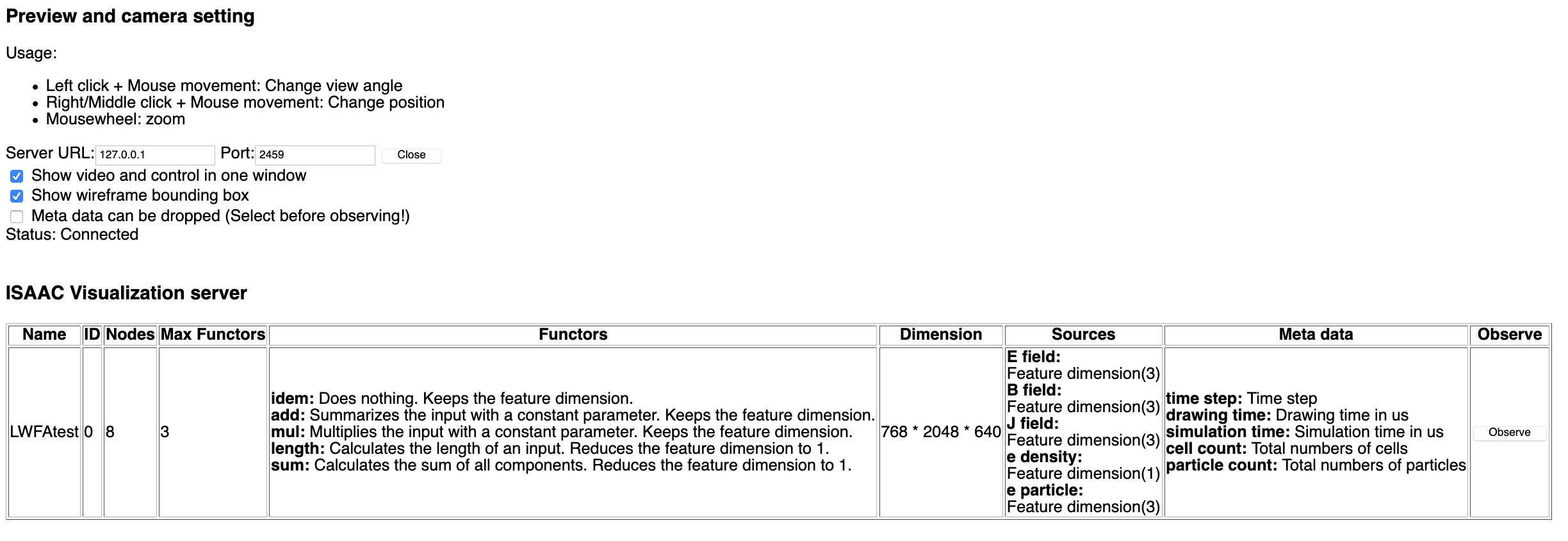
From what you wrote previously, I assume that PIConGPU runs in a docker container, and that the server runs on a separate machine, which the docker container sees as 172.17.0.1. Somehow, the TCP connection opened by PIConGPU does not reach the server. Is a connection via port 2460 open (TCP connection using socket)? Could it be that your docker container is still in the bridge network and not in the local network as the machine the ISAAC server runs on? Since I am not an expert in docker container networking, I can not tell you how to set this up correctly.
However, your docker container could also run both the ISAAC server (in the background) and PIConGPU. This would allow connecting PIConGPU and the ISAAC server over localhost (default) and only connection between the client to the server (common docker task) would be needed.
As far as I can tell, your PICpnGPU simulation ran. (Since you did not set --isaac.directPause 1, it it started without the go from the client.)
PrometheusPi
on 5 Nov 2020
Dear Richard,
Many thanks for the detailed answer.
The docker container with PIConGPU is hosted on the host that Issac server runs on.
I am 99% sure the tcp communication path between the docker and the host is open
including tcp port 2460.
The docker ip is 172.17.0.2 and the host server ip is 172.17.0.1
I saw other communications running between these 2 and there is no firewall on this docker-network .
I thought to first make sure somehow that the issac in situ library is actually running in the simulation. So I wonder if there is any indication in logs or console output of the simulation or any other indication that can assure the issac in situ extension actually kicks in during the simulation.
If for sure the in situ issac add on is running and still not communicating to the server , I'll do your recommendation to put the issac server on the docker as well.
Thank you
Amir
amircogan
on 6 Nov 2020
Hello @amircogan ,
I think a quick way to check if ISAAC plugin was initialized successfully at run time is to enable a more detailed log level in PIConGPU. To do so, please either make a new build with pic-build with -c "-DPIC_VERBOSE=33" added to your other options. Or go to the existing build directory, then to .build, ccmake ., fix the same variable there and rebuild.
With this new log level, PIConGPU will output much more to the standard output. And among this, either ISAAC Init failed, disable plugin or ISAAC Init succeded. And this output means not whether ISAAC was enabled at compile-time, but if it was actually starting in run-time.
sbastrakov
on 6 Nov 2020
@amircogan Setting the output/verbose level, as suggested by @sbastrakov, would be an excellent way to test the status of the ISAAC plugin.
By the way, would you be so kind and add your company to our community map: https://github.com/ComputationalRadiationPhysics/picongpu-communitymap
PrometheusPi
on 8 Nov 2020
Dear all,
With all your good advise I got the isaac in situ library to start working. So that is great.
I also noticed the docker you supply already comes with the isaac server and in situ library packages installed on it.I guess for newer features it is required to install these packages or build from source.
However we cannot see the graphical simulation yet.
The status is:
We run the LaserWakefield simulation with the 1_isaac.cfg file
On the browser we have url:
file:///home/user/isaac/client/html/visualisation.html
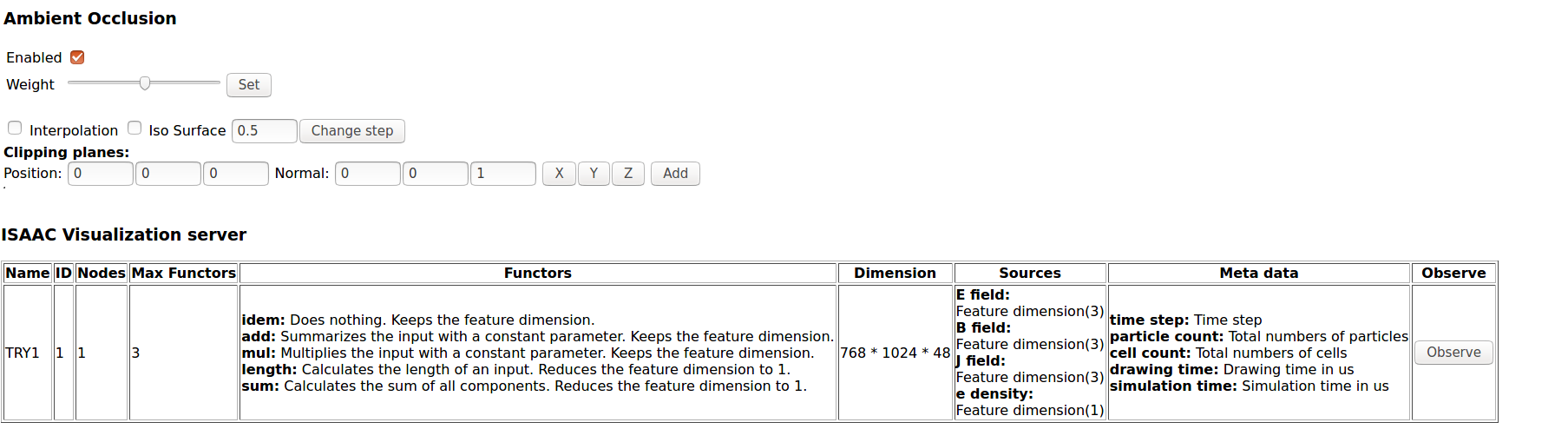
Click Observe and we get the black ISAAC window, but no data is seem in this window. The mouse movements work - mouse rotates and pans the box displayed in the black window.
I added below screenshots of the browser.
Can you please help understand why we don't see anything displayed ?
Many thanks

amircogan
on 10 Nov 2020
OK, I ran the server on the docker as well and everything is good now. So thanks alot. Will keep you updated.
amircogan
on 10 Nov 2020
@amircogan great to hear.
So you see something like this in the end:
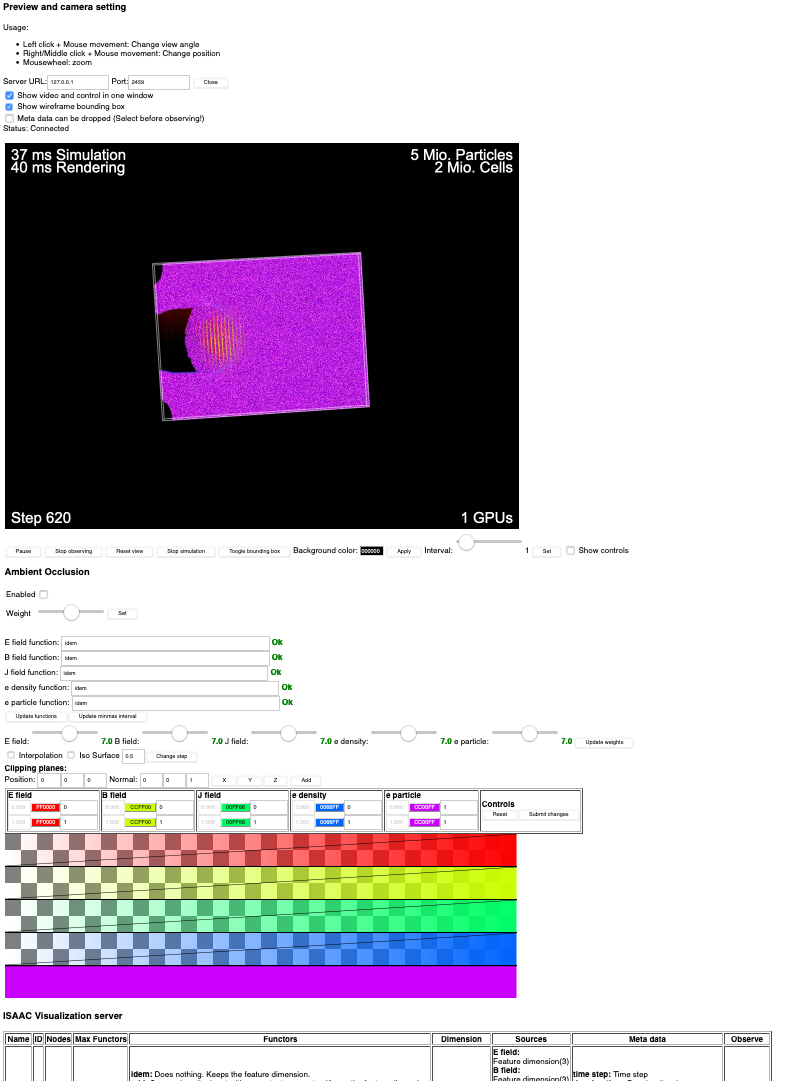
Do you know what the issue with the connectivity between the docker picongpu and the isaac server was?
Regarding the in-between issue: it is very surprising that the simulation connected but did not provide images (the white frame-box is generated by the client and not from the simulation.)
PrometheusPi
on 10 Nov 2020
Dear Richard,
Yes, we get a display like that, so this is exciting for us !!! I am pretty sure that my issue was that the isaac in situ library was not picked up in the simulation, rather than a docker to host connectivity issue.
Why it was black when the server was running on the host (and in situ library already picked up)- I not sure , probably the server was not built 100% correctly on my host. Now it is working so we are very happy (server on the docker as well).
We are now searching for example that has a magnetic pulse introduced into an existing plasma. I opened a separate issue on that.
Many thanks
amircogan
on 10 Nov 2020
Great it is working now. I will now close this issue, since it seems resolved. In case there are more questions or issues please do not hesitate to re-open or create new ones.
sbastrakov
on 11 Nov 2020
Thank you for this excellent support!!!
amircogan
on 15 Nov 2020
Dear @steindev @n01r @PrometheusPi @FelixTUD,
I am trying to use isaac for visualization of modified lwfa-example. My .cfg file has
TBG_isaac="--isaac.period 1 --isaac.name TRY1 --isaac.url 127.0.0.2  --isaac.port 2500"
TBG_plugins="!TBG_isaac"
and ../.build/picongpu -h gives :
[ajitup@kshitij-5-pre .build]$ ./picongpu -h
Usage picongpu [-d dx=1 dy=1 dz=1] -g width height depth [options]
:
IsaacPlugin:
  --isaac.period arg                    Enable IsaacPlugin [for each n-th   step].
  --isaac.name arg (=default)           The name of the simulation. Default is  "default".
  --isaac.url arg (=localhost)          The url of the isaac server to connect  to. Default is "localhost".
  --isaac.port arg (=2460)              The port of the isaac server to connect  to. Default is 2460.
  --isaac.width arg (=1024)             The width per isaac framebuffer.  Default is 1024.
  --isaac.height arg (=768)             The height per isaac framebuffer. Default is 768.
  --isaac.directPause arg (=0)          Direct pausing after starting  simulation. Default is false.
  --isaac.quality arg (=90)             JPEG quality. Default is 90.
  --isaac.reconnect arg (=1)            Trying to reconnect every time an image is rendered if the connection is lost
                                        or could never established at all.
When I start isaac on the head node of my cluster it gives following message and hangs at that:
[ajitup@kshitij-5-pre lwfa_001_gpu_isaac]$ isaac --url 127.0.0.2 --web_port 2500
Using web_port=2500, tcp_port=2458 and sim_port=2460

lwsts[23367]: Initial logging level 7
lwsts[23367]: Libwebsockets version: 2.2.0 [email protected]
lwsts[23367]: IPV6 not compiled in
lwsts[23367]: libev support not compiled in
lwsts[23367]: libuv support not compiled in
lwsts[23367]:  Threads: 1 each 1024 fds
lwsts[23367]:  mem: platform fd map:  8192 bytes
lwsts[23367]:  Compiled with OpenSSL support
lwsts[23367]:  SSL disabled: no LWS_SERVER_OPTION_DO_SSL_GLOBAL_INIT
lwsts[23367]: Creating Vhost 'default' port 2500, 2 protocols, IPv6 off
lwsts[23367]:  Listening on port 2500
lwsts[23367]:  mem: per-conn:          568 bytes + protocol rx buf
lwsts[23367]:  canonical_hostname = kshitij-5-pre.rrcat.gov.in
Running ISAAC Master
Starting insitu plugin listener
Launching WebSocketDataConnector
Launching TCPDataConnector
Launching JPEG_URI_Stream
I keep on waiting but it does not return to shell even after half an hour.
I submitted the lwfa simulation from a different shell and it aborted giving following error:
running program...
==> Error: Spec '[email protected]%[email protected]+adios+hdf5+isaac+png backend=cuda cudacxx=nvcc arch=linux-rhel7-skylake_avx512 ^[email protected]%[email protected]+blosc~bzip2~fortran~hdf5~infiniband+lz4+mpi~netcdf+shared+sz~szip+zfp+zlib patches=01113e9efb929d71c28bf33cc8b7f215d85195ec700e99cb41164e2f8f830640,8ae17f655248e87cbab1d1ed794e15364a38d2f5f8d971b1086702f72d79bd42,d24b79b795f66e40ddcd331ea4be896ac9c393d6f68f4318616d23928b0694e9 staging=none arch=linux-rhel7-skylake_avx512 ^[email protected]%[email protected] arch=linux-rhel7-skylake_avx512 ^[email protected]%[email protected] arch=linux-rhel7-skylake_avx512 ^[email protected]%[email protected] arch=linux-rhel7-skylake_avx512 ^[email protected]%[email protected]+atomic+chrono~clanglibcpp~container~context~coroutine+date_time~debug+exception~fiber+filesystem+graph~icu+iostreams+locale+log+math~mpi+multithreaded~numpy~pic+program_options~python+random+regex+serialization+shared+signals~singlethreaded+system~taggedlayout+test+thread+timer~versionedlayout+wave cxxstd=11 visibility=hidden arch=linux-rhel7-skylake_avx512 ^[email protected]%[email protected]+shared arch=linux-rhel7-skylake_avx512 ^[email protected]%[email protected]+avx2 build_type=RelWithDebInfo patches=cd40604a26157a0e018ea496cf3267e116e6ec5ff80a7d1cef11b841c154c388 arch=linux-rhel7-skylake_avx512 ^[email protected]%[email protected]~doc+ncurses+openssl+ownlibs~qt arch=linux-rhel7-skylake_avx512 ^[email protected]%[email protected] arch=linux-rhel7-skylake_avx512 ^[email protected]%[email protected] arch=linux-rhel7-skylake_avx512 ^[email protected]%[email protected]+libbsd arch=linux-rhel7-skylake_avx512 ^[email protected]%[email protected] arch=linux-rhel7-skylake_avx512 ^[email protected]%[email protected] arch=linux-rhel7-skylake_avx512 ^[email protected]%[email protected]+bzip2+curses+git~libunistring+libxml2+tar+xz arch=linux-rhel7-skylake_avx512 ^[email protected]%[email protected]~cxx~debug~fortran~hl~java+mpi+pic+shared~szip~threadsafe api=none arch=linux-rhel7-skylake_avx512 ^[email protected]%[email protected]~cairo~cuda~gl~libudev+libxml2~netloc~nvml+pci+shared arch=linux-rhel7-skylake_avx512 ^[email protected]%[email protected] build_type=RelWithDebInfo arch=linux-rhel7-skylake_avx512 ^[email protected]%[email protected]+cuda build_type=RelWithDebInfo arch=linux-rhel7-skylake_avx512 ^[email protected]%[email protected] build_type=RelWithDebInfo arch=linux-rhel7-skylake_avx512 ^[email protected]%[email protected]+shared build_type=RelWithDebInfo arch=linux-rhel7-skylake_avx512 ^[email protected]%[email protected] arch=linux-rhel7-skylake_avx512 ^[email protected]%[email protected] patches=26f26c6f29a7ce9bf370ad3ab2610f99365b4bdd7b82e7c31df41a3370d685c0 arch=linux-rhel7-skylake_avx512 ^[email protected]%[email protected] arch=linux-rhel7-skylake_avx512 ^[email protected]%[email protected] arch=linux-rhel7-skylake_avx512 ^[email protected]%[email protected] arch=linux-rhel7-skylake_avx512 ^[email protected]%[email protected] arch=linux-rhel7-skylake_avx512 ^[email protected]%[email protected] arch=linux-rhel7-skylake_avx512 ^[email protected]%[email protected]+mpi build_type=RelWithDebInfo patches=669608721dfce0ada7cef1ac84344352791a8916b7bb98ca8a0d4e6d4670e744 arch=linux-rhel7-skylake_avx512 ^[email protected]%[email protected] arch=linux-rhel7-skylake_avx512 ^[email protected]%[email protected] build_type=RelWithDebInfo arch=linux-rhel7-skylake_avx512 ^[email protected]%[email protected]~python arch=linux-rhel7-skylake_avx512 ^[email protected]%[email protected] arch=linux-rhel7-skylake_avx512 ^[email protected]%[email protected]+sigsegv patches=3877ab548f88597ab2327a2230ee048d2d07ace1062efe81fc92e91b7f39cd00,fc9b61654a3ba1a8d6cd78ce087e7c96366c290bc8d2c299f09828d793b853c8 arch=linux-rhel7-skylake_avx512 ^[email protected]%[email protected] arch=linux-rhel7-skylake_avx512 ^[email protected]%[email protected]~symlinks+termlib arch=linux-rhel7-skylake_avx512 ^[email protected]%[email protected] arch=linux-rhel7-skylake_avx512 ^[email protected]%[email protected]~atomics~cuda~cxx~cxx_exceptions+gpfs~java~legacylaunchers~lustre~memchecker~pmi~singularity~sqlite3+static~thread_multiple+vt+wrapper-rpath fabrics=none schedulers=none arch=linux-rhel7-skylake_avx512 ^[email protected]%[email protected]+systemcerts arch=linux-rhel7-skylake_avx512 ^[email protected]%[email protected]+cpanm+shared+threads arch=linux-rhel7-skylake_avx512 ^[email protected]%[email protected] arch=linux-rhel7-skylake_avx512 ^[email protected]%[email protected] build_type=RelWithDebInfo arch=linux-
rhel7-skylake_avx512 ^[email protected]%[email protected] arch=linux-rhel7-skylake_avx512 ^[email protected]%[email protected]+bz2+ctypes+dbm~debug+libxml2+lzma~nis~optimizations+pic+pyexpat+pythoncmd+readline+shared+sqlite3+ssl~tix~tkinter~ucs4~uuid+zlib patches=0d98e93189bc278fbc37a50ed7f183bd8aaf249a8e1670a465f0db6bb4f8cf87 arch=linux-rhel7-skylake_avx512 ^[email protected]%[email protected] arch=linux-rhel7-skylake_avx512 ^[email protected]%[email protected] arch=linux-rhel7-skylake_avx512 ^[email protected]%[email protected]+pic+shared build_type=RelWithDebInfo patches=c9cfecb1f7a623418590cf4e00ae7d308d1c3faeb15046c2e5090e38221da7cd arch=linux-rhel7-skylake_avx512 ^[email protected]%[email protected]+column_metadata+fts~functions~rtree arch=linux-rhel7-skylake_avx512 ^[email protected]%[email protected]~fortran~hdf5~netcdf~pastri~python~random_access+shared~time_compression build_type=RelWithDebInfo arch=linux-rhel7-skylake_avx512 ^[email protected]%[email protected] arch=linux-rhel7-skylake_avx512 ^[email protected]%[email protected] arch=linux-rhel7-skylake_avx512 ^[email protected]%[email protected] arch=linux-rhel7-skylake_avx512 ^[email protected]%[email protected]~pic arch=linux-rhel7-skylake_avx512 ^[email protected]%[email protected]~aligned~fasthash~profile+shared~strided~twoway bsws=64 build_type=RelWithDebInfo arch=linux-rhel7-skylake_avx512 ^[email protected]%[email protected]+optimize+pic+shared arch=linux-rhel7-skylake_avx512 ^[email protected]%[email protected]+pic arch=linux-rhel7-skylake_avx512' matches no installed packages.
PIConGPU: 0.4.3
  Build-Type: Release

Third party:
  OS:         Linux-3.10.0-957.el7.x86_64
  arch:       x86_64
  CXX:        GNU (7.3.0)
  CMake:      3.18.2
  CUDA:       10.0.130
  mallocMC:   2.3.1
  Boost:      1.70.0
  MPI:
    standard: 3.1
    flavor:   OpenMPI (3.1.6)
  PNGwriter:  0.7.0
  libSplash:  1.7.0 (Format 4.0)
  ADIOS:      NOTFOUND
PIConGPUVerbose PHYSICS(1) | Sliding Window is ON
PIConGPUVerbose INPUT_OUTPUT(32) | ISAAC Init succeded
PIConGPUVerbose PHYSICS(1) | used Random Number Generator: RNGProvider3XorMin seed: 42
PIConGPUVerbose PHYSICS(1) | Courant c*dt <= 1.00229 ? 1
PIConGPUVerbose PHYSICS(1) | species e: omega_p * dt <= 0.1 ? 0.0247974
PIConGPUVerbose PHYSICS(1) | y-cells per wavelength: 18.0587
PIConGPUVerbose PHYSICS(1) | macro particles per device: 100663296
PIConGPUVerbose PHYSICS(1) | typical macro particle weighting: 6955.06
PIConGPUVerbose PHYSICS(1) | UNIT_SPEED 2.99792e+08
PIConGPUVerbose PHYSICS(1) | UNIT_TIME 1.39e-16
PIConGPUVerbose PHYSICS(1) | UNIT_LENGTH 4.16712e-08
PIConGPUVerbose PHYSICS(1) | UNIT_MASS 6.33563e-27
PIConGPUVerbose PHYSICS(1) | UNIT_CHARGE 1.11432e-15
PIConGPUVerbose PHYSICS(1) | UNIT_EFIELD 1.22627e+13
PIConGPUVerbose PHYSICS(1) | UNIT_BFIELD 40903.8
PIConGPUVerbose PHYSICS(1) | UNIT_ENERGY 5.69418e-10
initialization time:  4min 56sec 731msec = 296 sec
terminate called after throwing an instance of 'std::runtime_error'
  what():  /home2/ajitup/.local/spack/opt/spack/linux-rhel7-skylake_avx512/gcc-7.3.0/picongpu-0.4.3-4tebd4rs6otiq547yib44vfdloz2cyc5/thirdParty/alpaka/include/alpaka/stream/StreamCudaRtAsync.hpp(351) 'cudaStreamSynchronize( stream.m_spStreamImpl->m_CudaStream)' A previous CUDA call (not this one) set the error  : 'cudaErrorInvalidConfiguration': 'invalid configuration argument'!
[kshitij-5-gpu8:25837] *** Process received signal ***
[kshitij-5-gpu8:25837] Signal: Aborted (6)
[kshitij-5-gpu8:25837] Signal code:  (-6)
[kshitij-5-gpu8:25837] [ 0] /usr/lib64/libpthread.so.0(+0xf5d0)[0x7f2ca4b6d5d0]
[kshitij-5-gpu8:25837] [ 1] /usr/lib64/libc.so.6(gsignal+0x37)[0x7f2ca26e0207]
[kshitij-5-gpu8:25837] [ 2] /usr/lib64/libc.so.6(abort+0x148)[0x7f2ca26e18f8]
[kshitij-5-gpu8:25837] [ 3] /home2/ajitup/src/spack/opt/spack/linux-rhel7-haswell/gcc-4.8.5/gcc-7.3.0-xrfc4r3ue7v73fq4rqsqffw3o2dnvqlf/lib64/libstdc++.so.6(_ZN9__gnu_cxx27__verbose_terminate_handlerEv+0x125)[0x7f2ca2f4d185]
[kshitij-5-gpu8:25837] [ 4] /home2/ajitup/src/spack/opt/spack/linux-rhel7-haswell/gcc-4.8.5/gcc-7.3.0-xrfc4r3ue7v73fq4rqsqffw3o2dnvqlf/lib64/libstdc++.so.6(+0x8ef56)[0x7f2ca2f4af56]
[kshitij-5-gpu8:25837] [ 5] /home2/ajitup/src/spack/opt/spack/linux-rhel7-haswell/gcc-4.8.5/gcc-7.3.0-xrfc4r3ue7v73fq4rqsqffw3o2dnvqlf/lib64/libstdc++.so.6(+0x8efa1)[0x7f2ca2f4afa1]
[kshitij-5-gpu8:25837] [ 6] /home2/ajitup/src/spack/opt/spack/linux-rhel7-haswell/gcc-4.8.5/gcc-7.3.0-xrfc4r3ue7v73fq4rqsqffw3o2dnvqlf/lib64/libstdc++.so.6(+0x8f1e4)[0x7f2ca2f4b1e4]
[kshitij-5-gpu8:25837] [ 7] /home2/ajitup/run.picongpu/lwfa_001_gpu_isaac/runs/input/bin/picongpu[0x45a0ae]
[kshitij-5-gpu8:25837] [ 8] /home2/ajitup/run.picongpu/lwfa_001_gpu_isaac/runs/input/bin/picongpu[0x491dd2]
[kshitij-5-gpu8:25837] [ 9] /home2/ajitup/run.picongpu/lwfa_001_gpu_isaac/runs/input/bin/picongpu[0x4dd2ba]
[kshitij-5-gpu8:25837] [10] /home2/ajitup/run.picongpu/lwfa_001_gpu_isaac/runs/input/bin/picongpu[0x6efc8d]
[kshitij-5-gpu8:25837] [11] /home2/ajitup/run.picongpu/lwfa_001_gpu_isaac/runs/input/bin/picongpu[0x6f0ce4]
[kshitij-5-gpu8:25837] [12] /home2/ajitup/run.picongpu/lwfa_001_gpu_isaac/runs/input/bin/picongpu[0x6f6a05]
[kshitij-5-gpu8:25837] [13] /home2/ajitup/run.picongpu/lwfa_001_gpu_isaac/runs/input/bin/picongpu[0x6ed86d]
[kshitij-5-gpu8:25837] [14] /home2/ajitup/run.picongpu/lwfa_001_gpu_isaac/runs/input/bin/picongpu[0x5503f2]
[kshitij-5-gpu8:25837] [15] /home2/ajitup/run.picongpu/lwfa_001_gpu_isaac/runs/input/bin/picongpu[0x552e44]
[kshitij-5-gpu8:25837] [16] /home2/ajitup/run.picongpu/lwfa_001_gpu_isaac/runs/input/bin/picongpu[0x4a2d07]
[kshitij-5-gpu8:25837] [17] /home2/ajitup/run.picongpu/lwfa_001_gpu_isaac/runs/input/bin/picongpu[0x58fcb1]
[kshitij-5-gpu8:25837] [18] /home2/ajitup/run.picongpu/lwfa_001_gpu_isaac/runs/input/bin/picongpu[0x5902c0]
[kshitij-5-gpu8:25837] [19] /home2/ajitup/run.picongpu/lwfa_001_gpu_isaac/runs/input/bin/picongpu[0x414c3b]
[kshitij-5-gpu8:25837] [20] /usr/lib64/libc.so.6(__libc_start_main+0xf5)[0x7f2ca26cc3d5]
[kshitij-5-gpu8:25837] [21] /home2/ajitup/run.picongpu/lwfa_001_gpu_isaac/runs/input/bin/picongpu[0x416eef]
[kshitij-5-gpu8:25837] *** End of error message ***
--------------------------------------------------------------------------
Primary job  terminated normally, but 1 process returned
a non-zero exit code. Per user-direction, the job has been aborted.
--------------------------------------------------------------------------
In the browser on the postprocessor node, do I have to use url: http://127.0.0.2:2500/ ??? as it shows: could not connect. When I used ../client/html/visualisation.html file and tried to connect, it did not connect.
When I cancel the issac-server it gives:
^C
Waiting for insitu Master thread to finish... Done
Asking WebSocketDataConnector to exit
Asking TCPDataConnector to exit
Asking JPEG_URI_Stream to exit
lwsts[23367]: lws_context_destroy: ctx 0x1f47020
lwsts[23367]: lws_context_destroy2: ctx 0x1f47020
WebSocketDataConnector finished
TCPDataConnector finished
JPEG_URI_Stream finished
Am I doing it right? Could you please help me in solving this issue and visualizing the output using isaac?
 ajitup73
on 18 Dec 2020
ajitup73
on 18 Dec 2020
Dear @ajitup73,
Thanks for trying PIConGPU and ISAAC. Since this issue is probably unrelated to what you are experiencing, I have made a new issue #3481 quoting your question. We will try to help in that, new, one.
sbastrakov
on 18 Dec 2020
Related issues
 mikewang2000
·
3Comments
mikewang2000
·
3Comments
 psychocoderHPC
·
4Comments
sbastrakov
·
3Comments
PrometheusPi
·
3Comments
psychocoderHPC
·
4Comments
sbastrakov
·
3Comments
PrometheusPi
·
3Comments
 ax3l
·
4Comments
ax3l
·
4Comments