Picongpu: Crash of the PIConGPU simulation on k20
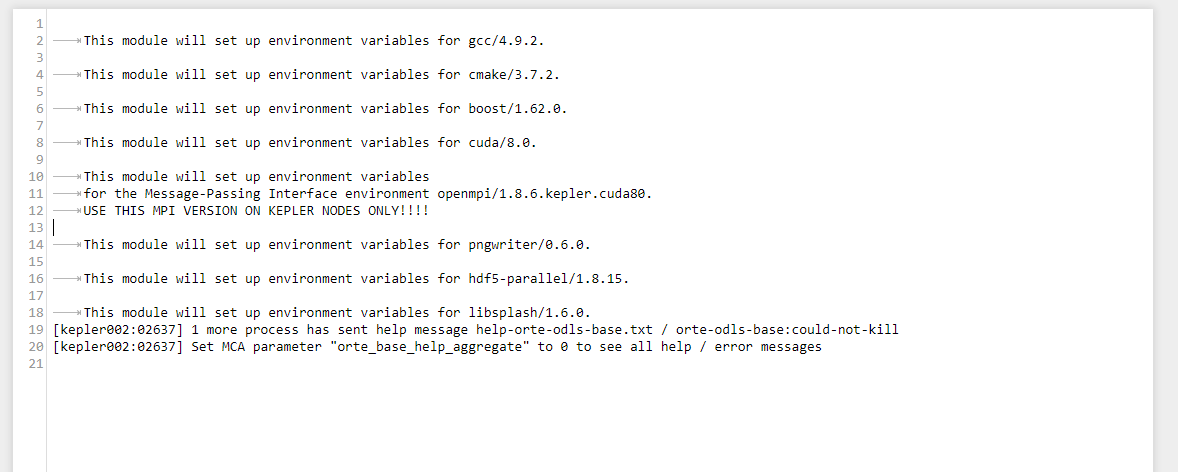
I tried to start PIConGPU simulation and got these error messages:
[kepler002:02637] 1 more process has sent help message help-orte-odls-base.txt / orte-odls-base:could-not-kill
[kepler002:02637] Set MCA parameter "orte_base_help_aggregate" to 0 to see all help / error messages
And one week ago the same simulation worked nicely...
Is it due to some cluster update work or?
 NastasiaM
All 101 comments
Dear @NastasiaM, thank you for the report.
Yes, we are struggling with the updates the cluster received last week and are waiting for a solution and tests by our central IT. We are expected to receive an other round of major updates during the day.
Can you post the full error/output message as an attachement? The message you posted looks ok so far.
 ax3l
on 5 Feb 2018
ax3l
on 5 Feb 2018
Hi Axel!
Here it is.
NastasiaM
on 5 Feb 2018
the stderror looks ok so far, what's in stdout?
ax3l
on 5 Feb 2018
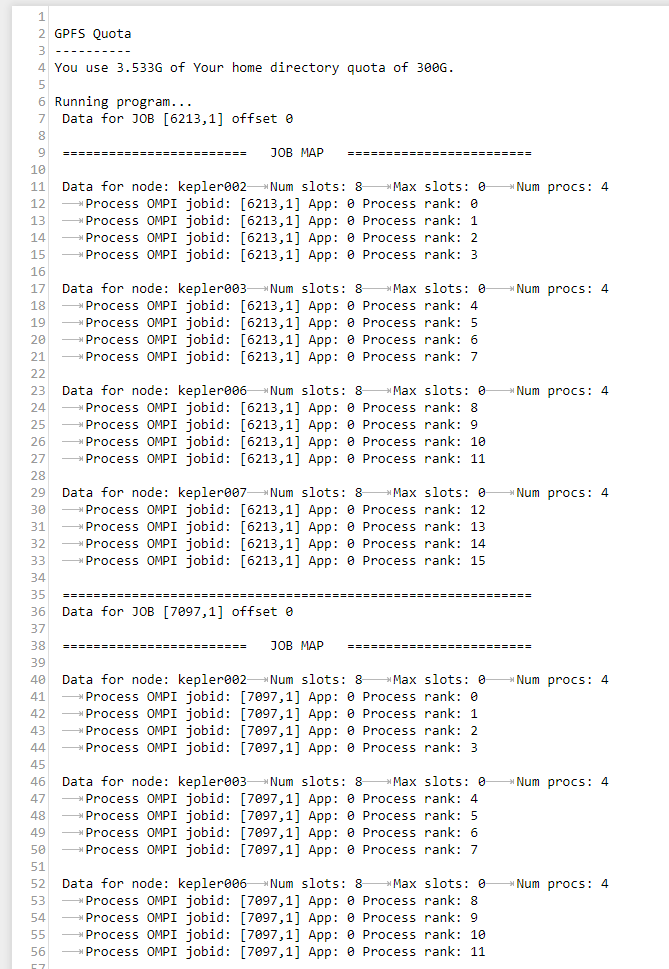
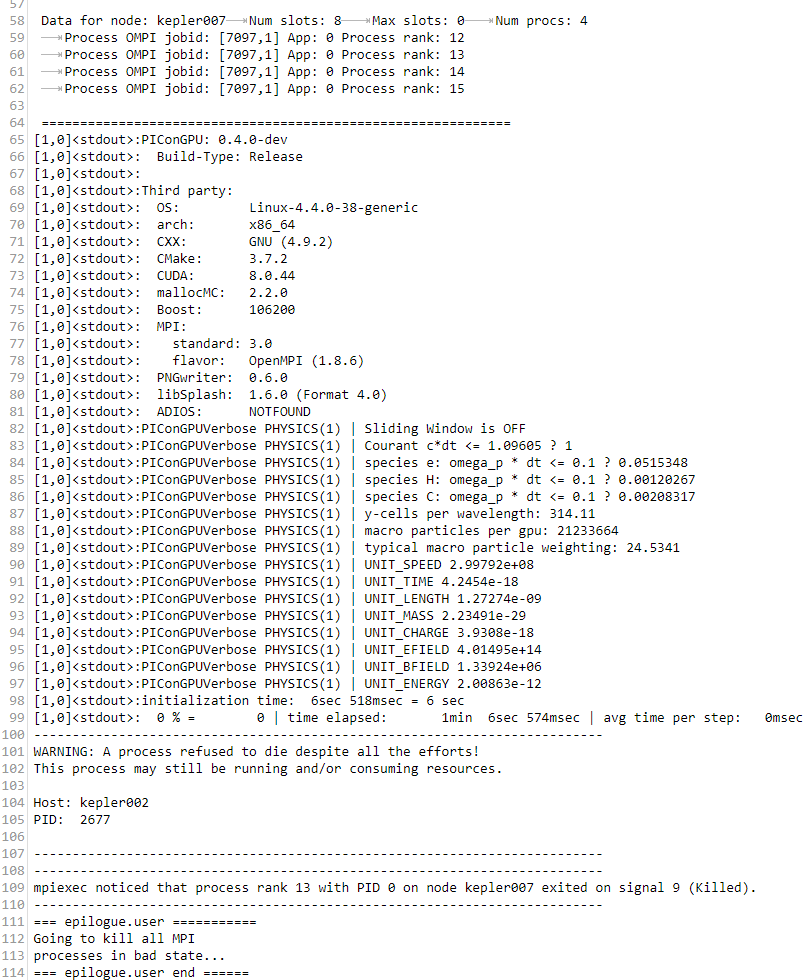
NastasiaM
on 5 Feb 2018
All right, let's try to re-compile and re-submit tomorrow.
Have not heard about the update yet, but I hope they will announce it on the HPC user list on which you should be on as well.
ax3l
on 5 Feb 2018
I tried re-compile and re-submit today, and it still gives the same error. What is strange - the simulation crashed after a couple of hours (100 fs was simulated), and it is just the time of the first checkpoint. Could it happen that something is wrong with the checkpoint?
NastasiaM
on 6 Feb 2018
Hm, we currently hope for the update that is scheduled for Thursday. What was the error & output this time?
ax3l
on 6 Feb 2018
Error message was the same as previous time. Ok, let's wait till Thursday.
NastasiaM
on 6 Feb 2018
Hi @NastasiaM ,
the cluster has been updated. Please update your picongpu.profile modules as follows: #2521
openmpi/1.8.6.kepler.cuda80->openmpi/2.1.2.kepler.cuda80openmpi/2.1.2.cuda80hdf5-parallel/1.8.15->hdf5-parallel/1.8.20
but stay with libsplash/1.6.0 (do not take 1.7.0 with your version of PIConGPU).
Afterwards, recompile and re-submit and you should be good to go again.
ax3l
on 9 Feb 2018
Hi,
I did the update but I still have that in stderr:
openmpi(6):ERROR:105: Unable to locate a modulefile for 'openmpi/2.1.2.kepler.cuda80'
This module will set up environment variables for pngwriter/0.6.0.
hdf5-parallel(9):ERROR:105: Unable to locate a modulefile for 'hdf5-parallel/1.8.20'
libsplash/1.6.0(7):ERROR:151: Module 'libsplash/1.6.0' depends on one of the module(s) 'openmpi/1.8.6'
libsplash/1.6.0(7):ERROR:102: Tcl command execution failed: prereq openmpi/1.8.6
/var/spool/torque/mom_priv/jobs/1523039.hypnos3.SC: Zeile 72: mpiexec: Befehl nicht gefunden
/var/spool/torque/mom_priv/jobs/1523039.hypnos3.SC: Zeile 81: mpiexec: Befehl nicht gefunden
NastasiaM
on 9 Feb 2018
Sorry, this is a bug that existed for half a day. It was fixed with #2523
If you update your picongpu.profile accordingly so that openmpi/2.1.2.kepler.cuda80 becomes openmpi/2.1.2.cuda80, and compile picongpu again, it should work.
 PrometheusPi
on 9 Feb 2018
PrometheusPi
on 9 Feb 2018
Yeah, now it gives different error message)
like that:
[1,0]
and plenty of similar stuff.
NastasiaM
on 9 Feb 2018
Can you please try again like this:
- update profile
- log out and in again
- source profile
- recompile
- resubmit
?
ax3l
on 9 Feb 2018
I did it... and I still have an error.
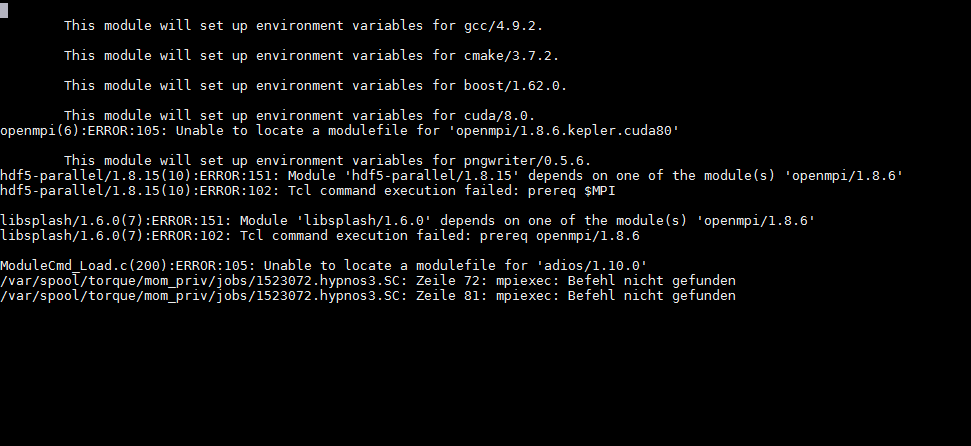
O just checked if I have right modules

and it looks that I have the right ones.
NastasiaM
on 9 Feb 2018
Please try these modules:
        module purge

        # Core Dependencies
        module load gcc/4.9.2
        module load cmake/3.7.2
        module load boost/1.62.0
        module load cuda/8.0
        module load openmpi/2.1.2.cuda80

        # Plugins (optional)
        module load pngwriter/0.6.0
        module load hdf5-parallel/1.8.20 libsplash/1.6.0

        # either use libSplash or ADIOS for file I/O
        module load adios/1.10.0
looks like there is still a line in your profile trying to load openmpi/1.8.6 (pls remove it)
ax3l
on 9 Feb 2018
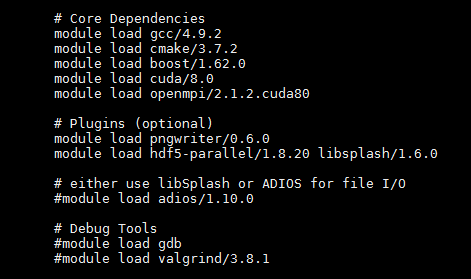
and it was like that before
NastasiaM
on 9 Feb 2018
is it possible you are editing the wrong file? e.g. picongpu.profile instead of k80_picongpu.profile in your $HOME or similar?
ax3l
on 9 Feb 2018
But then I execute this file. And when I check the right modules are loaded. Or...?
NastasiaM
on 9 Feb 2018
The moment you source (not execute) the file via:
source $HOME/picongpu.profile
and re-compile everything should be fine.
The problem is that it shows errors of wrongly loaded modules when you source it. Is module purge still in the file? Can you please post the complete file (feel free to remove the email first)?
ax3l
on 9 Feb 2018
Here it is
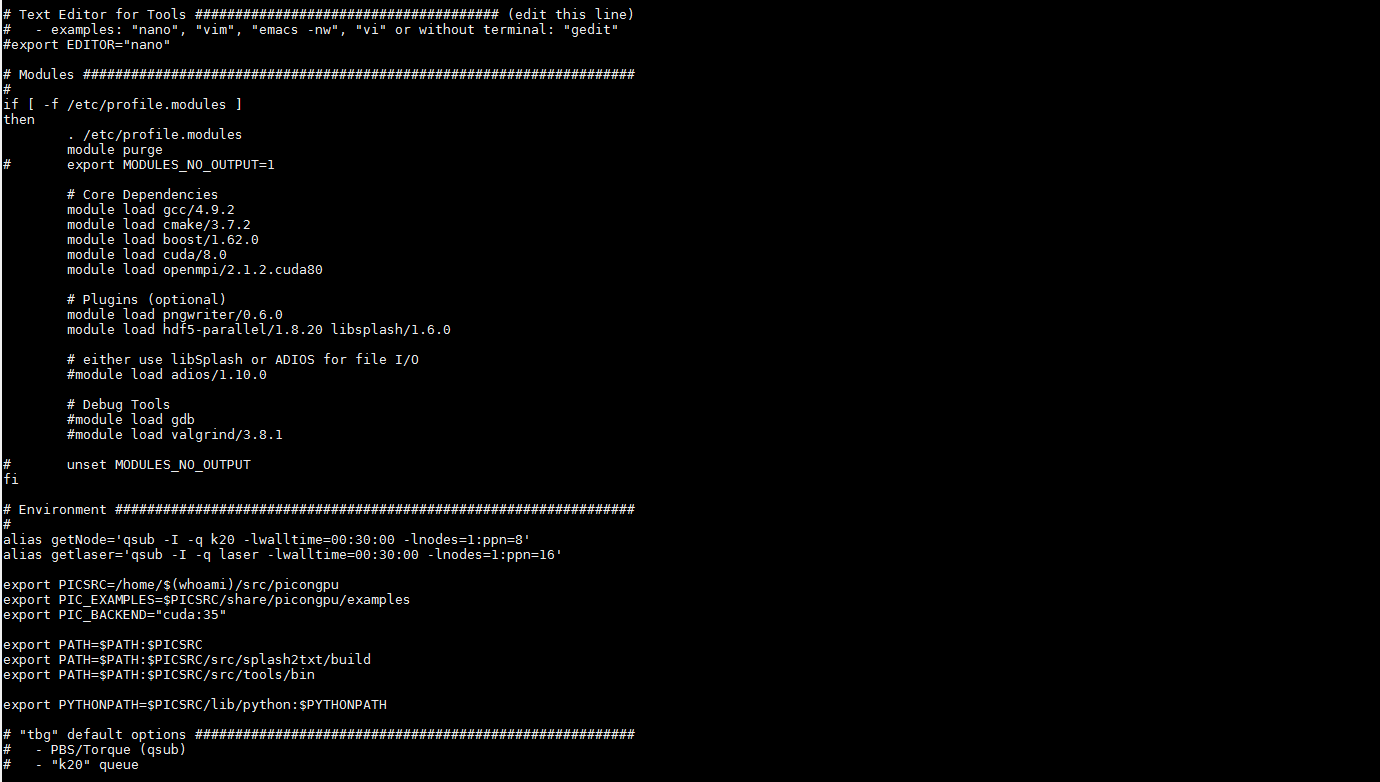
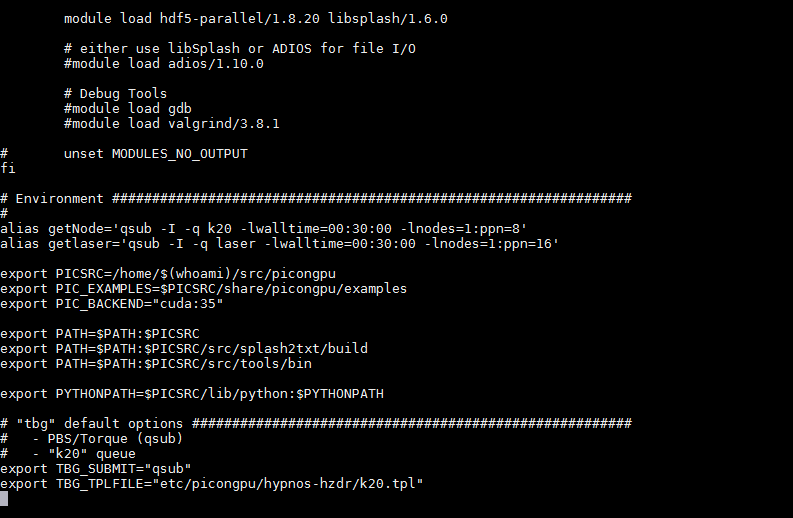
NastasiaM
on 9 Feb 2018
looks alright!
If you log in and type module li, what does it show?
module li
source $HOME/picongpu.profile
module li

NastasiaM
on 9 Feb 2018
Please post the full output of all three commands after a fresh login :)
ax3l
on 9 Feb 2018
enjoy!
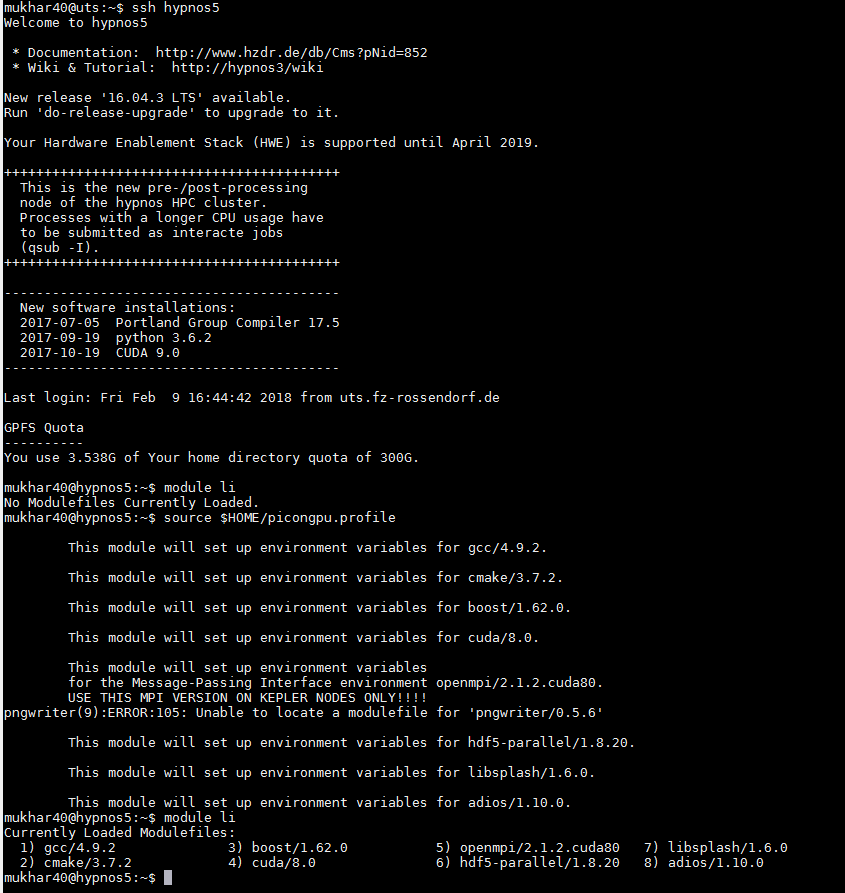
NastasiaM
on 9 Feb 2018
Why does it load pngwriter/0.5.6? Can you please update this to 0.6.0? Everything else is fine now :)
You need to recompile & resubmit and then let's see if it works.
ax3l
on 9 Feb 2018
Hi Axel!
recompiled & resubmitted, error
This is stderr file

NastasiaM
on 12 Feb 2018
All right. Can you please paste the tbg/submit.tpl file our the crashed run? Ah wait, I see the modules. It's something weird in the environment... hm
ax3l
on 12 Feb 2018
You still had outdated modules in $HOME/own.modules - we commented them out now. Please re-log in and re-compile and re-submit
ax3l
on 12 Feb 2018
Here is .tpl file
#!/usr/bin/env bash
# Copyright 2013-2018 Axel Huebl, Anton Helm, Rene Widera
# This file is part of PIConGPU.
# PIConGPU is free software: you can redistribute it and/or modify
# it under the terms of the GNU General Public License as published by
# the Free Software Foundation, either version 3 of the License, or
# (at your option) any later version.
#
# PIConGPU is distributed in the hope that it will be useful,
# but WITHOUT ANY WARRANTY; without even the implied warranty of
# MERCHANTABILITY or FITNESS FOR A PARTICULAR PURPOSE.  See the
# GNU General Public License for more details.
#
# You should have received a copy of the GNU General Public License
# along with PIConGPU.
# If not, see <http://www.gnu.org/licenses/>.
#


# PIConGPU batch script for hypnos PBS batch system

#PBS -q !TBG_queue
#PBS -l walltime=!TBG_wallTime
# Sets batch job's name
#PBS -N !TBG_jobName
#PBS -l nodes=!TBG_nodes:ppn=!TBG_coresPerNode
# send me mails on job (b)egin, (e)nd, (a)bortion or (n)o mail
#PBS -m !TBG_mailSettings -M !TBG_mailAddress
#PBS -d !TBG_dstPath
#PBS -n

#PBS -o stdout
#PBS -e stderr


## calculation are done by tbg ##
.TBG_queue="k20"

# settings that can be controlled by environment variables before submit
.TBG_mailSettings=${MY_MAILNOTIFY:-"n"}
.TBG_mailAddress=${MY_MAIL:-"[email protected]"}
.TBG_author=${MY_NAME:+--author \"${MY_NAME}\"}
.TBG_profile=${PIC_PROFILE:-"~/picongpu.profile"}

# 4 gpus per node if we need more than 4 gpus else same count as TBG_tasks
.TBG_gpusPerNode=`if [ $TBG_tasks -gt 4 ] ; then echo 4; else echo $TBG_tasks; fi`

#number of cores per parallel node / default is 2 cores per gpu on k20 queue
.TBG_coresPerNode="$(( TBG_gpusPerNode * 2 ))"

# use ceil to caculate nodes
.TBG_nodes="$(( ( TBG_tasks + TBG_gpusPerNode -1 ) / TBG_gpusPerNode))"
## end calculations ##

echo 'Running program...'

cd !TBG_dstPath

export MODULES_NO_OUTPUT=1
source !TBG_profile

#PBS -o stdout
#PBS -e stderr


## calculation are done by tbg ##
.TBG_queue="k20"

# settings that can be controlled by environment variables before submit
.TBG_mailSettings=${MY_MAILNOTIFY:-"n"}
.TBG_mailAddress=${MY_MAIL:-"[email protected]"}
.TBG_author=${MY_NAME:+--author \"${MY_NAME}\"}
.TBG_profile=${PIC_PROFILE:-"~/picongpu.profile"}

# 4 gpus per node if we need more than 4 gpus else same count as TBG_tasks
.TBG_gpusPerNode=`if [ $TBG_tasks -gt 4 ] ; then echo 4; else echo $TBG_tasks; fi`

#number of cores per parallel node / default is 2 cores per gpu on k20 queue
.TBG_coresPerNode="$(( TBG_gpusPerNode * 2 ))"

# use ceil to caculate nodes
.TBG_nodes="$(( ( TBG_tasks + TBG_gpusPerNode -1 ) / TBG_gpusPerNode))"
## end calculations ##

echo 'Running program...'

cd !TBG_dstPath

export MODULES_NO_OUTPUT=1
source !TBG_profile
if [ $? -ne 0 ] ; then
  echo "Error: PIConGPU environment profile under \"!TBG_profile\" not found!"
  exit 1
fi
unset MODULES_NO_OUTPUT

#set user rights to u=rwx;g=r-x;o=---
umask 0027

mkdir simOutput 2> /dev/null
cd simOutput

#wait that all nodes see ouput folder
sleep 1

# test if cuda_memtest binary is available
if [ -f !TBG_dstPath/input/bin/cuda_memtest ] ; then
  mpiexec --prefix $MPIHOME -tag-output --display-map -x LIBRARY_PATH -am !TBG_dstPath/tbg/openib.conf --mca mpi_leave_pinned 0 -npernode !TBG_gpusPerNode -n !TBG_tasks !TBG_dstPath/input/bin/$
else
  echo "no binary 'cuda_memtest' available, skip GPU memory test" >&2
fi

if [ $? -eq 0 ] ; then
  mpiexec --prefix $MPIHOME -x LIBRARY_PATH -tag-output --display-map -am !TBG_dstPath/tbg/openib.conf --mca mpi_leave_pinned 0 -npernode !TBG_gpusPerNode -n !TBG_tasks !TBG_dstPath/input/bin/$
fi

mpiexec --prefix $MPIHOME -x LIBRARY_PATH -npernode !TBG_gpusPerNode -n !TBG_tasks /usr/bin/env bash -c "killall -9 picongpu 2>/dev/null || true"
@NastasiaM have you tried again after we removed the outdated module loads from your own.modules?
ax3l
on 12 Feb 2018
I recompiled and resubmitted one more time and it still has the same error :(
NastasiaM
on 12 Feb 2018
Hm, I just recompiled your example, submitted it and it worked (test 13).
Can you re-login and try please?
ax3l
on 12 Feb 2018
Wow! it looks like it works... what did you change?
NastasiaM
on 12 Feb 2018
I think I cleaned up own.modules even more. there were still active lines lurking purge-ing modules. Let us not touch this file again ^^
ax3l
on 12 Feb 2018
Ok, now it starts, but why is it terminated after 4 hours? (I put walltime 60:00:00)
NastasiaM
on 13 Feb 2018
looks like it died during the write of simulation step 16000, maybe a filesystem issue.
just restart :)
ax3l
on 13 Feb 2018
You are also occupying already about 2.8TByte of output.
Feel free to remove old or failed simulations if you can (or the heavy-weight data within it, such as checkpoints and h5 files).
ax3l
on 13 Feb 2018
I deleted 1TB of output, but still, simulation crashes after 3:46 hours. And actually that also happened with test simulation which you started. Maybe something else is wrong?
NastasiaM
on 14 Feb 2018
Maybe it did run out of memory? Maybe try increasing the number of GPUs you use.
ax3l
on 14 Feb 2018
But it worked before with such numbers of GPU... just because of longer simulation time it starts to crash? Ok, I'll try.
NastasiaM
on 14 Feb 2018
Might be!
ax3l
on 14 Feb 2018
Maybe it did run out of memory?
Don't we have any possibilities to check for such failures? I mean, we are using our own allocator, is it not possibly to at least throw an "out of memory" exception? :confused:
 theZiz
on 14 Feb 2018
theZiz
on 14 Feb 2018
Usually there should be a warning in the output if it runs out of memory.
What's the crash message you got?
ax3l
on 14 Feb 2018
I looked in the stdout
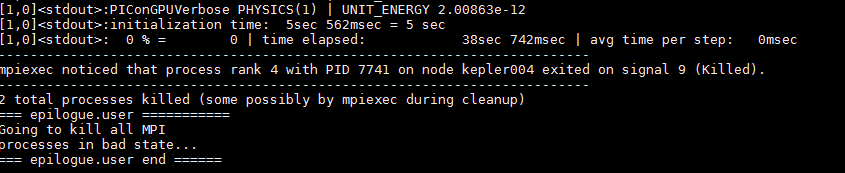
The process was killed but I didn't found anything about the memory
NastasiaM
on 14 Feb 2018
What are the last couple lines of the stderr file?
PrometheusPi
on 14 Feb 2018
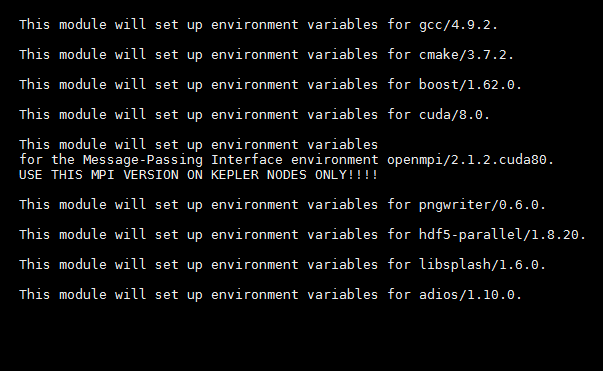
Here is the whole stderr and it looks fune
NastasiaM
on 14 Feb 2018
can you post the directory where this output lies?
ax3l
on 14 Feb 2018
Here it is.
/bigdata/hplsim/.../.../colloidalMelting_TF_I=6.3_long_good/
NastasiaM
on 14 Feb 2018
ok, that one died during the write of step 16000 (see content in simOutput/h5/), lilkely a file system issue.
just retry then.
can for for the next write add a checkpoint at step 15000 so one can quickly iterate to the crash?
ax3l
on 14 Feb 2018
Ok, just submitted a new one with 15000 checkpoint
NastasiaM
on 14 Feb 2018
Simulation
/bigdata/hplsim/.../.../colloidalMelting_TF_I=6.3_long_good_1/
with checkpoint at 15 000 crashed after 03:32:11. Looks like it is because of the checkpoint
NastasiaM
on 14 Feb 2018
Wow, looks like the file I/O has issues with the new modules... dang.
ax3l
on 15 Feb 2018
Hi!
Please tell me when something will be done with this issue, I'll check if it works then.
NastasiaM
on 16 Feb 2018
@psychocoderHPC @n01r @PrometheusPi if anyone of you has some time feel free to continue debugging here issue. I have unfortunately no time in the next weeks.
Please send her your SSH pubkey if you need a hands-on login into her hypnos acc.
ax3l
on 26 Feb 2018
Hey @NastasiaM, I sent you my public key.
Proceed as explained in the mail and then I can have a look on occasion. :)
 n01r
on 2 Mar 2018
n01r
on 2 Mar 2018
offline (online xD) with @NastasiaM on 2018-03-02:
- a small default example with the checkpoint option also crashes
Looks to me like both checkpoints (checkpoint_0 and checkpoint_15000) are actually created and the crash happens after this.
The .bp file seems to be corrupted though and a bprecover doesn't seem to help.
I would suggest to write the checkpoints with hdf5 instead, to test if this is somehow an adios problem.
@NastasiaM, could you do the following changes to your submit.cfg
Old
# Create a checkpoint that is restartable every --checkpoints steps
TBG_checkpoints="--checkpoint.period 15000"
# Restart the simulation from checkpoints created using TBG_checkpoints
TBG_restart="--checkpoint.restart"
New
# Create a checkpoint that is restartable every --checkpoints steps
TBG_checkpoints="--checkpoint.period 15000 --checkpoint.backend hdf5"
# Restart the simulation from checkpoints created using TBG_checkpoints
TBG_restart="--checkpoint.restart --checkpoint.restart.backend hdf5"
So please just add the *backend hdf* option to both. :)
But try it first with the small default example which also crashes that we talked about offline.
update
The default example (FoilLCT) failed for some other reason :/
[1,0]<stderr>:mpiInfo: error while loading shared libraries: libmpi.so.1: cannot open shared object file: No such file or directory
[1,1]<stderr>:mpiInfo: error while loading shared libraries: libmpi.so.1: cannot open shared object file: No such file or directory
[1,2]<stderr>:mpiInfo: error while loading shared libraries: libmpi.so.1: cannot open shared object file: No such file or directory
[1,3]<stderr>:mpiInfo: error while loading shared libraries: libmpi.so.1: cannot open shared object file: No such file or directory
[1,1]<stderr>:cuda_memtest: error while loading shared libraries: libmpi.so.1: cannot open shared object file: No such file or directory
[1,0]<stderr>:cuda_memtest: error while loading shared libraries: libmpi.so.1: cannot open shared object file: No such file or directory
[1,3]<stderr>:cuda_memtest: error while loading shared libraries: libmpi.so.1: cannot open shared object file: No such file or directory
[1,2]<stderr>:cuda_memtest: error while loading shared libraries: libmpi.so.1: cannot open shared object file: No such file or directory
[1,0]<stderr>:cuda_memtest crash: see file /bigdata/hplsim/<path-to>/Foil_LCT_test_checkpoint/simOutput/cuda_memtest_kepler014_.err
[1,3]<stderr>:cuda_memtest crash: see file /bigdata/hplsim/<path-to>/Foil_LCT_test_checkpoint/simOutput/cuda_memtest_kepler014_.err
[1,2]<stderr>:cuda_memtest crash: see file /bigdata/hplsim/<path-to>/Foil_LCT_test_checkpoint/simOutput/cuda_memtest_kepler014_.err
[1,1]<stderr>:cuda_memtest crash: see file /bigdata/hplsim/<path-to>/Foil_LCT_test_checkpoint/simOutput/cuda_memtest_kepler014_.err
Something is wrong with the environment.
Could you please go into the test case and run:
- load all modules
module lildd bin/picongpuldd bin/mpiInfoenv
Please post all output including the commands.
 psychocoderHPC
on 5 Mar 2018
psychocoderHPC
on 5 Mar 2018
Oha ... this'll be a long cell.
$ cd /bigdata/hplsim/<path-to>/Foil_LCT_test_checkpoint
<user>@hypnos5:/bigdata/hplsim/<path-to>/Foil_LCT_test_checkpoint$ source ~/picongpu.profile

    This module will set up environment variables for gcc/4.9.2.

    This module will set up environment variables for cmake/3.7.2.

    This module will set up environment variables for boost/1.62.0.

    This module will set up environment variables for cuda/8.0.

    This module will set up environment variables
    for the Message-Passing Interface environment openmpi/2.1.2.cuda80.
    USE THIS MPI VERSION ON KEPLER NODES ONLY!!!!

    This module will set up environment variables for pngwriter/0.6.0.

    This module will set up environment variables for hdf5-parallel/1.8.20.

    This module will set up environment variables for libsplash/1.6.0.

    This module will set up environment variables for adios/1.10.0.

hypnos5:/bigdata/hplsim/<path-to>/Foil_LCT_test_checkpoint$ module li

Currently Loaded Modulefiles:
  1) gcc/4.9.2              3) boost/1.62.0           5) openmpi/2.1.2.cuda80   7) hdf5-parallel/1.8.20   9) adios/1.10.0
  2) cmake/3.7.2            4) cuda/8.0               6) pngwriter/0.6.0        8) libsplash/1.6.0

hypnos5:/bigdata/hplsim/<path-to>/Foil_LCT_test_checkpoint$ ldd input/bin/picongpu
    linux-vdso.so.1 =>  (0x00007fff97fc8000)
    libpthread.so.0 => /lib/x86_64-linux-gnu/libpthread.so.0 (0x00007f609bc2e000)
    libdl.so.2 => /lib/x86_64-linux-gnu/libdl.so.2 (0x00007f609ba26000)
    librt.so.1 => /lib/x86_64-linux-gnu/librt.so.1 (0x00007f609b81e000)
    libcudart.so.8.0 => /opt/pkg/devel/cuda/8.0/lib64/libcudart.so.8.0 (0x00007f609b5b6000)
    libmpi.so.1 => not found
    libmpi_cxx.so.1 => not found
    libboost_filesystem.so.1.62.0 => /opt/pkg/devel/boost/1.62.0/gnu/4.9.2/64/opt/lib/libboost_filesystem.so.1.62.0 (0x00007f609b396000)
    libboost_system.so.1.62.0 => /opt/pkg/devel/boost/1.62.0/gnu/4.9.2/64/opt/lib/libboost_system.so.1.62.0 (0x00007f609b18e000)
    libboost_math_tr1.so.1.62.0 => /opt/pkg/devel/boost/1.62.0/gnu/4.9.2/64/opt/lib/libboost_math_tr1.so.1.62.0 (0x00007f609af3e000)
    libz.so.1 => /lib/x86_64-linux-gnu/libz.so.1 (0x00007f609ad1e000)
    libboost_program_options.so.1.62.0 => /opt/pkg/devel/boost/1.62.0/gnu/4.9.2/64/opt/lib/libboost_program_options.so.1.62.0 (0x00007f609aaa6000)
    libboost_regex.so.1.62.0 => /opt/pkg/devel/boost/1.62.0/gnu/4.9.2/64/opt/lib/libboost_regex.so.1.62.0 (0x00007f609a786000)
    libboost_serialization.so.1.62.0 => /opt/pkg/devel/boost/1.62.0/gnu/4.9.2/64/opt/lib/libboost_serialization.so.1.62.0 (0x00007f609a53e000)
    libibverbs.so.1 => /usr/lib/libibverbs.so.1 (0x00007f609a32e000)
    libm.so.6 => /lib/x86_64-linux-gnu/libm.so.6 (0x00007f609a026000)
    libhdf5.so.10 => /opt/pkg/filelib/hdf5-parallel/1.8.20/gnu/4.9.2/64/opt/openmpi/2.1.2.cuda80/lib/libhdf5.so.10 (0x00007f6099b0e000)
    libpngwriter.so => /opt/pkg/filelib/pngwriter/0.6.0/gnu/4.9.2/64/opt/lib/libpngwriter.so (0x00007f60998ee000)
    libpng12.so.0 => /lib/x86_64-linux-gnu/libpng12.so.0 (0x00007f60996c6000)
    libfreetype.so.6 => /usr/lib/x86_64-linux-gnu/libfreetype.so.6 (0x00007f609941e000)
    libstdc++.so.6 => /opt/pkg/compiler/gnu/gcc/4.9.2/lib64/libstdc++.so.6 (0x00007f60990ee000)
    libgomp.so.1 => /opt/pkg/compiler/gnu/gcc/4.9.2/lib64/libgomp.so.1 (0x00007f6098ed6000)
    libgcc_s.so.1 => /opt/pkg/compiler/gnu/gcc/4.9.2/lib64/libgcc_s.so.1 (0x00007f6098cbe000)
    libc.so.6 => /lib/x86_64-linux-gnu/libc.so.6 (0x00007f60988f6000)
    /lib64/ld-linux-x86-64.so.2 (0x000055cd7753c000)
    libicudata.so.52 => /usr/lib/x86_64-linux-gnu/libicudata.so.52 (0x00007f6097086000)
    libicui18n.so.52 => /usr/lib/x86_64-linux-gnu/libicui18n.so.52 (0x00007f6096c7e000)
    libicuuc.so.52 => /usr/lib/x86_64-linux-gnu/libicuuc.so.52 (0x00007f60968fe000)
    libmpi.so.20 => /opt/pkg/mpi/openmpi/2.1.2.cuda80/gnu/4.9.2/64/opt/lib/libmpi.so.20 (0x00007f6096606000)
    libopen-rte.so.20 => /opt/pkg/mpi/openmpi/2.1.2.cuda80/gnu/4.9.2/64/opt/lib/libopen-rte.so.20 (0x00007f6096376000)
    libopen-pal.so.20 => /opt/pkg/mpi/openmpi/2.1.2.cuda80/gnu/4.9.2/64/opt/lib/libopen-pal.so.20 (0x00007f6096076000)
    libudev.so.1 => /lib/x86_64-linux-gnu/libudev.so.1 (0x00007f6095e5e000)
    libnvidia-ml.so.1 => /opt/pkg/devel/cuda/8.0/lib64/libnvidia-ml.so.1 (0x00007f6095b26000)
    libutil.so.1 => /lib/x86_64-linux-gnu/libutil.so.1 (0x00007f609591e000)
    libcgmanager.so.0 => /lib/x86_64-linux-gnu/libcgmanager.so.0 (0x00007f60956fe000)
    libnih.so.1 => /lib/x86_64-linux-gnu/libnih.so.1 (0x00007f60954e6000)
    libnih-dbus.so.1 => /lib/x86_64-linux-gnu/libnih-dbus.so.1 (0x00007f60952d6000)
    libdbus-1.so.3 => /lib/x86_64-linux-gnu/libdbus-1.so.3 (0x00007f609508e000)

<user>@hypnos5:/bigdata/hplsim/<path-to>/Foil_LCT_test_checkpoint$ ldd input/bin/mpiInfo

    linux-vdso.so.1 =>  (0x00007ffdb5fe0000)
    libcudart.so.8.0 => /opt/pkg/devel/cuda/8.0/lib64/libcudart.so.8.0 (0x00007f5c13e6e000)
    libpthread.so.0 => /lib/x86_64-linux-gnu/libpthread.so.0 (0x00007f5c13c26000)
    librt.so.1 => /lib/x86_64-linux-gnu/librt.so.1 (0x00007f5c13a1e000)
    libmpi.so.1 => not found
    libmpi_cxx.so.1 => not found
    libboost_filesystem.so.1.62.0 => /opt/pkg/devel/boost/1.62.0/gnu/4.9.2/64/opt/lib/libboost_filesystem.so.1.62.0 (0x00007f5c137fe000)
    libboost_system.so.1.62.0 => /opt/pkg/devel/boost/1.62.0/gnu/4.9.2/64/opt/lib/libboost_system.so.1.62.0 (0x00007f5c135f6000)
    libboost_math_tr1.so.1.62.0 => /opt/pkg/devel/boost/1.62.0/gnu/4.9.2/64/opt/lib/libboost_math_tr1.so.1.62.0 (0x00007f5c133a6000)
    libz.so.1 => /lib/x86_64-linux-gnu/libz.so.1 (0x00007f5c13186000)
    libboost_program_options.so.1.62.0 => /opt/pkg/devel/boost/1.62.0/gnu/4.9.2/64/opt/lib/libboost_program_options.so.1.62.0 (0x00007f5c12f0e000)
    libboost_regex.so.1.62.0 => /opt/pkg/devel/boost/1.62.0/gnu/4.9.2/64/opt/lib/libboost_regex.so.1.62.0 (0x00007f5c12bee000)
    libboost_serialization.so.1.62.0 => /opt/pkg/devel/boost/1.62.0/gnu/4.9.2/64/opt/lib/libboost_serialization.so.1.62.0 (0x00007f5c129a6000)
    libm.so.6 => /lib/x86_64-linux-gnu/libm.so.6 (0x00007f5c1269e000)
    libstdc++.so.6 => /opt/pkg/compiler/gnu/gcc/4.9.2/lib64/libstdc++.so.6 (0x00007f5c1236e000)
    libgomp.so.1 => /opt/pkg/compiler/gnu/gcc/4.9.2/lib64/libgomp.so.1 (0x00007f5c12156000)
    libgcc_s.so.1 => /opt/pkg/compiler/gnu/gcc/4.9.2/lib64/libgcc_s.so.1 (0x00007f5c11f3e000)
    libc.so.6 => /lib/x86_64-linux-gnu/libc.so.6 (0x00007f5c11b76000)
    libdl.so.2 => /lib/x86_64-linux-gnu/libdl.so.2 (0x00007f5c1196e000)
    /lib64/ld-linux-x86-64.so.2 (0x000055888d20d000)
    libicudata.so.52 => /usr/lib/x86_64-linux-gnu/libicudata.so.52 (0x00007f5c100fe000)
    libicui18n.so.52 => /usr/lib/x86_64-linux-gnu/libicui18n.so.52 (0x00007f5c0fcf6000)
    libicuuc.so.52 => /usr/lib/x86_64-linux-gnu/libicuuc.so.52 (0x00007f5c0f976000)

<user>@hypnos5:/bigdata/hplsim/<path-to>/Foil_LCT_test_checkpoint$ env

TBG_SUBMIT=qsub
CPLUS_INCLUDE_PATH=/opt/pkg/devel/boost/1.62.0/gnu/4.9.2/64/opt/include
MODULE_VERSION_STACK=3.2.6
OMPI_MCA_mtl=^mxm
LPATH=/opt/pkg/devel/cuda/8.0/lib64:/opt/pkg/filelib/hdf5-parallel/1.8.20/gnu/4.9.2/64/opt/openmpi/2.1.2.cuda80/lib:/opt/pkg/filelib/libsplash/1.6.0/gnu/4.9.2/64/opt/openmpi/2.1.2.cuda80/lib:/opt/pkg/filelib/adios/1.10.0/gnu/4.9.2/64/opt/openmpi/2.1.2.cuda80/lib
MANPATH=/opt/pkg/mpi/openmpi/2.1.2.cuda80/gnu/4.9.2/64/opt/share/man:/opt/pkg/compiler/gnu/gcc/4.9.2/share/man:/opt/torque/share/man:/usr/share/man:/opt/pkg/devel/cuda/8.0/doc/man
HDF5_DIR=/opt/pkg/filelib/hdf5-parallel/1.8.20/gnu/4.9.2/64/opt/openmpi/2.1.2.cuda80
TERM=xterm
SHELL=/bin/bash
LIBSPLASH_ROOT=/opt/pkg/filelib/libsplash/1.6.0/gnu/4.9.2/64/opt/openmpi/2.1.2.cuda80
CPPFLAGS=-g0 -O3 -m64
SSH_CLIENT=10.0.2.5 57304 22
LIBRARY_PATH=/opt/pkg/devel/cuda/8.0/lib64:/opt/pkg/devel/cuda/8.0/lib:/opt/pkg/compiler/gnu/gcc/4.9.2/lib64
PIC_PROFILE=/home/<user>/picongpu.profile
PICSRC=/home/<user>/src/picongpu
OLDPWD=/home/<user>
MODCMPVERS=4.9.2
SSH_TTY=/dev/pts/164
LC_ALL=en_US.UTF-8
USER=<user>
LD_LIBRARY_PATH=/opt/pkg/filelib/adios/1.10.0/gnu/4.9.2/64/opt/openmpi/2.1.2.cuda80/lib:/opt/pkg/filelib/libsplash/1.6.0/gnu/4.9.2/64/opt/openmpi/2.1.2.cuda80/lib:/opt/pkg/filelib/pngwriter/0.6.0/gnu/4.9.2/64/opt/lib:/opt/pkg/mpi/openmpi/2.1.2.cuda80/gnu/4.9.2/64/opt/lib:/opt/pkg/devel/cuda/8.0/lib64:/opt/pkg/devel/cuda/8.0/lib:/opt/pkg/devel/boost/1.62.0/gnu/4.9.2/64/opt/lib:/opt/pkg/compiler/gnu/gcc/4.9.2/lib64:/opt/pkg/numlib/mpfr/3.1.2/lib:/opt/pkg/numlib/mpc/1.0.1/lib:/opt/pkg/numlib/gmp/5.1.1/lib:/opt/torque/lib:/opt/mellanox/mxm/lib/:/opt/pkg/filelib/hdf5-parallel/1.8.20/gnu/4.9.2/64/opt/openmpi/2.1.2.cuda80/lib
CPATH=/opt/pkg/devel/cuda/8.0/include:/opt/pkg/numlib/gmp/5.1.1/include:/opt/pkg/numlib/mpc/1.0.1/include:/opt/pkg/numlib/mpfr/3.1.2/include:/opt/pkg/filelib/hdf5-parallel/1.8.20/gnu/4.9.2/64/opt/openmpi/2.1.2.cuda80/include:/opt/pkg/filelib/libsplash/1.6.0/gnu/4.9.2/64/opt/openmpi/2.1.2.cuda80/include:/opt/pkg/filelib/adios/1.10.0/gnu/4.9.2/64/opt/openmpi/2.1.2.cuda80/include
PNGWRITER_ROOT=/opt/pkg/filelib/pngwriter/0.6.0/gnu/4.9.2/64/opt
SPLASH_ROOT=/opt/pkg/filelib/libsplash/1.6.0/gnu/4.9.2/64/opt/openmpi/2.1.2.cuda80
CXXFLAGS=-g0 -O3 -m64
BOOST_LIB_PATH=/opt/pkg/devel/boost/1.62.0/gnu/4.9.2/64/opt/lib
MY_MAILNOTIFY=bea
MPIROOT=/opt/pkg/mpi/openmpi/2.1.2.cuda80/gnu/4.9.2/64/opt
ADIOS_ROOT=/opt/pkg/filelib/adios/1.10.0/gnu/4.9.2/64/opt/openmpi/2.1.2.cuda80
MODULE_VERSION=3.2.6
MAIL=/var/mail/<user>
PATH=/opt/pkg/filelib/adios/1.10.0/gnu/4.9.2/64/opt/openmpi/2.1.2.cuda80/bin:/opt/pkg/filelib/libsplash/1.6.0/gnu/4.9.2/64/opt/openmpi/2.1.2.cuda80/bin:/opt/pkg/mpi/openmpi/2.1.2.cuda80/gnu/4.9.2/64/opt/bin:/opt/pkg/devel/cuda/8.0/bin:/opt/pkg/devel/cmake/3.7.2/bin:/opt/pkg/compiler/gnu/gcc/4.9.2/bin:/usr/local/sbin:/usr/local/bin:/usr/sbin:/usr/bin:/sbin:/bin:/opt/thinlinc/bin:/opt/torque/bin:/opt/pkg/filelib/hdf5-parallel/1.8.20/gnu/4.9.2/64/opt/openmpi/2.1.2.cuda80/bin:/home/<user>/src/picongpu:/home/<user>/src/picongpu/src/splash2txt/build:/home/<user>/src/picongpu/src/tools/bin
C_INCLUDE_PATH=/opt/pkg/devel/boost/1.62.0/gnu/4.9.2/64/opt/include
MODCMPSDIR=gnu/4.9.2/64/opt
PWD=/bigdata/hplsim/<path-to>/Foil_LCT_test_checkpoint
PIC_EXAMPLES=/home/<user>/src/picongpu/share/picongpu/examples
HDF5_ROOT=/opt/pkg/filelib/hdf5-parallel/1.8.20/gnu/4.9.2/64/opt/openmpi/2.1.2.cuda80
_LMFILES_=/opt/modules/3.2.6/compiler/gcc/4.9.2:/opt/modules/3.2.6/devel/cmake/3.7.2:/opt/modules/3.2.6/gnu492/devel/boost/1.62.0:/opt/modules/3.2.6/devel/cuda/8.0:/opt/modules/3.2.6/gnu492/mpi/openmpi/2.1.2.cuda80:/opt/modules/3.2.6/gnu492-mpi212k/filelib/pngwriter/0.6.0:/opt/modules/3.2.6/gnu492-mpi212k/filelib/hdf5-parallel/1.8.20:/opt/modules/3.2.6/gnu492-mpi212k/filelib/libsplash/1.6.0:/opt/modules/3.2.6/gnu492-mpi212k/filelib/adios/1.10.0
MY_NAME=<name>
F95=/opt/pkg/compiler/gnu/gcc/4.9.2/bin/gfortran-4.9.2
LANG=en_US.UTF-8
MODULEPATH=/opt/modules/3.2.6/modulefiles:/opt/modules/3.2.6/tools:/opt/modules/3.2.6/ansys:/opt/modules/3.2.6/infiniband:/opt/modules/3.2.6/numlib:/opt/modules/3.2.6/analysis:/opt/modules/3.2.6/simulation:/opt/modules/3.2.6/devel:/opt/modules/3.2.6/compiler_debug:/opt/modules/3.2.6/compiler:/opt/modules/3.2.6/gnu492/devel:/opt/modules/3.2.6/gnu492/mpi:/opt/modules/3.2.6/gnu492-mpi212k/devel:/opt/modules/3.2.6/gnu492-mpi212k/filelib:/opt/modules/3.2.6/gnu492-mpi212k/numlib
LOADEDMODULES=gcc/4.9.2:cmake/3.7.2:boost/1.62.0:cuda/8.0:openmpi/2.1.2.cuda80:pngwriter/0.6.0:hdf5-parallel/1.8.20:libsplash/1.6.0:adios/1.10.0
OMPI_MCA_btl_openib_warn_default_gid_prefix=0
[email protected]
F77=/opt/pkg/compiler/gnu/gcc/4.9.2/bin/gfortran-4.9.2
HDF5_LIB=/opt/pkg/filelib/hdf5-parallel/1.8.20/gnu/4.9.2/64/opt/openmpi/2.1.2.cuda80/lib
CXX=/opt/pkg/compiler/gnu/gcc/4.9.2/bin/g++-4.9.2
SHLVL=1
HOME=/home/<user>
COMPILER_ROOT=/opt/pkg/compiler/gnu/gcc/4.9.2
MPIHOME=/opt/pkg/mpi/openmpi/2.1.2.cuda80/gnu/4.9.2/64/opt
FC=/opt/pkg/compiler/gnu/gcc/4.9.2/bin/gfortran-4.9.2
TBG_TPLFILE=submit/hypnos-hzdr/k20_profile.tpl
MATHEMATICA_HOME=/opt/pkg/analysis/Mathematica/10.2.0
MPI_ROOT=/opt/pkg/mpi/openmpi/2.1.2.cuda80/gnu/4.9.2/64/opt
LOGNAME=<user>
BOOST_ROOT=/opt/pkg/devel/boost/1.62.0/gnu/4.9.2/64/opt
SSH_CONNECTION=10.0.2.5 57304 10.0.2.5 22
MODULESHOME=/opt/modules-3.2.6/Modules/3.2.6
MODCMPNAME=gnu
CMAKE_PREFIX_PATH=/opt/pkg/filelib/adios/1.10.0/gnu/4.9.2/64/opt/openmpi/2.1.2.cuda80:/opt/pkg/filelib/libsplash/1.6.0/gnu/4.9.2/64/opt/openmpi/2.1.2.cuda80:/opt/pkg/filelib/hdf5-parallel/1.8.20/gnu/4.9.2/64/opt/openmpi/2.1.2.cuda80:/opt/pkg/filelib/pngwriter/0.6.0/gnu/4.9.2/64/opt
BOOST_INC_PATH=/opt/pkg/devel/boost/1.62.0/gnu/4.9.2/64/opt/include
CC=/opt/pkg/compiler/gnu/gcc/4.9.2/bin/gcc-4.9.2
DISPLAY=localhost:87.0
CUDA_ROOT=/opt/pkg/devel/cuda/8.0
CMAKE_ROOT=/opt/pkg/devel/cmake/3.7.2
OMPI_MCA_plm=rsh
HDF5_INC=/opt/pkg/filelib/hdf5-parallel/1.8.20/gnu/4.9.2/64/opt/openmpi/2.1.2.cuda80/include
OMPI_MCA_btl=openib,self,sm
_=/usr/bin/env
Okay, whatever the case with this default example, I set up a standard FoilLCT from her branch with her modules and ran one with HDF5 checkpoints and one with ADIOS checkpoints and both are running fine.
n01r
on 5 Mar 2018
Okay, since the change was so small and the other tests were both successful, I tried manipulating the submit.start of /bigdata/hplsim/<path-to>/colloidalMelting_TF_I=6.3_long_good_1/ and changed the checkpoint backend to hdf5.
Then I started it from the directory directly and it's still running and currently past the point of the previous crash.
This issue should still be investigated more deeply but with the current workaround the production runs should be able to go on, @NastasiaM.
update
Unfortunately this crashed a bit later during the write of an HDF5 dump.
The stderr doesn't show anything but h5stat simData_21000.h5 says that it can't open the file.
n01r
on 5 Mar 2018
hm, could also just be that the HDF5 lib is build with the wrong compiler or MPI or ... or that libSplash was build against a different HDF5...
ax3l
on 6 Mar 2018
Hi! Any news about this issue?
NastasiaM
on 16 Mar 2018
Hey @NastasiaM, @psychocoderHPC and I just had a quick look at this simulation's output again.
We looked at the number of particles you produce and the domain decomposition of the simulation volume.
We found in submit.start/<your-config-file>.cfg that the GPUs are distributed as -d 2 4 2 and the cells are -g 64 512 128.
From looking at the PNG output of your electrons we can see that ionization is probably just beginning.

Could you just try taking 16 GPUs in total and using double the amount of GPUs in the laser propagation direction? The new GPU distribution would be 2 8 2. Maybe you're really just running out of memory as it currently is.
n01r
on 16 Mar 2018
Is the MPI issue solved? We mixed in this issue different problems. Who solved the missing MPI lib problem, please provide the solution.
psychocoderHPC
on 16 Mar 2018
Hi! I tried 16 GPUs (1 8 2) and it also didn't work :(
So the problem is not solved yet.
NastasiaM
on 20 Mar 2018
Good morning!
Some more input - if I start the simulation with 2 8 2 GPUs is crashes not after 3 but after 6 hours.
NastasiaM
on 21 Mar 2018
Could you calculate what the maximum number of macroparticles in the simulation is?
You would do that as follows:
Find the number of particles per cell for each species in particle.param. If I remember right, you have only C and H as ion species. You need to calculate (6+1)NppcC + (1+1)NppH. This is the maximum number of macroparticles per cell if nothing moves. Now calculate how many cells are filled with plasma/colloidal crystal from the close-packing of the spheres you simulate as a percentage of the 64x512x128 cells in your volume. We're interested in the maximum number of particles per GPU in the end. As a rough estimate one can have a maximum of about 50-60 million macroparticles per k20 GPU.
n01r
on 21 Mar 2018
PPC=27.
How many cells are filled with plasma - I would estimate 60% of the simulation volume

So that means 64512128 * 27(6+1+1+1) * 0.6 = 6.810^9.
If we have 8 GPUs it is 85 million particles per GPU. It is too much, But it is the upper border because we don't ionize so many particles and we don't ionize it to C6+.
I can try reducing PPC to... 8 for example?
NastasiaM
on 21 Mar 2018
But a lot of particles get displaced by the laser and you just need a single GPU to run out of memory for the simulation to crash. Also the first GPU layer in laser propagation direction contains mostly vacuum. So you're sharing the particles between a smaller number of GPUs.
Since it is a 3D sim you can reduce the number of PPC a little and still get good statistics.
So yes, try 8. But remember to also change the densityRatio accordingly so that you still arrive at the density you intended and make sure to check the ion density in your first outputs after the change to be sure that all is configured correctly.
n01r
on 21 Mar 2018
I changed to 8PPC and it also crashed after 3 hours :(
NastasiaM
on 21 Mar 2018
Hi!
Actually, I think that you are right that there are too many particles and GPUs just run out of memory. I checked 8 PPC simulations and it crashed when nearly all target was ionized.
You know any ways how to deal with it?
NastasiaM
on 22 Mar 2018
You could always reduce the number of particles further. Radically. To see if the simulation finishes.
Go to 1 PPC, change densityRatio accordingly and see what happens.
At the same time @psychocoderHPC told me offline that he is following another lead as well (which of course might not be connected to this).
n01r
on 22 Mar 2018
Oh, btw, could you also please include
TBG_countParticles="--e_macroParticlesCount.period 50  \
                    --H_macroParticlesCount.period 50  \
                    --C_macroParticlesCount.period 50"
and then add !TBG_countParticles to your CFG file? That way we know how many macro-particles there are during the run with good temporal resolution.
Nevertheless, @psychocoderHPC copied your example, updated it to the most recent dev and had it running today for himself. He was able to reproduce the crash after 4h and still thinks that it happens while writing the HDF5 files. Unfortunately, the exact reason for the crashes is still unknown, though.
n01r
on 22 Mar 2018
Hi! I also tried just not to save h5 files (png only) and now simulation with 1PPC runs for the whole night .and not going to crash. So looks like @psychocoderHPC is right.
I forgot to add TBG_countParticles - will do it in the next simulation.
NastasiaM
on 23 Mar 2018
@NastasiaM Currently there is no need to rerun the simulation with the macro particle counter. I run it with the counter enabled and have all information . The number of particles is fine.
It looks like it is an issue with our cluster. I run the problem over night with gdb debugging enabled an got our missing error message. I opened an issue in our ticket system and we need to wait for feedback from our admins.
[1,4]<stdout>:Program terminated with signal SIGKILL, Killed.
[1,4]<stdout>:---Type <return> to continue, or q <return> to quit---[1,4]<stdout>:The program no longer exists.
[1,4]<stdout>:(gdb) quit
--------------------------------------------------------------------------
The InfiniBand retry count between two MPI processes has been
exceeded.  "Retry count" is defined in the InfiniBand spec 1.2
(section 12.7.38):

    The total number of times that the sender wishes the receiver to
    retry timeout, packet sequence, etc. errors before posting a
    completion error.

This error typically means that there is something awry within the
InfiniBand fabric itself.  You should note the hosts on which this
error has occurred; it has been observed that rebooting or removing a
particular host from the job can sometimes resolve this issue.

Two MCA parameters can be used to control Open MPI's behavior with
respect to the retry count:

* btl_openib_ib_retry_count - The number of times the sender will
  attempt to retry (defaulted to 7, the maximum value).
* btl_openib_ib_timeout - The local ACK timeout parameter (defaulted
  to 20).  The actual timeout value used is calculated as:

     4.096 microseconds * (2^btl_openib_ib_timeout)

  See the InfiniBand spec 1.2 (section 12.7.34) for more details.

Below is some information about the host that raised the error and the
peer to which it was connected:

  Local host:   kepler009
  Local device: mlx4_0
  Peer host:    kepler005

You may need to consult with your system administrator to get this
problem fixed.
--------------------------------------------------------------------------
Ok, thanks!
Please, tell me when something is solved (hopefully).
NastasiaM
on 26 Mar 2018
Yesterday the cluster was restarted. The simulation is still crashing after a few hours. I tested if it is possible to restart the simulation from the last checkpoint. This is possible and can be used as temporary workaround.
psychocoderHPC
on 29 Mar 2018
And is it possible to automatically restart the simulation from the last checkpoint several times with https://github.com/ComputationalRadiationPhysics/picongpu/blob/dev/etc/picongpu/hypnos-hzdr/k80_restart.tpl
just adapted to k20?
because it crashes after 4.5 hours and I need ~60.
NastasiaM
on 29 Mar 2018
Hi everyone!
I have one more question about restarting simulation from the checkpoint. If the simulation crashes the last h5 file's name looks like that simData_20000.h5-249364481.lock and that doesn't allow to open simulation output via Jupyter logbook. Maybe you know how to deal with it?
NastasiaM
on 3 Apr 2018
And is it possible to automatically restart the simulation from the last checkpoint several times with https://github.com/ComputationalRadiationPhysics/picongpu/blob/dev/etc/picongpu/hypnos-hzdr/k80_restart.tpl
just adapted to k20?
Yes, it's fairly straightforward. I just tried with a minimal simulation example. All I did was to copy the file and rename it to k20_restart.tpl, change k80 in line 23 to k20 and then submit the job with this .tpl file. I chose only 5 minutes walltime and a checkpoint period of 500 steps while my simulation is supposed to run for 25000. It always reaches these 500 steps before 5min are over and then resubmits and restarts just fine. If you apply this to your case and scale walltime and checkpoint period accordingly it should work.
the last h5 file's name looks like that simData_20000.h5-249364481.lock and that doesn't allow to open simulation output via Jupyter logbook. Maybe you know how to deal with it?
That likely means that the crash happened during the creation of the file simData_20000.h5 and that this file is unfortunately broken and cannot be used.
n01r
on 5 Apr 2018
Looks like the HDF5 libs on Hypnos have been updated now!
In your k20_picongpu.profile, add module load zlib/1.2.8.
Then re-login, source, compile and submit - this should hopefully make things more stable as well.
ax3l
on 6 Apr 2018
Hey @wmles, this module update concerns you as well! This is why today you got errors with your current module list on Hypnos.
@NastasiaM, just to clarify:
Please don't dump checkpoints every 500 steps because that would put our file system under much stress! :sweat_smile: I was only explaining how I tested that the method works on a minimal example.
n01r
on 6 Apr 2018
@NastasiaM how does it look? Did that fix the crashes?
n01r
on 12 Apr 2018
Hi!
I tried just adding module load zlib/1.2.8. and it didn't work still stops after 2 hours.
Also, I tried k20_restart.tpl and it restarts this simulation but it stops one minute after and it looks like this process can be infinite
NastasiaM
on 13 Apr 2018
I tried just adding module load zlib/1.2.8. and it didn't work still stops after 2 hours.
Did you recompile the code with the new modules?
Also, I tried k20_restart.tpl and it restarts this simulation but it stops one minute after and it looks like this process can be infinite
What is your checkpoint.period?
n01r
on 13 Apr 2018
Yes I recompiled the code. (At least as I remember I can try one more time)
Checkpoint.period is 1000.
NastasiaM
on 14 Apr 2018
Hi everyone! Did you miss me? :)
I tried using k20_restart.tpl and yes, it restarts the simulation but it is always stuck at one point and doesn't want to go further. Also, it gives this error message as output.
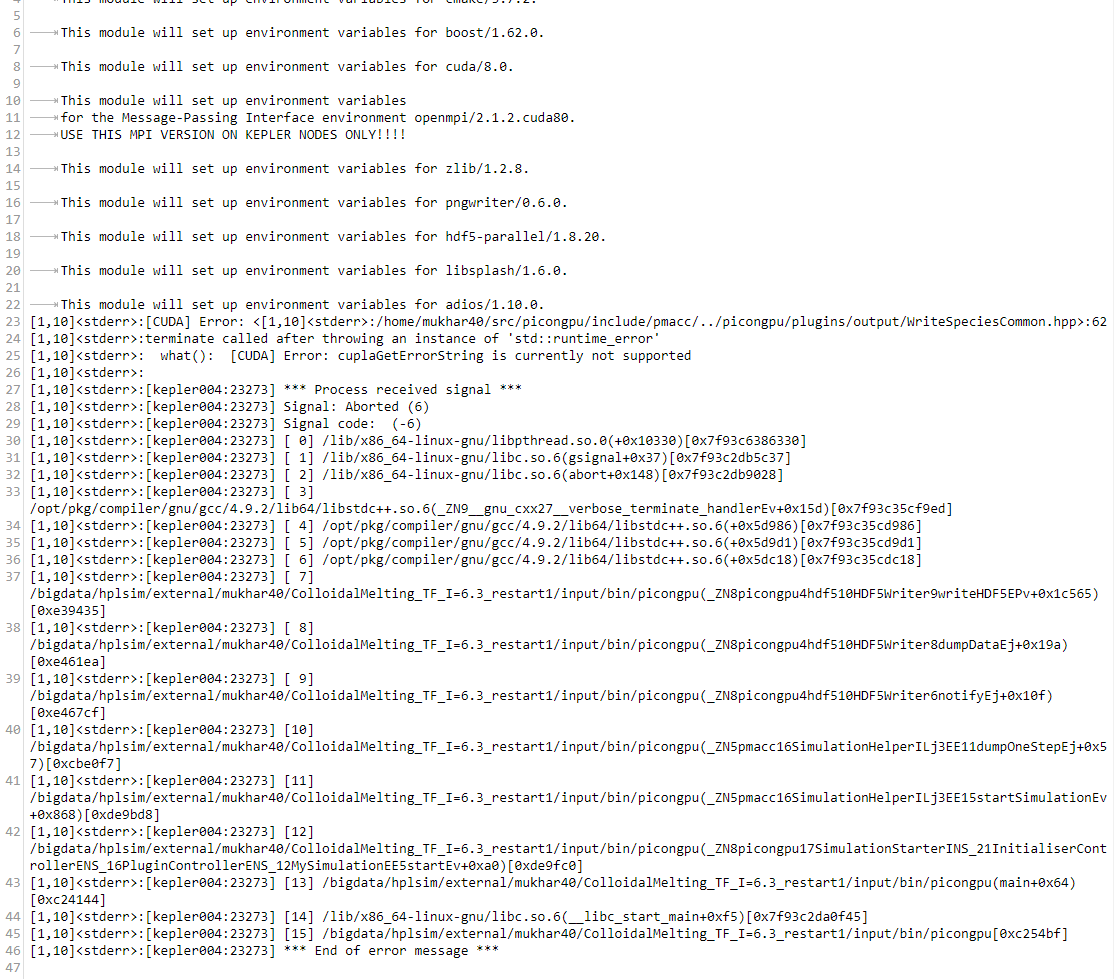
Is it possible to make this finally work somehow?
NastasiaM
on 25 Apr 2018
Do you get this error also if you try to restart the simulation again? Maybe the node is/wars broken.
psychocoderHPC
on 2 May 2018
Is it maybe possible to update the code to the latest dev? This will require to change a few param files. If you point to the code location of your current param files I can help you (provide an updated parameter set)
psychocoderHPC
on 2 May 2018
Yes, once I left this k20_restart to work over e weekend and it crashed like hundred times.
Current param files are in my $HOME/paramSets/colloidalMelting_TF/.
You need anything else?
NastasiaM
on 2 May 2018
Hi!
Should I update the code with
source $HOME/picongpu.profile
cd src/picongpu
git fetch --all
git pull --ff-only
or there will be some other instructions from your side?
NastasiaM
on 3 May 2018
update @NastasiaM: I am currently preparing the parameter files for you
psychocoderHPC
on 7 May 2018
Thanks, please don't forget to tell me when you will finish... or if you need something from my side.
NastasiaM
on 7 May 2018
@NastasiaM I will give you the updated parameters next week. I will hold it a few days more back because I do some tests and think I am the bug on the lane. But this week is a short week because of the celebration day tomorrow.
psychocoderHPC
on 9 May 2018
@NastasiaM I realized that you EMail address was set in the profile I used to run my jobs. Therefore you get spammed with the output of my test jobs. Could you please forward all males you got last week from hypnos to [email protected]. It looks like there are some important data about the crash in the mail but not in the files on the disk.
psychocoderHPC
on 14 May 2018
Hi!
Do you already have any updates of simulation parameters?
NastasiaM
on 17 May 2018
You can find the updated parameter set in /home/mukhar40/paramSets/2018_05_17_dev_colloidalMelting_TF
Please use the picongpu.profile.example within the updated folder to load the needed modules.
In my tests the simulation is still crashing after over 40k steps. It looks like this are Infiniband (Network) issues on hypnos. A restart after a crash should solve the issue.
psychocoderHPC
on 17 May 2018
Hmmm
There are many picongpu.profile.exaples in this folder
./paramSets/2018_05_17_dev_colloidalMelting_TF/hdf5Bug/etc/picongpu/lawrencium-lbnl/picongpu.profile.example
./paramSets/2018_05_17_dev_colloidalMelting_TF/hdf5Bug/etc/picongpu/titan-ornl/picongpu.profile.example
./paramSets/2018_05_17_dev_colloidalMelting_TF/hdf5Bug/etc/picongpu/pizdaint-cscs/picongpu.profile.example
./paramSets/2018_05_17_dev_colloidalMelting_TF/hdf5Bug/etc/picongpu/draco-mpcdf/picongpu.profile.example
./paramSets/2018_05_17_dev_colloidalMelting_TF/etc/picongpu/lawrencium-lbnl/picongpu.profile.example
./paramSets/2018_05_17_dev_colloidalMelting_TF/etc/picongpu/titan-ornl/picongpu.profile.example
./paramSets/2018_05_17_dev_colloidalMelting_TF/etc/picongpu/pizdaint-cscs/picongpu.profile.example
./paramSets/2018_05_17_dev_colloidalMelting_TF/etc/picongpu/draco-mpcdf/picongpu.profile.example
none of them is in hypnos folder... which should I use?
NastasiaM
on 17 May 2018
Hi!
And with k20_picongpu.profile.example in /paramSets/2018_05_17_dev_colloidalMelting_TF it doesn't compile.
Are you sure that's the right file?
NastasiaM
on 22 May 2018
@NastasiaM Please update your PIConGPU source to the latest dev version. If you still have issue please open a new issue because this issue has switch the topic very often and the current problem is not clear.
psychocoderHPC
on 22 May 2018
@NastasiaM We found the source of the evil. #2690 solves this issue. I simulated 280000 time steps with the your parameter input set.
psychocoderHPC
on 20 Aug 2018
Related issues
PrometheusPi
·
28Comments
PrometheusPi
·
43Comments
 cbontoiu
·
32Comments
cbontoiu
·
32Comments
 ajitup73
·
31Comments
cbontoiu
·
38Comments
ajitup73
·
31Comments
cbontoiu
·
38Comments