Pi-hole: Installation fails on latest Raspbian 2018-11-13
In raising this issue, I confirm the following:
- [X] I have read and understood the contributors guide.
- [X] The issue I am reporting can be replicated.
- [X] The issue I am reporting isn't a duplicate (see FAQs, closed issues, and open issues).
How familiar are you with the the source code relevant to this issue?:
2 - I've scanned through the bash script.
Expected behaviour:
The installation via curl -L install.pi-hole.net | bash as mentioned in the documentation or curl -sSL https://install.pi-hole.net | bash as mentioned on pi-hole.net should be successful.
Actual behaviour:
The installation of FTL fails. Leaving the Pi in a state with no internet connectivity.
Steps to reproduce:
- Flash a SD card with the latest Raspbian Stretch 2018-11-13 lite.
- Boot the Raspberry Pi from it.
- Execute
curl -L install.pi-hole.net | bash. - When prompted, use default settings.
During the installation the following messages appear:
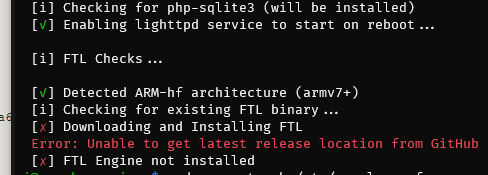
  [i] FTL Checks...

  [✓] Detected ARM-hf architecture (armv6 or lower) Using ARM binary
  [i] Checking for existing FTL binary...
  [✗] Downloading and Installing FTL
  Error: Unable to get latest release location from GitHub
  [✗] FTL Engine not installed

  [i] Skipping firewall configuration
Debug token provided by uploading pihole -d log:
vmlbireajx
Troubleshooting undertaken, and/or other relevant information:
After the failed installation there is no internet connectivity. I have to manually edit the /etc/dhcpcd.conf and change the entry to the domain_name_servers to my router instead of localhost.
It seems to me that the dhcpcd.conf file is being edited too early.
 kwasmich
All 53 comments
Error: Unable to get latest release location from GitHub
This message usually means either of the two:
- You haven't had Internet connectivity already before
- You hit GitHub rate limiting: Only a certain limited number of requests per hour is allowed and, afterwards, all further requests to GitHub from your IP are blocked for a certain time.
When you can confirm that your Internet connection does work again after your manual edit, please try again in maybe 1-2 hours to make sure you're out of the possily active GitHub rate limiting.
 DL6ER
on 26 Dec 2018
DL6ER
on 26 Dec 2018
- You haven't had Internet connectivity already before
Yes, I did. The whole setup including the command line curl and update of all Raspbian packages in the installation process would not have worked otherwise.
- You hit GitHub rate limiting: Only a certain limited number of requests per hour is allowed and, afterwards, all further requests to GitHub from your IP are blocked for a certain time.
I disagree. I tried to modify the script in order to find out what was going on and saw that the github domain name could not be resolved as it came to the installation of the FTL.
The repair installation using sudo pihole -r after setting the dhcpcd.conf to something sensible worked as intended. Reverting to localhost after that made pi-hole usable.
But it was difficult to get there.
No sane person would try to use a DNS server that is not installed yet and then attempt to install the DNS server without the possibility to resolve the DNS.
kwasmich
on 26 Dec 2018
No sane person would try to use a DNS server that is not installed yet and then attempt to install the DNS server without the possibility to resolve the DNS.
Obviously this is not what is happening, right? Because, as you write it, it wouldn't work anywhere.
DL6ER
on 26 Dec 2018
Obviously this is not what is happening, right? Because, as you write it, it wouldn't work anywhere.
That is just my humble observation.
The bash script calls look like this for me
- main
- use4andor6
- setStaticIPv4
- setDHCPCD
- setStaticIPv4
- installPihole
- FTLdetect
- FTLinstall
- FTLdetect
- use4andor6
Not sure what triggers the use of the newly set DNS before the end of the installation.
I'll try to make a screen capture on a clean flashed SD card later.
kwasmich
on 26 Dec 2018
The flow as you describe it is what I intend to implement, but reversed. Since any changes to setting static (setDHCPCD) can not be changed on the fly it's assumed that you have a static IP address already reserved or configured for the device and that the device is using that address. You are only configuring Pi-hole to use that address in it's configuration.
Any changes to the device via setDHCPCD must be put in to effect by rebooting the device or restarting the networking stack. Restarting the stack in the middle of a script leaves the network stack in an undetermined state for the script.
But the flow should be to detect the FTL engine and attempt to download it along with the apt calls for other dependencies and not to continue to the bulk of the installation process until all dependencies and required binaries have been recieved.
 dschaper
on 26 Dec 2018
dschaper
on 26 Dec 2018
I also am seeing this problem as of yesterdays attempt.
Raspbian Stretch with desktop and recommended software 4.14 downloaded and applied to SD Card.
Boot up go through the Raspbian setup connect to internet to update / ect the Base OS. Then run through the setup of Pi-hole and I lose internet on the Pi and get the error: Error: Unable to get latest release location from GitHub.
 evanquinnalaska
on 26 Dec 2018
evanquinnalaska
on 26 Dec 2018
Going to attempt again tonight and write down exact steps taken to create the problem.
evanquinnalaska
on 26 Dec 2018
Here is a screen capture from the installation process that proves:
- I have internet connectivity in the first place
- during the installation the dhcpcd.conf is applied before everything is downloaded
The internet is still reachable but the host name resolving is not.
I will try to nail it down further. In the screen capture the host name resolving stops working at about 05:27. Just after resolvconf, sqlite3, idn2, netcat and dpkg.
_Update:_
On the left is the installation process and on the right attempts to show when the network goes down.
P.S.
I tried an installation of Pi-Hole about a month ago. It also failed back then. I had just no time to deal with it until now.
kwasmich
on 26 Dec 2018
What was the IP address of the device before curl, and did that change at any time during the process. What was the contents of /etc/resolv.conf before the process. Run a screen with watch -n1 cat /etc/resolv.conf and I think you'll see that the nameservers are changed right when resolvconf takes over as that package takes ownership of /etc/resolv.conf.
dschaper
on 26 Dec 2018
It's also noted that a reboot may be required after installation. We know that there is a problem that happens with trying to get the FTL binary after the system has been modified and as I noted this will be addressed.

dschaper
on 26 Dec 2018
It's also noted that a reboot may be required after installation. We know that there is a problem that happens with trying to get the FTL binary after the system has been modified and as I noted this will be addressed.
Yes, I now. But a reboot did not change the state. When FTL could not be downloaded, it could not be installed and is still not present after a reboot.
kwasmich
on 26 Dec 2018
Okay, I think I see another problem with the process. We do an initial dependency download for things that the installer needs, (apt/yum, whiptail, etc.) Then, and this I think is the mistake, we ask for upstream/IP addresses/other information. At that point we set /etc/dhcpcd.conf with the static IP addressing information, and set the nameserver to 127.0.0.1 (edit: This is in the dhcpcd.conf file as the nameserver to use). After that we download all the packages including resolvconf and that package reads the /etc/dhcpcd.conf file, then sets /etc/resolv.conf to use 127.0.0.1. The problem is that there is no resolver configured there yet.
So the install process needs to be redone. First we should ask about optional packages (lighttpd), and preliminary configuration. Immediately after that all packages should be acquired, and the FTL binary pulled since that is now dnsmasq. Only at that point should we really start the installation and set the static IP and configure FTL. A reboot might be needed, but if we stay setting the Pi-hole device to using itself as the resolver, then that's the price. Other options are to leave the Pi-hole device to use the original /etc/resolv.conf nameserver, but if the user is using the Desktop and browsing on the same device then they would not get the benefits of blocking.
dschaper
on 26 Dec 2018
Exactly what I tried to say. It's just a problem with the sequence that maybe only occurs on a fresh plain vanilla Raspbian Lite due to its lack of preinstalled packages. As described above, I can make it work with a few additional steps but other less skilled people might just dump it as it does not "just work".
kwasmich
on 26 Dec 2018
We've talked about not setting 127.0.0.1 as the device resolver and just assuming people aren't going to be using Pi-hole on a workstation that browses with Raspbian Desktop or another Desktop Environment. But quite a few users are running NOOBS or Desktop and protecting the Pi-hole device with the DNS sinkhole is expected behavior.
I just didn't see installing resolvconf as a package as being a trigger to changing the network state. Thought it would only change /etc/resolv.conf when the networking service was restarted or when the device was rebooted.
dschaper
on 26 Dec 2018
Interesting feed back, I wasn't aware that by installing Pi-hole it would be expected that the Pi would not be usable for other functions such as browsing. Kinda would expect that to be a disclaimer somewhere stating that as a Gotcha. ~NOOB here when it comes to Raspberry Pi's and their sub services.
evanquinnalaska
on 26 Dec 2018
As it is now it's designed for the Pi-hole device to be used as a browsing workstation.
dschaper
on 26 Dec 2018
hmmm....
evanquinnalaska
on 26 Dec 2018
I would believe for the fool that I am, it would be install > test on the Pi its installed onto > Adjust as needed till its not too aggressive / lax, then apply it to the rest of the network via Router's dhcp DNS value. I'm going to re-image and start again tonight and see if I might be more successful then.
evanquinnalaska
on 26 Dec 2018
I've run 4 attempts at flashing Raspbian Stretch Lite and running the installation. I've had it fail 1 time and succeed the other times. On failure /etc/resolv.conf was populated with just comments.
If you have this problem, can you post the contents of /etc/resolv.conf when FTL fails to download please?
dschaper
on 27 Dec 2018
Re-imaged the Pi and tried again and that seemed to do the trick at least for me.
evanquinnalaska
on 27 Dec 2018
Initial content of /etc/resolv.conf
# Generated by resolvconf
domain Speedport_W_723V_1_46_000
nameserver 192.168.2.1
nameserver fe80::1%eth0
Intermediate content during installation
# Generated by dhcpcd
# /etc/resolv.conf.head can replace this line
# /etc/resolv.conf.tail can replace this line
it stays that way until reboot.
After reboot
# Dynamic resolv.conf(5) file for glibc resolver(3) generated by resolvconf(8)
# DO NOT EDIT THIS FILE BY HAND -- YOUR CHANGES WILL BE OVERWRITTEN
nameserver 127.0.0.1
I tried different Raspberry Pi models …
- Raspberry Pi Model B
- Raspberry Pi 2 Model B (BCM2836)
- Raspberry Pi 3 Model B
- Raspberry Pi 3 Model B+
… with no success.
kwasmich
on 27 Dec 2018
When it failed the one time for me I saw exactly what you are describing for the file state.
Can you detail exactly each step you are taking? How do you enable ssh for the device, do you run anything beforehand like raspi-config? And can you get a copy of /var/log/dpkg.log to see if any other packages are being pulled in during the installation run?
I've been unable to get the process to fail again after the initial failure and another team member has been trying but completes the install every attempt without issue.
dschaper
on 27 Dec 2018
Just out of curiosity I pulled out an old image of Raspbian Lite 2017-08-16 and there it just works.
I'll try some more recent images (but not the latest one for obvious reasons).
kwasmich
on 27 Dec 2018
Can you detail exactly each step you are taking? How do you enable
sshfor the device, do you run anything beforehand likeraspi-config?
I am working on OS X 10.11.6 El Capitan so devices are mounted at /Volumes/nameOfVolume and the device is at /dev/rdiskX (with r for RAW access instead of using the slower /dev/diskX)
- After inserting the SD card I unmount it using
Disk Utilities. - I flash the image using
sudo dd if=/path/to/2018-11-13-raspbian-stretch-lite.img of=/dev/rdisk3 bs=1m. - To enable SSH I use
touch /Volumes/boot/ssh. - As this is a new installation with a new fingerprint I have to clear my local
~/.ssh/known_hostsbefore I am able to connect. - I connect using
ssh [email protected]. - After that I run
curl -L install.pi-hole.net | bash. - At each prompt I just hit the enter key.
That is it. I do not perform any other steps except the above.
kwasmich
on 27 Dec 2018
Thanks for the details.
dschaper
on 27 Dec 2018
It also works on Raspbian Lite 2018-10-09. So as far as I can tell, just the latest release 2018-11-13 gives me some trouble.
kwasmich
on 27 Dec 2018
If you do another try and it fails, we could use a look at /var/log/dpkg.log as that will show if openresolv and resolvconf are flipped when the dependencies are installed.
dschaper
on 27 Dec 2018
Again using 2018-11-13 which failed:
/var/log/dpkg.log
is empty before running the installer.
2018-12-27 17:47:41 startup archives unpack
2018-12-27 17:47:43 install liberror-perl:all <none> 0.17024-1
2018-12-27 17:47:43 status half-installed liberror-perl:all 0.17024-1
2018-12-27 17:47:43 status triggers-pending man-db:armhf 2.7.6.1-2
2018-12-27 17:47:43 status unpacked liberror-perl:all 0.17024-1
2018-12-27 17:47:43 status unpacked liberror-perl:all 0.17024-1
2018-12-27 17:47:43 install git-man:all <none> 1:2.11.0-3+deb9u4
2018-12-27 17:47:43 status half-installed git-man:all 1:2.11.0-3+deb9u4
2018-12-27 17:47:47 status unpacked git-man:all 1:2.11.0-3+deb9u4
2018-12-27 17:47:47 status unpacked git-man:all 1:2.11.0-3+deb9u4
2018-12-27 17:47:47 install git:armhf <none> 1:2.11.0-3+deb9u4
2018-12-27 17:47:47 status half-installed git:armhf 1:2.11.0-3+deb9u4
2018-12-27 17:48:00 status unpacked git:armhf 1:2.11.0-3+deb9u4
2018-12-27 17:48:00 status unpacked git:armhf 1:2.11.0-3+deb9u4
2018-12-27 17:48:00 install dialog:armhf <none> 1.3-20160828-2
2018-12-27 17:48:00 status half-installed dialog:armhf 1.3-20160828-2
2018-12-27 17:48:04 status unpacked dialog:armhf 1.3-20160828-2
2018-12-27 17:48:04 status unpacked dialog:armhf 1.3-20160828-2
2018-12-27 17:48:04 startup packages configure
2018-12-27 17:48:04 configure git-man:all 1:2.11.0-3+deb9u4 <none>
2018-12-27 17:48:04 status unpacked git-man:all 1:2.11.0-3+deb9u4
2018-12-27 17:48:04 status half-configured git-man:all 1:2.11.0-3+deb9u4
2018-12-27 17:48:04 status installed git-man:all 1:2.11.0-3+deb9u4
2018-12-27 17:48:04 configure dialog:armhf 1.3-20160828-2 <none>
2018-12-27 17:48:04 status unpacked dialog:armhf 1.3-20160828-2
2018-12-27 17:48:04 status half-configured dialog:armhf 1.3-20160828-2
2018-12-27 17:48:04 status installed dialog:armhf 1.3-20160828-2
2018-12-27 17:48:04 configure liberror-perl:all 0.17024-1 <none>
2018-12-27 17:48:04 status unpacked liberror-perl:all 0.17024-1
2018-12-27 17:48:04 status half-configured liberror-perl:all 0.17024-1
2018-12-27 17:48:04 status installed liberror-perl:all 0.17024-1
2018-12-27 17:48:05 trigproc man-db:armhf 2.7.6.1-2 <none>
2018-12-27 17:48:05 status half-configured man-db:armhf 2.7.6.1-2
2018-12-27 17:48:28 status installed man-db:armhf 2.7.6.1-2
2018-12-27 17:48:28 configure git:armhf 1:2.11.0-3+deb9u4 <none>
2018-12-27 17:48:28 status unpacked git:armhf 1:2.11.0-3+deb9u4
2018-12-27 17:48:29 status unpacked git:armhf 1:2.11.0-3+deb9u4
2018-12-27 17:48:29 status half-configured git:armhf 1:2.11.0-3+deb9u4
2018-12-27 17:48:29 status installed git:armhf 1:2.11.0-3+deb9u4
2018-12-27 17:49:37 startup packages remove
2018-12-27 17:49:37 status installed openresolv:armhf 3.8.0-1
2018-12-27 17:49:37 remove openresolv:armhf 3.8.0-1 <none>
2018-12-27 17:49:37 status half-configured openresolv:armhf 3.8.0-1
2018-12-27 17:49:37 status half-installed openresolv:armhf 3.8.0-1
2018-12-27 17:49:37 status triggers-pending man-db:armhf 2.7.6.1-2
2018-12-27 17:49:37 status config-files openresolv:armhf 3.8.0-1
2018-12-27 17:49:37 status config-files openresolv:armhf 3.8.0-1
2018-12-27 17:49:38 startup archives unpack
2018-12-27 17:49:39 install bc:armhf <none> 1.06.95-9
2018-12-27 17:49:39 status half-installed bc:armhf 1.06.95-9
2018-12-27 17:49:39 status triggers-pending install-info:armhf 6.3.0.dfsg.1-1+b1
2018-12-27 17:49:40 status unpacked bc:armhf 1.06.95-9
2018-12-27 17:49:40 status unpacked bc:armhf 1.06.95-9
2018-12-27 17:49:40 install dnsutils:armhf <none> 1:9.10.3.dfsg.P4-12.3+deb9u4
2018-12-27 17:49:40 status half-installed dnsutils:armhf 1:9.10.3.dfsg.P4-12.3+deb9u4
2018-12-27 17:49:42 status unpacked dnsutils:armhf 1:9.10.3.dfsg.P4-12.3+deb9u4
2018-12-27 17:49:42 status unpacked dnsutils:armhf 1:9.10.3.dfsg.P4-12.3+deb9u4
2018-12-27 17:49:42 install lsof:armhf <none> 4.89+dfsg-0.1
2018-12-27 17:49:42 status half-installed lsof:armhf 4.89+dfsg-0.1
2018-12-27 17:49:43 status unpacked lsof:armhf 4.89+dfsg-0.1
2018-12-27 17:49:44 status unpacked lsof:armhf 4.89+dfsg-0.1
2018-12-27 17:49:44 install dns-root-data:all <none> 2017072601~deb9u1
2018-12-27 17:49:44 status half-installed dns-root-data:all 2017072601~deb9u1
2018-12-27 17:49:44 status unpacked dns-root-data:all 2017072601~deb9u1
2018-12-27 17:49:44 status unpacked dns-root-data:all 2017072601~deb9u1
2018-12-27 17:49:44 install libfam0:armhf <none> 2.7.0-17.2
2018-12-27 17:49:45 status triggers-pending libc-bin:armhf 2.24-11+deb9u3
2018-12-27 17:49:45 status half-installed libfam0:armhf 2.7.0-17.2
2018-12-27 17:49:45 status unpacked libfam0:armhf 2.7.0-17.2
2018-12-27 17:49:45 status unpacked libfam0:armhf 2.7.0-17.2
2018-12-27 17:49:45 install lighttpd:armhf <none> 1.4.45-1
2018-12-27 17:49:45 status half-installed lighttpd:armhf 1.4.45-1
2018-12-27 17:49:45 status triggers-pending systemd:armhf 232-25+deb9u6
2018-12-27 17:49:47 status unpacked lighttpd:armhf 1.4.45-1
2018-12-27 17:49:47 status unpacked lighttpd:armhf 1.4.45-1
2018-12-27 17:49:47 install php-common:all <none> 1:49
2018-12-27 17:49:47 status half-installed php-common:all 1:49
2018-12-27 17:49:47 status unpacked php-common:all 1:49
2018-12-27 17:49:48 status unpacked php-common:all 1:49
2018-12-27 17:49:48 install php7.0-common:armhf <none> 7.0.33-0+deb9u1
2018-12-27 17:49:48 status half-installed php7.0-common:armhf 7.0.33-0+deb9u1
2018-12-27 17:49:52 status unpacked php7.0-common:armhf 7.0.33-0+deb9u1
2018-12-27 17:49:52 status unpacked php7.0-common:armhf 7.0.33-0+deb9u1
2018-12-27 17:49:53 install php7.0-json:armhf <none> 7.0.33-0+deb9u1
2018-12-27 17:49:53 status half-installed php7.0-json:armhf 7.0.33-0+deb9u1
2018-12-27 17:49:53 status unpacked php7.0-json:armhf 7.0.33-0+deb9u1
2018-12-27 17:49:53 status unpacked php7.0-json:armhf 7.0.33-0+deb9u1
2018-12-27 17:49:53 install php7.0-opcache:armhf <none> 7.0.33-0+deb9u1
2018-12-27 17:49:53 status half-installed php7.0-opcache:armhf 7.0.33-0+deb9u1
2018-12-27 17:49:54 status unpacked php7.0-opcache:armhf 7.0.33-0+deb9u1
2018-12-27 17:49:54 status unpacked php7.0-opcache:armhf 7.0.33-0+deb9u1
2018-12-27 17:49:54 install php7.0-readline:armhf <none> 7.0.33-0+deb9u1
2018-12-27 17:49:54 status half-installed php7.0-readline:armhf 7.0.33-0+deb9u1
2018-12-27 17:49:55 status unpacked php7.0-readline:armhf 7.0.33-0+deb9u1
2018-12-27 17:49:55 status unpacked php7.0-readline:armhf 7.0.33-0+deb9u1
2018-12-27 17:49:55 install php7.0-cli:armhf <none> 7.0.33-0+deb9u1
2018-12-27 17:49:55 status half-installed php7.0-cli:armhf 7.0.33-0+deb9u1
2018-12-27 17:50:00 status unpacked php7.0-cli:armhf 7.0.33-0+deb9u1
2018-12-27 17:50:00 status unpacked php7.0-cli:armhf 7.0.33-0+deb9u1
2018-12-27 17:50:00 install php7.0-cgi:armhf <none> 7.0.33-0+deb9u1
2018-12-27 17:50:00 status half-installed php7.0-cgi:armhf 7.0.33-0+deb9u1
2018-12-27 17:50:04 status unpacked php7.0-cgi:armhf 7.0.33-0+deb9u1
2018-12-27 17:50:05 status unpacked php7.0-cgi:armhf 7.0.33-0+deb9u1
2018-12-27 17:50:05 install php-cgi:all <none> 1:7.0+49
2018-12-27 17:50:05 status half-installed php-cgi:all 1:7.0+49
2018-12-27 17:50:05 status unpacked php-cgi:all 1:7.0+49
2018-12-27 17:50:05 status unpacked php-cgi:all 1:7.0+49
2018-12-27 17:50:05 install php7.0-sqlite3:armhf <none> 7.0.33-0+deb9u1
2018-12-27 17:50:05 status half-installed php7.0-sqlite3:armhf 7.0.33-0+deb9u1
2018-12-27 17:50:06 status unpacked php7.0-sqlite3:armhf 7.0.33-0+deb9u1
2018-12-27 17:50:06 status unpacked php7.0-sqlite3:armhf 7.0.33-0+deb9u1
2018-12-27 17:50:06 install php-sqlite3:all <none> 1:7.0+49
2018-12-27 17:50:06 status half-installed php-sqlite3:all 1:7.0+49
2018-12-27 17:50:06 status unpacked php-sqlite3:all 1:7.0+49
2018-12-27 17:50:06 status unpacked php-sqlite3:all 1:7.0+49
2018-12-27 17:50:07 install resolvconf:all <none> 1.79
2018-12-27 17:50:07 status half-installed resolvconf:all 1.79
2018-12-27 17:50:07 status unpacked resolvconf:all 1.79
2018-12-27 17:50:07 status unpacked resolvconf:all 1.79
2018-12-27 17:50:08 install sqlite3:armhf <none> 3.16.2-5+deb9u1
2018-12-27 17:50:08 status half-installed sqlite3:armhf 3.16.2-5+deb9u1
2018-12-27 17:50:09 status unpacked sqlite3:armhf 3.16.2-5+deb9u1
2018-12-27 17:50:10 status unpacked sqlite3:armhf 3.16.2-5+deb9u1
2018-12-27 17:50:11 install idn2:armhf <none> 0.16-1+deb9u1
2018-12-27 17:50:11 status half-installed idn2:armhf 0.16-1+deb9u1
2018-12-27 17:50:11 status unpacked idn2:armhf 0.16-1+deb9u1
2018-12-27 17:50:11 status unpacked idn2:armhf 0.16-1+deb9u1
2018-12-27 17:50:11 install netcat:all <none> 1.10-41
2018-12-27 17:50:11 status half-installed netcat:all 1.10-41
2018-12-27 17:50:12 status unpacked netcat:all 1.10-41
2018-12-27 17:50:12 status unpacked netcat:all 1.10-41
2018-12-27 17:50:13 startup packages configure
2018-12-27 17:50:13 configure libfam0:armhf 2.7.0-17.2 <none>
2018-12-27 17:50:13 status unpacked libfam0:armhf 2.7.0-17.2
2018-12-27 17:50:13 status half-configured libfam0:armhf 2.7.0-17.2
2018-12-27 17:50:13 status installed libfam0:armhf 2.7.0-17.2
2018-12-27 17:50:14 trigproc install-info:armhf 6.3.0.dfsg.1-1+b1 <none>
2018-12-27 17:50:14 status half-configured install-info:armhf 6.3.0.dfsg.1-1+b1
2018-12-27 17:50:15 status installed install-info:armhf 6.3.0.dfsg.1-1+b1
2018-12-27 17:50:15 configure lsof:armhf 4.89+dfsg-0.1 <none>
2018-12-27 17:50:15 status unpacked lsof:armhf 4.89+dfsg-0.1
2018-12-27 17:50:15 status half-configured lsof:armhf 4.89+dfsg-0.1
2018-12-27 17:50:15 status installed lsof:armhf 4.89+dfsg-0.1
2018-12-27 17:50:15 configure idn2:armhf 0.16-1+deb9u1 <none>
2018-12-27 17:50:15 status unpacked idn2:armhf 0.16-1+deb9u1
2018-12-27 17:50:15 status half-configured idn2:armhf 0.16-1+deb9u1
2018-12-27 17:50:15 status installed idn2:armhf 0.16-1+deb9u1
2018-12-27 17:50:15 configure dns-root-data:all 2017072601~deb9u1 <none>
2018-12-27 17:50:15 status unpacked dns-root-data:all 2017072601~deb9u1
2018-12-27 17:50:15 status half-configured dns-root-data:all 2017072601~deb9u1
2018-12-27 17:50:15 status installed dns-root-data:all 2017072601~deb9u1
2018-12-27 17:50:15 configure dnsutils:armhf 1:9.10.3.dfsg.P4-12.3+deb9u4 <none>
2018-12-27 17:50:15 status unpacked dnsutils:armhf 1:9.10.3.dfsg.P4-12.3+deb9u4
2018-12-27 17:50:15 status half-configured dnsutils:armhf 1:9.10.3.dfsg.P4-12.3+deb9u4
2018-12-27 17:50:15 status installed dnsutils:armhf 1:9.10.3.dfsg.P4-12.3+deb9u4
2018-12-27 17:50:15 configure sqlite3:armhf 3.16.2-5+deb9u1 <none>
2018-12-27 17:50:15 status unpacked sqlite3:armhf 3.16.2-5+deb9u1
2018-12-27 17:50:15 status half-configured sqlite3:armhf 3.16.2-5+deb9u1
2018-12-27 17:50:15 status installed sqlite3:armhf 3.16.2-5+deb9u1
2018-12-27 17:50:15 trigproc libc-bin:armhf 2.24-11+deb9u3 <none>
2018-12-27 17:50:15 status half-configured libc-bin:armhf 2.24-11+deb9u3
2018-12-27 17:50:17 status installed libc-bin:armhf 2.24-11+deb9u3
2018-12-27 17:50:17 configure php-common:all 1:49 <none>
2018-12-27 17:50:17 status unpacked php-common:all 1:49
2018-12-27 17:50:17 status unpacked php-common:all 1:49
2018-12-27 17:50:17 status half-configured php-common:all 1:49
2018-12-27 17:50:26 status installed php-common:all 1:49
2018-12-27 17:50:26 configure lighttpd:armhf 1.4.45-1 <none>
2018-12-27 17:50:26 status unpacked lighttpd:armhf 1.4.45-1
2018-12-27 17:50:26 status unpacked lighttpd:armhf 1.4.45-1
2018-12-27 17:50:26 status unpacked lighttpd:armhf 1.4.45-1
2018-12-27 17:50:26 status unpacked lighttpd:armhf 1.4.45-1
2018-12-27 17:50:26 status unpacked lighttpd:armhf 1.4.45-1
2018-12-27 17:50:26 status unpacked lighttpd:armhf 1.4.45-1
2018-12-27 17:50:26 status unpacked lighttpd:armhf 1.4.45-1
2018-12-27 17:50:26 status unpacked lighttpd:armhf 1.4.45-1
2018-12-27 17:50:26 status unpacked lighttpd:armhf 1.4.45-1
2018-12-27 17:50:27 status unpacked lighttpd:armhf 1.4.45-1
2018-12-27 17:50:27 status unpacked lighttpd:armhf 1.4.45-1
2018-12-27 17:50:27 status unpacked lighttpd:armhf 1.4.45-1
2018-12-27 17:50:27 status unpacked lighttpd:armhf 1.4.45-1
2018-12-27 17:50:27 status unpacked lighttpd:armhf 1.4.45-1
2018-12-27 17:50:27 status unpacked lighttpd:armhf 1.4.45-1
2018-12-27 17:50:27 status unpacked lighttpd:armhf 1.4.45-1
2018-12-27 17:50:27 status unpacked lighttpd:armhf 1.4.45-1
2018-12-27 17:50:27 status unpacked lighttpd:armhf 1.4.45-1
2018-12-27 17:50:27 status unpacked lighttpd:armhf 1.4.45-1
2018-12-27 17:50:27 status unpacked lighttpd:armhf 1.4.45-1
2018-12-27 17:50:27 status unpacked lighttpd:armhf 1.4.45-1
2018-12-27 17:50:27 status unpacked lighttpd:armhf 1.4.45-1
2018-12-27 17:50:27 status unpacked lighttpd:armhf 1.4.45-1
2018-12-27 17:50:27 status unpacked lighttpd:armhf 1.4.45-1
2018-12-27 17:50:27 status unpacked lighttpd:armhf 1.4.45-1
2018-12-27 17:50:27 status unpacked lighttpd:armhf 1.4.45-1
2018-12-27 17:50:27 status unpacked lighttpd:armhf 1.4.45-1
2018-12-27 17:50:27 status unpacked lighttpd:armhf 1.4.45-1
2018-12-27 17:50:27 status half-configured lighttpd:armhf 1.4.45-1
2018-12-27 17:50:42 status installed lighttpd:armhf 1.4.45-1
2018-12-27 17:50:42 trigproc systemd:armhf 232-25+deb9u6 <none>
2018-12-27 17:50:42 status half-configured systemd:armhf 232-25+deb9u6
2018-12-27 17:50:44 status installed systemd:armhf 232-25+deb9u6
2018-12-27 17:50:45 configure netcat:all 1.10-41 <none>
2018-12-27 17:50:45 status unpacked netcat:all 1.10-41
2018-12-27 17:50:45 status half-configured netcat:all 1.10-41
2018-12-27 17:50:45 status installed netcat:all 1.10-41
2018-12-27 17:50:45 trigproc man-db:armhf 2.7.6.1-2 <none>
2018-12-27 17:50:45 status half-configured man-db:armhf 2.7.6.1-2
2018-12-27 17:50:55 status installed man-db:armhf 2.7.6.1-2
2018-12-27 17:50:55 configure resolvconf:all 1.79 <none>
2018-12-27 17:50:55 status unpacked resolvconf:all 1.79
2018-12-27 17:50:55 status unpacked resolvconf:all 1.79
2018-12-27 17:50:55 status triggers-pending systemd:armhf 232-25+deb9u6
2018-12-27 17:50:55 status unpacked resolvconf:all 1.79
2018-12-27 17:50:55 status unpacked resolvconf:all 1.79
2018-12-27 17:50:55 status unpacked resolvconf:all 1.79
2018-12-27 17:50:56 status unpacked resolvconf:all 1.79
2018-12-27 17:50:56 status unpacked resolvconf:all 1.79
2018-12-27 17:50:56 status unpacked resolvconf:all 1.79
2018-12-27 17:50:57 status unpacked resolvconf:all 1.79
2018-12-27 17:50:58 status unpacked resolvconf:all 1.79
2018-12-27 17:50:58 status unpacked resolvconf:all 1.79
2018-12-27 17:50:59 status unpacked resolvconf:all 1.79
2018-12-27 17:50:59 status half-configured resolvconf:all 1.79
2018-12-27 17:51:16 status installed resolvconf:all 1.79
2018-12-27 17:51:16 status triggers-pending resolvconf:all 1.79
2018-12-27 17:51:16 configure php7.0-common:armhf 7.0.33-0+deb9u1 <none>
2018-12-27 17:51:16 status unpacked php7.0-common:armhf 7.0.33-0+deb9u1
2018-12-27 17:51:16 status half-configured php7.0-common:armhf 7.0.33-0+deb9u1
2018-12-27 17:53:27 status installed php7.0-common:armhf 7.0.33-0+deb9u1
2018-12-27 17:53:27 configure bc:armhf 1.06.95-9 <none>
2018-12-27 17:53:27 status unpacked bc:armhf 1.06.95-9
2018-12-27 17:53:27 status half-configured bc:armhf 1.06.95-9
2018-12-27 17:53:27 status installed bc:armhf 1.06.95-9
2018-12-27 17:53:27 configure php7.0-readline:armhf 7.0.33-0+deb9u1 <none>
2018-12-27 17:53:27 status unpacked php7.0-readline:armhf 7.0.33-0+deb9u1
2018-12-27 17:53:28 status half-configured php7.0-readline:armhf 7.0.33-0+deb9u1
2018-12-27 17:53:36 status installed php7.0-readline:armhf 7.0.33-0+deb9u1
2018-12-27 17:53:36 configure php7.0-opcache:armhf 7.0.33-0+deb9u1 <none>
2018-12-27 17:53:36 status unpacked php7.0-opcache:armhf 7.0.33-0+deb9u1
2018-12-27 17:53:36 status half-configured php7.0-opcache:armhf 7.0.33-0+deb9u1
2018-12-27 17:53:44 status installed php7.0-opcache:armhf 7.0.33-0+deb9u1
2018-12-27 17:53:44 configure php7.0-sqlite3:armhf 7.0.33-0+deb9u1 <none>
2018-12-27 17:53:44 status unpacked php7.0-sqlite3:armhf 7.0.33-0+deb9u1
2018-12-27 17:53:44 status half-configured php7.0-sqlite3:armhf 7.0.33-0+deb9u1
2018-12-27 17:54:01 status installed php7.0-sqlite3:armhf 7.0.33-0+deb9u1
2018-12-27 17:54:01 configure php7.0-json:armhf 7.0.33-0+deb9u1 <none>
2018-12-27 17:54:01 status unpacked php7.0-json:armhf 7.0.33-0+deb9u1
2018-12-27 17:54:01 status half-configured php7.0-json:armhf 7.0.33-0+deb9u1
2018-12-27 17:54:09 status installed php7.0-json:armhf 7.0.33-0+deb9u1
2018-12-27 17:54:10 configure php-sqlite3:all 1:7.0+49 <none>
2018-12-27 17:54:10 status unpacked php-sqlite3:all 1:7.0+49
2018-12-27 17:54:10 status half-configured php-sqlite3:all 1:7.0+49
2018-12-27 17:54:10 status installed php-sqlite3:all 1:7.0+49
2018-12-27 17:54:10 configure php7.0-cli:armhf 7.0.33-0+deb9u1 <none>
2018-12-27 17:54:10 status unpacked php7.0-cli:armhf 7.0.33-0+deb9u1
2018-12-27 17:54:10 status half-configured php7.0-cli:armhf 7.0.33-0+deb9u1
2018-12-27 17:54:23 status installed php7.0-cli:armhf 7.0.33-0+deb9u1
2018-12-27 17:54:23 configure php7.0-cgi:armhf 7.0.33-0+deb9u1 <none>
2018-12-27 17:54:23 status unpacked php7.0-cgi:armhf 7.0.33-0+deb9u1
2018-12-27 17:54:23 status unpacked php7.0-cgi:armhf 7.0.33-0+deb9u1
2018-12-27 17:54:23 status half-configured php7.0-cgi:armhf 7.0.33-0+deb9u1
2018-12-27 17:54:36 status installed php7.0-cgi:armhf 7.0.33-0+deb9u1
2018-12-27 17:54:36 configure php-cgi:all 1:7.0+49 <none>
2018-12-27 17:54:36 status unpacked php-cgi:all 1:7.0+49
2018-12-27 17:54:36 status half-configured php-cgi:all 1:7.0+49
2018-12-27 17:54:36 status installed php-cgi:all 1:7.0+49
2018-12-27 17:54:37 trigproc systemd:armhf 232-25+deb9u6 <none>
2018-12-27 17:54:37 status half-configured systemd:armhf 232-25+deb9u6
2018-12-27 17:54:39 status installed systemd:armhf 232-25+deb9u6
2018-12-27 17:54:39 trigproc resolvconf:all 1.79 <none>
2018-12-27 17:54:39 status half-configured resolvconf:all 1.79
2018-12-27 17:54:49 status installed resolvconf:all 1.79
Boy, I miss the times when computers used to be deterministic.
I found a way to install Pi-Hole on the latest release of Raspberry Pi 2018-11-13.
But in my eyes it does not make any sense. Here is what I did:
After running curl -L install.pi-hole.net | bash I wait for the first welcoming prompt.
If that shows up, only then I open a second SSH session. There I run cat /var/log/dpkg.log and nothing more. However I leave the session opened.
I return to the prompt and continue as seen in the screen capture before. (Just hitting the return key a dozen times.)
I don't know why it works. But I've reproduced it twice. To rule out other changes I skipped that second session between the two successes. And that one without the second session failed as before.
kwasmich
on 27 Dec 2018
Yeah, I've spent most of yesterday and this morning trying to find anything that will reliably trigger the event. When there's a fail, manually editing /etc/resolv.conf to have a public nameserver and then pihole -r to repair seems to grab everything and put it correct. Moving the FTL download needs to be done anyways and that will prevent this problem, but it's concerning that this cause is so elusive.
dschaper
on 27 Dec 2018
This is crazy. I've been testing with multiple SSH sessions open and watching various files. With that configuration everything installs without issue. But running with just a single SSH session that is used to curl the installation results in an /etc/resolv.conf that is Generated by dhcpcd and only includes comments.
This is going to end up with me having more grey hair than I have now, so I think we'll just move FTL download to right after the git repositories are cloned and hope that does it. Worst case scenario is that you'd have to reboot after the script finishes, but that's an acceptable compromise.
dschaper
on 27 Dec 2018
If the separating line is multiple vs. single SSH connection it might be a precaution to not restart some networking service when more than a single SSH is active, but I admit that this is highly speculative and we should just rearrange the download of FTL.
Worst case scenario is that you'd have to reboot after the script finishes
I don't see this happening. When we just download and start FTL earlier, there is no other change. FTL can run just fine without having a static address or resolv.conf configured to localhost so all this can be done at the same place it is done now. We just download the FTL binary before we install the dependencies and everything is fine.
If we want to be best, we would also try to start FTL before we install the deps that change resolve.conf so that the resolver is not changed if FTL cannot be restarted (e.g. some other service using port 53). By this, we would ensure that we can never end up in a situation where resolving is not possible even if things drive against the wall.
Anyhow, I'd suggest to do this in two steps. First, we move the downloading earlier (targeting v4.2), and only secondly we do more complex changes to the installer (maybe targeting v4.3). I cannot do any core coding right now, but I can assist with this in January.
DL6ER
on 28 Dec 2018
I just meant that you'd have to reboot to change the network stack like you would have to anyways. So worst case scenario would be that you'd have to do what we already tell people to do and that is reboot to make changes in the network stack take effect.
dschaper
on 28 Dec 2018
I came across this issue while i had the same problem configuring pihole...I did the workaround by opening a second ssh connection :confused:. Hopefully this does not lead into any side effects... I also faced the problem by using an old raspian image, but after doing an sudo apt-get update && sudo apt-get upgrade...
 beatgrabe
on 31 Dec 2018
beatgrabe
on 31 Dec 2018
[i] Checking for existing FTL binary...
[✗] Downloading and Installing FTL
Error: Unable to get latest release location from GitHub
[✗] FTL Engine not installed
[...]
pi@raspberrypi:~ $ ping github.com
ping: github.com: Temporary failure in name resolution
pi@raspberrypi:~ $ ping 8.8.8.8
PING 8.8.8.8 (8.8.8.8) 56(84) bytes of data.
64 bytes from 8.8.8.8: icmp_seq=1 ttl=119 time=21.3 ms
/etc/resolv.conf says only nameserver 127.0.0.1, changed to nameserver 8.8.8.8, ran again sudo pihole -r -> repair and FTL was installed correctly
 LMY
on 31 Dec 2018
LMY
on 31 Dec 2018
Also ran into this today on an original raspberry pi (circa 2011) with a fresh install of 2018-11-13-raspbian-stretch-lite.
$ lsb_release -a
No LSB modules are available.
Distributor ID: Raspbian
Description:    Raspbian GNU/Linux 9.4 (stretch)
Release:        9.4
Codename:       stretch
The install script failed at:
...
[i] Web Interface On
[i] Web Server On
[i] Logging Off.
[✗] Check for existing repository in /etc/.pihole
[i] Clone https://github.com/pi-hole/pi-hole.git into /etc/.pihole...
Error: Could not update local repository. Contact support.
The following steps work to produce a full install for me:
1) curl -sSL https://install.pi-hole.net | bash and let the script run until it fails
2) sudo shutdown -r now, wait for the pi to reboot, and then ssh back in
3) echo 'nameserver 1.1.1.1' > /etc/resolv.conf
4) re-run curl -sSL https://install.pi-hole.net | bash and the script finishes without error
5) sudo shutdown -r now
6) echo 'nameserver 1.1.1.1' > /etc/resolv.conf
7) sudo apt-get update && sudo apt-get upgrade -y
8) pihole -r
9) sudo shutdown -r now
Thanks @dschaper for your awesome debugging work so far! :heart:
 retrohacker
on 31 Dec 2018
retrohacker
on 31 Dec 2018
today on an original raspberry pi 3 model b with a fresh install with noobs 2018-11-16
root@raspberrypi:/home/pi# lsb_release -a
No LSB modules are available.
Distributor ID: Raspbian
Description:    Raspbian GNU/Linux 9.6 (stretch)
Release:    9.6
Codename:   stretch
i have solution for stuck this install
[✗] DNS resolution is currently unavailable
this worked for me install :
root@raspberrypi:/home/pi# cat /etc/resolv.confcopy this to notecurl -sSL https://install.pi-hole.net | bashrun script- after this text show
[✗] DNS resolution is currently unavailableyou replace from copyroot@raspberrypi:/home/pi# cat /etc/resolv.conf - and done
 andytryn
on 9 Jan 2019
andytryn
on 9 Jan 2019
sudo update-rc.d pihole-FTL defaults
sudo update-rc.d pihole-FTL enable
Try this...
 Prajwal-Koirala
on 9 Jan 2019
Prajwal-Koirala
on 9 Jan 2019
The following steps work to produce a full install for me:
curl -sSL https://install.pi-hole.net | bashand let the script run until it failssudo shutdown -r now, wait for the pi to reboot, and then ssh back inecho 'nameserver 1.1.1.1' > /etc/resolv.conf- re-run
curl -sSL https://install.pi-hole.net | bashand the script finishes without errorsudo shutdown -r nowecho 'nameserver 1.1.1.1' > /etc/resolv.confsudo apt-get update && sudo apt-get upgrade -ypihole -rsudo shutdown -r now
This worked for me too.
 DanielRuf
on 12 Feb 2019
DanielRuf
on 12 Feb 2019
If the dns-root-data package is installed, /etc/init.d/dnsmasq parses the contents of /usr/share/dns/root.ds incorrectly and puts invalid data in the $DNSMASQ_OPTS variable which is used to create the command line to start dnsmasq so it fails to start.
 wrffrz
on 15 Mar 2019
wrffrz
on 15 Mar 2019
dnsmasq hasn't been a dependency for Pi-hole since we started using pihole-FTL with it's own init file.
dschaper
on 15 Mar 2019
Sounds like the upgrade failure I experienced (hadn't upgraded the piholes in about 9 months and pihole-FTL was still v3.0) is something different than the clean-install failures here.
wrffrz
on 15 Mar 2019
Hi all. This is my first little project but seem to be failing on this as well. I too fail on the script and when I try the echo 'nameserver 1.1.1.1' > /etc/resolv.conf command I get back this:
-bash: /etc/resolv.conf: Permission denied
I've tried looking on the internet for a way round this but I have come up empty.
Any ideas?
 JJSSS
on 20 Mar 2019
JJSSS
on 20 Mar 2019
@JJSSS you need permission to edit that file (Google for "sudo"). If you have other issues, please make a new issue.
 Mcat12
on 21 Mar 2019
Mcat12
on 21 Mar 2019
no new issue
 4-FLOSS-Free-Libre-Open-Source-Software
on 12 Apr 2019
4-FLOSS-Free-Libre-Open-Source-Software
on 12 Apr 2019
@4-FLOSS-Free-Libre-Open-Source-Software what OS is this on?
 technicalpyro
on 12 Apr 2019
technicalpyro
on 12 Apr 2019
had the same issue.
try:
cd /usr/share/lighttpd/
sudo ln -s create-mime.conf.pl create-mime.assign.pl
 ssaeeung
on 27 Jun 2019
ssaeeung
on 27 Jun 2019
I successfully installed pi-hole on Raspbian Buster (on a Rpi 3B+) on the 1st of July 2019 with the default install script, so not sure if this issue is still valid?
 Forceflow
on 6 Jul 2019
Forceflow
on 6 Jul 2019
@dschaper can we close this PR as stale or split it out into clearer, actionable issues?
Mcat12
on 7 Jul 2019
I successfully installed pi-hole on Raspbian Buster (on a Rpi 3B+) on the 1st of July 2019 with the default install script, so not sure if this issue is still valid?
I've just downloaded the latest version of Rasbian Buster Lite yesterday (version September 2019 - release date 2019-09-26 - kernel version 4.19) and I'm having this exact same issue.
 alexander-paterson
on 9 Oct 2019
alexander-paterson
on 9 Oct 2019
Hi. As a new user to PiHole, I had this same issue on an install today.
As part of the install, I also changed the IP Address. In the end it failed with the same error above.
After a reboot, changing nameserver back to default, and running the re-install process, it has successfully completed
 J4CE2
on 25 Nov 2019
J4CE2
on 25 Nov 2019
Resolved v4.3.5
dschaper
on 24 Feb 2020
Related issues
 bauxi
·
53Comments
bauxi
·
53Comments
 fsantiago07044
·
31Comments
fsantiago07044
·
31Comments
 silv3rr
·
41Comments
silv3rr
·
41Comments
 stewx
·
60Comments
technicalpyro
·
46Comments
stewx
·
60Comments
technicalpyro
·
46Comments
Most helpful comment
Also ran into this today on an original raspberry pi (circa 2011) with a fresh install of
2018-11-13-raspbian-stretch-lite.The install script failed at:
The following steps work to produce a full install for me:
1)
curl -sSL https://install.pi-hole.net | bashand let the script run until it fails2)
sudo shutdown -r now, wait for the pi to reboot, and then ssh back in3)
echo 'nameserver 1.1.1.1' > /etc/resolv.conf4) re-run
curl -sSL https://install.pi-hole.net | bashand the script finishes without error5)
sudo shutdown -r now6)
echo 'nameserver 1.1.1.1' > /etc/resolv.conf7)
sudo apt-get update && sudo apt-get upgrade -y8)
pihole -r9)
sudo shutdown -r nowThanks @dschaper for your awesome debugging work so far! :heart: