Pi-hole: Whitelisted sites display block page
In raising this issue, I confirm the following: {please fill the checkboxes, e.g: [X]}
- [X] I have read and understood the contributors guide.
- [X] The issue I am reporting can be replicated.
- [X] The issue I am reporting isn't a duplicate (see FAQs, closed issues, and open issues).
How familiar are you with the the source code relevant to this issue?:
{3}
Expected behaviour:
whitelisted pages display as normal pages
Actual behaviour:

Steps to reproduce:
not entirely sure this was happening to me quite often whil running the beta last week when the 3.3 update came out i switched to master and this issue is still present
this issue is present across all devices not just my android
Debug token provided by uploading pihole -d log:
{aeii9cagsk}
Troubleshooting undertaken, and/or other relevant information:
{checked white and black lists and run pihole -g neither one seems to resolve the issue, f;ushing as advised does not resolve the issue either}
- _This template was created based on the work of
udemy-dl._
 technicalpyro
All 46 comments
Seeing the same thing- the only way around it that I found was to disable pihole for 5 minutes while browsing the whitelisted site.
 davidreverett
on 17 Feb 2018
davidreverett
on 17 Feb 2018
We have several users report this recently and we are looking into it.
 jacobsalmela
on 17 Feb 2018
jacobsalmela
on 17 Feb 2018
Could you run
dig play.googleapis.com
(or any other whitelisted website)?
Please do it another time after running
sudo service dnsmasq restart
 DL6ER
on 17 Feb 2018
DL6ER
on 17 Feb 2018
pi@davidreverett-openvpn:/etc/.pihole $ sudo service dnsmasq restart
pi@davidreverett-openvpn:/etc/.pihole $ dig app.plex.tv
; <<>> DiG 9.9.5-9+deb8u15-Raspbian <<>> app.plex.tv
;; global options: +cmd
;; Got answer:
;; ->>HEADER<<- opcode: QUERY, status: NOERROR, id: 51293
;; flags: qr rd ra; QUERY: 1, ANSWER: 2, AUTHORITY: 0, ADDITIONAL: 1
;; OPT PSEUDOSECTION:
; EDNS: version: 0, flags:; udp: 4096
;; QUESTION SECTION:
;app.plex.tv. IN A
;; ANSWER SECTION:
app.plex.tv. 60 IN A 34.199.97.117
app.plex.tv. 60 IN A 52.1.240.14
;; Query time: 82 msec
;; SERVER: 127.0.0.1#53(127.0.0.1)
;; WHEN: Sat Feb 17 11:25:12 PST 2018
;; MSG SIZE rcvd: 72
pi@davidreverett-openvpn:/etc/.pihole $
davidreverett
on 17 Feb 2018
i just had to run gravity which restarted dnsmasq i will reply with the tests once the issue occurs again
technicalpyro
on 17 Feb 2018
Still reproducible now-
http://pocketnow.com/2018/02/14/us-consumers-warned-by-government-not-to-use-huawei-or-zte-phones
pi@davidreverett-openvpn:/etc/.pihole $ dig pocketnow.com
; <<>> DiG 9.9.5-9+deb8u15-Raspbian <<>> pocketnow.com
;; global options: +cmd
;; Got answer:
;; ->>HEADER<<- opcode: QUERY, status: NOERROR, id: 38878
;; flags: qr aa rd ra; QUERY: 1, ANSWER: 1, AUTHORITY: 0, ADDITIONAL: 1
;; OPT PSEUDOSECTION:
; EDNS: version: 0, flags:; udp: 4096
;; QUESTION SECTION:
;pocketnow.com. IN A
;; ANSWER SECTION:
pocketnow.com. 2 IN A 192.168.0.196
;; Query time: 1 msec
;; SERVER: 127.0.0.1#53(127.0.0.1)
;; WHEN: Sat Feb 17 11:31:47 PST 2018
;; MSG SIZE rcvd: 58
pi@davidreverett-openvpn:/etc/.pihole $
https://www.avast.com/sig-email?utm_medium=email&utm_source=link&utm_campaign=sig-email&utm_content=webmail&utm_term=icon
Virus-free.
www.avast.com
https://www.avast.com/sig-email?utm_medium=email&utm_source=link&utm_campaign=sig-email&utm_content=webmail&utm_term=link
<#DAB4FAD8-2DD7-40BB-A1B8-4E2AA1F9FDF2>
On Sat, Feb 17, 2018 at 11:29 AM, technicalpyro notifications@github.com
wrote:
i just had to run gravity which restarted dnsmasq i will reply with the
tests once the issue occurs again—
You are receiving this because you commented.
Reply to this email directly, view it on GitHub
https://github.com/pi-hole/pi-hole/issues/1965#issuecomment-366465376,
or mute the thread
https://github.com/notifications/unsubscribe-auth/AOPEsFnQCc9PpWsEtVdDNmkwrcL3JP-Pks5tVyiFgaJpZM4SHFK5
.
davidreverett
on 17 Feb 2018
I can't seem to reproduce this for anything...
jacobsalmela
on 17 Feb 2018
I don't know if how I created this white list entry would make any
difference, but here's what I did. Browsed to the pocketnow website and got
my block page. Used the Technical Info button and entered my password to
add the site to the white list. Still blocked until I disabled pihole for 5
mins, then could access the site. I have confirmed that pocketnow.com shows
in my White list page.
https://www.avast.com/sig-email?utm_medium=email&utm_source=link&utm_campaign=sig-email&utm_content=webmail&utm_term=icon
Virus-free.
www.avast.com
https://www.avast.com/sig-email?utm_medium=email&utm_source=link&utm_campaign=sig-email&utm_content=webmail&utm_term=link
<#DAB4FAD8-2DD7-40BB-A1B8-4E2AA1F9FDF2>
On Sat, Feb 17, 2018 at 11:34 AM, Jacob Salmela notifications@github.com
wrote:
I can't seem to reproduce this for anything...
—
You are receiving this because you commented.
Reply to this email directly, view it on GitHub
https://github.com/pi-hole/pi-hole/issues/1965#issuecomment-366465770,
or mute the thread
https://github.com/notifications/unsubscribe-auth/AOPEsFLZGvhSpIlmiCYcycmtOQrMYeG6ks5tVynhgaJpZM4SHFK5
.
davidreverett
on 17 Feb 2018
It could...I have tried whitelisting from the command line and the GUI. Next up is directly from the block page.
jacobsalmela
on 17 Feb 2018
OK, now I was able to reproduce it by whitelisting from the block page.
jacobsalmela
on 17 Feb 2018
Nice :)
https://www.avast.com/sig-email?utm_medium=email&utm_source=link&utm_campaign=sig-email&utm_content=webmail&utm_term=icon
Virus-free.
www.avast.com
https://www.avast.com/sig-email?utm_medium=email&utm_source=link&utm_campaign=sig-email&utm_content=webmail&utm_term=link
<#DAB4FAD8-2DD7-40BB-A1B8-4E2AA1F9FDF2>
On Sat, Feb 17, 2018 at 11:44 AM, Jacob Salmela notifications@github.com
wrote:
OK, now I was able to reproduce it by whitelisting from the block page.
—
You are receiving this because you commented.
Reply to this email directly, view it on GitHub
https://github.com/pi-hole/pi-hole/issues/1965#issuecomment-366466389,
or mute the thread
https://github.com/notifications/unsubscribe-auth/AOPEsOgnmNS4rjBqPepkkQumDDjyLuLUks5tVywagaJpZM4SHFK5
.
davidreverett
on 17 Feb 2018
Is there another site you could try it on for us? Once you see the problem
- flush Pi-hole's cache with
pihole restartdns - flush your browser cache
- flush your operating system DNS cache
And see if it the problem still persists?
jacobsalmela
on 17 Feb 2018
i get the erro message( i used the tweak in lighthtrtpd for SSL to be quicker) when access bit.ly a whitelisted site
this is the diug from it
pi@raspberrypi:~ $ dig bit.ly

; <<>> DiG 9.10.3-P4-Raspbian <<>> bit.ly
;; global options: +cmd
;; Got answer:
;; ->>HEADER<<- opcode: QUERY, status: NOERROR, id: 30270
;; flags: qr rd ra; QUERY: 1, ANSWER: 2, AUTHORITY: 0, ADDITIONAL: 1

;; OPT PSEUDOSECTION:
; EDNS: version: 0, flags:; udp: 4096
;; QUESTION SECTION:
;bit.ly.                                IN      A

;; ANSWER SECTION:
bit.ly.                 272     IN      A       67.199.248.11
bit.ly.                 272     IN      A       67.199.248.10

;; Query time: 36 msec
;; SERVER: 127.0.0.1#53(127.0.0.1)
;; WHEN: Sat Feb 17 13:55:51 CST 2018
;; MSG SIZE  rcvd: 67

pi@raspberrypi:~ $
after flushing the pihole dns using the command provided biut.ly loads correctly
technicalpyro
on 17 Feb 2018
Still persists. I added mixpanel.com using the same steps described
earlier, followed the steps you gave, site still is blocked. Dig on the pi
gives the same results as well:
pi@davidreverett-openvpn:~ $ pihole restartdns
[â] Restarting DNS service
pi@davidreverett-openvpn:~ $ dig mixpanel.com
; <<>> DiG 9.9.5-9+deb8u15-Raspbian <<>> mixpanel.com
;; global options: +cmd
;; Got answer:
;; ->>HEADER<<- opcode: QUERY, status: NOERROR, id: 10675
;; flags: qr aa rd ra; QUERY: 1, ANSWER: 1, AUTHORITY: 0, ADDITIONAL: 1
;; OPT PSEUDOSECTION:
; EDNS: version: 0, flags:; udp: 4096
;; QUESTION SECTION:
;mixpanel.com. IN A
;; ANSWER SECTION:
mixpanel.com. 2 IN A 192.168.0.196
;; Query time: 1 msec
;; SERVER: 127.0.0.1#53(127.0.0.1)
;; WHEN: Sat Feb 17 11:55:34 PST 2018
;; MSG SIZE rcvd: 57
https://www.avast.com/sig-email?utm_medium=email&utm_source=link&utm_campaign=sig-email&utm_content=webmail&utm_term=icon
Virus-free.
www.avast.com
https://www.avast.com/sig-email?utm_medium=email&utm_source=link&utm_campaign=sig-email&utm_content=webmail&utm_term=link
<#DAB4FAD8-2DD7-40BB-A1B8-4E2AA1F9FDF2>
On Sat, Feb 17, 2018 at 11:47 AM, Jacob Salmela notifications@github.com
wrote:
Is there another site you could try it on for us? Once you see the problem
- flush Pi-hole's cache with pihole restartdns
- flush your browser cache
- flush your operating system DNS cache
And see if it the problem still persists?
—
You are receiving this because you commented.
Reply to this email directly, view it on GitHub
https://github.com/pi-hole/pi-hole/issues/1965#issuecomment-366466567,
or mute the thread
https://github.com/notifications/unsubscribe-auth/AOPEsDXihu8ihhUCRNZC0ZxpEvurR1pLks5tVyzAgaJpZM4SHFK5
.
davidreverett
on 17 Feb 2018
Tried restarting again- still blocked:
pi@davidreverett-openvpn:~ $ pihole restartdns
[â] Restarting DNS service
pi@davidreverett-openvpn:~ $ dig mixpanel.com
; <<>> DiG 9.9.5-9+deb8u15-Raspbian <<>> mixpanel.com
;; global options: +cmd
;; Got answer:
;; ->>HEADER<<- opcode: QUERY, status: NOERROR, id: 22277
;; flags: qr aa rd ra; QUERY: 1, ANSWER: 1, AUTHORITY: 0, ADDITIONAL: 1
;; OPT PSEUDOSECTION:
; EDNS: version: 0, flags:; udp: 4096
;; QUESTION SECTION:
;mixpanel.com. IN A
;; ANSWER SECTION:
mixpanel.com. 2 IN A 192.168.0.196
;; Query time: 4556 msec
;; SERVER: 127.0.0.1#53(127.0.0.1)
;; WHEN: Sat Feb 17 11:59:57 PST 2018
;; MSG SIZE rcvd: 57
https://www.avast.com/sig-email?utm_medium=email&utm_source=link&utm_campaign=sig-email&utm_content=webmail&utm_term=icon
Virus-free.
www.avast.com
https://www.avast.com/sig-email?utm_medium=email&utm_source=link&utm_campaign=sig-email&utm_content=webmail&utm_term=link
<#DAB4FAD8-2DD7-40BB-A1B8-4E2AA1F9FDF2>
On Sat, Feb 17, 2018 at 11:58 AM, technicalpyro notifications@github.com
wrote:
after flushing the pihole dns using the command provided biut.ly loads
correctly—
You are receiving this because you commented.
Reply to this email directly, view it on GitHub
https://github.com/pi-hole/pi-hole/issues/1965#issuecomment-366467348,
or mute the thread
https://github.com/notifications/unsubscribe-auth/AOPEsGe4JJbqRBJAOs_D19Ht0Jiby3deks5tVy9_gaJpZM4SHFK5
.
davidreverett
on 17 Feb 2018
Just so I'm clear, to reproduce this:
- Navigate to a blocked domain (Pi-hole's block page appears)
- Whitelist the domain from the blockpage button
- Attempt to access the now-whiteisted domain again
- It is still blocked
- The problem still persists after flushing all layers of cache (Pi-hole, browser, and OS)?
jacobsalmela
on 17 Feb 2018
for me it occurs when a site is already whitelisted as shown in the OP image
technicalpyro
on 17 Feb 2018
on my setupo windows dns cache is disable and i have firefox set to expire dns after 30 seconds so when i restarted using pihole restartdns it came back to work but i know from experience it wont last
technicalpyro
on 17 Feb 2018
Correct.
https://www.avast.com/sig-email?utm_medium=email&utm_source=link&utm_campaign=sig-email&utm_content=webmail&utm_term=icon
Virus-free.
www.avast.com
https://www.avast.com/sig-email?utm_medium=email&utm_source=link&utm_campaign=sig-email&utm_content=webmail&utm_term=link
<#DAB4FAD8-2DD7-40BB-A1B8-4E2AA1F9FDF2>
On Sat, Feb 17, 2018 at 12:01 PM, Jacob Salmela notifications@github.com
wrote:
Just so I'm clear, to reproduce this:
- Navigate to a blocked domain (Pi-hole's block page appears)
- Whitelist the domain from the blockpage button
- Attempt to access the now-whiteisted domain again
- It is still blocked
- The problem still persists after flushing all layers of cache
(Pi-hole, browser, and OS)?—
You are receiving this because you commented.
Reply to this email directly, view it on GitHub
https://github.com/pi-hole/pi-hole/issues/1965#issuecomment-366467546,
or mute the thread
https://github.com/notifications/unsubscribe-auth/AOPEsHDMgWydzu32_0yslt5k2hgt67Qlks5tVzA1gaJpZM4SHFK5
.
davidreverett
on 17 Feb 2018
OK, still researching this.
jacobsalmela
on 17 Feb 2018
@technicalpyro can you generate a new debug token? I missed the window.
jacobsalmela
on 18 Feb 2018
Debug 86ewvlj2pe
taken while issue is present also dig from same timeframe
pi@raspberrypi:~ $ dig play.googleapis.com

; <<>> DiG 9.10.3-P4-Raspbian <<>> play.googleapis.com
;; global options: +cmd
;; Got answer:
;; ->>HEADER<<- opcode: QUERY, status: NOERROR, id: 39295
;; flags: qr aa rd ra; QUERY: 1, ANSWER: 1, AUTHORITY: 0, ADDITIONAL: 1

;; OPT PSEUDOSECTION:
; EDNS: version: 0, flags:; udp: 4096
;; QUESTION SECTION:
;play.googleapis.com.           IN      A

;; ANSWER SECTION:
play.googleapis.com.    2       IN      A       172.16.1.102

;; Query time: 1 msec
;; SERVER: 127.0.0.1#53(127.0.0.1)
;; WHEN: Sat Feb 17 18:01:12 CST 2018
;; MSG SIZE  rcvd: 64
And post pihole restartdns
pi@raspberrypi:~ $ dig play.googleapis.com

; <<>> DiG 9.10.3-P4-Raspbian <<>> play.googleapis.com
;; global options: +cmd
;; Got answer:
;; ->>HEADER<<- opcode: QUERY, status: NOERROR, id: 51739
;; flags: qr aa rd ra; QUERY: 1, ANSWER: 1, AUTHORITY: 0, ADDITIONAL: 1

;; OPT PSEUDOSECTION:
; EDNS: version: 0, flags:; udp: 4096
;; QUESTION SECTION:
;play.googleapis.com.           IN      A

;; ANSWER SECTION:
play.googleapis.com.    2       IN      A       172.16.1.102

;; Query time: 0 msec
;; SERVER: 127.0.0.1#53(127.0.0.1)
;; WHEN: Sat Feb 17 18:03:11 CST 2018
;; MSG SIZE  rcvd: 64
i have verified that the url in question is whitelisted and as this is a new install would have been placed on the whitelist by directly pasting my whitelist into the whitelist.txt file then running gravity
technicalpyro
on 18 Feb 2018
Thanks. I'm seeing some conflicting information in your debug log. It states you have a whitelist and gravity.list but some of the logs claim they cannot read the file because it doesn't exist.
Can you confirm the output of some of this
ls -l /etc/pihole
hmmm i wonder if it is because i was using root (su rooot) to make edits on those files
pi@raspberrypi:~ $ ls -l /etc/pihole
total 98760
-rw-r--r-- 1 root   root       2274 Feb 17 13:23 adlists.list
-rw-r--r-- 1 root   root         14 Feb 17 16:26 GitHubVersions
-rw-r--r-- 1 root   root   39092321 Feb 17 16:41 gravity.list
-rw-r--r-- 1 root   root       1430 Feb 17 13:06 install.log
-rw------- 1 root   root     413367 Feb 17 13:25 list.0.v.firebog.net.domains
-rw------- 1 root   root      11800 Feb 17 13:25 list.10.v.firebog.net.domains
-rw------- 1 root   root        403 Feb 17 13:25 list.11.v.firebog.net.domains
-rw------- 1 root   root      26417 Feb 17 13:25 list.12.v.firebog.net.domains
-rw------- 1 root   root       2051 Feb 17 13:25 list.13.v.firebog.net.domains
-rw------- 1 root   root     264953 Feb 17 13:25 list.14.v.firebog.net.domains
-rw------- 1 root   root     129099 Feb 17 13:25 list.15.v.firebog.net.domains
-rw------- 1 root   root     119556 Feb 17 13:25 list.16.v.firebog.net.domains
-rw------- 1 root   root     262830 Feb 17 13:25 list.17.v.firebog.net.domains
-rw------- 1 root   root       7668 Feb 17 13:25 list.18.v.firebog.net.domains
-rw------- 1 root   root      43554 Feb 17 13:25 list.19.v.firebog.net.domains
-rw------- 1 root   root      78402 Feb 17 13:25 list.1.v.firebog.net.domains
-rw------- 1 root   root    1292845 Feb 17 13:25 list.20.v.firebog.net.domains
-rw------- 1 root   root     212208 Feb 17 13:25 list.21.v.firebog.net.domains
-rw------- 1 root   root     210410 Feb 17 13:25 list.22.v.firebog.net.domains
-rw------- 1 root   root         85 Feb 17 13:25 list.23.v.firebog.net.domains
-rw------- 1 root   root        259 Feb 17 13:25 list.24.v.firebog.net.domains
-rw------- 1 root   root     268635 Feb 17 13:25 list.25.v.firebog.net.domains
-rw------- 1 root   root      16769 Feb 17 13:25 list.26.v.firebog.net.domains
-rw------- 1 root   root    1297440 Feb 17 13:25 list.27.v.firebog.net.domains
-rw------- 1 root   root        520 Feb 17 13:25 list.28.v.firebog.net.domains
-rw------- 1 root   root      71352 Feb 17 13:25 list.29.v.firebog.net.domains
-rw------- 1 root   root    9438529 Feb 17 13:25 list.2.v.firebog.net.domains
-rw------- 1 root   root      93612 Feb 17 13:25 list.30.v.firebog.net.domains
-rw------- 1 root   root     161658 Feb 17 13:25 list.31.v.firebog.net.domains
-rw------- 1 root   root      27118 Feb 17 13:25 list.32.v.firebog.net.domains
-rw------- 1 root   root       1191 Feb 17 13:25 list.33.v.firebog.net.domains
-rw------- 1 root   root      43843 Feb 17 13:25 list.34.v.firebog.net.domains
-rw------- 1 root   root    1298430 Feb 17 13:25 list.35.v.firebog.net.domains
-rw------- 1 root   root     134003 Feb 17 13:25 list.36.v.firebog.net.domains
-rw------- 1 root   root    3222229 Feb 17 13:25 list.37.v.firebog.net.domains
-rw------- 1 root   root     356685 Feb 17 13:25 list.38.v.firebog.net.domains
-rw------- 1 root   root    4716687 Feb 17 13:25 list.39.v.firebog.net.domains
-rw------- 1 root   root     428215 Feb 17 13:25 list.3.v.firebog.net.domains
-rw------- 1 root   root      50624 Feb 17 13:25 list.40.v.firebog.net.domains
-rw------- 1 root   root      22831 Feb 17 13:25 list.41.v.firebog.net.domains
-rw------- 1 root   root     333386 Feb 17 13:25 list.42.v.firebog.net.domains
-rw------- 1 root   root     100610 Feb 17 13:26 list.43.v.firebog.net.domains
-rw------- 1 root   root        938 Feb 17 13:26 list.44.v.firebog.net.domains
-rw------- 1 root   root      51098 Feb 17 13:26 list.45.v.firebog.net.domains
-rw------- 1 root   root      55003 Feb 17 13:26 list.46.v.firebog.net.domains
-rw------- 1 root   root     339688 Feb 17 13:26 list.47.v.firebog.net.domains
-rw------- 1 root   root      77388 Feb 17 13:26 list.48.v.firebog.net.domains
-rw------- 1 root   root     931593 Feb 17 13:26 list.49.v.firebog.net.domains
-rw------- 1 root   root     406901 Feb 17 13:25 list.4.v.firebog.net.domains
-rw------- 1 root   root       6723 Feb 17 13:26 list.50.v.firebog.net.domains
-rw------- 1 root   root    4021415 Feb 17 13:25 list.5.v.firebog.net.domains
-rw------- 1 root   root    4014008 Feb 17 13:25 list.6.v.firebog.net.domains
-rw------- 1 root   root    1857184 Feb 17 13:25 list.7.v.firebog.net.domains
-rw------- 1 root   root      41895 Feb 17 13:25 list.8.v.firebog.net.domains
-rw------- 1 root   root       9821 Feb 17 13:25 list.9.v.firebog.net.domains
-rw-r--r-- 1 root   root   23768508 Feb 17 13:26 list.preEventHorizon
-rw-r--r-- 1 root   root         18 Feb 17 19:20 localbranches
-rw-r--r-- 1 root   root         46 Feb 17 16:41 local.list
-rw-r--r-- 1 root   root         36 Feb 17 19:20 localversions
-rw-r--r-- 1 root   root        234 Feb 17 13:06 logrotate
-rw-r--r-- 1 pihole pihole  1146880 Feb 17 19:27 pihole-FTL.db
-rw-r--r-- 1 root   root        247 Feb 17 13:08 setupVars.conf
-rw-r--r-- 1 root   root       2587 Feb 17 16:41 whitelist.txt
also not sure ifg the last time i tried a fresh install whether i was logged in as root or pi
technicalpyro
on 18 Feb 2018
That helps. Thanks. Still digging
jacobsalmela
on 18 Feb 2018
Hmm I did get it to happen once, but I cannot reliably reproduce this at all.
jacobsalmela
on 18 Feb 2018
I originlly thought it was due to running the dev branches and there was something actively being worked on. i have ofund this to occur lately on everything i try i have
- Reinstalled
- Re-imaged SD then installed
- tried readding whitelisted domains
- checked that the whitelist.txt is readable in all system types(unix linux mac windows)
is there anyway the block page is misinterpereting the whitelist as a blocklist somehow or gravity is?
technicalpyro
on 18 Feb 2018
Maybe? Did you do a pihole uninstall then curl -sSL https://install.pi-hole.net | bash?
Do you happen to have a fresh machine to try a brand new install and see if it happens there?
jacobsalmela
on 18 Feb 2018
i can re image an SD card and see what the results are my uninstall process is to run the command you posted followed by removing all directories /etc/.pihole and /etc/pihole
then curl -sSL https://install.pi-hole.net | bash
technicalpyro
on 18 Feb 2018
That should be good enough to remove any remnants. Just trying to narrow down the problem area since I can't reproduce.
jacobsalmela
on 18 Feb 2018
yeah will do a re-image i dont have anything mission critical running on this at the moment
technicalpyro
on 18 Feb 2018
OK, great. Let me know the results
jacobsalmela
on 18 Feb 2018
fresh install including all my usual block lists and my proper whitelist 0p5qi91r3u
will try a whitelisted domain in the AM approx 10 hrs and see if the problem is back
technicalpyro
on 18 Feb 2018
Great. Thanks!
jacobsalmela
on 18 Feb 2018
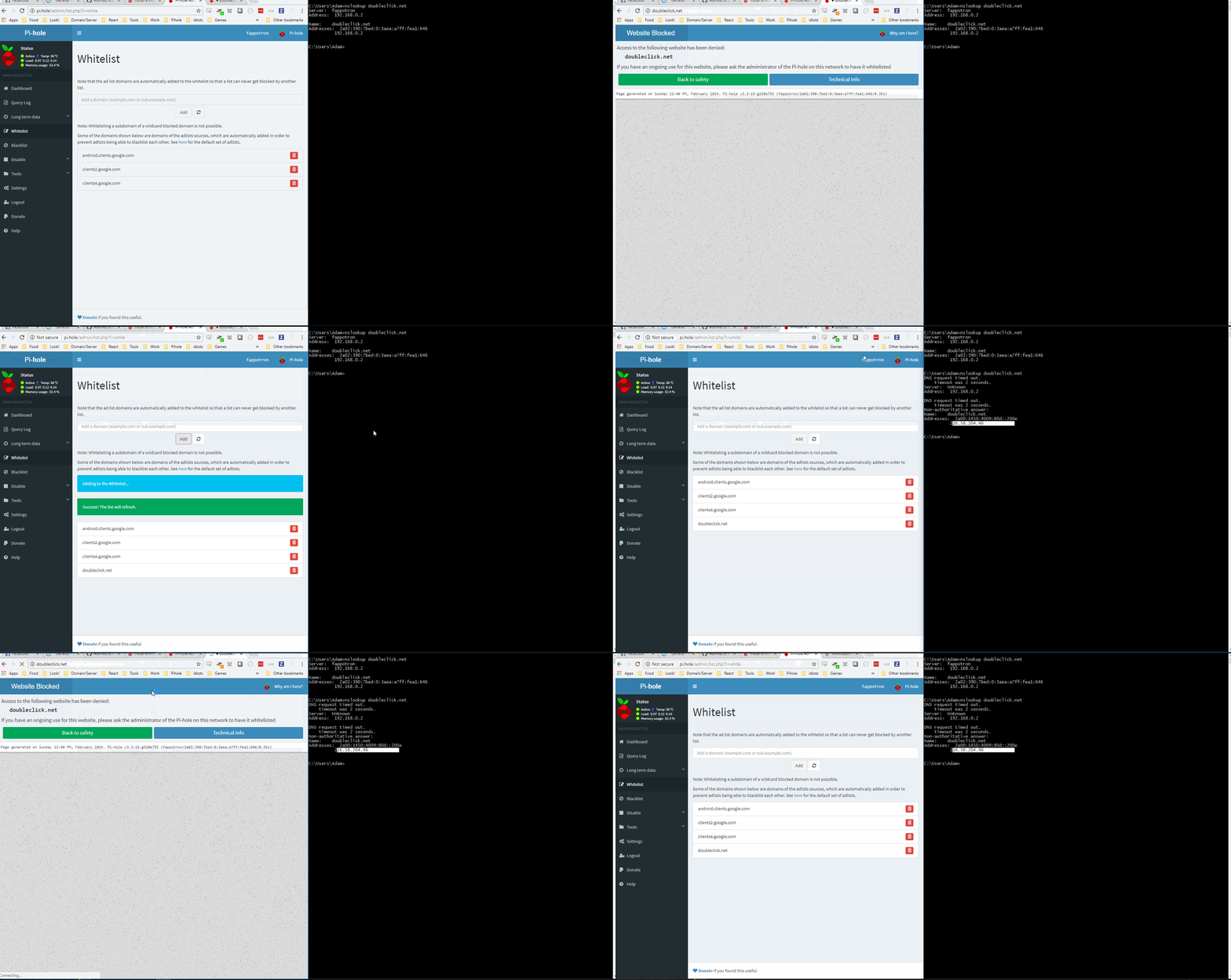
I'm 99% certain this is a caching issue see below:

 PromoFaux
on 18 Feb 2018
PromoFaux
on 18 Feb 2018
the question then become if i whitelist XYZ.org from the block page why things that have previously been whitelisted like bit.ly are now blocked?
i managed to reproduce this issue this morning by whitelisting from the block page it worked fine for a couple minutes then the site appeared blocked again
technicalpyro
on 18 Feb 2018
So on your fresh install you still experienced the issue?
jacobsalmela
on 18 Feb 2018
yes that is correct
technicalpyro
on 18 Feb 2018
if it would be easier to troubleshoot i do not mind giving SSH access to my RPi for the devteam i trust you guys
technicalpyro
on 19 Feb 2018
This may be an issue more with stretch than pihole
https://www.reddit.com/r/pihole/comments/7yq3gv/fresh_install_of_stretch_33_whitelists_no_longer/?st=JDURO10A&sh=0402fe88
technicalpyro
on 19 Feb 2018
for any following this #1996 addresses the cause
technicalpyro
on 21 Feb 2018
Running pihole -g, thus updating the list of ad-serving domains solved the issue for me for a short while, but then the issue re-occurred.
Did manage to work around this issue by whitelisting both www.domain.net and domain.net.
 heskja
on 26 Apr 2018
heskja
on 26 Apr 2018
Fixed in v3.3.1
 Mcat12
on 27 Apr 2018
Mcat12
on 27 Apr 2018
Related issues
 JobbeDeluxe
·
37Comments
JobbeDeluxe
·
37Comments
 emmtte
·
33Comments
emmtte
·
33Comments
 ghost
·
36Comments
ghost
·
36Comments
 fsantiago07044
·
31Comments
fsantiago07044
·
31Comments
 cardassian-tailor
·
38Comments
cardassian-tailor
·
38Comments