I'm using pfSense.
It's possible to implement dashboard for OpenVPN?
 darvinrivera
All 59 comments
@darvinrivera - Easy...just need some logs to work with - at your leisure, please provide some sanitized logs. I'll need to need to compare agains OPNsense, refine and build a dashboard.
 a3ilson
on 22 Feb 2021
a3ilson
on 22 Feb 2021
@a3ilson
From pfSense:
cat /var/log/openvpn.log
https://pastebin.com/v6avpyLp
darvinrivera
on 23 Feb 2021
Thanks! I'd prefer the log (syntax/format) from the logs being sent remotely. Are the OpenVPN logs being sent from the remote syslog settings? If so, can you send them to your pfelk instance and confirm or provide the OpenVPN logs (e.g. sudo tcpdump -vvv -A -i any port 5141)
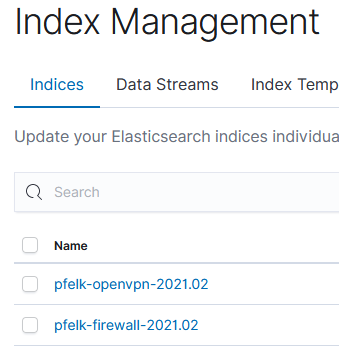
Taking another look at the current configuration, OpenVPN is supported (haven't confirmed the GROK in a few years as I don't utilize it) but will require a revision within your 50-outputs.conf. I made that revision below which should create an index and allow you to view the received records.
# 50-outputs.conf
################################################################################
# Version: 21.03                                                               #
# Required: Yes                                                                #
# Description: Sends enriched logs to Elasticsearch. Remove "#ILM#" to enable  #
# ILM                                                                          #
################################################################################
#
output {
  ################################################################################
  ###                               firewall                                   ###
  ################################################################################
  if "firewall" in [tags] {
    elasticsearch {
      hosts => ["http://localhost:9200"]
      index => "pfelk-firewall-%{+YYYY.MM}"
#ILM#      ilm_enabled => true
#ILM#      ilm_rollover_alias => "pfelk-firewall"
#ILM#      ilm_pattern => "000001"
#ILM#      ilm_policy => "pfelk-ilm"
#ILM#      ecs_compatibility => "v1"
      manage_template => false
      ### X-Pack Username and Password ###
      # user => USERNAMEHERE
      # password => PASSWORDHERE
    }
  }
  ################################################################################
  ###                             captive portal                               ###
  ################################################################################
  if "captive" in [tags] {
    elasticsearch {
      hosts => ["http://localhost:9200"]
      index => "pfelk-captive-%{+YYYY.MM}"
#ILM#      ilm_enabled => true
#ILM#      ilm_rollover_alias => "pfelk-captive"
#ILM#      ilm_pattern => "000001"
#ILM#      ilm_policy => "pfelk-ilm"
#ILM#    ecs_compatibility => "v1"
      manage_template => false
      ### X-Pack Username and Password ###
      # user => USERNAMEHERE
      # password => PASSWORDHERE
    }
  }
  ################################################################################
  ###                                   dhcp                                   ###
  ################################################################################
  if "dhcp" in [tags] {
    elasticsearch {
      hosts => ["http://localhost:9200"]
      index => "pfelk-dhcp-%{+YYYY.MM}"
#ILM#      ilm_enabled => true
#ILM#      ilm_rollover_alias => "pfelk-dhcp"
#ILM#      ilm_pattern => "000001"
#ILM#      ilm_policy => "pfelk-ilm"
#ILM#      ecs_compatibility => "v1"
      manage_template => false
      ### X-Pack Username and Password ###
      # user => USERNAMEHERE
      # password => PASSWORDHERE
    }
  }
  ################################################################################
  ###                                 OpenVPN                                  ###
  ################################################################################
  if [process][name] == "openvpn" {
    elasticsearch {
      hosts => ["http://localhost:9200"]
      index => "pfelk-openvpn-%{+YYYY.MM}"
  #ILM#      ilm_enabled => true
  #ILM#      ilm_rollover_alias => "pfelk-openvpn"
  #ILM#      ilm_pattern => "000001"
  #ILM#      ilm_policy => "pfelk-ilm"
  #ILM#      ecs_compatibility => "v1"
      manage_template => false
      ### X-Pack Username and Password ###
      # user => USERNAMEHERE
      # password => PASSWORDHERE
    }
  }
  ################################################################################
  ###                                 unbound                                  ###
  ################################################################################
  if [process][name] == "unbound" {
    elasticsearch {
      hosts => ["http://localhost:9200"]
      index => "pfelk-unbound-%{+YYYY.MM}"
#ILM#      ilm_enabled => true
#ILM#      ilm_rollover_alias => "pfelk-unbound"
#ILM#      ilm_pattern => "000001"
#ILM#      ilm_policy => "pfelk-ilm"
#ILM#      ecs_compatibility => "v1"
      manage_template => false
      ### X-Pack Username and Password ###
      # user => USERNAMEHERE
      # password => PASSWORDHERE
    }
  }
  ################################################################################
  ###                                 suricata                                 ###
  ################################################################################
  if [process][name] == "suricata" {
    elasticsearch {
      hosts => ["http://localhost:9200"]
      index => "pfelk-suricata-%{+YYYY.MM}"
#ILM#      ilm_enabled => true
#ILM#      ilm_rollover_alias => "pfelk-suricata"
#ILM#      ilm_pattern => "000001"
#ILM#      ilm_policy => "pfelk-ilm"
#ILM#      ecs_compatibility => "v1"
      manage_template => false
      ### X-Pack Username and Password ###
      # user => USERNAMEHERE
      # password => PASSWORDHERE
    }
  }
  ################################################################################
  ###                                  snort                                   ###
  ################################################################################
  if [process][name] == "snort" {
    elasticsearch {
      hosts => ["http://localhost:9200"]
      index => "pfelk-snort-%{+YYYY.MM}"
#ILM#      ilm_enabled => true
#ILM#      ilm_rollover_alias => "pfelk-snort"
#ILM#      ilm_pattern => "000001"
#ILM#      ilm_policy => "pfelk-ilm"
#ILM#      ecs_compatibility => "v1"
      manage_template => false
      ### X-Pack Username and Password ###
      # user => USERNAMEHERE
      # password => PASSWORDHERE
    }
  }
  ################################################################################
  ###                                  squid                                   ###
  ################################################################################
  if [process][name] == "squid" {
    elasticsearch {
      hosts => ["http://localhost:9200"]
      index => "pfelk-squid-%{+YYYY.MM}"
#ILM#      ilm_enabled => true
#ILM#      ilm_rollover_alias => "pfelk-squid"
#ILM#      ilm_pattern => "000001"
#ILM#      ilm_policy => "pfelk-ilm"
#ILM#      ecs_compatibility => "v1"
      manage_template => false
      ### X-Pack Username and Password ###
      # user => USERNAMEHERE
      # password => PASSWORDHERE
    }
  }
  ################################################################################
  ###                                 HAPROXY                                  ###
  ################################################################################
  if [process][name] == "haproxy" {
    elasticsearch {
      hosts => ["http://localhost:9200"]
      index => "pfelk-haproxy-%{+YYYY.MM}"
#ILM#      ilm_enabled => true
#ILM#      ilm_rollover_alias => "pfelk-haproxy"
#ILM#      ilm_pattern => "000001"
#ILM#      ilm_policy => "pfelk-ilm"
#ILM#      ecs_compatibility => "v1"
      manage_template => false
      ### X-Pack Username and Password ###
      # user => USERNAMEHERE
      # password => PASSWORDHERE
    }
  }
  ################################################################################
  ###                                  BEATS                                   ###
  ################################################################################
  if [type] == "beats" {
    elasticsearch {
      hosts => ["http://localhost:9200"]
      index => "%{[@metadata][beat]}-%{[@metadata][version]}"
      # ecs_compatibility => "v1"
      # manage_template => false
      ### X-Pack Username and Password ###
      # user => USERNAMEHERE
      # password => PASSWORDHERE
    }
  }
}
Please update your 50-outputs.conf with the content above and provide the parsed out OpenVPN logs.
a3ilson
on 23 Feb 2021
@a3ilson
Here is my dump log using tcpdump:
https://pastebin.com/waYwqBef
OpenVPN Index:
OpenVPN Discovery:
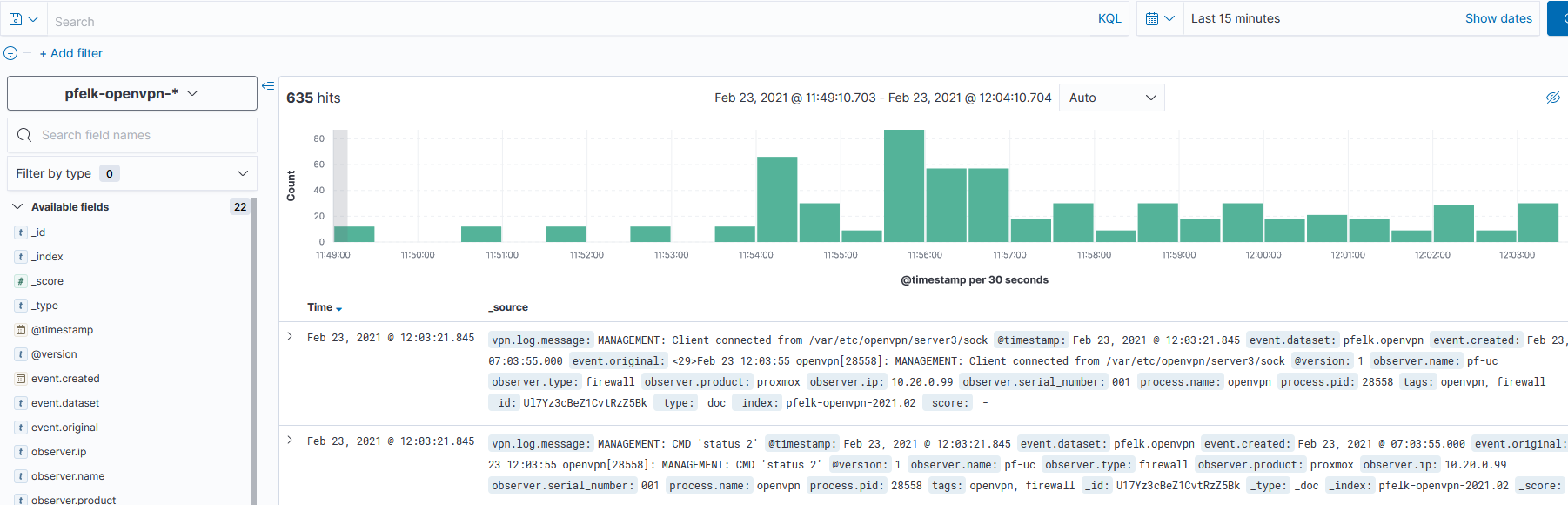
event.original:
  | <29>Feb 23 12:08:17 openvpn[28558]: yanaima.jauriga/45.45.45.123:8302 SENT CONTROL [yanaima.jauriga]: 'PUSH_REPLY,dhcp-option DNS 1.1.1.1,redirect-gateway def1,route-gateway 10.20.91.1,topology subnet,ping 10,ping-restart 60,ifconfig 10.20.91.2 255.255.255.0,peer-id 0,cipher AES-256-GCM' (status=1)
-- | --
@darvinrivera - Great/Thank you!
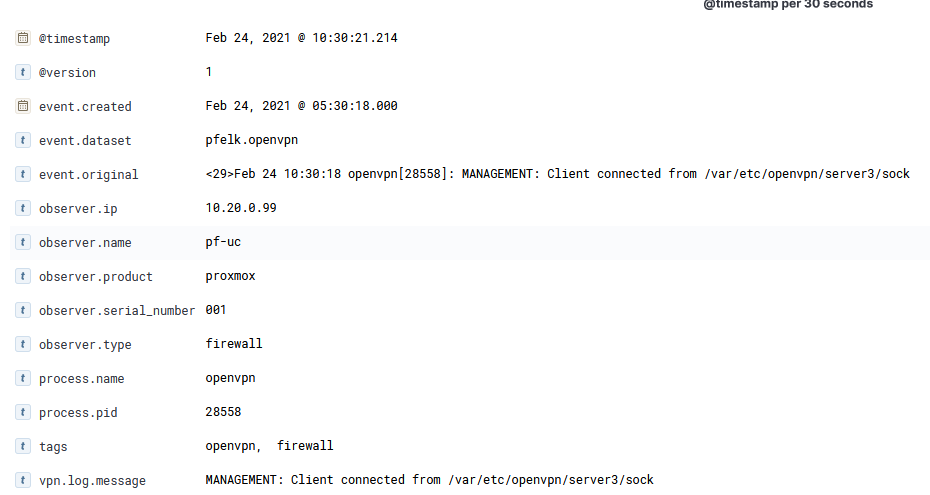
It appears to be parsing...can you expand one of the events within the viewer to confirm which fields are being successfully parsed/enriched?
The Dashboard will be a fairly quick fix/solution.
a3ilson
on 24 Feb 2021
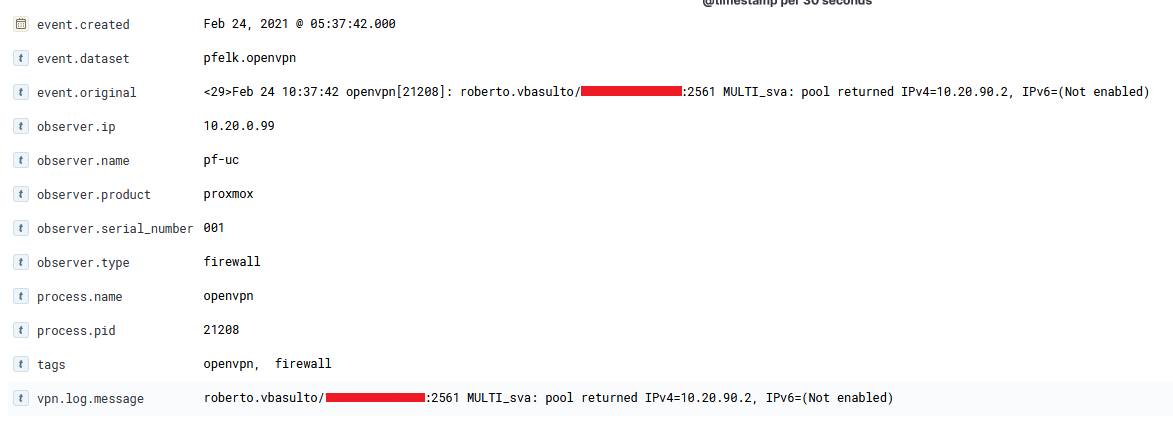
Fields we may need (some ideas):
username, remote user ip, vpn user ip, server dns (to do the dashboard filter), route gateway? (to make a dashboard filter), state? (to make a board filter)
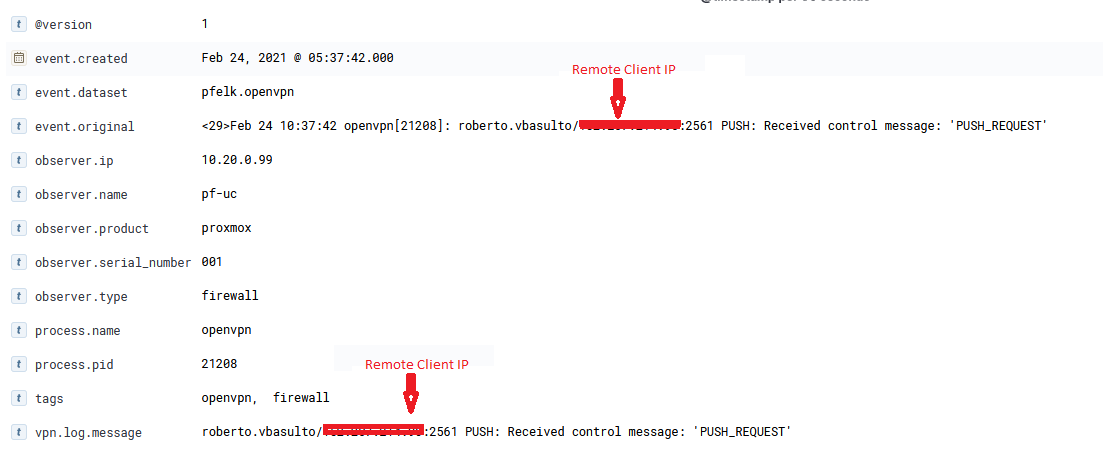
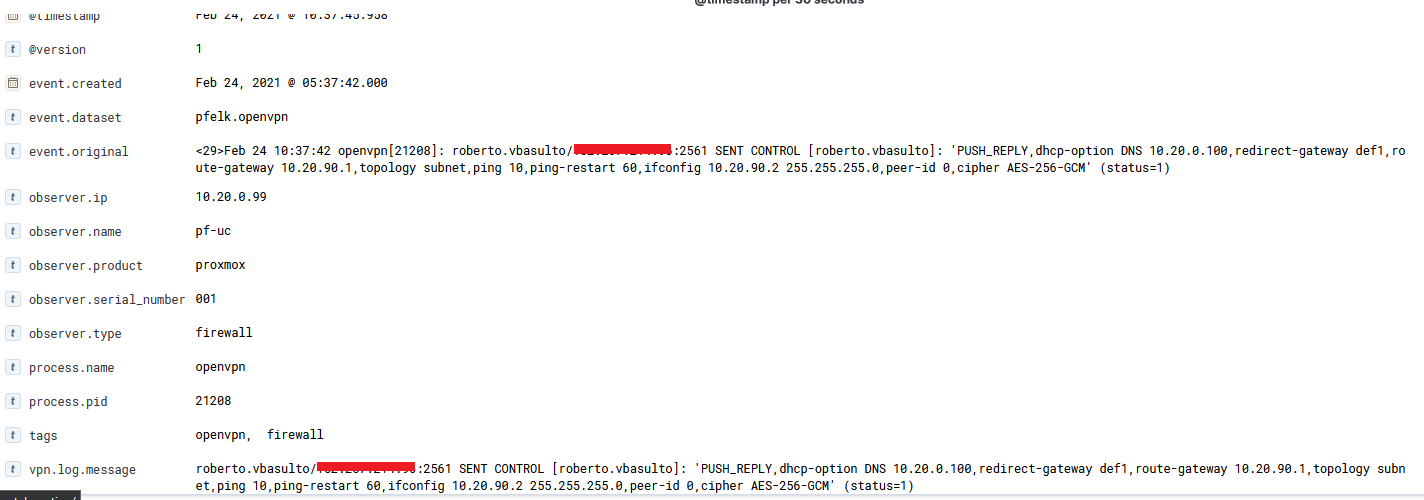
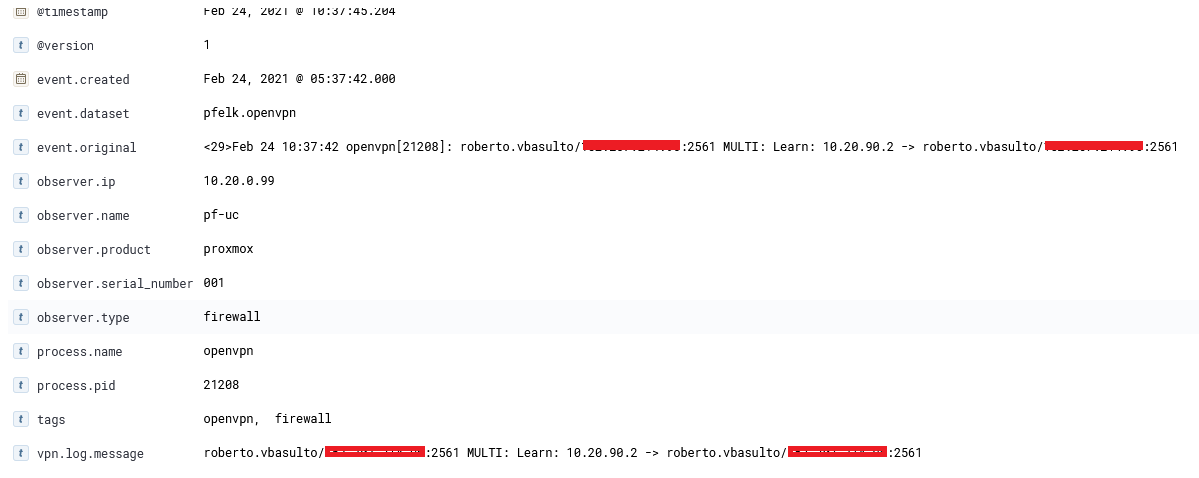
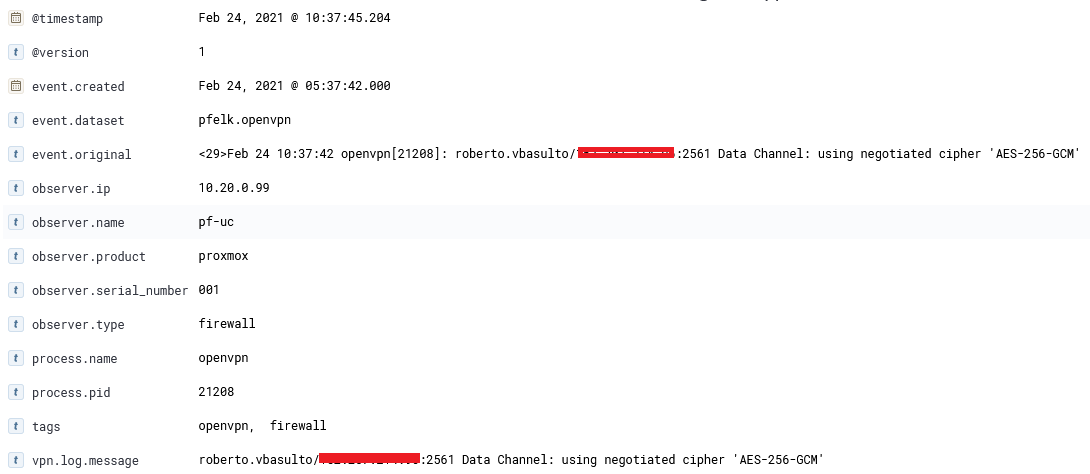
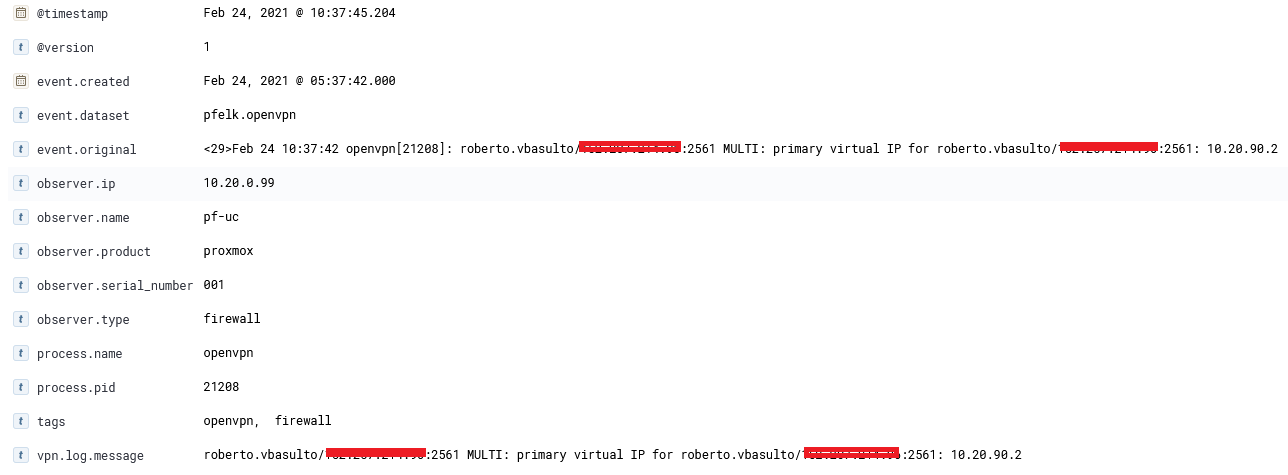
Note:
I'm using 3 VPNs Servers in pfSense but OpenVPN log dont show me the VPN name, Protocol (tcp or udp), Port, Interface name that user is connecting, mabe that information is in firewall log?
Example:
User1 conecting to ip (pfSense) 45.45.45.123:8443 (tcp) (VPN Public - Tunnel Network 10.20.80.0/22)
User2 conecting to ip (pfSense) 45.45.45.123:443 (udp) (VPNs for Lans users - Tunnel Network 10.20.90.0/24)
User3 conecting to ip (pfSense) 45.45.45.123:443 (tcp) (VPNs for VIP users - Tunnel Network 10.20.91.0/24)
Question: Can i have this data in dashboard?
darvinrivera
on 24 Feb 2021
Thanks! Thats the same that I was able to parse out with the current GROK on OPNsense. I'll update (further enrich) this weekend and have you further test/validate before building out a dashboard.
a3ilson
on 24 Feb 2021
@darvinrivera - Based on your previously provided log, there were 35 unique openvpn messages with varying syntax. There is commonality with the suffix of the messages but the prefixes will take a bit to test/validate. I hope to have something for you to test later today.
a3ilson
on 28 Feb 2021
@a3ilson
Thank you very much for your great work, I am waiting for the work you are doing.
darvinrivera
on 28 Feb 2021
Still chipping away. I am able to test and validate within a grok debugger unable to generate sufficient log types to fully test. Will request your assistance to test and build out.
Please update your pfelk.grok file (removed openvpn grok pattern)
Please download openvpn.grok and place in your patterns folder: /etc/pfelk/patterns/ or here /etc/logstash/conf.d/patterns/ depending on when you installed pfelk.
I'm about 50% complete and will continue to make updates as time permits
a3ilson
on 28 Feb 2021
I have my configuration here: /etc/logstash/patterns/
Now i'm testing new grok.
darvinrivera
on 1 Mar 2021
systemctl restart logstash.service and loose all logs... Now i'm not collecting any data.
darvinrivera
on 1 Mar 2021
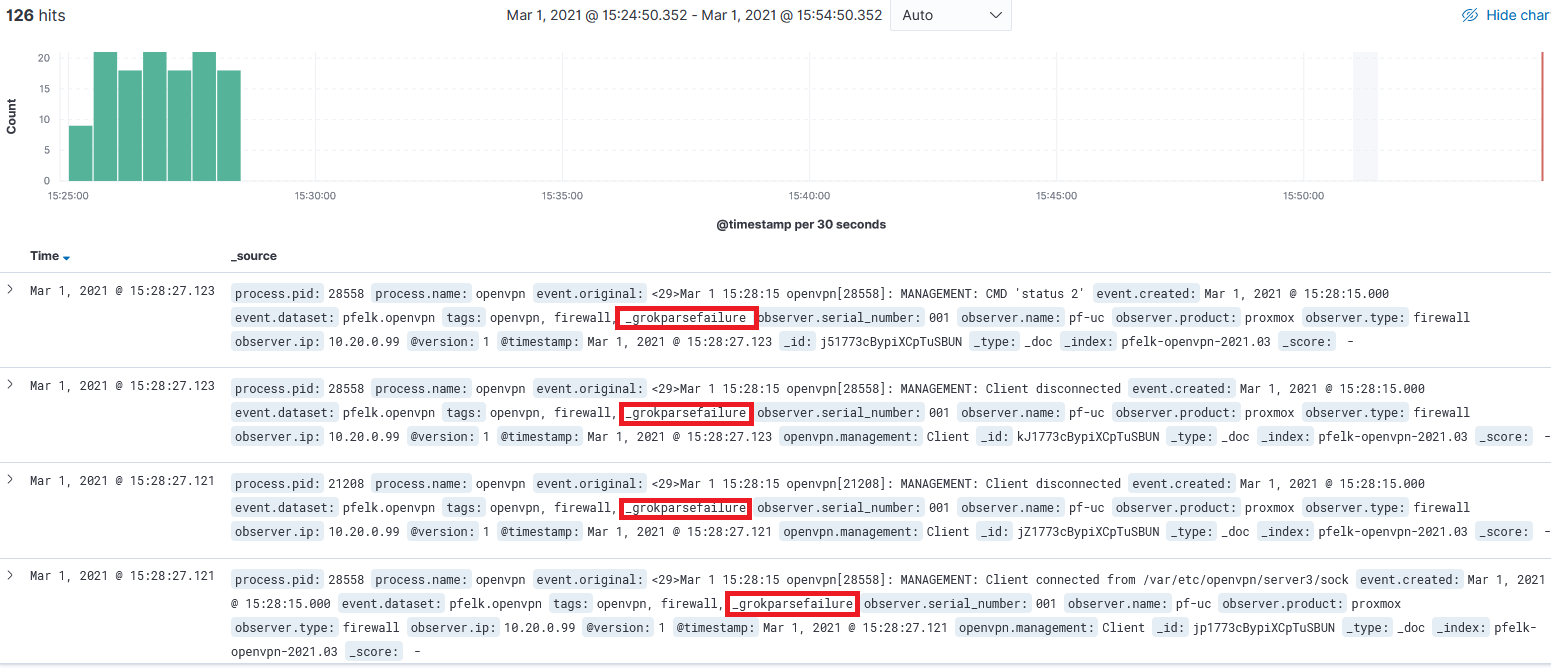
my mistake... i override 50-outputs.conf and lose our custom config... Now i have logs.
I can't see vpn client ip address (private address assigned to user... _grokparsefailure).
darvinrivera
on 1 Mar 2021
Great! Is it enriching the openvpn logs?
a3ilson
on 1 Mar 2021
@a3ilson
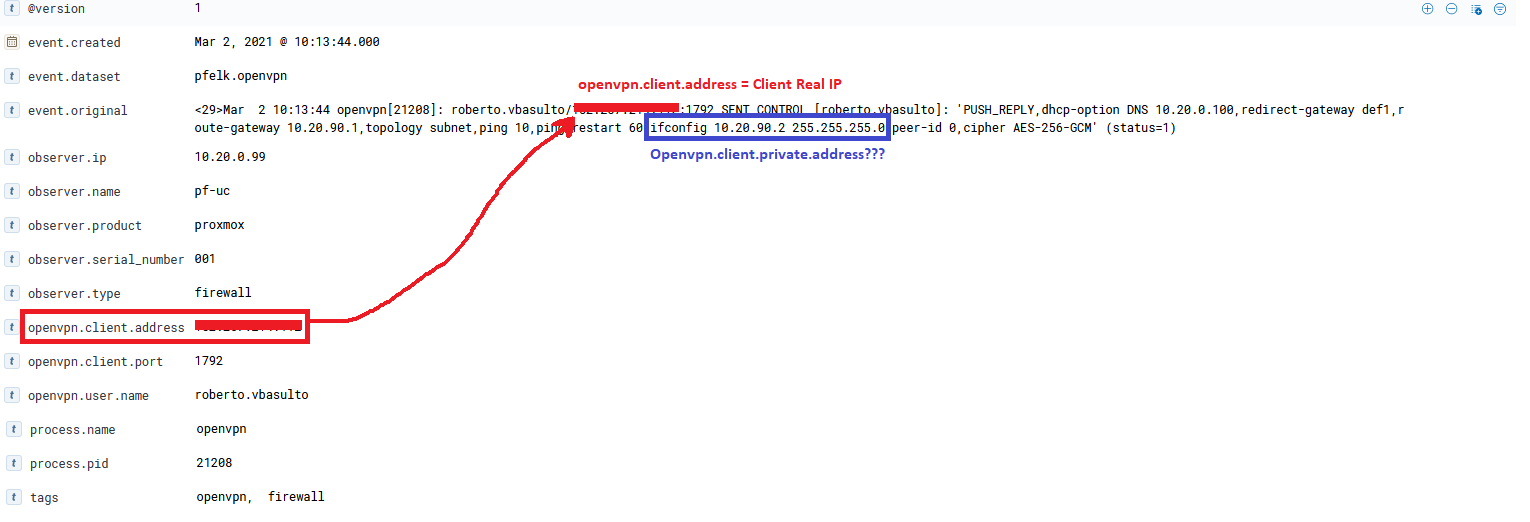
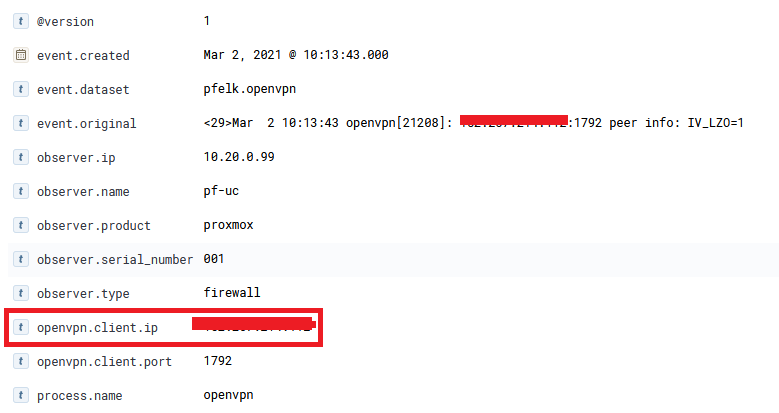
openvpn.client.ip and openvpn.client.address are giving the same value (real ip from client).
openvpn.user.name is working 100%, always gaving the correct value.
In red is client real ip and blue is private ip assignet from openvpn to the user, we can add this flield. Here some screenshots:


Here i upload new dump logs filtered (only openvpn) from tcpdump, maybe you can use it to enrich openvpn.grok to fix some fields or/and add new.
https://pastebin.com/CnLDV990
45.45.x.x- Real IP from clients
10.20.90.x- Private IP assignet from openvpn to the user
darvinrivera
on 2 Mar 2021
Okay, so I need to revise or delineate openvpn.client.ip to equal their IP (done) and create openvpn.assigned.ip or other ECS field to equal the private ip?
I'll add the provided logs to those previously provided.
The created GROK should have been able to parse our most logs resulting in a few dozen fields. However, based on your screenshot, it appears that I may need to revise (likely some erroneous spacing). Please confirm.
a3ilson
on 2 Mar 2021
@a3ilson
Yes, please, check openvpn.client.ip and add openvpn.assigned.ip for private openvpn ip. I'll try Grok Debugger to test some fileds.
darvinrivera
on 2 Mar 2021
In Discovery:
event.original: <29>Mar 2 12:29:17 openvpn[21208]: MANAGEMENT: Client disconnected
i get in tags: _grokparsefailure
darvinrivera
on 2 Mar 2021
In Discovery:
event.original: <29>Mar 2 12:29:17 openvpn[21208]: MANAGEMENT: Client disconnected
i get in tags: _grokparsefailure
I'll need to build out another GROK for the private.ip (I'll work on that later this week). As for the Client disconnected message, it should parse out as follows:
Message
<29>Mar 2 12:29:17 openvpn[21208]: MANAGEMENT: Client disconnected 16:56:35.061217 IP (tos 0x0, ttl 64, id 57907, offset 0, flags [none], proto UDP (17), length 127) 10.20.0.99.31428 > 10.20.0.171.5140: [udp sum ok] UDP, length 99
After openvpn.grok
{
  "[openvpn][server][ip]": "10.20.0.171",
  "[openvpn][client][ip]": "10.20.0.99",
  "[openvpn][client][port]": "31428",
  "[openvpn][management][status]": "disconnected",
  "[openvpn][management]": "Client",
  "[openvpn][network][transport]": "UDP",
  "[openvpn][process][ppid]": "57907",
  "[openvpn][ttl]": "64",
  "[openvpn][transport][data_length]": "99",
  "[openvpn][flags]": "none",
  "[openvpn][offset]": "0",
  "[openvpn][protocol][id]": "17",
  "[openvpn][checksum]": "udp sum ok",
  "[openvpn][server][port]": "5140",
  "[openvpn][packet][length]": "127",
  "[openvpn][event][starttime]": "16:56:35.061217",
  "[openvpn][tos]": "0x0",
  "[openvpn][protocol][type]": "UDP"
}
I'll need to check the openvpn.grok file but as stated before suspect there to be some extra spacing (spaces) resulting in grok failures...will need your assistance on further testing.
a3ilson
on 3 Mar 2021
Quick overview of how the files are enriched:
- Example message :
<29>Mar 2 12:29:17 openvpn[21208]: MANAGEMENT: Client disconnected 16:56:35.061217 IP (tos 0x0, ttl 64, id 57907, offset 0, flags [none], proto UDP (17), length 127) 10.20.0.99.31428 > 10.20.0.171.5140: [udp sum ok] UDP, length 99
- The first filter is applied within the 03-filter.conf and enriches the first portion of the message:
{
  "[event][created]": "Mar 2 12:29:17",
  "[process][pid]": "21208",
  "filter_message": "MANAGEMENT: Client disconnected 16:56:35.061217 IP (tos 0x0, ttl 64, id 57907, offset 0, flags [none], proto UDP (17), length 127) 10.20.0.99.31428 > 10.20.0.171.5140: [udp sum ok] UDP, length 99",
  "[process][name]": "openvpn"
}
Next, the 05-apps.conf will filter based on the process.name. Line 81 matches the process.name field and references OPENVPN within the grok patterns directory.
The following is the order if which the GROK filter should filter/enrich this message but obviously it is not fully working (possibly due to errors and or too many variables within the 40+ openvpn patterns)
- This results in the following matching GROK pattern of:
(?<[openvpn][management]>(Client)) (?<[openvpn][management][status]>(connected|disconnected)) %{TIME:[openvpn][event][starttime]} IP .*\(tos\s*%{BASE16NUM:[openvpn][tos]},\s*ttl\s*%{INT:[openvpn][ttl]},\s*id\s*%{POSINT:[openvpn][process][ppid]},\s*offset\s*%{INT:[openvpn][offset]},\s*flags\s*\[%{WORD:[openvpn][flags]}\],\s*proto\s*%{WORD:[openvpn][protocol][type]}\s*\(%{INT:[openvpn][protocol][id]}\),\s*length\s*%{NUMBER:[openvpn][packet][length]}\)\s*%{IP:[openvpn][client][ip]}\.%{INT:[openvpn][client][port]}\s*>\s*%{IP:[openvpn][server][ip]}\.%{INT:[openvpn][server][port]}:\s*\[%{GREEDYDATA:[openvpn][checksum]}\]\s*%{WORD:[openvpn][network][transport]},\s*length\s*%{INT:[openvpn][transport][data_length]}
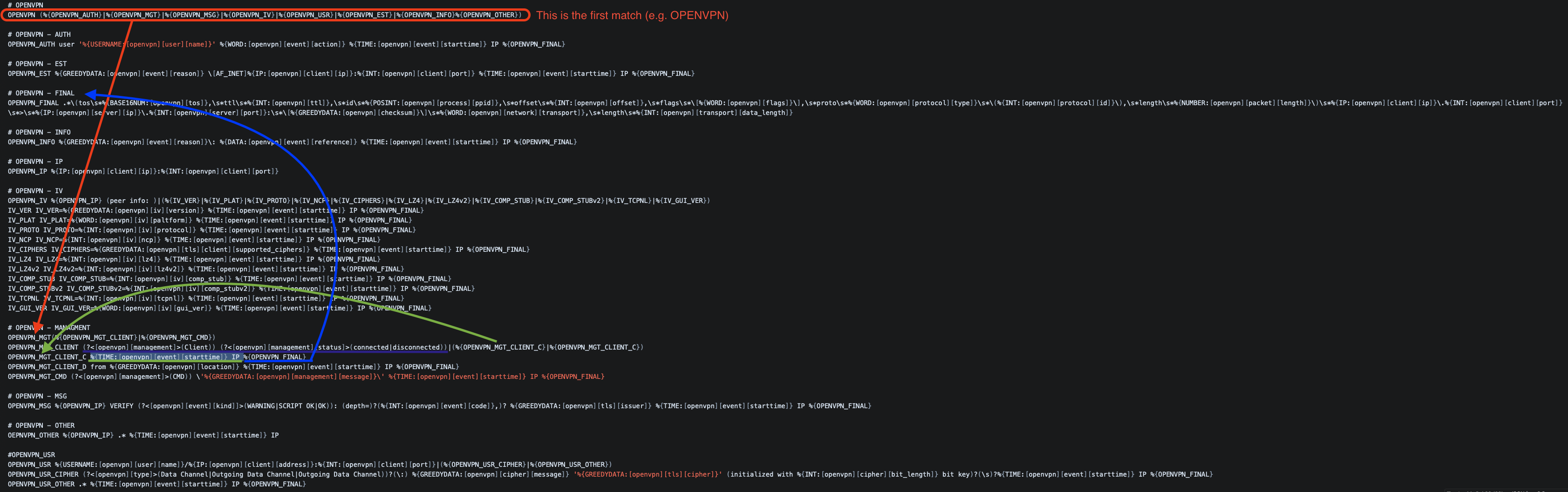
- And will enrich the example message as:
{
  "[openvpn][server][ip]": "10.20.0.171",
  "[openvpn][client][ip]": "10.20.0.99",
  "[openvpn][client][port]": "31428",
  "[openvpn][management][status]": "disconnected",
  "[openvpn][management]": "Client",
  "[openvpn][network][transport]": "UDP",
  "[openvpn][process][ppid]": "57907",
  "[openvpn][ttl]": "64",
  "[openvpn][transport][data_length]": "99",
  "[openvpn][flags]": "none",
  "[openvpn][offset]": "0",
  "[openvpn][protocol][id]": "17",
  "[openvpn][checksum]": "udp sum ok",
  "[openvpn][server][port]": "5140",
  "[openvpn][packet][length]": "127",
  "[openvpn][event][starttime]": "16:56:35.061217",
  "[openvpn][tos]": "0x0",
  "[openvpn][protocol][type]": "UDP"
}
@darvinrivera - any updates with this? I'll have some time this weekend to dig into a little bit.
a3ilson
on 12 Mar 2021
@a3ilson
I had a very difficult week and i have not been able to fix/add anything new. If you could help me I would really appreciate it. thanks for your help.
darvinrivera
on 12 Mar 2021
@darvinrivera - I took a look at the additional logs and noted additional variations. Essentially, openVPN logs are a pain for filtering via GROK @OpenVPN...
Short Term Fix
Let me know if you are open to the following:
- Let's reset this endeavor
- Identify your top 10 logs
- Build a filter for those 10 log variations
- Once working, we'll build out additional filtering
Long Term Solution
Leverage Ruby + GROK
a3ilson
on 14 Mar 2021
i like Short Term Fix
I want to log basic behaviour: username, client ip from username, openvpn set ip to username, time start connection, vpn name, vpn protocol conecction, time end conection...
All this "fields" are in multiples logs, even, in the same log.... I will put here the most important logs.
darvinrivera
on 15 Mar 2021
alright...let me go back through the logs, sort based on that criteria and rebuild the grok pattern. It may be a bit as I am a fairly busy for the next several weeks but I'll get something soon, to start with.
a3ilson
on 16 Mar 2021
@darvinrivera -
I made a little progress today. Please update the following files:
This is the first increment to make some progress and enrich the wide variety of OPENVPN logs. Please test and follow up so that we can further enrich these messages. Once you have made the updates and restarted the OPENVPN messages will be parsed as follows:
Most messages contain two distinguishable parts. The first is the "wide variety" and I hope to leverage RUBY but will continue building via GROK since I've already built most of the GROK pattern. The second part which is not observed in every message log is a nicely structured output which will be enriched with this update.
- The first part will parse out into a new field called
openvpn_message - The second part will be enriched with multiple observable fields
The next iteration will be a continued enrichment of the first part or the message portion contained in the openvpn_message field. This will also allow you to continue collecting those messages and leveraging KQL searching to find logs of interest until this issue is resolved.
Sorry for the delay but I have limited time for the next several months. I plan to continue to chip away at this (1-2x a week) depending on feedback and testing (mostly on your part). So thanks and keep up updated as this continues to evolve.
a3ilson
on 20 Mar 2021
@a3ilson
Thanks!!!! This is my report:
I updated and i get this 3 fields without problems:
openvpn.client.address
    15.15.14.72
openvpn.client.port
    4608
openvpn.user.name
    eduardo.osquel
OpenVPN Message have missing parts (The ip address assigned by the vpn server is missing, "we" need this field)
Here is openvpn_message vs event.original
openvpn_message
    eduardo.osquel/15.15.14.72:4608 MULTI: primary virtual IP for eduardo.osquel/15.15.14.72:4608:
event.original
    <29>Mar 22 16:51:47 openvpn[47106]: eduardo.osquel/15.15.14.72:4608 MULTI: primary virtual IP for eduardo.osquel/15.15.14.72:4608: 10.20.90.2
More examples
openvpn_message
          eduardo.osquel/15.15.14.72:4608 MULTI_sva: pool returned IPv4=10.20.90.2, IPv6=(Not
event.original
    <29>Mar 22 16:56:17 openvpn[47106]: eduardo.osquel/15.15.14.72:4608 MULTI_sva: pool returned IPv4=10.20.90.2, IPv6=(Not enabled)
More examples
openvpn_message
          jos.arm/15.27.47.189:4096 PUSH: Received control message:
event.original
     <29>Mar 22 17:07:57 openvpn[47106]: jos.arm/15.27.47.189:4096 PUSH: Received control message: 'PUSH_REQUEST'
We only need to add the ip that is assigned by the vpn server, with all this we have the basic fields that we need. Later it could be enriched with more fields.
darvinrivera
on 22 Mar 2021
To confirm, you need the address which followed the username?
user.name/0.0.0.0...
a3ilson
on 23 Mar 2021
@a3ilson
No, user.name/0.0.0.0 its the field openvpn.client.address.
openvpn_message
          eduardo.osquel/15.15.14.72:4608 MULTI_sva: pool returned IPv4=10.20.90.2, IPv6=(Not
By mapped Fields:
openvpn.user.name: eduardo.osquel
openvpn.client.address: 15.15.14.72
openvpn.client.port: 4608
Extra Message (Incomplete Message):MULTI_sva: pool returned IPv4=10.20.90.2, IPv6=(Not
This is the address i need: 10.20.90.2... This is the ip address assigned by openvpn server to the client, this ip address appears in others messages too.
Other Message where we can get the ip address assigned by openvpn server to the client:
openvpn_message
    eduardo.osquel/15.15.14.72:4352 SENT CONTROL [eduardo.osquel]: 'PUSH_REPLY,dhcp-option DNS 10.20.0.100,redirect-gateway def1,route-gateway 10.20.90.1,topology subnet,ping 10,ping-restart 60,ifconfig 10.20.90.2 255.255.255.0,peer-id 0,cipher AES-256-GCM'
Mapped Fields:
openvpn.user.name: eduardo.osquel
openvpn.client.address: 15.15.14.72
openvpn.client.port: 4352
Extra Message (Complete Message): SENT CONTROL [eduardo.osquel]: 'PUSH_REPLY,dhcp-option DNS 10.20.0.100,redirect-gateway def1,route-gateway 10.20.90.1,topology subnet,ping 10,ping-restart 60,ifconfig 10.20.90.2 255.255.255.0,peer-id 0,cipher AES-256-GCM'
I have three VPNs on a pfsense server.
Fields that we can Mapped (We can usit in Dashboard to filter different OPENVPN servers):
openvpn.server.dns: 10.20.0.100 -> different DNS to diferent OPENVPN Servers.
openvpn.server.gateway: 10.20.90.1 -> different gataways to different OPENVPN Servers.
openvpn.server.clientaddress: 10.20.90.2 -> Ip Assigned to the client.
You can choose the name for these new fields, I just put them as examples.
darvinrivera
on 23 Mar 2021
Got it...I should get to it this week.
a3ilson
on 24 Mar 2021
@a3ilson Thanks a lot. I'll wait for the changes to test.
darvinrivera
on 25 Mar 2021
I updated the openvpn.grok - please update and check to see if it parses the "SENT CONTROL" messages. It's not the most aesthetic solution but it'll suffice unit I have more time to cleanup the messy openvpn message types.
a3ilson
on 26 Mar 2021
@a3ilson
In line 52 missing % in OPENVPN_USER_SENT_CONTROL, logstash start with logstash.filters.grok
this's the line:
OPENVPN_USR %{USERNAME:[openvpn][user][name]}/%{IP:[openvpn][client][address]}:%{INT:[openvpn][client][port]}|(%{OPENVPN_USR_CIPHER}|%{OPENVPN_USR_OTHER}|{OPENVPN_USER_SENT_CONTROL})
I get warnning in logstash logs:
[2021-03-26T14:47:28,877][WARN ][logstash.filters.grok ][pfelk][b5a5372782132a30c8c29400a7179245ef1a2262163f19b673c233ef7fb1d0bb] Grok regexp threw exception {:exception=>"Could not set field 'status' on object 'Client' to value 'connected'.This is probably due to trying to set a field like [foo][bar] = someValuewhen [foo] is not either a map or a string", :backtrace=>["org.logstash.Accessors.setChild(Accessors.java:142)", "org.logstash.Accessors.set(Accessors.java:36)", "org.logstash.Event.setField(Event.java:208)"......
darvinrivera
on 26 Mar 2021
@a3ilson
Now i cant filter openvpn.user.name or openvpn.client.address. I get _grokparsefailure.
darvinrivera
on 26 Mar 2021
try again...I just updated the grok pattern (openvpn). There were two instances where the user.name value was defined and likely causing the issue.
a3ilson
on 26 Mar 2021
@a3ilson
I updated grok pattern and i still have _grokparsefailureand a lot of:
[2021-03-26T15:38:00,920][WARN ][logstash.filters.grok ][pfelk][b5a5372782132a30c8c29400a7179245ef1a2262163f19b673c233ef7fb1d0bb] Grok regexp threw exception {:exception=>"Could not set field 'status' on object 'Client' to value 'connected'.This is probably due to trying to set a field like [foo][bar] = someValuewhen [foo] is not either a map or a string", :backtrace=>["org.logstash.Accessors.setChild(Accessors.java:142)", "org.logstash.Accessors.set(Accessors.java:36)", "org.logstash.Event.setField(Event.java:208)", "org.logstash.ext.JrubyEventExtLibrary$RubyEvent.ruby_set_field(JrubyEventExtLibrary.java:121)", "usr.share.logstash.vendor.bundle.jruby.$2_dot_5_dot_0.gems.logstash_minus_filter_minus_grok_minus_4_dot_3_dot_0.lib.logstash.filters.grok.RUBY$method$handle$0(/usr/share/logstash/vendor/bundle/jruby/2.5.0/gems/logstash-filter-grok-4.3.0/lib/logstash/filters/grok.rb:414)", "usr.share.logstash.vendor.bundle.jruby.$2_dot_5_dot_0.gems.logstash
darvinrivera
on 26 Mar 2021
ugh, sorry. Try again. I had a duplicated GROK pattern.
a3ilson
on 26 Mar 2021
Lol... updating again and testing.
darvinrivera
on 26 Mar 2021
@a3ilson
The only filter is working for me is openvpn.client.address with this specific openvpn_message:
Edited: i can filter openvpn.user.name too only with this openvpn_message.
openvpn_message
    eduardo.osquel/121.20.241.69:1525 SIGTERM[soft,] received, client-instance
All others fields i cant see, only i get _grokparsefailure and logstatsh log is:
[2021-03-30T12:52:51,095][WARN ][logstash.filters.grok ][pfelk][b5a5372782132a30c8c29400a7179245ef1a2262163f19b673c233ef7fb1d0bb] Grok regexp threw exception {:exception=>"Could not set field 'status' on object 'Client' to value 'connected'.This is probably due to trying to set a field like [foo][bar] = someValuewhen [foo] is not either a map or a string", :backtrace=>["org.logstash.Accessors.setChild(Accessors.java:142)", "org.logstash.Accessors.set(Accessors.java:36)", "org.logstash.Event.setField(Event.java:208)", "org.logstash.ext.JrubyEventExtLibrary$RubyEvent.ruby_set_field(JrubyEventExtLibrary.java:121)", "usr.share.logstash.vendor.bundle.jruby.$2_dot_5_dot_0.gems.logstash_minus_filter_minus_grok_minus_4_dot_3_dot_0.lib.logstash.filters.grok.RUBY$method$handle$0(/usr/share/logstash/vendor/bundle/jruby/2.5.0/gems/logstash-filter-grok-4.3.0/lib/logstash/filters/grok.rb:414)", "usr.share.logstash.vendor.bundle.jruby.$2_dot_5_dot_0.gems.logstash_minus_filter_minus_grok_minus_4_dot_3_dot_0.lib.logstash.filters.grok.RUBY$block$match$2(/usr/share/logstash/vendor/bundle/jruby/2.5.0/gems/logstash-filter-grok-4.3.0/lib/logstash/filters/grok.rb:372)",
We need to check OPENVPN_USR and OPENVPN_USER_SENT_CONTROL in GROK pattern.
darvinrivera
on 30 Mar 2021
I checked event.original vs openvpn_message and there is a lot of trunked messages with the same tag: _grokparsefailure
darvinrivera
on 30 Mar 2021
Yuck....this was also an issue with Suricata on pfSense prior to v2.5.0
I am not running pfSense but here are some options:
- RFC3164 (para 4.1) limits the message to no greater than 1024 bytes and believe this is the default for pfSense
- RFC5424 (para 6.1) allows for messages 2048 and messages MAY be larger than 2048 octets

- Try changing from RFC3164 to RFC5424...let me know if that works otherwise leveraging syslog-ng will work but will need to be installed and configured. I have no idea why pfSense did not make syslog-ng the native option for logging (OPNsense does and has for a while) not to mention the security enhancement over a very old/legacy syslog. (comeon @pfSense)
a3ilson
on 31 Mar 2021
pfSense version: v2.5
I change Log Message Format to syslog (RFC 5224...) and checked again event.original vs openvpn_message... the messages keep trunked
Example 1:
event.original
    <29>1 2021-03-30T19:06:23.507862-04:00 openvpn.lab openvpn 19776 - - roberto.vbasulto/132.27.21.214:4353 PUSH: Received control message: 'PUSH_REQUEST'
openvpn_message
    roberto.vbasulto/132.27.21.214:4353 PUSH: Received control message:


md5-388c0d99ca57653d9936a4ef33ee0f11


event.original
    <29>1 2021-03-30T19:06:23.508027-04:00 openvpn.lab openvpn 19776 - - roberto.vbasulto/132.27.21.214:4353 SENT CONTROL [roberto.vbasulto]: 'PUSH_REPLY,dhcp-option DNS 10.20.0.100,redirect-gateway def1,route-gateway 10.20.90.1,topology subnet,ping 10,ping-restart 60,ifconfig 10.20.90.2 255.255.255.0,peer-id 0,cipher AES-256-GCM' (status=1)


md5-f5ee70e15fee8d8cf3a605a742706277


openvpn_message
    roberto.vbasulto/132.27.21.214:4353 SENT CONTROL [roberto.vbasulto]: 'PUSH_REPLY,dhcp-option DNS 10.20.0.100,redirect-gateway def1,route-gateway 10.20.90.1,topology subnet,ping 10,ping-restart 60,ifconfig 10.20.90.2 255.255.255.0,peer-id 0,cipher AES-256-GCM'
@a3ilson
GROK pattern its not working for me with this openvpn_message:
roberto.vbasulto/132.27.21.214:4353 SENT CONTROL [roberto.vbasulto]: 'PUSH_REPLY,dhcp-option DNS 10.20.0.100,redirect-gateway def1,route-gateway 10.20.90.1,topology subnet,ping 10,ping-restart 60,ifconfig 10.20.90.2 255.255.255.0,peer-id 0,cipher AES-256-GCM'
The new fields are not displaying.
darvinrivera
on 31 Mar 2021
The truncated messages will not be parsed/enriched...you'll need to utilize syslog-ng. However, looking at the reference messages, I do not believe they are truncated. The event.original is the original message. That message will be partially enriched and the remaining of the message or openvpn message will be be captured within filter_message and then the openvpn_message.
Orignal Message
<29>1 2021-03-30T19:06:23.508027-04:00 openvpn.lab openvpn 19776 - - roberto.vbasulto/132.27.21.214:4353 SENT CONTROL [roberto.vbasulto]: 'PUSH_REPLY,dhcp-option DNS 10.20.0.100,redirect-gateway def1,route-gateway 10.20.90.1,topology subnet,ping 10,ping-restart 60,ifconfig 10.20.90.2 255.255.255.0,peer-id 0,cipher AES-256-GCM' (status=1)
First Filter (03-filter.conf)
{
  "[event][created]": "2021-03-30T19:06:23.508027-04:00",
  "[host][name]": "openvpn.lab",
  "[process][pid]": "19776",
  "[log][syslog][version]": "1",
  "filter_message": "roberto.vbasulto/132.27.21.214:4353 SENT CONTROL [roberto.vbasulto]: 'PUSH_REPLY,dhcp-option DNS 10.20.0.100,redirect-gateway def1,route-gateway 10.20.90.1,topology subnet,ping 10,ping-restart 60,ifconfig 10.20.90.2 255.255.255.0,peer-id 0,cipher AES-256-GCM' (status=1)",
  "[process][name]": "openvpn"
}
Second Filter (05-apps.conf) via pfelk.grok
{
  "openvpn_message": "roberto.vbasulto/132.27.21.214:4353 SENT CONTROL [roberto.vbasulto]: 'PUSH_REPLY,dhcp-option DNS 10.20.0.100,redirect-gateway def1,route-gateway 10.20.90.1,topology subnet,ping 10,ping-restart 60,ifconfig 10.20.90.2 255.255.255.0,peer-id 0,cipher AES-256-GCM'"
}
Third Filter (05-apps.conf) via openvpn.grok
{
  "[openvpn][gateway][ip]": "10.20.90.1",
  "[openvpn][dns][ip]": "10.20.0.100",
  "[openvpn][client][nat][subnet]": "255.255.255.0",
  "[openvpn][user][name_test]": "roberto.vbasulto",
  "[openvpn][peerid]": "0",
  "[openvpn][tls][cipher]": "AES-256-GCM' (status=1)",
  "[openvpn][client][nat][ip]": "10.20.90.2"
}
I just updated the openvpn.grok file...update and give it another go.
a3ilson
on 31 Mar 2021
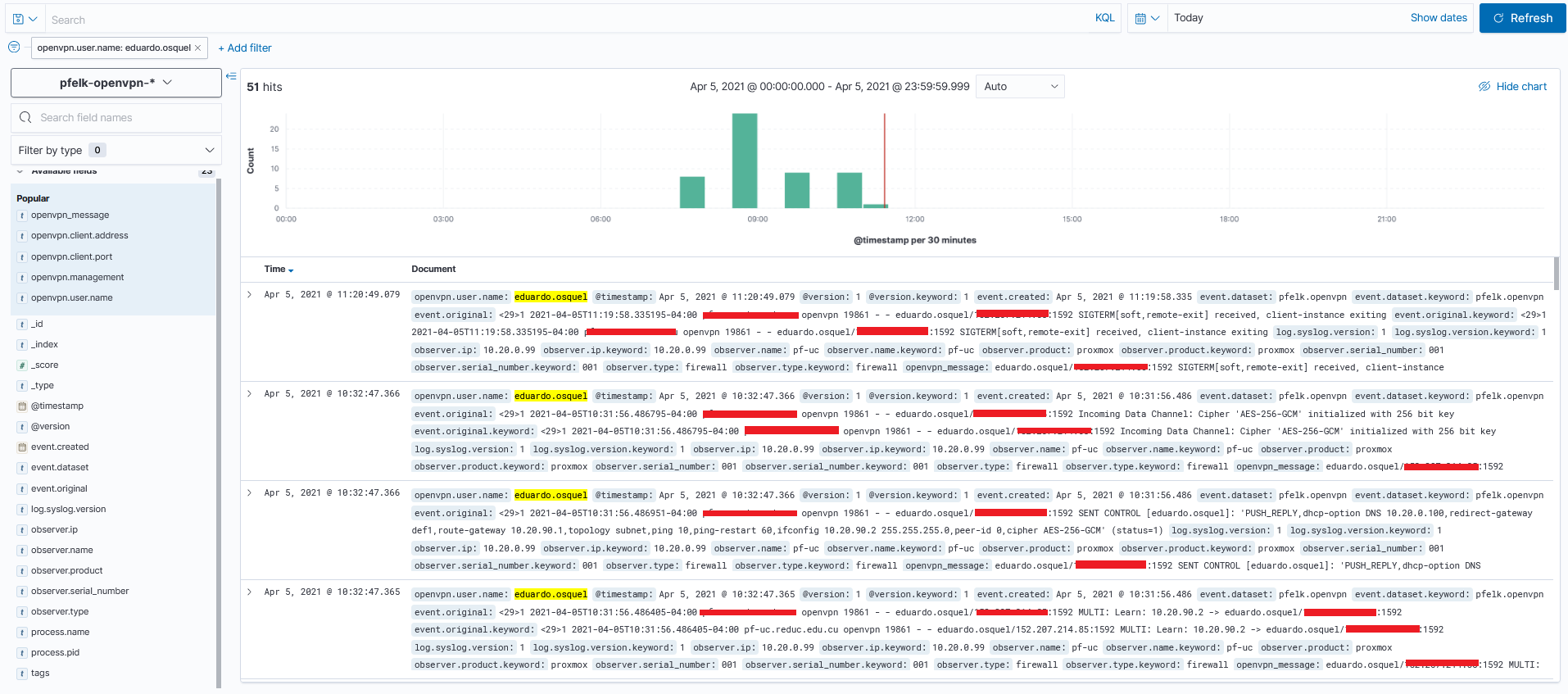
@a3ilson
I don't know why I don't know how ... Only fields openvpn.user.name, openvpn.client.address and openvpn.client.port are show to me.
darvinrivera
on 1 Apr 2021
Can you provide a screenshot?
a3ilson
on 2 Apr 2021
@a3ilson
Forgive the delay. I was waiting to get more logs. Check all configuration files and they are up to date. Here's the screenshot of today.
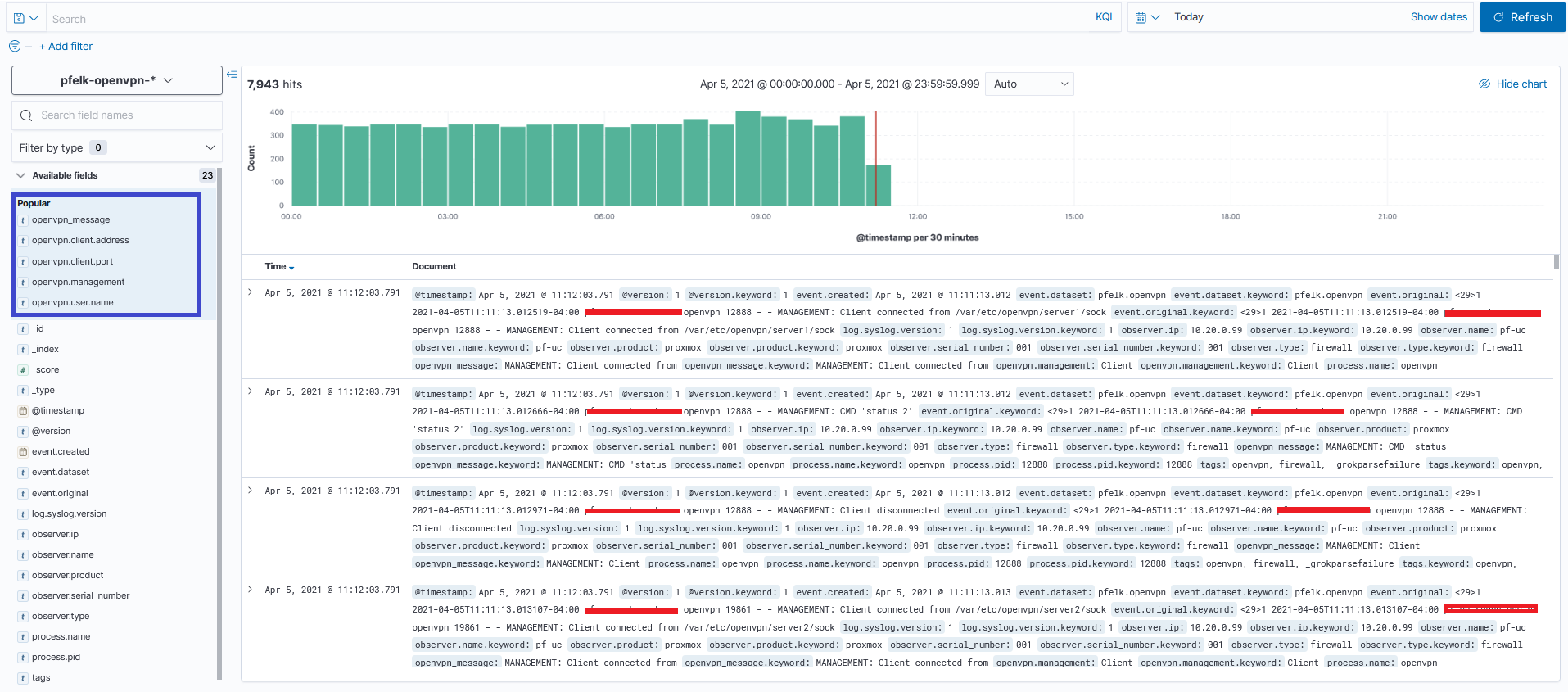
This is a user's log, just remove the ip of the server and the real ip of the client.
darvinrivera
on 5 Apr 2021
No worries...I may try to ingest them manually (file) on my end for further troubleshooting or simplify the grok filter in small increments for you to test...I'll update the grok for you to test later this week. Thanks!
a3ilson
on 6 Apr 2021
@a3ilson
I find and "space" in 05-apps.conf, line 84, before firewall. Here is the line: add_tag => [ "openvpn", " firewall" ]
Ok, I will wait for you.
darvinrivera
on 6 Apr 2021
Thanks! fixed the space but that was only for tagging...it won't fix/change anything substantial. I'll have a new openvpn grok to test out in the next day or two.
a3ilson
on 9 Apr 2021
Yes, i know that was only for tagging... but its a little fix. I will wait...
Thanks!
darvinrivera
on 9 Apr 2021
Sorry for the delay...I plan to make time for this (will install an troubleshoot on my end) but will have a GROK later today for you to test/try
a3ilson
on 11 Apr 2021
Alright...let me know if this works:
update your openvpn.grok file to:
# openvpn.grok
################################################################################
# Version: 21.04-beta                                                          #
#                                                                              #
# OPNsense/pfSense openvpn log grok pattern for pfELK                          #
#                                                                              #
################################################################################
#
# OPENVPN_RAW
OPENVPN_RAW %{USERNAME:[openvpn][user][name]}/%{IP:[openvpn][client][address]}:%{INT:[openvpn][client][port]}
I am just curious if the grok is working...this should parse out the following:
{
  "[openvpn][user][name]": "user.name",
  "[openvpn][client][port]": "4321",
  "[openvpn][client][address]": "10.0.0.0"
}
I have all the grok patterns but I believe it is just a matter of getting the spacing and syntax right. I'll have some free time this coming weekend and will build-out and hopefully get to a 80-90% solution. My plan is to install openvpn and log in/out while testing the grok patterns.
a3ilson
on 12 Apr 2021
@a3ilson
I was testing the new configuration but... here is the screenshot
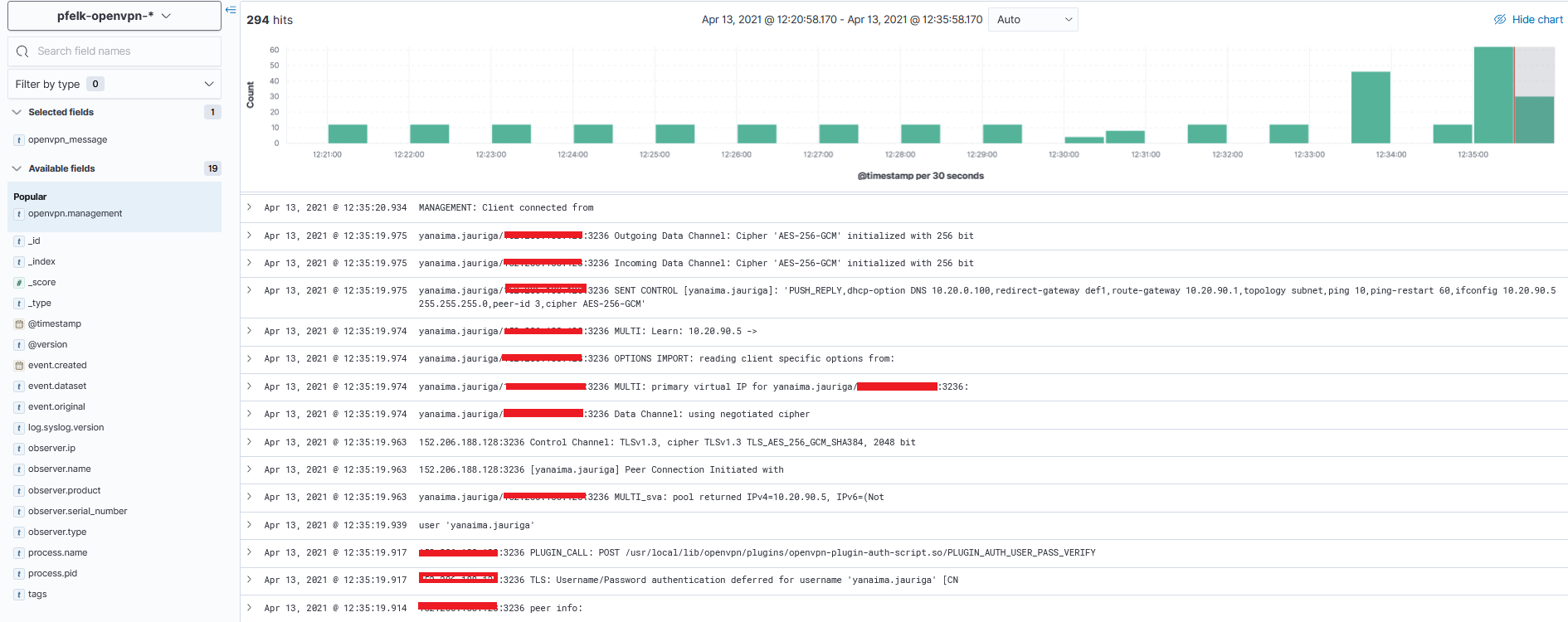
darvinrivera
on 13 Apr 2021
Dang... well I’ll start testing soon and get this resolved.
a3ilson
on 14 Apr 2021
@darvinrivera - I configured my system with openvpn and will have time on the 24/25 of April to get something together/working. Sorry for the delay.
a3ilson
on 19 Apr 2021
@a3ilson Don't worry, thanks for your help, i will wait,
darvinrivera
on 19 Apr 2021
@darvinrivera - apologize for the delay. I haven’t had time to dedicate to this but have installed and utilizing openvpn while traveling. I’ll have the logs too build out once things slow down.
a3ilson
on 11 May 2021
@a3ilson thanks. waiting...
darvinrivera
on 15 May 2021
Related issues
 fastxl
·
5Comments
fastxl
·
5Comments
 mango1122
·
3Comments
mango1122
·
3Comments
 ledge39
·
7Comments
ledge39
·
7Comments
 fktkrt
·
21Comments
fktkrt
·
21Comments
 InvokerFury
·
20Comments
InvokerFury
·
20Comments