Unbound message sent from pfSense are all failing pattern match.
Example
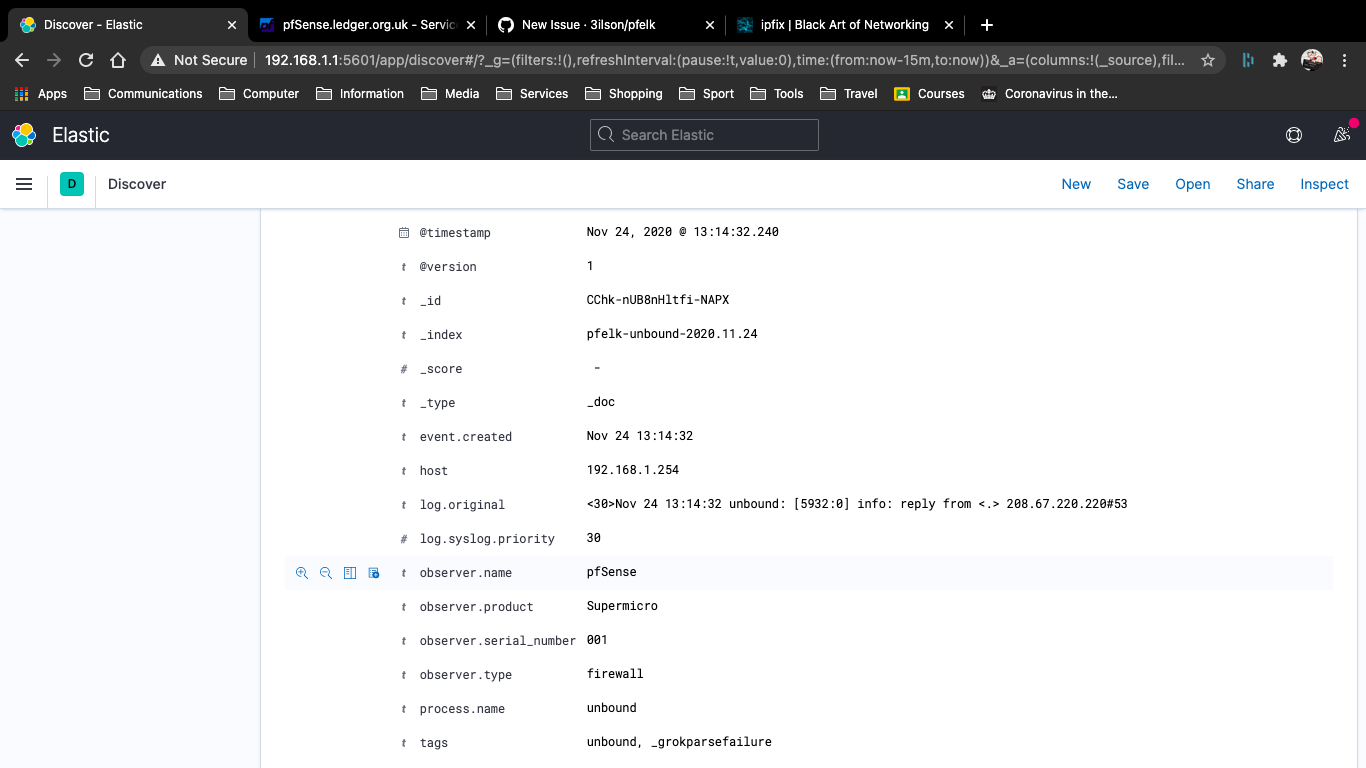
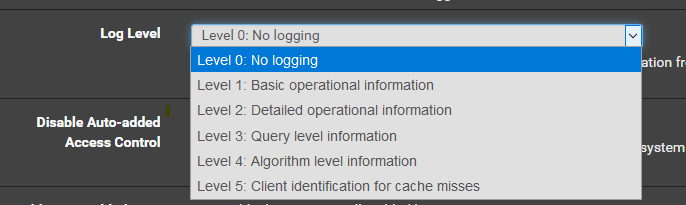
I noticed that the example for setting up Unbound was for OPNSense and not pfSense, but i assumed you just set logging to Level 3 - Services/DNS Resolver/Advance Settings

pfSense 2.4.5-RELEASE-p1 (arm64)
Ubuntu 20.10 (GNU/Linux 5.8.0-1007-raspi aarch64)
Manual install -
Elasticsearch, Logstash, Kibana 7.10
Attach the pfELK Error Log (error.pfelk), for Better Assistance*
error.pfelk.log
For info, I have added additional netflow configrations within conf.d/ to import softflowd from pfSense and I am also working on some Dashboards. Happy to add them to pfelk, if your interested?
Many Thanks
 ledge39
All 7 comments
Go to Services -> DNS Resolver and add the line: log-queries: yes to the custom options like so:
server:
    log-queries: yes
........
* any other custom config options *
since the canned verbosity level in the dropdown for the DNS resolver includes extra messages when you bump it up to the level that logs queries, this is the most elegant solution to get the query data without th eparse failures from the resolver status messages. Mine works great this way
 revere521
on 24 Nov 2020
revere521
on 24 Nov 2020
I'll give it a go this evening
ledge39
on 24 Nov 2020
I am running OPNsense and only developed the GROK pattern for Level 1 Logs. I see you have Level 3 selected within your screenshot. This is a fairly easy enrichment that can be added...can you confirm Level 3 Logs is your desired log output...should be set to level 0.
I see you're running on a RPI, nice! - how's that working out?
We would certainly be interested in adding/incorporating net flow data. Care to open another issue and provide specifics for testing and help with building this out? What version will you be leveraging (v5 or v9)? I held off on Netflow...there is a built-in netflow module but at the time I was unable to run the module and pfELK on the same Logstash instance (limitation). I have not re-engaged but will to assist and incorporate.
 a3ilson
on 24 Nov 2020
a3ilson
on 24 Nov 2020
I forgot that I have Level 0: No Logging selected under advanced for the DNS Resolver in addition to the log queries custom option.
In order to get to log queries in PFsense, you have to select level 3, but you get the basic and detailed operational information for unbound itself. You may not want to include all that chaff, as its a variety of items in different formats referring to the status of the server. The actual queries are more valuable in my opinion.
revere521
on 24 Nov 2020
@revere521 - perhaps we should add a step 4i within the finalization section to denote the pfSense Unbound configuration.
a3ilson
on 24 Nov 2020
@revere521 - Disregard... I adjusted mine to Level 0 (mimicked your setup on OPNsense) and it works just fine.
a3ilson
on 24 Nov 2020
Thanks guys thats working fine....
Raspberry Pi seems to be working out well. Its is a Pi 4 8GB version, booting from a 128GB USB disk.
I also feel in to the trap of enabling Logstash netflow module, but as you say lost can't run both in tandem. Its early days at moment with testing and tweaking, it need further refinement.
I went with IPFIX - Ver 10
I have add the following:-
01-inputs.conf
  ### Netflow  ###
  udp {
    codec => netflow
    port => 2055
    type => "netflow"
    tags => "netflow"
  }

03-filter.conf
  }
  ### Netflow ###
  if [type] == "netflow" {
    # Map IP protocol identifier
    translate {
      field => "[netflow][protocolIdentifier]"
      destination => "[netflow][protocol]"
      override => "true"
      dictionary => [ "6", "TCP", "17", "UDP", "1", "ICMP", "47", "GRE", "50", "ESP", "58", "IPv6-ICMP" ]
    }
    # Reverse DNS Lookup
    mutate {
      add_field => ["[netflow][sourceDNSName]", "%{[netflow][sourceIPv4Address]}"]
      add_field => ["[netflow][destinationDNSName]", "%{[netflow][destinationIPv4Address]}"]
    }
    dns {
      reverse => ["[netflow][sourceDNSName]","[netflow][destinationDNSName]"]
      action => "replace"
    }
  }

50-output.conf

Line 4 added ......and "netflow" not in [tags]

  ### Netflow  ###
  if "netflow" in [tags] {
    elasticsearch {
      hosts => ["http://192.168.1.1:9200"]
      #hosts => ["http://10.0.0.20:9200"]
      index => "netflow-%{+YYYY.MM.dd}"
      ### X-Pack Username and Password ###
      # user => USERNAMEHERE
      # password => PASSWORDHERE
    }
  }
Keep up the good work. I'll let you know on Netflow progress
ledge39
on 24 Nov 2020
Related issues
 bNg91
·
30Comments
bNg91
·
30Comments
 squirrelboot
·
12Comments
squirrelboot
·
12Comments
 fktkrt
·
21Comments
fktkrt
·
5Comments
fktkrt
·
21Comments
fktkrt
·
5Comments
 mango1122
·
3Comments
mango1122
·
3Comments
Most helpful comment
Go to Services -> DNS Resolver and add the line:
log-queries: yesto the custom options like so:since the canned verbosity level in the dropdown for the DNS resolver includes extra messages when you bump it up to the level that logs queries, this is the most elegant solution to get the query data without th eparse failures from the resolver status messages. Mine works great this way