Pengwin: npm not found after Pengwin setup
Describe the bug
After installing node, npm, yarn and zsh, when I run npm I have
zsh: command not found: npm
To Reproduce
The steps above
Expected behavior
To have npm ready to use
Basic Troubleshooting Checklist
- [x] I have searched Google for the error message.
- [x] I have checked official WSL troubleshooting documentation: https://docs.microsoft.com/en-us/windows/wsl/troubleshooting#confirm-wsl-is-enabled.
- [x] I have searched the official Microsoft WSL issues page: https://github.com/Microsoft/WSL/issues.
- [x] I have searched the Pengwin issues page: https://github.com/WhitewaterFoundry/Pengwin/issues.
- [ ] I have reset Pengwin: Settings->Apps->Apps & features->Pengwin->Advanced Options->Reset.
- [ ] I have disabled and re-enabled WSL in Windows Features.
- [ ] I have run Windows 10 updates and restarted.
Pengwin Version
Insert here: 1.2.4.0
Windows Build
Run 'systeminfo | findstr /C:"OS"' in Command Prompt and insert here: 10.0.17763 N/D build 17763
 aborruso
All 43 comments
After adding in .zshrc
export PATH=/home/username/n/bin:$PATH
it works.
Probably it should be an opition in pengwin setup to map npm installation coupled with zsh
aborruso
on 26 May 2019
Hello,
npm installation with zsh should work if pengwin-setup is called from zsh. Try this, please.
Regards
 crramirez
on 26 May 2019
crramirez
on 26 May 2019
Hi @crramirez it does not work.
To work I must add "export PATH=/home/username/n/bin:$PATH" in .zshrc
aborruso
on 26 May 2019
Hello,
Do this: https://github.com/WhitewaterFoundry/Pengwin/issues/435#issuecomment-485926555
From zsh, delete your previous node installation:
rm -rf $HOME/n
And run pengwin-setup again from zsh. Install nodejs in the same way you did before. It will be configured correctly with zsh.
Regards
crramirez
on 3 Jun 2019
hello @crramirez and why this time should work? Do I must before update pengwin-setup script?
thank you
aborruso
on 3 Jun 2019
Because you need to delete "n" first and run it from zsh
crramirez
on 3 Jun 2019
I am looking for a general fix due to many users install zsh after installing npm.
crramirez
on 3 Jun 2019
hello @crramirez and why this time should work? Do I must before update pengwin-setup script?
thank you
You don't need to update pengwin-setup
crramirez
on 3 Jun 2019
@crramirez I have used standard pengwin-setup, the default order of installation.
Tomorrow I will try, thank you!
aborruso
on 3 Jun 2019
Exactly, node installation executes first. I am fixing it. I'll keep you informed
crramirez
on 3 Jun 2019
https://github.com/WhitewaterFoundry/pengwin-setup/pull/167 This fix the problem. As a workaround now do this:
cat ${HOME}/.bashrc | grep "^.*N_PREFIX.*$" | cut -d'#' -f 1 | sudo tee "/etc/profile.d/n-prefix.sh"
Regards
crramirez
on 3 Jun 2019
Hi
Do this: #435 (comment)
From zsh, delete your previous node installation:
rm -rf $HOME/n
And run pengwin-setup again from zsh. Install nodejs in the same way you did before. It will be configured correctly with zsh.
I did it, but now I have 😣

aborruso
on 5 Jun 2019
@crramirez I have uninstalled nodejs from windows and do pengwin-setup again and now it works.
It's necessary to have a pengwin-setup that does not conflict with node-js for windows
aborruso
on 5 Jun 2019
You have nodejs installed in Windows as well. You will need a more complex solution which I already pushed some hours ago. Run this:
WIN_NPM_PATH="$(dirname "$(which npm)")"
PATH=$(echo "${PATH}" | sed -e "s#${WIN_NPM_PATH}:##")
Then run pengwin-setup.
Then create a file called /etc/profile.d/n-prefix.sh with the following content:
# Check if we have Windows Path
if ( which cmd.exe >/dev/null ); then
  WIN_NPM_PATH="\$(dirname "\$(which npm)")"
  WIN_C_PATH="\$(wslpath 'C:\')"
   if [[ "\${WIN_NPM_PATH}" == "\${WIN_C_PATH}"* ]]; then
    PATH=\$(echo "\${PATH}" | sed -e "s#\${WIN_NPM_PATH}:##")
  fi
   WIN_YARN_PATH="\$(dirname "\$(which yarn)")"
  if [[ "\${WIN_YARN_PATH}" == "\${WIN_C_PATH}"* ]]; then
    PATH=\$(echo "\${PATH}" | sed -e "s#\${WIN_YARN_PATH}:##")
  fi
fi
After you restart pengwin you will be able to use your npm even that you have another in Windows
crramirez
on 5 Jun 2019
I have already a working solution (after I have uninstalled all and install all again).
Is it better however to create /etc/profile.d/n-prefix.sh file?
Thank you
aborruso
on 5 Jun 2019
Restart Pengwin, if everything works, leave it. But if you see again the error with npm, this file will correct it.
crramirez
on 5 Jun 2019
Okey I now read the message that you uninstalled the Windows version. If you want to follow the progress for this look: https://github.com/WhitewaterFoundry/Pengwin/issues/400
crramirez
on 5 Jun 2019
Let close it when the change in pengwin-setup is merged.
crramirez
on 5 Jun 2019
@crramirez I thought I had solved by updating pengwin, but again I have the same conflict problem with windows.
When I run npm, I have
: not foundram Files/nodejs//npm: 3: /mnt/c/Program Files/nodejs//npm:
: not foundram Files/nodejs//npm: 5: /mnt/c/Program Files/nodejs//npm:
/mnt/c/Program Files/nodejs//npm: 6: /mnt/c/Program Files/nodejs//npm: Syntax error: word unexpected (expecting "in")
I'm using pengwin 1.2.4 and and Win 10.0.18362 N/D build 18362.
Thank you
aborruso
on 11 Jun 2019
Just install again node using pengwin-setup it will take care of your node installed in Windows
crramirez
on 11 Jun 2019
@crramirez I had already done it, but I always have that error.
Do I must run rm -rf $HOME/n ?
Thank you
aborruso
on 11 Jun 2019
I think that it is not necessary this time
crramirez
on 11 Jun 2019
@crramirez ok I have the same error
aborruso
on 11 Jun 2019
Restart Pengwin
crramirez
on 11 Jun 2019
@crramirez I have already done. I have always that error
aborruso
on 11 Jun 2019
Using the setup I have
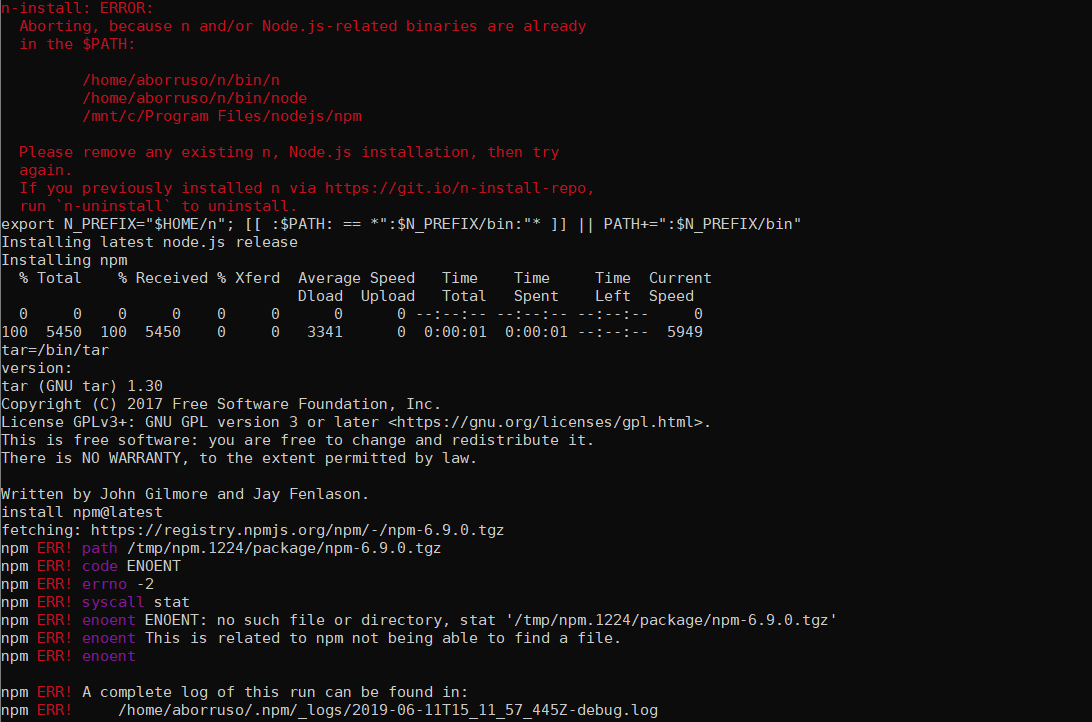
aborruso
on 11 Jun 2019
It should have created a file called /etc/profile.d/n-prefix.sh with:
# Check if we have Windows Path
if ( which cmd.exe >/dev/null ); then
  WIN_NPM_PATH="\$(dirname "\$(which npm)")"
  WIN_C_PATH="\$(wslpath 'C:\')"
  if [[ "\${WIN_NPM_PATH}" == "\${WIN_C_PATH}"* ]]; then
    PATH=\$(echo "\${PATH}" | sed -e "s#\${WIN_NPM_PATH}:##")
  fi
  WIN_YARN_PATH="\$(dirname "\$(which yarn)")"
  if [[ "\${WIN_YARN_PATH}" == "\${WIN_C_PATH}"* ]]; then
    PATH=\$(echo "\${PATH}" | sed -e "s#\${WIN_YARN_PATH}:##")
  fi
fi
Could you please execute the pengwin-setup with --debug? And send us the result?
crramirez
on 11 Jun 2019
Thank you
Running in debug/verbose mode
++ shift
++ [[ 0 -gt 0 ]]
++ wslpath 'C:\'
+++ cmd-exe /c 'echo %HOMEDRIVE%%HOMEPATH%'
+++ tr -d '\r'
++ readonly 'wHomeWinPath=C:\Users\aborr'
++ wHomeWinPath='C:\Users\aborr'
+++ wslpath -u 'C:\Users\aborr'
++ readonly wHome=/mnt/c/Users/aborr
++ wHome=/mnt/c/Users/aborr
++ readonly CANCELLED=CANCELLED
++ CANCELLED=CANCELLED
++ SetupDir=/usr/local/pengwin-setup.d
++ readonly GOVERSION=1.12
++ GOVERSION=1.12
+ WelcomePrompt
+ whiptail --title 'Welcome to Pengwin' --msgbox 'Thank you for supporting sustainable independent open source development.\n
Pengwin comes with a core set of useful packages pre-installed, such as curl, git, and wslu.\n
pengwin-setup allows you to install additional hand-curated selections for Pengwin and configure optional WSL-specific settings. \n
Many more packages are available via the apt package manager and optional pip, npm, and RubyGems package managers.' 17 80
+ continue_prompt
+ confirm --title 'Continue setup?' --yesno 'Would you like to continue pengwin-setup?' 8 45
+ [[ ! -n '' ]]
+ whiptail --title 'Continue setup?' --yesno 'Would you like to continue pengwin-setup?' 8 45
+ return 0
+ echo 'Starting pengwin-setup.'
Starting pengwin-setup.
+ [[ ! -n '' ]]
+ CheckUpgrades
+ echo 'Updating package database'
Updating package database
+ sudo apt-get update
Hit:1 https://dl.yarnpkg.com/debian stable InRelease
Hit:2 https://packages.microsoft.com/repos/microsoft-debian-stretch-prod stretch InRelease
Hit:3 https://deb.nodesource.com/node_10.x buster InRelease
Hit:4 https://cdn-aws.deb.debian.org/debian testing InRelease
Hit:5 https://cdn-aws.deb.debian.org/debian testing-updates InRelease
Hit:7 https://cdn-aws.deb.debian.org/debian-security testing/updates InRelease
Hit:8 https://cdn-aws.deb.debian.org/debian unstable InRelease
Hit:6 https://packagecloud.io/whitewaterfoundry/pengwin-base/debian buster InRelease
Ign:9 https://cdn-aws.deb.debian.org/debian stable InRelease
Hit:10 https://packagecloud.io/whitewaterfoundry/pengwin-setup/debian buster InRelease
Hit:11 https://cdn-aws.deb.debian.org/debian stable Release
Hit:12 https://packagecloud.io/whitewaterfoundry/wslu/debian buster InRelease
Reading package lists... Done
+ '[' -f /etc/apt/.dist-upgrade ']'
+ echo 'Running upgrade check...'
Running upgrade check...
++ sudo apt-get upgrade --show-upgraded --assume-no
++ grep pengwin
+ UPGRD_CHECK=
+ [[ '' == *\p\e\n\g\w\i\n* ]]
+ echo 'Holding pengwin-base & pengwin-setup to ensure no changes while operating'
Holding pengwin-base & pengwin-setup to ensure no changes while operating
+ sudo apt-mark hold pengwin-base pengwin-setup
+ install_menu --debug
++ menu --title pengwin-setup --checklist --separate-output '\nHand-curated add-ons [SPACE to select, ENTER to confirm]:' 15 99 7 EDITORS 'Install text editors neovim, emacs, or Visual Studio Code (requires X)    ' off GUI 'Install an X server or various other GUI applications' off MAINTENANCE 'Various maintenance tasks like home backup' off PROGRAMMING 'Install various programming languages support' off SERVICES 'Enable services support (SSH, rc.local)' off SETTINGS 'Change various settings in Pengwin' off TOOLS 'Install applications or servers' off
++ local menu_choice
+++ whiptail --title pengwin-setup --checklist --separate-output '\nHand-curated add-ons [SPACE to select, ENTER to confirm]:' 15 99 7 EDITORS 'Install text editors neovim, emacs, or Visual Studio Code (requires X)    ' off GUI 'Install an X server or various other GUI applications' off MAINTENANCE 'Various maintenance tasks like home backup' off PROGRAMMING 'Install various programming languages support' off SERVICES 'Enable services support (SSH, rc.local)' off SETTINGS 'Change various settings in Pengwin' off TOOLS 'Install applications or servers' off
++ menu_choice=PROGRAMMING
++ local exit_status=0
++ [[ 0 != 0 ]]
++ [[ -z PROGRAMMING ]]
++ echo PROGRAMMING
+ local menu_choice=PROGRAMMING
+ echo Selected: PROGRAMMING
Selected: PROGRAMMING
+ [[ PROGRAMMING == \C\A\N\C\E\L\L\E\D ]]
+ local exit_status
+ [[ PROGRAMMING == *\E\D\I\T\O\R\S* ]]
+ [[ PROGRAMMING == *\G\U\I* ]]
+ [[ PROGRAMMING == *\M\A\I\N\T\E\N\A\N\C\E* ]]
+ [[ PROGRAMMING == *\P\R\O\G\R\A\M\M\I\N\G* ]]
+ echo PROGRAMMING
PROGRAMMING
+ bash /usr/local/pengwin-setup.d/programming.sh --debug
Running in debug/verbose mode
++ shift
++ [[ 0 -gt 0 ]]
++ wslpath 'C:\'
+++ cmd-exe /c 'echo %HOMEDRIVE%%HOMEPATH%'
+++ tr -d '\r'
++ readonly 'wHomeWinPath=C:\Users\aborr'
++ wHomeWinPath='C:\Users\aborr'
+++ wslpath -u 'C:\Users\aborr'
++ readonly wHome=/mnt/c/Users/aborr
++ wHome=/mnt/c/Users/aborr
++ readonly CANCELLED=CANCELLED
++ CANCELLED=CANCELLED
++ SetupDir=/usr/local/pengwin-setup.d
++ readonly GOVERSION=1.12
++ GOVERSION=1.12
+ main --debug
++ menu --title 'Programming Menu' --checklist --separate-output 'Install various programming languages support\n[SPACE to select, ENTER to confirm]:' 16 95 8 C++ 'Install support for Linux C/C++ programming in Visual Studio and CLion  ' off DOTNET 'Install .NET Core SDK from Microsoft and optionally install NuGet  ' off GO 'Install the latest Go from Google' off JAVA 'Install the SDKMan to manage Java SDKs' off NODEJS 'Install Node.js and npm' off PYTHONPI 'Install Python 3.7 and download and install latest PyPi' off RUBY 'Install Ruby using rbenv and optionally install Rails' off RUST 'Install latest version of Rust via rustup installer' off
++ local menu_choice
+++ whiptail --title 'Programming Menu' --checklist --separate-output 'Install various programming languages support\n[SPACE to select, ENTER to confirm]:' 16 95 8 C++ 'Install support for Linux C/C++ programming in Visual Studio and CLion  ' off DOTNET 'Install .NET Core SDK from Microsoft and optionally install NuGet  ' off GO 'Install the latest Go from Google' off JAVA 'Install the SDKMan to manage Java SDKs' off NODEJS 'Install Node.js and npm' off PYTHONPI 'Install Python 3.7 and download and install latest PyPi' off RUBY 'Install Ruby using rbenv and optionally install Rails' off RUST 'Install latest version of Rust via rustup installer' off
++ menu_choice=NODEJS
++ local exit_status=0
++ [[ 0 != 0 ]]
++ [[ -z NODEJS ]]
++ echo NODEJS
+ local menu_choice=NODEJS
+ [[ NODEJS == \C\A\N\C\E\L\L\E\D ]]
+ [[ NODEJS == *\C\+\+* ]]
+ [[ NODEJS == *\D\O\T\N\E\T* ]]
+ [[ NODEJS == *\G\O* ]]
+ [[ NODEJS == *\J\A\V\A* ]]
+ [[ NODEJS == *\N\O\D\E\J\S* ]]
+ echo NODE
NODE
+ bash /usr/local/pengwin-setup.d/nodejs.sh --debug
Running in debug/verbose mode
++ shift
++ [[ 0 -gt 0 ]]
++ wslpath 'C:\'
+++ cmd-exe /c 'echo %HOMEDRIVE%%HOMEPATH%'
+++ tr -d '\r'
++ readonly 'wHomeWinPath=C:\Users\aborr'
++ wHomeWinPath='C:\Users\aborr'
+++ wslpath -u 'C:\Users\aborr'
++ readonly wHome=/mnt/c/Users/aborr
++ wHome=/mnt/c/Users/aborr
++ readonly CANCELLED=CANCELLED
++ CANCELLED=CANCELLED
++ SetupDir=/usr/local/pengwin-setup.d
++ readonly GOVERSION=1.12
++ GOVERSION=1.12
+ [[ ! -n '' ]]
+ whiptail --title NODE --yesno 'Would you like to download and install NodeJS using n and the npm package manager?' 8 88
+ echo 'Installing NODE'
Installing NODE
+ createtmp
+ echo 'Saving current directory as $CURDIR'
Saving current directory as $CURDIR
++ pwd
+ CURDIR=/home/aborruso
++ mktemp -d
+ TMPDIR=/tmp/tmp.4yqZAzdR89
+ echo 'Going to $TMPDIR: /tmp/tmp.4yqZAzdR89'
Going to $TMPDIR: /tmp/tmp.4yqZAzdR89
+ cd /tmp/tmp.4yqZAzdR89
+ echo 'Look for Windows version of npm'
Look for Windows version of npm
+ NPM_PROFILE=/etc/profile.d/n-prefix.sh
++ which npm
++ wslpath 'C:\'
+ [[ /mnt/c/Program Files/nodejs//npm == /mnt/c/* ]]
+++ which npm
++ wslpath -m '/mnt/c/Program Files/nodejs//npm'
+ confirm --title 'npm in Windows' --yesno 'npm is already installed in Windows in "C:/Program Files/nodejs/npm".\n\nWould you still want to install the Linux version? This will hide the Windows version inside Pengwin.' 12 80
+ [[ ! -n '' ]]
+ whiptail --title 'npm in Windows' --yesno 'npm is already installed in Windows in "C:/Program Files/nodejs/npm".\n\nWould you still want to install the Linux version? This will hide the Windows version inside Pengwin.' 12 80
+ return 0
+ sudo tee /etc/profile.d/n-prefix.sh

# Check if we have Windows Path
if ( which cmd.exe >/dev/null ); then
  WIN_NPM_PATH="$(dirname "$(which npm)")"
  WIN_C_PATH="$(wslpath 'C:\')"

  if [[ "${WIN_NPM_PATH}" == "${WIN_C_PATH}"* ]]; then
    PATH=$(echo "${PATH}" | sed -e "s#${WIN_NPM_PATH}:##")
  fi

  WIN_YARN_PATH="$(dirname "$(which yarn)")"
  if [[ "${WIN_YARN_PATH}" == "${WIN_C_PATH}"* ]]; then
    PATH=$(echo "${PATH}" | sed -e "s#${WIN_YARN_PATH}:##")
  fi
fi
++ cat /etc/profile.d/n-prefix.sh
+ eval '
# Check if we have Windows Path
if ( which cmd.exe >/dev/null ); then
  WIN_NPM_PATH="$(dirname "$(which npm)")"
  WIN_C_PATH="$(wslpath '\''C:\'\'')"

  if [[ "${WIN_NPM_PATH}" == "${WIN_C_PATH}"* ]]; then
    PATH=$(echo "${PATH}" | sed -e "s#${WIN_NPM_PATH}:##")
  fi

  WIN_YARN_PATH="$(dirname "$(which yarn)")"
  if [[ "${WIN_YARN_PATH}" == "${WIN_C_PATH}"* ]]; then
    PATH=$(echo "${PATH}" | sed -e "s#${WIN_YARN_PATH}:##")
  fi
fi'
++ which cmd.exe
++++ which npm
+++ dirname '/mnt/c/Program Files/nodejs//npm'
++ WIN_NPM_PATH='/mnt/c/Program Files/nodejs'
+++ wslpath 'C:\'
++ WIN_C_PATH=/mnt/c/
++ [[ /mnt/c/Program Files/nodejs == \/\m\n\t\/\c\/* ]]
+++ echo '/home/aborruso/.local/bin:/home/aborruso/bin:/home/aborruso/.rbenv/plugins/ruby-build/bin:/home/aborruso/.rbenv/shims:/home/aborruso/.rbenv/bin:/home/aborruso/go//bin:/usr/local/go/bin:/usr/local/go/bin:/usr/local/sbin:/usr/local/bin:/usr/sbin:/usr/bin:/sbin:/bin:/usr/games:/usr/local/games:/mnt/c/ProgramData/DockerDesktop/version-bin:/mnt/c/Program Files/Docker/Docker/Resources/bin:/mnt/c/Program Files/Amazon Corretto/jdk1.8.0_212/bin:/mnt/c/Program Files/AdoptOpenJDK/jre-8.0.212.03-hotspot/bin:/mnt/c/WINDOWS/system32:/mnt/c/WINDOWS:/mnt/c/WINDOWS/System32/Wbem:/mnt/c/WINDOWS/System32/WindowsPowerShell/v1.0/:/mnt/c/WINDOWS/System32/OpenSSH/:/mnt/c/Program Files (x86)/Intel/Intel(R) Management Engine Components/DAL:/mnt/c/Program Files/Intel/Intel(R) Management Engine Components/DAL:/mnt/c/Program Files/PuTTY/:/mnt/c/Program Files/Microsoft VS Code/bin:/mnt/c/Program Files/Git/cmd:/mnt/c/utilities:/mnt/c/msys64/usr/bin:/mnt/c/ProgramData/chocolatey/bin:/mnt/c/Go/bin:/mnt/c/Program Files/Intel/WiFi/b+++ sed -e 's#/mnt/c/Program Files/nodejs:##'
in/:/mnt/c/Program Files/Common Files/Intel/WirelessCommon/:/mnt/c/Program Files/nodejs/:/mnt/c/Program Files (x86)/Yarn/bin/:/mnt/c/Program Files (x86)/GNU/GnuPG/pub:/mnt/c/Users/aborr/AppData/Local/Microsoft/WindowsApps:/mnt/c/Users/aborr/AppData/Local/GitHubDesktop/bin:/mnt/c/Users/aborr/go/bin:/mnt/c/Users/aborr/AppData/Roaming/npm:/mnt/c/Users/aborr/AppData/Local/Yarn/bin:/mnt/c/Users/aborr/AppData/Local/Microsoft/WindowsApps:/home/aborruso/n/bin'
++ PATH='/home/aborruso/.local/bin:/home/aborruso/bin:/home/aborruso/.rbenv/plugins/ruby-build/bin:/home/aborruso/.rbenv/shims:/home/aborruso/.rbenv/bin:/home/aborruso/go//bin:/usr/local/go/bin:/usr/local/go/bin:/usr/local/sbin:/usr/local/bin:/usr/sbin:/usr/bin:/sbin:/bin:/usr/games:/usr/local/games:/mnt/c/ProgramData/DockerDesktop/version-bin:/mnt/c/Program Files/Docker/Docker/Resources/bin:/mnt/c/Program Files/Amazon Corretto/jdk1.8.0_212/bin:/mnt/c/Program Files/AdoptOpenJDK/jre-8.0.212.03-hotspot/bin:/mnt/c/WINDOWS/system32:/mnt/c/WINDOWS:/mnt/c/WINDOWS/System32/Wbem:/mnt/c/WINDOWS/System32/WindowsPowerShell/v1.0/:/mnt/c/WINDOWS/System32/OpenSSH/:/mnt/c/Program Files (x86)/Intel/Intel(R) Management Engine Components/DAL:/mnt/c/Program Files/Intel/Intel(R) Management Engine Components/DAL:/mnt/c/Program Files/PuTTY/:/mnt/c/Program Files/Microsoft VS Code/bin:/mnt/c/Program Files/Git/cmd:/mnt/c/utilities:/mnt/c/msys64/usr/bin:/mnt/c/ProgramData/chocolatey/bin:/mnt/c/Go/bin:/mnt/c/Program Files/Intel/WiFi/bin/:/mnt/c/Program Files/Common Files/Intel/WirelessCommon/:/mnt/c/Program Files/nodejs/:/mnt/c/Program Files (x86)/Yarn/bin/:/mnt/c/Program Files (x86)/GNU/GnuPG/pub:/mnt/c/Users/aborr/AppData/Local/Microsoft/WindowsApps:/mnt/c/Users/aborr/AppData/Local/GitHubDesktop/bin:/mnt/c/Users/aborr/go/bin:/mnt/c/Users/aborr/AppData/Roaming/npm:/mnt/c/Users/aborr/AppData/Local/Yarn/bin:/mnt/c/Users/aborr/AppData/Local/Microsoft/WindowsApps:/home/aborruso/n/bin'
++++ which yarn
+++ dirname /usr/bin/yarn
++ WIN_YARN_PATH=/usr/bin
++ [[ /usr/bin == \/\m\n\t\/\c\/* ]]
+ echo 'Ensuring we have build-essential installed'
Ensuring we have build-essential installed
+ sudo apt-get -y -q install build-essential
Reading package lists...
Building dependency tree...
Reading state information...
build-essential is already the newest version (12.6).
The following packages were automatically installed and are no longer required:
  libc-ares2 libnode64 libuv1 nodejs-doc
Use 'sudo apt autoremove' to remove them.
0 upgraded, 0 newly installed, 0 to remove and 7 not upgraded.
+ echo 'Installing n, Node.js version manager'
Installing n, Node.js version manager
+ curl -L https://git.io/n-install -o n-install.sh
  % Total    % Received % Xferd  Average Speed   Time    Time     Time  Current
                                 Dload  Upload   Total   Spent    Left  Speed
  0     0    0     0    0     0      0      0 --:--:-- --:--:-- --:--:--     0
100 39430  100 39430    0     0  31901      0  0:00:01  0:00:01 --:--:--  342k
++ which bash
+ env SHELL=/bin/bash bash n-install.sh -y
n-install: ERROR:
  Aborting, because n and/or Node.js-related binaries are already
  in the $PATH:

         /home/aborruso/n/bin/n
         /home/aborruso/n/bin/node
         /mnt/c/Program Files/nodejs/npm

  Please remove any existing n, Node.js installation, then try
  again.
  If you previously installed n via https://git.io/n-install-repo,
  run `n-uninstall` to uninstall.
++ cat /home/aborruso/.bashrc
++ grep '^.*N_PREFIX.*$'
++ cut -d# -f 1
+ N_PATH='export N_PREFIX="$HOME/n"; [[ :$PATH: == *":$N_PREFIX/bin:"* ]] || PATH+=":$N_PREFIX/bin"  '
+ echo 'export N_PREFIX="$HOME/n"; [[ :$PATH: == *":$N_PREFIX/bin:"* ]] || PATH+=":$N_PREFIX/bin"  '
+ sudo tee -a /etc/profile.d/n-prefix.sh
export N_PREFIX="$HOME/n"; [[ :$PATH: == *":$N_PREFIX/bin:"* ]] || PATH+=":$N_PREFIX/bin"
+ eval 'export N_PREFIX="$HOME/n"; [[ :$PATH: == *":$N_PREFIX/bin:"* ]] || PATH+=":$N_PREFIX/bin"  '
++ export N_PREFIX=/home/aborruso/n
++ N_PREFIX=/home/aborruso/n
++ [[ :/home/aborruso/.local/bin:/home/aborruso/bin:/home/aborruso/.rbenv/plugins/ruby-build/bin:/home/aborruso/.rbenv/shims:/home/aborruso/.rbenv/bin:/home/aborruso/go//bin:/usr/local/go/bin:/usr/local/go/bin:/usr/local/sbin:/usr/local/bin:/usr/sbin:/usr/bin:/sbin:/bin:/usr/games:/usr/local/games:/mnt/c/ProgramData/DockerDesktop/version-bin:/mnt/c/Program Files/Docker/Docker/Resources/bin:/mnt/c/Program Files/Amazon Corretto/jdk1.8.0_212/bin:/mnt/c/Program Files/AdoptOpenJDK/jre-8.0.212.03-hotspot/bin:/mnt/c/WINDOWS/system32:/mnt/c/WINDOWS:/mnt/c/WINDOWS/System32/Wbem:/mnt/c/WINDOWS/System32/WindowsPowerShell/v1.0/:/mnt/c/WINDOWS/System32/OpenSSH/:/mnt/c/Program Files (x86)/Intel/Intel(R) Management Engine Components/DAL:/mnt/c/Program Files/Intel/Intel(R) Management Engine Components/DAL:/mnt/c/Program Files/PuTTY/:/mnt/c/Program Files/Microsoft VS Code/bin:/mnt/c/Program Files/Git/cmd:/mnt/c/utilities:/mnt/c/msys64/usr/bin:/mnt/c/ProgramData/chocolatey/bin:/mnt/c/Go/bin:/mnt/c/Program Files/Intel/WiFi/bin/:/mnt/c/Program Files/Common Files/Intel/WirelessCommon/:/mnt/c/Program Files/nodejs/:/mnt/c/Program Files (x86)/Yarn/bin/:/mnt/c/Program Files (x86)/GNU/GnuPG/pub:/mnt/c/Users/aborr/AppData/Local/Microsoft/WindowsApps:/mnt/c/Users/aborr/AppData/Local/GitHubDesktop/bin:/mnt/c/Users/aborr/go/bin:/mnt/c/Users/aborr/AppData/Roaming/npm:/mnt/c/Users/aborr/AppData/Local/Yarn/bin:/mnt/c/Users/aborr/AppData/Local/Microsoft/WindowsApps:/home/aborruso/n/bin: == *\:\/\h\o\m\e\/\a\b\o\r\r\u\s\o\/\n\/\b\i\n\:* ]]
+ echo 'Installing latest node.js release'
Installing latest node.js release
+ n latest
+ echo 'Installing npm'
Installing npm
+ curl -0 -L https://npmjs.com/install.sh -o install.sh
  % Total    % Received % Xferd  Average Speed   Time    Time     Time  Current
                                 Dload  Upload   Total   Spent    Left  Speed
  0     0    0     0    0     0      0      0 --:--:-- --:--:-- --:--:--     0
100  5450  100  5450    0     0   7956      0 --:--:-- --:--:-- --:--:--  7956
+ sh install.sh
tar=/bin/tar
version:
tar (GNU tar) 1.30
Copyright (C) 2017 Free Software Foundation, Inc.
License GPLv3+: GNU GPL version 3 or later <https://gnu.org/licenses/gpl.html>.
This is free software: you are free to change and redistribute it.
There is NO WARRANTY, to the extent permitted by law.

Written by John Gilmore and Jay Fenlason.
install npm@latest
fetching: https://registry.npmjs.org/npm/-/npm-6.9.0.tgz
npm ERR! path /tmp/npm.1227/package/npm-6.9.0.tgz
npm ERR! code ENOENT
npm ERR! errno -2
npm ERR! syscall stat
npm ERR! enoent ENOENT: no such file or directory, stat '/tmp/npm.1227/package/npm-6.9.0.tgz'
npm ERR! enoent This is related to npm not being able to find a file.
npm ERR! enoent

npm ERR! A complete log of this run can be found in:
npm ERR!     /home/aborruso/.npm/_logs/2019-06-11T15_20_33_128Z-debug.log
/home/aborruso/n/bin/npx -> /home/aborruso/n/lib/node_modules/npm/bin/npx-cli.js
/home/aborruso/n/bin/npm -> /home/aborruso/n/lib/node_modules/npm/bin/npm-cli.js
+ [email protected]
updated 1 package in 37.571s
It worked
+ sudo mkdir -p /etc/bash_completion.d
+ npm completion
+ sudo tee /etc/bash_completion.d/npm
: not foundram Files/nodejs/npm: 3: /mnt/c/Program Files/nodejs/npm:
: not foundram Files/nodejs/npm: 5: /mnt/c/Program Files/nodejs/npm:
/mnt/c/Program Files/nodejs/npm: 6: /mnt/c/Program Files/nodejs/npm: Syntax error: word unexpected (expecting "in")
+ cleantmp
+ echo 'Returning to /home/aborruso'
Returning to /home/aborruso
+ cd /home/aborruso
+ echo 'Cleaning up /tmp/tmp.4yqZAzdR89'
Cleaning up /tmp/tmp.4yqZAzdR89
+ sudo rm -r /tmp/tmp.4yqZAzdR89
+ whiptail --title YARN --yesno 'Would you like to download and install the Yarn package manager? (optional)' 8 80
+ echo 'Installing YARN'
Installing YARN
+ curl -sL https://dl.yarnpkg.com/debian/pubkey.gpg
+ sudo apt-key add -
OK
+ echo 'deb https://dl.yarnpkg.com/debian/ stable main'
+ sudo tee /etc/apt/sources.list.d/yarn.list
deb https://dl.yarnpkg.com/debian/ stable main
+ sudo apt-get update
Hit:1 https://dl.yarnpkg.com/debian stable InRelease
Hit:2 https://packages.microsoft.com/repos/microsoft-debian-stretch-prod stretch InRelease
Hit:4 https://deb.nodesource.com/node_10.x buster InRelease
Hit:3 https://cdn-aws.deb.debian.org/debian testing InRelease
Hit:5 https://cdn-aws.deb.debian.org/debian testing-updates InRelease
Hit:6 https://cdn-aws.deb.debian.org/debian-security testing/updates InRelease
Hit:7 https://cdn-aws.deb.debian.org/debian unstable InRelease
Ign:8 https://cdn-aws.deb.debian.org/debian stable InRelease
Hit:11 https://cdn-aws.deb.debian.org/debian stable Release
Hit:9 https://packagecloud.io/whitewaterfoundry/pengwin-base/debian buster InRelease
Hit:10 https://packagecloud.io/whitewaterfoundry/pengwin-setup/debian buster InRelease
Hit:12 https://packagecloud.io/whitewaterfoundry/wslu/debian buster InRelease
Reading package lists... Done
+ sudo apt-get install yarn -y --no-install-recommends
Reading package lists... Done
Building dependency tree
Reading state information... Done
yarn is already the newest version (1.16.0-1).
The following packages were automatically installed and are no longer required:
  libc-ares2 libnode64 libuv1 nodejs-doc
Use 'sudo apt autoremove' to remove them.
0 upgraded, 0 newly installed, 0 to remove and 7 not upgraded.
+ [[ NODEJS == *\P\Y\T\H\O\N\P\I* ]]
+ [[ NODEJS == *\R\U\B\Y* ]]
+ [[ NODEJS == *\R\U\S\T* ]]
+ exit_status=0
+ [[ PROGRAMMING == *\S\E\R\V\I\C\E\S* ]]
+ [[ PROGRAMMING == *\S\E\T\T\I\N\G\S* ]]
+ [[ PROGRAMMING == *\T\O\O\L\S* ]]
+ [[ 0 != 0 ]]
+ echo 'Unholding pengwin-base & pengwin-setup'
Unholding pengwin-base & pengwin-setup
+ sudo apt-mark unhold pengwin-base pengwin-setup
+ ByeMessage
+ whiptail --title 'Setup is complete.' --msgbox 'You may run pengwin-setup again any time by typing $ pengwin-setup\n\nYou may open a browser link to get help any time by typing: $ pengwin-help' 8 80
+ exit 0
Well, it is detecting correctly your Windows version of node and writing the file.
Please run bash -x /etc/profile.d/n-prefix.sh and send us the result
crramirez
on 11 Jun 2019
+ which cmd.exe
+++ which npm
++ dirname '/mnt/c/Program Files/nodejs//npm'
+ WIN_NPM_PATH='/mnt/c/Program Files/nodejs'
++ wslpath 'C:\'
+ WIN_C_PATH=/mnt/c/
+ [[ /mnt/c/Program Files/nodejs == \/\m\n\t\/\c\/* ]]
++ echo '/home/aborruso/.local/bin:/home/aborruso/bin:/home/aborruso/.rbenv/plugins/ruby-build/bin:/home/aborruso/.rbenv/shims:/home/aborruso/.rbenv/bin:/home/aborruso/go//bin:/usr/local/go/bin:/usr/local/go/bin:/usr/local/sbin:/usr/local/bin:/usr/sbin:/usr/bin:/sbin:/bin:/usr/games:/usr/local/games:/mnt/c/ProgramData/DockerDesktop/version-bin:/mnt/c/Program Files/Docker/Docker/Resources/bin:/mnt/c/Program Files/Amazon Corretto/jdk1.8.0_212/bin:/mnt/c/Program Files/AdoptOpenJDK/jre-8.0.212.03-hotspot/bin:/mnt/c/WINDOWS/system32:/mnt/c/WINDOWS:/mnt/c/WINDOWS/System32/Wbem:/mnt/c/WINDOWS/System32/WindowsPowerShell/v1.0/:/mnt/c/WINDOWS/System32/OpenSSH/:/mnt/c/Program Files (x86)/Intel/Intel(R) Management Engine Components/DAL:/mnt/c/Program Files/Intel/Intel(R) Management Engine Components/DAL:/mnt/c/Program Files/PuTTY/:/mnt/c/Program Files/Microsoft VS Code/bin:/mnt/c/Program Files/Git/cmd:/mnt/c/utilities:/mnt/c/msys64/usr/bin:/mnt/c/ProgramData/chocolatey/bin:/mnt/c/Go/bin:/mnt/c/Program Files/Intel/WiFi/bi++ sed -e 's#/mnt/c/Program Files/nodejs:##'
n/:/mnt/c/Program Files/Common Files/Intel/WirelessCommon/:/mnt/c/Program Files/nodejs/:/mnt/c/Program Files (x86)/Yarn/bin/:/mnt/c/Program Files (x86)/GNU/GnuPG/pub:/mnt/c/Users/aborr/AppData/Local/Microsoft/WindowsApps:/mnt/c/Users/aborr/AppData/Local/GitHubDesktop/bin:/mnt/c/Users/aborr/go/bin:/mnt/c/Users/aborr/AppData/Roaming/npm:/mnt/c/Users/aborr/AppData/Local/Yarn/bin:/mnt/c/Users/aborr/AppData/Local/Microsoft/WindowsApps:/home/aborruso/n/bin'
+ PATH='/home/aborruso/.local/bin:/home/aborruso/bin:/home/aborruso/.rbenv/plugins/ruby-build/bin:/home/aborruso/.rbenv/shims:/home/aborruso/.rbenv/bin:/home/aborruso/go//bin:/usr/local/go/bin:/usr/local/go/bin:/usr/local/sbin:/usr/local/bin:/usr/sbin:/usr/bin:/sbin:/bin:/usr/games:/usr/local/games:/mnt/c/ProgramData/DockerDesktop/version-bin:/mnt/c/Program Files/Docker/Docker/Resources/bin:/mnt/c/Program Files/Amazon Corretto/jdk1.8.0_212/bin:/mnt/c/Program Files/AdoptOpenJDK/jre-8.0.212.03-hotspot/bin:/mnt/c/WINDOWS/system32:/mnt/c/WINDOWS:/mnt/c/WINDOWS/System32/Wbem:/mnt/c/WINDOWS/System32/WindowsPowerShell/v1.0/:/mnt/c/WINDOWS/System32/OpenSSH/:/mnt/c/Program Files (x86)/Intel/Intel(R) Management Engine Components/DAL:/mnt/c/Program Files/Intel/Intel(R) Management Engine Components/DAL:/mnt/c/Program Files/PuTTY/:/mnt/c/Program Files/Microsoft VS Code/bin:/mnt/c/Program Files/Git/cmd:/mnt/c/utilities:/mnt/c/msys64/usr/bin:/mnt/c/ProgramData/chocolatey/bin:/mnt/c/Go/bin:/mnt/c/Program Files/Intel/WiFi/bin/:/mnt/c/Program Files/Common Files/Intel/WirelessCommon/:/mnt/c/Program Files/nodejs/:/mnt/c/Program Files (x86)/Yarn/bin/:/mnt/c/Program Files (x86)/GNU/GnuPG/pub:/mnt/c/Users/aborr/AppData/Local/Microsoft/WindowsApps:/mnt/c/Users/aborr/AppData/Local/GitHubDesktop/bin:/mnt/c/Users/aborr/go/bin:/mnt/c/Users/aborr/AppData/Roaming/npm:/mnt/c/Users/aborr/AppData/Local/Yarn/bin:/mnt/c/Users/aborr/AppData/Local/Microsoft/WindowsApps:/home/aborruso/n/bin'
+++ which yarn
++ dirname /usr/bin/yarn
+ WIN_YARN_PATH=/usr/bin
+ [[ /usr/bin == \/\m\n\t\/\c\/* ]]
+ export N_PREFIX=/home/aborruso/n
+ N_PREFIX=/home/aborruso/n
+ [[ :/home/aborruso/.local/bin:/home/aborruso/bin:/home/aborruso/.rbenv/plugins/ruby-build/bin:/home/aborruso/.rbenv/shims:/home/aborruso/.rbenv/bin:/home/aborruso/go//bin:/usr/local/go/bin:/usr/local/go/bin:/usr/local/sbin:/usr/local/bin:/usr/sbin:/usr/bin:/sbin:/bin:/usr/games:/usr/local/games:/mnt/c/ProgramData/DockerDesktop/version-bin:/mnt/c/Program Files/Docker/Docker/Resources/bin:/mnt/c/Program Files/Amazon Corretto/jdk1.8.0_212/bin:/mnt/c/Program Files/AdoptOpenJDK/jre-8.0.212.03-hotspot/bin:/mnt/c/WINDOWS/system32:/mnt/c/WINDOWS:/mnt/c/WINDOWS/System32/Wbem:/mnt/c/WINDOWS/System32/WindowsPowerShell/v1.0/:/mnt/c/WINDOWS/System32/OpenSSH/:/mnt/c/Program Files (x86)/Intel/Intel(R) Management Engine Components/DAL:/mnt/c/Program Files/Intel/Intel(R) Management Engine Components/DAL:/mnt/c/Program Files/PuTTY/:/mnt/c/Program Files/Microsoft VS Code/bin:/mnt/c/Program Files/Git/cmd:/mnt/c/utilities:/mnt/c/msys64/usr/bin:/mnt/c/ProgramData/chocolatey/bin:/mnt/c/Go/bin:/mnt/c/Program Files/Intel/WiFi/bin/:/mnt/c/Program Files/Common Files/Intel/WirelessCommon/:/mnt/c/Program Files/nodejs/:/mnt/c/Program Files (x86)/Yarn/bin/:/mnt/c/Program Files (x86)/GNU/GnuPG/pub:/mnt/c/Users/aborr/AppData/Local/Microsoft/WindowsApps:/mnt/c/Users/aborr/AppData/Local/GitHubDesktop/bin:/mnt/c/Users/aborr/go/bin:/mnt/c/Users/aborr/AppData/Roaming/npm:/mnt/c/Users/aborr/AppData/Local/Yarn/bin:/mnt/c/Users/aborr/AppData/Local/Microsoft/WindowsApps:/home/aborruso/n/bin: == *\:\/\h\o\m\e\/\a\b\o\r\r\u\s\o\/\n\/\b\i\n\:* ]]
Ok, open the file /etc/profile.d/n-prefix.sh and delete the colons ":" in lines 41 and 46. Restart Pengwin.
Fix: https://github.com/WhitewaterFoundry/pengwin-setup/pull/172/files
crramirez
on 11 Jun 2019
it works, you are making a great work, thank you
aborruso
on 12 Jun 2019
It is incredible that we have the same Windows version and the paths in yours have a "/" at the end and mine no. :-S
You are welcome. We are happy that finally, it worked. I usually don't mention it but if you want to give a public comment you can leave a review in Windows Store: https://www.microsoft.com/en-us/p/pengwin/9nv1gv1pxz6p?activetab=pivot:reviewstab
Regards
crramirez
on 12 Jun 2019
This is still an issue for me
 deanhtid
on 8 Aug 2019
deanhtid
on 8 Aug 2019
We will check following your steps.
crramirez
on 8 Aug 2019
We will check following your steps.
As recommended I first open pengwin, launce pengwin-setup, install zsh and ohmyzsh, reboot the terminal, install node using pengwin-setup, reboot the terminal, enter node -v and i get the zsh not found error,
deanhtid
on 8 Aug 2019
`
We will check following your steps.
As recommended I first open pengwin, launce pengwin-setup, install zsh and ohmyzsh, reboot the terminal, install node using pengwin-setup, reboot the terminal, enter node -v and i get the zsh not found error,
Just to confirm i'm running in ZSH
╭─deanhtid99@NGN-L20166 ~
╰─$ echo $SHELL
/usr/bin/zsh
╭─deanhtid99@NGN-L20166 ~
╰─$ pengwin-setup
deanhtid
on 8 Aug 2019
think this is the problem:
-- Cloning https://github.com/tj/n to '/home/deanhtid99/n/n/.repo'...
-- Running local n installation to '/home/deanhtid99/n/bin'...
-- Shell initialization file '/home/deanhtid99/.bashrc' updated.
-- Installing helper scripts in '/home/deanhtid99/n/bin'...
-- Installing the requested Node.js version(s)...
as you can see Shell initialization file '/home/deanhtid99/.bashrc' updated. is still using bash.
Can I assume that if I copy the entry from .bashrc into .zshrc it will work?
No ideal though
deanhtid
on 8 Aug 2019
It forces the installation into bash, then it copies the configuration to /etc/profile.d/n-prefix.sh, and zsh should be using it to configure node correctly
crramirez
on 8 Aug 2019
ah right, we'll it doesnt work unless i copy and paste the entered lines from bashrc to zshrc
deanhtid
on 8 Aug 2019
this is the contents of n-prefix.sh
export N_PREFIX="$HOME/n"; [[ :$PATH: == ":$N_PREFIX/bin:" ]] || PATH+=":$N_PREFIX/bin"
deanhtid
on 8 Aug 2019
Here is some more information that may help:
╭─deanhtid99@NGN-L20166 /etc/profile.d
╰─$ echo $PATH
/usr/local/sbin:/usr/local/bin:/usr/sbin:/usr/bin:/sbin:/bin:/usr/games:/usr/local/games:/mnt/c/Program Files/WindowsApps/WhitewaterFoundryLtd.Co.16571368D6CFF_1.2.7.0_x64__kd1vv0z0vy70w:/mnt/c/Windows/System32:/mnt/c/Windows:/mnt/c/Windows/System32/wbem:/mnt/c/Windows/System32/WindowsPowerShell/v1.0:/mnt/c/Windows/System32/OpenSSH:/mnt/c/Program Files (x86)/Intel/Intel(R) Management Engine Components/DAL:/mnt/c/Program Files/Intel/Intel(R) Management Engine Components/DAL:/mnt/c/Program Files/Microsoft VS Code/bin:/mnt/c/Program Files/Intel/WiFi/bin:/mnt/c/Program Files/Common Files/Intel/WirelessCommon:/mnt/c/Users/dwhittaker/AppData/Local/Microsoft/WindowsApps:/mnt/c/Users/dwhittaker/AppData/Local/hyper/app-3.0.2/resources/bin:/home/deanhtid99/n/bin
deanhtid
on 8 Aug 2019
Installing Python and it seems to be having the same issues. adds PATH to bashrc and not zshrc
deanhtid
on 8 Aug 2019
Related issues
 thalamus
·
3Comments
thalamus
·
3Comments
 mikart143
·
5Comments
mikart143
·
5Comments
 alanfluff
·
3Comments
alanfluff
·
3Comments
 laurin1
·
4Comments
laurin1
·
4Comments
 juliosegarra
·
3Comments
juliosegarra
·
3Comments