Pengwin: Unable to install Powershell (failed dependencies)
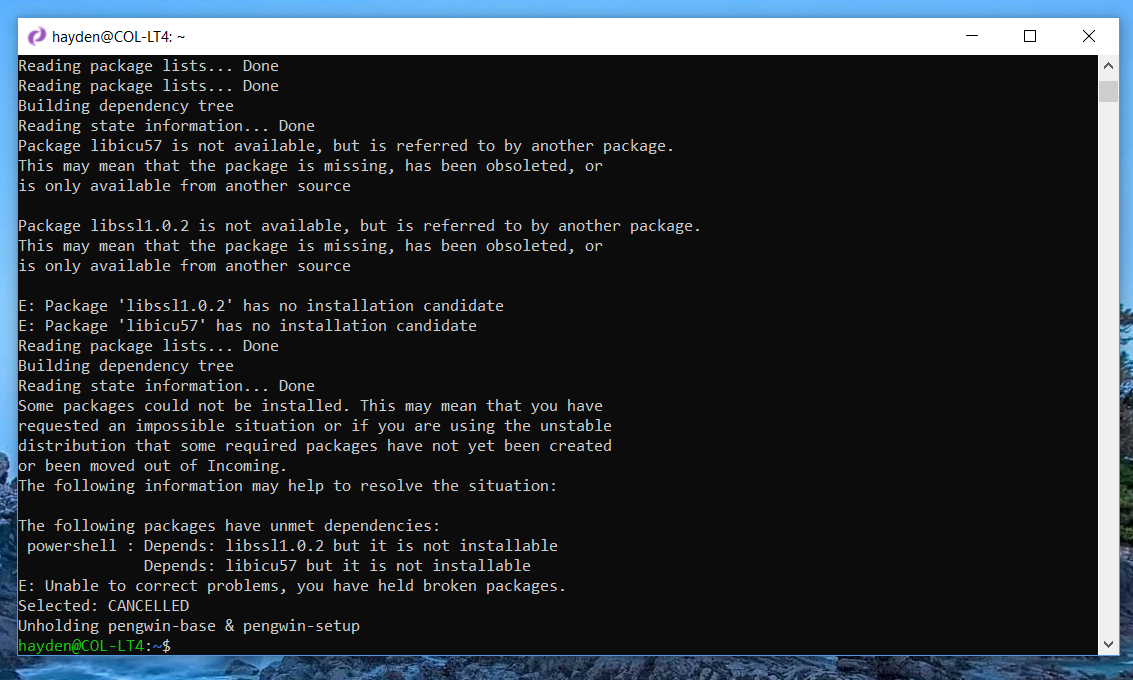
Unable to install powershell on a fresh 1.2.3 install. Failed dependencies of libssl1.0.2 and libicu57.
Steps to reproduce the behavior:
- Install latest version of Pengwin from Microsoft Store
- Launch pengwin-setup
- Select install powershell
- Install fails with unmet dependency errors
Expected behavior
Powershell should be installed, all dependencies should be met.
Additional context
The reason why it fails is because debian unstable provides libssl1.1, and libicu63, and libssl1.0.2 and libicu57 are not available.
To resolve this issue, I have had to create a new file /etc/apt/sources.list.d/stable-repos.list and put the stable repos into it, which provides the missing libraries and resolves the issue.
Basic Troubleshooting Checklist
[y] I have searched Google for the error message.
[n/a] I have checked official WSL troubleshooting documentation: https://docs.microsoft.com/en-us/windows/wsl/troubleshooting#confirm-wsl-is-enabled.
[n/a] I have searched the official Microsoft WSL issues page: https://github.com/Microsoft/WSL/issues.
[y] I have searched the Pengwin issues page: https://github.com/WhitewaterFoundry/Pengwin/issues.
[n/a] I have reset Pengwin: Settings->Apps->Apps & features->Pengwin->Advanced Options->Reset.
[n/a] I have disabled and re-enabled WSL in Windows Features.
[n/a] I have run Windows 10 updates and restarted.
What other troubleshooting have you attempted?
See resolution above.
Pengwin Version
1.2.3.0
Windows Build
18362.53
 thalamus
All 3 comments
We will check this.
Thanks for reporting
 crramirez
on 12 Apr 2019
crramirez
on 12 Apr 2019
Can reproduce.
 sirredbeard
on 12 Apr 2019
sirredbeard
on 12 Apr 2019
Proposed patch: https://github.com/WhitewaterFoundry/pengwin-setup/pull/126
sirredbeard
on 12 Apr 2019
Related issues
 BhavyaJain7
·
3Comments
BhavyaJain7
·
3Comments
 AceHack
·
4Comments
AceHack
·
4Comments
 alanfluff
·
3Comments
alanfluff
·
3Comments
 camilorojasguzman
·
4Comments
camilorojasguzman
·
4Comments
 LucasYihsuehTsai
·
3Comments
LucasYihsuehTsai
·
3Comments