Pencil: Problem zoom version Nightly Build
I try zoom in zoom out, , this action not work very well
Actual Results
The tool zoom not work very well when using the pen
Expected Results
The zoom in and zoom out to be should fluid when using the pen
hint: Explain how the function should behave in the context you're using it.
when trying to zoom You can not properly control the function of the tool when using the pen
But yes work when using mouse

System Information
Pencil2D Version: Nightly Build 2019-10-07
Operating System:
+Windows 7 64 bits- RAM Size: 8 Ram
+Intel(R) Pentium(R) CPU G2030 @ 3.00GHz - Graphics Tablet: AMD Radeon R7 200 Series
+Wacom Intuos S
 zarco1794
All 18 comments
@zarco1794 This bug happened to me before in previous versions but the devs had fixed it. I also was using a Genius MousePen 8x6.
First thing, please make sure you are using the latest drivers on your Wacom Intuos S, and also please check that the "Windows Ink" option is turned off.
Next please try the stable release (0.6.4) does this happen to you in that version as well?
Additionally, in the Nightly Build try to zoom in / out in a new blank file and let us know if the same behavior that you show in the GIF happens when zooming in the new file. I'm asking this because there was an explicit problem with the zoom when the drawing goes outside the camera frame borders and beyond the canvas visible area, which produces visible stuttering when using the zoom tools and I have yet to report it as well.
You mentioned that with mouse the zoom is working. Can you go to your wacom intuos driver settings and enable the "mouse mode" and see if this also "fixes" your problem? (Don't leave the mouse mode enabled afterwards or your tablet won't work as you expect it. This is only to check if the mouse events vs tablet events are causing this problem)

We'll be pending confirmation on your behalf to continue troubleshooting this issue. Thanks!
 Jose-Moreno
on 24 Oct 2019
Jose-Moreno
on 24 Oct 2019
I think the error is due to setting the camera with a resolution of 1920 x 1080. Create a new document with lower resolution and it is working fine
zarco1794
on 27 Oct 2019
I sorry, not resolution problem, i Open project in version stable, later quit and i open same project in Night Build, well work for seconds later the bug happened again
zarco1794
on 27 Oct 2019
https://github.com/pencil2d/pencil/issues/1286#issuecomment-545988937
Select this option ( mouse in Wacom Intuos) and work very well. My "Wacom Intuos S" Is updated, but the bug persists
zarco1794
on 27 Oct 2019
In Layer Camare the zoom work very well
zarco1794
on 27 Oct 2019
@zarco1794 Thank you for taking the time to make these tests.
Once the developers resume their work, I'll look into trying to replicate this problem so we can see if it's possible to fix it soon.
So far we are aware that there is an issue when generating the mouse vs. tablet events in the framework that Pencil2D uses "under the hood".
If there's any update I'll comment here and let you know.
Jose-Moreno
on 27 Oct 2019
I managed to replicate this same issue. I also realized that the camera layer also brings the trembling zoom in/out issue, but noticed that if the frame is almost empty (just some line brushes on it) the smoother the zoom will be in that frame
 Kaikogf
on 26 Feb 2020
Kaikogf
on 26 Feb 2020
After some tests, this is basically the same as #1169 . Similar to Kaiko and the OP, I'm also experiencing a regression with the same behaviors and tools as the cited issue, but now in the latest nightly build available in Google Drive (2020-01-09)
To expand the description:
I'm using both the Hand Tool and the Zoom behavior when using the drawing tools, and both have the same problem.
Nightly build
commit: 4a5f8b65a7679e7f23a87eb8c60b15f35a4cfc6a
date: 2020-01-09_10:40:27
Operating System: Windows 7 (6.1)
CPU Architecture: x86_64
Qt Version: 5.12.5
Graphics Tablet: Intuos Wacom 5 Small (PTH-450)
Driver version: 6.3.38-2 (latest available at wacom.com)
Notice that it says Windows 7 because i'm using the application with Windows 7 compatibility so my tablet has working pressure with the latest drivers, however I'm currently using Windows 10 v1809 and even without the compability switch the same issue occurs..
Jose-Moreno
on 1 Mar 2020
@Kaikogf @zarco1794 Hi, can you test this in the latest nightly build for 2020-01-09 but mapping MMB and RMB click to separate stylus buttons and testing each one individually?
As per #1189 Middle mouse button behavior is broken, so If you map and use the Right Click to Zoom when working with the stylus instead, this should work fine, however using Middle Mouse Click will bring this problem consistently.
If possible can you both test and report back if this works for you or not? Thanks.
Jose-Moreno
on 1 Mar 2020
@Jose-Moreno
Here the results:
win8.1x64bits
Imported an image (200kb) to the bitmap layer with a resolution camera 1920/1080, using the default shortcut keys.
(using CTRL key):
- CTRL + RMB: the zoom in/out is trembling. Another issue is that the zoom is reset to a value of 1% every time the RMB is released and pressed again (CTRL is pressed)
- CTRL + MMB: the zoom is trembling
- RMB (moving the canvas): OK
(using SHIFT key):
- SHIFT + RMB: the zoom is OK
- SHIFT + MMB: the zoom is trembling
- MMB (moving the canvas): a slow issue (the icon is a close hand)
NOTE:
I noticed when pressing RMB alone, the icon tool is a hand fully opened. Pressing MMB the icon is a close hand.
[test with the last code from GitHub (07-Mar-2020)]
.
.
.
.
[the following test with Nightly build 09-01-2020]
- Pressure Issue: There is no pressure sensitivity in any drawing tool
- CTRL + MMB (zoom is reset to a value of 1% as before)
- SHIFT + MMB: nothing happens, canvas remain fixed
- MMB (moving canvas): OK
- RMB (moving canvas): OK
Kaikogf
on 9 Mar 2020
@Kaikogf Well I asked specifically to test RMB and MMB, but this values help too.
If you can update the comment later, to add the MMB behavior, that'd work best. Either way thank you again for your time with these tests 😄
Jose-Moreno
on 9 Mar 2020
@Jose-Moreno
Sorry my bad. Instead of LMB it should read MMB.
Edited the last post accordingly. (RMB will keep as RMB)
Kaikogf
on 10 Mar 2020
This problem has been tested under Windows & Linux and was fixed by this commit https://github.com/pencil2d/pencil/commit/9e1555ebda8f4d365e7d6c1e7db96c58ba66e416
@kaiko @zarco1794 please test the latest nightly build from August 30th and let us know how it works with both MMB and RMB. Additionally the zoom is now "targeted" so the canvas center will move towards the cursor unlike before where the canvas was always centered relative to the view :tada
Jose-Moreno
on 30 Aug 2020
@Jose-Moreno
I tested it under similar conditions to my previous post, and it showed no real issues here. The zoom feature is lot more smoothly.
I was not able to test it under the building code (not able to build it on my PC) so I used the last new version v.0.6.5
(using CTRL key):
• CTRL + RMB: the zoom in/out is OK _[was trembling before this version]_
• CTRL + MMB: the zoom in/out is OK _[was trembling before this version]_
(using SHIFT key):
• SHIFT + RMB: the zoom in/out is trembling.
• SHIFT + MMB: the zoom in/out is OK
Odd thing. And you mentioned it before @Jose-Moreno . I waited a little bit in order for the software to settle down (if that were even possible LOL) and tried the last commands shortcuts, but now everything was working fine, no trembling while using the zoom feature. Closing Pencil2D and open it again fresh will bring the trembling zoom when applying shortcut _SHIFT+RMB_.
ISSUE: the canvas is set to a random zoom value (usually lower than 10%) every time the MMB/RMB is released and pressed again while pressing CTRL.
On the other hand, while pressing (SHIFT+RMB), it does not show that issue.
Kaikogf
on 3 Sep 2020
@Kaikogf Thank you for your report. Can I trouble you to record a video where you can clearly show these issues? I want to see if we should reopen this. Also did you try this with your mouse or with your graphics tablet stylus?
@scribblemaniac What do you make out of Kaikogf's comment? He mentions that he still has the trembling and the "zoom jump" we saw on the debugging session appears to still be in effect. I've yet to test this to confirm.
Jose-Moreno
on 3 Sep 2020
@Kaikogf Hmm I'm testing the latest nightly build. I tried with all the combinations you mentioned but none of them gave me "trembling" nor the 10% zoom issue. Can you please try the version from September 4th at least? And when you open Pencil2D please make sure you are using the development version and not an existing version just in case.
I do have one issue, but that seems to be unrelated to the zoom problem itself and i'll report it separately. When I press MMB with my stylus third button mapped to MMB, the application does not PAN automatically while hovering the stylus.
I have to explicitly press the pointer button (LMB) to pan, but that's because the hand tool is already invoked due to pressing MMB. This does not happen with a mouse though and when i press CTRL in that "locked" state I can zoom normally.
There's also trouble when using MMB and ALT to rotate the canvas, but again this only happens with the stylus.
Jose-Moreno
on 5 Sep 2020
I forgot to comment on this. Definitely test with the latest development build as at least the issue which @Jose-Moreno was having was only fixed after v0.6.5. Will look into it more if it persists in the newest nightly build for example.
 scribblemaniac
on 5 Sep 2020
scribblemaniac
on 5 Sep 2020
So, here is the video reference
Strange thing but the issue related to the random zoom value is no longer present, so this video shows the trembling issue.
Steps:
Imported an image, (build from day 5th/Set)
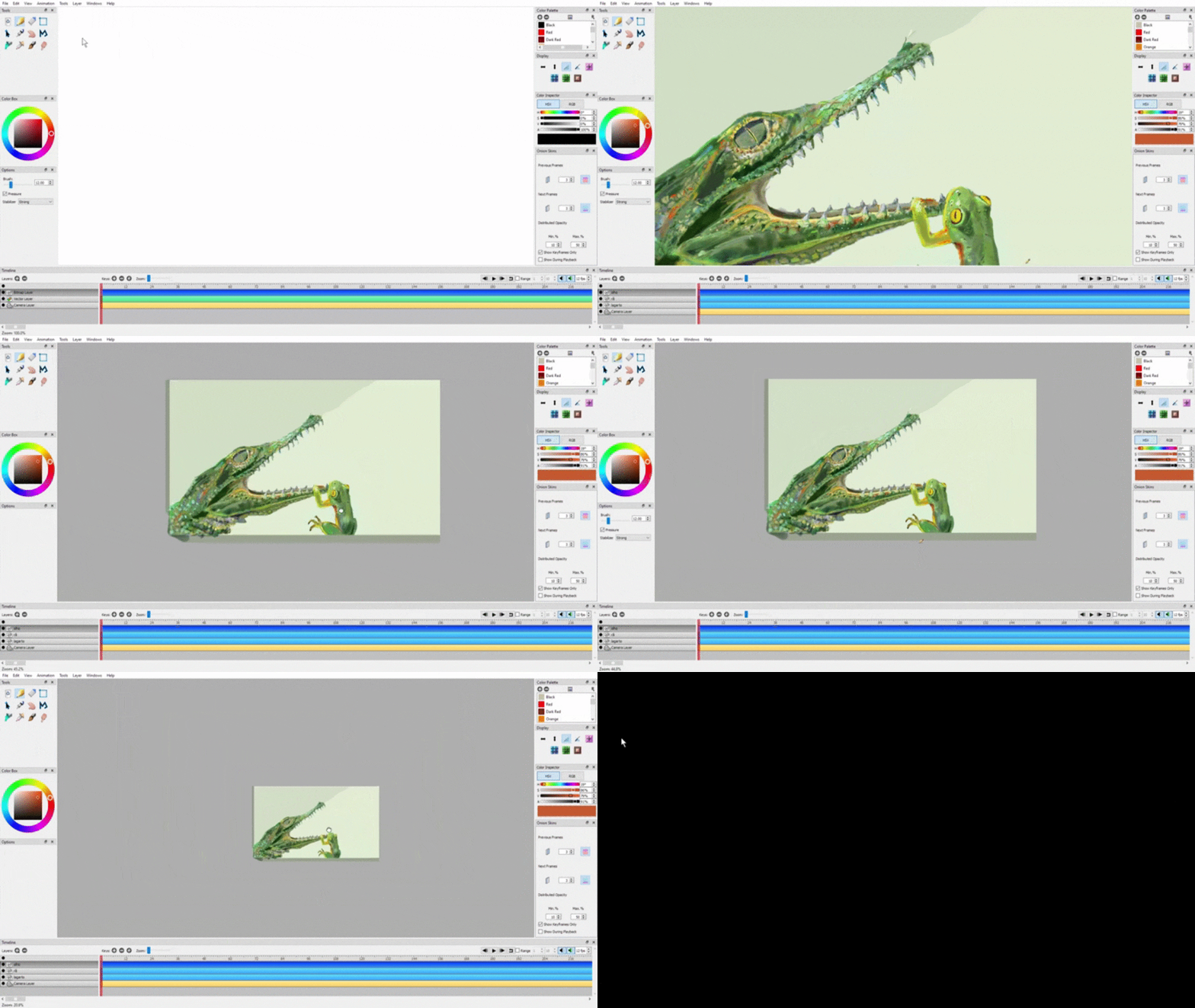
CTRL+RMB
CTRL+MMB
SHIFT+RMB
SHIFT+MMB
👍
Kaikogf
on 7 Sep 2020
Related issues
scribblemaniac
·
3Comments
 eszlari
·
3Comments
Jose-Moreno
·
4Comments
Kaikogf
·
3Comments
Jose-Moreno
·
3Comments
eszlari
·
3Comments
Jose-Moreno
·
4Comments
Kaikogf
·
3Comments
Jose-Moreno
·
3Comments