Pdf-lib: Changing field names per page / making them unique to a duplicated page
Hello,
Is it possible to rename the various fields on a page-by-page basis? So for example, if I copied a particular page but wanted to assign a unique set of field names to it (as I might have multiple copies of the same page in the same PDF), would I need to add a whole bunch of new refs just for that particular page?
Still learning how things work under the hood but from what I can gather so far is that the different field names per duplicated page will stay the same (unless they can be changed).
It's bit out there I agree, but it's a bit of an out there sort of project.
 sdfereday
All 10 comments
Hello @sdfereday!
I don't think I fully understand your question. Are you trying to copy a page that contains AcroForm text fields (aka interactive text inputs)? And you want to be able to modify the content of the text fields on the original page, without affecting the content of the fields on a copied page?
 Hopding
on 3 Aug 2019
Hopding
on 3 Aug 2019
Good evening @Hopding !
That's pretty much it yeah (sorry, my explanation was really crap!), but the other way around. So I'd like to leave the AcroForm fields on the original page intact, but clone that page and modify them on the cloned page instead if that makes sense?
My process at present is this (it doesn't really work but maybe it's along the right lines?):
- Copy page(s) from the source document
- Create a new empty document and add those copied pages in to the new document
- Perform all the changes needed to the interactive inputs (such as give them a unique Id as a field name for example)
- Copy that new PDF back in to the source document
- Profit (maybe)
I've never done such funky stuff with PDF's before, this is new territory 😆
sdfereday
on 4 Aug 2019
@sdfereday I created a script that does the following:
- Loads an PDF that contains a single page with 2 acroform fields.
- Copies the page (so that there are 2 pages).
- Does some post processing on the acrofields of the copied page.
- Modifies the value of one of the acroforms on the second page (without affecting the first page).
import fs from 'fs';
import {
  PDFArray,
  PDFBool,
  PDFDict,
  PDFDocument,
  PDFName,
  PDFPage,
  PDFString,
} from 'pdf-lib';

const postProcessCopiedAnnots = (page: PDFPage) => {
  const acroForm = page.doc.catalog.lookup(PDFName.of('AcroForm'), PDFDict);
  const acroFields = acroForm.lookup(PDFName.of('Fields'), PDFArray);

  acroForm.set(PDFName.of('NeedAppearances'), PDFBool.True);

  const annots = page.node.Annots()!;
  for (let idx = 0; idx < annots.size(); idx++) {
    const annot = annots.lookup(idx, PDFDict);
    const tVal = (annot.lookup(PDFName.of('T')) as any).value;

    annot.set(PDFName.of('P'), page.ref);
    annot.set(PDFName.of('T'), PDFString.of(`${tVal}_${idx}`));
    annot.delete(PDFName.of('AP'));

    acroFields.push(annots.get(idx));
  }
};

(async () => {
  const pdfDoc = await PDFDocument.load(fs.readFileSync('simple_form.pdf'));

  const firstPage = pdfDoc.getPages()[0];

  const [secondPage] = await pdfDoc.copyPages(pdfDoc, [0]);
  postProcessCopiedAnnots(secondPage);
  pdfDoc.addPage(secondPage);

  firstPage.drawText('I am the 1st page', { y: 10 });
  secondPage.drawText('I am the 2nd page', { y: 10 });

  secondPage.node
    .Annots()!
    .lookup(0, PDFDict)
    .set(PDFName.of('V'), PDFString.of('Testing...'));

  const pdfBytes = await pdfDoc.save();

  fs.writeFileSync('./out.pdf', pdfBytes);
})();
Here's the input PDF: simple_form.pdf
And here's the output PDF: out.pdf
I hope this helps. Please let me know if you have any additional questions!
Hopding
on 4 Aug 2019
@Hopding Thank you so much for this, I'll give it a swing. :)
Out of curiosity what does this line do?
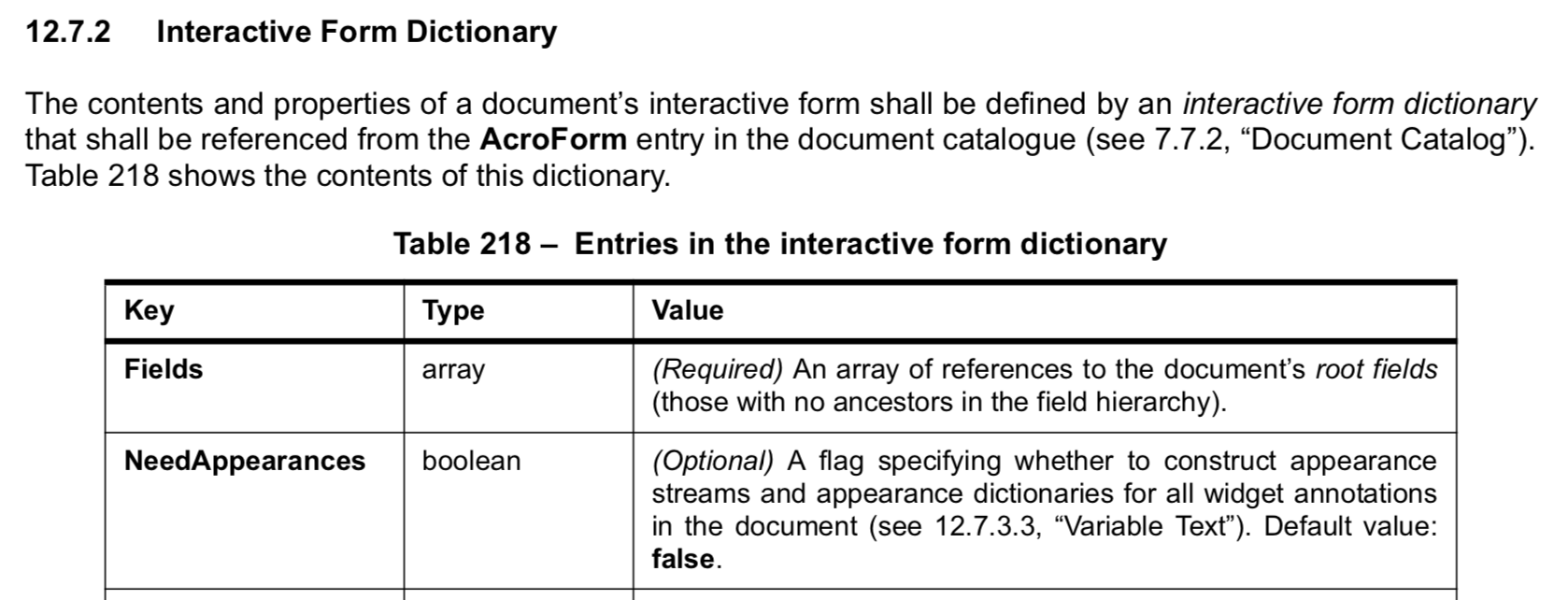
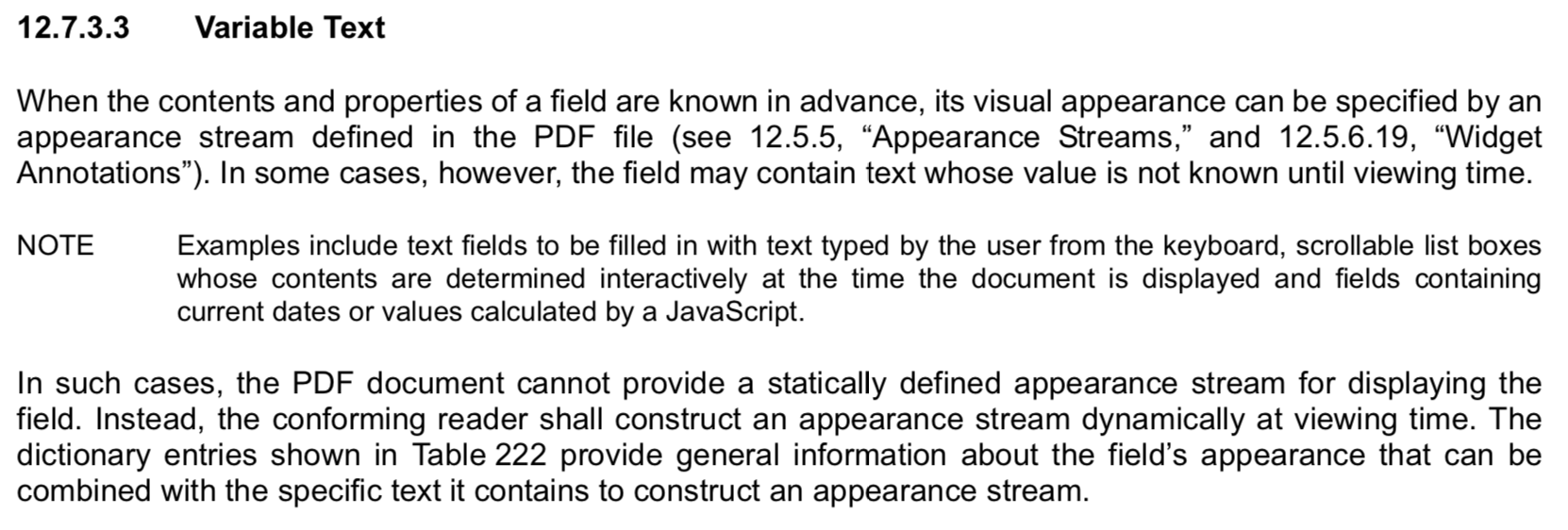
acroForm.set(PDFName.of('NeedAppearances'), PDFBool.True);
You've got some mad PDF manipulation skills sir! ✋
sdfereday
on 4 Aug 2019
@sdfereday It basically tells the PDF reader to automatically figure out the best way to render the content of the text fields. If we don't do this, then we have to do a lot more work to construct a custom appearance stream for the text fields.
Here are some excerpts from the PDF spec that provide more detail, if you're interested:
Hopding
on 4 Aug 2019
Aaaah, I see! Well that's another thing I've learnt about PDF's. Thanks @Hopding, your knowledge is greatly appreciated.
sdfereday
on 4 Aug 2019
For those following along at home, note that there's some typescript in @Hopding's generous answer, so you'll need to strip that out if you're not using that environment (watch for the !, as and function arg definitions). Thanks @Hopding!
 patcon
on 17 Oct 2020
patcon
on 17 Oct 2020
Hey @Hopding, inspired by @btecu's work in #716, I was wondering whether it would be welcome for me to submit a helper function or option for copied pages to append a suffix to field names during copy actions.
Would this be accepted in a PR, and if so, what api preference might you have?
patcon
on 22 Dec 2020
(would probably be a new opt arg when PDFPage is passed to insertPage or addPage, since copied pages might be inserted multiple times, and would need different prefixes)
patcon
on 22 Dec 2020
@patcon this would be a fantastic PR! Form copying is a shortcoming many users have encountered, so it would be great to have a proper solution for it.
I've given the API design some thought. It's a bit tricky because the current page copying API allows you to select a subset of the pages that you wish to copy over (and copying fewer pages results in a smaller document size). This is possible because each page is, more or less, independent of the other pages in the document.
The form fields would need to be copied in the same operation that the pages are copied (not at the time of insertion) due to the way object copying works. The simplest API for this would be to pass an option to copyPages, e.g.
destDoc.copyPages(srcDoc, [0, 3, 7], { copyFormFields: true });
The main downside to this API is that it would copy the entire form and all of its fields (and their widgets) into the destDoc. But this would only make sense if all the pages in the srcDoc were also copied over. Otherwise you run the risk of copying form fields that have widgets not attached to any pages in destDoc.
Perhaps this API could be implemented in such a way that only the form fields which had widgets on pages that were being copied (0, 3, or 7 in the above example) would be included in destDoc. This would require a bit more traversal during the copying phase to determine which fields should be included, but it seems like the most robust and intuitive way to implement the above API.
Another option would be to create a new API designed specifically for merging entire documents. This way you could just copy over all of the fields and not have to worry about only a subset of the pages being copied. This is the approach that pdfbox uses for their PDFMergerUtility class. This API would be convenient because it would make it easy to copy over other non-page structures when merging documents (e.g. outlines, name trees, etc...) without having to worry about which parts of those structures should be copied. Since you'd always be merging the entire document, you could always copy the structures in their entirety.
These are the first two good options that came to mind. I'm sure there are others though. What do you think?
Hopding
on 24 Dec 2020
Related issues
 emilsedgh
·
5Comments
sdfereday
·
4Comments
emilsedgh
·
5Comments
sdfereday
·
4Comments
 nachum37
·
3Comments
nachum37
·
3Comments
 kevinswartz
·
5Comments
kevinswartz
·
5Comments
 lepidotteri
·
3Comments
lepidotteri
·
3Comments
Most helpful comment
@sdfereday I created a script that does the following:
Here's the input PDF: simple_form.pdf
And here's the output PDF: out.pdf
I hope this helps. Please let me know if you have any additional questions!