Pdf-lib: Changing appearances of widgets
This is an amazing project! Clean code, nice documentation, extremely supportive on issues, etc. Impressive work.
I have a question regarding form widget annotations. The API to add new annotations is pretty straightforward.
My use case however is to manipulate existing ones.
I didn't find much available on the documentation, but digging through the code, I started doing this:
const PDFLib = require('pdf-lib')
const fs = require('fs').promises

const { rgb } = PDFLib

const run = async () => {
  const buffer = await fs.readFile(process.argv[2])
  const doc = await PDFLib.PDFDocument.load(buffer)

  const form = doc.getForm()

  for(field of form.getFields()) {
    if (field.constructor.name !== 'PDFTextField')
      continue

    field.setText('one punch man')
    const [ widget ] = field.acroField.getWidgets()
    const ac = widget.getAppearanceCharacteristics()
    ac.setBackgroundColor(rgb(0,1,0))

    widget.getBorderStyle().setWidth(10)
    ac.setBorderColor(rgb(1,1,0))
  }

  await fs.writeFile(process.argv[3], await doc.save())
}

run()
The purpose of this script is to iterate through all forms and change the background color and border color of text fields.
The problem im facing is that the pdf saves fine, but none of the changes i made to widgets are effective. The input pdf and output pdf's widget background colors and border colors are the same.
Any ideas?
 emilsedgh
All 5 comments
Can you try form.markFieldAsDirty(field.ref)?
 ajaishankar
on 8 Nov 2020
ajaishankar
on 8 Nov 2020
Hey @ajaishankar I just gave it a try. No luck unfortunately. No errors, but the output is still the same.
emilsedgh
on 8 Nov 2020
For some further clarification, I did use your above code to set my border width to 0 and that did correctly remove the border. Color changes didn't work for me either, though.
 rickhall
on 13 Nov 2020
rickhall
on 13 Nov 2020
Hello @emilsedgh!
You need to use the colorToComponents(...) function. Note also that the best way to check what subtype of PDFField you're working with is instanceof.
I've updated the snippet you shared below:
import { colorToComponents, PDFDocument, PDFTextField, rgb } from 'pdf-lib';

(async () => {
  const dodBytes = await fetch(
    'https://pdf-lib.js.org/assets/dod_character.pdf',
  ).then((res) => res.arrayBuffer());

  const pdfDoc = await PDFDocument.load(dodBytes);

  const form = pdfDoc.getForm();

  for (const field of form.getFields()) {
    if (field instanceof PDFTextField) {
      field.setText('one punch man');

      const [widget] = field.acroField.getWidgets();
      const ac = widget.getAppearanceCharacteristics();
      ac?.setBackgroundColor(colorToComponents(rgb(0, 1, 0)));

      widget.getBorderStyle()?.setWidth(5);
      ac?.setBorderColor(colorToComponents(rgb(1, 0, 0)));
    }
  }

  const pdfBytes = await pdfDoc.save();
})();
This script produces a document that looks like the following:
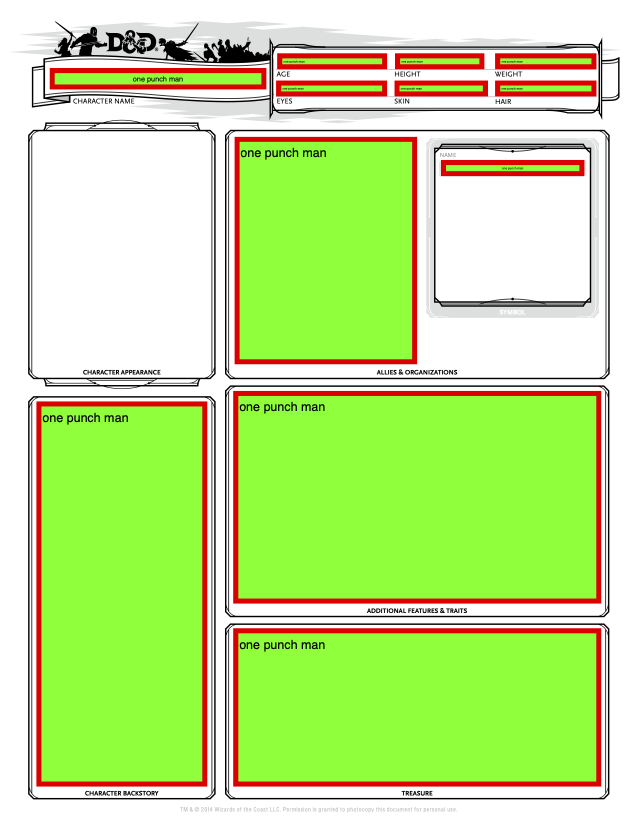
>
As you observed, pdf-lib does not provide high-level APIs for modifying the widget properties of existing form fields. So it is necessary to use low-level APIs that are not well documented. But I would very much like to add high-level APIs for this. If you're interested in submitting a PR, I'd be happy to provide guidance!
 Hopding
on 14 Nov 2020
Hopding
on 14 Nov 2020
Hey @Hopding
Thank you so much for the fantastic library and great support.
emilsedgh
on 14 Nov 2020
Related issues
 fatso83
·
3Comments
fatso83
·
3Comments
 kevinswartz
·
5Comments
kevinswartz
·
5Comments
 nachum37
·
3Comments
nachum37
·
3Comments
 MarcGodard
·
3Comments
MarcGodard
·
3Comments
 AlanHadzic
·
3Comments
AlanHadzic
·
3Comments
Most helpful comment
Hello @emilsedgh!
You need to use the
colorToComponents(...)function. Note also that the best way to check what subtype ofPDFFieldyou're working with isinstanceof.I've updated the snippet you shared below:
This script produces a document that looks like the following:
>
As you observed, pdf-lib does not provide high-level APIs for modifying the widget properties of existing form fields. So it is necessary to use low-level APIs that are not well documented. But I would very much like to add high-level APIs for this. If you're interested in submitting a PR, I'd be happy to provide guidance!