Pdf-lib: Missing support for embedding SVG
It could be a very handy feature imo, right now, in a browser environment for example, you would need to parse the SVG in order to be drawn into a canvas only for the newly drawn image base64 to be taken.
Would it be possible to add this kind of feature by re-using the existing vector graphics drawing functions of pdf-lib?
 lepidotteri
All 3 comments
Hello @lepidotteri! This feature could definitely be added to pdf-lib. It would be implemented, as you suggest, by parsing the SVG and invoking pdf-lib's vector graphics functions for each of the SVG's elements. pdfkit does exactly this to implement it's SVG feature.
I can't commit to delivering this feature by any specific date. There are several other important things I'm planning to work on first. But this feature is certainly on my radar. And, of course, I'm always open to somebody submitting a PR for this!
 Hopding
on 2 Jun 2019
Hopding
on 2 Jun 2019
@lepidotteri - FYI, there is now SVG path support in version 1.2.0.
https://pdf-lib.js.org/docs/api/classes/pdfpage#drawsvgpath
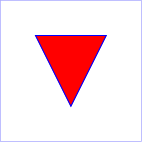
So if you had an SVG like:
<svg width="4cm" height="4cm" viewBox="0 0 400 400"
     xmlns="http://www.w3.org/2000/svg" version="1.1">
  <title>Example triangle01- simple example of a 'path'</title>
  <desc>A path that draws a triangle</desc>
  <rect x="1" y="1" width="398" height="398"
        fill="none" stroke="blue" />
  <path d="M 100 100 L 300 100 L 200 300 z"
        fill="red" stroke="blue" stroke-width="3" />
</svg>
You could render that in pdf-lib with this code:
const pdfDoc = await PDFDocument.create();
const page = pdfDoc.addPage(PageSizes.Letter);

// 1" from upper left
const positionX = 72;
const positionY = 720;

const svgWidth = 398;
const svgHeight = 398;
const blue = rgb(0, 0, 1);
const red = rgb(1, 0, 0);

page.drawRectangle({
    x: positionX,
    y: positionY - svgHeight,
    width: svgWidth,
    height: svgHeight,
    borderColor: blue,
});
page.drawSvgPath('M 100 100 L 300 100 L 200 300 z', {
    x: positionX,
    y: positionY,
    color: red,
    borderColor: blue,
    borderWidth: 3
});
 jlmessenger
on 10 Oct 2019
jlmessenger
on 10 Oct 2019
win
lepidotteri
on 11 Oct 2019
Related issues
 kevinswartz
·
5Comments
kevinswartz
·
5Comments
 nachum37
·
3Comments
nachum37
·
3Comments
 BoLaMN
·
5Comments
BoLaMN
·
5Comments
 sdfereday
·
4Comments
sdfereday
·
4Comments
 AlanHadzic
·
3Comments
AlanHadzic
·
3Comments
Most helpful comment
@lepidotteri - FYI, there is now SVG path support in version
1.2.0.https://pdf-lib.js.org/docs/api/classes/pdfpage#drawsvgpath
So if you had an SVG like:
You could render that in pdf-lib with this code: