First I know, i shouldnt open this on "issues" it's a project or a pull request (because the feature i request can be done automaticly), and I will be glad if you decide to move this project to the right place.
This is just the first time I use github
I was recently discovered some intresting ways to change how ps2 game is being rendered, and i want to share it and start a new project, which it's goal is to bring ps2 games to a better video quality, this include:
- Progressive scan
- 640x512 native resolution
- more visible viewing area
- Higher fps (maybe)???
So let's start
Progressive Scan
Some of you can say that pcsx2 has progressive scan by using no interlacing codes
https://forums.pcsx2.net/Thread-No-interlacing-codes
and while it's true that the video output is on progressive scan, the game itself is still being rendered in 2 dieffrents fields.
A true progressive scan need to have:
- Progressive Scan Signals
- SDTV480P Mode
- Frame Mode
The most easy way to force progressive scan is through "sceGsResetGraph"
by changing the Hex code from
002C0500 2000B2FF 00340600 1000B1FF 003C0700
to
0000053C 2000B2FF 5000063C 1000B1FF 0100073C
or
By changing the Hex code from
038c050003940600XXXXXXXX039c0700
to
0000112450001224XXXXXXXX01001324
this wont work 100% and sometimes this hack comes with some issue, but the biggest issue and the reason i believe most people dont make progressive scan hack is because the lost of resolution
the game wont be rendering in full native resolution but rather half because it's only render 1 field instead of 2, which bring me to my solution:
Forcing Native resolution to be 640x512
let's take Ace combat 04 for example which it's native resolution on menu screen is 640x448 in US version.
I put a progressive scan signal hack
patch=1,EE,002616f4,word,3c050000 //00052c00
(And no interlacing to prevent shaking ,patch=1,EE,20104974,extended,34050001)
and this is how the menu looks

the next step was make a code that cancel the transiation between "the playstation 2 logo when the game is booting" to "the game itself"
this can be done for most games by just changing the Hex code from
0000a3fc 200002de
to
00000000 200002de
here is the code
patch=1,EE,00261c00,word,00000000 //fca30000
I use hardware mode and i full boot the game, and this is how the game is looking now
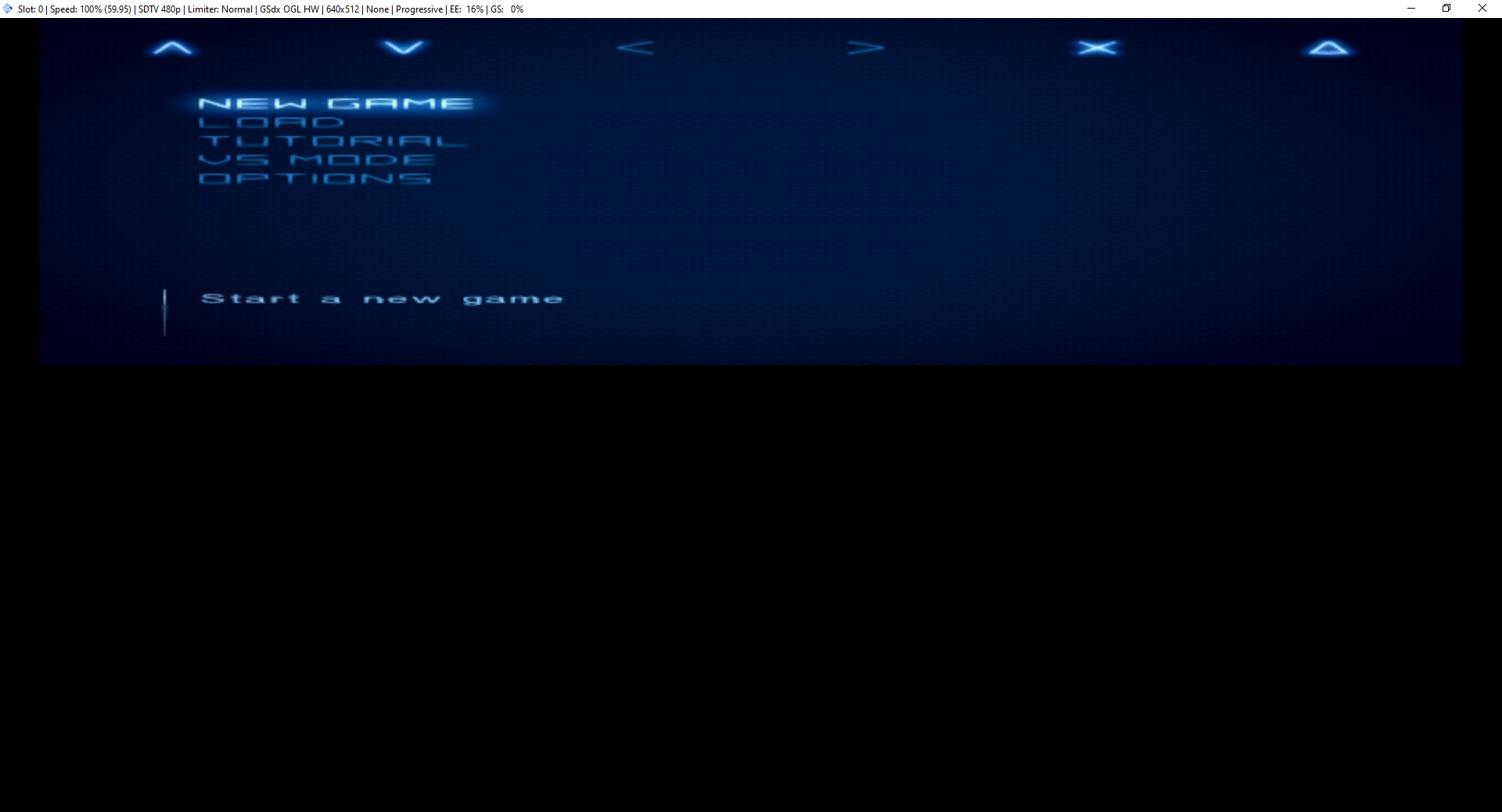
Pcsx2 now tells us that the game is running at 640x512 but we cant see any improvment because the image was shrinked, this is a GSdx PCRTC issue
https://github.com/PCSX2/pcsx2/issues/961
It is hapening because the height and the width of the game is still remaning 640x224 picture on 640x512
anyway lt's fix it
i changed the height to 512 pixels
patch=1,EE,2029F3F6,extended,00000200

you can compare the first picture with this one and see a big quality increased
basicly i get a game with NTSC frame rate + PAL image quality + Progressive scan
Let's try another game: dark cloud
here is the game on 640x448i no interlaced

here is the game on 640x512P

The 640x512p looks sharper but somthing feels a bit off, and that is i broke the asspect ratio, i changed the height to 512 pixels and oraginlly it was suppose to be 448 pixels.
which brings me to another benefits of "Force 640x512P"
More visible viewing area
Game that was originally 640x448 and got streched to 640x512 need to change the Y axis to 0.875 from the orignal value
448/512=0.875
Game that was originally 512x448 and got streched to 640x512 need to change the X axis to 0.91428 from the original value or for those who wants to play at 16:9 widescreen the X to 0.68571 from the original value
512/448=1.14285
1.14285 X 512=585.14285
585.14285/640=0.91428
0.914285 X 0.75=0.68571
Now here is the last thing about "Force 640x512P" It can also fix the problem that SDTV480P Mode make the game crash/ show only black screen
why it's important because?
Higher FPS
When SDTV480P Mode code is combained with in game FPS equal to refresh rate (59.94/50)
a speed issue might occur
for example in God hand 60 fps code + SDTV480P Mode code will make the gameplay (not menus and cutscenes) to run at half speed ,meaning you can play the game at 120fps at full speed.
//60 FPS
patch=1,EE,00747A09,extended,00000001
//SDTV480P Mode
patch=1,EE,0039520c,word,3c060050
this isnt the first time somthing like that happen in pcsx2
in Souculiber 3 the exact thing happened in an early version of PCSX2
https://wiki.pcsx2.net/SoulCalibur_III
the effect can also be 2x speed music like in dark cloud
//SDTV480P Mode
patch=1,EE,001122c4,word,3c060050 //00063400
//Force 640x512P (Black screen fix)
patch=1,EE,00112748,word,00000000 //fca30000
So what do i want from Pcsx2 team?
I write this as a side project that you might be intrested making in the future.
1.Instead of making hacking codes for each game there should be the ability to force progressive scan, after all (most of the time) it's the same values that need to change.
2.There should be an option in pcsx2 to streched the image to full screen after using "Force 640x512P" .
- Update all the widescreen hack for more visible viewing area.
- Learning and trying to reproduce the SDTV480P Mode bug???
5.Finding more ways to force 640x512 and progressive scan mode
Thank you for reading that and thank you for being awesome!!!
 FuxorLuck
All 2 comments
Awesome stuff, you should post this over at the pcsx2 forums too !
 emjzero2
on 22 Nov 2019
emjzero2
on 22 Nov 2019
Thanks, but my codes are useless without height and width fix
that is way i ask for an option in pcsx2 to strech the image or at least find a way to make finding these codes easy.
FuxorLuck
on 22 Nov 2019
Related issues
 Clarke2131
·
3Comments
Clarke2131
·
3Comments
 Javed-Iqbal-1
·
5Comments
Javed-Iqbal-1
·
5Comments
 jobs-git
·
3Comments
jobs-git
·
3Comments
 XXXBold
·
4Comments
XXXBold
·
4Comments
 zerr10
·
6Comments
zerr10
·
6Comments
Most helpful comment
Awesome stuff, you should post this over at the pcsx2 forums too !