-PCSX2 version: v1.5.0-20160704144520
-PCSX2 options: Defaults.
-Plugins used: Defaults.
-Description: The game runs extremely slowly whenever any 3D geometry is rendered. Looking at the sky dramatically improves the framerate.
-How to replicate: Start a new game.
-Last known version to work: Game has always had severe performance issues.
-PC specifications: CPU: Intel Q9400 GPU: Gigabyte GTX 750Ti OS: Windows 10 64 Bit
 AmbientMalice
All 48 comments
That's just a sign of your CPU not making the cut for this game. Some games are just more demanding than others. I had this issue with several games when I was still using my dual core processor( that had a better single thread rate than your Q9400). But with my current i5 performance on those games is a smooth 50/60fps.
 FlatOutPS2
on 5 Jul 2016
FlatOutPS2
on 5 Jul 2016
@FlatOutPS2 It could be, but the game runs at 15VIs, and someone with a 3.4Ghz i7 reported "Runs very slowly" back in 2014.
AmbientMalice
on 5 Jul 2016
24 is a very slow game
 refractionpcsx2
on 5 Jul 2016
refractionpcsx2
on 5 Jul 2016
@FlatOutPS2 It could be, but the game runs at 15VIs, and someone with a 3.4Ghz i7 reported "Runs very slowly" back in 2014.
There are some slow(outdated) 3.4Ghz i7's as well. I couldn't find anyone trying this game with a 2000+ str CPU.
FlatOutPS2
on 5 Jul 2016
@refractionpcsx2 Do you have any idea why the game is so demanding?

EE load is high, but the EE cycle rate hack has no effect on performance. Tampering with the VU just seems to cause heavy frame skipping, but the the VU load isn't high (compared to EE) to begin with. Unless I'm misreading the figures. The game runs at the same speed whether in SW or HW mode.
AmbientMalice
on 5 Jul 2016
Judging by the fact that neither EE or GS is maxed out, there is probably a shader that is running really slow. A GS Dump might help @gregory38 work out what is causing it to go so slow, but I couldn't personally say what it is. The likelyhood is there is some post processing effect which does hundreds or thousands of draw calls which might be doable in one if we're lucky :P
refractionpcsx2
on 5 Jul 2016
I'd say 93% is pretty close to being maxed out. :p
FlatOutPS2
on 5 Jul 2016
It's close but it's not maxed :P
Is software mode any quicker?
refractionpcsx2
on 5 Jul 2016
Is software mode any quicker?
No. Seems to be exact same speed.
AmbientMalice
on 5 Jul 2016
hm okay then, might not be a GS thing :P
What about speedhacks, do any of them help?
refractionpcsx2
on 5 Jul 2016
What about speedhacks, do any of them help?
EE cycle rate does nothing as far as I can tell. Changing VU stealing makes the game frameskip like crazy so it runs at around 4-5fps but reads as 50-60Hz. No other settings seem to make a difference. MTVU has zero effect as far as I can tell.
The game does need clamping to fix the radar going weird, but that's a side issue.
AmbientMalice
on 5 Jul 2016
ok thanks for the info :) Possibly something strange going on with the VU's then. I take it SuperVU1 and Interpreter VU1 are either the same or much slower (and possibly more broken)?
refractionpcsx2
on 5 Jul 2016
SuperVU is slightly faster (maybe 3%) Interpreter is 3-4x slower. It basically freezes if both VU0 and VU1 are set to interpreter.
AmbientMalice
on 5 Jul 2016
SuperVU is slightly faster (maybe 3%) Interpreter is 3-4x slower. It basically freezes if both VU0 and VU1 are set to interpreter.
That isn't uncommon. And the software mode speed is in line with expectations of your CPU.
FlatOutPS2
on 5 Jul 2016
And the software mode speed is in line with expectations of your CPU.
Pretty much. Although it is worth noting that it is overclocked to 3.2Ghz, it's a plucky but aging CPU long past its prime.
However, it is fairly unusual, in my experience, for a game to run at the exact same speed in HW and SW mode with PCSX2.
AmbientMalice
on 5 Jul 2016
Yes, that is unusual. But it could be a coincidence as the hardware mode may have a speed issue, and the software mode could just hitting the limits of your cpu at the same framerate.
Even with a deeper issue that also affects software mode, you'd expect a small difference between hardware and software modes.
FlatOutPS2
on 5 Jul 2016
One of the slowest running games I know. I haven't found a convincing cause for it yet.
 ramapcsx2
on 6 Jul 2016
ramapcsx2
on 6 Jul 2016
MTVU probably stops it from being 100%. Threading overhead easily can produce 93%. I don't think it's a GS issue.
Sounds like spinlock-equivalent for a non-EE component in the EE thread. (Probably that doesn't make sense.) With other words I guess it is some job in the IOP or SPU or whatever that needs to be finished and EE is just nop-ing all the time waiting for the job's finalization.
 willkuer
on 6 Jul 2016
willkuer
on 6 Jul 2016
Exactly. So all we'd see when profiling this would be lots of EE spinwaits.
ramapcsx2
on 11 Jul 2016
Is there something I can do to help debugging this ? maybe run some tests ? logs ?
 DarkMoe
on 11 Oct 2017
DarkMoe
on 11 Oct 2017
Another guesswork from me. This problem is probably hard to solve.
If you want you can check whether there is a difference between
1) VU0 SuperVU & VU1 MicroVU
vs
2) VU0 MicroVU & VU1 SuperVU.
Apparently VU cycle stealing does something to the process so one of both VU components have an issue. I think MTVU only separates VU1 but not VU0 and such it doesn't help when VU0 is blocking the emulation. Accordingly case 1) should be faster than case 2). At least some asymmetry should appear (Asymmetry can also occur due to the different use of VU0/1). Then the origin for the EE wait is probably known. However the issue can be in the VU component or one of the components feeding it. One could possibly monitor the memory. Everytime before a frame is emitted some bit has to change 0<->1 as the wait condition in the EE thread (probably somewhere in VU0) is satisfied. However there will be probably hundreds of values with similar behavior. One could try to find the responsible address and fix it to either 1 or 0 to achieve something similar as the VU cycle stealing hack or freeze the emulation completely. Then one can try to find out which program is changing this value and go deep into the nasty code.
Another way could be to use a debugger and check what EE does when it is not waiting. Probably it initiates some recompiled code in the VU. You can step in and try to figure out what the VU tries to accomplish.
Both ways sound horrible from my point of view.
willkuer
on 11 Oct 2017
Esit: Also, you're correct about MTVU. It separates VU1, VU0 needs to be synced with the EE iirc.
Debug logs would help. Test Drive does something similar with the loading screens, it gets stuck waiting for VU0 (I think) - I don't know which mode it's in (still confuses me)
In that game, EE cyclerate needs to be -3 for the menu event to trigger at all (FPS still needs to be unlocked and wait 20 seconds) I guess that may be of use here.
 MrCK1
on 11 Oct 2017
MrCK1
on 11 Oct 2017
VU0 SuperVU & VU1 MicroVU
vs
VU0 MicroVU & VU1 SuperVU.
I tested both of these, and results were exactly the same, game goes to 15 fps as soon as level 1 starts
 aromanella
on 25 Oct 2017
aromanella
on 25 Oct 2017
Ok more info,
The only thing that seems to affect this game, is changing the option: VU Cycle stealing.
If this is set to 1 or higher, game will behave at 60 FPS, audio will be perfect, but there's still going to be 1 real FPS (title bar says 60 but they are not real).
Maybe this is a clue to what's going on ?
aromanella
on 26 Oct 2017
VU Cycle Stealing will mess with game speed internally. The title bar isn't measuring internal performance, but instead the FPS cap set by the user.
MrCK1
on 26 Oct 2017
Does that info help in some manner ? What else can be done ?
aromanella
on 27 Oct 2017
Honstly I think it is really strange that superVU yields a performance increase but it doesn't matter if you use it in the vu0 or vu1.
willkuer
on 27 Oct 2017
It would be interesting to get a callstack in-game and see what the VUs are doing. COD2 is somewhat similar in the fact that it constantly hammers the VUs with poor in-game performance.
MrCK1
on 27 Oct 2017
Something weird is going on, I tried the latest version with an old pc vs a new one, and they got the same performance with hardware and software modes.
Menues always run perfect (60 fps), but ingame never gets to more than 25% speed. What else can I test ?
DarkMoe
on 12 Dec 2017
@DarkMoe Can you make a post over at forums.pcsx2.net? It will be easier for us to provide support there. :)
MrCK1
on 12 Dec 2017
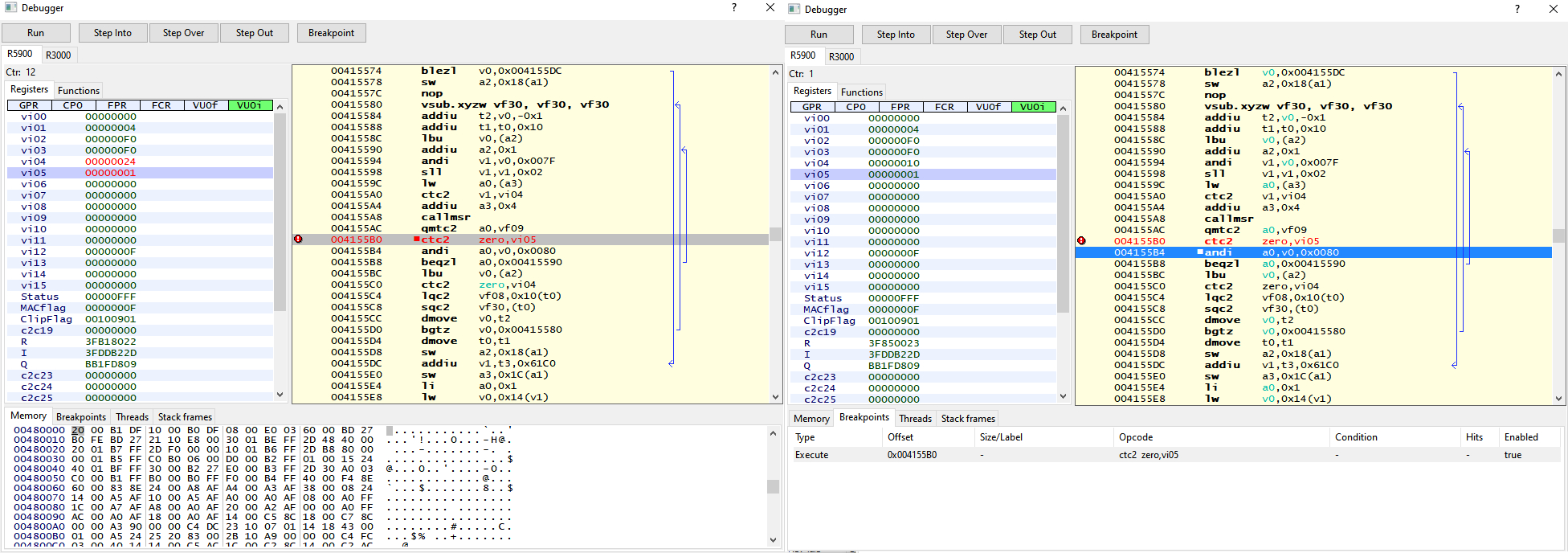
I looked today into that issue, and is definitely VU issue. I found problematic runtimes on EE, and on VU. Sadly i don't understand why this happening. Here is what is going on, offsets for SLUS_212.68
EE side:
2 problematic places are 0x4155B0, 0x415668 where CTC2 zero, vi05 is done. But this seems to not working like it should, register vi05 won't change to 0. Looks like something is block it to change.
VU side:
4 places where VU is looping in wait to vi05 change to 0. For some reason only 2 places seems to be issue, 0x53d640 and 0x53d5e8. compare is done with vi0 that seems to be always 0 then.

I tired to fix that by myself but i failed. Anyway at least i confirmed that problem is really there for both EE, and VU side. Maybe collected info will help team to find solution/workaround. Last picture include patches that i used to test that.

 kozarovv
on 20 Aug 2019
kozarovv
on 20 Aug 2019
I looked today into that issue, and is definitely VU issue. I found problematic runtimes on EE, and on VU. Sadly i don't understand why this happening. Here is what is going on, offsets for SLUS_212.68
EE side:
2 problematic places are 0x4155B0, 0x415668 where CTC2 zero, vi05 is done. But this seems to not working like it should, register vi05 won't change to 0. Looks like something is block it to change.
VU side:
4 places where VU is looping in wait to vi05 change to 0. For some reason only 2 places seems to be issue, 0x53d640 and 0x53d5e8. compare is done with vi0 that seems to be always 0 then.
I tired to fix that by myself but i failed. Anyway at least i confirmed that problem is really there for both EE, and VU side. Maybe collected info will help team to find solution/workaround. Last picture include patches that i used to test that.
Can you repost the patch file you made, the YouTube video where the dude shows off the patch has a dead link and I'd like to try this out for myself. Thank you!
 TheRenegadist
on 9 Mar 2020
TheRenegadist
on 9 Mar 2020
The patch is literally in the screenshots
refractionpcsx2
on 9 Mar 2020
Something like this? Its just a pnach file u have to create that points to the right one with right codes.
 RedDevilus
on 9 Mar 2020
RedDevilus
on 9 Mar 2020
I have no idea what I'm doing, I've never attempted this before. I saw the video here: https://youtu.be/ClM5ileBu3g and was hoping to just download the pnach file the dude posted but the link is dead.
TheRenegadist
on 9 Mar 2020
Look comment above its a pnach in a zip file. Try it with unzipping that.
RedDevilus
on 9 Mar 2020
@TheRenegadist patch from youtube is that one:
REMOVED
Additionally set VU clamping to Extra + Preserve sign, that fix minimap without affecting speed.
But this patch require special build of pcsx2, that can be downloaded here (it will be deleted at some point):
REMOVED
Keep in mind that specific pcsx2 version wasn't merged to master branch, so you don't get any support for it here, nor on forums. So don't post any bug reports using this version of pcsx2, etc.
Edit: Patch/emu posted here were removed as they are no longer required to play game correctly. Please load game from memory card, with disabled patches/cheats. Using latest emu version from: https://buildbot.orphis.net/pcsx2/index.php
kozarovv
on 9 Mar 2020
@TheRenegadist patch from youtube is that one:
f1c7201e.zip
Additionally set VU clamping to Extra + Preserve sign, that fix minimap without affecting speed.But this patch require special build of pcsx2, that can be downloaded here (it will be deleted at some point): https://ci.appveyor.com/project/gregory38/pcsx2/builds/29818545/job/wg33o8g8u6kbjqoj/artifacts
Keep in mind that specific pcsx2 version wasn't merged to master branch, so you don't get any support for it here, nor on forums. So don't post any bug reports using this version of pcsx2, etc.
Thank you for doing all of this, I always thought my PC was the issue but it's just the emulator. Are there any plans to permanently fix the issue in 1.6.0 without patches or a special build?
TheRenegadist
on 9 Mar 2020
Is there a patch for the PAL version? Or is there another planned fix?
 Bommel24
on 17 Aug 2020
Bommel24
on 17 Aug 2020
There is no PAL patch currently. Maybe @prafullpcsx2 can port his patch for the NTSC version.
refractionpcsx2
on 17 Aug 2020
@Bommel24 You can use this patch until it's added to gamedb.
 prafullpcsx2
on 17 Aug 2020
prafullpcsx2
on 17 Aug 2020
@TheRenegadist patch from youtube is that one:
f1c7201e.zip
Additionally set VU clamping to Extra + Preserve sign, that fix minimap without affecting speed.But this patch require special build of pcsx2, that can be downloaded here (it will be deleted at some point): https://ci.appveyor.com/project/gregory38/pcsx2/builds/29818545/job/wg33o8g8u6kbjqoj/artifacts
Keep in mind that specific pcsx2 version wasn't merged to master branch, so you don't get any support for it here, nor on forums. So don't post any bug reports using this version of pcsx2, etc.
Is there anyone who can please re-upload this special build as I no longer see it posted at the link above and I really want to get this patch working. On the current stable version of the emulator I get graphical glitches when using the pnach file. Jack's body is missing and polygons are stretched.

 footwo
on 3 Sep 2020
footwo
on 3 Sep 2020
With current emulator version patch is not needed. Please try load game from memory card, with disabled patches/cheats.
Edit: by current i mean latest version from: https://buildbot.orphis.net/pcsx2/index.php
kozarovv
on 3 Sep 2020
dev138- 194 had the patch in master.
dev195 and later: completely fixed game + removed patch.
RedDevilus
on 3 Sep 2020
Thanks guys I've grabbed latest from there and formatted the memory card and its working fine now 🍡
footwo
on 3 Sep 2020
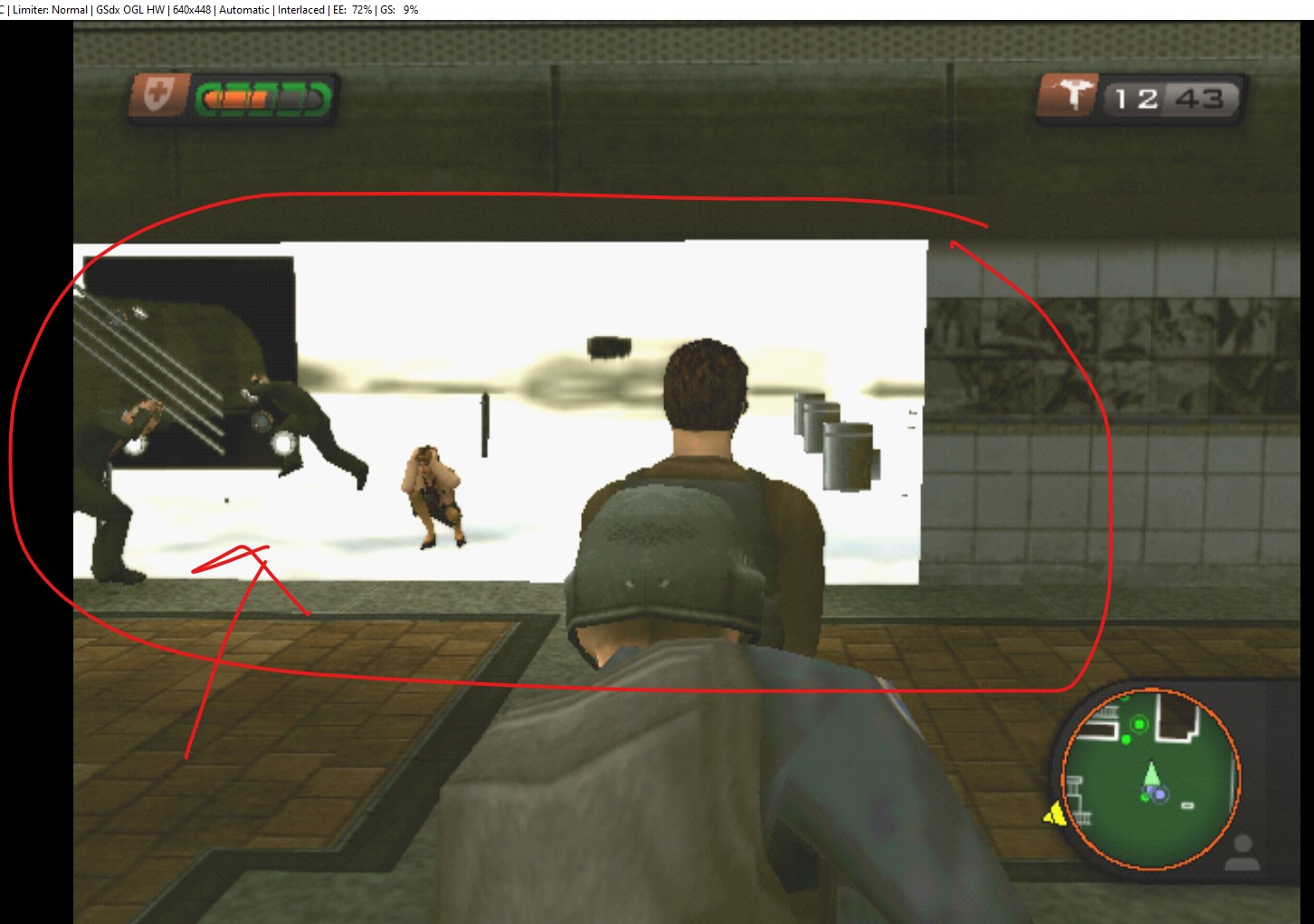
Using the latest version pcsx2-v1.7.0-dev-233-g6229b204f-windows-x86 but getting white textures. Any advice given would be great - thanks.

 kkcsteven
on 13 Sep 2020
kkcsteven
on 13 Sep 2020
Does pressing F9 fix it? if so we can try some other things.
refractionpcsx2
on 13 Sep 2020
@kkcsteven Thanks for reporting, enable the VU kickstart hack in manual gamefixes and it will be resolved. I'll add it to the database shortly
MrCK1
on 13 Sep 2020
Related issues
 Javed-Iqbal-1
·
5Comments
Javed-Iqbal-1
·
5Comments
 bryc
·
5Comments
bryc
·
5Comments
 IceString3
·
3Comments
IceString3
·
3Comments
 leyo96
·
5Comments
leyo96
·
5Comments
 jobs-git
·
3Comments
jobs-git
·
3Comments