Patternfly-react: Dropdown menu in modal gets clipped or adds scrollbars to modal
Within a modal, the dropdown is causing our modals to have scrollbars when ideally the menu would be shown over the modal.
It would be better if the dropdown menu was parented to the body instead of within the same container as the dropdown. Popperjs could be used for dropdown to help with positioning and alignment.
There is a similar concern with dropdowns from patternfly base:
https://github.com/patternfly/patternfly-next/issues/2194
 christianvogt
All 35 comments
Hi @christianvogt thanks for filing! A few quick questions for you.
Please provide the steps to reproduce so we can better understand and address the issue. Feel free to link CodePen or another tool:
Is this bug currently blocking you or is there a workaround?
What is your product and what release version are you targeting?
Is this issue for PF3 or PF4?
 rachael-phillips
on 3 Sep 2019
rachael-phillips
on 3 Sep 2019
Hi @christianvogt I'm following up here. Is this still an issue after #2418 was merged?
rachael-phillips
on 16 Sep 2019
@rachael-phillips yes this is still a problem.
I don't have a simple way to create a codepen without patternfly being hosted on a CDN. So here's a snippet I tried in your live documentation by combining the modal and dropdown examples:
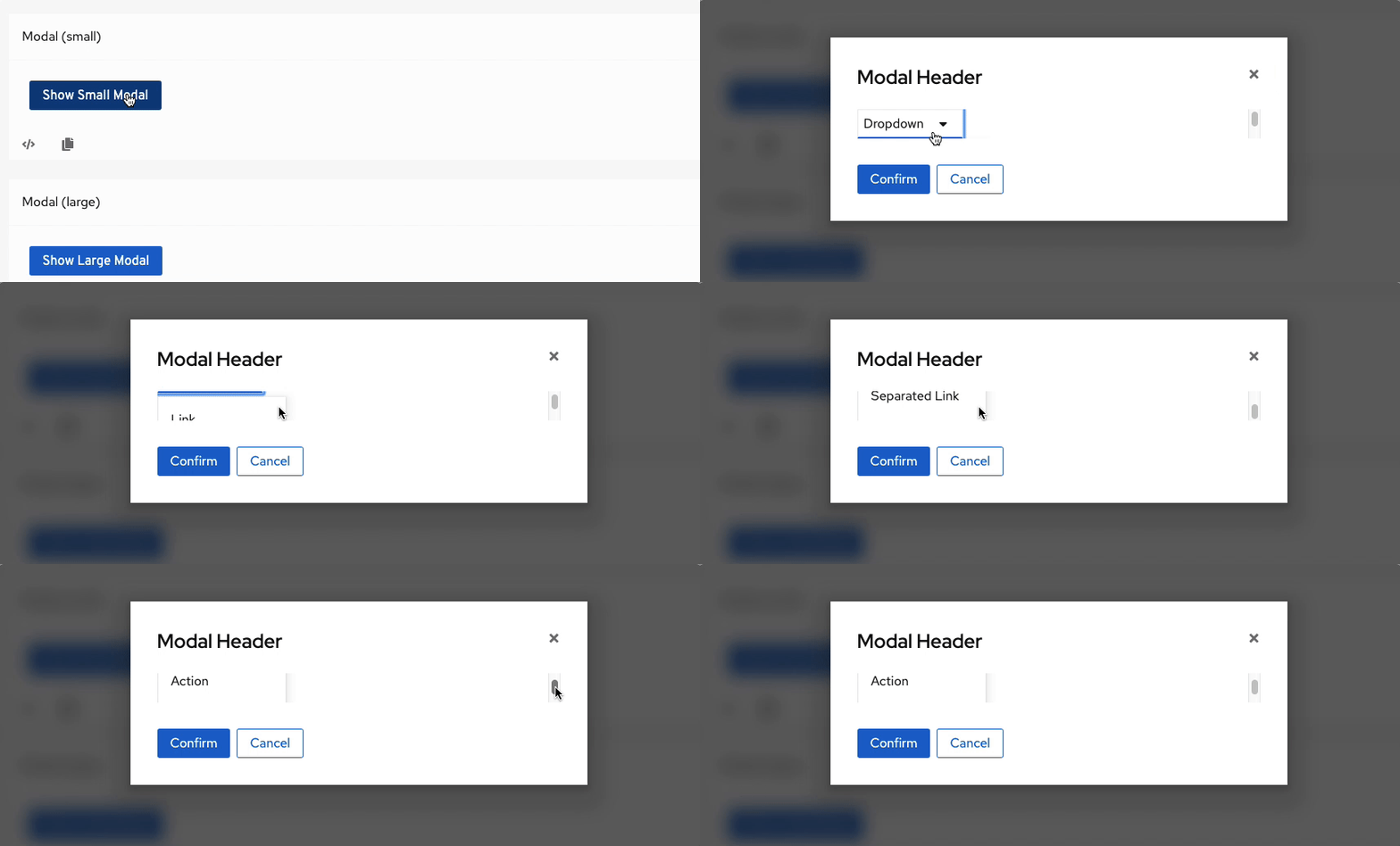
import React from 'react';
import { Modal, Button, Dropdown, DropdownToggle, DropdownItem, DropdownSeparator, DropdownPosition, DropdownDirection, KebabToggle } from '@patternfly/react-core';
import { ThIcon, CaretDownIcon } from '@patternfly/react-icons';

class SmallModal extends React.Component {
  constructor(props) {
    super(props);
    this.state = {
      isModalOpen: false,
      isOpen: false
    };
    this.handleModalToggle = () => {
      this.setState(({ isModalOpen }) => ({
        isModalOpen: !isModalOpen
      }));
    };
    this.onToggle = isOpen => {
      this.setState({
        isOpen
      });
    };
    this.onSelect = event => {
      this.setState({
        isOpen: !this.state.isOpen
      });
    };
  }

renderDropdown() {
    const { isOpen } = this.state;
    const dropdownItems = [
      <DropdownItem key="link">Link</DropdownItem>,
      <DropdownItem key="action" component="button">
        Action
      </DropdownItem>,
      <DropdownItem key="disabled link" isDisabled>
        Disabled Link
      </DropdownItem>,
      <DropdownItem key="disabled action" isDisabled component="button">
        Disabled Action
      </DropdownItem>,
      <DropdownSeparator key="separator" />,
      <DropdownItem key="separated link">Separated Link</DropdownItem>,
      <DropdownItem key="separated action" component="button">
        Separated Action
      </DropdownItem>
    ];
    return (
      <Dropdown
        onSelect={this.onSelect}
        toggle={<DropdownToggle onToggle={this.onToggle} iconComponent={CaretDownIcon}>Dropdown</DropdownToggle>}
        isOpen={isOpen}
        dropdownItems={dropdownItems}
      />
    );
  }

  render() {
    const { isModalOpen } = this.state;

    return (
      <React.Fragment>
        <Button variant="primary" onClick={this.handleModalToggle}>
          Show Small Modal
        </Button>
        <Modal
          isSmall
          title="Modal Header"
          isOpen={isModalOpen}
          onClose={this.handleModalToggle}
          actions={[
            <Button key="confirm" variant="primary" onClick={this.handleModalToggle}>
              Confirm
            </Button>,
            <Button key="cancel" variant="secondary" onClick={this.handleModalToggle}>
              Cancel
            </Button>
          ]}
          isFooterLeftAligned
        >
          {this.renderDropdown()}
        </Modal>
      </React.Fragment>
    );
  }
}
https://github.com/patternfly/patternfly-react/pull/2418 worked around the issue. But we have another use case that is experiencing this issue as well that we cannot easily work around.
christianvogt
on 16 Sep 2019
cc @mcoker
 tlabaj
on 3 Oct 2019
tlabaj
on 3 Oct 2019
@christianvogt mentioned https://github.com/patternfly/patternfly-next/issues/2194 which is the root issue.
It would be better if the dropdown menu was parented to the body instead of within the same container as the dropdown. Popperjs could be used for dropdown to help with positioning and alignment.
This could work, but we would need to see how that impacts the overall z-index structure we have in place for how components overlay other components.
I would like to investigate in https://github.com/patternfly/patternfly-next/issues/2194 if we can reconsider the modal's overflow behavior, since there is also an issue in general with short viewports and the way the modal creates a very small scrollable area for regular modal body content, too.
 mcoker
on 9 Oct 2019
mcoker
on 9 Oct 2019
Isn't a dropdown supposed to be an enhanced, more customizable variant of a <select> menu? The browser select menus appear on top of everything; even beyond the browser window itself.
What use cases are there to not have the dropdown menu appear above everything?
Furthermore popperjs allows for specifying the container for the cases where the menu _may_ need to be contained.
christianvogt
on 9 Oct 2019
What use cases are there to not have the dropdown menu appear above everything?
Just leaving my initial thoughts and want to verify we don't have a requirement for that. It very well may be the case that we don't. I think this would be a great enhancement to the dropdown.
popperjs allows for specifying the container
Even better!
mcoker
on 9 Oct 2019
@christianvogt @tlabaj I ran the issue by @mcarrano and we decided to stick with the overflow behavior in the modal if possible. This solution seems like a good addition to the dropdown and potentially other components like it (options menu and select).
Is the intention that we would have something like appendTo with the <Popover> that is unset by default, and you optionally define the container you want the menu to attach to? Or would we default to attaching the menu to the <body>, then allow a consumer change or unset that?
mcoker
on 10 Oct 2019
IMO body is a good default. Popperjs can even follow a node on scroll IIRC so even if the target is inside a scroll container but the popup is attached to the body, it will follow the target node. That being said giving the option to override is a good additional API.
christianvogt
on 10 Oct 2019
@tlabaj what do you think about adding support for this? This would also be the resolution to https://github.com/patternfly/patternfly-next/issues/2194
mcoker
on 18 Oct 2019
@tlabaj @mcoker
Is there any further discussion on using popper or tippy even?
Console has had to implement a custom solution here and we have many other issues with the PF dropdown in other areas.
christianvogt
on 13 Nov 2019
HI @christianvogt thank you for bringing this back up. I will be taking a look at this with @tlabaj this Friday, and we will get back to you.
rachael-phillips
on 13 Nov 2019
We will be addressing this issue in the Next repo, and we will attach an issue here once it is created.
rachael-phillips
on 15 Nov 2019
This seems to also be a problem in Stack and/ or PageSection:
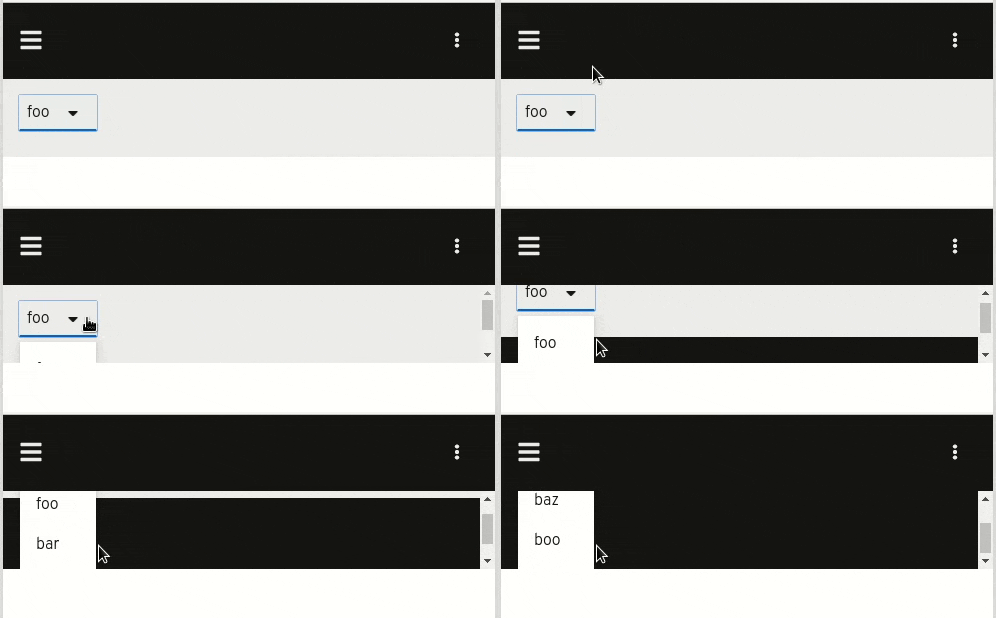
export class StatsView extends React.Component {
    constructor(props) {
        super(props);
    }

    public state = {
        durationDropdownOpen: false,
    };

    onDurationDropdownToggle = isOpen => {
        this.setState({ durationDropdownOpen: isOpen });
    };

    render() {
        const durationDropdownOpen = this.state.durationDropdownOpen;

        return (
            <PageSection>
            <Stack>
                <StackItem>
                    <Dropdown
                        position={DropdownPosition.right}
                        toggle={<DropdownToggle  onToggle={this.onDurationDropdownToggle}>{"foo"}</DropdownToggle>}
                        isOpen={durationDropdownOpen}
                        dropdownItems={["foo", "bar", "baz", "boo"].map(val => (
                            <DropdownItem key={val}>{val}</DropdownItem>
                        ))}
                    />
                </StackItem>
                <StackItem>
                    <div style = {{height: 10}} ></div>
                </StackItem>
            </Stack>
            </PageSection>
        );
    }
}
 jpf91
on 2 Dec 2019
jpf91
on 2 Dec 2019
@rachael-phillips what's the priority of this and what is the related PF next issue being tracked under? This is becoming more and more noticeable as we create more modals with dropdowns.
christianvogt
on 2 Dec 2019
We recently had to fix our kebab menus to use popper to avoid clipping at the end but would like to just migrate to a PF4 component.
Here was the initial work.
https://github.com/openshift/console/pull/3370
Same thing can be done with tippy.js
christianvogt
on 2 Dec 2019
@rachael-phillips why is this on hold and why is it p4? We've had issues with this bug since August 24.
christianvogt
on 12 Dec 2019
Hi @christianvogt I apologize for the delay on this issue. After we saw your comments we have been looking into this from a design perspective because we understand that https://github.com/patternfly/patternfly-next/issues/2194 in PF next won't address all of the design asks here. Thank you for your patience as we look into this.
rachael-phillips
on 12 Dec 2019
I'm not sure what that means from a design perspective. Unless that means designing separate menu components that can be used outside of the dropdown itself so that with react we can position the menu rooted at the body to fix this issue.
christianvogt
on 12 Dec 2019
@rachael-phillips do you have an update on this?
christianvogt
on 18 Dec 2019
@christianvogt After discussing with @mcoker we have a couple of potential actions. First, wanted to make sure you are aware that it's possible to make a select list or dropdown expand up rather than down. See https://www.patternfly.org/v4/documentation/react/components/select#single If you changed your dropdown near the bottom of the modal to expand up, would it solve this problem?
Besides that, we do want to pursue the solution you suggested to allow for attaching the menu to a parent container and floating it on top, as you suggest. There is an open issue for that here: https://github.com/patternfly/patternfly-next/issues/1429 Is this essentially what you are requesting? This would provide a number of benefits beyond that modal overflow situation that you've described. This will require some changes to the way our dropdowns and selects are currently built, however, and we will need to figure out when that work can be scheduled.
 mcarrano
on 18 Dec 2019
mcarrano
on 18 Dec 2019
@mcarrano Opening up is not a solution for us in the modal. While it's probably a sufficient bandaid for some cases, I don't believe a developer should need to concern themselves with the direction of the dropdown. Such behavior should be taken care of by the component library.
https://github.com/patternfly/patternfly-next/issues/1429 sounds like it would address the issue but it doesn't give me much confidence we will ever see an implementation based on how old that issue is.
That being said: tooltip, popover, dropdown, select, context menus, pickers etc are all variants of the same thing and should all share the same fundamental core.
christianvogt
on 18 Dec 2019
@christianvogt Agreed that this is something that's been sitting around for a long time, but we have lots of reasons why this is a good thing to do. @rachael-phillips @LHinson can we discuss getting this on the roadmap?
mcarrano
on 19 Dec 2019
This issue has been automatically marked as stale because it has not had recent activity. It will be closed if no further activity occurs.
![stale[bot] picture](https://avatars3.githubusercontent.com/in/1724?v=4&s=40) stale[bot]
on 17 Feb 2020
stale[bot]
on 17 Feb 2020
bump
christianvogt
on 17 Feb 2020
- We are tracking the design part of this issue here: https://github.com/patternfly/patternfly-design/issues/789
- The design issue is targeting the following milestone: https://github.com/patternfly/patternfly-design/milestone/6
- This issue is now pinned (so the stalebot will not close it) and will help track the react implementation of the modular dropdown
 LHinson
on 23 Mar 2020
LHinson
on 23 Mar 2020
We're also running into this on the OpenShift admin console. I was working with Brie and Collen on a PF4 modal migration and experienced this. We can't switch until this is fixed.
CC @jcaianirh @LHinson @beanh66 @bmignano
 rebeccaalpert
on 3 Jun 2020
rebeccaalpert
on 3 Jun 2020
Can we verify that the following two implementation stories will resolve this issue?
https://github.com/patternfly/patternfly/issues/2950 - Introduce Toggle dropdown component
https://github.com/patternfly/patternfly/issues/3015 - Introduce Context menu component
These look to be CSS changes to core, are there any additional issues that would need to be done to the React repo to resolve the scrolling effect vs. having dropdowns overlay on modals?
 catrobson
on 3 Jun 2020
catrobson
on 3 Jun 2020
I think that the short answer is yes @catrobson . @tlabaj can you comment more on this?
mcarrano
on 3 Jun 2020
@mcarrano I don't believe css will fix this.
So long as the dropdown menu DOM nodes are nested inside the scroll container, we will continue to see clipping.
The proper solution on the react side is to portal the menu to a higher node (eg. the body) so that it overlays above the scroll container.
christianvogt
on 3 Jun 2020
Sorry, but I think that I misread the question. Yes, you are correct @christianvogt . The two core issues that are referenced are only to give us a more modular dropdown approach that will enable this.
mcarrano
on 3 Jun 2020
@mcarrano - Can you help us get the relevant react issues created with the team? I'm hoping to take the full list of issues that are needed here into prioritization conversations for upcoming milestones.
catrobson
on 3 Jun 2020
@catrobson we will just track React work via this issue. @jschuler will work on this to target our 2020.08 milestone.
mcarrano
on 4 Jun 2020
In case anyone happens to stumble across this issue while the fix is in progress, I got around this in my project by setting a max height on the dropdown that fits within the modal.
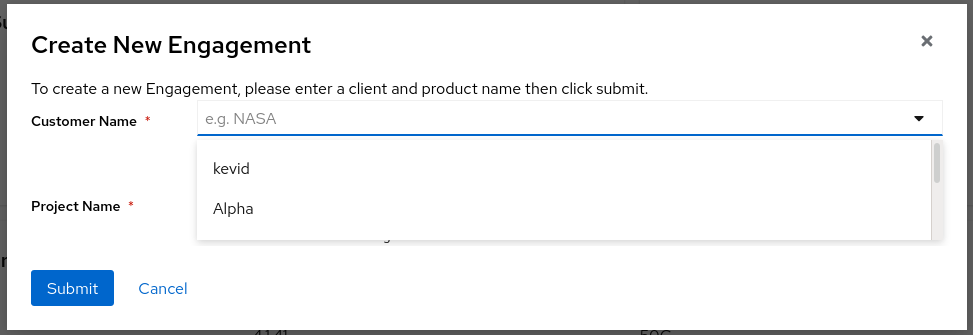
 sdstolworthy
on 16 Jun 2020
sdstolworthy
on 16 Jun 2020
Related issues
 dlabaj
·
4Comments
dlabaj
·
4Comments
 priley86
·
3Comments
priley86
·
3Comments
 eyevana
·
7Comments
eyevana
·
7Comments
 rvsia
·
5Comments
rvsia
·
4Comments
rvsia
·
5Comments
rvsia
·
4Comments