Patternfly-react: Horizontal form renders buttons in a column
Describe the issue. What is the expected and unexpected behavior?
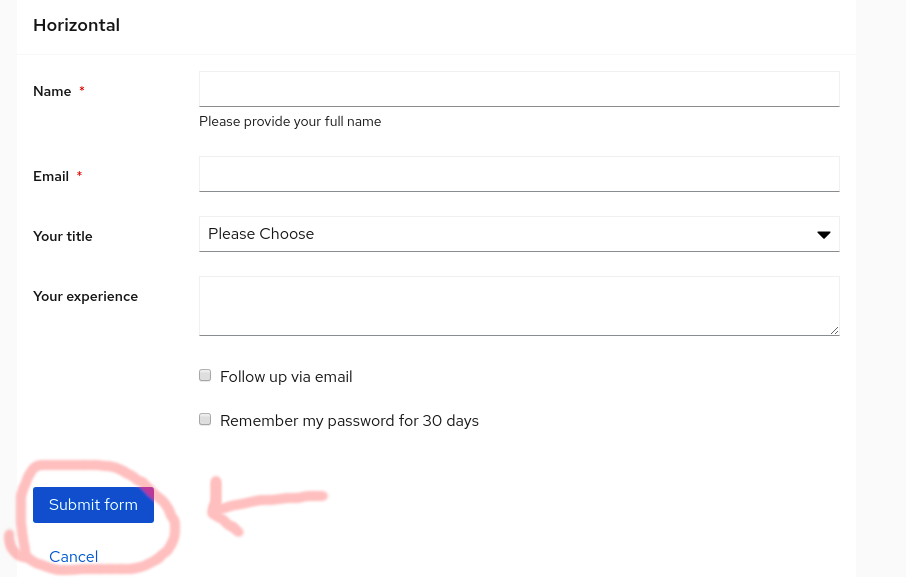
https://patternfly-react.surge.sh/documentation/react/components/form#horizontal
Buttons should be in a row, not in a column.
Is this a bug or enhancement? If this issue is a bug, is this issue blocking you or is there a work-around?
Bug. Blocking.
What is your product and what release version are you targeting?
Sources UI
We have a deadline for the upgrade on 7/6/2020.
 rvsia
rvsia
All 5 comments
cc @Hyperkid123 @karelhala
rvsia
on 15 Jun 2020
cc @evwilkin @tlabaj
 Hyperkid123
on 15 Jun 2020
Hyperkid123
on 15 Jun 2020
@tlabaj @mcoker it looks like the horizontal form has these styles applied for all .pf-c-form__group, including the .pf-m-action element containing the buttons circled in the screenshot above.
Should these styles be overruled for the .pf-m-action element?

 evwilkin
on 15 Jun 2020
evwilkin
on 15 Jun 2020
@evwilkin @tlabaj looks like the .pf-c-forms__actions element needs to be wrapped in .pf-c-form__group-control. Anything that belongs in the form control/elements section (the things on the right in a horizontal form) needs to be wrapped in .pf-c-form__group-control.
 mcoker
on 15 Jun 2020
mcoker
on 15 Jun 2020
@rvsia @Hyperkid123 we're working on getting this into the current milestone for release next week
evwilkin
on 17 Jun 2020
Related issues
 dlabrecq
·
5Comments
dlabrecq
·
5Comments
 SpyTec
·
3Comments
SpyTec
·
3Comments
 karelhala
·
5Comments
karelhala
·
5Comments
 crackcomm
·
4Comments
Hyperkid123
·
4Comments
crackcomm
·
4Comments
Hyperkid123
·
4Comments
Most helpful comment
@rvsia @Hyperkid123 we're working on getting this into the current milestone for release next week