Papirus-icon-theme: mullvad icon
'mullvad' icon name change to 'mullvad-vpn'

 Chamrosh
All 14 comments
@Chamrosh How abot tray icons?
 varlesh
on 23 Dec 2018
varlesh
on 23 Dec 2018
Hello Brother
I do not know, because elementary os disabled the system tray for other applications
Chamrosh
on 23 Dec 2018
Hi ) hm... i think need check sources
varlesh
on 23 Dec 2018
Chamrosh
on 23 Dec 2018
It's hardcoded tray icons:
https://github.com/mullvad/mullvadvpn-app/tree/master/gui/packages/desktop/src/assets/images/menubar%20icons
varlesh
on 23 Dec 2018
varlesh
on 23 Dec 2018
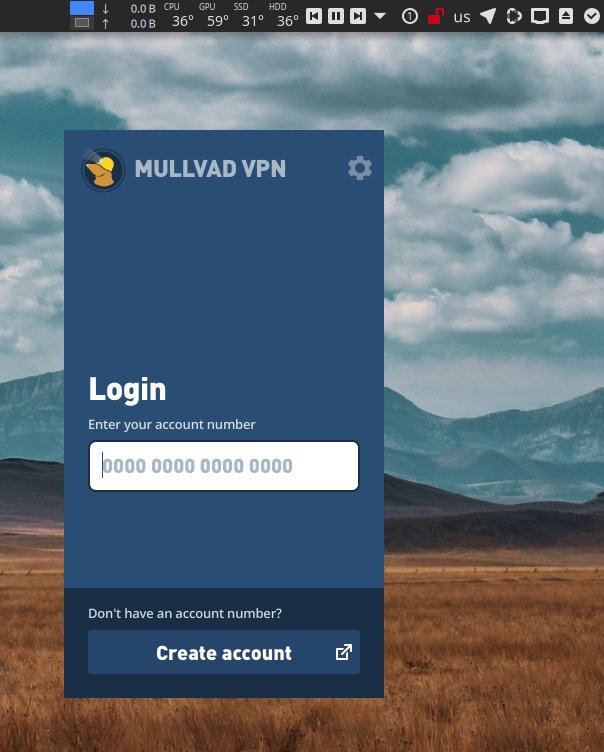
Apparently I'm not the only one who is a Mullvad devotee and thus has to look at that indescribably hideous tray icon. If you artistic geniuses could see your way clear to mocking up something that could be implemented with Hardcode-Tray, you'd have a new friend for life.
I don't think it needs to strictly adhere to their icon style either. I'd be elated with a scaled down version of the primary app icon that simply switched from monochrome to color to indicate the tunnel status.
 RogueScholar
on 1 Apr 2019
RogueScholar
on 1 Apr 2019
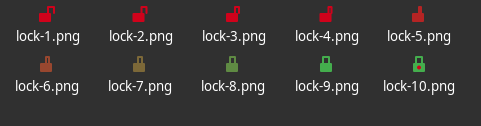
@Chamrosh @RogueScholar Guys you can to clarify what icons used for what?
varlesh
on 2 Apr 2019
I think from lock-2 to lock-8 or lock-9 - it's animation only
varlesh
on 2 Apr 2019
- lock-1 - mullvad not connected
- lock-2 - lock-8 - animation
- lock-9 - mulvad connected?
- lock-10 - mulvad connected?
varlesh
on 2 Apr 2019
@RogueScholar fixed, update Papirus and Hardcode-Tray from git and fix that.
varlesh
on 8 Apr 2019
@varlesh I just did as you suggested and I think you did a marvelous job! The outline of their logo identifies the app perfectly, and the choice to use rotational animation to signal the tunnel being created/destroyed is inspired. My only lingering desire would be for it to integrate better with dark color schemes.
I don't know if it's in keeping with your design philosophy, but my preference would be to use the current icon for active status as the inactive indicator, and then use a colored icon for the active state, either consistent with their official logo colors or a monochromatic bright green perhaps? Just a thought, but in any event I'm most grateful to you. :1st_place_medal:

RogueScholar
on 9 Apr 2019
@varlesh There is a new icon available: https://github.com/mullvad/mullvadvpn-app/blob/master/gui/assets/images/logo-icon.svg
 eax0r
on 4 Dec 2020
eax0r
on 4 Dec 2020
@eax0r updated
varlesh
on 5 Dec 2020
Related issues
 orschiro
·
23Comments
varlesh
·
37Comments
varlesh
·
113Comments
orschiro
·
23Comments
varlesh
·
37Comments
varlesh
·
113Comments
 heldderarbeit
·
29Comments
varlesh
·
89Comments
heldderarbeit
·
29Comments
varlesh
·
89Comments