Papirus-icon-theme: How to improve Inkscape experience?
Hi all,
We had a small discussion on the Solus Google+ regarding the default Papirus Inkscape icons.
They are very hard to distinguish from each other and all almost look the same.
Any ideas what we can do or how to improve the Inkscape user experience with Papirus?
Thanks!

 orschiro
All 23 comments
They are very hard to distinguish from each other and all almost look the same.
Hi. We use monochrome icons for all actions - it's Papirus style and not be changed!
I recommend open issue on inkscape bugtracker for add option use built-in icons or choose icon theme pack on preferencies
 varlesh
on 31 Jul 2017
varlesh
on 31 Jul 2017
varlesh
on 31 Jul 2017
varlesh
on 31 Jul 2017
I recommend open issue on inkscape bugtracker for add option use built-in icons or choose icon theme pack on preferencies
Will do, thanks!
orschiro
on 31 Jul 2017
Inkscape already have icon theme on /usr/share/inkscape/icons/icons.svg, but option for use built-icons not available. Also see #542 GTK2_RC_FILES key not worked for inkscape.
varlesh
on 31 Jul 2017
but option for use built-icons not available
So basically opening a bug ticket and request an option in the interface that allows people use the built-in icons, right?
orschiro
on 31 Jul 2017
yes, switch on/off button
varlesh
on 31 Jul 2017
Another way is to restore the default Inkscape icons and create a separate theme for the Inkscape.
Pros:
- the theme can be used in Windows, Mac OS and along with other themes of icons.
Cons:
- one more project/repo/package
 SmartFinn
on 31 Jul 2017
SmartFinn
on 31 Jul 2017
@SmartFinn What you mean restore the default Inkscape icons?
Inkscape icons contained on single file /usr/share/inkscape/icons/icons.svg. Need write script for render every icon or doing this manualy.
varlesh
on 31 Jul 2017
this file use ID identification (similar with icons for plasma theme)
varlesh
on 31 Jul 2017
file contained 372 ID layers
varlesh
on 31 Jul 2017
@varlesh I mean remove Inkscape specific icons from Papirus, and create separate icons.svg which can be installed optionally.
SmartFinn
on 31 Jul 2017
@varlesh I don't like the option, but it will solve the issues.
SmartFinn
on 31 Jul 2017
Not needed. It's upstream enhancement/bug. Gimp have this option
varlesh
on 31 Jul 2017
Inkscape guys have plans to remove the system that are working today. I mean, the load of incons.svg will be removed in near future.
So, I think the best choice is:
- Mantain the separated-icons in Papirus theme.
- The people must ask Inkscape developers for a implementation and configuration dialog for let the user choose the icon theme they want.
What do you think?
 jEsuSdA
on 31 Jul 2017
jEsuSdA
on 31 Jul 2017
@jEsuSdA
Mantain the separated-icons in Papirus theme.
How it possible if Inkscape plans to remove icons.svg support?
The people must ask Inkscape developers for a implementation and configuration dialog for let the user choose the icon theme they want.
An option for switching between built-in and system icons will be enough.
SmartFinn
on 31 Jul 2017
The people must ask Inkscape developers for a implementation and configuration dialog for let the user choose the icon theme they want.
There we go: https://bugs.launchpad.net/inkscape/+bug/1707835
Let's see what they think!
orschiro
on 1 Aug 2017
i voted.
@SmartFinn @thraemos @jEsuSdA please confirm this bug
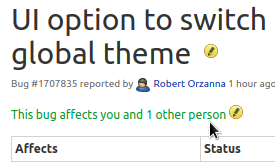
varlesh
on 1 Aug 2017
Thanks!
On Aug 1, 2017 7:54 AM, "Alexey Varfolomeev" notifications@github.com
wrote:
i voted
—
You are receiving this because you authored the thread.
Reply to this email directly, view it on GitHub
https://github.com/PapirusDevelopmentTeam/papirus-icon-theme/issues/587#issuecomment-319275402,
or mute the thread
https://github.com/notifications/unsubscribe-auth/AAKbw2zGYFqZoUZ0k8uPFEypwO3--KhZks5sTr2TgaJpZM4Ooe8p
.
orschiro
on 1 Aug 2017
Hi!
Excuse me for be late to this issue. I was on holidays. XD
I Like this initiative. It will be great to have an Inkscape configuration tool to select theme. ;) I vote for that!
jEsuSdA
on 24 Aug 2017
@orschiro See this https://github.com/PapirusDevelopmentTeam/papirus-icon-theme/issues/542#issuecomment-328324200
varlesh
on 10 Sep 2017
Would be really cool if had a switch to flip this theme on. This theme looks amazing!
 oleersoy
on 12 Feb 2019
oleersoy
on 12 Feb 2019
Any ideas what we can do or how to improve the Inkscape user experience with Papirus?
Personally, I'd like it if users could just use their own Inkscape icons, instead of having to use a set provided by the system-level icon set. Inkscape already comes with several icon sets, and having the inkscape-specific icons in a system icon set prevents users from using those sets that come with Inkscape / those that they install themselves (but that might be fixed soon).
 Moini
on 13 Feb 2019
Moini
on 13 Feb 2019
Anyway, Inkscape 1.0 will provide a theme switcher, and an icon set switcher, in the preferences.
http://wiki.inkscape.org/wiki/index.php/Release_notes/1.0#Theme_selection
Moini
on 13 Feb 2019
Related issues
 thirtysat
·
4Comments
thirtysat
·
4Comments
 JoshStrobl
·
7Comments
JoshStrobl
·
7Comments
 amrmsaraya
·
5Comments
amrmsaraya
·
5Comments
 Chamrosh
·
4Comments
jEsuSdA
·
8Comments
Chamrosh
·
4Comments
jEsuSdA
·
8Comments
Most helpful comment
i voted.

@SmartFinn @thraemos @jEsuSdA please confirm this bug