Papirus-icon-theme: Weird tray icon for internet connection via bluetooth
When connecting to a network via bluetooth the connections icon shows a rectangle (almost full? I do not know what it is)
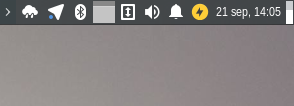
Could not find the name of this icon, This is what is displayed using the Elementary Xfce Darker icon theme:
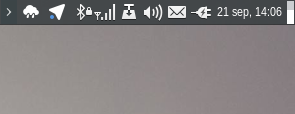
OS: Xubuntu 17.04
 Art-2
Art-2
All 14 comments
@Art-2 thx for report.
Not available icons for XFCE panel:
applications-email-panel.svg
audio-volume-muted-blocked-panel.svg
audio-volume-muted-blocking-panel.svg
audio-volume-off.svg
battery_charged.svg
battery_full.svg
battery-000-charging.svg
battery-000.svg
battery-020-charging.svg
battery-020.svg
battery-040-charging.svg
battery-040.svg
battery-060-charging.svg
battery-060.svg
battery-080-charging.svg
battery-080.svg
battery-100-charging.svg
battery-100.svg
battery-charged.svg
blueman.svg
gnome-do-symbolic.svg
gpm-battery-empty.svg
new-messages-red.svg
nm-device-wired-autoip.svg
nm-device-wireless.svg
nm-device-wwan.svg
nm-vpn-connecting12.svg
nm-vpn-connecting13.svg
nm-vpn-connecting14.svg
onboard-mono.svg
pithos-tray-plugin.svg
pithos.svg
preferences-desktop-accessibility-panel.svg
rhythmbox-notplaying.svg
start-here.svg
steadyflow-alert-panel.svg
steadyflow-panel.svg
system-devices-panel-information.svg
system-restart-panel.svg
xfce-newmail.svg
xfce-nomail.svg
xfce4-menu.svg
xfce4-mixer-volume-high.svg
xfce4-mixer-volume-low-medium.svg
xfce4-mixer-volume-low.svg
xfce4-mixer-volume-medium.svg
xfce4-mixer-volume-ultra-low.svg
xfce4-mixer-volume-very-high.svg
xfce4-notes-plugin.svg
xfpm-brightness-lcd.svg
xfpm-keyboard-030.svg
xfpm-mouse-030.svg
xfpm-phone-030.svg
 varlesh
on 21 Sep 2017
varlesh
on 21 Sep 2017
@Art-2 Please check
varlesh
on 22 Sep 2017
@varlesh the problem persists

Art-2
on 22 Sep 2017
@Art-2 maybe you use hidpi display?
varlesh
on 23 Sep 2017
I think this icon nm-device-wwan used from Papirus/48x48/status/ and i don't understand why not used from Papirus/22x22/panel/
Also try reduce panel size.
varlesh
on 23 Sep 2017
This icons always preserve the same size of 22 px (do not increase their size by increasing the width of the panel) and indeed is nm-device-wwan
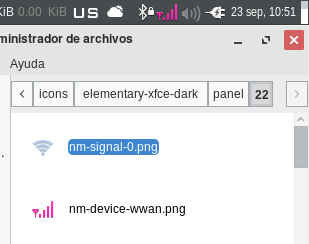
I updated the icons but is missing in this path Papirus/22x22/panel/ , i tried to manually put it there but it always used the icon in Papirus/48x48/status/
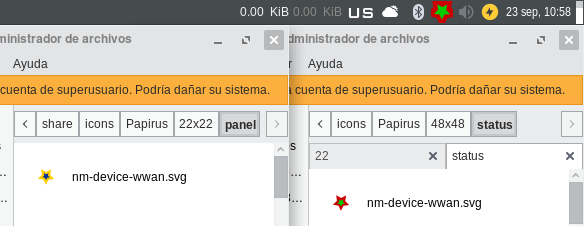
Art-2
on 23 Sep 2017
@Art-2 try to install Papirus.HiDPI from that branch https://github.com/PapirusDevelopmentTeam/papirus-icon-theme/tree/HiDPI Just for a test.
 SmartFinn
on 23 Sep 2017
SmartFinn
on 23 Sep 2017
@SmartFinn oki, (I am using a regular display)

Art-2
on 23 Sep 2017
@Art-2 Check please again
varlesh
on 23 Sep 2017
@varlesh must be this one?
(Papirus)

(Papirus-Light)

Art-2
on 24 Sep 2017
@Art-2 Sorry, it's my fault. I'm confused with ln -s and ./new-symlink.sh targets.
Now added absent links.
@SmartFinn Кстати, может правда в ./new-symlink.sh поменяем цель симлинк местами? Я вот путаюсь иногда по аналогии с ln. Плюс так удобней вбивать несколько симлинков подряд
varlesh
on 24 Sep 2017
@varlesh для меня так кажется логичней, ведь при создании у тебя уже есть имя симлинка и его вставляешь первым, а потом ищешь имя иконки и вставляешь вторым. Может я и ошибаюсь с логикой, посмотрю как наоборот будет.
SmartFinn
on 24 Sep 2017
@SmartFinn Часто бывает, когда надо на один значок добавить несколько симлинков и курсор все равно приходится перемещать в начало - это неудобно. И путаницы не будет с ln
varlesh
on 24 Sep 2017
i think it is fine now

Art-2
on 24 Sep 2017
Related issues
 Ste74
·
22Comments
Ste74
·
22Comments
 orschiro
·
23Comments
varlesh
·
285Comments
varlesh
·
113Comments
orschiro
·
23Comments
varlesh
·
285Comments
varlesh
·
113Comments
 acutbal
·
40Comments
acutbal
·
40Comments