Outlookgooglecalendarsync: Unable to reclaim orphan calendar entries in Outlook calendar 2.7.8.5
OGCS Version: 2.7.8.5
Installed or Portable: Portable
Problem Description
After applying the 2.7.8.5 hotfix everything worked for 3 syncs but returning to work after a few days off this Orphan error occurred and no syncing is done anymore.
Steps to Reproduce the Issue
- Just every sync this occurs
Any other information
tried to sync with 0 days in the past and 0 days in the future but still this occurs. I'm using the latest hotfix version 2.7.8.5
 rikoos
All 14 comments
:spiral_notepad: Please provide your OGcalsync.log file (see instructions).
🗒 v2.7.8.5 was posted against #702
 phw198
on 23 Apr 2019
rikoos
on 24 Apr 2019
phw198
on 23 Apr 2019
rikoos
on 24 Apr 2019
Oeps i accidently closed it, hopefully it is open again.
rikoos
on 24 Apr 2019
I've been having this for a while now. Have tried different settings but couldn't find a workaround. Syncs fine for the first step (Outlook -> Google) but same error when it starts going about the Outlook one.
Since it started appearing, I've stopped using the app, just opening every once in a while to sync the Outlook stuff into Google, as it crashes before syncing anything the other way.
Attached log.
Thanks!
OGcalsync.log
 Vladzor
on 25 Apr 2019
Vladzor
on 25 Apr 2019
@Vladzor Yours is issue #689 which already has a fix posted.
phw198
on 26 Apr 2019
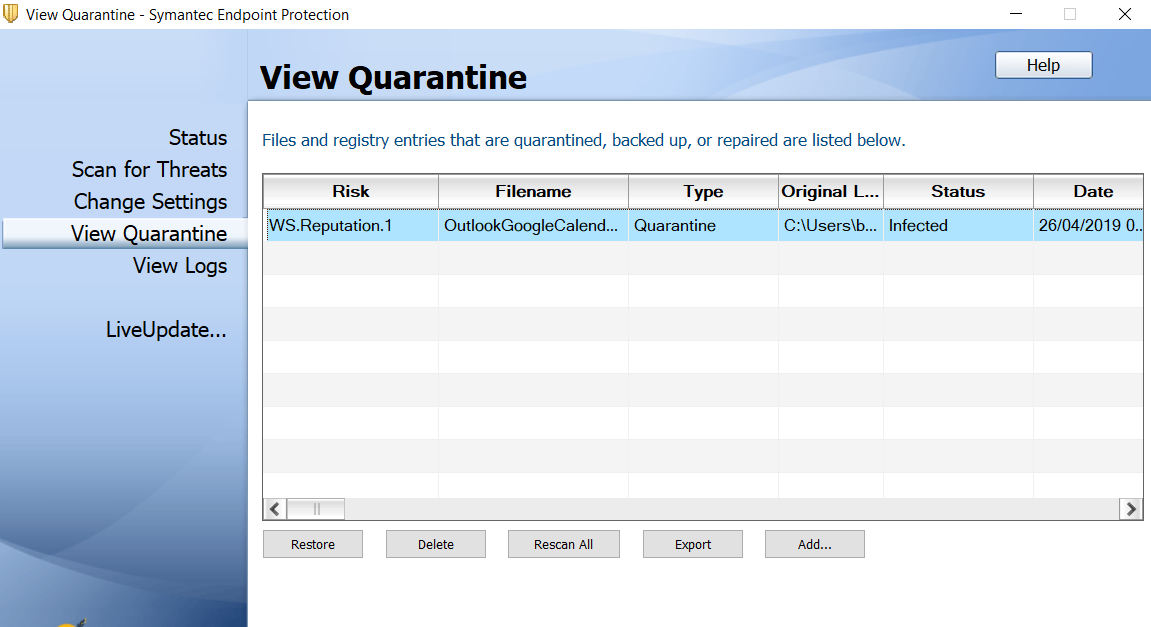
EDIT: Googled what the error in Symantec was, whitelisted in antivirus, works fine now, was able to identify appointment that triggered the error, deleted recurring appointment in both calendars, then recreated, sync working fine now. Thanks very much!
@phw198
I am using the portable version (don't know if it makes any difference.
Followed instructions, downloaded hotfix, replaced exe with hotfix one.
When I ran it, it triggered the Windows defender, then the antivirus (Symantec Endpoint Protection).
Any advice?
Thanks!
Vladzor
on 26 Apr 2019
Sorry but this is a other issue !!!! This will make a mess if you post your other problems inside this.
Hopefully my issue is now not hijacked by this guy as i still have the Unable to reclaim orphan calender problem. Hopefully you will get a solution for my problem.
Thank you!
rikoos
on 29 Apr 2019
Some extra info: sync from Outlook -> Google works fine but the other way around from Google -> Outlook is giving the Orphan problems so this log file is only when syncing google to outlook.
rikoos
on 29 Apr 2019
@rikoos This might be slightly confusing but later hotfix numbers don't imply inclusion of previous hotfixes (as they may not have been confirmed fixed yet). Therefore v2.7.8.1 is not included in v2.7.8.5.
:package: I've therefore done a special build of all the accepted fixes since v2.7.8.0 - please could you try v2.7.8.7.zip (see instructions for applying).
Please let me know how it goes.
phw198
on 4 May 2019
@phw198 Hi Paul,
I used the 2787 version but unfortunately still an Orphan error.
rikoos
on 6 May 2019
Hello.
I am having the same issue, also with the 2787 version. I've also stopped using the app because of this issue long time ago. Maybe I will use only Otulook -> Google, that's working fine.
Please, tell me if you need extra details about the event that is failing.
Syncing Outlook ← Google
Checking for orphaned items...

Failure processing Outlook item:-
14.05.2019 15:30 "visite GC"
Unable to reclaim orphan calendar entries in Outlook calendar.
Object reference not set to an instance of an object.
Thanks indeed for the app. Despite this issue, the app is quite great.
 pomareta
on 6 May 2019
pomareta
on 6 May 2019
@rikoos @Rjjp So it's doing what I'd expect. The comment against v2.7.8.1 hotfix was:
This should prevent the cause of the problem from happening again (a bug with click and dragging an Outlook appointment, or copy-and-pasting an appointment).
However, it won't fix items that already have the problem, but it will now report which item(s) cause the sync to fail - these will need to be manually recreated.
phw198
on 7 May 2019
Hi Paul, thank you for clarifying this. indeed the problem is now gone! I deleted the recurring appointments (which had some manual changed entries), recreated these and the error is gone.
Thank you for the support !!
rikoos
on 8 May 2019
Understood! I've removed the problematic events and it has started working again.
Thank you so much for the great job!
pomareta
on 9 May 2019
Related issues
 tdalon
·
5Comments
tdalon
·
5Comments
 mkorenbl
·
6Comments
mkorenbl
·
6Comments
 fyates
·
4Comments
fyates
·
4Comments
 jjkober
·
7Comments
phw198
·
3Comments
jjkober
·
7Comments
phw198
·
3Comments