Outline: File upload in document editor fails with some S3 regions
File upload to S3 fails in document editor, when the S3 bucket is in an AWS region that only supports signature version 4. The list of the regions and their signature version support is here. Avatar upload when logging in first time works fine since it uses aws-sdk.
The error message received from AWS is as follows:
The authorization mechanism you have provided is not supported. Please use AWS4-HMAC-SHA256
In this case I was using eu-central-1 region.
 egetin
All 9 comments
Thanks for the report @egetin! I'm going to create a new label for issues that only affect self-hosted instances.
 tommoor
on 16 Aug 2018
tommoor
on 16 Aug 2018
Hit by this as well. Let me see if I can file a PR for this.
 captn3m0
on 5 Mar 2019
captn3m0
on 5 Mar 2019
Based on the AWS S3 Signature Version Doc: https://docs.aws.amazon.com/general/latest/gr/rande.html
| Region Name | Region | Status |
|--------------------------------|----------------|--------|
| Asia Pacific (Seoul) | ap-northeast-2 | Breaks |
| Asia Pacific (Osaka-Local) * | ap-northeast-3 | Breaks |
| Asia Pacific (Mumbai) | ap-south-1 | Breaks |
| Canada (Central) | ca-central-1 | Breaks |
| China (Beijing) | cn-north-1 | Breaks |
| China (Ningxia) | cn-northwest-1 | Breaks |
| EU (Frankfurt) | eu-central-1 | Breaks |
| EU (Stockholm) | eu-north-1 | Breaks |
| EU (London) | eu-west-2 | Breaks |
| EU (Paris) | eu-west-3 | Breaks |
| US East (Ohio) | us-east-2 | Breaks |
| Asia Pacific (Tokyo) | ap-northeast-1 | Works |
| Asia Pacific (Singapore) | ap-southeast-1 | Works |
| Asia Pacific (Sydney) | ap-southeast-2 | Works |
| EU (Ireland) | eu-west-1 | Works |
| South America (São Paulo) | sa-east-1 | Works |
| US East (N. Virginia) | us-east-1 | Works |
| US West (N. California) | us-west-1 | Works |
| US West (Oregon) | us-west-2 | Works |
captn3m0
on 13 Mar 2019
I switched our bucket to ap-southeast-1 as a temporary fix, but it still doesn't seem to be working. The file upload happens successfully (I can access the image S3 URL), but I only get a CORS error on the console and the image doesn't show up on outline

Cross-Origin Request Blocked: The Same Origin Policy disallows reading the remote resource at https://s3-ap-southeast-1.amazonaws.com/BUCKET_NAME. (Reason: CORS header ‘Access-Control-Allow-Origin’ missing).[Learn More]
Unhandled promise rejection TypeError: "NetworkError when attempting to fetch resource."
Is there any specific configuration to be applied on the bucket?
captn3m0
on 19 Mar 2019
@tommoor Can you help with the configuration please?
This is what we are currently using:
resource "aws_s3_bucket" "bucket" {
  bucket = "${var.bucket_prefix}${var.name}"

  acl = "private"

  tags {
    Name        = "${var.name}"
    environment = "production"
  }

  server_side_encryption_configuration {
    rule {
      apply_server_side_encryption_by_default {
        sse_algorithm = "AES256"
      }
    }
  }
}

data "aws_iam_policy_document" "policy" {
  statement {
    sid    = "1"
    effect = "Allow"

    actions = [
      "s3:*",
    ]

    resources = [
      "${aws_s3_bucket.bucket.arn}",
      "${aws_s3_bucket.bucket.arn}/*",
    ]
  }
}
Is there a workaround we can use?
The bucket is already in ap-southeast-1 so the issue is not the region one.
captn3m0
on 7 May 2019
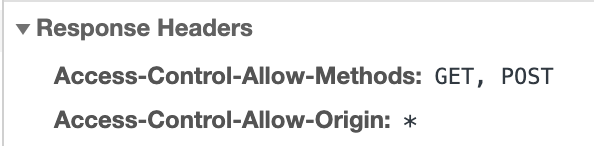
Hey @captn3m0 – as noted in the message from AWS you're missing the Access-Control-Allow-Origin header.
In the production application we allow GET and POST requests from any hostname, but you may restrict it as much as you like. This is a setting on the S3 bucket.
tommoor
on 8 May 2019
Thanks, it worked. I was unsure of the need for setting a CORS header because I misunderstood this old comment to mean that CORS wasn't needed (instead of CORS on wildcard wasn't needed): https://github.com/outline/outline/pull/766#issuecomment-417831493
captn3m0
on 8 May 2019
Ah, apologies for the confusion – glad you got it working 👏
tommoor
on 8 May 2019
If you're following this then the fix is now published in version 0.31.0 – you'll need to add a new AWS_REGION environment variable when upgrading. Something like:
AWS_REGION=us-east-1
tommoor
on 19 Jun 2019
Related issues
tommoor
·
4Comments
 gaui
·
6Comments
gaui
·
6Comments
 JoeyJanson
·
8Comments
JoeyJanson
·
8Comments
 harinij
·
4Comments
tommoor
·
9Comments
harinij
·
4Comments
tommoor
·
9Comments
Most helpful comment
Hit by this as well. Let me see if I can file a PR for this.