Outline: Linking to an anchor in the same document
Doesn't work as expected. I think links that begin with '#' need special treatment.
 tommoor
All 9 comments
Here is what I could notice:
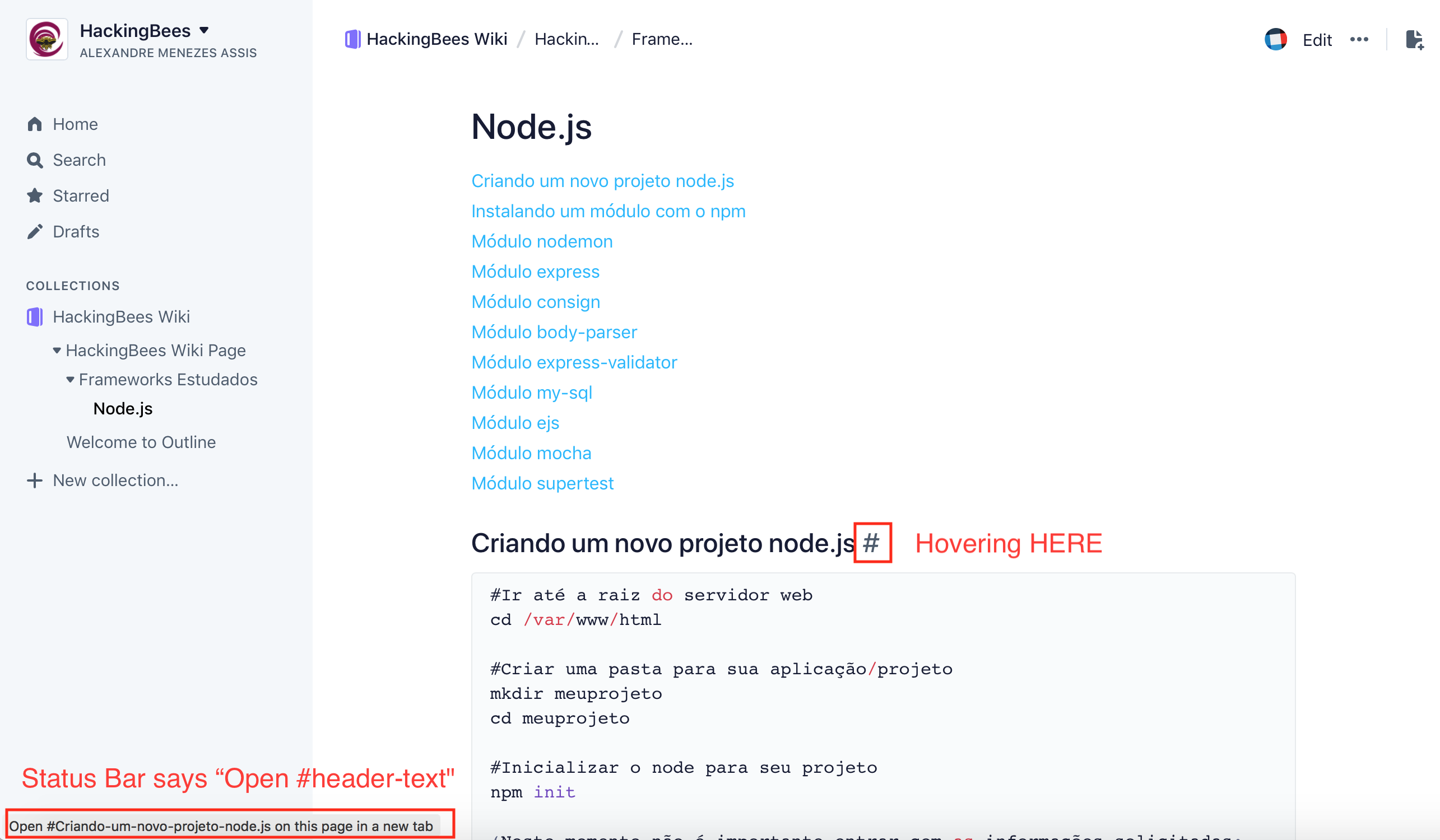
1) h1's generate an anchor and a link automatically - not sure why that is - they link to themselves.
ou can see that by hovering over the end of any h1 and you will notice a "#" sign - and a link in the status bar says "Go to #header-title-text" (screenshot below). If you click that link, it works - you can see the page "jump" to that position, even though it is not as useful, the link actually works.
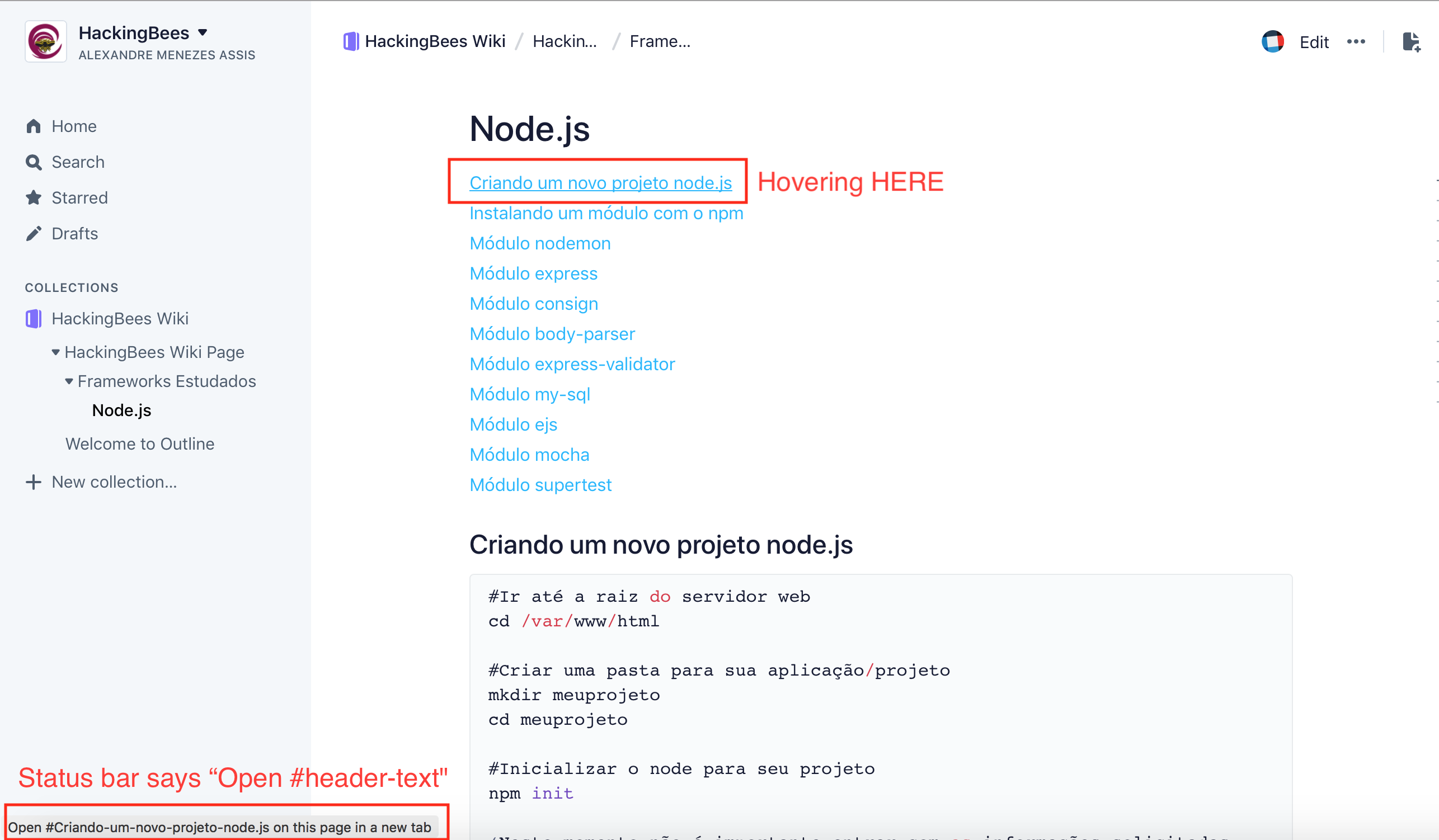
2) I tried creating a table of contents on the top of the page but I didn't know how to refer to those links. I tried both adding links in these two formats, neither one works:
a) This causes the browser to open a new tab with the same page. It doesn't browse to the anchor in the same page as expected.
#header-title-text
b) This doesn't do anything
https://www.getoutline.com/doc/my-page-name-and-id#header-title-text
3) Curiously, hovering over the link I created with the full url - it shows me a different message in the status bar as "Open #header-title-text" (notice "Open" rather than "Go to" as mentioned in #1 - screenshot below)
I hope this helps somehow :)
Thanks
Alex
 amassis
on 5 Aug 2018
amassis
on 5 Aug 2018
Will definitely take a look into it! One thing you might not have noticed - the table of contents is automatically generated and can be seen by hovering your mouse on the right hand side of the document.
It might make sense to introduce an option to show it at the top of the document instead so you don't need to any of this manual linking…
tommoor
on 5 Aug 2018
Hmmmm I had not seen that. I noticed a few small “lines” on the right margin of the page, but couldn’t figure out it was a ToC. They are very discrete :)
Thanks!
amassis
on 5 Aug 2018
So a couple of key takeaways from this…
- [x] Clicking on the "#" next to headings should copy a link to the clipboard
- [x] Visiting a link with a "#" should correctly jump to the heading (this seems to be broken)
- [x] Ensure that manually creating links beginning with "#" works as expected
- [ ] Make the table of contents more obvious (optionally at the top of document?)
tommoor
on 5 Aug 2018
Regarding making the ToC more obvious (which I agree with, I usually forget
they are there), one idea I have is to let the user, while in edit mode,
insert a ToC into the document using the (+) button. Just make it another
insert option.
This way if you want to add it you can. You also have the ability to add it
anywhere in the document that you think makes sense.
On Sun, Aug 5, 2018 at 2:02 PM Tom Moor notifications@github.com wrote:
So a couple of key takeaways from this…
- Clicking on the "#" next to headings should copy a link to the
clipboard- Visiting a link with a "#" should correctly jump to the heading
(this seems to be broken)- Ensure that manually creating links beginning with "#" works as
expected- Make the table of contents more obvious (optionally at the top of
document?)—
You are receiving this because you are subscribed to this thread.
Reply to this email directly, view it on GitHub
https://github.com/outline/outline/issues/739#issuecomment-410547781,
or mute the thread
https://github.com/notifications/unsubscribe-auth/AA6tPQhu4EgZpz0OIurv-IUhcGVOUqUKks5uN11UgaJpZM4VvMko
.
 jasonquiz
on 5 Aug 2018
jasonquiz
on 5 Aug 2018
@tommoor perfect summary
@jasonquiz it is very common in wikis to be able to include a ToC on the top of a page, so, I would say it is definitely a good one :+1:
amassis
on 6 Aug 2018
Just a couple more details:
1) If you click any ToC item, it goes to the proper place, but the Header gets hidden behind the navbar (where the breadcrumbs are)
2) If you create a "Child Page" it goes below the "parent page" in the navigation to the left - but there is no reference inside the "parent page" as to the existence of children (i.e. Child Pages don't appear in the ToC and I couldn't find any indication there is a child page - other than the nav to the left. This is not very intuitive when reading.
amassis
on 6 Aug 2018
Hey @amassis fix incoming for the hidden behind navbar issue.
For the child documents, the sidebar is the place to find those for now. It's likely we'll introduce a nav at the bottom of the document to skip to children / next sibling but I'd consider that a separate issue. I want to make sure the scope of this one doesn't balloon :)
tommoor
on 7 Aug 2018
Absolutely.
Thank you!
Get Outlook for iOShttps://aka.ms/o0ukef
From: Tom Moor notifications@github.com
Sent: Tuesday, August 7, 2018 1:05:44 AM
To: outline/outline
Cc: Alexandre M. Assis; Mention
Subject: Re: [outline/outline] Linking to an anchor in the same document (#739)
Hey @amassishttps://nam01.safelinks.protection.outlook.com/?url=https%3A%2F%2Fgithub.com%2Famassis&data=02%7C01%7C%7Cf0295e460ea4419c4aae08d5fc1b0ccb%7C84df9e7fe9f640afb435aaaaaaaaaaaa%7C1%7C0%7C636692115456689850&sdata=LnGxZiEnaSsuheQQ17LnpBwhirB8ql%2Bjdv1u5%2BBEHJo%3D&reserved=0 fix incoming for the hidden behind navbar issue.
For the child documents, the sidebar is the place to find those for now. It's likely we'll introduce a nav at the bottom of the document to skip to children / next sibling but I'd consider that a separate issue. I want to make sure the scope of this one doesn't balloon :)
—
You are receiving this because you were mentioned.
Reply to this email directly, view it on GitHubhttps://nam01.safelinks.protection.outlook.com/?url=https%3A%2F%2Fgithub.com%2Foutline%2Foutline%2Fissues%2F739%23issuecomment-410926616&data=02%7C01%7C%7Cf0295e460ea4419c4aae08d5fc1b0ccb%7C84df9e7fe9f640afb435aaaaaaaaaaaa%7C1%7C0%7C636692115456846098&sdata=PT9gMpzeFgb4stnweCfJlsXXsLhKeDNQTn6GSkQ6C5A%3D&reserved=0, or mute the threadhttps://nam01.safelinks.protection.outlook.com/?url=https%3A%2F%2Fgithub.com%2Fnotifications%2Funsubscribe-auth%2FAJ2jJTl7AC3GMc-M5mekq5YeIyKt1-9jks5uORIYgaJpZM4VvMko&data=02%7C01%7C%7Cf0295e460ea4419c4aae08d5fc1b0ccb%7C84df9e7fe9f640afb435aaaaaaaaaaaa%7C1%7C0%7C636692115456846098&sdata=szr9wpCPq1HBP6WJgrYiaOO6A4nMAgoWzcdzqo3rbWE%3D&reserved=0.
amassis
on 7 Aug 2018
Related issues
 b3z
·
7Comments
b3z
·
7Comments
 ADWadmin
·
4Comments
tommoor
·
3Comments
ADWadmin
·
4Comments
tommoor
·
3Comments
 paladini
·
3Comments
paladini
·
3Comments
 carvalhorafael
·
5Comments
carvalhorafael
·
5Comments