Outline-client: Loss of internet access after waking from sleep/hibernation [WINDOWS]
Describe the bug
Internet access is lost after sleeping for a long period of time (one hour should be enough) or hibernating. Outline is still shown as connected but there is no internet access.
To Reproduce
Steps to reproduce the behavior:
- Connect outline
- sleep/hibernate
- wake from sleep after an hour or immediately after hibernation
- test internet access
Expected behavior
Outline remains connected and working after sleep or hibernation
Desktop (please complete the following information):
- OS: Windows 10 1903
Additional context
This issue does not occur on ios or mac. Android was not tested.
 Omoeba
All 2 comments
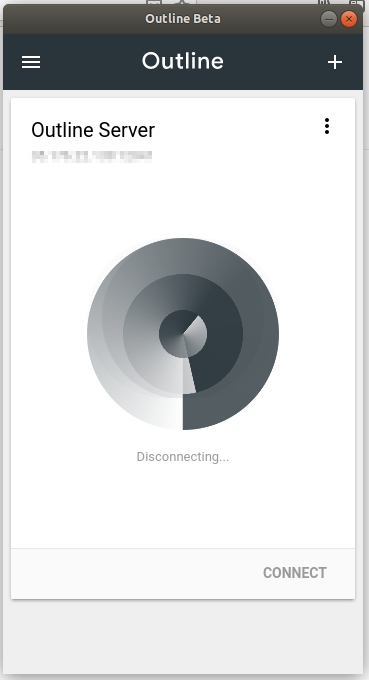
Same happens on Linux (Ubuntu 18.04.3), after waking up from sleep, internet access is lost and when I try to disconnect from Outline, it stays on disconnecting forever and nothing happens.
A restart is required to regain internet access.
Client version: Linux v1.0.10
 helnokaly
on 15 Aug 2019
helnokaly
on 15 Aug 2019
@Omoeba, sorry for the long delay. We fixed this issue in the Windows client some months ago; I just tested on Windows 10 1903. Please feel free to reopen if the issue persists.
@helnokaly, this is a known Linux issue - we are working on getting the Linux client out of beta and this is on our backlog.
 alalamav
on 22 Jan 2020
alalamav
on 22 Jan 2020
Related issues
 shanghaix
·
5Comments
shanghaix
·
5Comments
 AiprNick
·
8Comments
AiprNick
·
8Comments
 hwnahm
·
5Comments
hwnahm
·
5Comments
 RedL0tus
·
8Comments
RedL0tus
·
8Comments
 prashant-shahi
·
5Comments
prashant-shahi
·
5Comments
Most helpful comment
Same happens on Linux (Ubuntu 18.04.3), after waking up from sleep, internet access is lost and when I try to disconnect from Outline, it stays on disconnecting forever and nothing happens.
A restart is required to regain internet access.
Client version: Linux v1.0.10