Operating-system: HassOS 2.10 stuck at boot
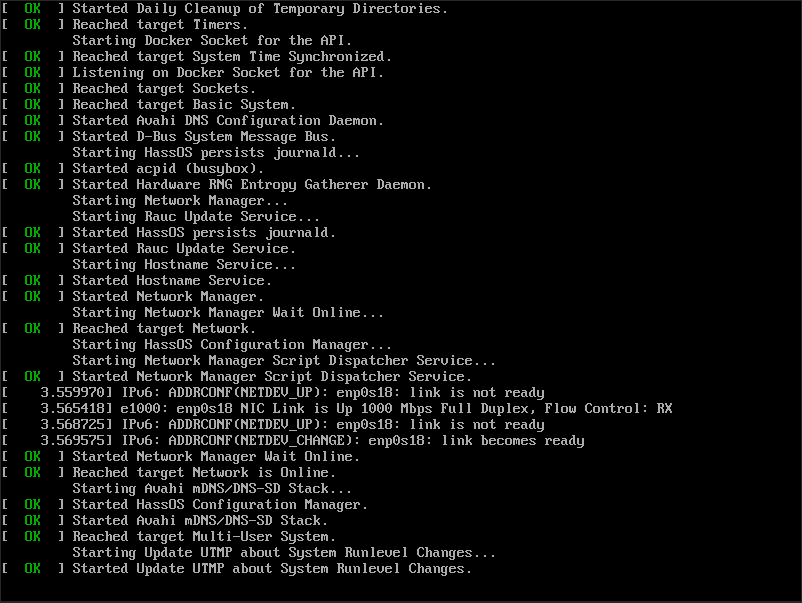
I was previously running 2.9 and tried updating to 2.10 via the Hassio menu. It seemed to work, except that after rebooting it won't start up anymore. It appears to be the same issue as #344 but I'm running the VMDK with Proxmox on a NUC. I have my data partition moved to a separate drive, but the partition labels all look correct still. I've tried reboot the VM and NUC to no avail.
 tboyce021
All 13 comments
Wrong button...
tboyce021
on 25 Feb 2019
As I see that on tinker boards, a reboot solve the issue. Anyway: Boot 3 times and it go back to the old installation. Look like a systemd target is not loaded :/
 pvizeli
on 26 Feb 2019
pvizeli
on 26 Feb 2019
I think it might be hosed. Rebooted several times and still same issue. I tried booting system 0 and 1 and neither seems to work. Anything else I can try? I'm not too concerned if I have to do a clean install though since I'm mostly just testing the setup right now.
tboyce021
on 26 Feb 2019
Any way I can test the fix? I can't seem to mount the system rw to edit that file. I tried just building a new image but the build fails telling me it can't find hassos-hostapps locally and pull access is denied.
tboyce021
on 26 Feb 2019
I ended up updating it by building an image with #370 and then using dd to replace my existing partition with the one with the fix. If I boot up with the original data partition, I can see the change on the filesystem. However, I still can't boot with an external data partition.
I got a better screenshot of the error messages:
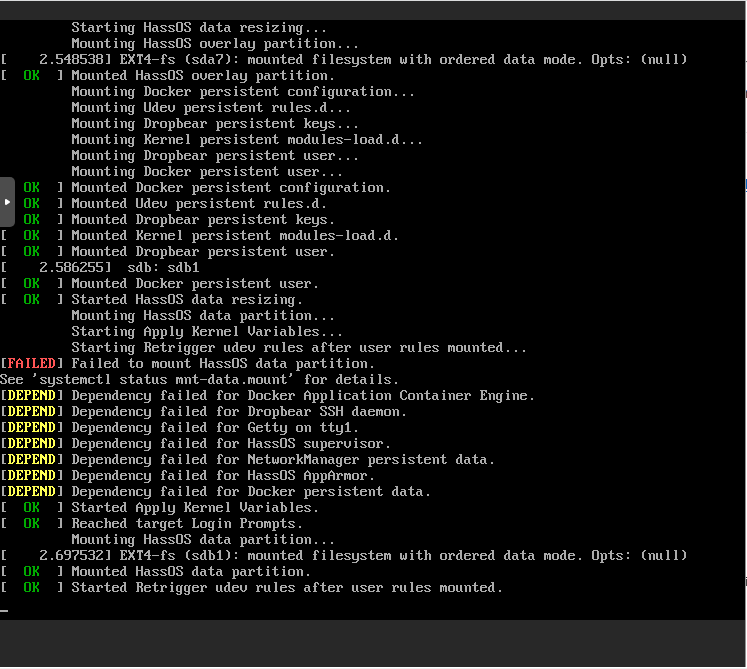
Not sure if they're just printed out of order, but it looks like the data partition is getting mounted after it already fails?
tboyce021
on 4 Mar 2019
Yes, it looks like you have right. The question and what we do not see, why this fails? It should wait until the device is available...
pvizeli
on 5 Mar 2019
Not sure what was going on. I did a clean install with #370 and went through the process of moving the data partition to a separate disk again. Currently seems to be working again :man_shrugging:.
Spoke too soon. Resized the disk, rebooted, and now it's not booting anymore. Same issue. Appears to be mounting the partition after it has already failed.
tboyce021
on 6 Mar 2019
Tried again without resizing and still same issue. Works for the first boot but subsequent boots all get stuck. There is no [FAILED] in the logs, but the dependencies still fail and don't seem to be waiting.

tboyce021
on 6 Mar 2019
I managed to fix this based on a comment in #164.
When running dd to copy the partition, if I specify of=/dev/sdb1 it will only work for the first boot. Specifying of=/dev/sdb works for reboots as well. I assume it has something to do with being the whole disk rather than a partition on the disk, but I'm not sure exactly why it doesn't work for a partition.
tboyce021
on 14 Mar 2019
You need remove the old partition
pvizeli
on 18 Mar 2019
Hi everyone, I just experienced something similar: I am running the hassio image on a RPi4 and I got the "Started Update UTMP... " error.
After checking the boot process again I noticed that the hassos-data partioion was not mounted due to block damage, inserting my SD into a linux box proved the same. I ran filesystem repair using gparted and could repair the disk, now everything works again :-)
Just wanted to put this here in case anyone lands here as I did, no need to reopen this or anything ;-)
 s00500
on 10 Dec 2019
s00500
on 10 Dec 2019
Hi everyone, I just experienced something similar: I am running the hassio image on a RPi4 and I got the "Started Update UTMP... " error.
After checking the boot process again I noticed that the hassos-data partioion was not mounted due to block damage, inserting my SD into a linux box proved the same. I ran filesystem repair using gparted and could repair the disk, now everything works again :-)Just wanted to put this here in case anyone lands here as I did, no need to reopen this or anything ;-)
Hi,
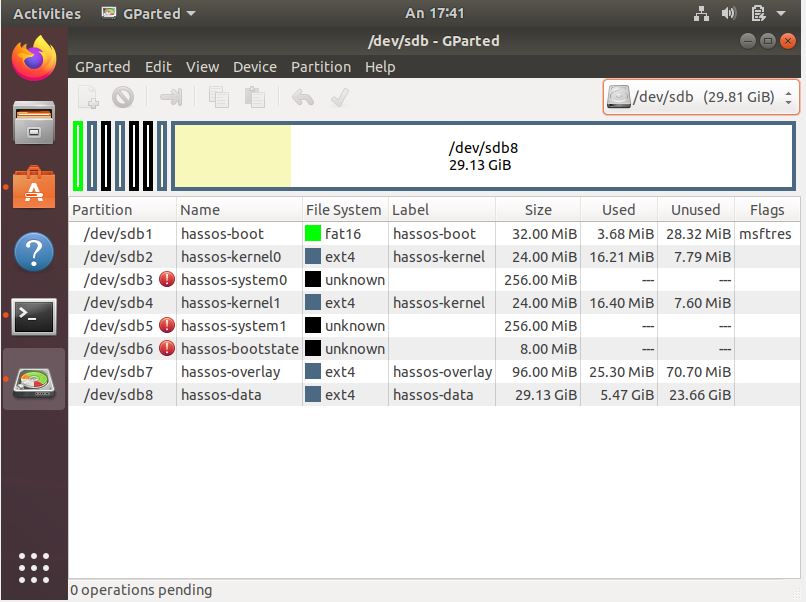
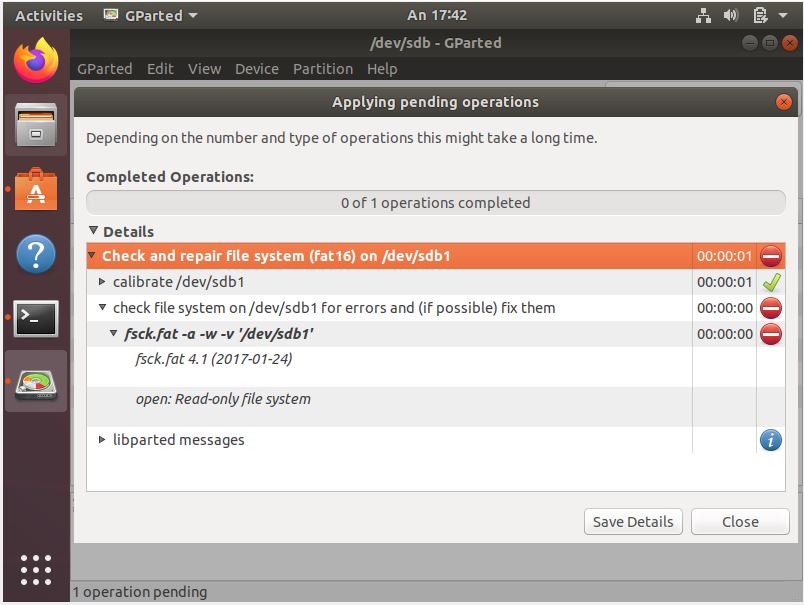
Seems that I have same problem, Data and/or Overlay partition cant be mounted during startup. Could you please explain me how you performed file system repair? I have tried gparted software and also terminal with fsck function, but I always get same message that partition is read-only and not possible to check/repair. I would appreciate detailed instructions (as I am newbie on linux) for file system repair. Thank you in advance!
 cigas4
on 24 Mar 2020
cigas4
on 24 Mar 2020
I have this same problem after updating HassOS and now can't boot...
 estiens
on 1 Apr 2020
estiens
on 1 Apr 2020
Related issues
 JoeyG1973
·
12Comments
JoeyG1973
·
12Comments
 pepeEL
·
14Comments
pepeEL
·
14Comments
 boaschti
·
13Comments
boaschti
·
13Comments
 Meph79
·
5Comments
pvizeli
·
10Comments
Meph79
·
5Comments
pvizeli
·
10Comments
Most helpful comment
Hi everyone, I just experienced something similar: I am running the hassio image on a RPi4 and I got the "Started Update UTMP... " error.
After checking the boot process again I noticed that the hassos-data partioion was not mounted due to block damage, inserting my SD into a linux box proved the same. I ran filesystem repair using gparted and could repair the disk, now everything works again :-)
Just wanted to put this here in case anyone lands here as I did, no need to reopen this or anything ;-)