Operating-system: RPI 3b+ cannot install hassio
Hi
My rpi hangs after a short time during install process.
First everything looks fine red led is on and green led flashes as usual.
Ping is Ok.
Then red and green led is on, Pi gets warm, no ping is possible. No reaktion after hours...
I use etcher, raspian and a other image (homeassistant) are running.
I tried hassos_rpi3-1.11, hassos_rpi3-1.12, hassos_rpi3-1.13, hassos_rpi3-2.3.
Any idea??
https://community.home-assistant.io/t/fresh-install-on-raspberry-pi-3-b/61836/28
 boaschti
All 13 comments
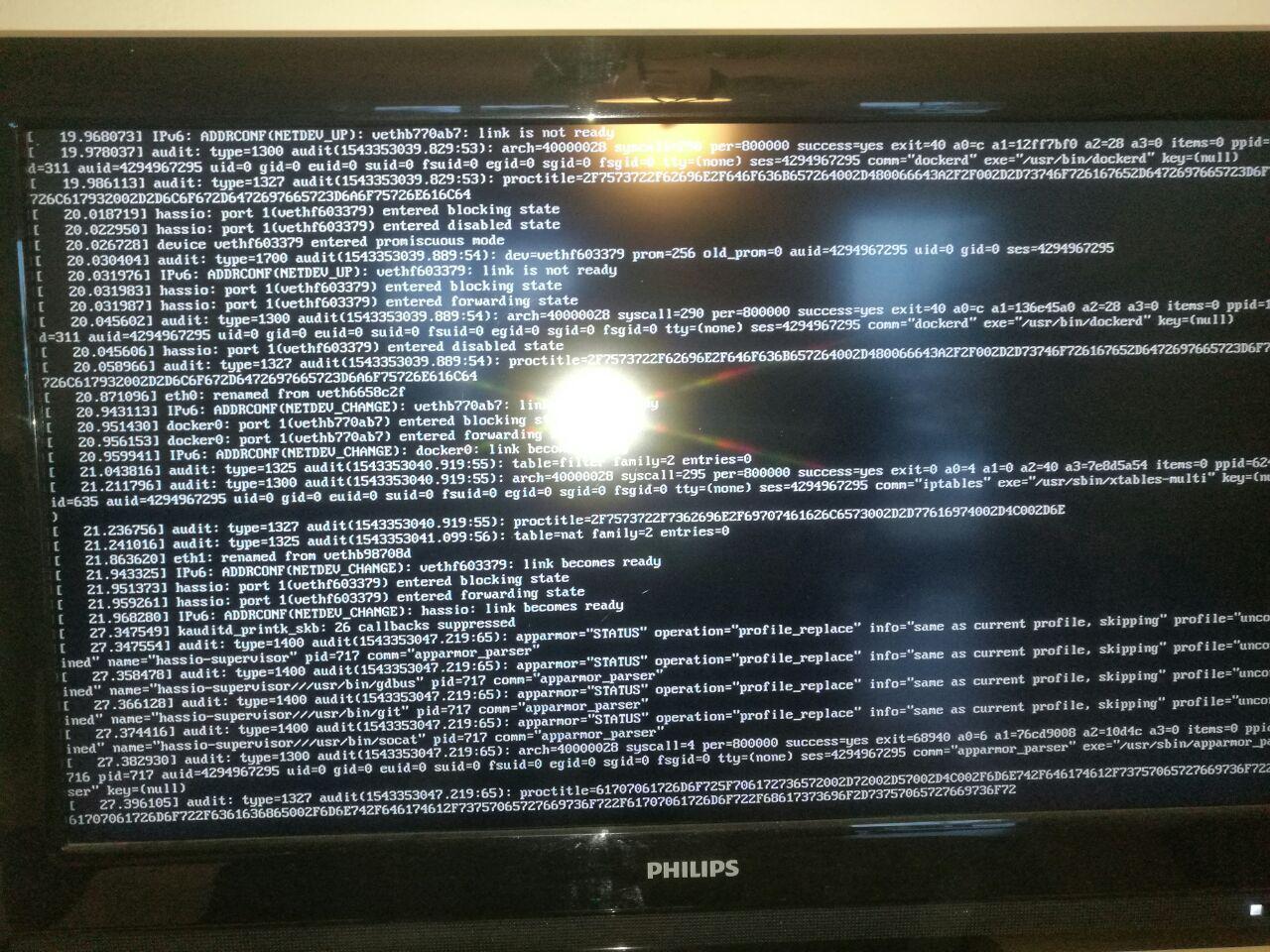
Can you attach an HDMI and look what you see? Maybe you can log in and use su logs or journalctl -f on shell itself.
 pvizeli
on 28 Nov 2018
pvizeli
on 28 Nov 2018
Here a photo. I think login is not possible. Now the green Led is off, red on, ping not possible.
boaschti
on 28 Nov 2018
It looks as same place as #246
Did you try file timesyncd.conf with NTP servers?
 mkh595
on 29 Nov 2018
mkh595
on 29 Nov 2018
Really no boot without ntp??? Ist it fixed in comming versions? Is rtc with auto detect an option? Looks exact the same. Can you explain what is to do?
boaschti
on 30 Nov 2018
Yes. The whole world use SSL and that work not with incorrect local time.
pvizeli
on 30 Nov 2018
Can someone please loop me in on what to do with the "timesyncd.conf" as in what it is and where i put/ alter it?? I'm having the same issues
 ajdezigns
on 10 Jan 2019
ajdezigns
on 10 Jan 2019
I don't know it yet. I was in hope that future image versions (2.4) are working... It is a little bit annoing for beginners or “not linux people“ to fail with the official “get started“ installation.
boaschti
on 10 Jan 2019
Please try the new 2.5 image, it should use hardware random device, which will improve https performance at boot time quite a bit.
Timesyncd config is explained in https://github.com/home-assistant/hassos/blob/dev/Documentation/configuration.md.
 jvanderneutstulen
on 10 Jan 2019
jvanderneutstulen
on 10 Jan 2019
Following solution works for me:
Image 2.5.
Put following lines into a file named timesyncd.conf on a usb stick named CONFIG. Put the USB stick into your pi before powering on.
[Time]
Servers=0.debian.pool.ntp.org 1.debian.pool.ntp.org 2.debian.pool.ntp.org 3.debian.pool.ntp.org
@pvizeli
Isn't it possible to put a valid standard file into the image?
boaschti
on 11 Jan 2019
And note: dont press update because the server will not boot again. I have no idea because there is no ssh active. That is the best idea ever to disable it in standard config ^^. I think my old hass 0.59 on old pi and old python will run for a longer time since the new things are running.... or i try a other system....
boaschti
on 19 Jan 2019
There is a working file they read the time from Google. You can use your own time server with the CONFIG folder on boot partition or USB stick.
pvizeli
on 19 Jan 2019
Yes but then there is another problem with the timeserver. Google is definitely reachable in my network.
boaschti
on 20 Jan 2019
This issue has been automatically marked as stale because it has not had recent activity. It will be closed if no further activity occurs. Thank you for your contributions.
![stale[bot] picture](https://avatars3.githubusercontent.com/in/1724?v=4&s=40) stale[bot]
on 16 Apr 2019
stale[bot]
on 16 Apr 2019
Related issues
 mrIngrid
·
11Comments
pvizeli
·
4Comments
mrIngrid
·
11Comments
pvizeli
·
4Comments
 Ayo91
·
9Comments
Ayo91
·
9Comments
 tboyce021
·
13Comments
tboyce021
·
13Comments
 pepeEL
·
8Comments
pepeEL
·
8Comments
Most helpful comment
Really no boot without ntp??? Ist it fixed in comming versions? Is rtc with auto detect an option? Looks exact the same. Can you explain what is to do?