Operating-system: Hassio does not start.
I'm trying to install HomeAssistant on my Raspberry PI 3 using this method (https://www.home-assistant.io/getting-started/ ) but it never start and just keep showing (Preparing Hass.io) for 24 hours so far. I connected my PI with HDMI to see the progress. IT shows that it stuck at this ( https://www.dropbox.com/s/3c5xflagy2f5gma/20181111_235144.jpg?dl=0 ). Can you help me understanding the problem ?
Thank you very much !
 azizBayouni
All 18 comments
I have same issue. I tried install _hassos_rpi3-1.11.img_ and also _hassos_rpi3-1.12.img_ but it hangs after 28 seconds, see picture

 mkh595
on 19 Nov 2018
mkh595
on 19 Nov 2018
Login as root and show the logs with su logs
 pvizeli
on 19 Nov 2018
pvizeli
on 19 Nov 2018
Log says
The HTTP request failed with the error: Get http://hassio/supervisor/logs: dial tcp 172.30.32.2:80: connect: connection refused
mkh595
on 19 Nov 2018
I restarted yesterday two RPI's via Hass.io>System>Reboot and both never started again. Then I tried new installation of HA from image but without success (picture above). To get my productive HA configuration working I copied SD card from test HA via HDDRawCopy, then restore snapshot, it started HA but someting is still wrong because sensor now().strftime('%A %d.%m.%Y %H:%M') shows now 19.11.2018 Monday 05.11.2018 20:37
mkh595
on 19 Nov 2018
If PR is done, how can I get working image with this correction?
I don't know linux and don't have linux machine so I am not able to build image myself.
mkh595
on 21 Nov 2018
I have the same problem with a Raspberry PI 3 and Raspberry Pi 3 Model B and B+ 32bit image obtaining an picture similar to the previous one (for more than 14 hours).
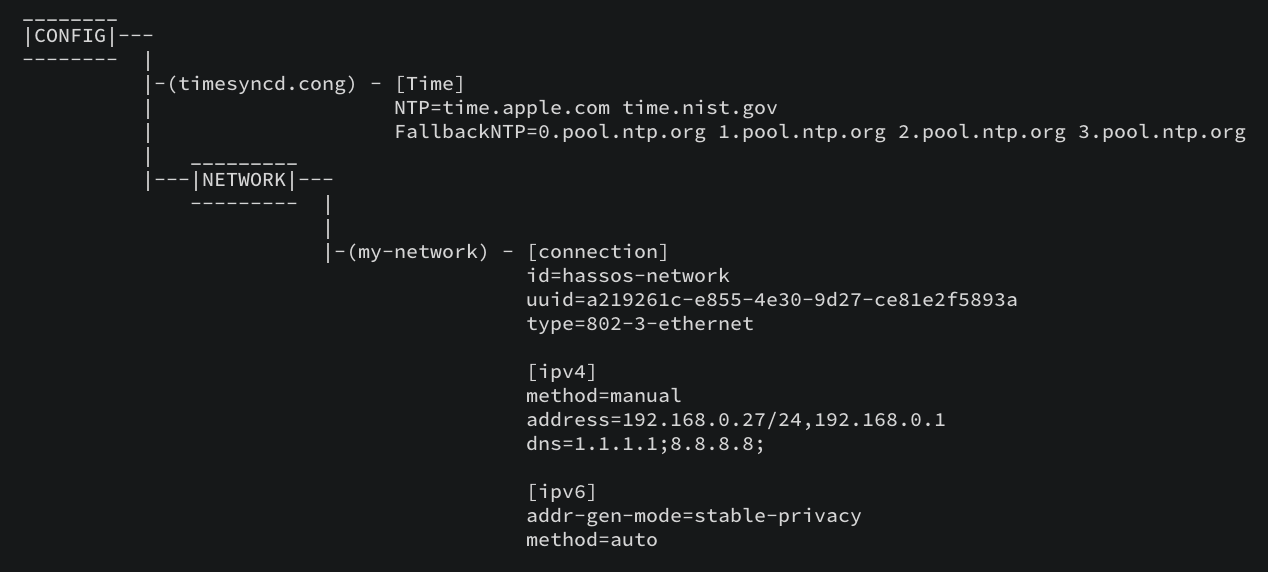
I have tried making the directory \CONFIG\network\ including the file my-network using a HassOS howto sample, but I get the same result.
Thank you very much!
 juandelaoliva
on 23 Nov 2018
juandelaoliva
on 23 Nov 2018
I tried image hassos_rpi3-1.13.img.gz and timesyncd.conf and instalation now works.
Thank you Pascal
mkh595
on 23 Nov 2018
Can someone please loop me in on what to do with the "timesyncd.conf" as in what it is and where i put/ alter it?? I'm having the same issues
 ajdezigns
on 10 Jan 2019
ajdezigns
on 10 Jan 2019
It is explained in https://github.com/home-assistant/hassos/blob/dev/Documentation/configuration.md. You may also want to try the new 2.5 image, it should use hardware random device, which will improve https performance at boot time quite a bit.
 jvanderneutstulen
on 10 Jan 2019
jvanderneutstulen
on 10 Jan 2019
I have attempted the new image 2.5 it errors out at the same place with the same issue. I just tried you're the instructions you provided with 1.3 no luck going to try with 2.5 and see what happens. really sux i wanted to give my home assistant a bit more power then a pi 2 it's been using
ajdezigns
on 10 Jan 2019
so just tried that and no go here is a break down of my USB stick
ajdezigns
on 10 Jan 2019

ajdezigns
on 10 Jan 2019
when you login to the host system (first 'root' and then 'login'), can you
- ping the dns servers?
- ping the time servers?
- what is the system's date/time?
jvanderneutstulen
on 10 Jan 2019
That’s the thing it just keeps looping the text in the photo I posted it never gives me the opportunity to do anything
Sent from my iPhone
On Jan 10, 2019, at 14:38, Jasper van der Neut - Stulen notifications@github.com wrote:
when you login to the host system (first 'root' and then 'login'), can you
ping the dns servers?
ping the time servers?
what is the system's date/time?
—
You are receiving this because you commented.
Reply to this email directly, view it on GitHub, or mute the thread.
ajdezigns
on 11 Jan 2019
I see a login prompt at the top in your photo, so you should be able to login locally using a keyboard. That should even work without any network. Also you might need to check your power supply or micro-usb cable, because you have 'Voltage normalized' message on the console. This indicates your pi has detected a low voltage condition, which may cause onboard devices to fail.
jvanderneutstulen
on 11 Jan 2019
I'm facing exactly the same problem, and I'm also out of ideas. I flashed the 1.13 image from the getting started and connected the RPi directly to the network via Ethernet. I can ping it, but no matter how long I'll wait, nothing ever shows up on port 8123. I even tried a different Raspberry to check if there's some hw failure but the issue is the same. The log from the RPi HDMI is useless (loops on a bunch of docker messages) and I can't get anything else from anywhere.. Honestly, I have no clue where to go from here.
 GPhilo
on 14 Jan 2019
GPhilo
on 14 Jan 2019
I'm having the same issues. Haven't been able to get my PI going either.
 mach7
on 19 Mar 2019
mach7
on 19 Mar 2019
Mine worked for a few days and now it's just looping the gibberish docker text on HDMI - Hassio never comes backup.
hassos_supervisor starts, crashes, dissapears, reappears and then over again.
 MTrab
on 16 Apr 2019
MTrab
on 16 Apr 2019
Related issues
 pepeEL
·
14Comments
pepeEL
·
14Comments
 rradar
·
10Comments
rradar
·
10Comments
 robmarkcole
·
11Comments
robmarkcole
·
11Comments
 Swiftnesses
·
10Comments
Swiftnesses
·
10Comments
 DidierLmn
·
6Comments
DidierLmn
·
6Comments
Most helpful comment
I'm facing exactly the same problem, and I'm also out of ideas. I flashed the 1.13 image from the getting started and connected the RPi directly to the network via Ethernet. I can ping it, but no matter how long I'll wait, nothing ever shows up on port 8123. I even tried a different Raspberry to check if there's some hw failure but the issue is the same. The log from the RPi HDMI is useless (loops on a bunch of docker messages) and I can't get anything else from anywhere.. Honestly, I have no clue where to go from here.