Operating-system: HassOS on SSD
Is it possible ton install HassOS on an SSD disk on a Raspberry Pi 3?
Does anybody knows how?
 hugodelaroza
All 197 comments
We want add a feature that it is allow to offload the data partition (they will be not RO) to a external drive. But that come with next version.
 pvizeli
on 18 Aug 2018
pvizeli
on 18 Aug 2018
Sorry, I can't understand you. Is there an addon that will allow this? or the next version of HASSOS will?
hugodelaroza
on 19 Aug 2018
As I understand, we will have to wait for the next HassOS release.
Regarding SSD/eMMC, will this also work for the Asus tinker board S? It has a 16Gb eMMC soldered. To burn an image on it you just have to connect it on a computer with a USB cable and use etcher. So no offload needed.
 mbo18
on 20 Aug 2018
mbo18
on 20 Aug 2018
Boot from SSD would be great feature.
 tdolder
on 23 Sep 2018
tdolder
on 23 Sep 2018
With the new update, there is amention of the odroid eMMC commit. I wonder if that means we can use SSD on pi3 bas well.
 tj31moll
on 28 Sep 2018
tj31moll
on 28 Sep 2018
@tj31moll Unfortunately there would be some effort required to allow non-SD card booting.
 rbray89
on 28 Sep 2018
rbray89
on 28 Sep 2018
What about the Asus tinker board S eMMC?
Got one, maybe I can help?
mbo18
on 1 Oct 2018
@rbray89 Can you please develop on this bit ? I was thinking of diving into this matter at some point, SD card are just unreliable. Can you please develop on what is blocking for the moment ? Thank you
 shyne99
on 3 Nov 2018
shyne99
on 3 Nov 2018
https://github.com/home-assistant/hassos/commit/960e11dc4f7f32fa3c4937a432ee79d0fe8f1686 was merged to dev. It includes a change for the tinkerboard that should provide the potential for booting off of eMMC, however due to not having the device, the change has yet to be verified.
USB booting is unfortunately usually out of the question, as there exists a chicken-in-the-egg scenario where the USB disk drivers have to be provided at boot.
rbray89
on 4 Nov 2018
So you are saying that no usb boot support will EVER be added to HassOS? This is a huge reliability complaint from the community.
 mrphyslaw
on 5 Nov 2018
mrphyslaw
on 5 Nov 2018
@murphyslaw05 It's not possible to boot directly from USB for most embedded devices. We'll attempt to boot from eMMC and USB when available, but it isn't always possible. You should note that there ARE plans to allow users to move the data partition onto USB as @pvizeli mentioned above.
You should also be aware that good quality SD cards often have no issues over long-running installs. (read the tips here: https://www.raspberrypi.org/documentation/installation/sd-cards.md)
If this continues to be an issue for you, I'd suggest moving to a platform where we support eMMC booting, or an efi x86 install.
rbray89
on 5 Nov 2018
Hi,
Thank you for your feedback.
As a user of SD cards on SBC in a professional way. I can assure you that SSD are way more reliable than SD card. SD card are the less reliable way to go for system partition, and good quality SD card only mitigate the issue, or postpone the inevitable partition corruption .
I think that your way of only putting boot partition o. SD card and lay the rest in SSD is a good solution. And this is actually a mandatory feature for a home automation system (again with reliability in mind)
shyne99
on 5 Nov 2018
@murphyslaw05 It's not possible to boot directly from USB for most embedded devices. We'll attempt to boot from eMMC and USB when available, but it isn't always possible. You should note that there ARE plans to allow users to move the data partition onto USB as @pvizeli mentioned above.
You should also be aware that good quality SD cards often have no issues over long-running installs. (read the tips here: https://www.raspberrypi.org/documentation/installation/sd-cards.md)
If this continues to be an issue for you, I'd suggest moving to a platform where we support eMMC booting, or an efi x86 install.
Thanks for the suggestions. I have a good quality card, over sized power supply, along with a ups, and do not have corruption issues, but many people do. However there is no viable way to have any sort of write intensive functionality. I am not familiar enough with the OS structure to know much about the limitations, I believe that some sort of version of external drive option was available with ResinOS. This is why myself and others are asking.
mrphyslaw
on 5 Nov 2018
@murphyslaw05 It's not possible to boot directly from USB for most embedded devices. We'll attempt to boot from eMMC and USB when available, but it isn't always possible. You should note that there ARE plans to allow users to move the data partition onto USB as @pvizeli mentioned above.
You should also be aware that good quality SD cards often have no issues over long-running installs. (read the tips here: https://www.raspberrypi.org/documentation/installation/sd-cards.md)
If this continues to be an issue for you, I'd suggest moving to a platform where we support eMMC booting, or an efi x86 install.
Hi.
Sorry for my possible lack of knowledge, but for the RPi 3B+ it's possible to boot directly from USB when using Eg. Raspbian - I know hassio is based on another system, but isn't it somehow possible to make a Hassio release for RPi 3B+ that makes it possible to boot from USB like eg. Raspbian?
And by the way, you are doing a fantastic job. :)
/Thomas.
 thomashup
on 8 Nov 2018
thomashup
on 8 Nov 2018
@murphyslaw05 It's not possible to boot directly from USB for most embedded devices. We'll attempt to boot from eMMC and USB when available, but it isn't always possible. You should note that there ARE plans to allow users to move the data partition onto USB as @pvizeli mentioned above.
You should also be aware that good quality SD cards often have no issues over long-running installs. (read the tips here: https://www.raspberrypi.org/documentation/installation/sd-cards.md)
If this continues to be an issue for you, I'd suggest moving to a platform where we support eMMC booting, or an efi x86 install.Hi.
Sorry for my possible lack of knowledge, but for the RPi 3B+ it's possible to boot directly from USB when using Eg. Raspbian - I know hassio is based on another system, but isn't it somehow possible to make a Hassio release for RPi 3B+ that makes it possible to boot from USB like eg. Raspbian?
And by the way, you are doing a fantastic job. :)
/Thomas.
I think you are getting confused with terminology here.
There are two versions of Hass.io. One is based on new system (HassOS) and other one is based on old system (ResinOS). You cannot boot from Hass.io based on HassOS, but you can boot from Hass.io based on ResinOS.
 cholek3
on 8 Nov 2018
cholek3
on 8 Nov 2018
Is there any progress with this question?
I really would like to use Hassio (hassos version) from msata with my rpi3b+ :(
I already lost 2 sd cards (sandisk ultras ...), now hassio is on a sandisk extreme plus, but I don't feel safe :)
Regards
Tamás
 taanczos
on 7 Jan 2019
taanczos
on 7 Jan 2019
Is any chance to add this feature?
 pepeEL
on 13 Jan 2019
pepeEL
on 13 Jan 2019
Hi
Maybe there is a way to put only db files to usb?
 szurr
on 19 Jan 2019
szurr
on 19 Jan 2019
@berg seems to be working on it: https://github.com/home-assistant/hassos/pull/318
mbo18
on 19 Jan 2019
Waiting to see result of this one https://github.com/home-assistant/hassos/pull/318 seems to be merged already into Dev
 ghost
on 1 Feb 2019
ghost
on 1 Feb 2019
Is there any progress with this question?
I really would like to use Hassio (hassos version) from msata with my rpi3b+ :(
I already lost 2 sd cards (sandisk ultras ...), now hassio is on a sandisk extreme plus, but I don't feel safe :)
Regards
Tamás
I have the same problem... I lost 2 sd cards too.. And they were a good brand. After that, I create automatic backups and upload to Dropbox. We need usb boot :(
 Ayo91
on 17 Feb 2019
Ayo91
on 17 Feb 2019
+1 an usb boot option would be very great, I have unused usb ssd that waits to run as an hassos hard drive
 tikkerei
on 19 Feb 2019
tikkerei
on 19 Feb 2019
Yes, my Pi has broken 2 Sandisk SD card. After some months they were corrupted.... We need this funcionality...
I have been researching and it seems a solution is install HA in other way around:https://www.home-assistant.io/docs/installation/raspberry-pi/
Any feedback?
Ayo91
on 20 Feb 2019
The main issue the data partition which gets written to a lot. The PR from @berg should be enough to move the data partition to an external drive. Basically it's two steps:
- Create ext4 partition with label
hassos-dataon the external drive. - Rename the partition
hassos-dataon the sdcard to something else.
With the RPI 3 you can (permanently) enable usb boot mode, but this will probably require changes in the uboot configuration, so a different image for usb and mmc. As an alternative it may be posssible to create a small usb-boot uboot image, so the bootloader lives on the sdcard and the other stuff is on the external disk. This principle can work with other targets as well.
 jvanderneutstulen
on 20 Feb 2019
jvanderneutstulen
on 20 Feb 2019
@Ayo91
You are correct that many other methods exist. This is specifically for those that prefer the HassIO method using the self contained HassOS image.
🙂
@jvanderneutstulen
The boot loader is an interesting idea as it would rarely need to be anything other than a read only device.
I wonder if maybe that is an option @Berg could work with rather than fully moving it all to a USB device.
You are right that the MMC and USB would likely need to be separate images, unless HassOS can be accept a txt config file with an option that could be toggled between USB and MMC boot modes
ghost
on 20 Feb 2019
I wonder if maybe that is an option @berg could work with rather than fully moving it all to a USB device.
You are right that the MMC and USB would likely need to be separate images, unless HassOS can be accept a txt config file with an option that could be toggled between USB and MMC boot modes
It will be awesome support that.
Ayo91
on 20 Feb 2019
The main issue the data partition which gets written to a lot. The PR from @berg should be enough to move the data partition to an external drive. Basically it's two steps:
- Create ext4 partition with label
hassos-dataon the external drive.- Rename the partition
hassos-dataon the sdcard to something else.
Has someone tested that? Because my HA is in live, its a monitoring system and an alarm and I dont want to break anything and stop the system. Should I migrate the content of the SD hassoss-data to the
new partition that I will create?
With the RPI 3 you can (permanently) enable usb boot mode, but this will probably require changes in the uboot configuration, so a different image for usb and mmc. As an alternative it may be posssible to create a small usb-boot uboot image, so the bootloader lives on the sdcard and the other stuff is on the external disk. This principle can work with other targets as well.
Some instructions for do that? small usb-boot uboot image and the rest in the SSD.
Thanks.
Ayo91
on 20 Feb 2019
The main issue the data partition which gets written to a lot. The PR from @berg should be enough to move the data partition to an external drive. Basically it's two steps:
- Create ext4 partition with label
hassos-dataon the external drive.- Rename the partition
hassos-dataon the sdcard to something else.Has someone tested that? Because my HA is in live, its a monitoring system and an alarm and I dont want to break anything and stop the system. Should I migrate the content of the SD hassoss-data to the
new partition that I will create?
I just tried this on my NUC (running HassOS VMDK on Proxmox) and it seems to have worked. I booted to an Ubuntu live USB and used gparted to rename/relabel the old partition to hassos-data-orig and create the new partition on a separate disk. Then I copied the data over using
sudo dd if=/dev/sda8 of=/dev/sdb1 bs=4096 conv=notrunc,noerror,sync
(update to use your paths)
That seems to have changed the label on the new partition to match the old one (hassos-data-orig), so I used gparted again to relabel the new partition to hassos-data.
Rebooted HassOS, briefly saw a message about it resizing the disk/partition, and can now see the new size with df -h /mnt/data.
You may be able to do this on a running system, but this was easier for me since I could ensure everything was shut down and not writing to the disk when I copied the contents.
 tboyce021
on 20 Feb 2019
tboyce021
on 20 Feb 2019
@tboyce021
Did you try the standard image as well as the virtual disk image?
In theory they should be the same, but the virtual disk image may have some tweaks in it.
🙂
ghost
on 20 Feb 2019
I only tried the VMDK. However, after just updating to 2.10, my HassOS VM won't boot anymore. Not sure if it's related to moving the data partition or not though.
tboyce021
on 25 Feb 2019
I deleted HassOs. Bad performance ever. I installed a Ubuntu server in a computer with a consumption of 25W and I'm very happy. Everything works nice and very stable. No more SD broken.
Ayo91
on 27 Feb 2019
Hi. Is this already available in the latest image?
I have tried what tboyce021 wrote but it does not boot.
I there any official statement how to achive that on hassio?
 iLLiac4
on 13 Mar 2019
iLLiac4
on 13 Mar 2019
Hi.
To answer my own question :)
Yes it is possible to migrate data from sd card to ssd.
I have tested few scenarios and they do work.
- Clean install:
- create sdcard with winimg32. and install hassio to sdcard.
- With partition manager (i was doing with gparted live usb, note that i doubt that any windows partition manager will work) create ext4 partition on the external drive (SSD).
- Clone partition from created sd card that is named hassos-data. You can do that inside gparted with terminal.
sudo dd if=/dev/sda8 of=/dev/sdb bs=4096 conv=notrunc,noerror,sync
The above command is very important!!!! (do not use of=/dev/sdb1 but sdb) Note that sda or sdb can differ from system to system. - After cloning label partition on sd card from hassos-data to hassos-data-old. Cloned partition label has to be labeled hassos-data on SSD.
- To extend the data partition of newly cloned ssd select from gparted menu Partition/Check and it will extend it.
- Connect everything to RPi and it will boot hassio from SSD.
- Migration:
- Create ext4 on SSD with gparted.
- Clone hassos-data from your production sd card to SSD with command:
sudo dd if=/dev/sda8 of=/dev/sdb bs=4096 conv=notrunc,noerror,sync - After clonning label sd card hassos-data to hassos-data-old.
- On SSD label of data partition has to be hassos-data.
- To extend the data partition of newly cloned ssd select from gparted menu Partition/Check and it will extend it.
- Insert sd card into rpi and newly created ssd and it will boot.
iLLiac4
on 14 Mar 2019
do not use of=/dev/sdb1 but sdb
Awesome find. For me, /dev/sdb1 would work fine initially, but subsequent boots would fail. With /dev/sdb, reboots seem to be working again.
Also, you don't need to create a new ext4 partition this way. It just uses the whole disk so you can skip that step.
FYI to others, you can add status=progress to the end of the dd command to get progress updates while it runs (assuming your version of dd is new enough).
tboyce021
on 14 Mar 2019
Somethings to note:
- Formating the new drive as ext4 is unnecessary.
- For me the original
hassos-datapartition is/dev/sda4NOT/dev/sda8. - Resizing the new
hassos-datapartition is NOT optional. I was stuck on "Preparing Hass.io" if I didn't resize the new partition. - DO NOT CLICK
UPDATEUNDER HOST SYSTEM CARD. (if on a dev build) 😭
 bbbenji
on 14 Mar 2019
bbbenji
on 14 Mar 2019
Ehat do you mean with this?
DO NOT CLICK UPDATE UNDER HOST SYSTEM CARD
Do you mean that the hassio can not be updated after migration to external ssd?
iLLiac4
on 15 Mar 2019
No. I mean that until a new stable build is released, that button will downgrade you to 2.10.
bbbenji
on 15 Mar 2019
Maybe add (if you're on 3.0+) to clarify. I did that same thing when on a development build once. But I'm currently on 2.10 and it still works fine.
tboyce021
on 15 Mar 2019
I was doing those testing on 2.10 image.
I did not see a 3.0+ images at all.
iLLiac4
on 15 Mar 2019
This issue has been automatically marked as stale because it has not had recent activity. It will be closed if no further activity occurs. Thank you for your contributions.
![stale[bot] picture](https://avatars3.githubusercontent.com/in/1724?v=4&s=40) stale[bot]
on 14 May 2019
stale[bot]
on 14 May 2019
I have followed iLLiac4's instructions for a new install after my SD card failed for the 2nd time. However, the RPi shows no signs of life except for the red power light. The green activity light never blinks even once. A fresh Hassio install will work just fine. Any ideas?
I used gparted from a USB drive to copy the data folder and followed your steps to the letter. I realize I haven't given many details, but I understand the steps as you wrote them and the SD card and USB drive both look to be correct when I am about to put them in the RPi. I can post more details tonight when I get home from work.
 nukefrenzy
on 20 May 2019
nukefrenzy
on 20 May 2019
However, the RPi shows no signs of life except for the red power light. The green activity light never blinks even once.
I had the exact same effect. Turned out that I had not changed the LABEL of the SD card data partition to hassos-data-old, but the NAME! Gparted allows to change both. You may have to unmount the partition before you can change the label. Unmounting is also possible through Gparted.
 Jpsy
on 4 Jun 2019
Jpsy
on 4 Jun 2019
When will be implement boot from SSD USB to image HASS.io ?
pepeEL
on 24 Jun 2019
Raspberry PI 4 is released and many of us are wondering if this scenario will be possible some day - download HASSIO image, flash it to Pen Drive or SSD and use that instead of SD Card.
 Misiu
on 25 Jun 2019
Misiu
on 25 Jun 2019
I buy RPI4 and wait for it. I also can be beta tester if it is need.
pepeEL
on 25 Jun 2019
Hi guys,
Just to share my experience of trying @iLLiac4 's steps directly on a RPI. I did it from a brand new install. I guess it can work with an existing setup, but I have not tried, and my knowledge of linux is too limited to vouch for that.
Full procedure
First I followed the Install Hassio doc to create my SD card with balenaEtcher (using the latest hassos_rpi3-2.12.img image) on a mac for a Raspberry Pi 3 Model B+ (32bit as recommended on the doc). Also did the optional part to get a static IP. And setup SSH on port 22222 as explained on the Debugging Hassio dev doc.
Launched my RPI with the "CONFIG" USB stick and a USB drive (target for holding all my Hassio data). All starts normally and as explained in the Debugging Hassio doc, I can SSH from my mac with a ssh [email protected] -p 22222 and access the host system use the 'login' command.
From there, lsblk gives me a picture of the partitions:
# lsblk -o name,mountpoint,label,size,uuid
NAME        MOUNTPOINT   LABEL             SIZE UUID
sda                                        1.9G
`-sda1                   CONFIG            1.9G C41D-13F5
sdb                                      465.8G
mmcblk0                                    7.4G
|-mmcblk0p1 /mnt/boot    hassos-boot        32M 25BC-1A86
|-mmcblk0p2              hassos-kernel      24M b3888eda-c63e-472d-a697-388c2a6d74be
|-mmcblk0p3 /                              256M
|-mmcblk0p4                                 24M
|-mmcblk0p5                                256M
|-mmcblk0p6                                  8M
|-mmcblk0p7 /mnt/overlay hassos-overlay     96M c3204cd3-41c0-456d-9305-e01c8e14d9cb
`-mmcblk0p8 /mnt/data    hassos-data       6.7G 73557961-3e93-47cd-ad4f-9c7751ac28d9
zram0       [SWAP]       hassos-zramswap 185.2M 16dad8e5-07b1-49e3-8711-ff4afbe159a6
zram1       /var         hassos-var         32M 1dba1baa-3905-463e-97e7-4ea75a057c40
zram2       /tmp         hassos-tmp         16M 45e52160-1bee-4ae8-a1c8-023cfb87da1a
So in my case, the partition I want to clone is /dev/mmcblk0p8. That is what I do:
# dd if=/dev/mmcblk0p8 of=/dev/sdb bs=4096 conv=notrunc,noerror,sync
At that point, the USB drive has the same hassos-data label as the SD card. I relabel the SD hassos-data to hassos-data-old:
# e2label /dev/mmcblk0p8 hassos-data-old
Checked with lsblk to see if all is fine, and it seems to be: (note that sdb seem to have changed name to sda in the process... pretty sure I did not change USB ports)
# lsblk -o name,mountpoint,label,size,uuid
NAME        MOUNTPOINT   LABEL             SIZE UUID
sda         /mnt/data    hassos-data     465.8G 73557961-3e93-47cd-ad4f-9c7751ac28d9
sdb                                        1.9G
`-sdb1                   CONFIG            1.9G C41D-13F5
mmcblk0                                    7.4G
|-mmcblk0p1 /mnt/boot    hassos-boot        32M 25BC-1A86
|-mmcblk0p2              hassos-kernel      24M b3888eda-c63e-472d-a697-388c2a6d74be
|-mmcblk0p3 /                              256M
|-mmcblk0p4                                 24M
|-mmcblk0p5                                256M
|-mmcblk0p6                                  8M
|-mmcblk0p7 /mnt/overlay hassos-overlay     96M c3204cd3-41c0-456d-9305-e01c8e14d9cb
`-mmcblk0p8              hassos-data-old   6.7G 73557961-3e93-47cd-ad4f-9c7751ac28d9
zram0       [SWAP]       hassos-zramswap 185.2M 9a2aa25f-6450-45db-a89f-5b959e36a9f6
zram1       /var         hassos-var         32M cc6cdd18-9615-43ce-b206-e8ab4232c32d
zram2       /tmp         hassos-tmp         16M 9f729146-0ac1-46e0-8b2d-85a49fded628
Since I am not so good in linux (so I don't really know how to check it smartly), I guess this all means that it has done things as expected. In any case, when I am starting the RPI without the USB drive, it would not work... Whereas it works just fine when the USB drive is plugged.
Finishing notes
Trying to unmount hassos-data-old
Tried to unmount /dev/mmcblk0p8 with fdisk to make sure it was not used, but fdisk talking to me about some complicated hybrid stuff:
# fdisk /dev/mmcblk0

Welcome to fdisk (util-linux 2.32.1).
Changes will remain in memory only, until you decide to write them.
Be careful before using the write command.

A hybrid GPT was detected. You have to sync the hybrid MBR manually (expert command 'M').

Command (m for help):
That didn't encourage me try further.
Extend the data partition of newly cloned hassos-data on USB drive
This was suggested in @iLLiac4 's steps. Is it really required? If yes, is it possible to do it without GParted?
__Any feedback welcome!__
 esciara
on 26 Jun 2019
esciara
on 26 Jun 2019
@esciara look like you know how a Linux system/partition work.
Add a script to /usr/sbin they do that automatically if you set a device as a parameter. That the expander script going wrong, is a bug. Maybe you can fix it?
Like: https://github.com/home-assistant/hassos/blob/dev/buildroot-external/rootfs-overlay/usr/libexec/hassos-expand
Use sgdisk for GPT and sfdisk for MBR (on the main harddisk). The new Data partition Harddisk should be all-time GPT because we don't need boot from it.
pvizeli
on 28 Jun 2019
Sorry for the late reply.
@pvizeli Google is my friend :stuck_out_tongue_winking_eye: . Put what I could find together (with enough understanding of it.
Add a script to /usr/sbin they do that automatically if you set a device as a parameter. That the expander script going wrong, is a bug. Maybe you can fix it?
Not sure I understood. Do you mean there is a bug somewhere in what I wrote? Or are you talking about adding a new feature? Can you clarify, please?
Like: https://github.com/home-assistant/hassos/blob/dev/buildroot-external/rootfs-overlay/usr/libexec/hassos-expand
Usesgdiskfor GPT andsfdiskfor MBR (on the main harddisk). The new Data partition Harddisk should be all-time GPT because we don't need boot from it.
I actually don't plan to touch the partitions... I prefer to do as less modifications as possible to avoid breaking things. Unless you think I should or that it should be done for it to work?
esciara
on 9 Jul 2019
@pvizeli is something going on to allow booting and running only from SSD/Pendrive?
Raspberry Pi3, Pi3B+ and soon Pi4 are/will be able to run from an external drive without the need to use SD card at all.
The ideal setup would be to download an image, flash it to SD/SSD/Pendrive plug it in and that's all. No need to manually edit files, move partitions.
Is this even doable for HassOS?
Misiu
on 12 Jul 2019
@Misiu : I did quite a bit of research on that, and the conclusion was that HassOS did not allow for that. Don't have the references at hand (please share if you find them), but I remember the alternative was about installing Hassio on raspbian, which has pros and cons, but is definitely more prone to having issues, since HassOS does a lot of work for you...
EDIT: and re-read the comments on this issue, especially the earlier ones... it gives quite a bit of info about why this is complicated...
esciara
on 12 Jul 2019
@Misiu @esciara:
Essentially, what we'd have to do is rework uboot and it's boot script buildroot-external/board/raspberrypi/rpi3-64/uboot-boot.ush to detect what we're booting off of and handle the two boot cases differently. You'd also need to follow this procedure on the rpi: https://www.raspberrypi.org/documentation/hardware/raspberrypi/bootmodes/msd.md
I have a spare RPI 3B that I can start investigating this. Initially, I thought that this may be impossible for a (pure) USB boot, but it seems that this may not be the case on the RPI given that it has it's own bootloader in eprom that can load bootcode off the USB drive.
The crux of this, is that the USB device will need to have support in uboot. This is going to cause a LOT of support tickets for us going forward as people are going to throw the image on the USB stick and it won't boot cause the specific drive they chose isn't supported in uboot.
rbray89
on 12 Jul 2019
@esciara I'm aware that this is complicated if it weren't then it would already be added 😁
@rbray89 thanks for the update.
USB stick and SSD support would be awesome. I wasn't aware that this can cause so much potential trouble with all the devices.
Nonetheless, having support for a single ssd and usb stick would be a massive step forward.
Raspbian doesn't work with all possible hardware, there are many forum posts about that (for example https://www.raspberrypi.org/forums/viewtopic.php?t=210497) and people must live with that.
Personally, I can buy a specific ssd drive/usb stick if only it would be supported and I think many users have the exact same opinion 🙂
Misiu
on 16 Jul 2019
@rbray89
The crux of this, is that the USB device will need to have support in uboot. This is going to cause a LOT of support tickets for us going forward as people are going to throw the image on the USB stick and it won't boot cause the specific drive they chose isn't supported in uboot.
Maybe writing a step by step somewhere explaining how to verify that the usb stick is uboot and other steps ? Then refer to this if people open an issue and asking to make sure they verified everything written before answering their issue?
I quickly searched but could not find useful links (but that was a very quick search...)
esciara
on 16 Jul 2019
Maybe writing a step by step somewhere explaining how to verify that the usb stick is uboot and other steps ? Then refer to this if people open an issue and asking to make sure they verified everything written before answering their issue?
That would be very useful and for sure would prevent a LOT of support tickets.
Misiu
on 16 Jul 2019
I think a script/wizard they offload the data partition is enought because al other are readonly...
pvizeli
on 16 Jul 2019
@pvizeli I don't mind having an SD card in the slot and having everything else on USB Thumb Drive or an SSD.
The ideal solution would be full support for booting off USB Thumb Drive or SSD drive.
Let's wait for @rbray89, maybe he'll have success with it.
Misiu
on 17 Jul 2019
@esciara @Misiu @pvizeli
Was able to get standalone USB booting on my RPI 3 B V1.2 working. Don't have other boards to test, but I don't see why any of them shouldn't work.
See https://github.com/rbray89/hassos/blob/rpi_usb_boot/Documentation/boards/raspberrypi.md#usb-boot for more info.
Pull request: https://github.com/home-assistant/hassos/pull/440
dev build: https://github.com/rbray89/hassos/releases/tag/3.4-rpi-usb-boot
rbray89
on 22 Jul 2019
But good if it will be available also for RPi4.
pepeEL
on 22 Jul 2019
@pepeEL I think it should work, but have to RPi4 to verify.
rbray89
on 22 Jul 2019
but there is no any info about rpi 4... only to works to rpi 3b+
pepeEL
on 22 Jul 2019
please also build image for RPI4 and i can test it... and share this image in your repo...
pepeEL
on 22 Jul 2019
@pepeEL Looks like the Pi4 FW bootloader does not support USB yet:
https://www.raspberrypi.org/forums/viewtopic.php?t=243995
https://www.raspberrypi.org/documentation/hardware/raspberrypi/booteeprom.md
rbray89
on 23 Jul 2019
Yes I read. But please share also image for RPI3b+. I test...
pepeEL
on 23 Jul 2019
@pepeEL , the release I posted earlier is the RPI3 beta:
https://github.com/rbray89/hassos/releases/tag/3.4-rpi-usb-boot
rbray89
on 23 Jul 2019
@pepeEL did You try this release? If yes then please share Your results.
Misiu
on 25 Jul 2019
No i don't try because it is for RPi3. I have a rpi4.
pepeEL
on 25 Jul 2019
Hi,
Thanks a lot.
I have the screen Hass.io preparing on XXX.XXX.XXX.XXX:8123
My Environnement :
- raspi 3b+
- ssd
- usb to sata converter amazon link for exemple
- alimentation poe splitter 5v amazon link for exemple
flash img with balenaEtcher
I had already check then boot on usb from raspbian buster.
 wakan
on 26 Jul 2019
wakan
on 26 Jul 2019
I have a spear Raspberry Pi 3B, next week I'll enable USB boot and try new image.
@rbray89 I see Your PR is already merged 🙂 Nice work! 🎉
Misiu
on 26 Jul 2019
Congratulations
I was waiting for this since beginning of hassos
Big thanks
szurr
on 26 Jul 2019
@pepeEL , the release I posted earlier is the RPI3 beta:
https://github.com/rbray89/hassos/releases/tag/3.4-rpi-usb-boot
I just tested this image on RPI3 (on a crucial BX500)
It doesnt boot. No disk detected.
I also tested with latest raspbian. It boot, and everything is ok.
Any clue ?
 jblamotte
on 26 Jul 2019
jblamotte
on 26 Jul 2019
Any clue ?
Did you activate USB boot? You need to "enable USB boot, add program_usb_boot_mode=1 into config.txt. Note that this permanently alters the one-time programmable memory of the device."
mbo18
on 26 Jul 2019
@mbo18 as @jblamotte wrote Raspbian works, so I assume he tested it with SSD.
@jblamotte could You confirm?
Misiu
on 26 Jul 2019
@mbo18 as @jblamotte wrote Raspbian works, so I assume he tested it with SSD.
@jblamotte could You confirm?
Yes, i confirm (NO sdcard at all, just disk and keyboard)
What i noticed is the image from raspbian has a MBR partition table, and the hassos beta image has GPT partition table. I have not found anything about GPT support (or not) on RPI3 ?
jblamotte
on 26 Jul 2019
We use uboot to boot from disk and not a linux kernel itself. Uboot is the limiting factor in that case and the different to raspbian they don't use a second stage bootloader. That means we can only boot from a device they are supported by uboot.
pvizeli
on 26 Jul 2019
@pvizeli so it looks like Crucial BX500 is not supported.
Is there a list of supported devices? Or a way to test the device if it supported by U-boot?
Where should we report such problems? I guess that we should report it to the U-boot team, but where?
Misiu
on 26 Jul 2019
Many USB drives simply do not work for boot. This is likely due to minimal driver support in uboot and will not be fixed. If you can't get it to boot on one drive, try a different brand/model. SanDisk Cruzer drives seem to have a higher rate of issues.
We can add a list of working device/adapter to the board documentation
EDIT:
As I said, the better solution is to offload the data partition on Linux to an external device and not the read-only file system of HassOS. In that scenario, every device they work with Linux kernel will do that job.
pvizeli
on 26 Jul 2019
As I said, the better solution is to offload the data partition on Linux to an external device and not the read-only file system of HassOS. In that scenario, every device they work with Linux kernel will do that job.
So SD Card will be responsible only for booting and the rest of files will be on USB Flash Drive / SSD Drive? Where all the config will be stored? What will happen during an upgrade? SD can be read-only?
Misiu
on 26 Jul 2019
Yes all data/configs are on a partition called hassio-data. It is correct that on a OTA update of HassOS, we write to a A/B partition layout, once on update.
We can and we do support the USB boot with next release but I say that the end solution for all platforms should be a script they move the data partition to a different location.
pvizeli
on 26 Jul 2019
@pvizeli, in that case, such a script would be awesome.
I think that many users would like to completely eliminate the need to use an SD card, but for those that have a device that isn't supported by U-boot the script You are talking about would be a way to go.
How this script should work? After flashing image to SD, You SSH to Home Assistant and call a specific command that will move hassio-data to Flash Drive / SSD, optionally resize that partition to use whole available space and finally remove hassio-data from SD?
BTW why all the releases of hassos are tagged as pre-release? Just wondering 🙂
Misiu
on 26 Jul 2019
I just tried to install this beta image on an sdcard, without sdd connected (in prevision to move data only on sdd), and it won't boot at all.
Standard image boot (https://github.com/home-assistant/hassos/releases/download/2.12/hassos_rpi3-2.12.img.gz)
jblamotte
on 26 Jul 2019
Works here with a Raspberry Pi 3 and a 8Gb USB Key (Corsair Voyagermini)
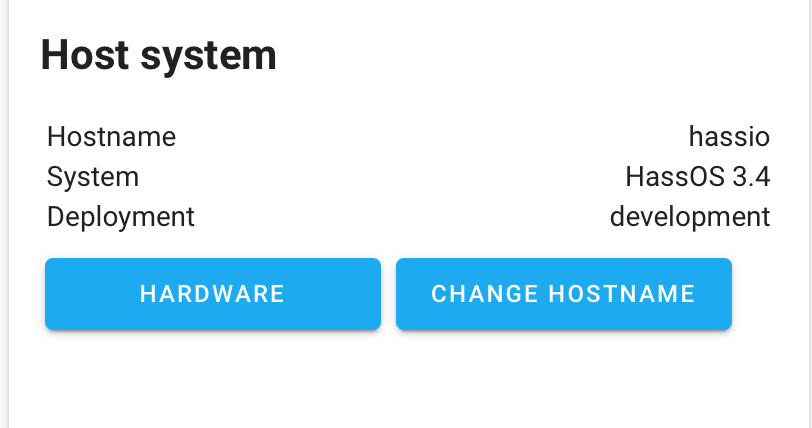
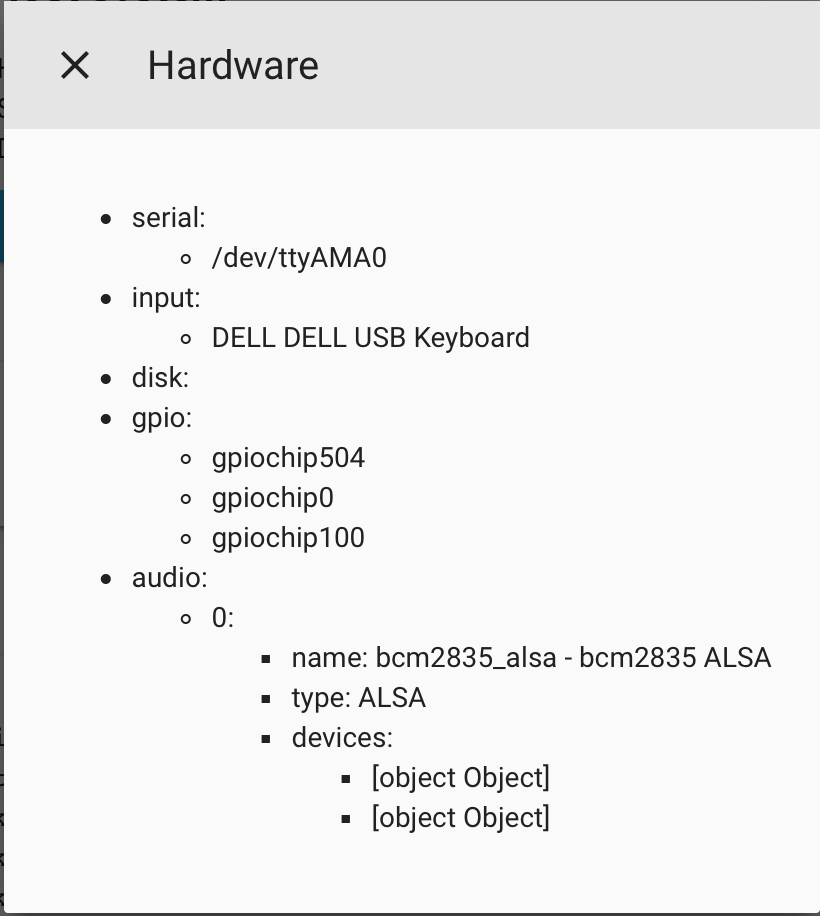
mbo18
on 26 Jul 2019
With the above linked image a cheap intenso usb-thumb drive looks like it boots. At least something shows up over hdmi output.
A (sandisk?!) m2 ssd in a usb enclosure with an asmedia chip does not. (https://www.amazon.de/gp/product/B07D35BLC7/)
going into the "boot environment", the usb enclosure shows up as a storage device though, so it appears to be detected by whatever stage that is.
not sure if this is the right place: I tried both the 3.3 pre-release image(https://github.com/home-assistant/hassos/releases) and the above linked image from an sd-card and both did not boot at all. Same sd-card boots the official 2.12 image successfully. My Pi has usb-boot enabled, but no other usb devices were connected, but my CC2530 was still connected to the gpio pins.
With the CC2530 disconnected at least the above linked "3.4" image starts to boot! The 3.3 still does not... Only tried the 3.4 image from usb, but that booted with cc2530 connected... not sure what to make of this.
It appears I downloaded the wrong image, the one for the original pi and not for pi 3. So I don't think any of the strikethroughed is still valid...
if you need me to debug anything, i'd be happy to help :-)
 universal
on 27 Jul 2019
universal
on 27 Jul 2019
Just tested on Raspberry Pi 3B and GOODRAM USB3.0 UPO3 32GB thumb drive and everything works fine (no SD Card in slot).
The only downside I noticed is the really slow speed of installation and starting up of HA. Both times more than doubled - installation took about 50 minutes and startup is taking about 6 minutes.
Does anyone have similar issues? 🤔
Misiu
on 5 Aug 2019
@Misiu
The slow speed is likely due to the thumb drive. The Raspberry Pi won't take advantage of USB3.0 so it will be dropping to USB2.0 Most USB3.0 thumb drives are pretty slow on USB 2.0, from my experience. I find SD Cards faster than USB Thumbdrive.
Might be just me, but I have found USB thunbdrives no more reliable than SD-Cards as well.
ghost
on 5 Aug 2019
@austwhite that's why we must wait for USB boot support in Pi 4.
I'm going to check with USB2.0 thumb drive. maybe this will help. Another option is to boot from SD and store everything on a thumb drive,
Misiu
on 6 Aug 2019
@Misiu
I think the boot from USB was mainly designed for SSD which, in general, are a lot quicker than thumb drives and SD cards.
That said, my reason for going to USB boot was reliability more than speed. I even tolerated a mechanical HDD initially but there was absolutely no corruption that seems to upset SD cards for some.
ghost
on 6 Aug 2019
@austwhite I want the same (reliability), that's why I started testing USB boot. SSD won't change anything on Pi 3, but on Pi 4 it will probably speed up everything.
I saw many tutorials on how to boot Pi 4 from SD and have all the rest on SSD, but I'll wait with ordering Pi 4 until everything with HA will work as expected (and USB boot will be added)
Misiu
on 6 Aug 2019
USB 3 can help if they have a fast data bus to CPU, faster as the SD reader. RPi4 have a USB 3 with a own chip, the question is now, how is the USB 3 chip sold with CPU. Maybe they use the same bus later as the USB 2 ports and have the same limit at the end
pvizeli
on 6 Aug 2019
Raspberry Pi 4 SoC has a PCI Express bus. The USB 3 is tied to that not to the same bus as USB 2. Not sure how fast it is, but is independent bus from USB 2
ghost
on 6 Aug 2019
One question it is.... When will be available boot from USB for RPi4....?
pepeEL
on 6 Aug 2019
USB 3 can help if they have a fast data bus to CPU, faster as the SD reader. RPi4 have a USB 3 with a own chip, the question is now, how is the USB 3 chip sold with CPU. Maybe they use the same bus later as the USB 2 ports and have the same limit at the end
heise has a german preview on performance: https://www.heise.de/ct/artikel/Raspberry-Pi-4-4-GByte-RAM-4K-USB-3-0-und-mehr-Rechenpower-4452964.html
They had reading speeds up to 200mb/s, reading and writing using samba with about 80mb/s :-)
universal
on 7 Aug 2019
is there a build that works with the latest USB commits?
 mattclar
on 8 Aug 2019
mattclar
on 8 Aug 2019
is there a build that works with the latest USB commits?
See this post: https://github.com/home-assistant/hassos/issues/164#issuecomment-513600770
it is available here: https://github.com/rbray89/hassos/releases/tag/3.4-rpi-usb-boot
Please read the associated documentation: https://github.com/rbray89/hassos/compare/3.4-rpi-usb-boot...rpi_usb_boot#diff-fb09d1e1c80de7e7a374dac408e56cf2
mbo18
on 8 Aug 2019
@Misiu
Boot may be slow due to the boot process: "Boot time can be significantly longer with USB. This is due to the boot process first attempting to boot from SD card, failing, and resorting to USB."
mbo18
on 8 Aug 2019
@mbo18 I understand it can be longer, but it is 3 times longer.
Installation is a one-time process, but it took 50 minutes, I think that updates will also take so long.
Hopefully, Raspberry Pi 4 will fix this "problem" by allowing booting directly from USB without trying SD first.
Besides the time issue, I'm happy that finally we can use HassOS from thumb drive. @rbray89 great work!
Misiu
on 8 Aug 2019
I don't want to burst any bubbles here, but I'm not very confident that when the RPi folks get around to supporting USB boot that they will support USB 3. I have a RPi4 now though, so I'll be able to start work on it once it is available in the FW.
rbray89
on 8 Aug 2019
Hi
I test image from this link:
https://github.com/rbray89/hassos/releases/tag/3.4-rpi-usb-boot
I test it with SSD on MSATA in adapter USB
- ADATA SP310 32GB and this not working
- SAMSUNG MZMPA024HMCD-000L1 32GB and this working correct. Why ?
I use this adapter USB:
https://www.aliexpress.com/item/32800420655.html?spm=a2g0s.9042311.0.0.27424c4dk1zxYO
But on SAMSUNG disk in Hassos not show any position in disk....
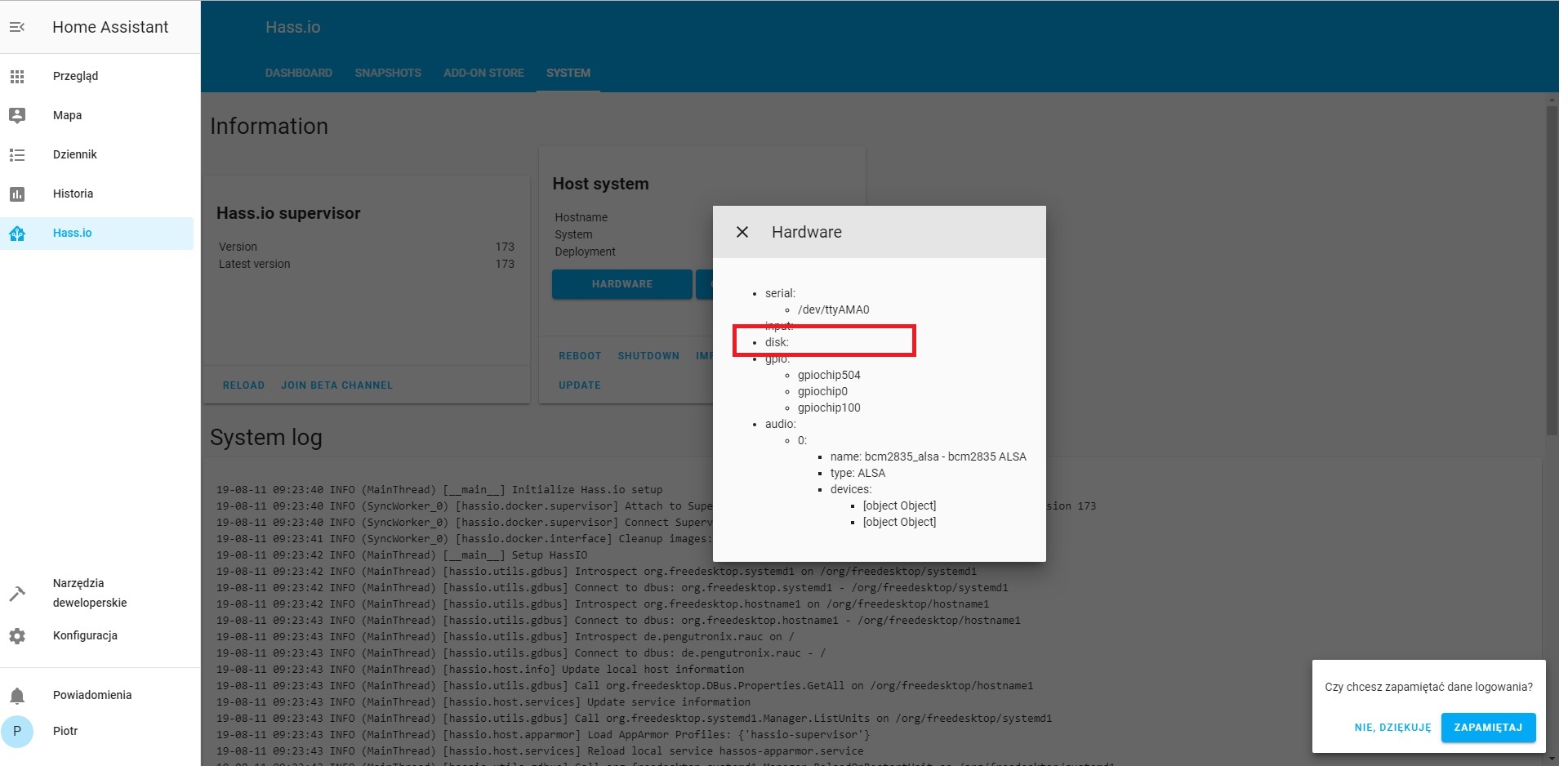
pepeEL
on 11 Aug 2019
I reflash again on ADATA and now working ok and boot. But still not show anything in position DISK.
pepeEL
on 11 Aug 2019
Hey @pepeEL,
I use this adapter USB:
https://www.aliexpress.com/item/32800420655.html?spm=a2g0s.9042311.0.0.27424c4dk1zxYO
your link is not working for me. Could you please specify which model you got?
universal
on 11 Aug 2019
I test and link worka ok.
Mini PCI-E mSATA do USB 3.0
pepeEL
on 11 Aug 2019
I also observe that after some Time many hours Home Assistant web not respond on disk ssd. I must power off RPI3 and power ON again. And again after some hours stop respond web and not open....
pepeEL
on 11 Aug 2019
Im having an issue where it loads up to the point of the initial
provisioning, but then I cannot progress past login..
On Mon, 12 Aug 2019 at 06:28, pepeEL notifications@github.com wrote:
I also observe that after some Time many hours Home Assistant web not
respond on disk ssd. I must power off RPI3 and power ON again. And again
after some hours stop respond web and not open....—
You are receiving this because you commented.
Reply to this email directly, view it on GitHub
https://github.com/home-assistant/hassos/issues/164?email_source=notifications&email_token=AAGNYD5VAMZQOWIDC55GCELQEBY6LA5CNFSM4FQJRYO2YY3PNVWWK3TUL52HS4DFVREXG43VMVBW63LNMVXHJKTDN5WW2ZLOORPWSZGOD4BICJQ#issuecomment-520257830,
or mute the thread
https://github.com/notifications/unsubscribe-auth/AAGNYD5J73CBCUQJVHXVJQ3QEBY6LANCNFSM4FQJRYOQ
.
mattclar
on 12 Aug 2019
For me Home Assistant on hassos start working ok but after some Time ssd start blinking and web Page Home Assistant not respond.
pepeEL
on 12 Aug 2019
Anybody know how resolved problem with working SSD and after some time stop working Home Assistant and hard drive ssd still blinking LED as like working but not working....
pepeEL
on 12 Aug 2019
Hi, thank you very much @rbray89 !
It works with "3.4 RPI USB Boot" on a Philips 3.0 usb key and a rpi 3b+
 VinhLg
on 16 Aug 2019
VinhLg
on 16 Aug 2019
Booting , but not rebooting on my 3b+ with startech usb312sat3cb adapter and a Kingston 120gb ssd. Same hardware is rebooting raspbian no prob.
[edit: Take that back... I must have done something wrong before because this morning I've gotten it to reboot several times without issues. i did not see any slow downs during install or reboots either as others have reported. If anything it's a bit faster installing and rebooting than it was with the sd. I also restored my snapshot,~~ and rebooted successfully~~! I'm calling this good, but will report back if any issue crops up. @rbray89, thank you very much for your work!!!
Reporting back I had issues rebooting today. Not sure why it rebooted before... maybe some of the changes from restoring the snapshot took a while to finish and those created problems? Anyhow, I fixed it using the 'boot sd' trick (copy bootcode.bin to sd and add "timeout"). Now I technically can't say it has "no-sd". :P]
 truglodite
on 21 Aug 2019
truglodite
on 21 Aug 2019
I have same problem now. tried to reboot and now it's not boot at all. x850 sata adapter and 120gb kingston ssd
 jussipu
on 21 Aug 2019
jussipu
on 21 Aug 2019
I think my reboot problem was just user error. I was restoring a snapshot and accidentally hit wipe/restore after a normal restore was underway. It failed to reboot after that. I forced bootup (by power cycle) and saw hassio didn't restore any of my added yamls as well. After that I just reflashed a fresh image, did a normal restore (no accidental presses this time), and it~~ just worked~~.
[Edit: Reboot issues came back. Looks like my startech adapter is not very compatible with uboot. Adding a bootup sd card (with boocode.bin & timeout files) fixed the issue. Several reboots now... no problem... no slowdowns either.
truglodite
on 21 Aug 2019
Maybe I have to reflash too. Only hassos-boot drive show's up when plugging drive to laptop
jussipu
on 21 Aug 2019
Yes doesn't sound right... after flashing my ssd there were 4 partitions visible to linux and windows pcs (3 of them were accessible, 1 showed issues with mounting). In gparted, there was a total of 6 partitions iirc... 2 of them are blacked out ('unknown'/not mountable).
On a side note, I am unable to successfully resize my data partition after flashing. If I do it won't boot, but not sure if I am just resizing incorrectly. So for now I am running with lots of unallocated space (still enough for now).
Strike that off... I didn't realize hassos properly allocates the drive space to the data partition as part of it's I installation routine. I checked my ssd after everything was running, and my data partition is 100gb (drive fully allocated).
truglodite
on 21 Aug 2019
@rbray89 could you create the hassos_rpi3-3.4 image for the Raspberry Pi 4 please? It works great on my RPi 3 with a Samsung EVO SSD w/ Sabrent USB 3.0 to SSD!
 kasper79
on 22 Aug 2019
kasper79
on 22 Aug 2019
I have same problem now. tried to reboot and now it's not boot at all. x850 sata adapter and 120gb kingston ssd
Try this firmware fo X850. For me help it and works ok.
https://drive.google.com/file/d/1uYr-519U0fhkVQJfYm56TkOqEU5OWLPx/view?usp=sharing
pepeEL
on 22 Aug 2019
@rbray89 - Many thanks for your work on this project.
I installed "3.4 RPI USB Boot" on a Crutial BX500 SSD (240GB) with RPi 3B+. System is working well for the past 2 days.
 Jefe2
on 23 Aug 2019
Jefe2
on 23 Aug 2019
@rbray89 is any chance to correct if we have installed Hass.io on USB Drive to show in hassio system info in position HADWARE info about DISK ? Now is empty. When use SD card show about all partition on SD Card.
Is any chance to correct ?
pepeEL
on 23 Aug 2019
Devs, just fyi I posted a preliminary compatibility list that I compiled here:
https://community.home-assistant.io/t/hass-io-transfer-from-sd-card-to-ssd-or-usb/97452/19?u=truglodite
Feel free to take it and use it however you need.
truglodite
on 26 Aug 2019
With Hass OS 3.4 i successfully install the system on SSD.
Now i have a problem with boot order of usb devices on RPi 3B+.
I have a USB SSD and USB ethernet adapter, but when RPi reboot it try to boot to USB ethernet. Can i change de boot order of usb devices?
 emanuelecavestri
on 30 Aug 2019
emanuelecavestri
on 30 Aug 2019
@emanuelecavestri : there is no way to configure USB boot order. You might be able to try swapping the ports used though, as USB device enumeration may be port number based.
rbray89
on 30 Aug 2019
@rbray89 i've tried to swapping the usb ports but the RPI try to boot always to USB Ethernet. This issue it will be resolved in the future?
emanuelecavestri
on 31 Aug 2019
@emanuelecavestri I'd have to look into if we can filter on device type. Does it boot without the USB Ethernet adapter?
rbray89
on 31 Aug 2019
@rbray89 Yes, if i unplug the USB Ethernet and turn on the RPI, it boot correctly.
emanuelecavestri
on 1 Sep 2019
I tried modifying /boot/cmdline.txt to have it mount my USB drive after boot but it doesn't seem to work (in cmdlinet.txt i added: dwc_otg.lpm_enable=0 console=serial0,115200 console=tty1 root=PARTUUID=6e6cd356-01 rootfstype=ext4 elevator=deadline fsck.repair=yes rootwait). Any ideas?
 skynet01
on 1 Sep 2019
skynet01
on 1 Sep 2019
That will not work because we boot uboot and they boot our partition logic.
pvizeli
on 2 Sep 2019
I see, well there goes that idea.. I take it there is no way to mount USB drive after sd boot with Hassos?
skynet01
on 2 Sep 2019
Everthing is an container. So you can write a small add-on they mount an usb drive to shared folder.
pvizeli
on 2 Sep 2019
There is no easy way to run a whole container from USB after hassos booted. Correct?
skynet01
on 2 Sep 2019
Hi,
I have a pull request pending https://github.com/home-assistant/hassos/pull/470 for Hassio to add support for using a backup filesystem, which can be located on a USB stick for example.
Thanks.
Phill.
 pssc
on 12 Sep 2019
pssc
on 12 Sep 2019
Justvas feedback, I burn the hassio image on USB drive, and then have the raspberry pi 3b+ boot from it, with success.
But hass.io then fails to continue on the usb drive, and tries to boot from network...
 laurent-martin
on 7 Nov 2019
laurent-martin
on 7 Nov 2019
Download latest build from this URL:
https://github.com/home-assistant/hassos/releases
Burn image on your SSD with Balena etcher
Format a SD-Card with FAT Partition, give it the name CONFIG
Goto the SD-Card and do follow commands:
mkdir network
nd network
nano my-network
Copy/Paste this part below and change your SSID and PSK with your own Wifi information:
[connection]
id=hassos-network
uuid=72111c67-4a5d-4d5c-925e-f8ee26efb3c3
type=802-11-wireless

[802-11-wireless]
mode=infrastructure
ssid=YOUR SSID
#hidden=true

[802-11-wireless-security]
auth-alg=open
key-mgmt=wpa-psk
psk=YOUR PASSWORD

[ipv4]
method=auto

[ipv6]
addr-gen-mode=stable-privacy
method=auto
Put your SC-Card in RPi and power your SSD! Otherwise it won’t work
Then power your RPi
What for some minutes 8-20 minutes
Try to connect to the Hassio link:
http://hassio.local:8123
If this is not working then search for the IP thats connect to
Setup your HA!!!
Then follow the steps in this link:
Install SSH & Web Terminal Add-on from the Hassio Community Repo
nmcli radio
nmcli device wifi rescan
nmcli device wifi
nmcli device wifi connect "YOUR_SSID" password "YOUR_WIFI_PASSWORD"
This will try to connect to your SSID and will generate a network profile for you if successfull.
The output will be similar to
"Device 'wlan0' successfully activated with...."
nmcli con show
nmcli connection delete CONNECTION_NAME
ip addr show
Restore Backup
 poudenes
on 26 Nov 2019
poudenes
on 26 Nov 2019
With Hass OS 3.4 i successfully install the system on SSD.
Now i have a problem with boot order of usb devices on RPi 3B+.
I have a USB SSD and USB ethernet adapter, but when RPi reboot it try to boot to USB ethernet. Can i change de boot order of usb devices?
I have upgraded to latest HassOS 3.7 but the problem is not solved. Any ideas?
emanuelecavestri
on 23 Dec 2019
I've also seen this tutorial: https://jamesachambers.com/raspberry-pi-4-usb-boot-config-guide-for-ssd-flash-drives/
 fluppie
on 3 Jan 2020
fluppie
on 3 Jan 2020
But it is probably not working with image HASSOS.
pepeEL
on 3 Jan 2020
Did you guys try with bootcore.bin file and timeout file on SD card? I am going to try it now with hassos 3.7 (but on 3b (not +)).
cholek3
on 3 Jan 2020
But we talk about RPI4
pepeEL
on 3 Jan 2020
I know. But why not try same on Pi4?
cholek3
on 3 Jan 2020
But where download bootcore.bin ?
And it is put on SD card as file ? And on SSD installed HASSOS by balena....?
pepeEL
on 3 Jan 2020
Well, it works for now. Just got Preparing Hass.io welcome screen.
So... download bootcore.bin file from Raspberry pi website (here). Create empty file called "timeout" (without extension, so make sure there is no .txt, or other extension). This will add 6 seconds for SSD to start and boot from it.
Then copy both files to previously formatted SD card (FAT32).
Download and Flash latest HassOS bin file (currently 3.7) to SSD with Etcher.
(Download file for your version of Raspberry Pi from here)
Insert both SD card and attach SSD to USB port and power on raspberry pi.
One more thing to mention. Not all USB to SATA adapters are compatible apparently. I use X850 extension board for Raspberry Pi and it DID NOT work with USB bridge that it came with, BUT WORKS with USB 3.0 0.5m long cable. Weird.
cholek3
on 3 Jan 2020
For me this solution on RPI4 not working. RPI4 powerON and led green blink. SDD no boot
pepeEL
on 3 Jan 2020
Hmmm, that's a shame. Did you copy timeout file to SD card?
Well, I have a partial success anyway. As I said before, hassio installs on ssd and seems to be working fine. Also, going to Configuration > Server Control > Restart works like a charm. BUT... After powering off whole Raspberry Pi3b, or System > Reboot host, it will not load again. Which is a shame. Investigating continues...
cholek3
on 3 Jan 2020
Yes all is as you write. But on Rpi4. Not on RPI3
pepeEL
on 3 Jan 2020
For me this solution on RPI4 not working. RPI4 powerON and led green blink. SDD no boot
Are you using any GPIO pins? If yes disconnect them and try that. I had a sensor hooked up to GPIO 0 which is a big no no and was causing the same issue you have.
skynet01
on 3 Jan 2020
I have on GPIO hub USB.. Now i disconect it and also teh same problem. RED led light but Green led blink and len on SSD no light.
You are use this solution boot from SSD also na RPI4 ?
pepeEL
on 3 Jan 2020
As far as I know you cant boot RPI4 from USB directly you can only boot RPI3. On PI4 you can, however, boot from SD and then hand over the control to USB, essentially getting the same thing. There is a guide on this here: https://community.home-assistant.io/t/rpi-4-installation/123514/87?u=skynet01
skynet01
on 3 Jan 2020
yes but it is for raspian. But i want use HASSOS with HASSIO
pepeEL
on 3 Jan 2020
Let me know if you find a way :)
skynet01
on 3 Jan 2020
ok
pepeEL
on 3 Jan 2020
ok
Hello pepeEL,
I am new on this but I am also tracking this post. Don't you think there might be a way by using portainer https://github.com/hassio-addons/addon-portainer/blob/v0.9.0/README.md add-on, where we can mount an NFS share to hassio container?
I am still struggling to figure out how to do that (unfortunately) - I'm still very inexperient, yet :-1:
Hope this becomes useful.
 carlosmsdias
on 8 Jan 2020
carlosmsdias
on 8 Jan 2020
ok
Hello pepeEL,
I am new on this but I am also tracking this post. Don't you think there might be a way by using portainer https://github.com/hassio-addons/addon-portainer/blob/v0.9.0/README.md add-on, where we can mount an NFS share to hassio container?
I am still struggling to figure out how to do that (unfortunately) - I'm still very inexperient, yet -1
Hope this becomes useful.
(This might become useful if for example you have a NAS that you can use from your Hass.io, leaving the importance of the SDCard apart - regarding storage functionality)
carlosmsdias
on 8 Jan 2020
I have already had lots of help from @pvizeli, so thanks for all the advice and help!
I am attempting to make a script to move the 'hassos-data' partition onto another drive ( e.g. a SSD). This script was purely automating the steps as outlined by others, above in this thread:
- upon booting checks to see if there is a drive with a partition labeled 'OFFLOAD'
- if so, the
hassos-datapartitioned is offloaded (dd) on to that drive, - the labels are changed
- reboot
- HassOS uses the new partition on the SSD.
I have not yet made a PR for this as my script does not work. I think I will work on this again next week, but I have a few problems.
The main one is, how to set the order of the script so that it occurs after the USB drives are available, but before the hassos-data partition is mounted, or at a point when the hassos-data partition can be remounted as read only?
The script below also attempts to shrink the filesystem before copying and doesn't work, when I next work on this I will omit this step, and then only try it again once everything else is working.
I will also attempt to just copy it to the whole drive, note I will also need to add a sbin command to "make" the drive to offload it, something like, take a drive as the input, e.g. sdb:
wipefs --all /dev/sdb
sgdisk -e
sgdisk -n 1 /dev/sdb
mkfs.ext4 -F /dev/sdb1
e2label /dev/sdb1 OFFLOAD
https://github.com/michaelstoner/hassos/commit/e25ecd433c8f5e11002005f68b6c83d01b3fc862
[Edited to add: Oh, right :-| , moments after I post I've now managed to get the dd to work, but it seemed the relabelling of the SDcard's partition failed, so I'll work on that next week, also I've changed the buildroot-external/rootfs-overlay/usr/lib/systemd/system/hassos-data-offload.service [Unit] to After=hassos-expand.service] i.e.
Description=HassOS hassos-data offload
 DefaultDependencies=no
 RefuseManualStart=true
 RefuseManualStop=true
-After=hassos-bind.target network.target
+After=hassos-expand.service
 michaelstoner
on 7 Feb 2020
michaelstoner
on 7 Feb 2020
@michaelstoner please open a PR. There are some things they we need adjust. I.e. don't hard copy or modify partition size layout in that script. Pin the requirement before hassos-expand and add requirement for the tmp (mount requirement on units for /tmp). After that create two mounts. Copy data over and was that sucessfuly, change the label. After that comes the expand and can adjust if needed.
Also provide also an script, they create an GPT layout with 1 partition that label OFFLOAD. This script can check and make sure that the new partition space is okay.
pvizeli
on 7 Feb 2020
@pvizeli Will do! thanks
michaelstoner
on 7 Feb 2020
Hi everyone...
Fairly green with all of this. I have HassOS on RPi4 and a nice new recommended SSD and and adapter.
I'd LOVE LOVE to load some or all from the SD to the SSD.
What is the latest with this?
Also what about still being able to use the nice, easy HassOS updates and Add-on installs?
Is this effected and if so how do I go about updating Hassio and installing ass-ons etc.
I'm scared of the impending SD card failures I read about all the time and chomping at the bit to do whatever I can now and hopefully by me some time until SSD is better supported.
Thank you all so much for helping a Noob out!
This stuff is pretty confusing, but I do have other programming/scripting skills.
Thanks again!
Geo
 geobdesign
on 6 Mar 2020
geobdesign
on 6 Mar 2020
@michaelstoner any updates? This would be an awesome feature to have 🎉🎉🎉
Not sure when Raspberry 4 will support boot from USB, but having all the data on SSD and only boot from sd (read-only) would be really useful.
I've just ordered Raspberry Pi 4 to build a dev environment, so when stuff arrives I can test the script.
Misiu
on 9 Mar 2020
Hi @Misiu
Sorry my plans have been massively put back by some unplanned work. Will update when I have something to contribute.
michaelstoner
on 10 Mar 2020
@Misiu in the meantime I have tested the following procedure today and it works. This is for Raspberry Pi 4, 32-bit HassOS, booting from SD card but with hassos-data (e.g. all the Docker images and data) on SSD.
- Install HassOS to SD card rpi4 32-bit, as per documented instructions.
- Boot up HassOS, login to shell ("root" then "login" command), set your network configuration according to documented instructions.
- Reboot device, HassOS will then connect ethernet and install Home Assistant (wait ~20 mins).
- Login to check Home Assistant is working, set username, apply any updates etc. Now you have a clean HassOS ready to go on your SD card.
- Shutdown device, take out the SD card, and plug in to a separate Linux machine. Also plug in your SSD to that separate Linux machine.
- Prepare your SSD partition if required, I personally used MBR partition type and filled the disk with one partition of type 83 (Linux).
- Clone the hassos-data partition from SD card to SSD (assume sda8 is SD card, sdb1 is SSD):
sudo dd if=/dev/sda8 of=/dev/sdb1 bs=10000000 - This takes time. Once completed, change the partition label of the SD card partition (your new SSD partition will have been cloned with the name "hassos-data")
sudo e2label /dev/sda8 hassos-data-old - I think HassOS might do this anyway, but I chose to resize my new SSD filesystem to fill the partition:
sudo resize2fs /dev/sdb1 - Plug SD card and SSD back into your Raspberry Pi and start up HassOS.
 juicejuice
on 22 Mar 2020
juicejuice
on 22 Mar 2020
@juicejuice this is basically the exact same procedure that was used for Pi3s before SSD boot was officially supported. My Pi3 runs flawlessly with this method since then - never changed it to the new way provided by today's HA OS.
Jpsy
on 22 Mar 2020
Awesome. Thank you @juicejuice !
I will give it a try.
Does the typical HassOS OS, Pi and Ad On updates all work correctly as before?
Or do you have to manually mess with some or whatever afterwards?
geobdesign
on 22 Mar 2020
@geobdesign concluding from Pi3b: You will not notice any difference at all.
Jpsy
on 22 Mar 2020
@geobdesign I think we should keep this discussion for direct issues related to HassOS on SSD. However, the SSD procedure for RPi4 makes no difference to the functionality as @Jpsy indicates.
juicejuice
on 22 Mar 2020
Thanks @Jpsy and @juicejuice !
geobdesign
on 23 Mar 2020
@Misiu in the meantime I have tested the following procedure today and it works. This is for Raspberry Pi 4, 32-bit HassOS, booting from SD card but with hassos-data (e.g. all the Docker images and data) on SSD.
1. Install HassOS to SD card rpi4 32-bit, as per documented instructions.

2. Boot up HassOS, login to shell ("root" then "login" command), set your network configuration according to documented instructions.

3. Reboot device, HassOS will then connect ethernet and install Home Assistant (wait ~20 mins).

4. Login to check Home Assistant is working, set username, apply any updates etc. Now you have a clean HassOS ready to go on your SD card.

5. Shutdown device, take out the SD card, and plug in to a separate Linux machine. Also plug in your SSD to that separate Linux machine.

6. Prepare your SSD partition if required, I personally used MBR partition type and filled the disk with one partition of type 83 (Linux).

7. Clone the hassos-data partition from SD card to SSD (assume sda8 is SD card, sdb1 is SSD):
   `sudo dd if=/dev/sda8 of=/dev/sdb1 bs=10000000`

8. This takes time. Once completed, change the partition label of the SD card partition (your new SSD partition will have been cloned with the name "hassos-data")
   `sudo e2label /dev/sda8 hassos-data-old`

9. I think HassOS might do this anyway, but I chose to resize my new SSD filesystem to fill the partition:
   `sudo resize2fs /dev/sdb1`

10. Plug SD card and SSD back into your Raspberry Pi and start up HassOS.
This worked for me. Here some tips:
- my SSD had a GPT (GUID) partition table. With diskpart in Windows 10 I changed it to MBR. I used EXT4 to format the partition.
- On my MINT linux pc the SDcard was seen as /dev/sdf8
- At first the rename does not work, it still uses the SDcard data partition. With Samba I put a file with the name 'is this the SSD.txt' to check on the Linux pc wich partition is used.
- Second rename worked. Could be a mistake from my side.
- I did the resize in the Linux diskmanager
- first time start took a very long time. I think that HassOS did a integrity check on the new partition on the SSD. During that time there is no web interface.
- I used a SATA to USB interface from aliexpress with JMS579 chipset and a Samsung SSD.
 Pino7777
on 30 Mar 2020
Pino7777
on 30 Mar 2020
This worked perfectly and is waaay faster. I've used a USB 3.0 32GB flash drive to spare the life of the small SD card. Thank you!
PD: Indeed it is NOT necessary to manually resize the partition.
 CarlosGS
on 6 May 2020
CarlosGS
on 6 May 2020
This worked perfectly and is waaay faster. I've used a USB 3.0 32GB flash drive to spare the life of the small SD card. Thank you!
PD: Indeed it is NOT necessary to manually resize the partition.
Is this possible by just using a Windows environment?
 snippem
on 11 May 2020
snippem
on 11 May 2020
Hi @snippem, Windows uses a different partition scheme. You won't be able to do it, at least with these Linux-specific steps. Maybe there is some other method. Good luck!!
CarlosGS
on 11 May 2020
Oh - you meant preparing the partitions for HassOS :sweat_smile:
Latest versions of Windows have an Ubuntu integration, you could first try to do it from that terminal and see if it works.
For step 6) you may need to download a partitioning tool, I'm not sure if Windows' supports creating Linux partitions.
CarlosGS
on 11 May 2020
Oh - you meant preparing the partitions for HassOS
Latest versions of Windows have an Ubuntu integration, you could first try to do it from that terminal and see if it works.For step 6) you may need to download a partitioning tool, I'm not sure if Windows' supports creating Linux partitions.
Booted Ubuntu with a usb stick 😄
Formatted the stick to ext4 under gparted I presume that is type 83 ( looked at the format on the SD card)
Not a experienced Linux user here but never to old to learn.
Going to try it first with a usb stick till my ssd arrives.
One question backups work with this solution?
snippem
on 11 May 2020
Excellent!! Yes, there are no differences in functionality.
CarlosGS
on 11 May 2020
I found out. By sheer folly. Wile trying some thing with my Rpi 4. That if you plug in a ssd that has been flashed with an HassOS image. I used hassos_rpi4-3.13. 32bit (same image that you flashed the SD with) And simple reboot. It seems to automagicly use the SSD!
After I rebooted with the ssd I went to my browser and refreshed the page and was welcomed (again) By the "please wait 20 min wile we install" screen. And noticed the ssd activity light blinking away.
After it loaded it surely seems as if it running, At least some of the HassOS partitions off of the ssd. Although you still need the HassOS SD in the slot to boot some of the OS, I'm guessing.
Very cool!
Thanks Dev's!
 ssirkakriss
on 12 May 2020
ssirkakriss
on 12 May 2020
Yes HassOS uses the partition names to recognise the various volumes it needs. Therefore it would be wise to rename the partitions on the SD card so one day it doesn't boot up in a confused state e.g. it might load the hassos-data from SD instead of SSD due to identical names.
juicejuice
on 12 May 2020
Yes HassOS uses the partition names to recognise the various volumes it needs. Therefore it would be wise to rename the partitions on the SD card so one day it doesn't boot up in a confused state e.g. it might load the hassos-data from SD instead of SSD due to identical names.
Got it all working now waiting for my ssd.
When I have it isn't this it a lot easier then writing a partition yourself?
And is it only the Hass-data that is writed on the external drive?
snippem
on 12 May 2020
Many thanks to devolpers and the users in this thread now have my ssd up and running.
A whole different user experience loading times are way faster and hopefully no more failing sd cards.
Used to flash sd card and ssd ubuntu booted from a usb drive (for the windows users like me)
setup:
Rasberry pi 4B 2GB
Verbatim Vx500 120GB usb ssd drive
Sandisk extreme pro 32gb.
Hassos 32bit.
Experience using a kingston hyper x usb flash drive makes absolutely no difference in the user experience and in my case even worse.
Kinda now that this would be the outcome because i benchmarked the usb drive in rasbian and got a lower score as the sd card.
Also from what i have read the memory read write technology is the same as a sd card so there is no wear leveling.
So in my opinion this is a great solution in combination with a ssd for usb.
Will be running with this setup till native booting of a usb drive arrives.
snippem
on 14 May 2020
USB boot is in beta
 sand3rk
on 17 May 2020
sand3rk
on 17 May 2020
@Pino7777 @juicejuice Does not work for me on RPI4 and hassos_rpi4-3.13.img. web-ui does not come up. I can ping hassos on ip.
I tried:
- /dev/sdb or /dev/sdb1, does not make a difference
- multible sata-usb adapters, startech (proved working), Orico, Ewent.
- multible ssd's and 2.5 hdd's.
- sudo e2label /dev/mmcblk0p8 hassos-data-old
sand3rk
on 18 May 2020
@sand3rk How long did you wait for it to boot? I also could ping the Pi4 without the Hassos GUI appearing until about 30 minutes after powering up
CarlosGS
on 18 May 2020
@sand3rk How long did you wait for it to boot? I also could ping the Pi4 without the Hassos GUI appearing until about 30 minutes after powering up
Waited for 45minutes with ssd. Web-ui does not come up
sand3rk
on 19 May 2020
the method worked perfect for me, but I experienced 2 issues:
- after booting from the SSD I had massive UAS driver problems.
This: https://www.raspberrypi.org/forums/viewtopic.php?t=245931 helped and now it is extremely fast. - After shutting down the hostsystem, the partition on the SD-Card was again renamed to hassos-data and I had to rename it again to boot from SSD
 rafael298
on 20 May 2020
rafael298
on 20 May 2020
USB boot is in beta
@pvizeli this be supported on PI 4?
 fjufju
on 21 May 2020
fjufju
on 21 May 2020
I did the exact procedure described in this thread above by @juicejuice a long time ago on my ODroid HC1 and it has been working since version 3.0.x betas. I have upgraded HassOS multiple times in the 3 lineage and am running production release 3.13 currently. Currently I have 2 partitions named "hassos-data" the one that comes on the SD card, and the one I created many months ago manually. At the time I had renamed the SD card partition from hassos-data to hassos-data-old, but apparently when upgrading using the regular tool, it re-creates the whole SD card and we end up with the name back to hassos-data. This hasn't harmed anything so far.
Recently the Supervisor page is offering 4.6 upgrade. When I upgrade, HassOS fails to boot. I put in issue https://github.com/home-assistant/operating-system/issues/662 which @pvizeli closed saying:
That is not our issue if you offload data partition in wrong way before instead to help to make that feature what we have now in REL-4
Can anyone point me to the "correct" approach? Maybe all I need to do is cut another SD card and manually rename the hassos-data partition and it will start working again -- I am willing to try this, but it seems like this is "the wrong way" and I don't know of other documentation for the right way.
I confess not understanding @pvizeli 's comment completely. What does "instead to help to make that feature" mean? is that a request for me to contribute to the new feature? I do not read commits as they come through. My very first exposure to the new offload feature was me trying to upgrade when it was offered. It didn't work so I posted an issue. I thought I _was_ helping.
 TonyApuzzo
on 21 May 2020
TonyApuzzo
on 21 May 2020
Is there an official way to use a USB/SSD for running HassOS? Can't seem to find it anywhere.
 barrymossel
on 23 May 2020
barrymossel
on 23 May 2020
A beta firmware for the Pi4 with USB boot built in was released on 15/5. More info here: https://tynick.com/blog/05-22-2020/raspberry-pi-4-boot-from-usb/
Hopefully this brings official Home Assistant installs on a Pi4's SSD closer. I'm currently waiting for this to resume development of my Home Assistant instances as corrupt SD cards broke my will. Relying on a 102.2 instant of Home Assistant running on a NAS at the moment!
 MimbaMonkeyHouse
on 24 May 2020
MimbaMonkeyHouse
on 24 May 2020
I don't really get it you react in a topic where Hass is running on a usb device.
It is basically the same as you are waiting for.
The SD card only is used for booting. I am running the sd-ssd setup for some time.
And everything is working and fast or faster than with a sdcard.
When the time comes and the pi 4 boots from usb. It's a peace of cake with a backup of hassos to switch from a sd-usb to a usb boot
snippem
on 24 May 2020
I don't really get it you react in a topic where Hass is running on a usb device.
It is basically the same as you are waiting for.
The SD card only is used for booting. I am running the sd-ssd setup for some time.
And everything is working and fast or faster than with a sdcard.
When the time comes and the pi 4 boots from usb. It's a peace of cake with a backup of hassos to switch from a sd-usb to a usb boot
Cheers for your reply. I may give a try to the SD boot plus SSD solution. Hope install is as easy as described. Native boot on USB as allowed by the Beta firmware seems relevant to me, especially when replying to this post:
Is there an official way to use a USB/SSD for running HassOS? Can't seem to find it anywhere.
MimbaMonkeyHouse
on 25 May 2020
Is there a specific issue (or is this it) for supporting multiple hard drives? Like on the NUC I have an nvme drive (primary installed drive) and a secondary ssd which would be nice for backups. To me this is just supporting external storage drives for boot?
 niemyjski
on 26 May 2020
niemyjski
on 26 May 2020
This ain't working for me.
Gets stuck on udevd(182): starting eudev-3.2.9
Hanges there and doesn't load web gui
 yusufptl
on 31 May 2020
yusufptl
on 31 May 2020
Got Rasp OS working on native SDD with SD so is there any inside off HassOS on native SSD boot?
 Peter750
on 6 Jun 2020
Peter750
on 6 Jun 2020
Implemented with REL-4
pvizeli
on 8 Jun 2020
Implemented with REL-4
So, with a Raspberry Pi4 there is no need to have a SD card installed? Do i have to just flash the HassOS image on the SSD and it should boot?
Regards
Richard
 darootler
on 8 Jun 2020
darootler
on 8 Jun 2020
We only support the following method official: https://github.com/home-assistant/operating-system/blob/dev/Documentation/partition.md#data
Maybe what you said comes with a packages update if u-boot or rpi4-firmware but we don't work actively on that because it is not what we official support and recommend to use.
pvizeli
on 8 Jun 2020
So in other words native boot from USB with SSD is not recommended, even after three SD card which fails to work after a period of time ????
PI + SSD is the PERFECT combination for the IO intensive home assistant
Peter750
on 8 Jun 2020
So in other words native boot from USB with SSD is not recommended, even after three SD card which fails to work after a period of time ????
PI + SSD is the PERFECT combination for the IO intensive home assistant
I also agree that the sd card is the weakest part and there should be an option to run HassOS without a sd card. But moving the data partition is the right direction :-)
Regards
Richard
darootler
on 8 Jun 2020
"Moving data partition" sounds for me like boot OS with floppy disk and store data on HD :-)
But firmware for PI4 is there and it is working with PI OS so hopefully soon somebody make or hack it to illuminate the need of the weak SD part.
Peter750
on 8 Jun 2020
I think this is an acceptable solution for now, in future the full SSD experience should be quite achievable too. Perhaps those with spare time and motivation can figure this out? I might try the "datactl move" method this weekend, thanks @pvizeli for the heads-up.
juicejuice
on 8 Jun 2020
I was able to get the SSD on my PI 4 working now using the datactl move method.
Since the whole process was not as straight-forward as I hoped it is a short guide/the way I got it working!
- Backup the SD card (e.g. using Apple Pi Baker) in case something goes wrong
- Boot your PI using the SD card (the SSD can be plugged in if it's empty, to be safe I plugged it in after the boot since I already tried other methods and had an hass.io image on my SSD)
- Enable SSH access on port 22222 by following this guide
- Login via SSH (on port 22222) and run
loginto login onto OS level - List all disks by running
fdisk -land look for your SSD - Wipe your disk by running
fdisk /dev/XXXe.g.fdisk /dev/sdain my case. This creates an interactive session where you have to enterdENTER and the partition your want to delete delete all so1,2,...(just repeat the process for all partitions). - To now actually, remove them enter
wENTER - Once the SSD is fully wiped you can continue with the actually datactl process by running
datactl move /dev/XXXe.g.datactl move /dev/sdain my case. - In the dialog confirm by pressing
a - Now it's time to reboot by running
ha host reboot, this takes some time and the PI seems unresponsive. JUST WAIT, it will restart after some time! - The PI will now move the data, this took about 40 minutes in my case (64gb SD / 480gb SSD)
The "works as expected part" ends here!
Afterwards my PI froze (all LEDs where solid) which is probably not supposed to happen since I didn't have a monitor attached and it didn't accept any SSH connections or even IMCP pings I restarted it by pulling out the power cord. After powering it up again everything works and the boot times are just amazing!
I used the following hardware:
- Crucial MX500 500GB 3D NAND
- Geekworm Raspberry Pi X825 Board with Metal Case
All of the information came from this thread.
https://community.home-assistant.io/t/hass-io-transfer-from-sd-card-to-ssd-or-usb/97452/268
 egnerfl
on 15 Jun 2020
egnerfl
on 15 Jun 2020
The PI will now move the data, this took about 40 minutes in my case (64gb SD / 480gb SSD)
Yeah the USB port of an RPi is so slow :(
pvizeli
on 16 Jun 2020
The PI will now move the data, this took about 40 minutes in my case (64gb SD / 480gb SSD)
Yeah the USB port of an RPi is so slow :(
I'm not sure if it really took that long to actually move all the files but after 40 minutes I noticed that the static LEDs.
egnerfl
on 16 Jun 2020
Any news for SSD boot on pi4? Now is official stable.
 mrIngrid
on 22 Jun 2020
mrIngrid
on 22 Jun 2020
@pvizeli @balloob
mrIngrid
on 22 Jun 2020
I'm thinking of attemting the fdisk + datactl move procedure only on a NUC. Do you expect this to work for me? Do you expect I will run into similar issues as folks have on the Pi4?
 bmbouter
on 27 Jun 2020
bmbouter
on 27 Jun 2020
Related issues
 Wampukas
·
4Comments
tboyce021
·
13Comments
Wampukas
·
4Comments
tboyce021
·
13Comments
 basdejong95
·
12Comments
basdejong95
·
12Comments
 robmarkcole
·
11Comments
robmarkcole
·
11Comments
 rradar
·
10Comments
rradar
·
10Comments
Most helpful comment
We want add a feature that it is allow to offload the data partition (they will be not RO) to a external drive. But that come with next version.