Openstreetmap-carto: is it possible to enter Kosmtik through shell with Docker?
Expected behavior
I would like to run a command similar to docker-compose up kosmtik and be able to enter the shell
Actual behavior
Doing this starts up kosmtik, but I cannot enter the shell to allow me to use kosmtik commands
Links and screenshots illustrating the problem
I would like to be able to export mbtiles through the kosmtik-mbtiles-export plugin using docker
 d3netxer
All 4 comments
Have you tried this (after running docker-compose up kosmtik)?
- Use
docker psto get the name of the existing container. - Use the command
docker exec -it <container name> /bin/bashto get a bash shell in the container.
 matthijsmelissen
on 11 Sep 2018
matthijsmelissen
on 11 Sep 2018
I think this is getting me closer @matthijsmelissen
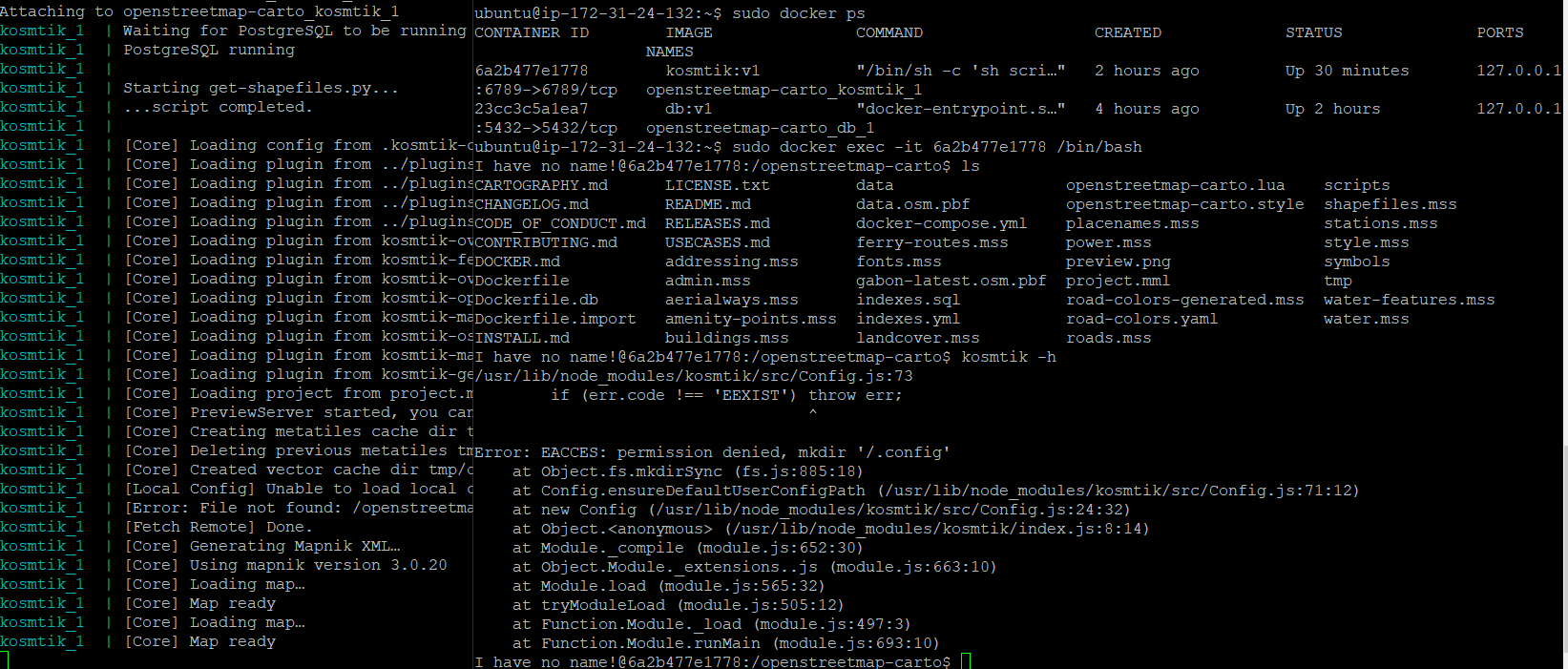
after your suggestion, I figured out I can keep the terminal open in Putty after docker-compose up kosmtik. I then opened a 2nd terminal in putty and was able to use docker ps and get a bash shell using the id of the container with the docker exec command.
Now I am inside the container, but the kosmtik command is not working for me. See screenshot.
d3netxer
on 11 Sep 2018
Alternatively, you could try modifying https://github.com/gravitystorm/openstreetmap-carto/blob/master/Dockerfile#L14 before running docker-compose up kosmtik.
But exporting mbtiles is getting a bit out of the scope of this repository, perhaps https://help.openstreetmap.org/ would be a better place to get answers to your question?
matthijsmelissen
on 11 Sep 2018
I wanted to mention that I was able to run the kosmtik command inside of the running container:
1st: In the 'scripts/docker-startup.sh' file I commented out the line kosmtik serve project.mml --host 0.0.0.0 because I didn't want the kosmtik server already up when I entered the running container. Then I added this line tail -f /dev/null so that the container would keep on running when I used the docker-compose up kosmtik command
2nd: I logged in the the server using another terminal and entered the container as the root user: sudo docker exec -u 0 -it containerID /bin/bash
Then once in the container I was able to run kosmtik commands.
d3netxer
on 25 Sep 2018
Related issues
 polarbearing
·
5Comments
polarbearing
·
5Comments
 dktue
·
4Comments
dktue
·
4Comments
 Phyks
·
3Comments
Phyks
·
3Comments
 boothym
·
5Comments
dktue
·
3Comments
boothym
·
5Comments
dktue
·
3Comments