Openshot-qt: Switching between transition and image - property editor keeps old properties
Could not find reported
Describe the bug:
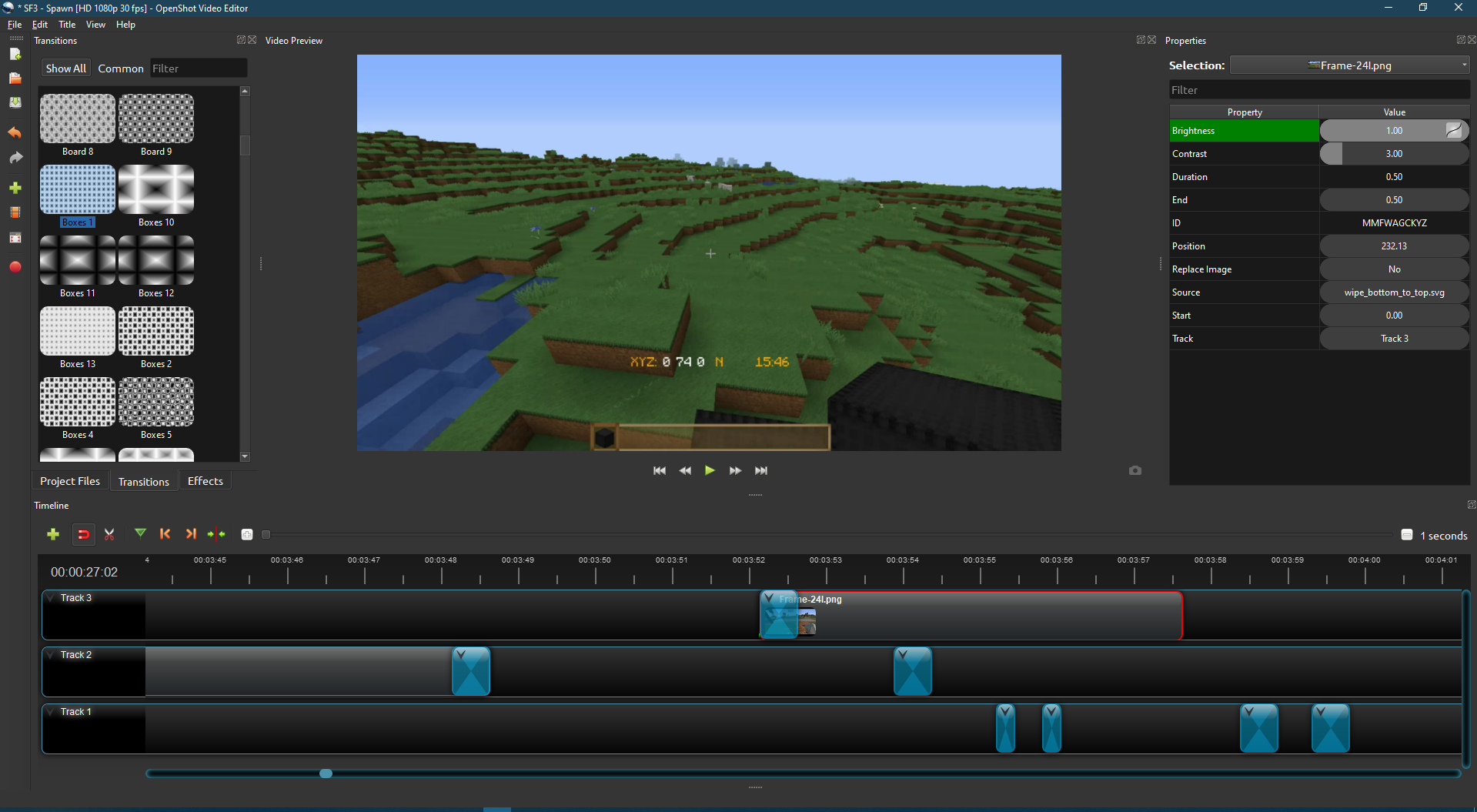
Clicking to change editing from a transition to an image, the properties changes the selection to the image but the properties remain the transition's and not the image properties.
Steps to reproduce the behavior:
I have a file with multiple clips (30+) split between images and short video, with transitions for each clip. While this could be an artifact of heavy load on OS, here is reproduction.
- Drag png image (screen shot from OS imported back into OS) to track.
- Drag transition to start of image and edit length to 2 sec (any transition)
- Click directly on image attached to transition. -- this should show issue in properties (see screenshot)
Note: this doesn't seem to happen every time, and I'm not sure how reproduce-able it is.
Workaround - Click from the transition to empty track space to clear properties, then click on the image.
Expected behavior:
I expected to see the properties of my image, not the transition.
System Details:
- OpenShot Version 2.5.0 Dev 1
- Operating System Windows 10
Log Files:
No log
Exception / Stacktrace:
N/A
Screenshots: (Optional)
See attached where image is selected, but properties show transition properties instead of image properties.
 TharenaMelishka
All 4 comments
As soon as it happens, please post the log-file from the OpenShot session. Maybe it will help to resolve the issue.
 SuslikV
on 25 Jan 2020
SuslikV
on 25 Jan 2020
openshot-qt.log
openshot-qt.log.1.log
openshot-qt.log.2.log
openshot-qt.log.3.log
..... Libopenshot.log is currently 130,680,295kb... even Word told me to go to hell. :) So... I'm assuming you want one of the openshot-qt logs. Cause I'm not giving Git the option of giving me the bird on that one. :) I saw the .1 .2 and .3 and wasn't sure if you needed those, so I renamed extension to log to upload, then reverted them so I could keep editing without blowing up my session.
Screenshot clearly shows a selection in the properties of the clip on track 5, while I have the clip on track 4 selected. Side-by-side of a video clip + replay mod clip time sync'ed, laying over an image to take up the blackspace background, plus audio track. Just trying to put a set of closing keyframes on to return to the main video on Track 5, then clipping the other tracks to mate with track 4.
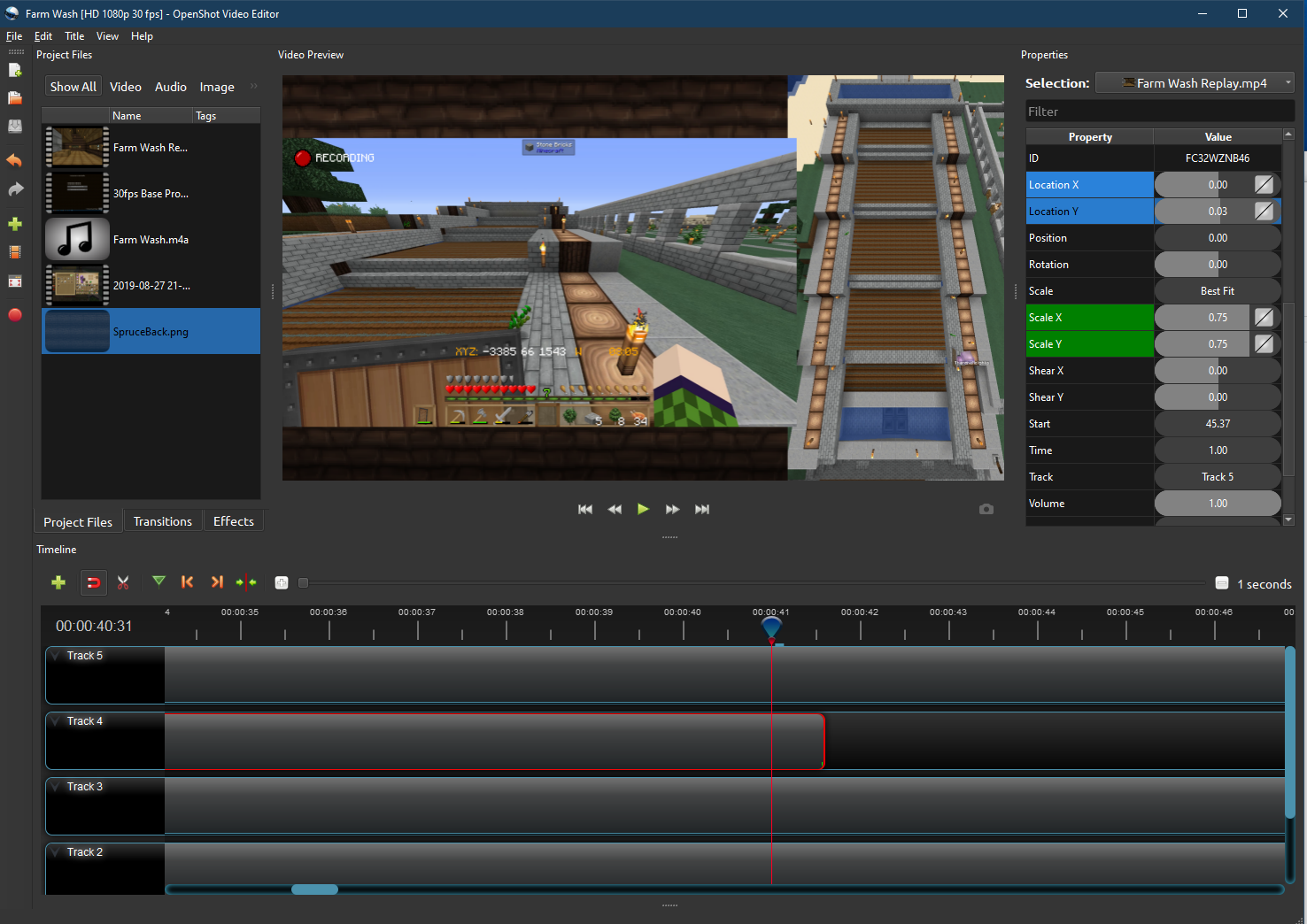
I've taken no actions since the error occurred except for going into the upper menus to see if there was a capture active log option in them. Hope it helps!
TharenaMelishka
on 3 Feb 2020
It seems that the
self.update_timer.stop() in properties_model.py
was called from the
update_model(self, filter="") in properties_model.py
right before the
update_item_timeout(self) was called by the timer's end. That function carries next series of calls to update the _Property_ list and it performs call for the update_model(self, filter="") in the end.
I think, that when the self.update_timer.start() was triggered the call for update_model(self, filter="") from everything else should be suspended until the update_item_timeout(self) will call for it and ends its own stuff.
The signal was delivered up to update_item(self, item_id, item_type) of the properties_model.py and, on the screenshot above, the label of the _Properties_ menu button was updated to the new file, while properties was left from the previous selection (Track 5, ID = FC32WZNB46 "2019-08-27 21-23-47.mp4", while Track 4, ID = IM7UEEAVGZ "Farm Wash Replay.mp4" ).
@TharenaMelishka the info above is for developers if there any...
SuslikV
on 3 Feb 2020
Thank you so much for submitting an issue to help improve OpenShot Video Editor. We are sorry about this, but this particular issue has gone unnoticed for quite some time. To help keep the OpenShot GitHub Issue Tracker organized and focused, we must ensure that every issue is correctly labelled and triaged, to get the proper attention.
This issue will be closed, as it meets the following criteria: - No activity in the past 180 days - No one is assigned to this issue
We'd like to ask you to help us out and determine whether this issue should be reopened. - If this issue is reporting a bug, please can you attempt to reproduce on the latest daily build to help us to understand whether the bug still needs our attention. - If this issue is proposing a new feature, please can you verify whether the feature proposal is still relevant.
Thanks again for your help!
![stale[bot] picture](https://avatars3.githubusercontent.com/in/1724?v=4&s=40) stale[bot]
on 26 Oct 2020
stale[bot]
on 26 Oct 2020
Related issues
 malinga91
·
3Comments
malinga91
·
3Comments
 carlosnewmusic
·
3Comments
carlosnewmusic
·
3Comments
 Geoff0627
·
3Comments
Geoff0627
·
3Comments
 ghost
·
3Comments
ghost
·
3Comments
 lukashajek78
·
3Comments
lukashajek78
·
3Comments