Openshot-qt: Track actions as always visible buttons (permanent view instead of context menu)
If I want to do something with the track (video/audio) then it is very non user friendly to right click and find anything in the context menu. For instance audio fade in/out which is the basic feature.
I would be nicer to have permanent menu (view) with the most popular actions.
It could be shown as buttons or anything which is always visible and does not disappear.
Now it takes up many clicks to select a desired action on each and every track.
In general I don't like context menu with more than 1 level.
Some options have even 3 levels which is very unclear and slow for using.
 lukashajek78
All 3 comments
I _tend_ to agree, and concur that it feels like there's a lot more we could be exposing in the interface instead of relegating to menus.
I did just want to point out that right-clicking isn't strictly necessary — the same actions menus can be accessed by left-clicking the sort of V-looking thing at the upper left corner of each clip/transition/track. (Not that this AT ALL affects the core issue of being able to access functions.)
The way I see it, there are two issues at play:
- The need to go into the (context)-menus at all, to perform nearly any operation on the timeline. That tends to be just inconvenient and clunky. It'd be preferable to have toolbar buttons for at least _some_ actions, or even to use system menus (instead of context menus) simply for their repeatability and ease of access. (System menu selections could also be more easily bound to keyboard shortcuts, whereas currently there's really no keyboard access to the context menu functions.)
- The organization of the many of the current action menu items, which can be annoyingly and uncomfortably deep. The Track and Transition menus are fine, they're pretty spare for the most part. But the Clip menu has turned into a messy catch-all of operations.
- Fade and Volume have separate submenus for acting on the "Start of Clip", "End of Clip", or "Entire Clip", and then provide basically the same set of "presets" for each.
- Animate adds yet _another_ layer below Start/End/Entire, splitting up the possible animation actions into "Zoom" and then "Center to Edge" / "Edge to Center" / "Edge to Edge", then lists the actual animation actions to be applied below those. Ugh. There _has_ to be a better way.
- The Time menu is patently insane. I mean, seriously?
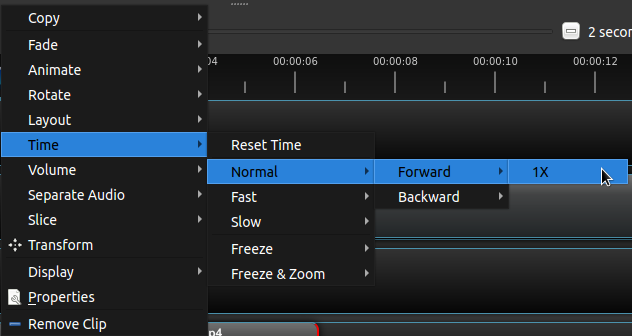
I'm tempted to say, "Let's start from the fact that this should _clearly_ beTime > Normal > Forward 1xandTime > Normal > Reverse 1x, if not even justTime > Forward 1xandTime > Reverse 1x", but simply consolidating a few too-deep menu structures would sort of be missing the larger point that everything about this is just Doing It Wrong™.
Basically, overall the action menus create a _lot_ of uncomfortable structure to paper over the fact that nothing is really adjustable interactively. The crazy curve menus for parameters have the same problem. Because keyframe parameters are not visually inspectable or interactively adjustable, we end up with this...
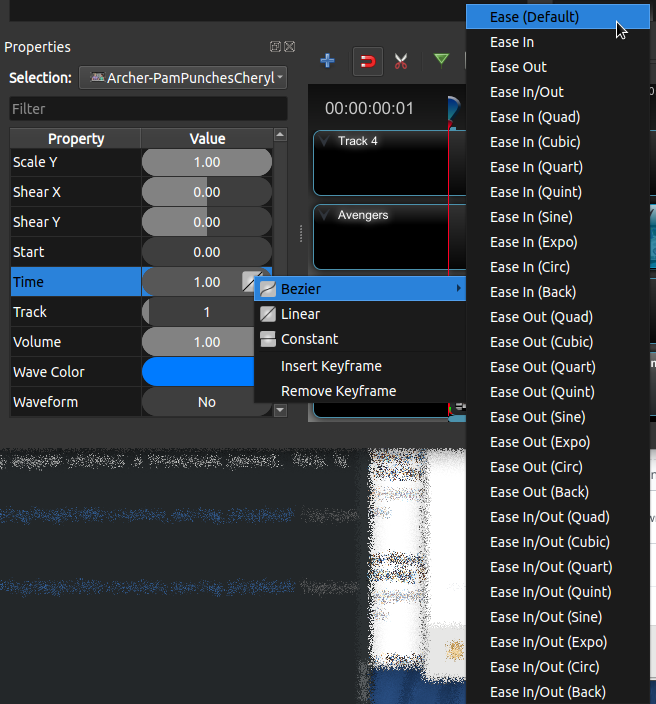
Which is not actually very useful, really, and could all be replaced (though I don't at all wish to trivialize the amount of work involved) with a spline and a couple of handles, ala the GIMP:
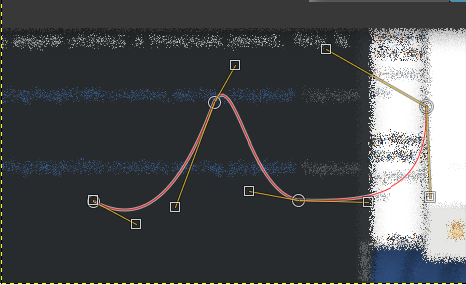
A visual presentation like that replaces the entire menu-o-presets, yet actually allows far more flexibility and power. Even if we can't fully achieve _that_, for the curves, any moves even in its general direction would be positive ones. And for actions in general, a flow more like "Choose an action to apply, then adjust the parameters as necessary" would be far preferable to "Choose the exact form of an action to apply from the exhaustive list of possibilities in the action menu and then that's it you're stuck you can adjust nothing hahahahaha!" (OK, the interface doesn't _actually_ have a maniacal laugh. Yet. Maybe for 2.5?)
 ferdnyc
on 30 May 2018
ferdnyc
on 30 May 2018
In general, media software has made _amazing_ strides in the past decade or two by embracing the concept of Non-Destructive Editing. First we had Non-Linear Editing, which was great, and OpenShot is an excellent non-linear editor. But the next step in the evolution is to edit non-destructively, and OpenShot isn't _quite_ there yet (though it's actually pretty close).
The gold standard for this is Photoshop. If you haven't used a version of Photoshop from the past 6-8 years, it's really a revelation.
Non-destructive editing in Photoshop
Pretty much everyone has at least some idea of what photo editing used to be like in Photoshop. It's just like it is today in the GIMP: You open a file, process either the whole image or selected areas to adjust things like brightness, contrast, tone, apply special effects, etc., maybe add some text layers or composite it with layers from other images (possibly making adjustments to those, as well), and finally export the finished product as a flat image file. If you choose, along the way you can save a native-format file (.PSD for Photoshop, .XCF for GIMP) that contains the unflattened state of the session, which allows you to retrieve and further edit the individual layers that make up the composite output.
But some time around the start of this decade, editing in Photoshop was completely transformed, to the point that the GIMP today is about as un-like Photoshop as it's ever been. The difference is night and day, and it all comes down to one key Photoshop feature: Adjustment Layers.
With Photoshop's Adjustment Layers, _nothing_ gets applied as an "operation" that changes the contents of an image layer or selection. Instead, all those actions that used to be destructive, one-way alterations to the image itself will instead create layers stacked on top of the image, each containing a particular filter or effect that gets applied. If you process just a section of the image, the adjustment layer is created with a layer mask so that it applies only to the selected area(s).
The history stack is history
The benefits this has over the traditional destructive editing model with undo/redo history cannot be overstated.
In the GIMP, if you decide 20 steps later that the blur your applied to your image was too heavy, the only option you have for fixing it is to undo the blur, which _also_ means having to undo every action you performed afterwards in order to restore the image's pre-blurred state. Then, you can apply the blur effect again with a reduced intensity, after which you then have to re-create every subsequent step in order to get back to the point where you changed your mind about the blur.
In Photoshop? Select the Adjustment Layer containing that blur effect, and alter the intensity of the effect however you like. That's it, done. Heck, if you feel like the blur was just a bad idea and want to eliminate it entirely, just disable or delete the Adjustment Layer. If you feel like you should've applied the blur _before_ adjusting the colors, instead of after, just change the order of the corresponding Adjustment Layers in the layer stack.
Undo/Redo almost becomes a thing of the past. Photoshop still _has_ a history stack, and undo/redo functionality, but it's only used to do what it was designed for: reverse user actions taken in error. Chose the wrong effect to apply, or changed the font for some text and decided it looked better before? Hit Ctrl-Z and it's like it never happened. But if you want to adjust or eliminate some operation you performed in the past, you don't need to Undo anything, because it's never too late to make those adjustments. Every operation remains accessible as a discrete, self-contained object in the interface (an Adjustment Layer on the layer stack) and they can be altered, rearranged, created, or deleted as necessary. Any of these steps can be done at any point and in any order, without affecting either the original image data _or_ any subsequent operations: Non-Destructive.
OpenShot
OpenShot is more non-destructive than you might think
OpenShot in its current form actually _does_ qualify as a non-destructive editor in many ways. Any software that works with input files by _reference_, rather than by importing the file data and altering it directly, is essentially non-destructive to an extent.
- Media inputs (still images, audio, and video files) are never operated only directly. The only time the audiovisual contents of the Project Files will be modified is during the Export process.
- What's more, media inputs are represented on the Timeline as Clips, and any parameter adjustments made are encapsulated within a particular Clip.
- Even Effects applied to the video are associated with a particular _Clip_, not the video itself, and can be added or removed for an individual Clip without affecting the other Effects or Parameters.
- Transitions are totally non-destructive. They exist as discrete Timeline entities, and can be rearranged or altered at any point without affecting the rest of the Timeline.
In a very real sense, you can think of both the Clips and Transitions on the Timeline as OpenShot's version of Adjustment Layers that it applies to the Project Files media.
But not as non-destructive as it could be
The only thing that OpenShot edits _destructively_ is its own project data. But that's true of Photoshop as well: If you change a parameter on an adjustment layer, that _parameter change_ can only be reversed by Undoing it. And it is possible to alter or eliminate an adjustment in OpenShot without affecting subsequent operations: If I applied a fade to a clip that I later changed my mind about, and I want to remove that fade, I can do that without affecting any of my subsequent actions.
There are only two reasons that OpenShot falls short on this front:
- All Effects and Parameter adjustments are applied destructively at the Clip level. There isn't any way to represent or access an individual operation as a discrete entity in the project data, which makes it difficult to manage those operations as discrete actions.
- Because of that, reversing or eliminating any actions performed on a Clip is an entirely manual process: If I apply a Fade, some keyframes are created on the Clip to adjust the "Alpha" Parameter. To adjust or remove that Fade, I have to manually modify or reset each of those keyframes. The more operations I perform on a Clip, the more complex its keyframe data grows. The more complex the Clip data, the more difficult and confusing it becomes to manage an individual Parameter separate from the others. But modifications to a Clip's data are destructive, so only _further_ modifications can alter them after the fact. The only other recourse is to delete the Clip entirely and start over again with a fresh copy.
It might be enough to simply have Clip Actions (Fade, Volume, Animation, etc.) represented as discrete nodes in the Project File. Right now, those actions operate by inserting keyframe values into the Parameters section of the Clip node. Any given action may create one or several keyframes on one or more Parameters, but they're all stored together in the Parameters list. The action itself doesn't exist as a discrete entity of its own, which is why it can't be adjusted after the fact.
Worse, if multiple actions operate on the same Parameter, they may trample each other: Try for example applying Volume > Entire Clip > 70%, then choosing one of the Volume > End of Clip > Fade Out options: The volume of the _rest_ of the clip (before the fade) will gradually ramp up from 70% to 100%, then fade down from 100% to 0%. This happens because the first action created 70% volume keyframes at the start and end of the clip, and then the second action created a 100% keyframe slightly before the end of the clip, and a 0% keyframe at the end (_overwriting_ the end-of-clip keyframe from the previous action).
Yes, that could be corrected by making the volume Fade actions smarter. (Ideally they'd check the current Volume parameter value at the "high" end of the fade, and use that value instead of always creating a keyframe set to 100%.) But if operations were discrete and cumulative that wouldn't be necessary. A Fade could always go from 100% to 0%, and when the Entire Clip volume setting and the Fade were combined during processing, the Fade would start at 100% of 70% and end at 0% of 70%.
ferdnyc
on 23 Jun 2018
Thank you so much for submitting an issue to help improve OpenShot Video Editor. We are sorry about this, but this particular issue has gone unnoticed for quite some time. To help keep the OpenShot GitHub Issue Tracker organized and focused, we must ensure that every issue is correctly labelled and triaged, to get the proper attention.
This issue will be closed, as it meets the following criteria: - No activity in the past 180 days - No one is assigned to this issue
We'd like to ask you to help us out and determine whether this issue should be reopened. - If this issue is reporting a bug, please can you attempt to reproduce on the latest daily build to help us to understand whether the bug still needs our attention. - If this issue is proposing a new feature, please can you verify whether the feature proposal is still relevant.
Thanks again for your help!
![stale[bot] picture](https://avatars3.githubusercontent.com/in/1724?v=4&s=40) stale[bot]
on 27 Oct 2020
stale[bot]
on 27 Oct 2020
Related issues
 Sefran007
·
3Comments
Sefran007
·
3Comments
 GrandpaBill3006
·
3Comments
GrandpaBill3006
·
3Comments
 malinga91
·
3Comments
malinga91
·
3Comments
 adswan
·
3Comments
adswan
·
3Comments
 carlosnewmusic
·
3Comments
carlosnewmusic
·
3Comments
Most helpful comment
I _tend_ to agree, and concur that it feels like there's a lot more we could be exposing in the interface instead of relegating to menus.
I did just want to point out that right-clicking isn't strictly necessary — the same actions menus can be accessed by left-clicking the sort of V-looking thing at the upper left corner of each clip/transition/track. (Not that this AT ALL affects the core issue of being able to access functions.)
The way I see it, there are two issues at play:
I'm tempted to say, "Let's start from the fact that this should _clearly_ be
Time > Normal > Forward 1xandTime > Normal > Reverse 1x, if not even justTime > Forward 1xandTime > Reverse 1x", but simply consolidating a few too-deep menu structures would sort of be missing the larger point that everything about this is just Doing It Wrong™.Basically, overall the action menus create a _lot_ of uncomfortable structure to paper over the fact that nothing is really adjustable interactively. The crazy curve menus for parameters have the same problem. Because keyframe parameters are not visually inspectable or interactively adjustable, we end up with this...


Which is not actually very useful, really, and could all be replaced (though I don't at all wish to trivialize the amount of work involved) with a spline and a couple of handles, ala the GIMP:
A visual presentation like that replaces the entire menu-o-presets, yet actually allows far more flexibility and power. Even if we can't fully achieve _that_, for the curves, any moves even in its general direction would be positive ones. And for actions in general, a flow more like "Choose an action to apply, then adjust the parameters as necessary" would be far preferable to "Choose the exact form of an action to apply from the exhaustive list of possibilities in the action menu and then that's it you're stuck you can adjust nothing hahahahaha!" (OK, the interface doesn't _actually_ have a maniacal laugh. Yet. Maybe for 2.5?)