Openshot-qt: Flickering on the right side of the video
Describe the bug
A flickering appears on the right edge of the screen in the video preview and the rendered video.
System Details (please complete the following information):
- OpenShot 2.4.2
- Linux Mint (4.13.0-25-generic # 29~16.04.2-Ubuntu SMP Tue Jan 9 12:16:39 UTC 2018 x86_64 x86_64 x86_64 GNU/Linux)
To Reproduce
Steps to reproduce the behavior:
- open a new project with profile HDV 720 24p
- add a video to the track (video details in screenshots)
Expected behavior
No flickering
Screenshots
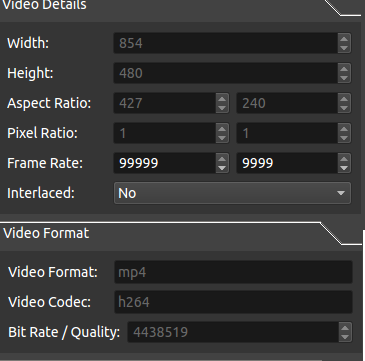
Additional context
 KidsDontPlay
All 14 comments
@MrRiegel Try v2.4.3 and let us know if you still have a problem.
 DylanC
on 3 Oct 2018
DylanC
on 3 Oct 2018
the problem is still there
KidsDontPlay
on 3 Oct 2018
I'm going to close #2050 in favour of this. And I'm going add my own example file here. I ran into the same issue this morning while trying to reverse the attached webm (that I got from 9gag) for testing. I was using the default profile.
 peanutbutterandcrackers
on 15 Dec 2018
peanutbutterandcrackers
on 15 Dec 2018
Thanks to everyone for this app. It is great!
I have this issue too. Tested in 2.4.3.
I tried just adding an image - then it works fine (no flicker on export). However, adding a video, with default settings, I get flicker or black on right side too.
Example video:
Untitled 5.mov.zip
Export options are the default, except I have set w/h to same resolution as the above movie:
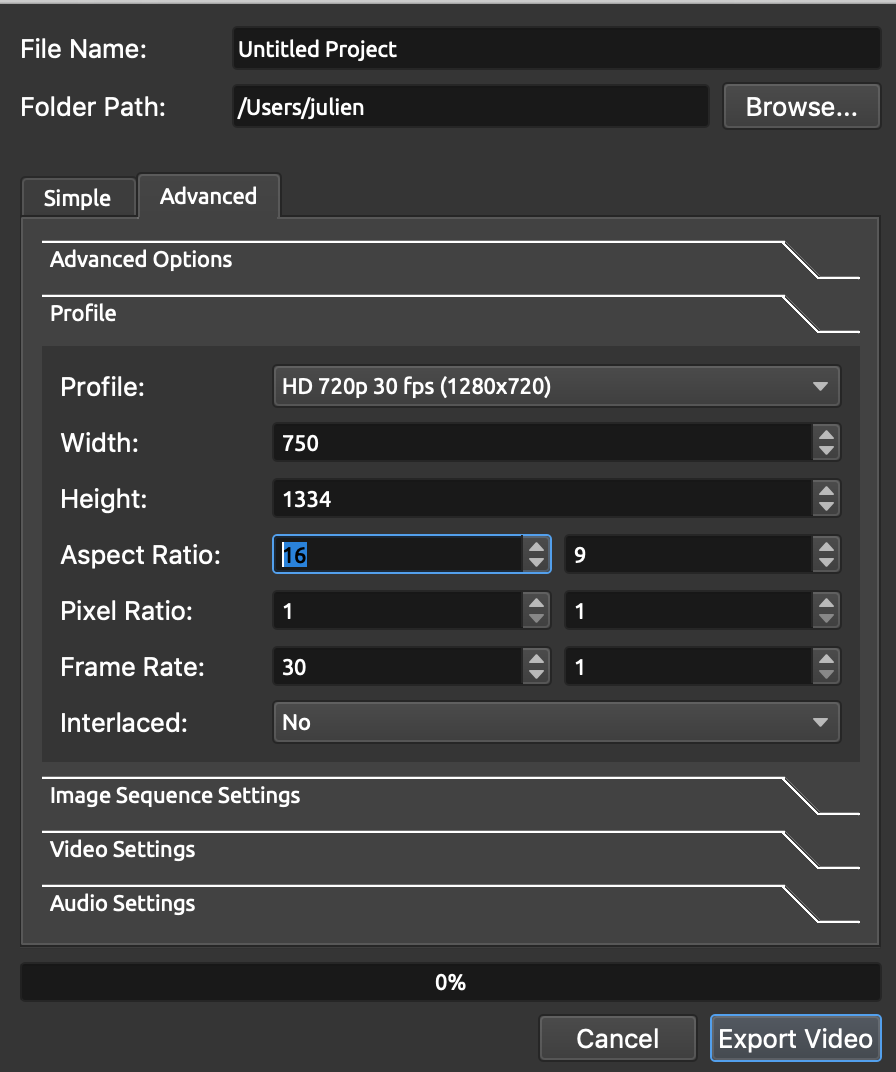
And the resulting export shows a black vertical line on the right. It is as if it is not writing the last pixels on each row from the source?
Untitled Project.mp4.zip
 julienaubert
on 22 Dec 2018
julienaubert
on 22 Dec 2018
I see it too and I think that this is a bug in the FFmpeg reader (or in libswscale) when the width of the video is not a multiple of 8. Here is a small program I made to test the behavior.
test1.cc.gz
You can change the values of NX (the image size) and STRIDE_OUT (a stride added to each output line) and see how the sws_scale function is behaving during a conversion from YUV420P to RGBA
What I am observing is that the pixels are always converted in batches of 8 pixels (probably because of vectorised code). Try for instance NX=21 and STRIDE_OUT=0. Only 16 pixels are converted per row.
In libopenshot, the output image RGBA has no stride which means that the incomplete batch of 8 pixels is not converted and since data allocated by av_malloc is not cleared, noise is produced.
Note: I think that FFMpegReader could allocate its image using av_image_alloc(...,8).
 schauveau
on 13 Mar 2019
schauveau
on 13 Mar 2019
The small test program in my previous comment should be compiled with something like
g++ test1.cc $(pkg-config --cflags --libs libswscale libavutil)
schauveau
on 13 Mar 2019
Please somebody comment how to actually solve it! The comments so far are either confusing or just simply like "yeah, it's a problem with me 2 lol".
 StarDust19
on 4 Jul 2019
StarDust19
on 4 Jul 2019
I do not know if my previous comment was confusing (yeah ... probably... that was more a comment for the openshot devs than for the users) but if I was right then a workaround could be to always use videos with a width that is a multiple of 8. For example, in the 2 screenshots posted previously, the videos have a width of 750 (=893+6) and 854 (=8106+6) thus causing the last 6 pixels to become random.
Ideally, the problem should be solved in libswscale (or in openshot?) but If you have ffmpeg installed then you could try one of the following commands to 'fix' the width of the problematic videos:
# use the pad filter to add borders on both sides to keep the video centered
ffmpeg -i  input.mp4 -vf "pad=w='8*ceil(iw/8)':x='(ow-iw)/2':color=black" output.mp4
# use the pad filter to add a single border on the right side
ffmpeg -i  input.mp4 -vf "pad=w='8*ceil(iw/8)':x='0':color=black" output.mp4
# use the crop filter to remove a few pixels on both sides.
ffmpeg -i input.mp4  -vf "crop=w='8*floor(iw/8)':x='(iw-ow)/2'" output.mp4
In the previous commands, iw and ow are respectively the input width and the output width of the video and you can of course replace black by your preferred border color (e.g. gray, #FF0000, ...)
PS: the documentation for the ffmpeg filters can be found in https://ffmpeg.org/ffmpeg-filters.html
PPS: you may also want to pass other options to ffmpeg for example to control the re-encoding quality.
schauveau
on 4 Jul 2019
Tested it in OpenShot 2.4.4 Ubuntu 18.04
same Problem.
Tested the fmpeg commands, they have no effect.
any other Solutions?
Testing it in KDEenlive, it runs out of the box. thats my workaround. Not happy not using my prefered app openshot
 olissongs
on 29 Aug 2019
olissongs
on 29 Aug 2019
Just to say that I also have this problem
 tomjridge
on 15 Nov 2019
tomjridge
on 15 Nov 2019
Tested on version 2.5.0-dev1 and ffmpeg to version 3.4.6-0 on Ubuntu0.18.04.1.
I get this exporting a video with 1280x720, which is divisible by 8.
Still same problem with the flickering
Kdenlive works fine, though
 didnthodl
on 24 Feb 2020
didnthodl
on 24 Feb 2020
I get this exporting a video with 1280x720, which is divisible by 8.
That isn't really the involved factor, though, it's a question of your input video's properties (dimensions and aspect ratio, primarily), along with any scaling or transformations on the Timeline.
The video noise is "attached to" (for lack of a better term) the imported video clip. And it can usually be worked around in OpenShot by scaling the video clip slightly larger than the output profile, so that the corrupted pixels are pushed offscreen.
 ferdnyc
on 24 Feb 2020
ferdnyc
on 24 Feb 2020
I get this exporting a video with 1280x720, which is divisible by 8.
That isn't really the involved factor, though, it's a question of your input video's properties (dimensions and aspect ratio, primarily), along with any scaling or transformations on the Timeline.
Wow, that was a quick solution. Thanks for the clarification! It works if the width of my input video is divisible by 8. That's actually a fairly easy thing for me to do. I was already reading tutorials on how to use Kdenlive...
Thanks so much!
didnthodl
on 24 Feb 2020
Thank's for the explanation. I had found out that displacing the X location between 0.001 and 0.005 resolved the problem. I thought it was just a hacky way to solve it but with the explanation, it is clear that it's a good way to remove the noise.
 rarsa69
on 2 Sep 2020
rarsa69
on 2 Sep 2020
Related issues
 Sefran007
·
3Comments
Sefran007
·
3Comments
 gbbbbb
·
3Comments
gbbbbb
·
3Comments
 malinga91
·
3Comments
malinga91
·
3Comments
 Yesideez
·
3Comments
Yesideez
·
3Comments
 sspmrsomebody1
·
3Comments
sspmrsomebody1
·
3Comments
Most helpful comment
the problem is still there